AffiliateWP vs SliceWP: Which Affiliate Plugin Should You Use in 2026?
AffiliateWP vs SliceWP compared: the free version, prices and renewals, lifetime licences, integrations, and what we measured on the same test store.

AffiliateWP and SliceWP both run an affiliate program inside WordPress, and both work with WooCommerce, Easy Digital Downloads and membership plugins. AffiliateWP has no free version and splits its features across plans; SliceWP has a free version on WordPress.org and puts every feature in both of its paid plans. That difference shapes almost everything below.
How we tested. We installed AffiliateWP 2.37.0 and the free SliceWP 1.2.12, one at a time, on a WordPress test site with WooCommerce and the default Twenty Twenty-Five theme, with every other affiliate plugin switched off and each plugin’s WooCommerce integration switched on. Each had the same seven example affiliates, each plugin with its own example referrals and visits from the month before, so the figures differ between the two. We opened every settings screen, took each payout screen as far as the preview without sending any money, logged in as one of the affiliates, and measured each plugin’s size and what it adds to the storefront. Our SliceWP copy is identical to the release on WordPress.org. Our AffiliateWP copy had every paid feature switched on and we could not compare it with the developer’s own release, so which plan includes each AffiliateWP feature comes from its pricing page, not from what the screens showed. We did not have SliceWP’s paid add-ons installed, so what this article says about them comes from SliceWP’s own pages. Prices were read from both developers’ pricing pages on 4 October 2026; the sources are linked at the end.
The short answer
- Choose SliceWP if you want to start free, want every feature on the cheapest paid plan, want a lifetime licence, or run up to ten sites. It costs less from the second year.
- Choose AffiliateWP if you need direct link tracking, vanity coupon codes, affiliates choosing their own payout method, or rule-based fraud detection that flags suspicious referrals.
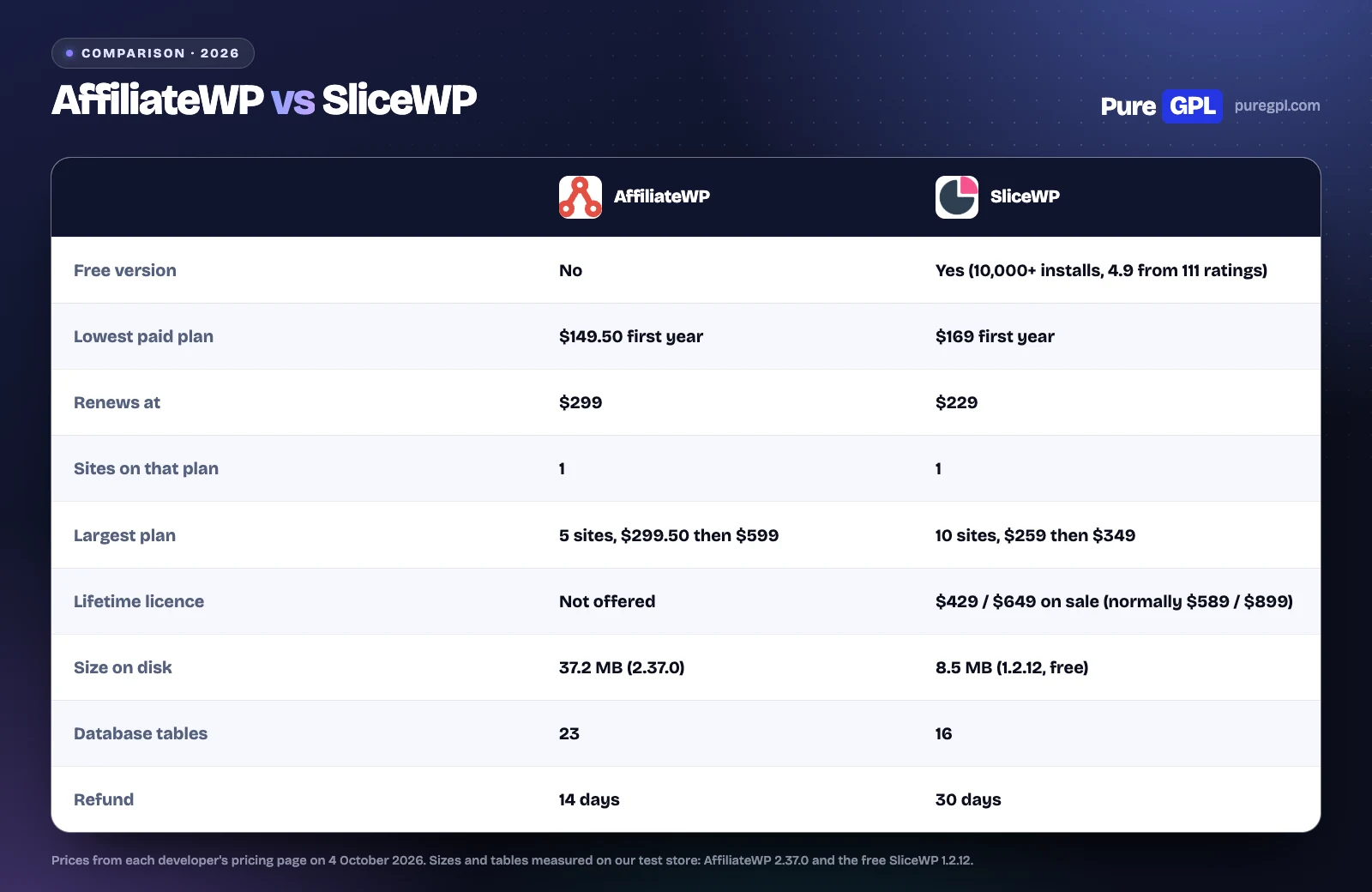
- On cost: AffiliateWP is cheaper in the first year on one site ($149.50 against $169), SliceWP from the second ($229 against $299), and SliceWP’s recurring and lifetime commissions do not need a top plan.
Side by side
| AffiliateWP | SliceWP | |
|---|---|---|
| Free version | No | Yes, on WordPress.org (10,000+ active installations, 4.9 from 111 ratings) |
| Lowest paid plan | Personal: $149.50 first year, then $299 (1 site) | Pro: $169 first year, then $229 (1 site) |
| Middle plan | Plus: $199.50 first year, then $399 (2 sites) | None |
| Largest plan | Pro: $299.50 first year, then $599 (5 sites) | Pro Plus: $259 first year, then $349 (10 sites) |
| Bundle | Growth Bundle: AffiliateWP Pro plus the RewardsWP Pro loyalty plugin, $349.50 first year, then $699 | None |
| Lifetime licence | Not offered | $429 for 1 site, $649 for 10 during a sale SliceWP calls 25% off (normally $589 and $899) |
| Features by plan | Split across three plans | Every feature and add-on in both paid plans |
| Integrations | WooCommerce plus 28 other eCommerce and form plugins on its features page (its pricing page says WooCommerce + 20) | 10 store and membership plugins in the free version; 3 form plugins that only work with the paid lead-commissions add-on |
| Payouts | Stripe, PayPal and store credit on every plan | Manual in the free version; PayPal, Stripe and store credit on paid plans |
| Support | Standard, priority on Pro | Email on Pro, priority on Pro Plus, forums for the free version |
| Refund | 14 days | 30 days |
| Users, as claimed by the developer | 30,000+ | 12,100+ |
Both developers say the lower figure is a first-year price and that renewals are at the regular price. One comparison that ranks for this search, on breakdance.com, prints AffiliateWP’s plans as $149.60, $199.60 and $299.60 for 1, 3 and 10 sites; AffiliateWP’s own pricing page shows $149.50, $199.50 and $299.50 for 1, 2 and 5 sites.
Integrations
Both cover the common stores and membership plugins. AffiliateWP’s features page counts WooCommerce plus 28 other eCommerce and form plugins. SliceWP’s free version lists ten platforms in its settings: WooCommerce, Easy Digital Downloads, GetPaid, Paid Memberships Pro, MemberPress, Paid Member Subscriptions, Restrict Content Pro, Studiocart, SureCart and Upsell. Its code also has integrations for three form plugins, Gravity Forms, Ninja Forms and WS Form, which the settings screen does not show and which create no commissions without the paid Lead Commissions add-on; with those, the total matches SliceWP’s own “13+ integrations”.
If you sell through something else, such as a course plugin or a less common cart, check both integration lists before you buy.
Price over three years
| One site | AffiliateWP Personal | SliceWP Pro |
|---|---|---|
| Year 1 | $149.50 | $169 |
| Year 2 | $299 | $229 |
| Year 3 | $299 | $229 |
| Three years | $747.50 | $627, or $429 once for a lifetime licence |
| Largest plan | AffiliateWP Pro | SliceWP Pro Plus |
|---|---|---|
| Sites | 5 | 10 |
| Year 1 | $299.50 | $259 |
| Years 2 and 3 | $599 each | $349 each |
| Three years | $1,497.50 | $957, or $649 once for a lifetime licence |
| Per site over three years | $299.50 | $95.70 |
AffiliateWP’s cheapest plan costs $19.50 less in the first year, then $70 a year more. The bigger gap is in features: recurring and lifetime commissions need AffiliateWP Pro, so one site that needs them costs $1,497.50 over three years with AffiliateWP against $627 with SliceWP. These figures assume both keep their published prices. SliceWP’s lifetime prices are sale prices, and SliceWP says support and updates run only while a subscription is active, so ask how that applies to a lifetime licence before you buy one.
The free version
Only SliceWP has one, and with its WooCommerce integration switched on it ran a full program on our store: affiliate registration with approval, referral links with a choice of first or last affiliate credit, friendly URLs and a QR code for each link, percentage or fixed commissions, a “new customers only” option, refund rejection, a refund grace period, a minimum payout amount, manual payouts, eight email notifications and three CAPTCHA providers.
The paid plans add Stripe payouts, and their add-ons add PayPal and store credit payouts, affiliate coupons, landing pages, custom affiliate slugs, custom registration fields, per-product and per-affiliate rates, recurring and lifetime commissions, multi-level affiliates, revenue share, reports, multi-currency, cross-site tracking, a REST API and email marketing integrations. In the free plugin’s payout settings, PayPal, Stripe and store credit are each marked “Pro Feature”.
AffiliateWP has no free version; its developer offers a refund within 14 days.
Setup
SliceWP’s wizard asks which platform you sell on, then the commission rate, currency and cookie length, then offers to create three pages (affiliate account, registration and password reset), all pre-selected and each optional, and which emails to switch on.
AffiliateWP created its affiliate area, login and registration pages on our store without being asked. After its wizard, its Setup screen becomes a checklist, with steps such as creating a registration form, adding your first affiliate, setting up the payout methods you chose and getting the Affiliate Portal add-on (on the Pro plan). Its menu is longer than SliceWP’s, with Tools, About Us and a Rewards screen for the developer’s separate loyalty plugin.
Commissions
| Commission feature | AffiliateWP | SliceWP |
|---|---|---|
| Percentage or flat rate, site-wide | Yes, in the core plugin | Free |
| Per-affiliate rates | Yes, in the core plugin | Paid add-on |
| Per-product rates | Yes, in the WooCommerce integration | Paid add-on |
| Affiliate groups with their own rate | Yes, plan not stated | Not listed |
| Commissions for new customers only | Not listed | Free |
| Tiered rates | Pro | Not listed |
| Recurring commissions on subscriptions | Pro | Paid add-on |
| Lifetime commissions | Pro | Paid add-on |
| Multi-level affiliates | Pro (multi-tier commissions) | Paid add-on |
| Revenue share (a product linked to an affiliate) | Not listed | Paid add-on |
| Bonuses | Plus (sign-up commissions and a welcome bonus) | Paid add-on (performance bonuses) |
| Lead commissions from a contact form | Not listed | Paid add-on |
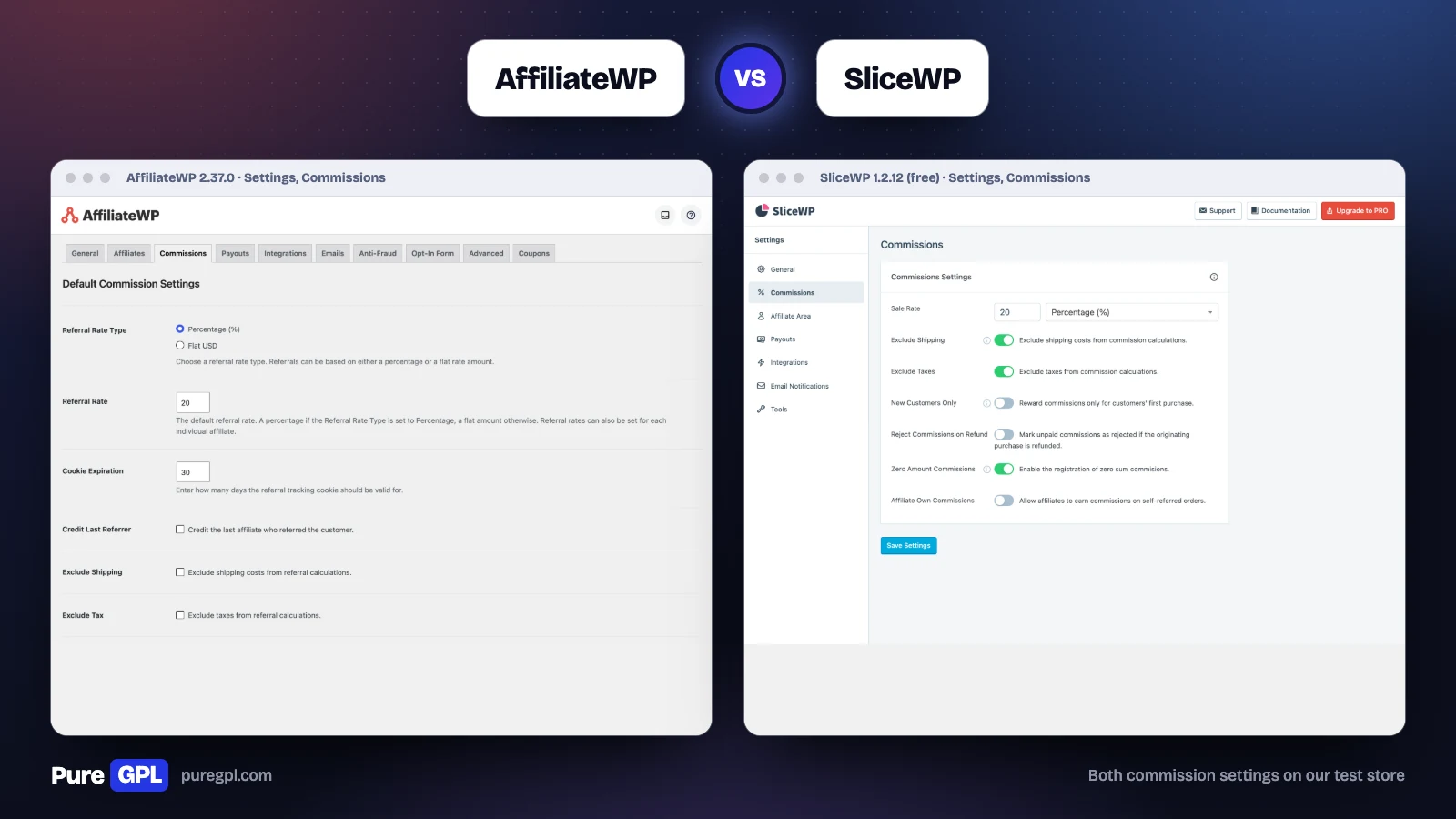
Both use a 20% default rate on our store. SliceWP’s commission settings fit on one short screen, with refund rejection and “new customers only” among them; AffiliateWP’s Commissions tab adds a cookie setting, credit to the last referrer and a holding period, plus switches for recurring and multi-tier commissions.
Tracking and coupons
| Tracking feature | AffiliateWP | SliceWP |
|---|---|---|
| Referral links and cookie length | All plans | Free |
| First or last affiliate credit | Yes (credit the last referrer, or not) | Free |
| Friendly referral links | All plans (pretty permalink referral links) | Free |
| QR code for each link | Yes, in the core plugin (share a link by QR code) | Free |
| Coupon tracking | All plans | Paid add-on |
| A coupon created for each new affiliate | Yes, a setting on the Coupons tab | Not listed |
| Custom affiliate slugs | Pro (personalized referral URLs) | Paid add-on |
| Affiliate landing pages | Pro | Paid add-on |
| Direct link tracking, without a referral link | Pro | Not listed |
| Vanity coupon codes | Pro | Not listed |
| Cross-site tracking | “Cross-domain promotions” listed on its features page | Paid add-on |
SliceWP puts first or last credit, friendly links and QR codes in its free version. AffiliateWP has more ways to credit a sale: direct link tracking credits sales from an affiliate’s own website without a referral link, and it can create a WooCommerce coupon for each new affiliate.
Payouts
| Payout feature | AffiliateWP | SliceWP |
|---|---|---|
| Manual payouts | Yes | Free |
| PayPal | All plans | Paid plans |
| Stripe | All plans | Paid plans |
| Store credit | All plans | Paid plans |
| Bank payouts | Through Stripe: 90+ countries if your Stripe account is in the US or UK, 30+ through accounts AffiliateWP creates for affiliates | Not listed |
| Minimum payout amount | Yes, plan not stated | Free |
| Refund grace period | Yes, as a holding period | Free |
| Affiliates choose how they are paid | Yes | Not listed |
| Affiliates request their own payout | Not listed | Paid add-on |
| Automatic payouts | Pro | Not listed |
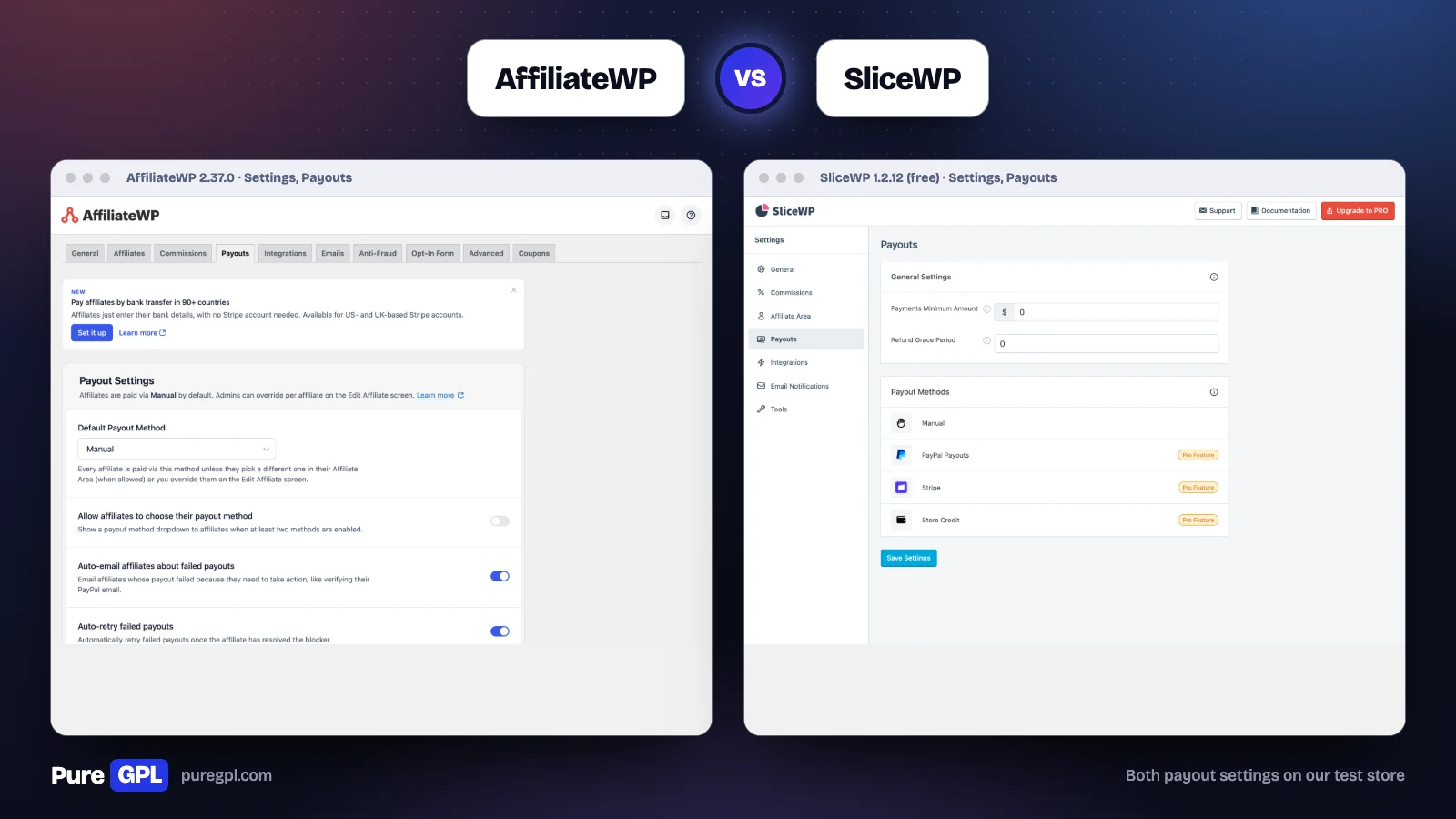
With the example referrals on our store, AffiliateWP’s Payouts screen showed $939.00 owed across six affiliates, ready to pay 33 referrals in one go. SliceWP’s dashboard showed six affiliates eligible for payment, totalling $1,087.20, and its Create Payout screen asked for a cut-off date, a minimum amount and which affiliates to include before a preview.
The gap is the payment method. AffiliateWP pays through Stripe, including bank transfers where your Stripe account’s country allows them, PayPal or store credit on every plan, lets affiliates pick their method, and can email an affiliate when a payout fails. SliceWP’s free version pays by hand, with the method set by you for each affiliate; Stripe, PayPal and store credit come with a paid plan.
Fraud and refunds
| Protection | AffiliateWP | SliceWP |
|---|---|---|
| Block self-referrals | Allow, flag or reject | Free, blocked by default |
| Reject unpaid commissions on refund | Yes | Free, off by default |
| Hold commissions until the refund window closes | Yes, a holding period | Free, 0 days by default |
| Visits only from the affiliate’s own website | Allow, flag or reject | Not listed |
| Unusually high or low conversion rates | Allow or flag | Not listed |
| Paid search traffic | Allow, flag or reject | Not listed |
| Many sign-ups from one IP address | Allow, flag or require approval | Not listed |
| CAPTCHA on affiliate forms | reCAPTCHA, hCaptcha or Turnstile, on registration and login | reCAPTCHA, hCaptcha or Turnstile on registration, login and password reset, free |
| Block sign-ups by email or domain | Not listed | Free (affiliate registration blocklist) |
| Branded fraud suite | Fraud Prevention Suite on Pro | Not listed |
Both cover self-referrals, refunds and a grace period, plus a choice of three CAPTCHA providers, which in our view is what a small program needs most. Check the defaults: SliceWP blocks self-referrals out of the box but starts with refund rejection off and no grace period. AffiliateWP’s Pro plan adds rules that watch where visits come from, how often they convert and whether they come from paid ads, and can flag a referral for your review instead of paying it straight away.
The admin dashboard
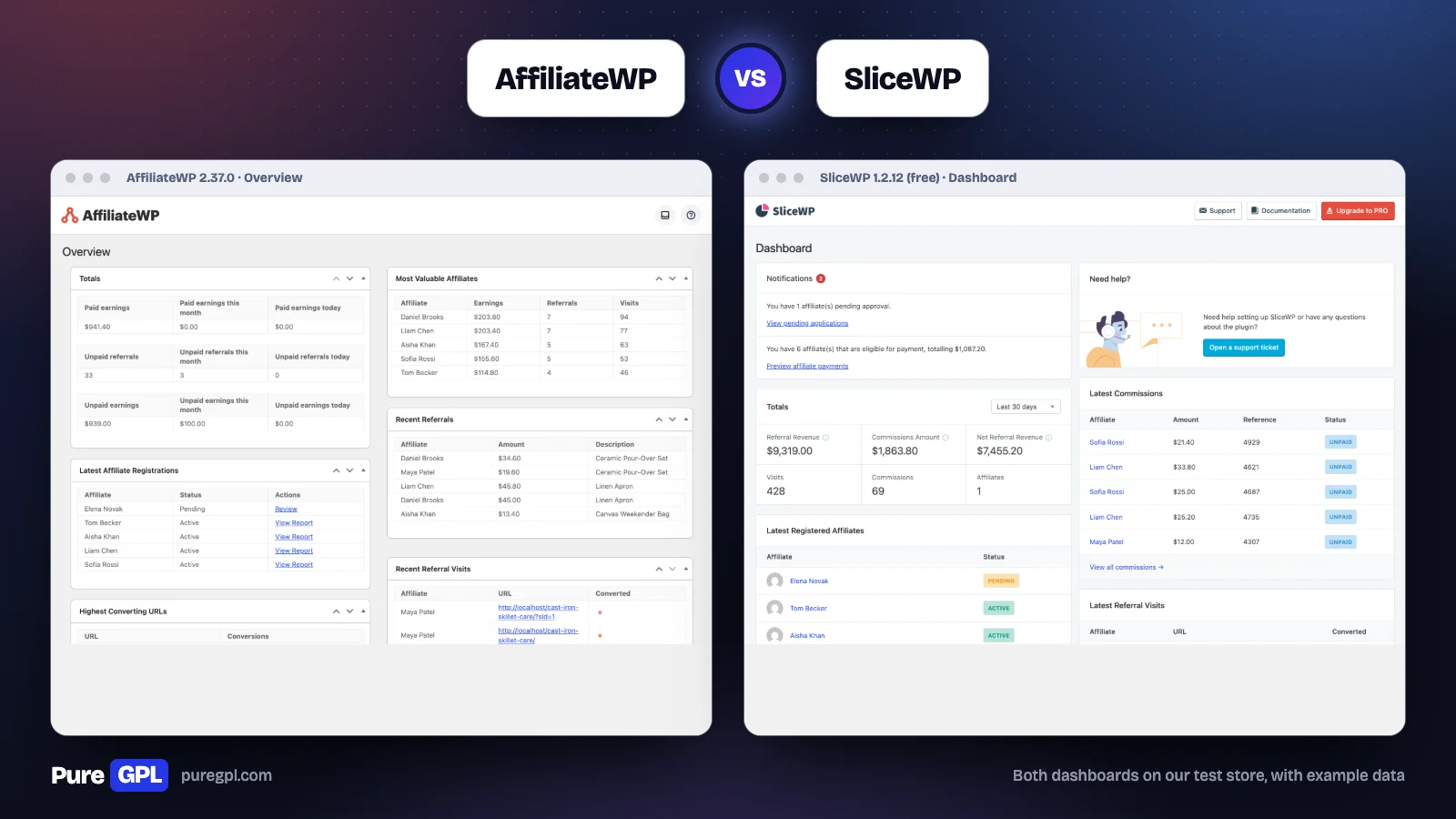
AffiliateWP’s Overview opens with paid and unpaid earnings and referral counts, then the latest registrations, the most valuable affiliates, recent referrals, recent visits and the highest-converting URLs.
SliceWP’s dashboard opens with notifications, on our store one affiliate waiting for approval and six eligible for payment, then totals for a chosen period, the latest affiliates, the latest commissions and the latest visits.
The affiliate’s view
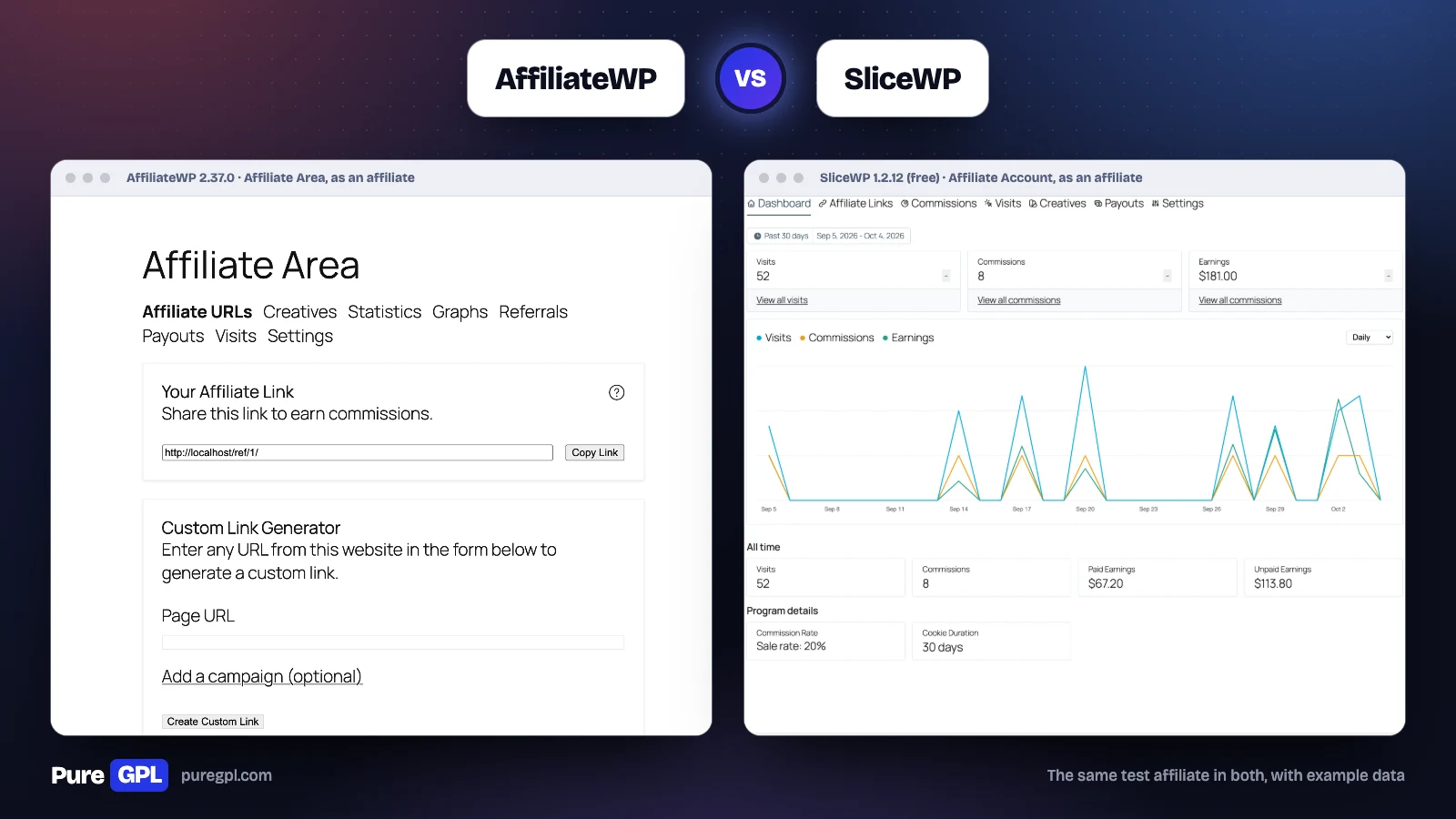
We logged in as the same test affiliate in both. AffiliateWP’s Affiliate Area opens on the referral link and a link generator, with tabs for creatives, statistics, graphs, referrals, payouts, visits and settings. Its own Affiliate Portal, with a separate design, is part of the Pro plan.
SliceWP’s Affiliate Account opens on the numbers: on our store 52 visits, eight commissions and $181.00 earned in the last 30 days, a chart, all-time paid and unpaid totals, and the affiliate’s commission rate and cookie length. Its tabs cover affiliate links, commissions, visits, creatives, payouts and settings. SliceWP’s first screen shows the affiliate’s numbers; AffiliateWP’s first tab is the link and generator, with statistics on separate tabs.
Reports
| Reporting | AffiliateWP | SliceWP |
|---|---|---|
| Reports screen | Real-time reporting on all plans; our copy showed referrals, affiliates, sales, payouts, visits and campaigns | Paid add-on; the free version shows dashboard totals |
| Campaign report | Yes | Not listed |
| Monthly email summary | To you, on by default; to each affiliate, off until you switch it on | Not listed |
On SliceWP’s free version, the Reports menu opens an invitation to the paid add-on.
Emails
| AffiliateWP | SliceWP (free) | |
|---|---|---|
| Template | Default template or plain text, with your logo | Default template or plain text, with your logo |
| To you: new affiliate sign-up | Yes | Yes |
| To you: new referral | Yes | Yes |
| To you: a payout failed | Yes | Not listed |
| To the affiliate: application received | Yes (pending) | Yes |
| To the affiliate: application approved or rejected | Yes | Yes |
| To the affiliate: new referral | Yes | Yes, when the order completes |
| To the affiliate: commission rejected | Not listed | Yes |
| To the affiliate: payment sent | Yes, for Stripe payouts (off until you switch it on) | Yes |
| Welcome email | When you add an affiliate yourself | When you add or register an affiliate yourself |
Both send the emails a program needs, and both let you edit each one. AffiliateWP adds a set of emails for Stripe payouts and failures, off until you switch them on; SliceWP tells an affiliate when one of their commissions is rejected.
Managing affiliates
| Management feature | AffiliateWP | SliceWP |
|---|---|---|
| Manual or automatic approval | Yes | Free |
| Register new users as affiliates automatically | Yes | Free |
| Custom registration form | Built in, edited as blocks; Gravity Forms or Ninja Forms on Plus | Custom fields, paid add-on |
| Turn existing customers into affiliates | Pro | Not listed |
| See an affiliate’s view | By switching to their account, with the free User Switching plugin | Not listed |
| Leaderboard | Plus | Paid add-on |
| Multi-currency commissions | Plus | Paid add-on |
| Data export | Yes, from the Tools screen | Paid add-on |
| REST API | Yes | Paid add-on |
Performance
| On our test store | AffiliateWP 2.37.0 | SliceWP 1.2.12 (free) |
|---|---|---|
| Size on disk | 37.2 MB (1,498 files) | 8.5 MB (312 files) |
| Database tables created | 23 | 16 |
| Scripts added to the home and shop pages | 0 | 1 |
| Stylesheets added | 1 | 1 |
| Bytes added to the page head | 611 | 1,024 |
This is not a like-for-like weight test: our AffiliateWP copy includes its paid add-ons, and SliceWP’s paid add-ons would be extra. On the storefront both are light, one stylesheet each and one small script from SliceWP.
Support and reviews
AffiliateWP includes standard support, with priority support on Pro. SliceWP includes email support on Pro and priority support on Pro Plus, and answers free-version questions in the WordPress.org forums.
SliceWP’s free plugin is rated 4.9 out of 5 from 111 ratings on WordPress.org. AffiliateWP is not on WordPress.org, so it has no rating there to compare. Another comparison describes SliceWP’s support as “VIP” on Pro Plus; SliceWP’s pricing page lists email support on Pro and priority support on Pro Plus.
Where each goes further
Where SliceWP goes further
- A free version that runs a real program, with QR codes, first or last credit and three CAPTCHA providers.
- Every feature in both paid plans, lifetime licences and lower renewals.
- Ten sites on its largest plan, against AffiliateWP’s five.
- Revenue share, lead commissions, cross-site tracking and payout requests as add-ons.
- A 30-day refund window.
Where AffiliateWP goes further
- Stripe, PayPal and store credit payouts on every plan, with bank transfers through Stripe where your account allows them, and affiliates choosing their method.
- Rule-based fraud detection on Pro.
- Direct link tracking, vanity coupon codes and automatic coupons for new affiliates.
- Real-time reports on every plan, with a campaign report on our copy.
- A REST API and data export without an add-on.
On PureGPL
AffiliateWP is in our catalogue at $3.49, version 2.37.0, along with many of its Pro add-ons as separate downloads. SliceWP’s free version is on WordPress.org; we do not carry its paid add-ons.
What a GPL copy does and does not include
AffiliateWP is licensed under the GPL, as its plugin header states, which is why we can distribute it. A GPL copy comes without a licence from the developer, so it comes without the developer’s support, and anything that runs through the developer’s own account or service is not part of it. Updates come from us, with a year of our own support included.
Sources
Prices, plan contents and installation figures were read from these pages on 4 October 2026. The screens, settings and measurements are from our own test store.
- AffiliateWP pricing
- AffiliateWP features
- SliceWP pricing
- SliceWP features
- SliceWP add-ons
- SliceWP on WordPress.org
Frequently asked questions
Is SliceWP better than AffiliateWP?
For a small program that wants to start free or pay once, yes: SliceWP has a free version, every feature in both paid plans and a lifetime licence. AffiliateWP is the better pick if you need its payout options on the cheapest plan, rule-based fraud detection or direct link tracking.
Is SliceWP free?
The base plugin is, on WordPress.org, and it runs a working program. Stripe, PayPal and store credit payouts, coupons, and multi-level, recurring and lifetime commissions need a paid plan.
Which is cheaper?
AffiliateWP in the first year on one site ($149.50 against $169), SliceWP after that ($229 a year against $299), and SliceWP by far if you need recurring or lifetime commissions.
Can AffiliateWP pay affiliates by bank transfer?
Yes, through Stripe. AffiliateWP says 90+ countries when your own Stripe account is in the US or UK, and 30+ through accounts it creates for affiliates. Other pages give 37 or 50 countries.
Which is lighter?
On our test store SliceWP’s free plugin was 8.5 MB with 16 database tables; our AffiliateWP copy, with its add-ons, was 37.2 MB with 23. Both add one stylesheet to the storefront, and SliceWP one small script.
Can I move from AffiliateWP to SliceWP?
Check SliceWP’s documentation for an import tool first, test on a staging copy, and keep existing referral links working, because affiliates have already shared them. The two use different link formats (AffiliateWP’s /ref/ or ?ref=, SliceWP’s ?aff=), so plan redirects for links already in use.
See also: best WordPress affiliate plugins, our AffiliateWP review, AffiliateWP vs Solid Affiliate, Solid Affiliate vs SliceWP, AffiliateWP vs Easy Affiliate, AffiliateWP vs Ultimate Affiliate Pro and AffiliateWP vs YITH WooCommerce Affiliates.


