AffiliateWP vs Solid Affiliate: Which Should You Use in 2026?
AffiliateWP vs Solid Affiliate compared: integrations, features by plan, and what each costs over three years. Which one fits your store.


AffiliateWP and Solid Affiliate both run an affiliate program inside WordPress, both give you unlimited affiliates, and both advertise almost the same first-year price. The real differences are what they connect to, which plan holds the feature you need, and what you pay from the second year.
We installed both on the same WooCommerce test store and went through every screen this article describes. Prices and plan contents come from the two developers’ pricing pages, read on 4 October 2026. The sources are linked at the end.
How we tested. AffiliateWP 2.37.0 and Solid Affiliate 3.1.0 ran one at a time on a WordPress test site with WooCommerce and the default Twenty Twenty-Five theme, with every other affiliate plugin switched off. Each had the same seven example affiliates, each plugin with its own example referrals and visits, so the figures differ between the two. We opened every settings screen, took each payout screen as far as choosing a payment method without sending any money, and logged in as one of the affiliates to see their side. Names and figures in the screenshots are example data. Our test copies had every paid feature switched on (our Solid Affiliate copy through a change to its licence check, and we could not compare our AffiliateWP copy with the developer’s own release), so the screens show each plugin’s top plan. Which plan includes each feature comes from each developer’s pricing page, not from what the screens showed.
The short answer
- Choose Solid Affiliate if your store runs only on WooCommerce and you want a self-contained affiliate portal, a 30-day refund window and more sites per plan.
- Choose AffiliateWP if you sell through Easy Digital Downloads, a membership plugin, a course plugin or a form, or you need Stripe payouts, multi-tier commissions or rule-based fraud detection.
- On one site, AffiliateWP costs less over three years. Both cost about the same in the first year ($149.50 and $149.60), but Solid Affiliate’s cheapest plan renews at $374 against AffiliateWP’s $299.
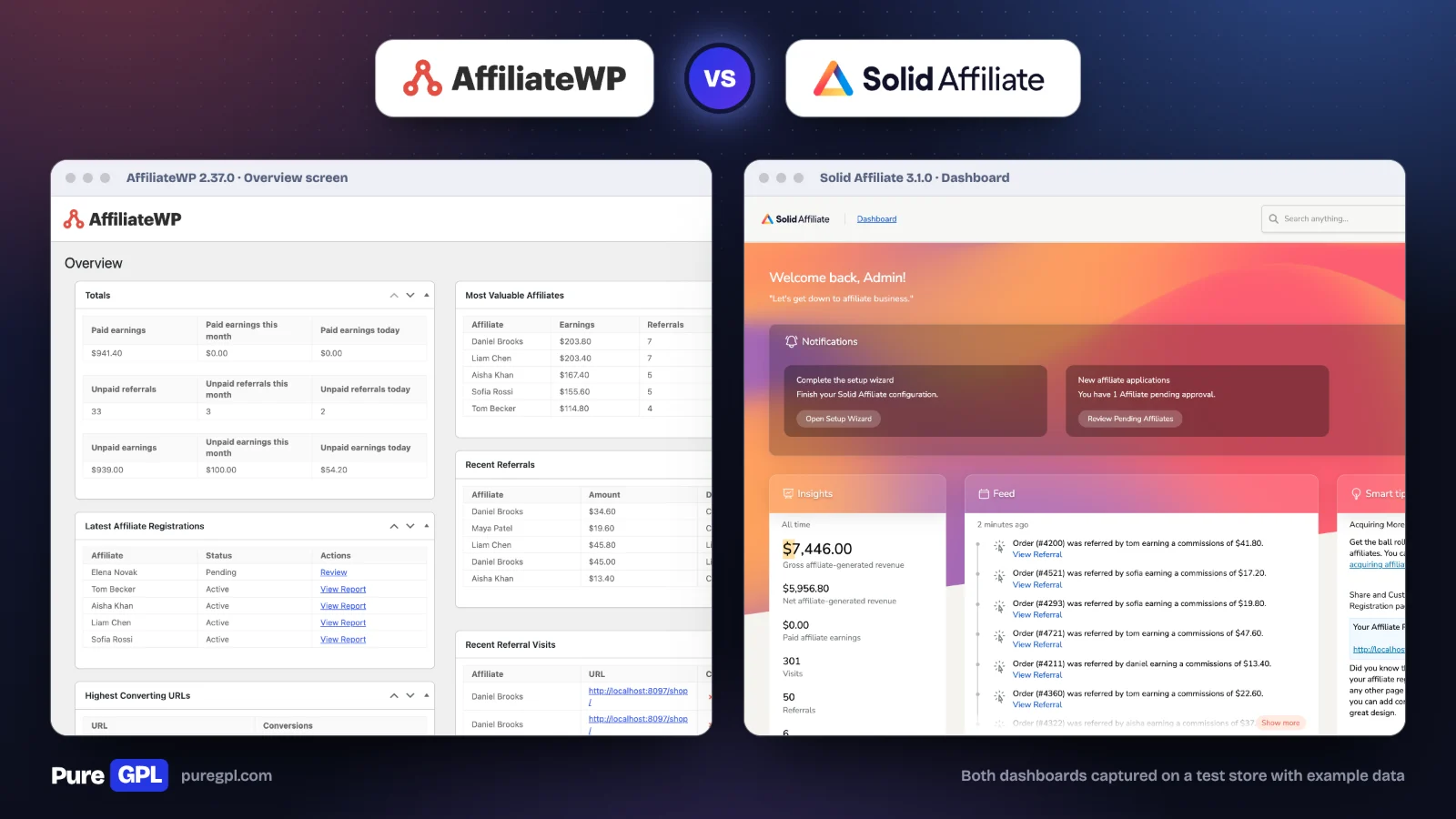
Side by side
| AffiliateWP | Solid Affiliate | |
|---|---|---|
| Made by | Sandhills Development, part of Awesome Motive | Solid Plugins, LLC |
| Works with | WooCommerce plus 28 other eCommerce and form plugins on its features page (its pricing page says WooCommerce + 20) | WooCommerce |
| Lowest plan, first year | $149.50 (1 site) | $149.60 (1 site) |
| Lowest plan, renewal | $299 | $374 |
| Middle plan | $199.50, then $399 (2 sites) | $174.65, then $499 (3 sites) |
| Top plan | $299.50, then $599 (5 sites) | $224.70, then $749 (10 sites) |
| Affiliates | Unlimited | Unlimited |
| Payouts | Stripe (including bank payouts), PayPal, store credit | PayPal bulk payout, CSV for manual payment, store credit |
| Lifetime commissions | Pro | Pro |
| Commission on subscription renewals | Pro | Pro |
| Fraud Prevention Suite | Pro | Pro |
| Multi-tier commissions | Pro | Not listed |
| Refund window | 14 days | 30 days |
| Users, as claimed by the developer | 30,000+ | 10,000+ |
Integrations: the deciding factor
This is the difference that settles most decisions. Solid Affiliate’s FAQ says it “integrates primarily with WooCommerce”, and that if you are not using WooCommerce you will need another solution. AffiliateWP lists WooCommerce, Easy Digital Downloads, MemberPress, Paid Memberships Pro, WPForms, Formidable Forms, Gravity Forms and more.
So if you sell digital downloads through EDD, memberships, courses or a payment form, the choice is already made: AffiliateWP.
The narrow focus is also Solid Affiliate’s strength. Its settings talk about WooCommerce coupons, order statuses and store credit directly, with no integration layer to configure. AffiliateWP’s settings have an Integrations tab where you switch on the plugins you sell through.
Price over three years
The first-year prices are within ten cents of each other on the lowest plan. From the second year they are not.
| One site, lowest plan | AffiliateWP Personal | Solid Affiliate Starter |
|---|---|---|
| Year 1 | $149.50 | $149.60 |
| Year 2 | $299 | $374 |
| Year 3 | $299 | $374 |
| Three years | $747.50 | $897.60 |
Solid Affiliate’s cheapest plan costs $75 a year more than AffiliateWP’s from the second year. That is easy to miss, because most comparisons quote only the first-year sale prices, and those are almost identical.
| Top plan, three years | AffiliateWP Pro | Solid Affiliate Pro |
|---|---|---|
| Sites | 5 | 10 |
| Year 1 | $299.50 | $224.70 |
| Years 2 and 3 | $599 each | $749 each |
| Three years | $1,497.50 | $1,722.70 |
| Per site over three years | $299.50 | $172.27 |
On one site AffiliateWP is cheaper over time. Across several sites the picture flips, because Solid Affiliate’s top plan covers ten sites and AffiliateWP’s covers five.
These figures assume both developers keep their published renewal prices. Both state that the lower price is introductory and that renewals are at the regular price.
Setup
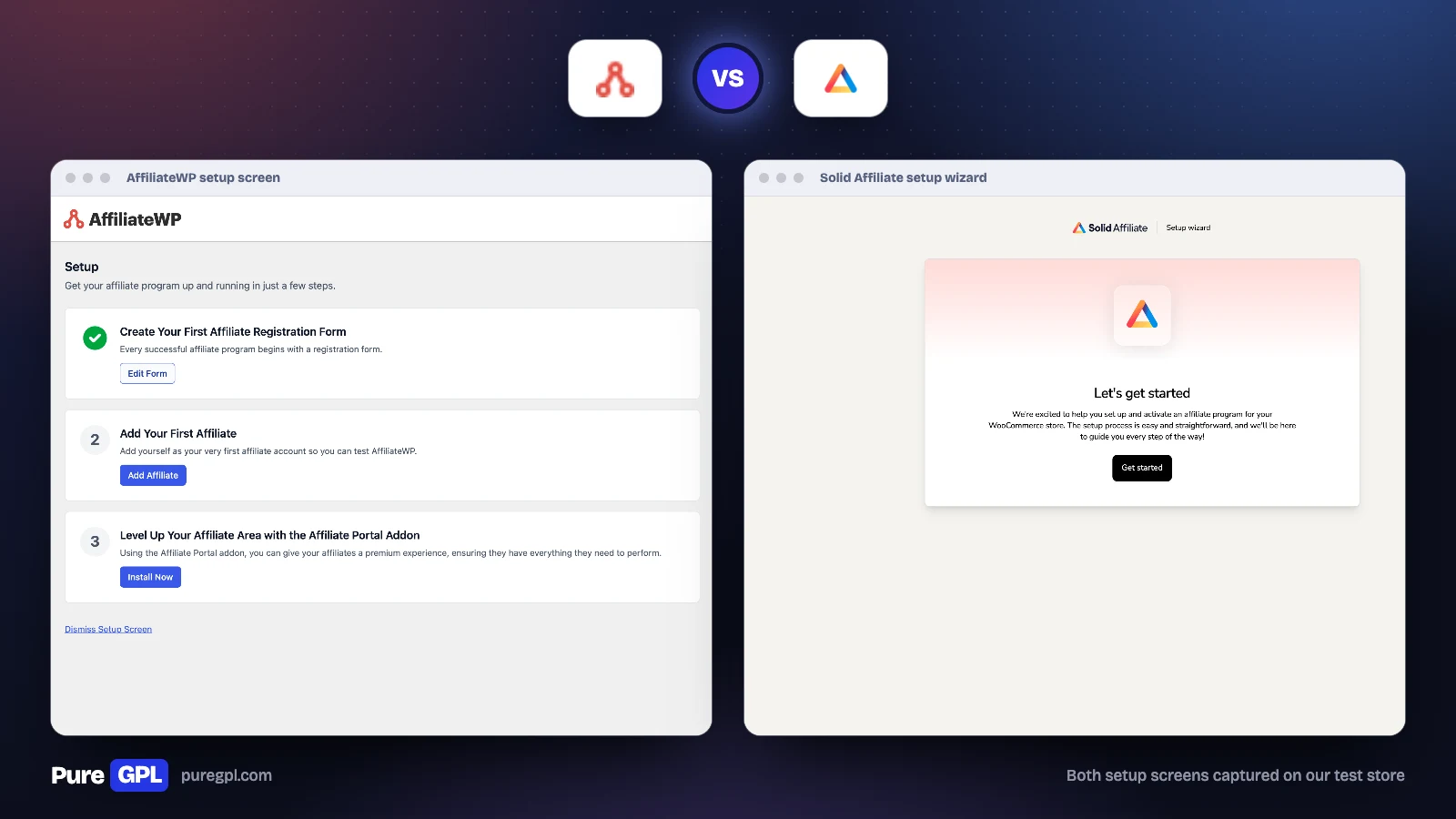
Both open with a setup wizard. Solid Affiliate’s wizard covers the whole program in one pass: it creates the affiliate portal page, sets the default commission (and a renewal rate, if WooCommerce Subscriptions is active), sets the sender name and address for emails, creates a template coupon and turns on automatic coupons for affiliates, and offers to turn existing users into affiliates.
AffiliateWP created its own affiliate area, login and registration pages on our test store. After the wizard, its Setup screen becomes a checklist: create a registration form, add your first affiliate, and an invitation to buy the Affiliate Portal add-on. On our store the first step was already marked done, because AffiliateWP creates the registration page when you activate it. The menu is longer than Solid Affiliate’s: alongside the usual screens there are Tools, Addons and a Rewards screen for the developer’s separate loyalty plugin.
Commissions
| Commission feature | AffiliateWP | Solid Affiliate |
|---|---|---|
| Percentage or flat rate | All plans | All plans |
| Per-affiliate rates | All plans | Yes, plan not stated |
| Affiliate groups with their own rate | Yes, plan not stated | All plans |
| Tiered rates | Pro | Not listed |
| Lifetime commissions | Pro | Pro |
| Subscription renewals | Pro | Pro |
| Revenue sharing (a product linked to an affiliate) | Not listed | Pro |
| Multi-tier (affiliates recruiting affiliates) | Pro | Not listed |
| Holding period before a commission can be paid | Yes | Yes, as a grace period |
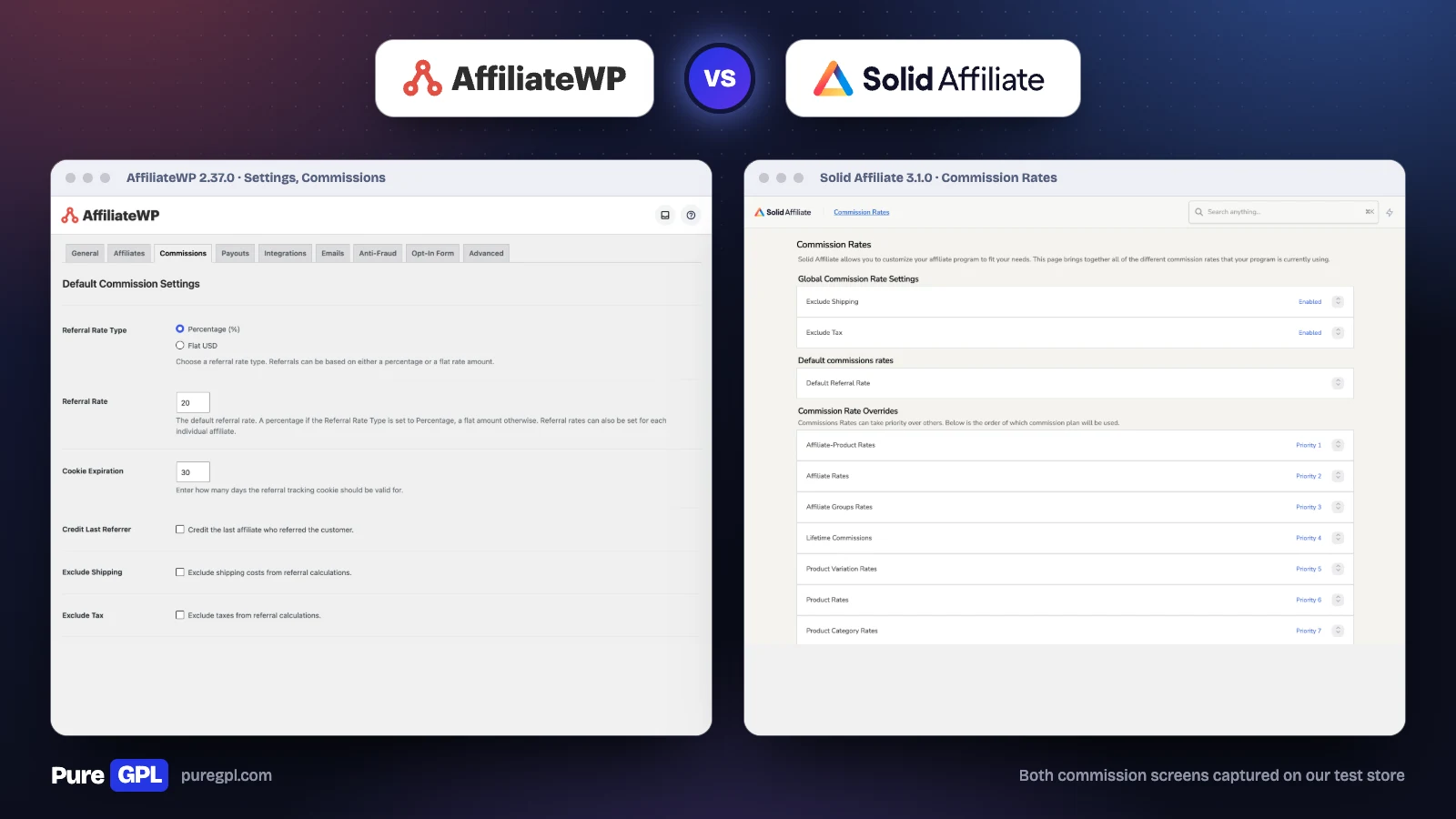
The screens show the difference in approach. AffiliateWP puts its commission options on one settings tab: rate type, rate, cookie length, credit to the last referrer, shipping and tax exclusion, a holding period, and switches for recurring and multi-tier commissions. On our store both plugins were set to a 20% default rate, and Solid Affiliate kept a second 20% default just for subscription renewals.
Solid Affiliate has a Commission Rates page that lists every rate in the order it applies. A rate for one affiliate on one product comes first, then affiliate, group, lifetime, product variation, product and category rates. If an affiliate is paid an amount you did not expect, that page shows the order the rules are checked in, so you can work out which one applied.
Tracking and coupons
| Tracking feature | AffiliateWP | Solid Affiliate |
|---|---|---|
| Referral links | All plans | All plans |
| Coupon tracking | All plans | All plans |
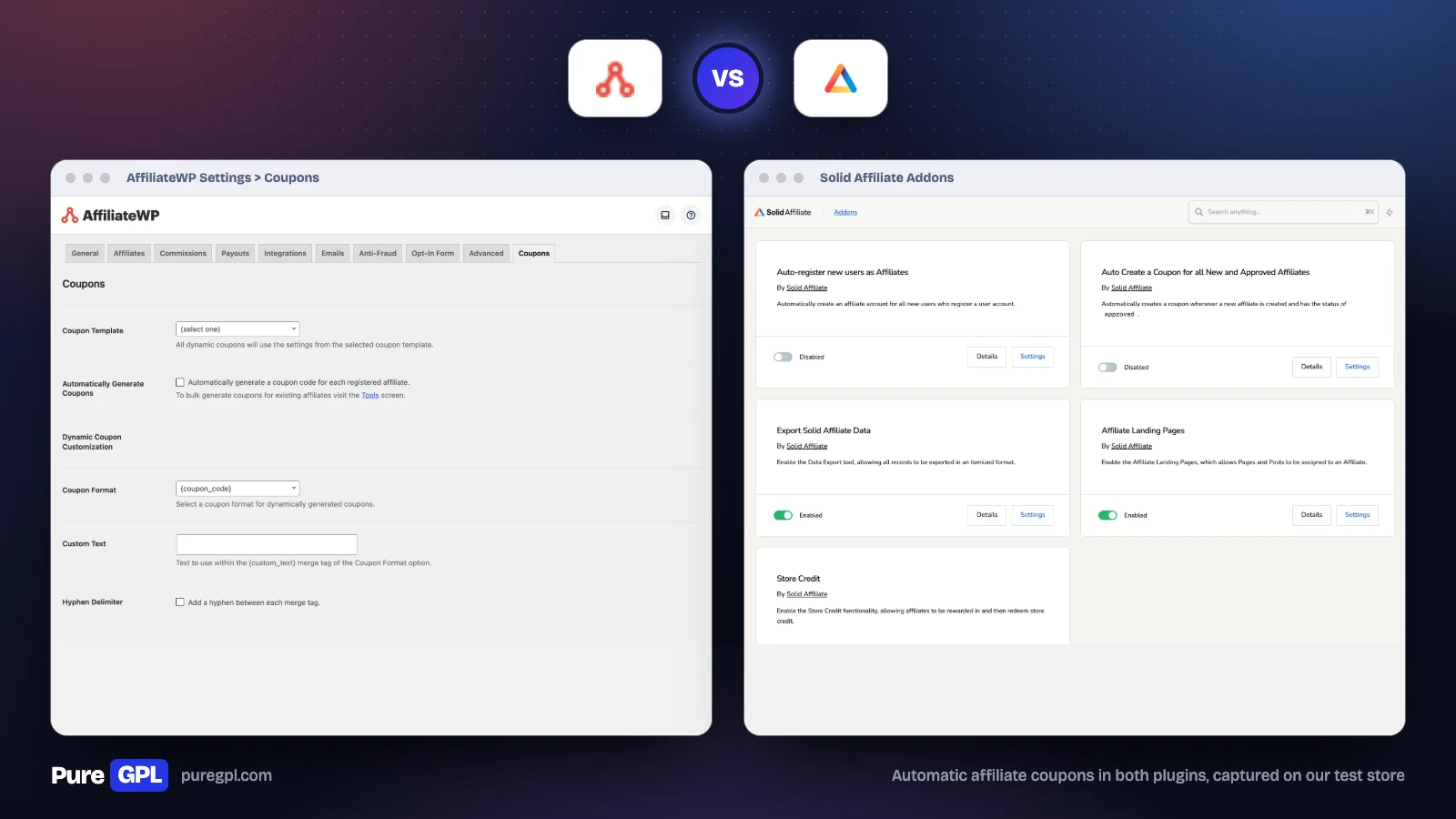
| A coupon created for every new affiliate | Yes, a setting on the Coupons tab | Yes, an add-on switch in the plugin |
| Custom affiliate slugs | Pro (personalized referral URLs) | Pro |
| Affiliate landing pages | Pro | Pro |
| Discount applied from an affiliate link | Pro (auto-discounts) | Pro (coupon discount links) |
| Direct link tracking, without a referral link | Pro | Not listed |
| Vanity coupon codes | Pro | Not listed |
| QR codes | Add-on | Not listed |
AffiliateWP has more ways to credit an affiliate. Direct link tracking credits sales from an affiliate’s own website without a referral link, and its add-ons screen on our test store also lists QR codes. Both can create a WooCommerce coupon for each new affiliate automatically, so every partner has a code from day one. AffiliateWP can also create coupons in bulk for affiliates you already have, from its Tools screen.
Payouts
| Payout feature | AffiliateWP | Solid Affiliate |
|---|---|---|
| PayPal | All plans | All plans, as a bulk payout |
| Stripe | All plans | Not offered |
| Bank payouts | Through Stripe, in 90+ countries by the developer’s count | Not offered |
| Store credit | All plans | All plans |
| Manual payout with a CSV | Yes | Yes |
| Automatic payouts | Pro | Through PayPal |
| Affiliates choose how they are paid | Yes | Not listed |
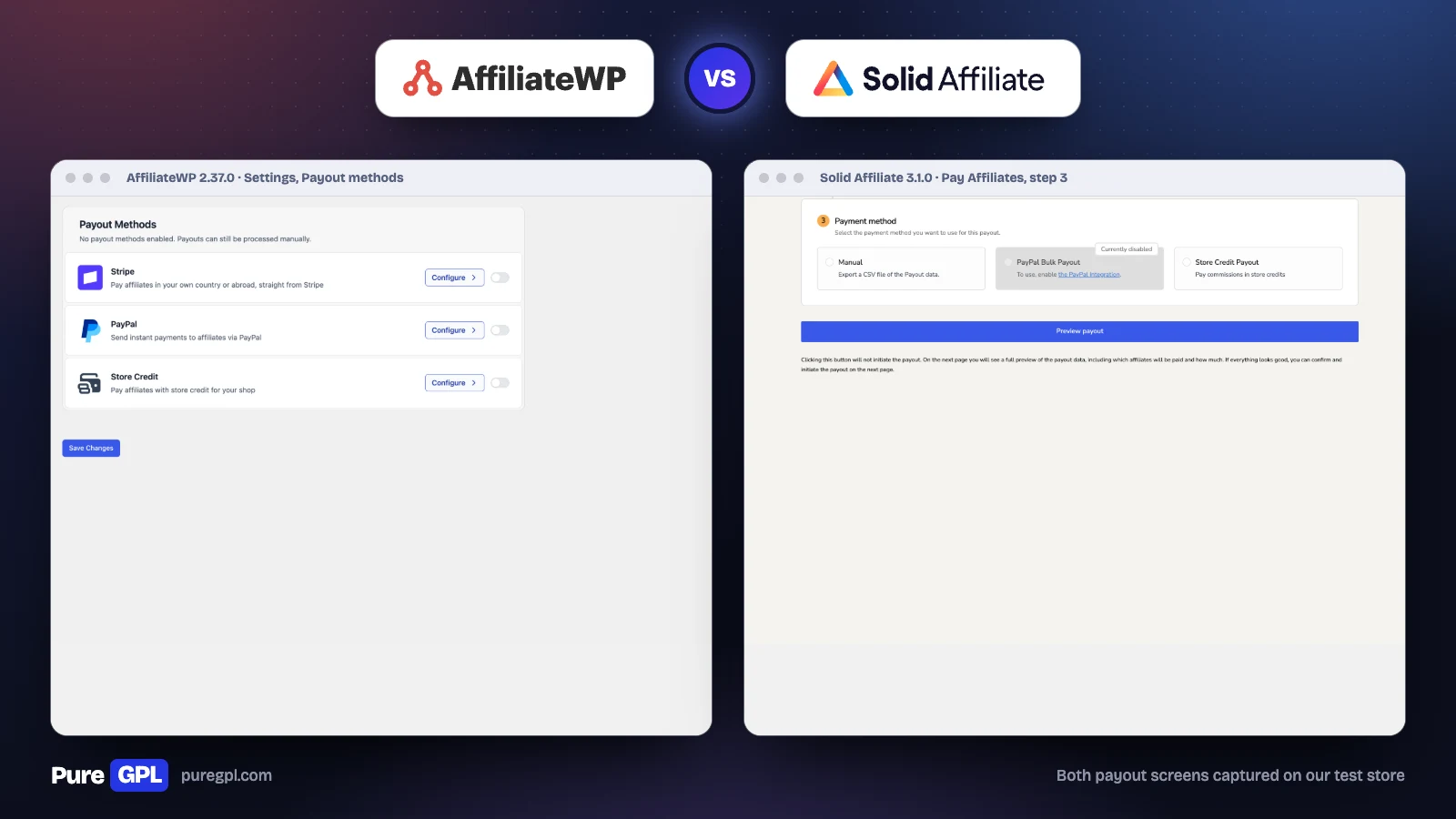
Payouts are the clearest gap between the two. AffiliateWP pays through Stripe, including straight to an affiliate’s bank account, as well as PayPal and store credit. It lets affiliates pick their own method, and it can email an affiliate and retry when a payout fails.
Solid Affiliate pays through PayPal or store credit, or gives you a CSV to pay any other way. Its Pay Affiliates screen is a three-step process: choose which unpaid referrals to include, optionally include or exclude affiliates (advanced payout filters are listed on Pro), then choose the method and preview the payout before anything is sent. If your affiliates do not use PayPal, you will be paying them by hand.
With the example referrals on our store, Solid Affiliate’s “all unpaid referrals” option showed $1,489.20 owed to six affiliates before we picked a method. AffiliateWP’s Payouts screen offered to pay all 33 unpaid referrals in one go, and its payout settings opened with a banner for its newer bank-transfer payouts.
One change the Oxygen comparison below has missed: AffiliateWP’s Payouts Service has closed. The plugin’s own Payouts settings now say the service was shut down on September 30, 2026, and ask you to set up another payout method. Pages that still describe it as an option are out of date.
Fraud protection
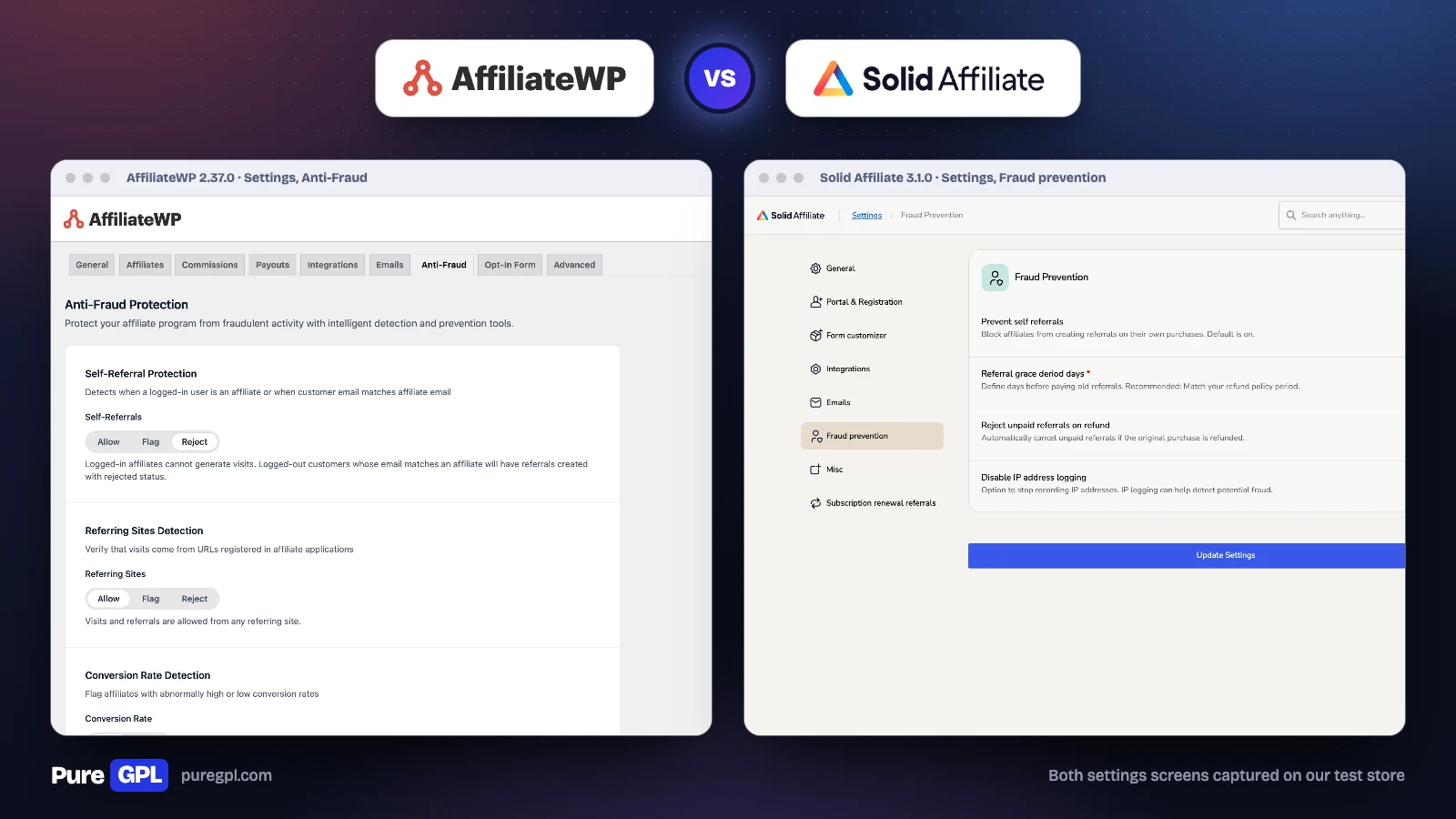
Both developers put their Fraud Prevention Suite on the Pro plan, so check the plan before relying on either. The settings screens show how different the two suites are.
| Fraud setting | AffiliateWP | Solid Affiliate |
|---|---|---|
| Self-referrals | Allow, flag or reject | On or off |
| Reject unpaid commissions when an order is refunded | Yes | Yes |
| Hold commissions until the refund window closes | Yes, a holding period | Yes, a grace period |
| Visits only from the affiliate’s own website | Allow, flag or reject | No |
| Unusually high or low conversion rates | Allow or flag, with your own limits | No |
| Paid search traffic | Allow, flag or reject | No |
| Many sign-ups from one IP address | Allow, flag or require approval | No |
| CAPTCHA on registration | reCAPTCHA, hCaptcha or Turnstile, also on login | reCAPTCHA |
| Turn off IP address logging | Yes, on the Advanced tab | Yes |
The table covers each plugin’s fraud settings screen and the related settings on its other tabs, in AffiliateWP 2.37.0 and Solid Affiliate 3.1.0.
AffiliateWP’s suite watches behaviour: where visits come from, how often they convert and whether they come from paid ads. Each rule can let a referral through, flag it for your review while it stays payable, or, for most rules, reject it. Solid Affiliate covers the basics that stop most losses, which are self-referrals, refunds and a grace period, and like AffiliateWP it lets you stop recording IP addresses.
For a small program with partners you know, Solid Affiliate’s four settings are enough. For an open program that anyone can join, AffiliateWP’s rules catch problems you would otherwise find in your refunds.
The affiliate’s view
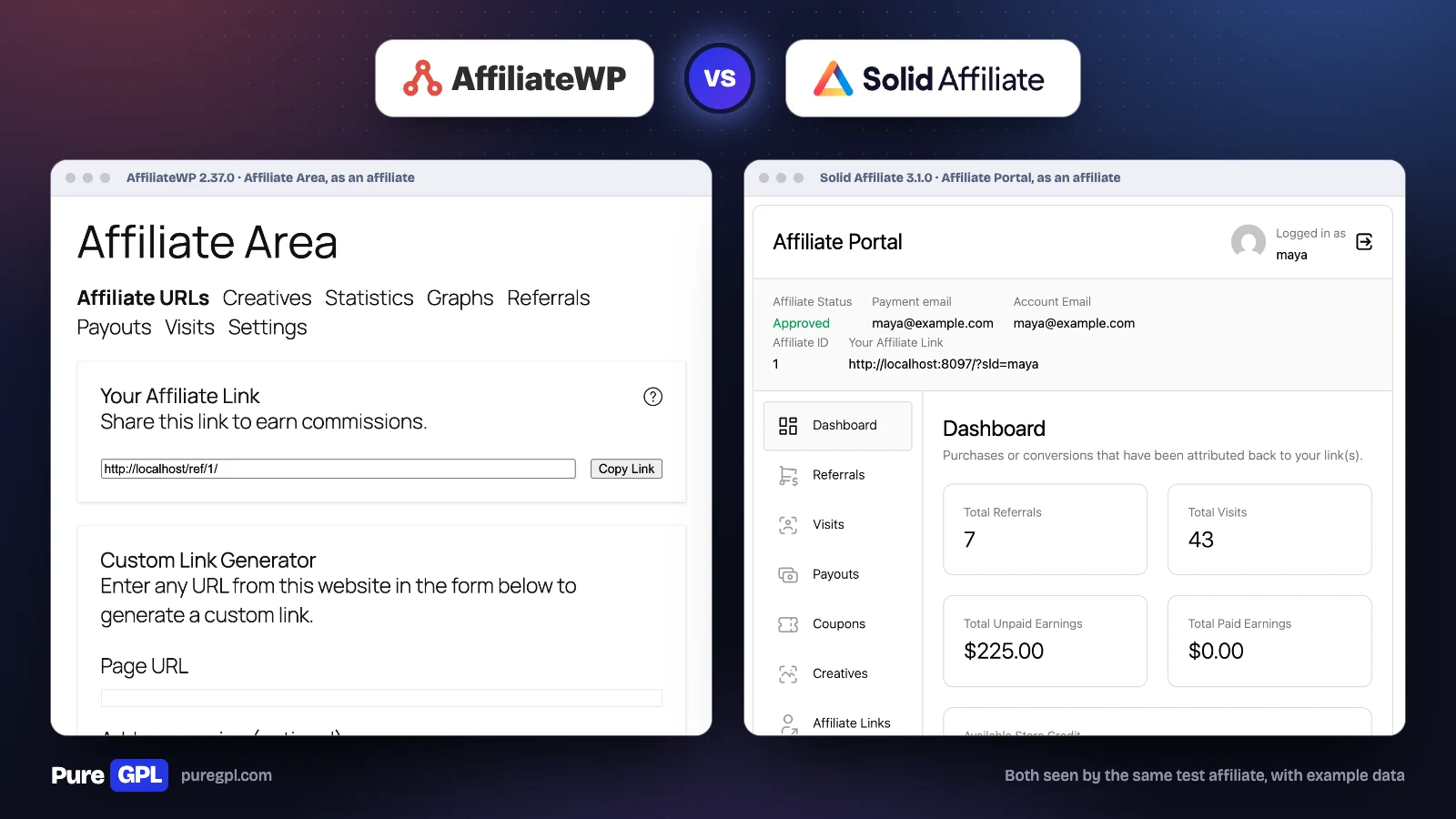
We logged in as the same test affiliate in both. AffiliateWP’s Affiliate Area takes its look from your theme. It has tabs for affiliate links, creatives, statistics, graphs, referrals, payouts, visits and settings, and a link generator for any page on the store. AffiliateWP’s own Affiliate Portal, with a separate design, is part of the Pro plan.
Solid Affiliate’s portal has its own design. It opens on a dashboard with referrals, visits, paid and unpaid earnings and store credit, and has tabs for referrals, visits, payouts, coupons, creatives, affiliate links, settings, landing pages and store credit. It looks more modern out of the box. Both sit inside a page of your theme; Solid Affiliate draws its own card-style screen with a sidebar, while AffiliateWP’s tabs take the theme’s styling.
The first thing each one showed our test affiliate was different. Solid Affiliate opened on the numbers: seven referrals, 43 visits and $225.00 unpaid. AffiliateWP opened on the referral link and a link generator, with the figures two tabs over under Statistics. One leads with what you have earned, the other with how to earn more.
Reports
| Reporting | AffiliateWP | Solid Affiliate |
|---|---|---|
| Report tabs | Referrals, affiliates, payouts, visits, campaigns | Overview, affiliates, referrals, payouts, visits, coupons |
| Main view | Stat cards and a trend chart | One table comparing all time, this year, last year and your chosen period, plus daily and monthly charts |
| Filters | Date range and affiliate | Date presets from today to all time, a custom range, and affiliate |
| Campaign report | Yes | Not listed |
| Coupon report | Not listed | Yes |
| Monthly email summary | To you, on by default; to each affiliate, off until you switch it on | To you, on by default in our 3.1.0 file; the pricing page lists it on Expert and Pro |
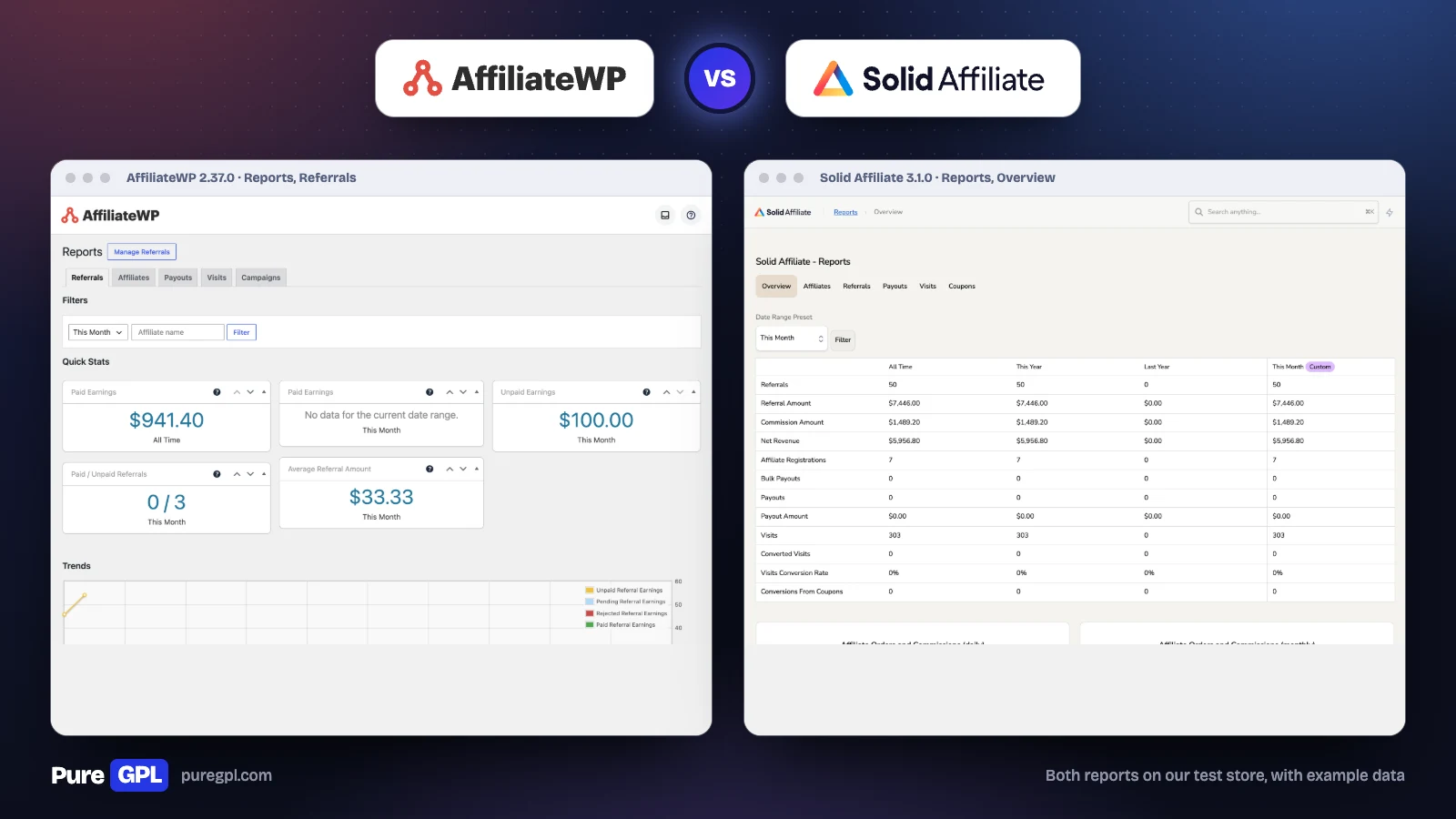
The two reports answer different questions. AffiliateWP’s Referrals report is built for a quick check: paid and unpaid earnings, the paid-to-unpaid count and the average referral, with a trend chart below. Its Campaigns tab shows which campaign an affiliate tagged on a link, which helps when one partner promotes you in several places.
Solid Affiliate’s Overview puts every figure for the program in one table and sets your chosen period beside all time, this year and last year. On our store that meant referral amount, commission, net revenue after commissions, sign-ups, payouts, visits, conversion rate and conversions from coupons, all on one screen. If you report to someone each month, that table is close to ready as it is.
Managing affiliates
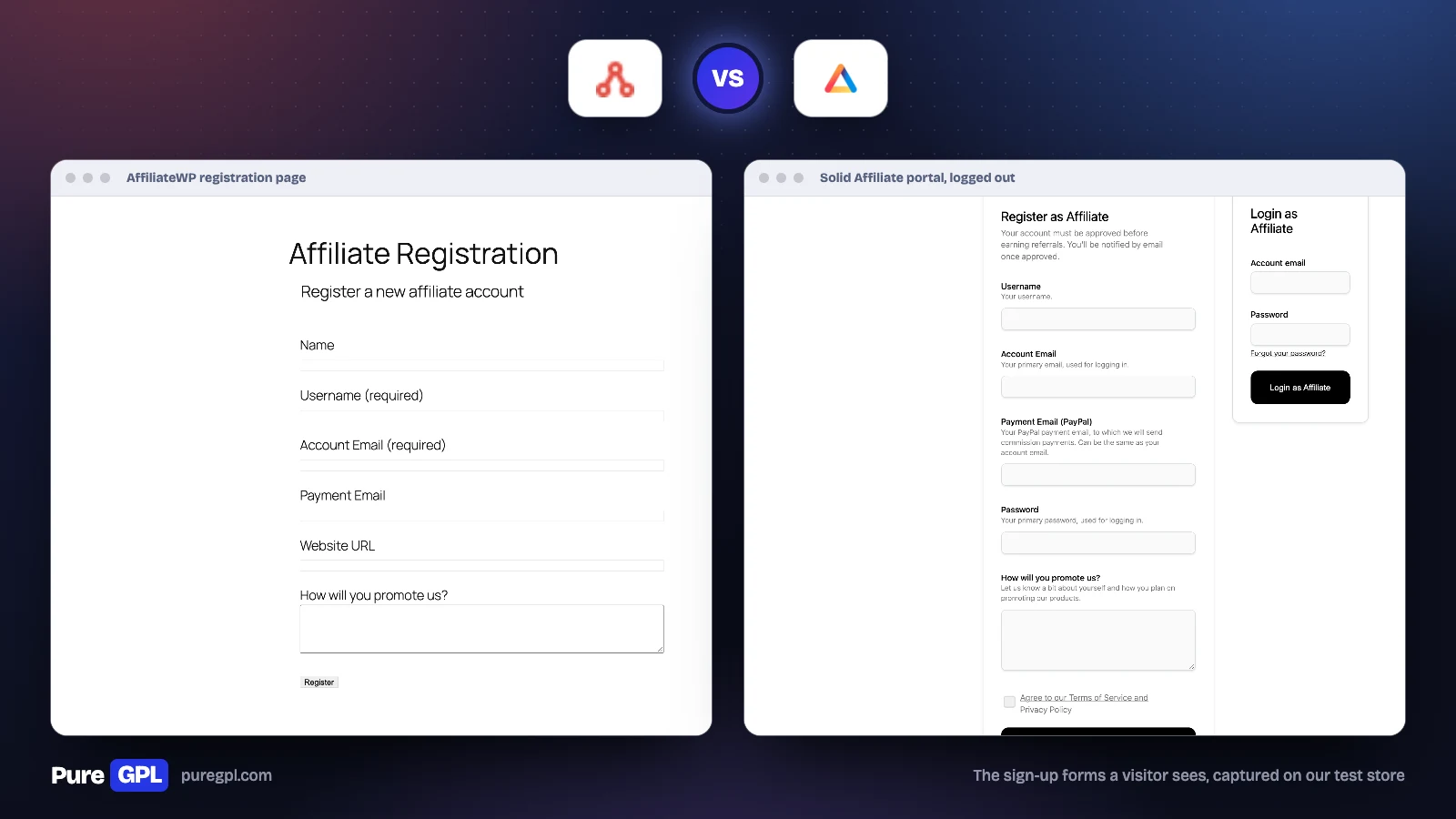
| Management feature | AffiliateWP | Solid Affiliate |
|---|---|---|
| Manual or automatic approval | Yes | Yes |
| Custom registration form | Built in, edited as blocks in the WordPress editor; Gravity Forms or Ninja Forms on Plus | Built in, Pro on the pricing page |
| Affiliate groups | Yes | All plans |
| Affiliate tags | Not listed | Expert and Pro |
| See the portal as a given affiliate | By switching to the affiliate’s account, with the free User Switching plugin | Pro |
| Turn existing customers into affiliates | Pro | In the setup wizard |
| Data export | Yes, from the Tools screen | All plans |
| Developer tools | REST API, hooks and templates | Hooks, no REST API |
Both have a registration form you can change without another plugin. Solid Affiliate’s is edited inside the plugin, field by field, and comes with a “How will you promote us?” question and a policy checkbox. AffiliateWP’s is a page you edit in the block editor, adding field blocks; Gravity Forms and Ninja Forms are an option on Plus. For developers, AffiliateWP adds a REST API and templates to its hooks, and its add-ons screen on our test store lists 28 add-ons. Solid Affiliate has hooks but no REST API.
Emails
| AffiliateWP | Solid Affiliate | |
|---|---|---|
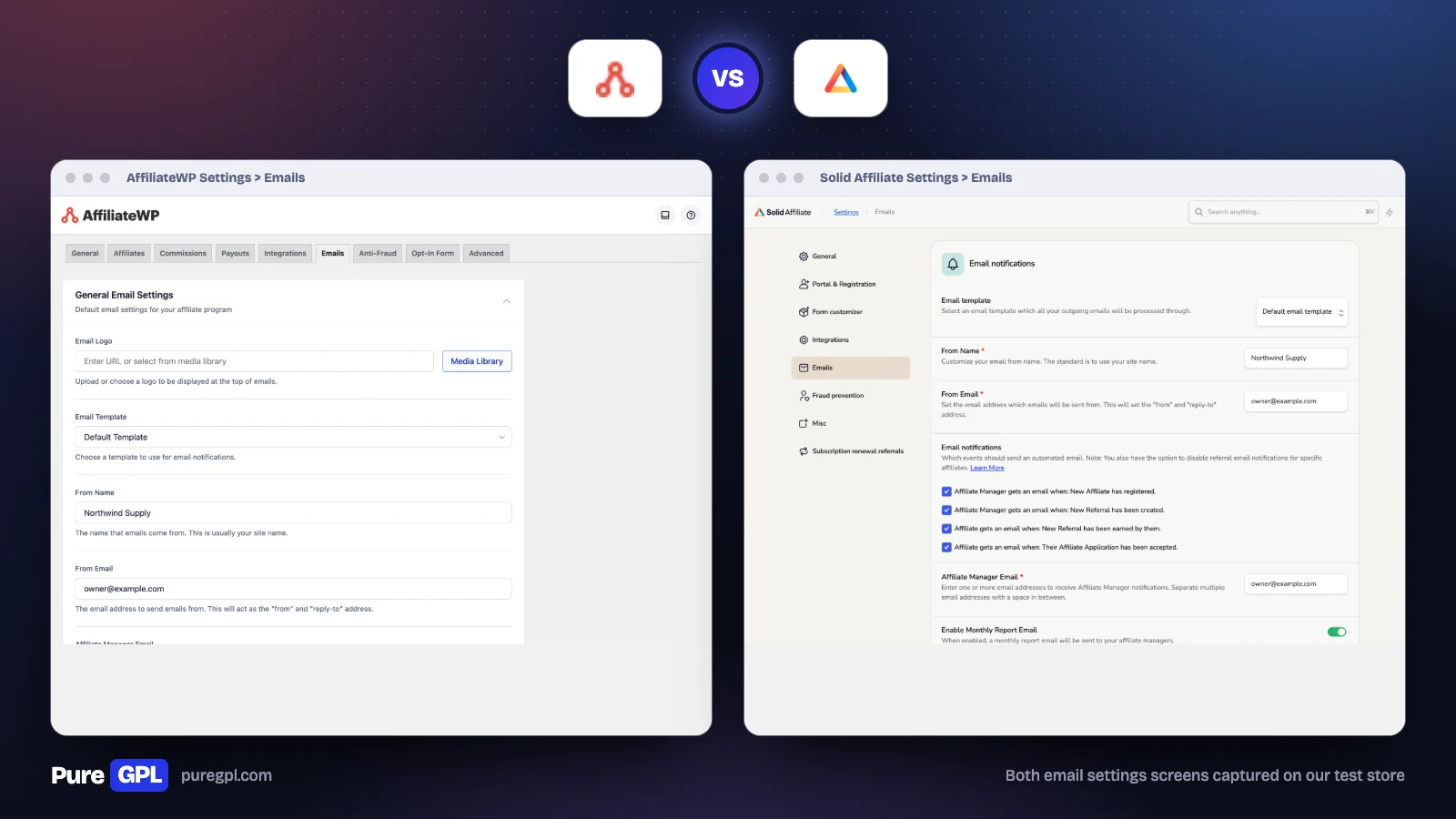
| Template | Default template or plain text, with your logo | Default template or plain text |
| To you: new affiliate sign-up | Yes | Yes |
| To you: new referral | Yes | Yes |
| To you: a payout failed | Yes | Not listed |
| To the affiliate: new referral | Yes | Yes |
| To the affiliate: application accepted | Yes | Yes |
| To the affiliate: application pending or rejected | Yes | Not listed |
| Welcome email | When you add an affiliate yourself | When the setup wizard invites existing users |
| Stripe payout emails | Transfer, payout and account emails for you and the affiliate | No Stripe payouts |
Both send the emails a program needs. AffiliateWP lets you edit the subject and text of each; on Solid Affiliate, custom email text is listed on Pro. AffiliateWP sends more, mostly because it does more: its Stripe payouts come with their own set of emails, and it tells affiliates when their application is pending or rejected. Both can send a welcome email, but only in narrow cases: AffiliateWP when you add an affiliate by hand, Solid Affiliate when its setup wizard invites your existing users.
Where each goes further
Where AffiliateWP goes further
- Integrations beyond WooCommerce.
- Stripe and bank payouts, with affiliates choosing their method.
- Behaviour-based fraud rules that flag referrals for review.
- Multi-tier commissions, direct link tracking, vanity coupons and QR codes.
- Lower renewal price on one site.
Where Solid Affiliate goes further
- A Commission Rates page that shows the order rates are applied in.
- Affiliate tags on Expert, and a “preview as affiliate” tool on Pro.
- Revenue sharing, which pays an affiliate on every sale of a linked product.
- Ten sites on the top plan and a 30-day refund window.
What other comparisons get wrong
The comparison on oxygenbuilder.com, the site of the Oxygen page builder, ends with an advert for Oxygen. We read it on 6 October 2026 and checked the AffiliateWP claims below: the features against AffiliateWP 2.37.0 on our store, the prices against both pricing pages.
| Their claim | What we found |
|---|---|
| Automatic affiliate coupons are “something I haven’t seen matched by AffiliateWP at any tier” | AffiliateWP has a setting to “Automatically generate a coupon code for each registered affiliate”, shown above |
| An auto-created portal page is marked not available in AffiliateWP | AffiliateWP created its Affiliate Area page itself when we activated it |
| For custom registration forms “you will need Gravity Forms or Ninja Forms” | AffiliateWP’s own registration page is built from its form blocks, which include text area and checkbox fields; those form plugins are an alternative, not a requirement |
| A Payouts Service that pays affiliates “in over 50 countries” | That service was shut down on September 30, 2026, by AffiliateWP’s own notice |
| Lists AffiliateWP at $149.50 and Solid Affiliate at $149.60 per year, without saying these are first-year prices | Both developers call these introductory prices; both plugins renew at a higher regular price (see Price over three years) |
Both on PureGPL
Both are licensed under the GPL: AffiliateWP says so in its plugin header, and Solid Affiliate in its licence agreement. Both are in our catalogue at $3.49 each, or included in a membership from $14 a month.
- AffiliateWP, version 2.37.0, updated October 2026
- Solid Affiliate, version 3.1.0
One thing to know before you choose: our Solid Affiliate file is version 3.1.0 and was last updated in January 2025, while our AffiliateWP file is current. The Solid Affiliate screens in this article come from that file, so the developer’s latest release may look different. If you want the most recent build, check the version on the product page first.
A GPL copy comes without a licence from the developer, so it comes without the developer’s support. Updates come from us, with a year of our own support included.
Sources
Prices, plan contents and user counts were read from these pages on 4 October 2026, and re-checked on 6 October 2026. The screens and settings described are from our own test store.
Frequently asked questions
Is Solid Affiliate better than AffiliateWP?
For a WooCommerce-only store that wants a simple setup and more sites per plan, yes. For anything that is not WooCommerce, or if you need Stripe payouts or detailed fraud rules, AffiliateWP is the better choice.
Which is cheaper?
In the first year they cost the same on one site. On renewal AffiliateWP is cheaper on one site ($299 against $374). Across several sites Solid Affiliate works out cheaper per site, because its top plan covers ten.
Does Solid Affiliate include fraud protection on every plan?
Not according to its pricing page, which lists the Fraud Prevention Suite on Pro only. AffiliateWP also keeps its suite on Pro.
Can Solid Affiliate pay affiliates through Stripe?
No. It pays through PayPal or store credit, or exports a CSV so you can pay another way. AffiliateWP supports Stripe, including bank payouts.
Can I switch from one to the other?
Check each developer’s documentation for a migration tool before you commit, and test on a staging copy first. Affiliate links that are already shared on the web must keep working after the move, so keep the same referral variable or set up redirects.
Do either have a free version?
No. Both are paid only, with a refund window of 14 days (AffiliateWP) and 30 days (Solid Affiliate).
For more options, see Best WordPress affiliate plugins, our AffiliateWP review and our Solid Affiliate review.


