Solid Affiliate Review 2026: The WooCommerce Affiliate Plugin, Examined
Solid Affiliate review: a WooCommerce-only affiliate plugin with a simple setup. Plans, real renewal prices, pros, cons and alternatives.


Solid Affiliate is an affiliate plugin built for WooCommerce stores. It runs your program inside WordPress, with its own dashboard and affiliate portal, PayPal and store credit payouts, and automatic coupons for affiliates. We tested version 3.1.0 on a WooCommerce store. In short, its setup wizard covers the basics if you sell only through WooCommerce, but it pays through PayPal, store credit or a CSV you pay from yourself, keeps lifetime and renewal commissions for its top plan, and its renewals cost from two and a half to more than three times the first-year price. We sell Solid Affiliate on PureGPL, so we have said where its rivals are cheaper.
How we tested. We installed Solid Affiliate 3.1.0 on a WordPress test site with WooCommerce and the default Twenty Twenty-Five theme, with seven example affiliates and their example referrals and visits. Its example referrals were all created on one day. We opened its setup wizard, settings, admin screens and reports, took the payout screen as far as choosing a method without sending any money, and logged in as one of the affiliates. We also measured its size and what it adds to the storefront. On 6 October we placed test orders through affiliate links, paid with Cash on Delivery, refunded one of them from the WooCommerce order screen, and deleted the test orders afterwards. Our Solid Affiliate copy had every Pro feature switched on, so which plan includes each feature comes from Solid Affiliate’s pricing page, not from what the screens showed. Version 3.1.0 is also older than the developer’s current release; see “Version” below. Prices were read on 6 October 2026; the sources are linked at the end.
The short verdict
- Good for WooCommerce-only stores that want a guided setup, an affiliate portal with its own design, store credit payouts and reports on every plan.
- Watch the plan: lifetime commissions, subscription renewal commissions, revenue sharing, landing pages and the Fraud Prevention Suite are on Pro.
- Watch the renewal and payouts: Starter renews at $374 after a $149.60 first year, and there is no Stripe.
- Pick something else if you sell outside WooCommerce, your affiliates want Stripe or bank payouts, you want multi-level commissions, or you want lifetime commissions without the top plan.
Pricing
| Plan | First year | Renewal | Sites |
|---|---|---|---|
| Starter | $149.60 | $374 | 1 |
| Expert | $174.65 | $499 | 3 |
| Pro | $224.70 | $749 | 10 |
Solid Affiliate calls the lower figure introductory pricing and says renewals are at the regular price; the three-year figures below assume the introductory price covers the first year. It offers a 30-day refund. It has no free version and no formal trial, though the code in our 3.1.0 copy lets the plugin run for seven days before it asks for a licence key.
| Over three years | Starter | Pro |
|---|---|---|
| Total | $897.60 | $1,722.70 |
| Per site | $897.60 | $172.27 |
On one site the cheap first year understates the running cost: three years of Starter is $897.60. On ten sites Pro is the better deal per site. These figures assume Solid Affiliate keeps its published prices.
AffiliateWP and SliceWP, which we have also tested, sell the same way: a cheap first year and full price after it. AffiliateWP’s pricing page says “Special introductory pricing, all renewals are at full price”, and SliceWP’s says “Sale price applies to the first year only.”
| Three years | Solid Affiliate | AffiliateWP | SliceWP |
|---|---|---|---|
| One site | $897.60 (Starter) | $747.50 (Personal) | $627 (Pro), or $429 once for a lifetime licence |
| Ten sites | $1,722.70 (Pro) | $2,995 (two 5-site Pro licences) | $957 (Pro Plus), or $649 once for a lifetime licence |
SliceWP is the cheapest of the three on one site or ten, and the only one with a lifetime licence. Its first-year prices are a “Special 25% off limited time deal”; at its normal prices three years cost $687 on one site and $1,047 on ten, still the lowest. Solid Affiliate is cheaper than AffiliateWP on ten sites, and dearer on one. The plans are not like for like: SliceWP’s include “all features and add-ons”, while AffiliateWP’s and Solid Affiliate’s lower plans leave features for higher ones.
What each plan includes
| Feature | Plan |
|---|---|
| Affiliate groups and flexible commission rates | Starter |
| One-click PayPal payouts, manual payouts and store credit | Starter |
| WooCommerce coupon tracking and order details for affiliates | Starter |
| Real-time reporting and exporting affiliate data | Starter |
| Affiliate tags, a quick search tool, monthly email reports and a sign-up bonus | Expert |
| Lifetime commissions, subscription renewal referrals and revenue sharing | Pro |
| Fraud Prevention Suite and advanced payout filters | Pro |
| Landing pages, custom affiliate slugs and coupon discount links | Pro |
| Custom email notifications, custom registration forms and a white-label affiliate area | Pro |
| Preview as affiliate | Pro |
WooCommerce only
Solid Affiliate’s FAQ says it “integrates primarily with WooCommerce”, and that “If you’re not using WordPress or WooCommerce, you’ll need an alternative.” Its in-plugin help lists Easy Digital Downloads as “Coming Soon”. The narrow focus is also its strength: its settings talk about WooCommerce coupons, order statuses and store credit directly, with no integration layer to configure.
Setup
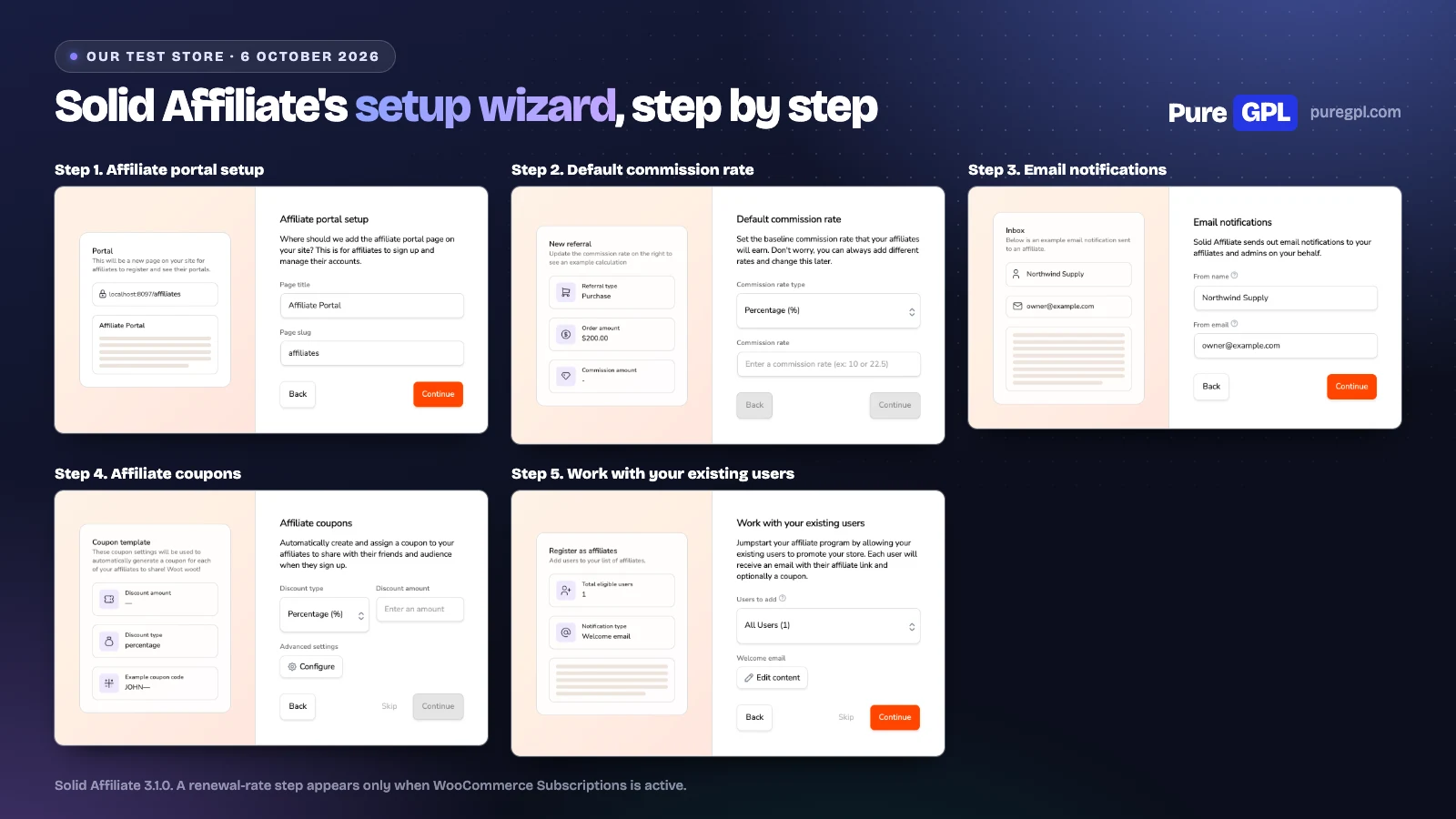
The wizard’s set-up steps are these five:
- Affiliate portal setup: the title and address of the page where affiliates sign up and log in (“affiliates” by default).
- Default commission rate: a percentage or a flat amount, with a live example on a $200.00 order.
- Email notifications: the sender name and address.
- Affiliate coupons: a coupon template, so each new affiliate gets their own discount code.
- Work with your existing users: turn people who already have an account into affiliates, each sent a welcome email.
It also asks for a licence key, skips the existing-users step when there is nobody to add, and shows a renewal-rate step only when WooCommerce Subscriptions is active. Together the steps set up the core of the program: the wizard creates the affiliate portal page, sets the default commission (and a renewal rate, if WooCommerce Subscriptions is active), sets the sender name and address for emails, creates a template coupon and turns on automatic coupons for affiliates, and offers to turn existing users into affiliates. The portal page holds the login and registration forms. It leaves payouts, fraud settings and the registration form to the settings screens. Each step saves as you continue, so the portal page is created at the portal step. On our store we did not go past that step, so the plugin created no page; we made the portal page with its shortcode for our screenshots.
Commissions
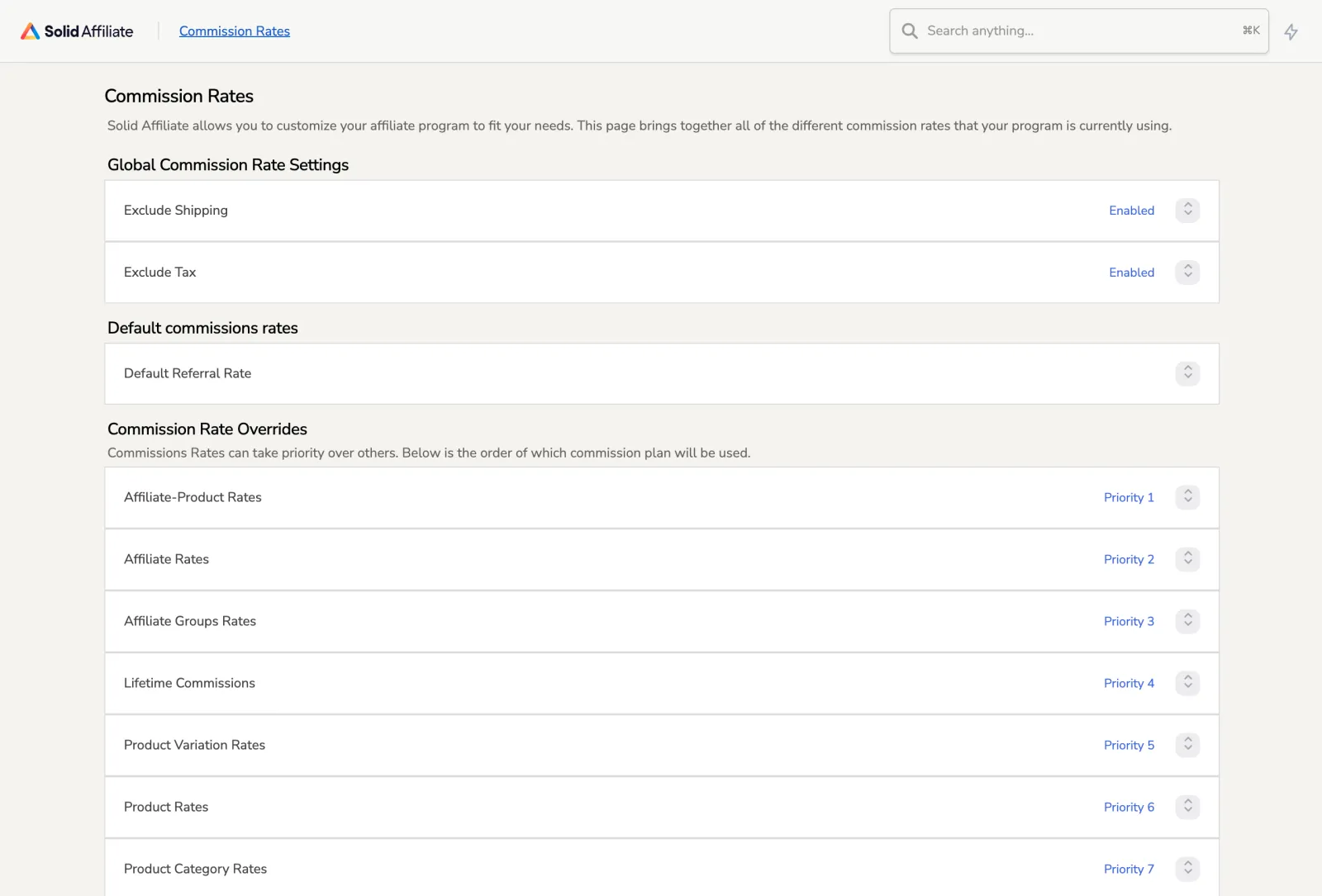
Our store used a 20% default rate, with a second 20% default for subscription renewals. Solid Affiliate’s Commission Rates page lists every rate in the order it applies: a rate for one affiliate on one product first, then affiliate, group, lifetime, product variation, product and category rates. If an affiliate is paid an amount you did not expect, that order tells you which rule would have applied. You can exclude shipping and tax from the calculation.
There are no multi-level or tiered commissions; we checked the plugin’s code for both.
Revenue sharing: two commissions on one sale
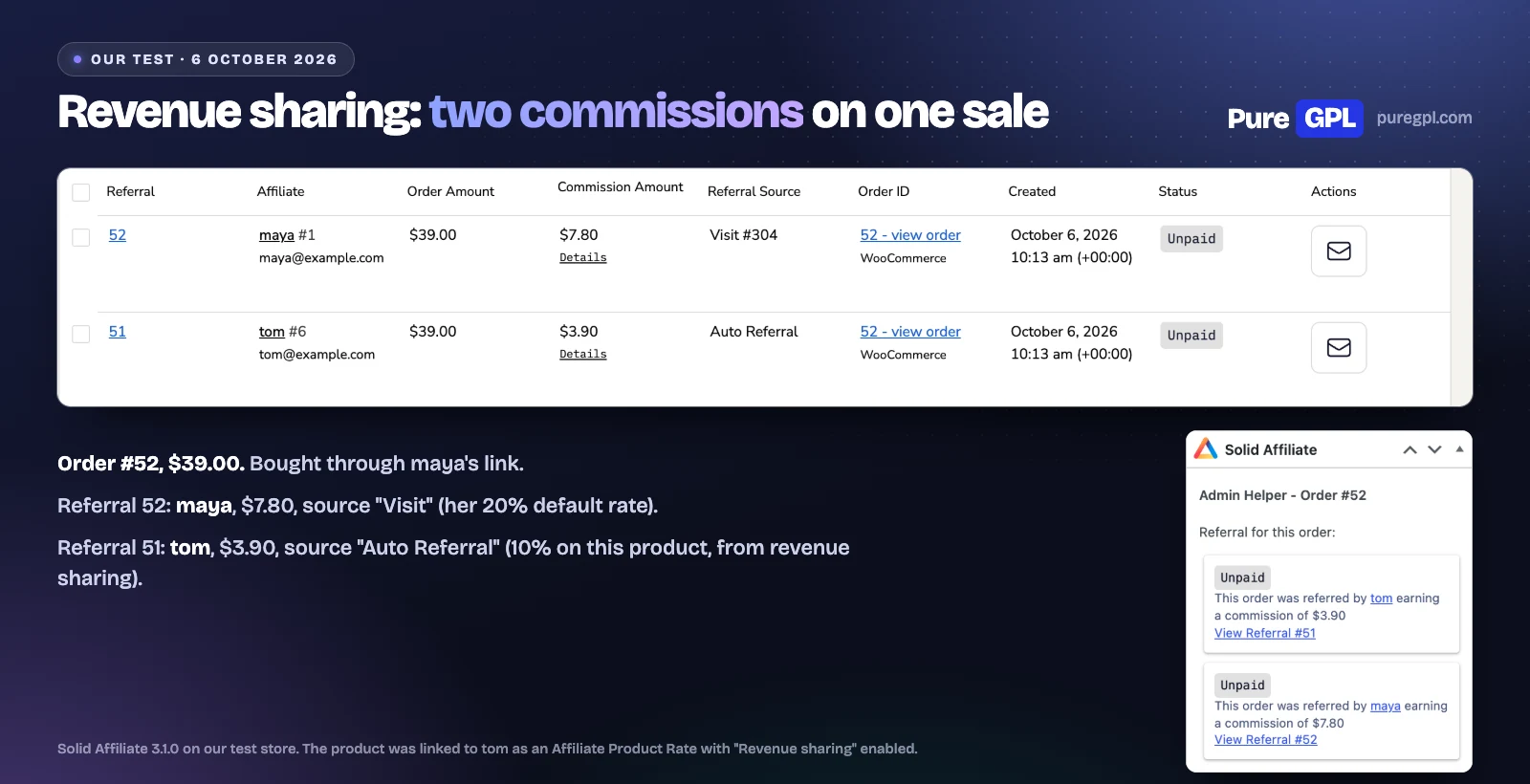
Revenue sharing, on Pro, ties a product to an affiliate so they earn on every sale of it, whoever referred the customer (subscription renewals excepted). Solid Affiliate’s documentation suggests it for “a revenue split agreement”, such as a royalty for a co-creator.
We tested it. We linked our $39 cast iron skillet to affiliate tom at 10%, with “Revenue sharing” enabled, then bought the skillet through affiliate maya’s link. The order created two commissions:
- maya: $7.80, source “Visit”, her 20% default rate.
- tom: $3.90, source “Auto Referral”, his 10% on this product.
The order screen listed both under “Referral for this order”. The “Prevent additional commissions” switch only stops the product partner earning a second commission on that product, for example when the customer also used their own link or coupon; a different affiliate still earns.
What it does not do is split one commission between two affiliates who both sent the customer. Solid Affiliate credits one referring affiliate per order, checking a lifetime link first, then a coupon, then the visit cookie, and its documentation says “Clicking on a new affiliate link will reset the cookie”. Revenue sharing pays a separate commission to a product partner, on top.
Lifetime commissions, landing pages and subscription renewals
These are on Pro. We did not test them with orders, so this is from Solid Affiliate’s documentation and code.
- Lifetime commissions: a customer is linked to the affiliate who first referred them, and that affiliate earns on the customer’s later purchases, “even if the customer clears their cookies”. In the plugin’s code the lifetime link is checked before a coupon or a link.
- Landing pages: a page on your site assigned to one affiliate, which they “can promote without using an affiliate link”. A visitor who arrives on it is credited to that affiliate.
- Subscription renewals: with WooCommerce Subscriptions active, renewals of a referred subscription create their own commission, at a separate “Recurring Referrals” rate. The first purchase uses the normal rate. Our store does not run WooCommerce Subscriptions.
Coupons and links
Solid Affiliate can create a WooCommerce coupon for each affiliate when they are approved; its pricing page does not say which plan includes this, and its code lists it among Pro features. Coupon tracking is on every plan. Its referral links use ?sld= by default. Custom affiliate slugs, landing pages and coupon discount links are on Pro. It has no QR codes and no direct link tracking.
Payouts
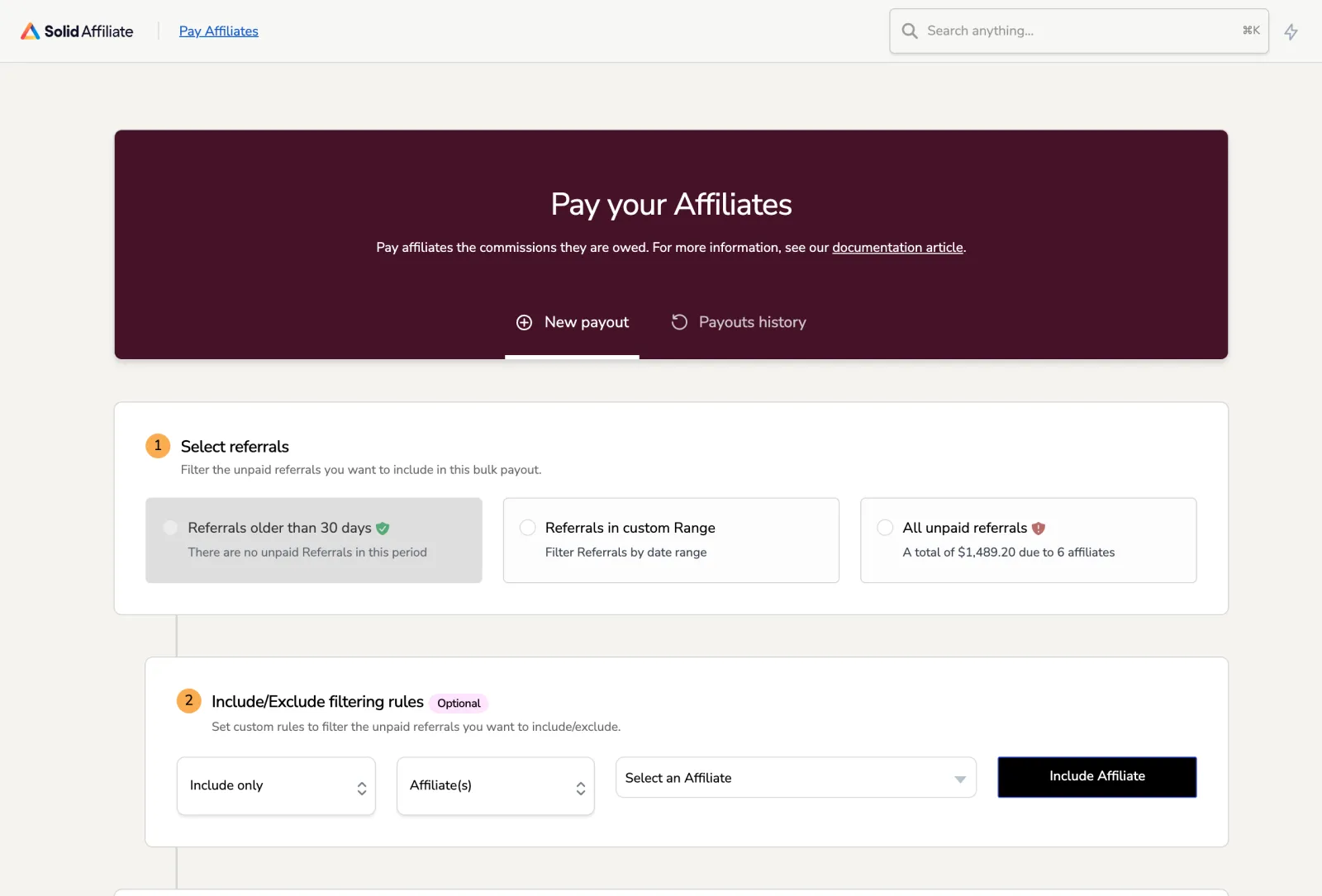
Solid Affiliate pays through PayPal, once you switch on its PayPal integration, or store credit, or gives you a CSV of the payout to pay any other way. Its Pay Affiliates screen is a three-step process: choose which unpaid referrals to include, optionally include or exclude affiliates (advanced payout filters are on Pro), then choose the method and preview the payout before anything is sent. With our example data, “all unpaid referrals” showed $1,489.20 due to six affiliates.
There is no Stripe and no bank payout. If your affiliates do not use PayPal and do not want store credit, you will be paying them by hand from the CSV.
Fraud prevention
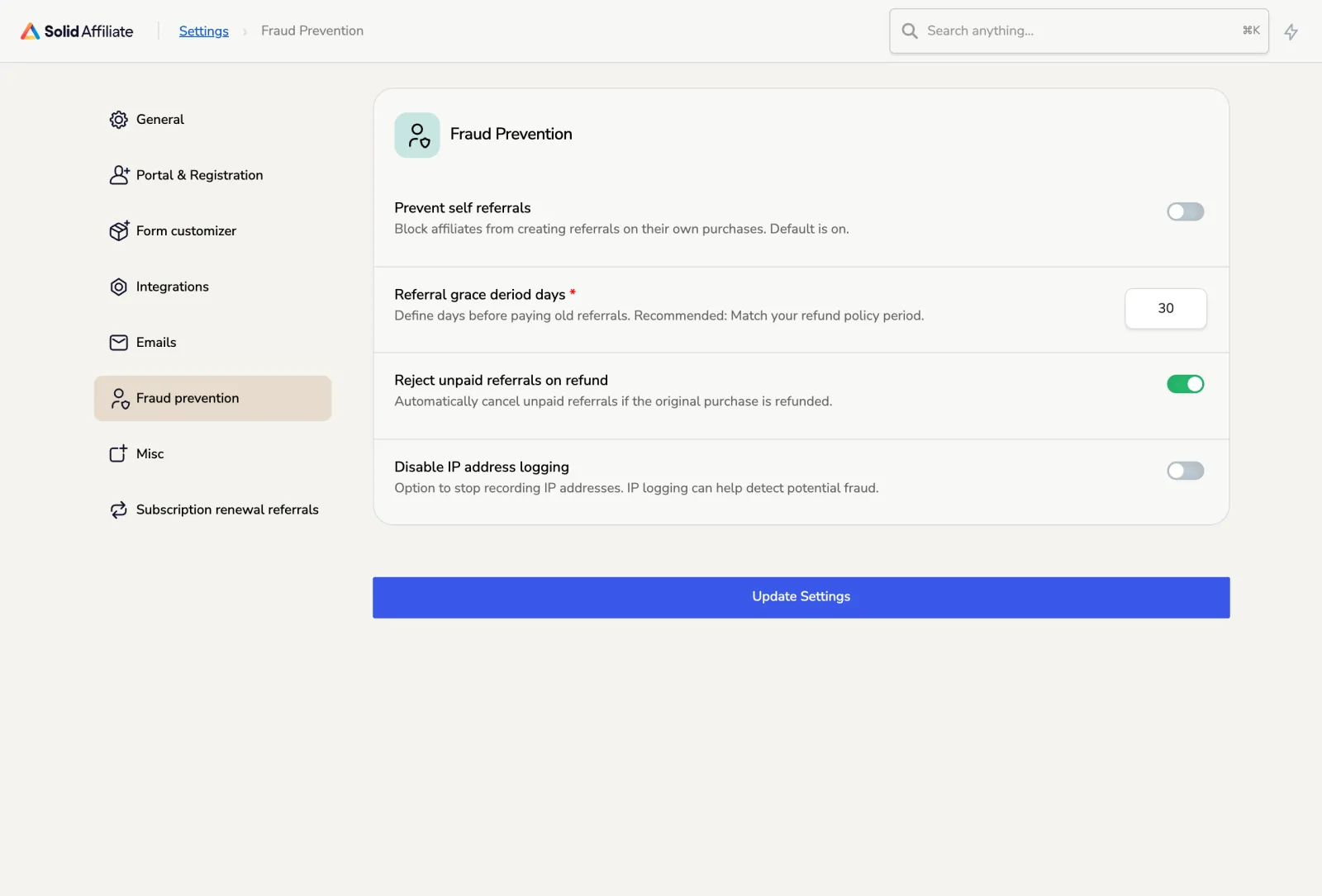
Solid Affiliate markets a Fraud Prevention Suite on Pro. On our copy the settings showed four: block self-referrals (off by default in its code and on our store, although its help text says “Default is on”), a grace period in days before old referrals are paid, rejecting unpaid referrals when the order is refunded, and turning off IP address logging. Apart from an optional Google reCAPTCHA on the registration form, there are no rules for referring sites, conversion rates, paid search traffic or many sign-ups from one IP address. They cover self-referrals and refunds; an open program that anyone can join may want rules for traffic and conversion rates too. Switch on self-referral blocking yourself.
Refunds
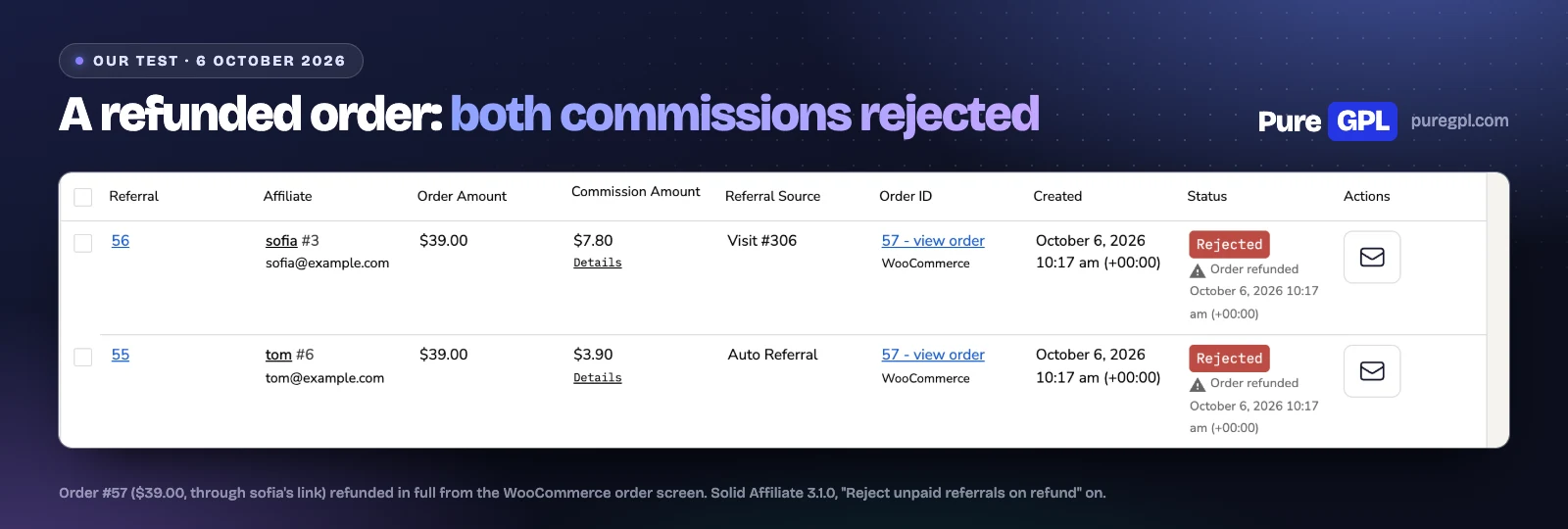
We refunded a $39 test order in full from the WooCommerce order screen, using “Refund manually”. Both of its commissions, the referring affiliate’s $7.80 and the product partner’s $3.90, changed to “Rejected” with an “Order refunded” note and the time of the refund.
The “Reject unpaid referrals on refund” setting does this, and it is on by default. Two limits in its 3.1.0 code:
- It only changes commissions you have not paid yet. A commission already paid stays paid.
- It acts when the order’s status changes to Refunded. A partial refund leaves the status as it was, so the commission stays as it was; the code has a note to look at partial refunds later.
- A cancelled, failed, trashed or deleted order also rejects a commission, but that part of the code handles one commission per order, so on an order with revenue sharing one of the two can stay unpaid. We tested only the refund.
The grace period in the fraud settings, 30 days on our store, is the range the Pay Affiliates screen offers first (“Before the refund grace period”), so a payout leaves out commissions newer than that unless you pick another range.
The dashboard and reports
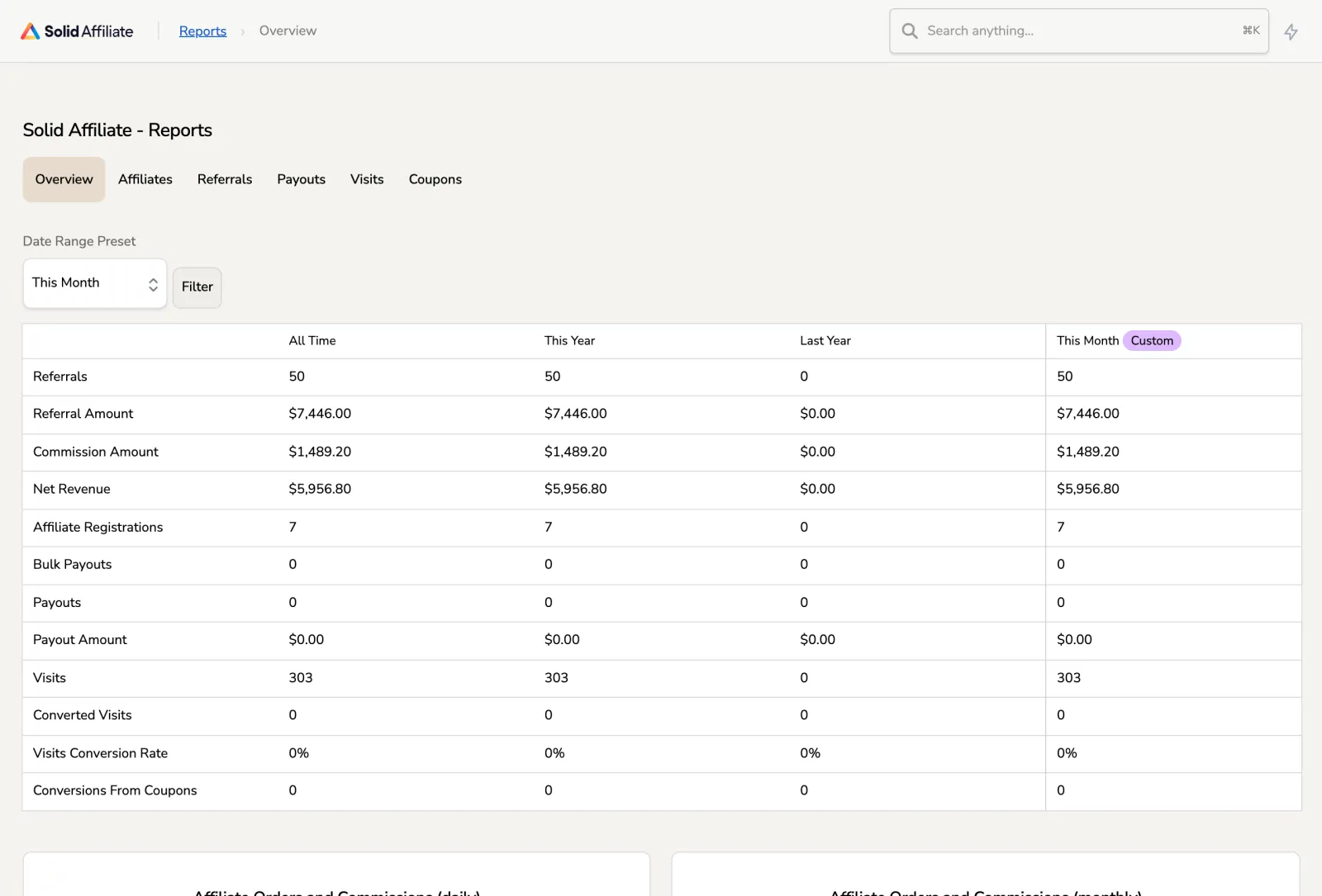
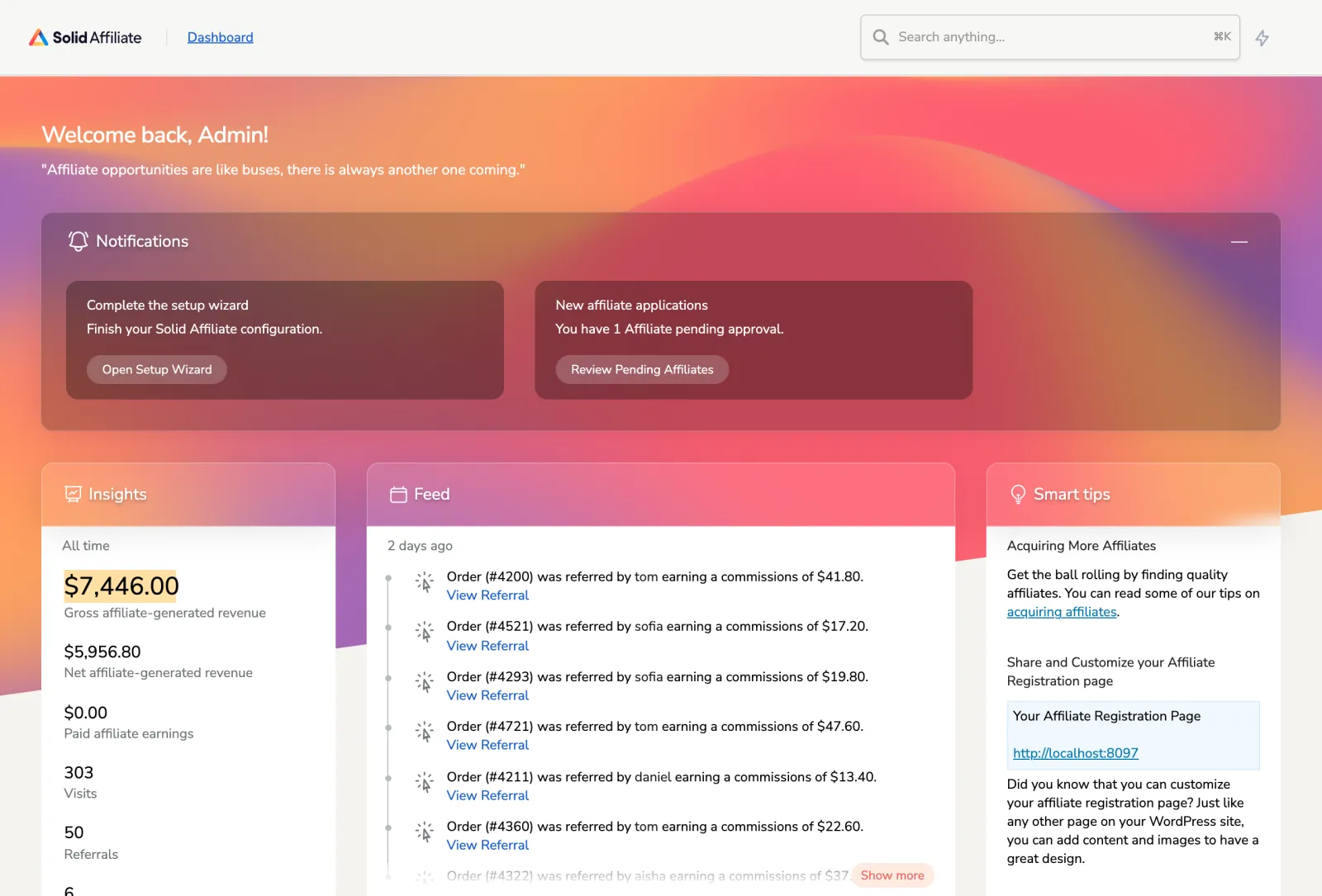
The dashboard opens with notifications, such as finishing the setup wizard and affiliates waiting for approval, then insights (all-time revenue, paid earnings, visits, referrals and approved affiliates), a feed of new referrals and new affiliates, and tips. The Overview report puts every figure in one table and sets your chosen period beside all time, this year and last year: referral amount, commission, net revenue after commissions, sign-ups, payouts, visits, conversion rate and conversions from coupons.
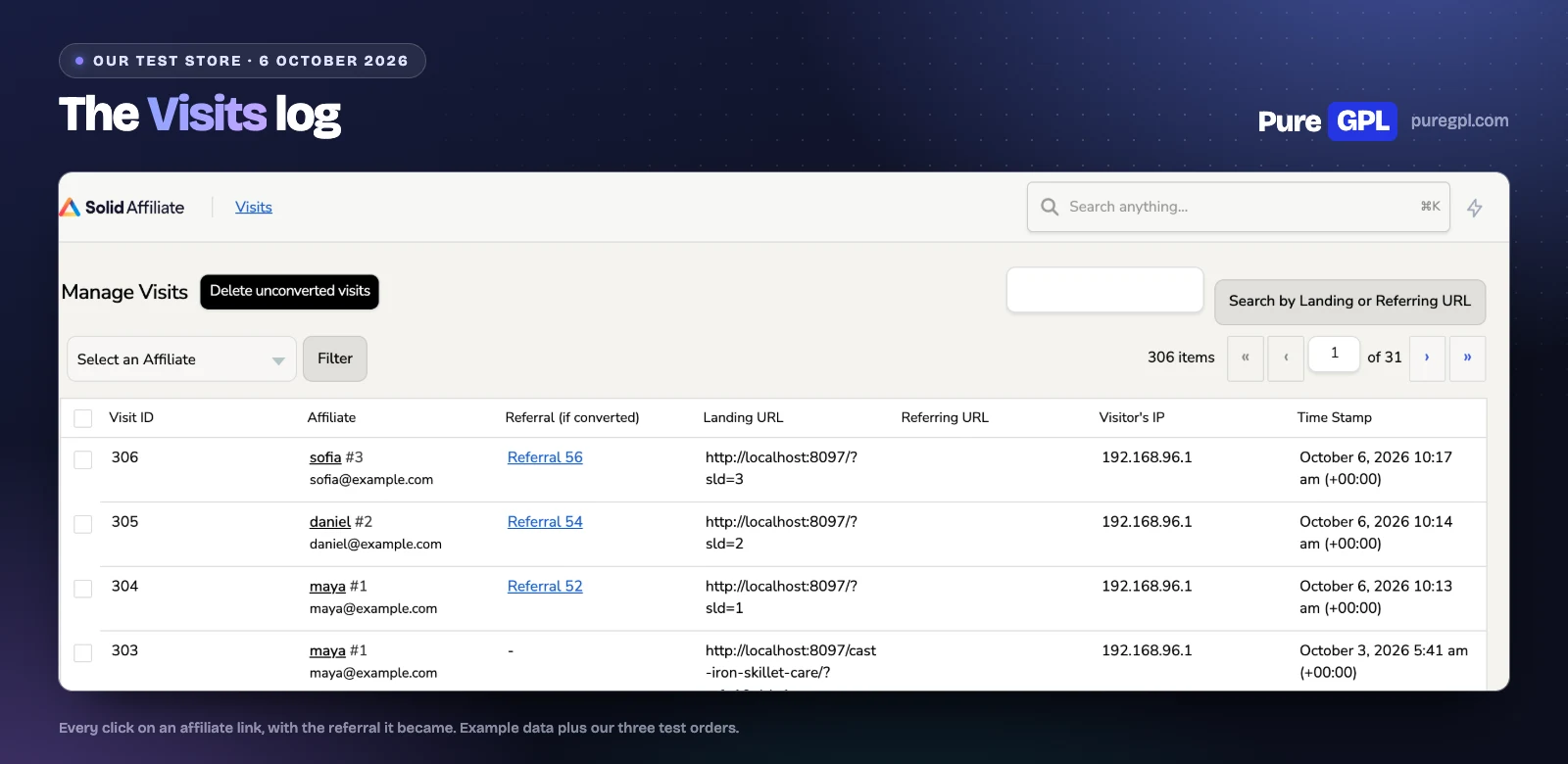
The Visits page logs every click on an affiliate link: the affiliate, the referral it turned into (if any), the landing and referring URLs, the visitor’s IP address and the time. A button deletes the visits that never converted. IP logging can be switched off in the fraud settings.
The Creatives page holds the banners and text links you give affiliates. Each creative has a name, a link and an optional image, and appears in the Creatives tab of the portal. Our store had none set up.
The affiliate portal
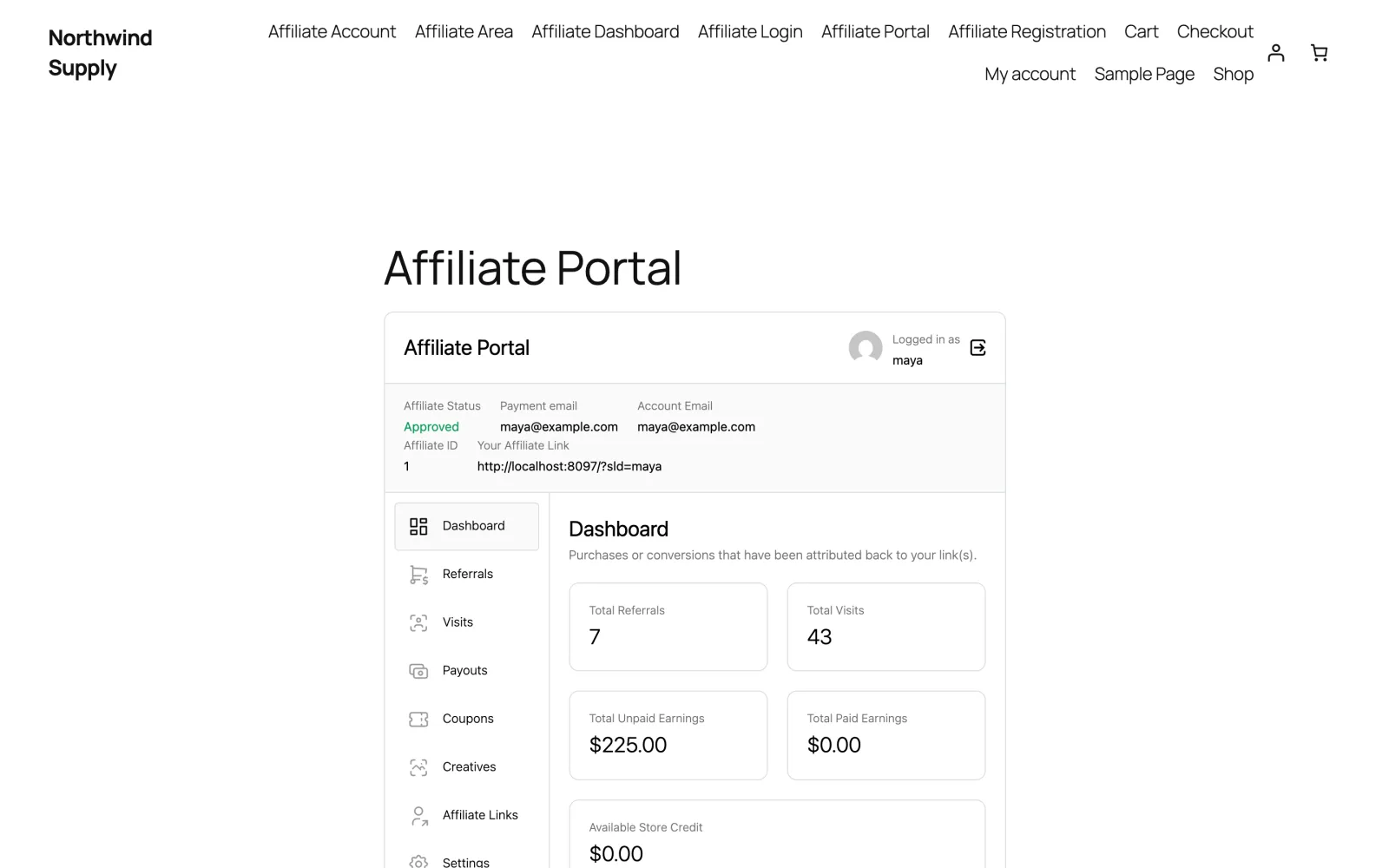
The portal has its own card-style design inside a page of your theme. Logged in as one of our example affiliates, it opened on the numbers: seven referrals, 43 visits and $225.00 unpaid, with tabs for referrals, visits, payouts, coupons, creatives, affiliate links, settings, landing pages and store credit. On Pro, a “Preview as affiliate” button on each affiliate’s admin page opens the portal as that affiliate sees it, which helps when they ask you about a number.
Emails and registration
By default Solid Affiliate sends four emails: to you for new affiliates and new referrals, and to affiliates for new referrals and accepted applications. Custom email text is listed on Pro. Its registration form, set up in a form customizer in its settings, starts with a “How will you promote us?” question and a policy checkbox; custom registration forms are listed on Pro. It does not tell an affiliate when their application is pending or rejected.
Managing affiliates
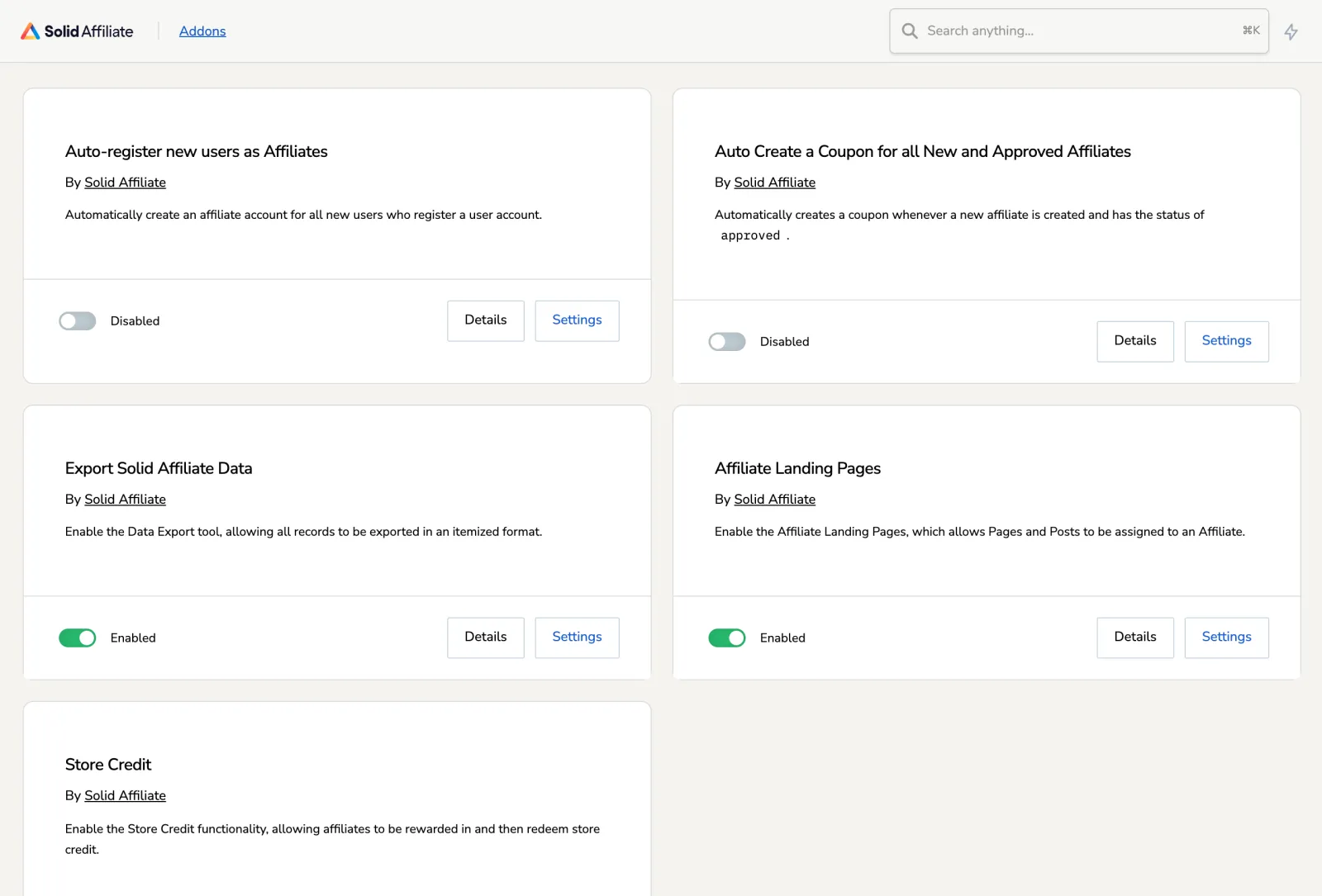
Affiliates can be organised into groups, on every plan, and tagged on Expert. Its Addons screen switches on built-in features: registering new users as affiliates automatically, a coupon for each new and approved affiliate, data export, landing pages and store credit. It has no REST API.
Performance
| On our test store | Solid Affiliate 3.1.0 |
|---|---|
| Size on disk | 16.0 MB (620 files) |
| Database tables created | 11 |
| Bytes added to the page head | 1,398 |
It adds two scripts and one stylesheet to the storefront.
Version
Our file is version 3.1.0. Solid Affiliate’s changelog lists version 3.3, dated 7 July 2026, as its latest. The releases since 3.1 bring store credit to WooCommerce’s block checkout, reconcile PayPal payouts with what PayPal actually processed, fix lifetime commissions for first-time guest customers and per-variation commission settings, and include a security update. Our screens come from 3.1.0, so the current release may look and behave differently in those areas.
Support and documentation
Solid Affiliate’s support page offers a contact form and says “we’ll get back to you within a day”. Its documentation site covers setup, each admin screen, the add-ons, the WooCommerce Subscriptions and PayPal integrations and troubleshooting. Some articles are a few years old: the revenue sharing page was last updated in April 2022. Support comes with a paid licence from Solid Affiliate; a GPL copy does not include it.
Pros and cons
Pros
- A setup wizard that covers the portal page, the commission rate, the email sender and affiliate coupons.
- An affiliate portal with its own design, and a dashboard that opens on what needs attention.
- Store credit payouts, and automatic WooCommerce coupons for affiliates (a Pro feature in its code).
- An Overview report that compares periods in one table.
- Ten sites on its largest plan.
Cons
- WooCommerce only.
- PayPal, store credit or a CSV for payouts; no Stripe, and self-referral blocking off by default.
- Lifetime and renewal commissions only on Pro, and no multi-level commissions.
- Renewals at two and a half times the first-year price on Starter, and about three times on Expert and Pro.
Alternatives
- AffiliateWP vs Solid Affiliate: AffiliateWP works with more plugins and adds Stripe and bank payouts.
- Solid Affiliate vs SliceWP: SliceWP has a free version and costs less from the second year.
Out-of-date or wrong claims in other reviews
- A lifetime deal. A review on wpmayor.com says that when it was written you paid “just $199 for lifetime usage on unlimited sites”, and one on daveswift.com describes “a one-time payment option for unlimited sites”. Those deals are gone: Solid Affiliate’s pricing page now sells only yearly plans, for 1, 3 or 10 sites.
- “$149.60 / year”, “$174.65 / year” and “$224.70 / year” on breakdance.com, whose CEO is quoted as a customer on Solid Affiliate’s own site. Those are first-year prices: Solid Affiliate’s own page says “Introductory pricing is limited; renewals will be at the regular price”, which is $374, $499 and $749. The same review describes lifetime commissions, revenue sharing, landing pages and custom slugs without saying they are on Pro only.
- Solid Affiliate “can’t do these natively”, says a review on alexstandiford.com, whose author builds a competing plugin; one of “these” is to “pay a creator royalty on the same sale that paid an affiliate”. Revenue sharing does that on Pro: our test order created a commission for both. The same review says Pro “adds the integrations that matter at scale”; on Solid Affiliate’s pricing page the only Pro addition tied to another plugin is subscription renewal referrals, for WooCommerce Subscriptions.
- Plans that differ only in sites. A review on zplatform.ai says “the only difference across tiers is the number of site licenses”. Solid Affiliate’s pricing page puts lifetime commissions, renewal referrals, revenue sharing and the Fraud Prevention Suite on Pro, and tags and monthly email reports on Expert.
On PureGPL
Solid Affiliate is in our catalogue at $3.49. Our file is version 3.1.0, dated 31 January 2025 in our version history (Solid’s changelog dates 3.1 to 29 January 2025), behind the developer’s 3.3.
What a GPL copy does and does not include
Solid Affiliate is licensed under the GPL v2, according to its developer’s licence agreement, which is why we can distribute it. A GPL copy comes without a licence from the developer, so it comes without the developer’s support, and anything that runs through the developer’s own account or service is not part of it. Updates come from us.
Sources
Prices, plan contents and documentation were read from these pages on 6 October 2026 (the changelog and licence on 4 October). The screens, settings, test orders and measurements are from our own test store.
- Solid Affiliate: Affiliate Product Rates (revenue sharing)
- Solid Affiliate: Lifetime Commissions
- Solid Affiliate: Affiliate Landing Pages
- Solid Affiliate: WooCommerce Subscriptions
- Solid Affiliate: Visits
- Solid Affiliate: Creatives
- Solid Affiliate support
- AffiliateWP pricing
- SliceWP pricing
- SliceWP on WordPress.org
- Solid Affiliate pricing
- Solid Affiliate changelog
- Solid Affiliate licence agreement
Frequently asked questions
Is Solid Affiliate worth it?
For a WooCommerce-only store whose affiliates are happy with PayPal or store credit, yes: its wizard covers the setup and it has reports on every plan. If you need Stripe, other integrations or lifetime commissions without the top plan, look at AffiliateWP or SliceWP.
Does Solid Affiliate have a free version?
No. Bought from the developer, it runs for seven days before it asks for a licence key, and there is a 30-day refund.
Is Solid Affiliate a one-time purchase?
Not any more. Its pricing page sells yearly plans: Starter at $149.60 the first year, then $374.
Can Solid Affiliate pay affiliates through Stripe?
No. It pays through PayPal or store credit, or exports a CSV for you to pay another way.
Can two affiliates earn on the same order?
Yes, on Pro, through revenue sharing: a product partner earns on every sale of their product, on top of the affiliate who referred the customer. Our test order created a commission for both. Two affiliates who both referred the same customer cannot split one commission: one referring affiliate is credited, by lifetime link first, then coupon, then the most recent link clicked.
What happens to a commission when an order is refunded?
If it has not been paid yet, it is rejected when the order’s status becomes Refunded, in the 3.1.0 code we read; this is on by default. Paid commissions are left as they are, and so is a partial refund that leaves the order’s status unchanged.
Does Solid Affiliate work without WooCommerce?
Not in practice. Its FAQ says it “integrates primarily with WooCommerce” and that if you’re not using WordPress or WooCommerce, you’ll need an alternative.
See also: best WordPress affiliate plugins and our AffiliateWP review.


