AffiliateWP Review 2026: Tested on a Real Store
AffiliateWP review: what each plan includes, the first-year and renewal prices, where it falls short, and the alternatives worth a look.

AffiliateWP runs an affiliate program inside your WordPress site. Affiliates sign up, share links and coupon codes, and you see every visit, referral and payout in your own admin, with no monthly platform fee. We installed version 2.37.0 on a WooCommerce test store, walked through its setup wizard, placed real orders through an affiliate link and an affiliate coupon, refunded one of them, and opened every screen this review describes. In short: it covers a lot on every plan, many of its best features are on its most expensive plan, and every plan renews at twice the first-year price.
How we tested. We tested AffiliateWP 2.37.0 on a WordPress test site running WooCommerce 11.1.2 and the default Twenty Twenty-Five theme. The store has 7 example affiliates and 65 example referrals dated 2 September to 2 October 2026. On 6 October 2026 we added 2 real orders of our own: one through an affiliate’s referral link and one with a coupon assigned to a different affiliate, both paid with Cash on Delivery by a new visitor in a fresh browser. We then completed the first order and refunded the second. We looked at the payout screen but sent no money. We also tried the Affiliate Portal add-on, version 1.5.3, and measured what AffiliateWP adds to the storefront. Our AffiliateWP file is not the developer’s own release. It is the same file PureGPL sells, and it has lines added at the top of its main file that write a fixed licence key into the site’s settings on every page load, answer AffiliateWP’s licence checks as valid and fetch add-ons from a different server, so every paid feature was switched on and the setup wizard reported an “Ultimate” plan. Which plan includes each feature therefore comes from AffiliateWP’s pricing page, not from what our screens showed. Prices were read on 6 October 2026; the sources are linked at the end.
The short verdict
- Good for stores that sell through WooCommerce or one of AffiliateWP’s other integrations and want Stripe, PayPal or store credit payouts, coupon tracking and self-referral checks on every plan.
- Watch the plan: recurring and lifetime commissions, multi-tier commissions, tiered rates, direct link tracking, the Affiliate Portal and automatic payouts are on Pro, $299.50 the first year and $599 after.
- Watch the renewal: every plan renews at double its first-year price.
- Watch the wizard: its last settings step ticks 2 extra free plugins for installation by default. Untick them if you do not want them.
- Save the Commissions tab once: until you do, the referral cookie lasts 1 day, even though the screen shows 30.
AffiliateWP at a glance
| Item | AffiliateWP |
|---|---|
| Version tested | 2.37.0 |
| Free version | No |
| Cheapest plan | $149.50 the first year, then $299, 1 site |
| Top plan | $299.50 the first year, then $599, 5 sites |
| Refund | 14 days |
| Trial or demo | No |
| Integrations | 21 on our copy’s Integrations screen |
| Payouts | Stripe, PayPal, store credit or by hand |
| Support | Standard on Personal and Plus, priority on Pro |
| Works on | Self-hosted WordPress, and WordPress.com on the Business or eCommerce plans |
Pricing
| Plan | First year | Renewal | Sites |
|---|---|---|---|
| Personal | $149.50 | $299 | 1 |
| Plus | $199.50 | $399 | 2 |
| Pro | $299.50 | $599 | 5 |
| Growth Bundle (Pro plus the RewardsWP plugin) | $349.50 | $699 | 10 (5 for each plugin) |
AffiliateWP says the lower figure is special introductory pricing and that all renewals are at full price. It offers a refund within 14 days, and its support page says it does not offer a lifetime licence, a trial or a demo. You can use it on client sites if you buy a licence that covers the number of sites.
| Over three years | Personal | Plus | Pro |
|---|---|---|---|
| Total | $747.50 | $997.50 | $1,497.50 |
| Per site | $747.50 | $498.75 | $299.50 |
These figures assume AffiliateWP keeps its published prices. If you need Pro features on 1 site, you still pay the Pro price: $1,497.50 over three years.
What each plan includes
| Feature | Plan |
|---|---|
| Referral links, pretty permalink links, coupon tracking | Personal |
| Stripe and PayPal payouts, store credit, international payouts | Personal |
| Real-time reporting and the affiliate dashboard | Personal |
| Smart affiliate review of applications | Personal |
| Multi-currency commissions, sign-up commissions and a welcome bonus | Plus |
| Leaderboards and assigning affiliates at checkout | Plus |
| Registration through Gravity Forms or Ninja Forms | Plus |
| Recurring referrals and lifetime commissions | Pro |
| Tiered rates and multi-tier commissions | Pro |
| Direct link tracking, landing pages, vanity coupon codes, personalized referral URLs | Pro |
| Automatic payouts and the Fraud Prevention Suite | Pro |
| Affiliate Portal and converting customers to affiliates | Pro |
| Priority support | Pro |
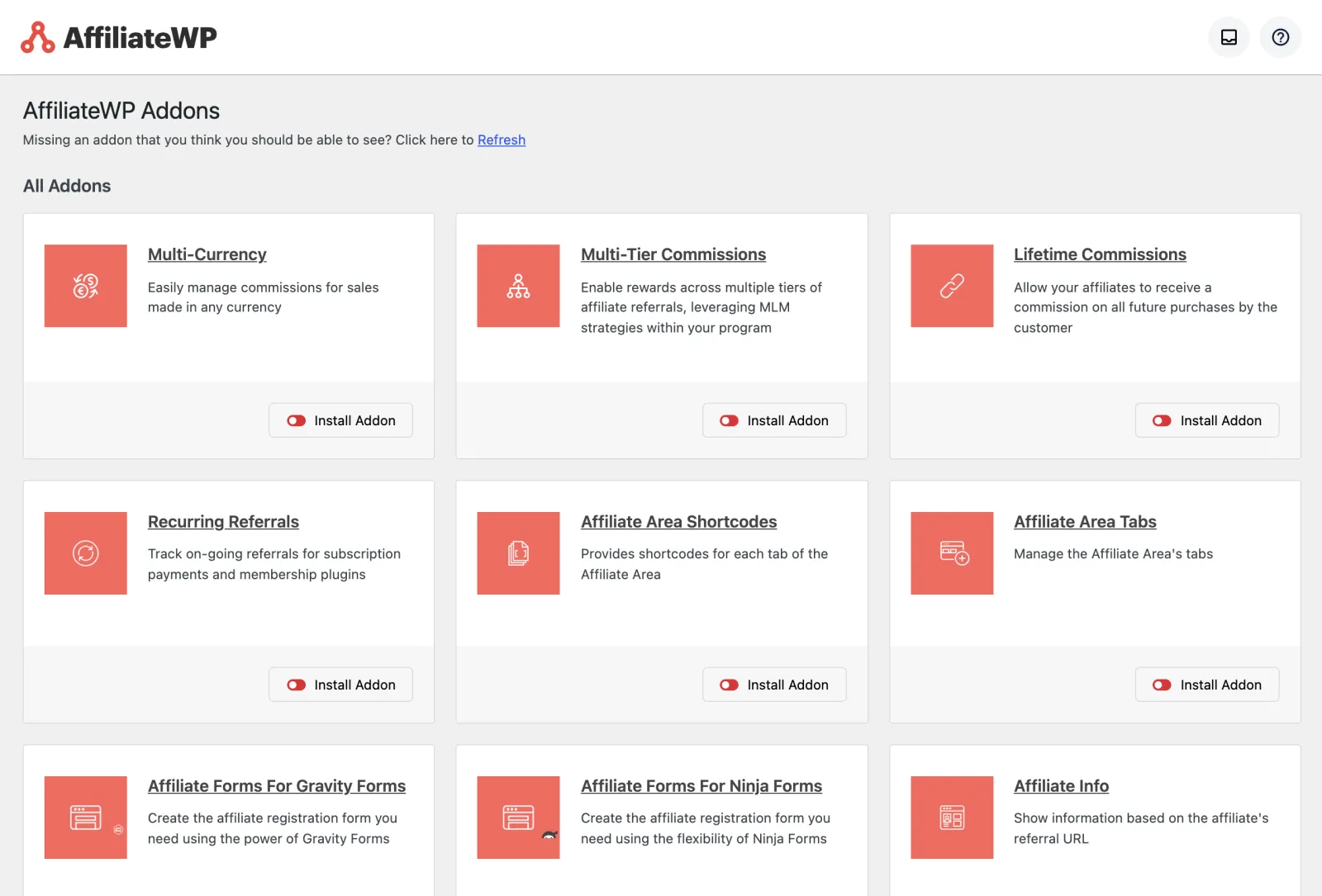
Some paid features are separate add-ons that you install from the Add-ons screen. On our copy that screen listed 28 add-ons, including multi-tier commissions, recurring referrals and multi-currency, each with an Install Addon button.
Setup: the wizard and the checklist
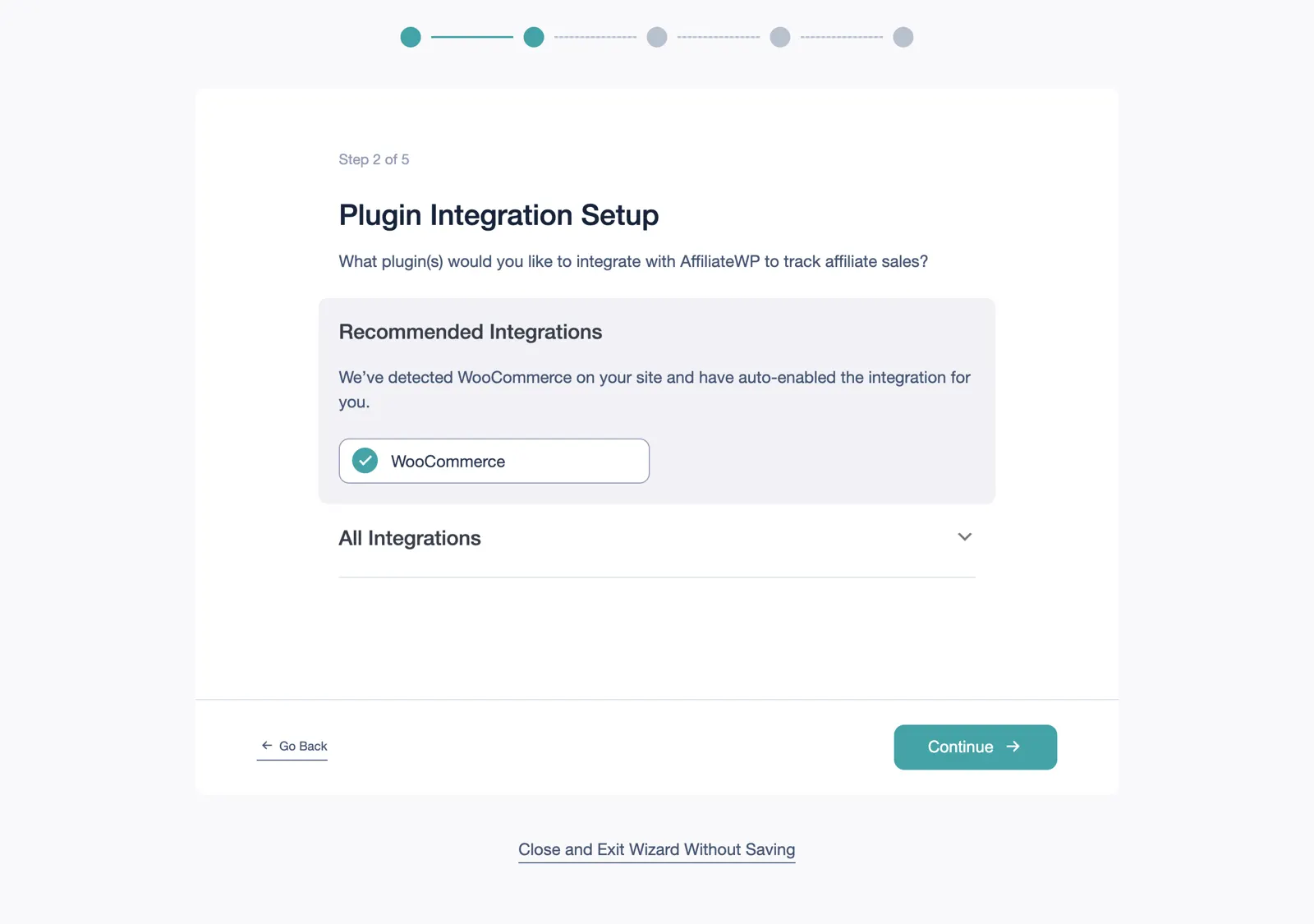
Activating AffiliateWP opens a setup wizard of 5 steps. Step 1 asks for your licence key. Step 2 lists integrations; on our store it said “We’ve detected WooCommerce on your site and have auto-enabled the integration for you.”
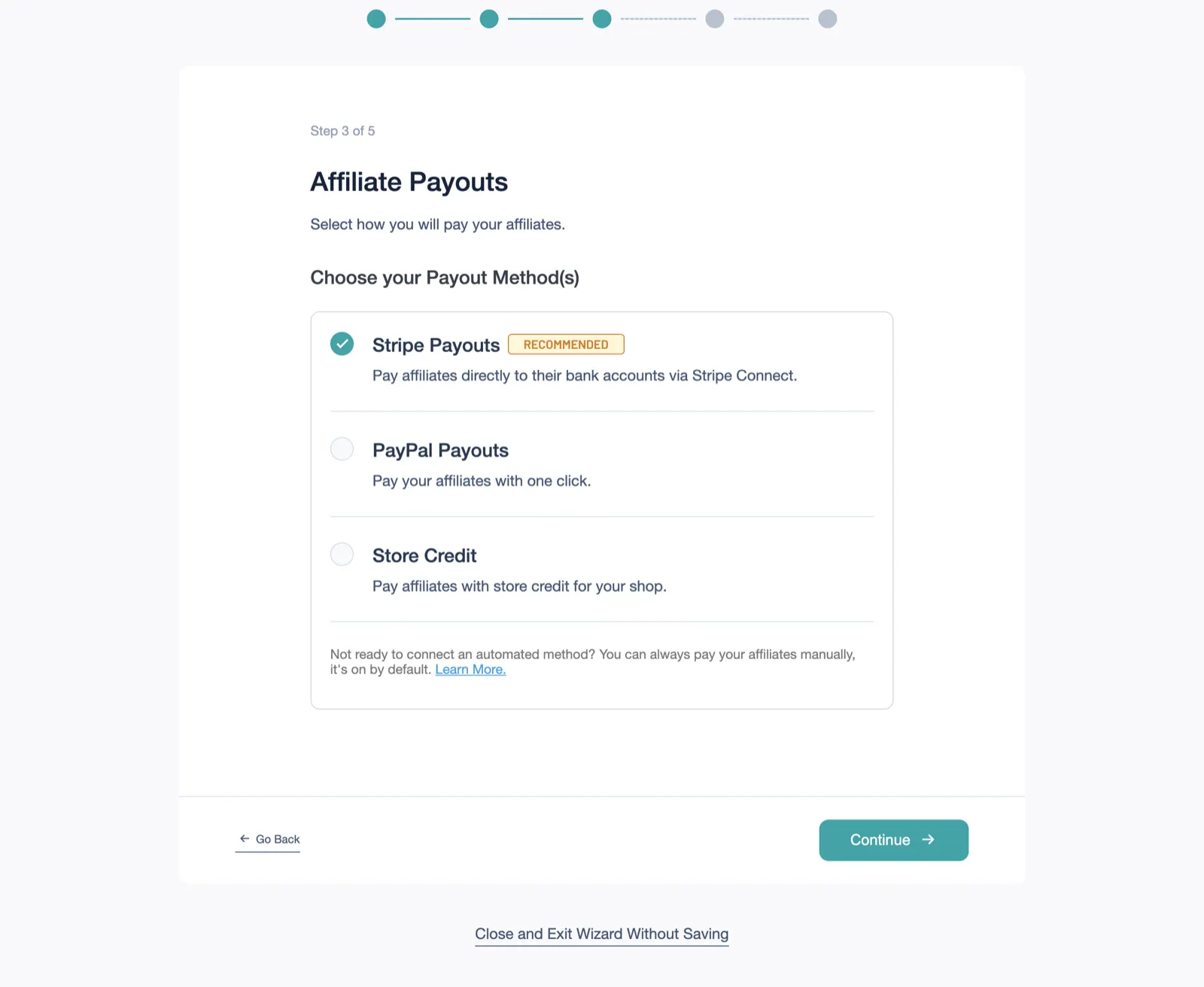
Step 3 asks how you will pay affiliates. Stripe Payouts is marked recommended and ticked; PayPal Payouts and Store Credit are not. The wizard notes that manual payouts are on by default.
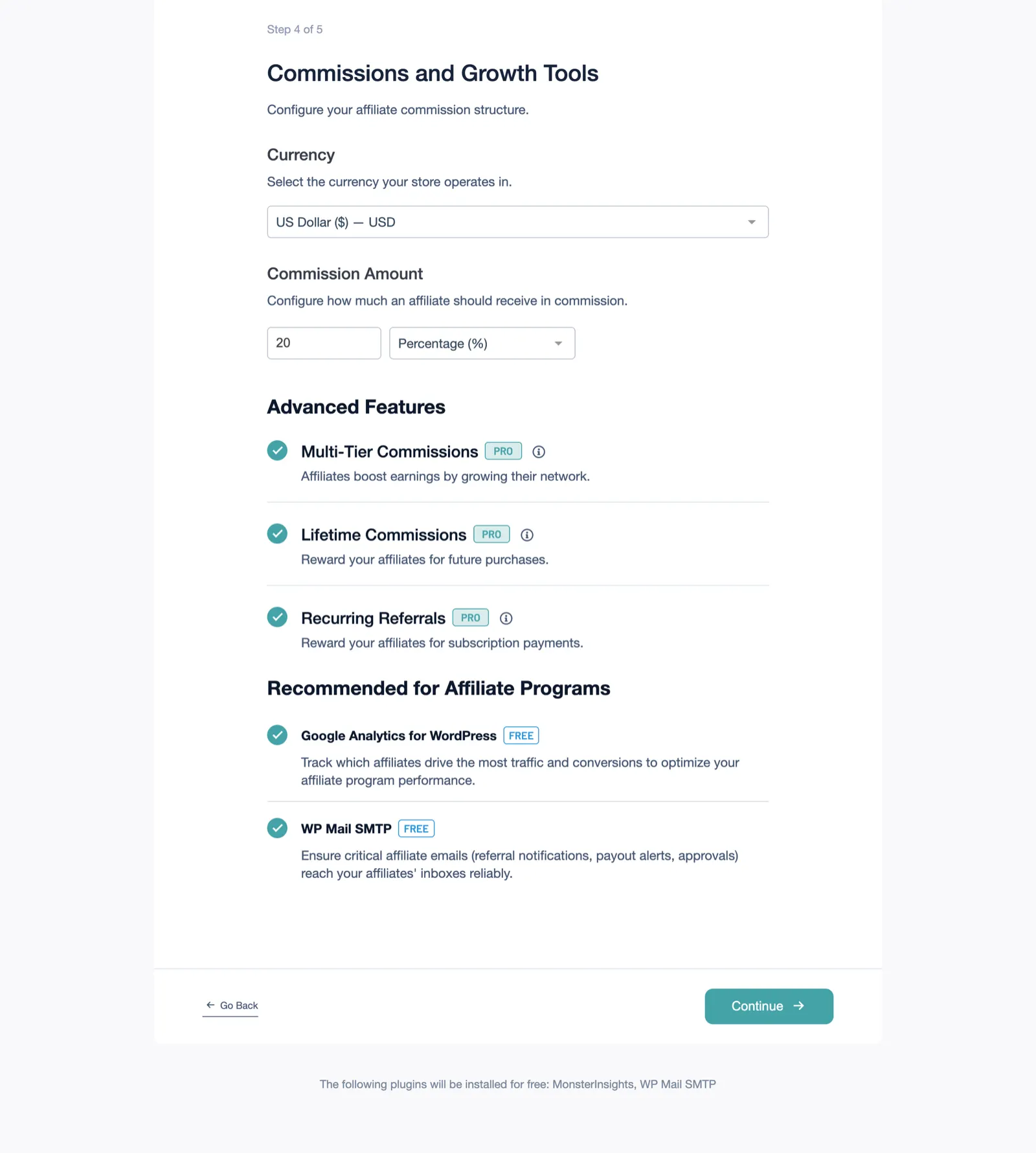
Step 4 sets the currency and the default commission, 20% as a percentage. Below that it offers 3 Pro features (multi-tier commissions, lifetime commissions and recurring referrals) and 2 free plugins from other products: MonsterInsights, shown as “Google Analytics for WordPress”, and WP Mail SMTP. All of them were ticked when the step opened, and the wizard’s own code sets every one of them to ticked by default. Under the Continue button it said: “The following plugins will be installed for free: MonsterInsights, WP Mail SMTP”. If you do not want those plugins, untick them before you continue. We closed the wizard here, so nothing was installed.
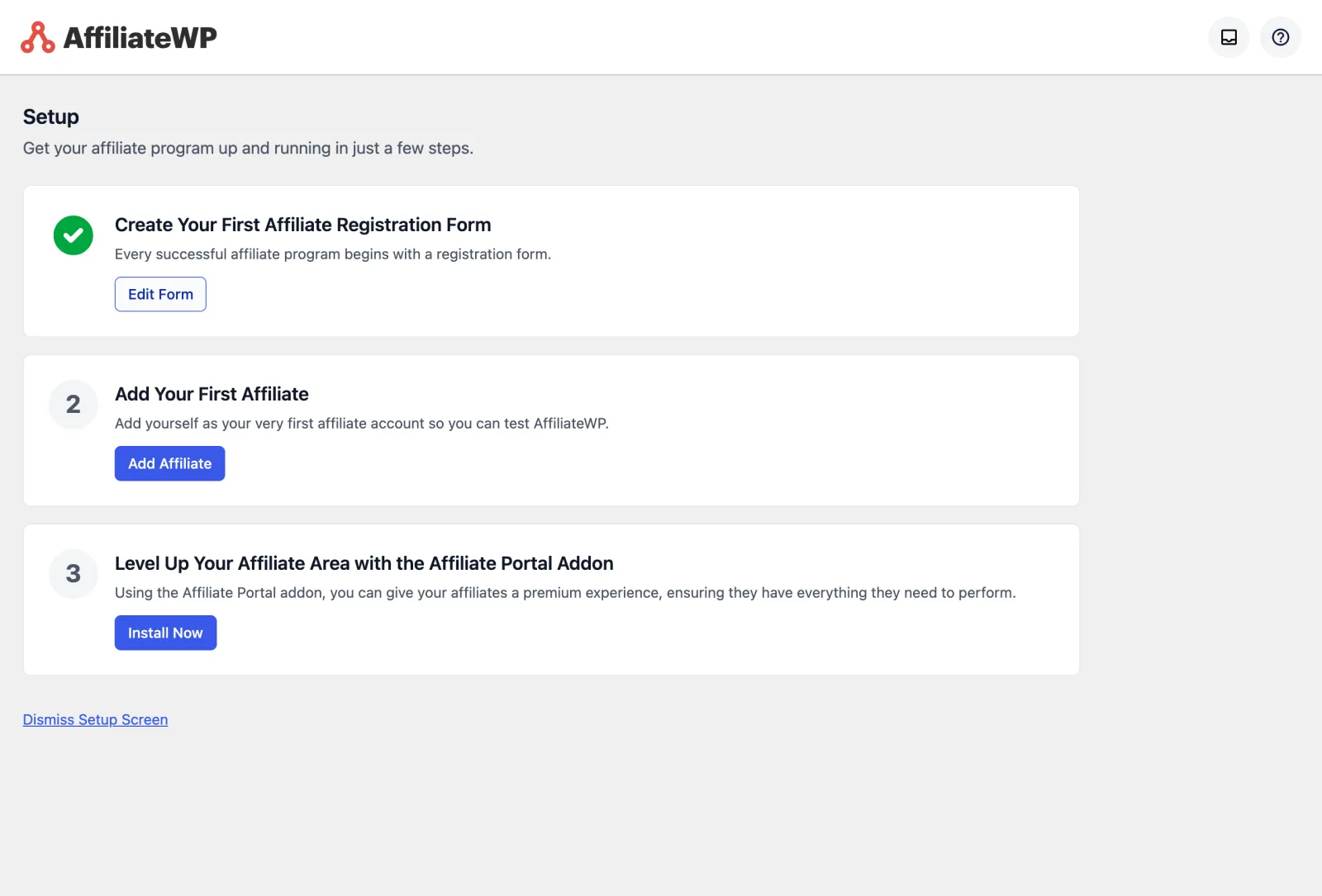
On activation AffiliateWP also created 3 pages: an affiliate area, a login page and a registration page, built from its own blocks. After the wizard, its Setup screen is a 3-step checklist: create your first affiliate registration form, add your first affiliate, and install the Affiliate Portal add-on, which is on the Pro plan. The admin menu adds Overview, Affiliates, Referrals, Payouts, Visits, Creatives, Reports, Tools, Settings and Add-ons, plus a Rewards screen for the developer’s separate loyalty plugin.
Day to day in the admin
Settings sit in tabs under one AffiliateWP menu: General, Affiliates, Commissions, Payouts, Integrations, Emails, Anti-Fraud, Opt-In Form, Advanced and Coupons. Most settings are a checkbox, a radio button or a text field with a line of help text underneath, so finding the cookie length or an email template takes a few seconds. Each add-on you activate adds its own tab to the same row.
Integrations
AffiliateWP’s features page counts WooCommerce plus 28 other eCommerce and form plugins; its pricing page lists “WooCommerce + 20 Integrations” on Personal. On our copy the Integrations screen listed 21, including WooCommerce, Easy Digital Downloads, MemberPress, Paid Memberships Pro, Restrict Content Pro, LearnDash, LifterLMS, Gravity Forms, WPForms and PayPal Buttons. Check that your shop’s plugin is on the list before you buy.
Tracking: our test orders
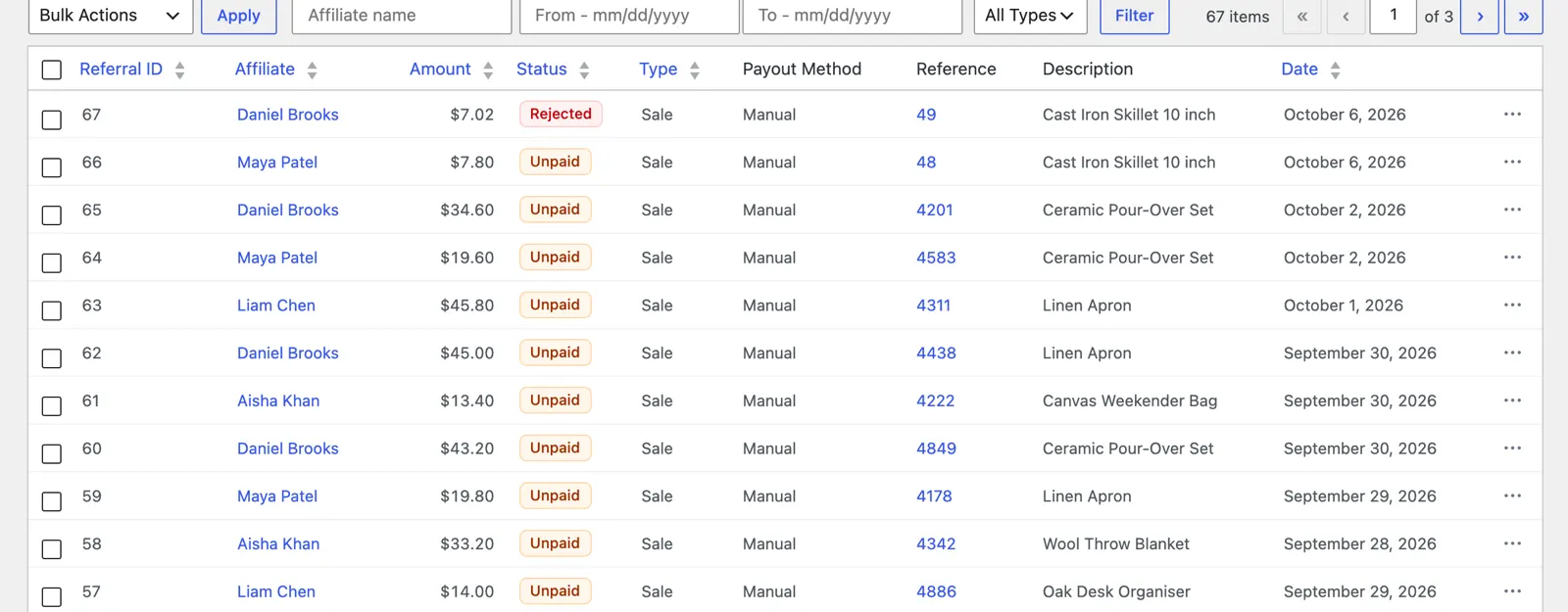
We placed 2 orders for a 39.00 dollar skillet as a new visitor, each in a fresh browser.
| Test | Referral link order | Coupon only order |
|---|---|---|
| How the buyer arrived | Visited maya’s link, /ref/1/ | No link; typed the code DANIEL10, assigned to daniel |
| Order total | $39.00 | $35.10 after the 10% coupon |
| Commission recorded | $7.80 for maya | $7.02 for daniel |
| Status when ordered | Pending | Pending |
| After we completed or refunded the order | Unpaid (completed) | Rejected (refunded) |
Both commissions were 20% of what the buyer paid, so the coupon discount came off before the commission was worked out. The link visit set 2 cookies, affwp_ref with the affiliate’s ID and affwp_ref_visit_id with the visit, and the referral was tied to that visit. The coupon order had no visit at all and was still credited, which is how coupon tracking should work for podcasts, videos and printed codes. The refund rejected the commission automatically because “Reject Unpaid Referrals on Refund” was on.
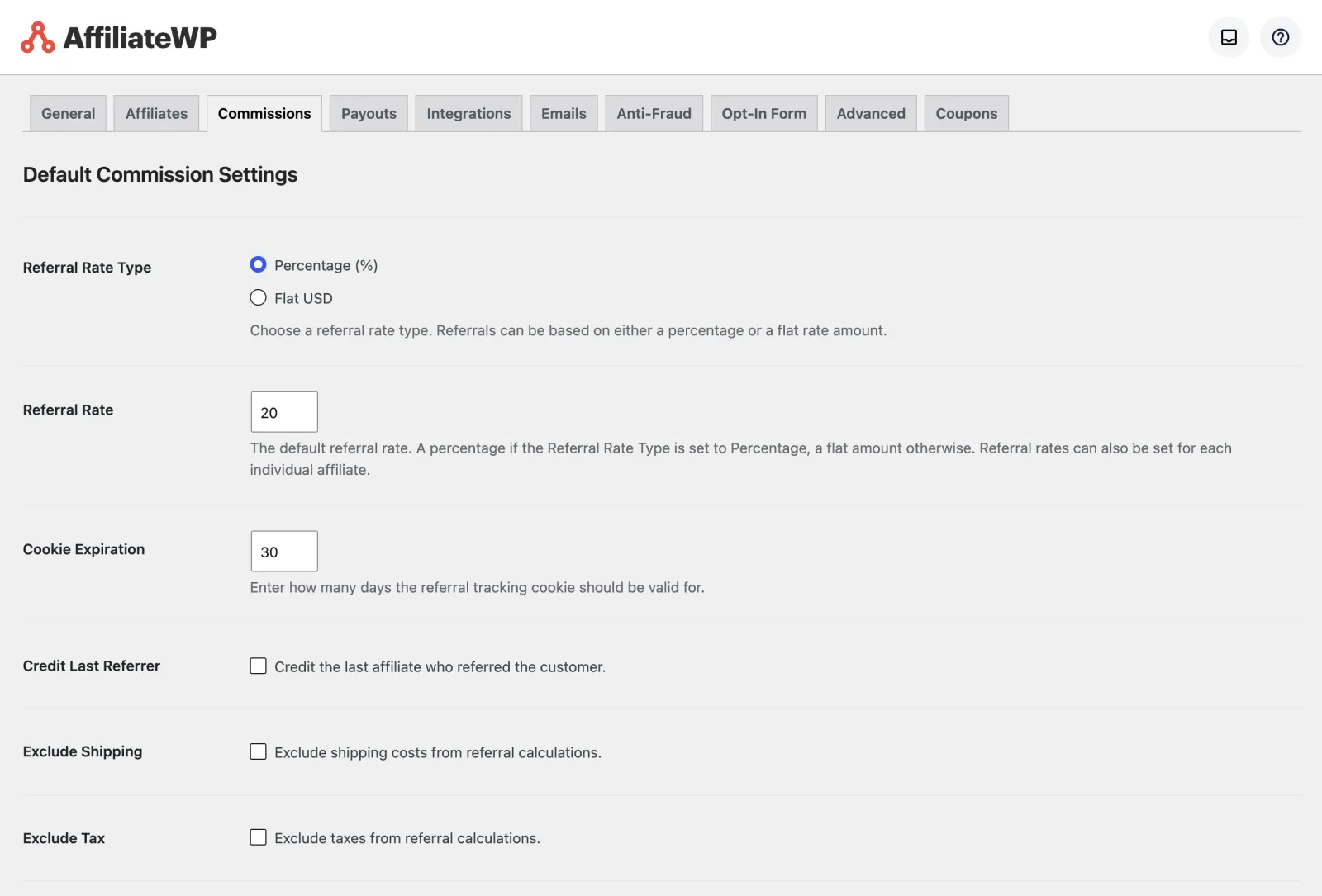
- Cookie: the Commissions tab shows 30 days, and there is an option to credit the last affiliate who referred the customer. But neither activation nor the wizard saves that 30, and until the tab is saved AffiliateWP’s tracking code falls back to 1 day. On our store the home page told the tracking script
expiration = 1. Press Save on the Commissions tab once after setup. Our link order was placed seconds after the visit, so it was unaffected. - Links: pretty permalink referral links on every plan, a link generator in the Affiliate Area, and sharing to Facebook, LinkedIn, X, email or a QR code if you switch those on.
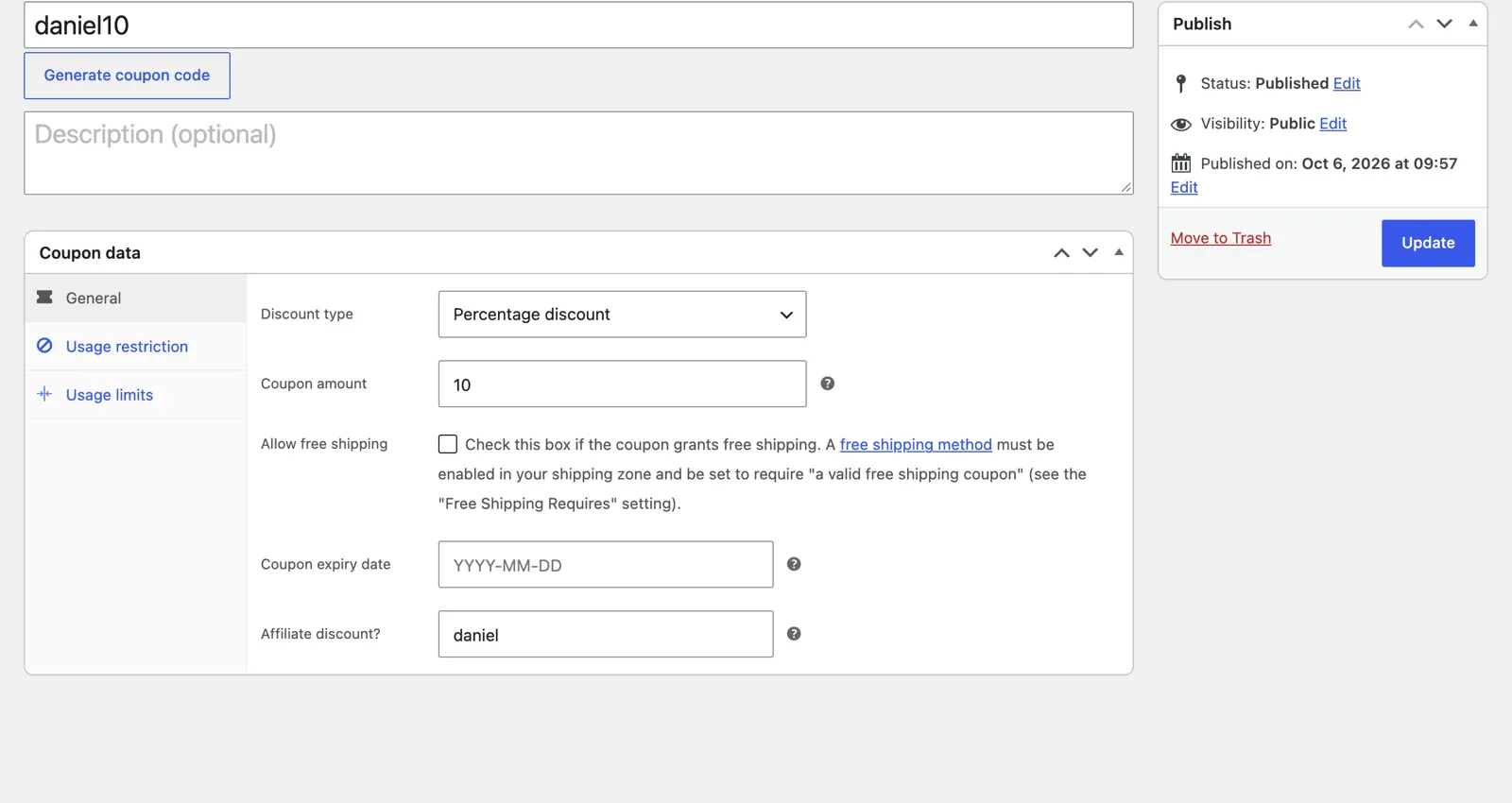
- Coupons: any WooCommerce coupon can be assigned to an affiliate from its “Affiliate discount?” field, and a setting on the Coupons tab creates a coupon for each new affiliate. Vanity coupon codes are on Pro.
- On Pro: direct link tracking, which credits sales from an affiliate’s own website without a referral link, landing pages and personalized referral URLs.
Commissions
The default rate is 20%, as a percentage or a flat amount. The Commissions tab also lets you exclude shipping and tax, reject unpaid referrals when an order is refunded, and set a holding period before commissions can be paid. A holding period at least as long as your refund window means most refunded sales are rejected before you pay them.
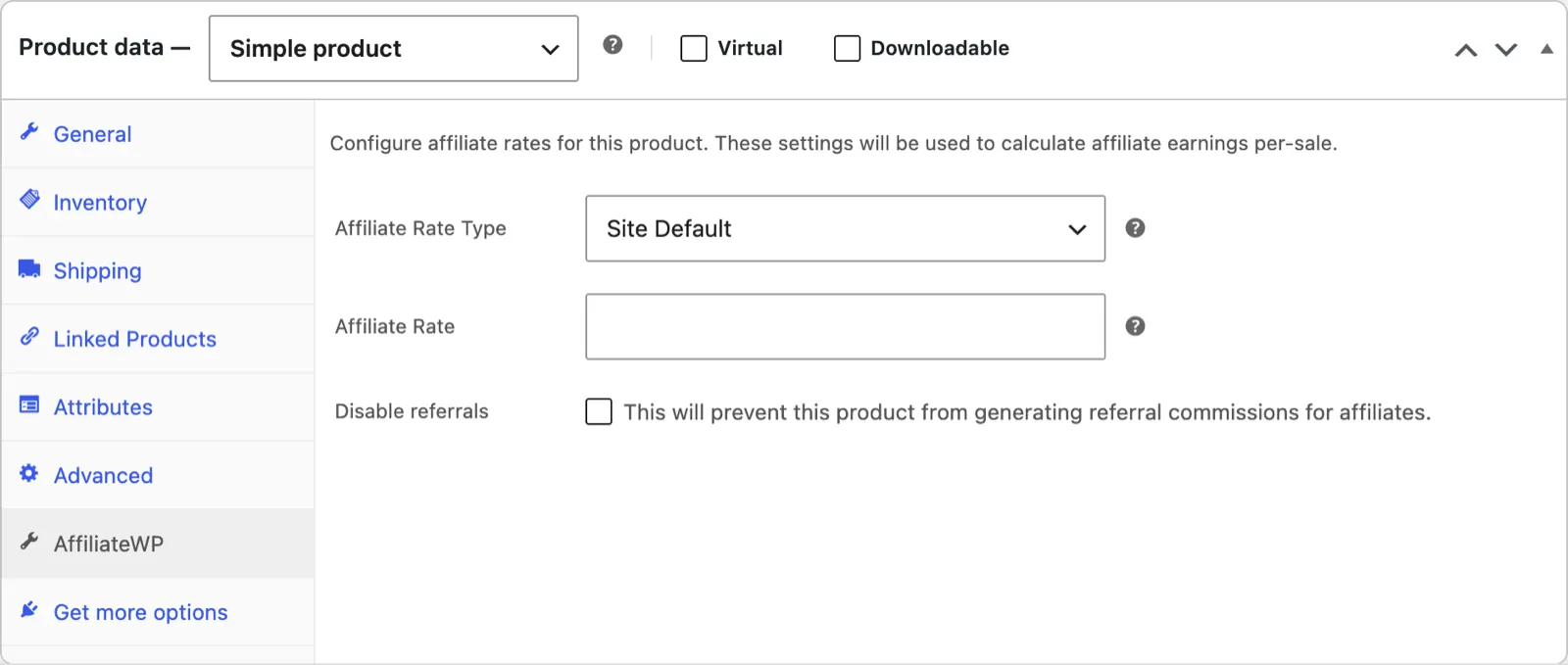
You can override the default rate at several levels:
- Per product: an AffiliateWP tab on each WooCommerce product sets the rate type (site default, percentage or flat), the rate, or turns referrals off for that product. Product categories can have a rate too.
- Per affiliate: the Edit Affiliate screen has its own rate type and rate. If you leave the rate blank, the site default is used.
- Per group: affiliate groups can have their own rate.
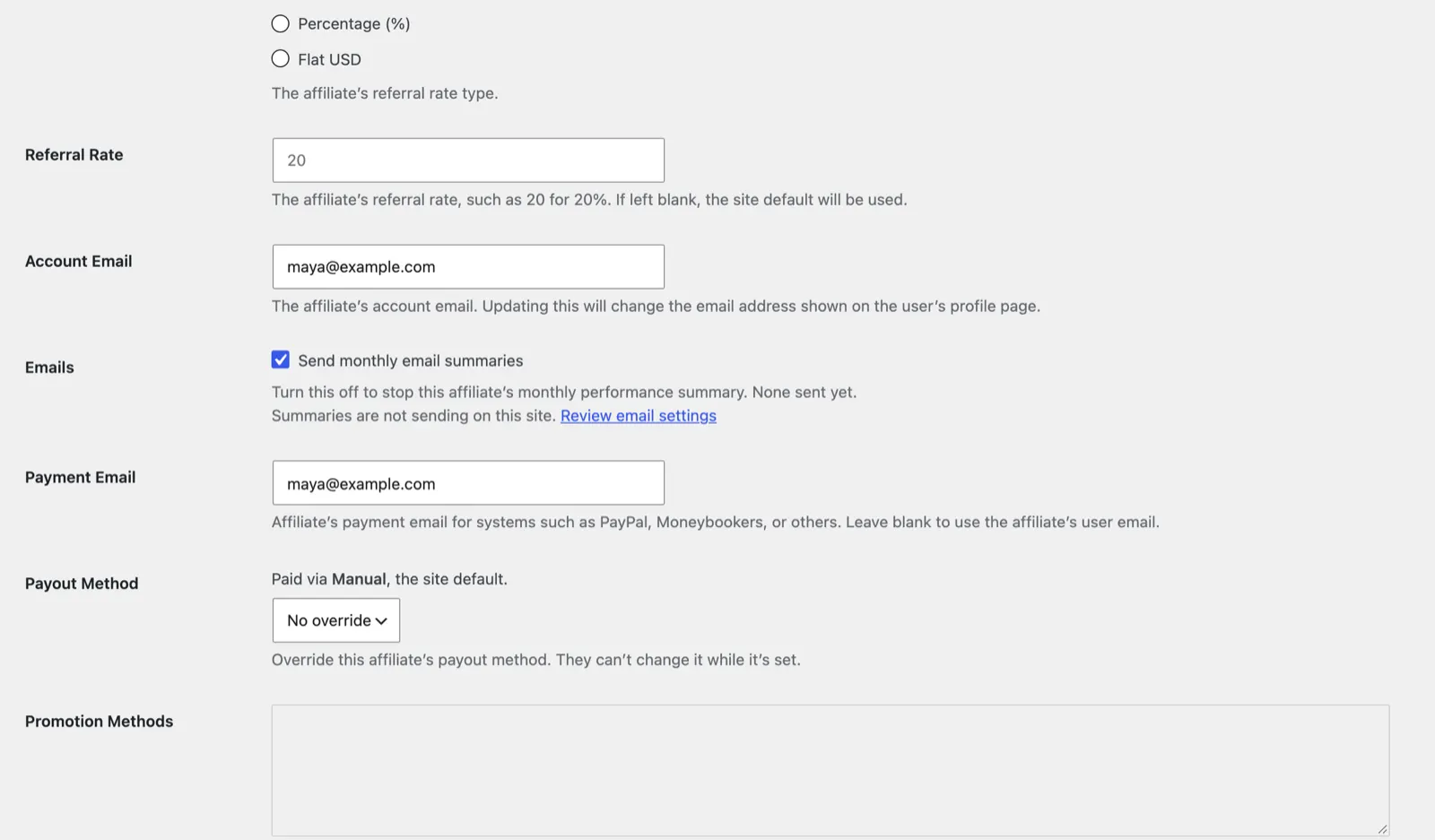
The same screen lets you switch off an affiliate’s monthly email summary and lock their payout method: “Override this affiliate’s payout method. They can’t change it while it’s set.” Recurring referrals, lifetime commissions, tiered rates and multi-tier commissions are on Pro.
Affiliate registration
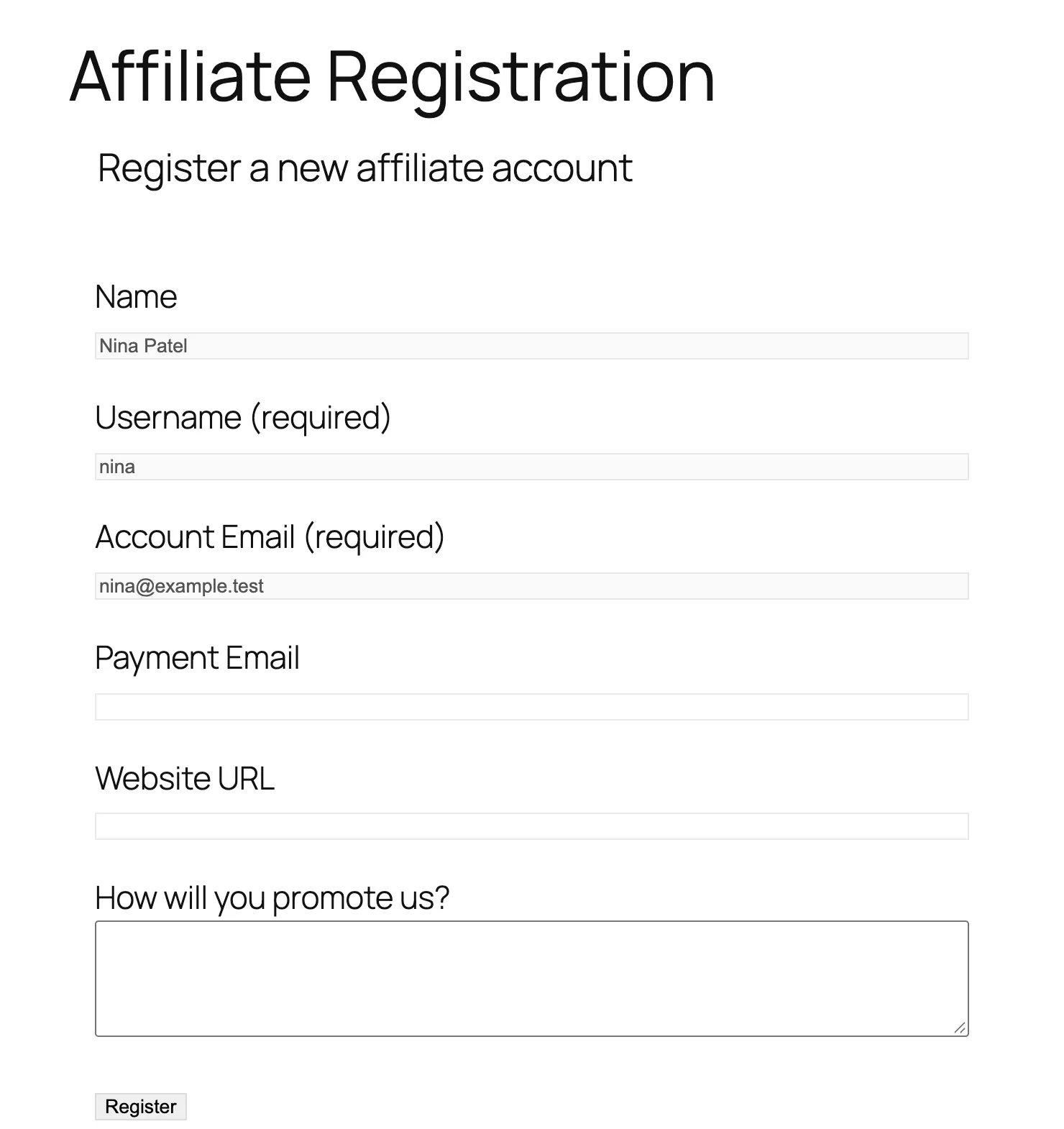
The registration page AffiliateWP created asks for a name, a username, an account email, a payment email, a website URL and “How will you promote us?”. You can make registration open or closed, approve each affiliate by hand, and give “AI Review Instructions” for reviewing pending applications with AI. On Plus you can build the form with Gravity Forms or Ninja Forms instead.
The Affiliate Area and the Affiliate Portal
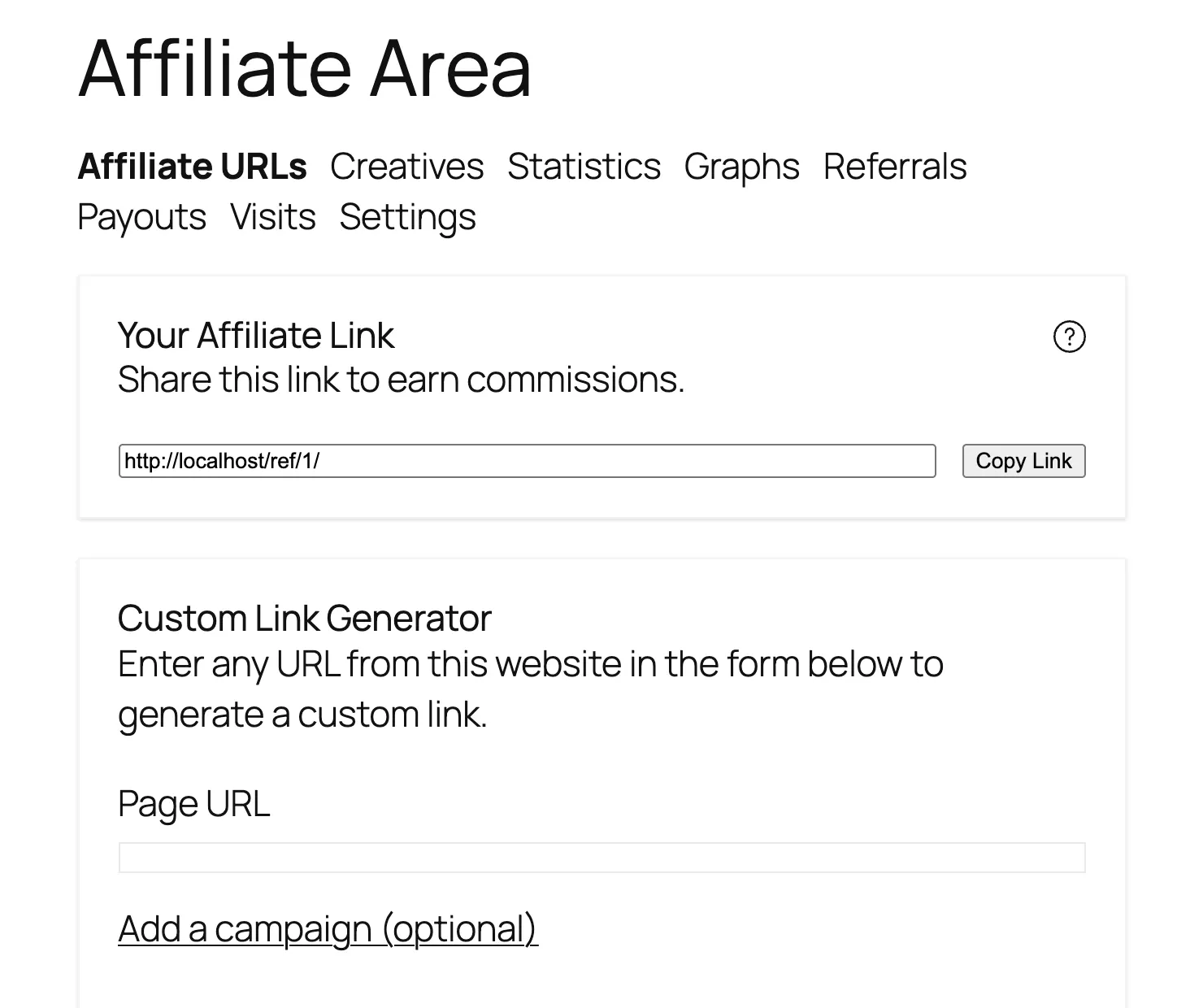
Affiliates log in to an Affiliate Area inside your theme, with tabs for affiliate URLs, creatives, statistics, graphs, referrals, payouts, visits and settings. The URLs tab shows the affiliate’s link with a copy button and a custom link generator for any page on your site, with an optional campaign name.
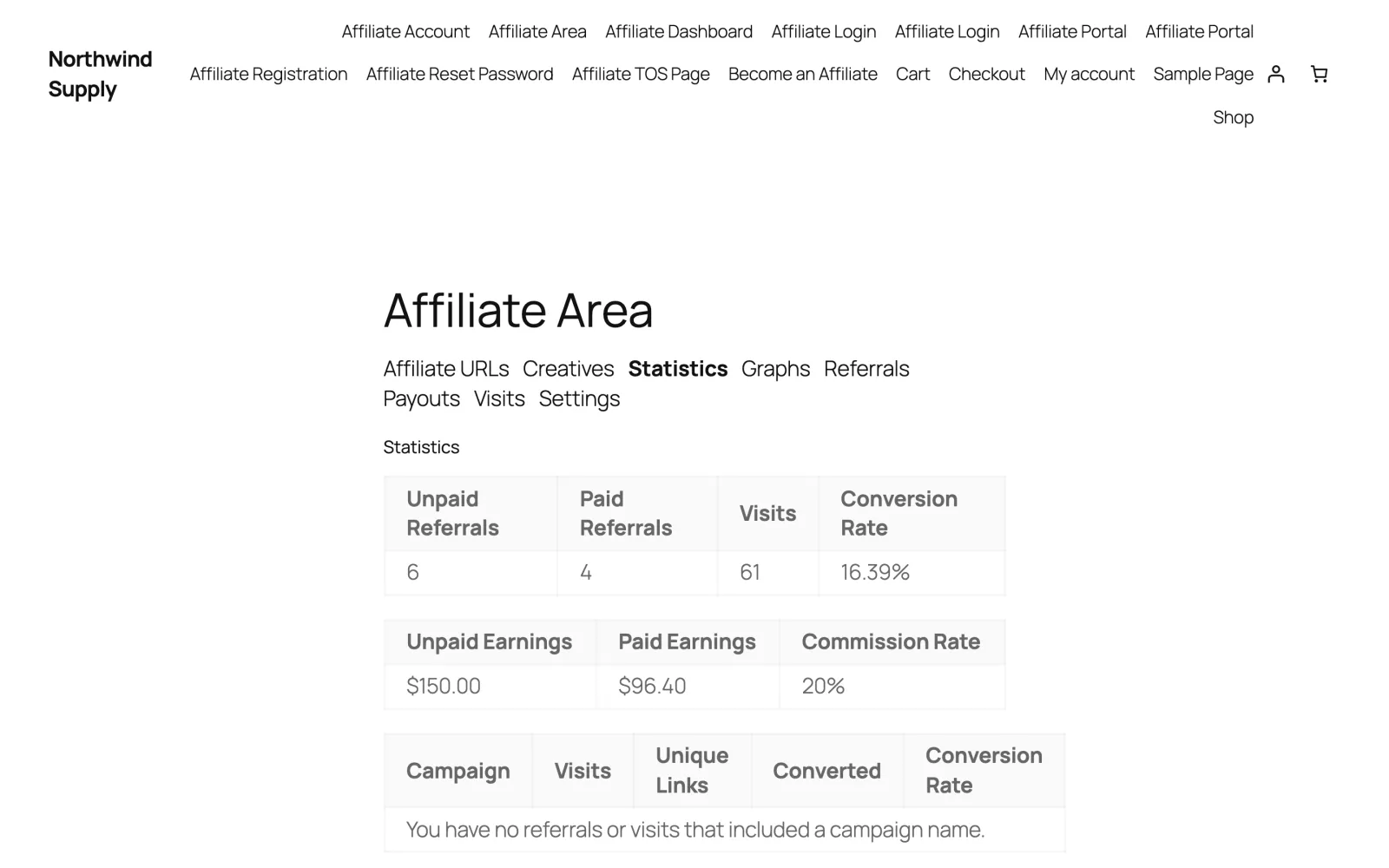
Logged in as maya on 4 October, before our test orders, the Statistics tab showed 6 unpaid and 4 paid referrals, 61 visits, a 16.39% conversion rate, $150.00 unpaid and $96.40 paid, at a 20% commission rate.
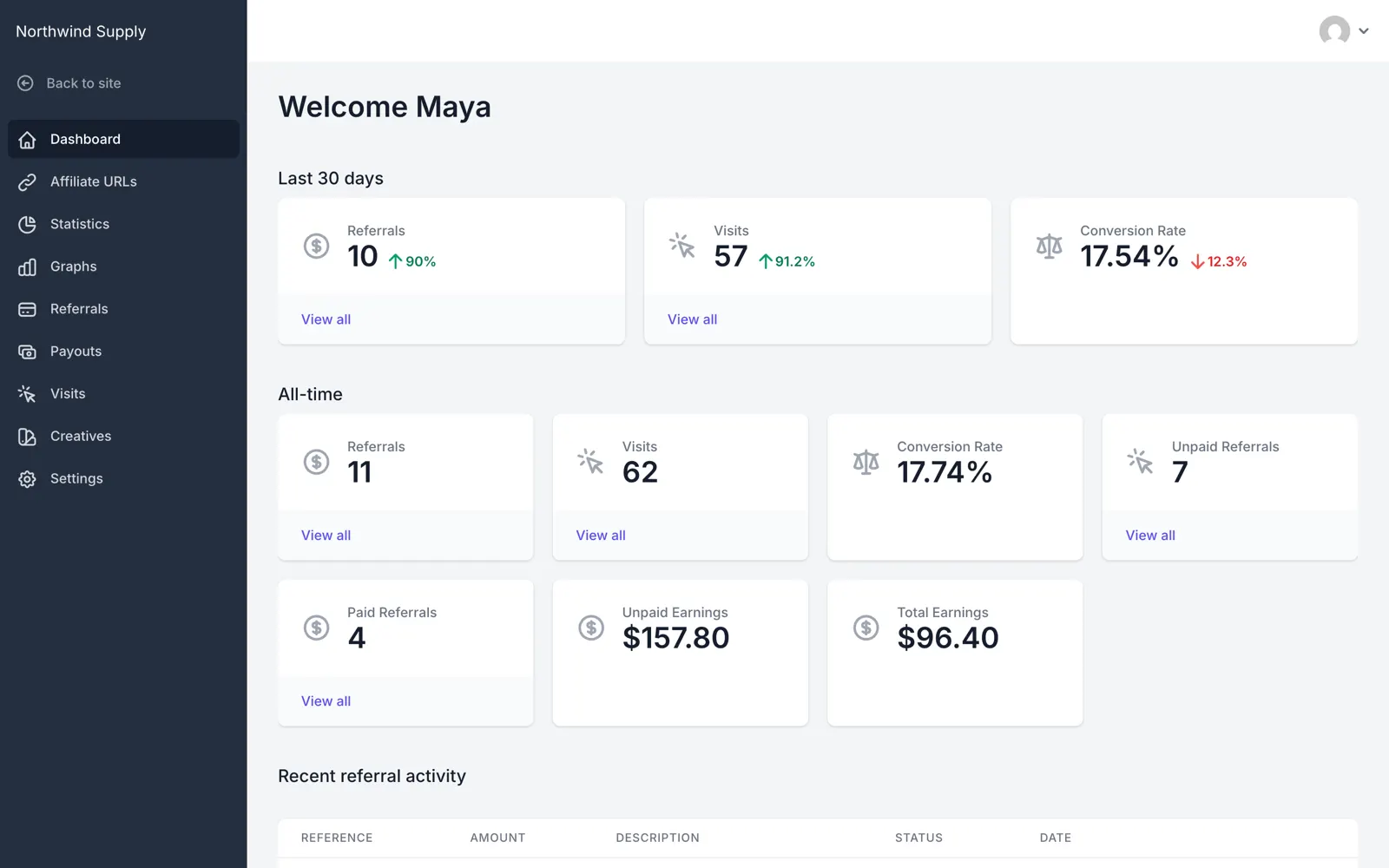
The Affiliate Portal add-on, on Pro, replaces that page with a full-screen dashboard outside your theme, with a sidebar and a “Back to site” link. After our link order it showed maya 11 referrals and 62 visits all-time, 7 unpaid referrals and $157.80 unpaid, the earlier $150.00 plus our $7.80. Its dashboard shows the last 30 days above the all-time figures.
Payouts
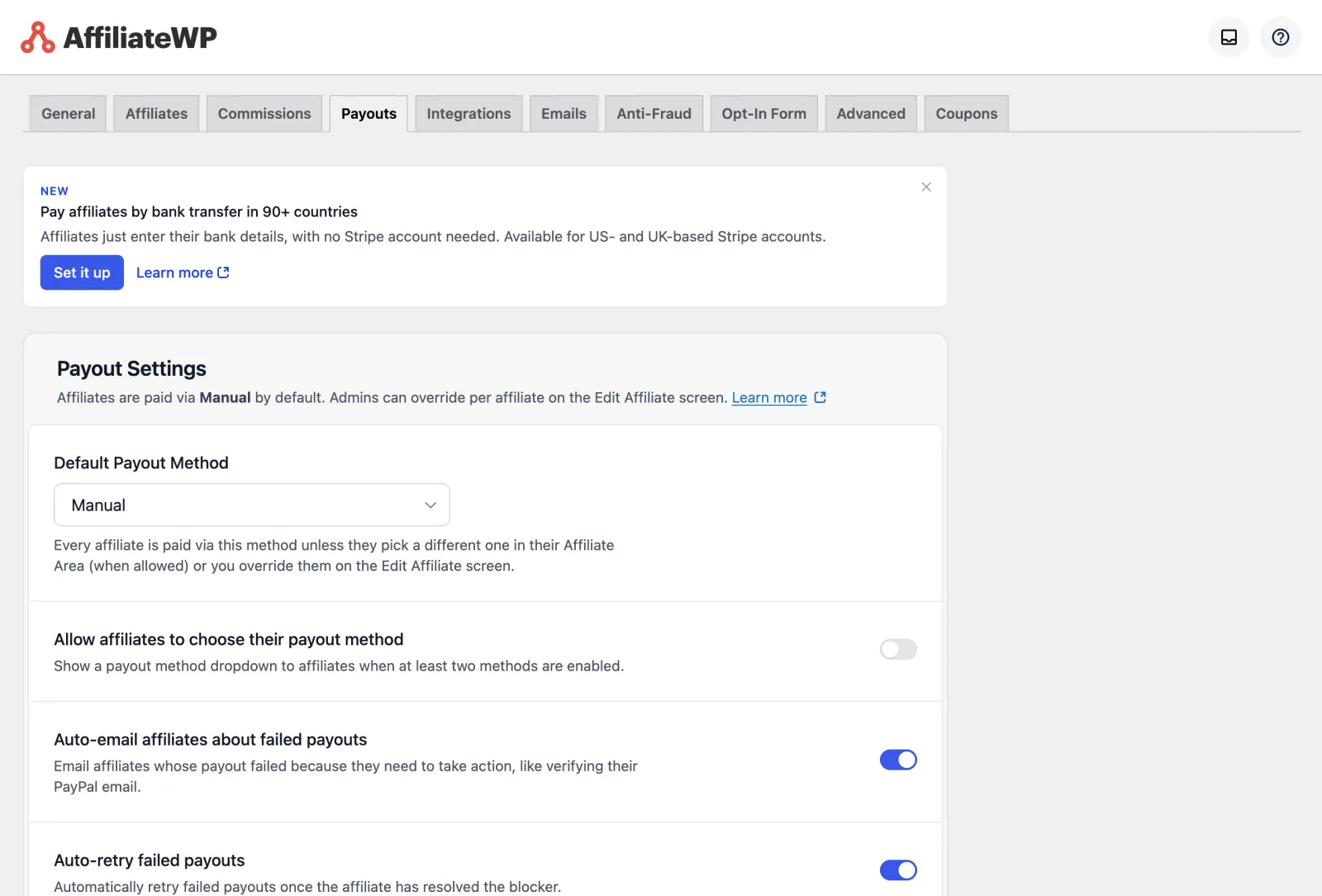
AffiliateWP pays affiliates through Stripe, PayPal, store credit or by hand. With Stripe it can also pay an affiliate’s bank: in 30+ countries through a Stripe account AffiliateWP creates for the affiliate, or directly in 90+ countries if your own Stripe account is in the US or UK. You can let affiliates choose their payout method, email them automatically when a payout fails, and retry failed payouts. Automatic payouts are on Pro.
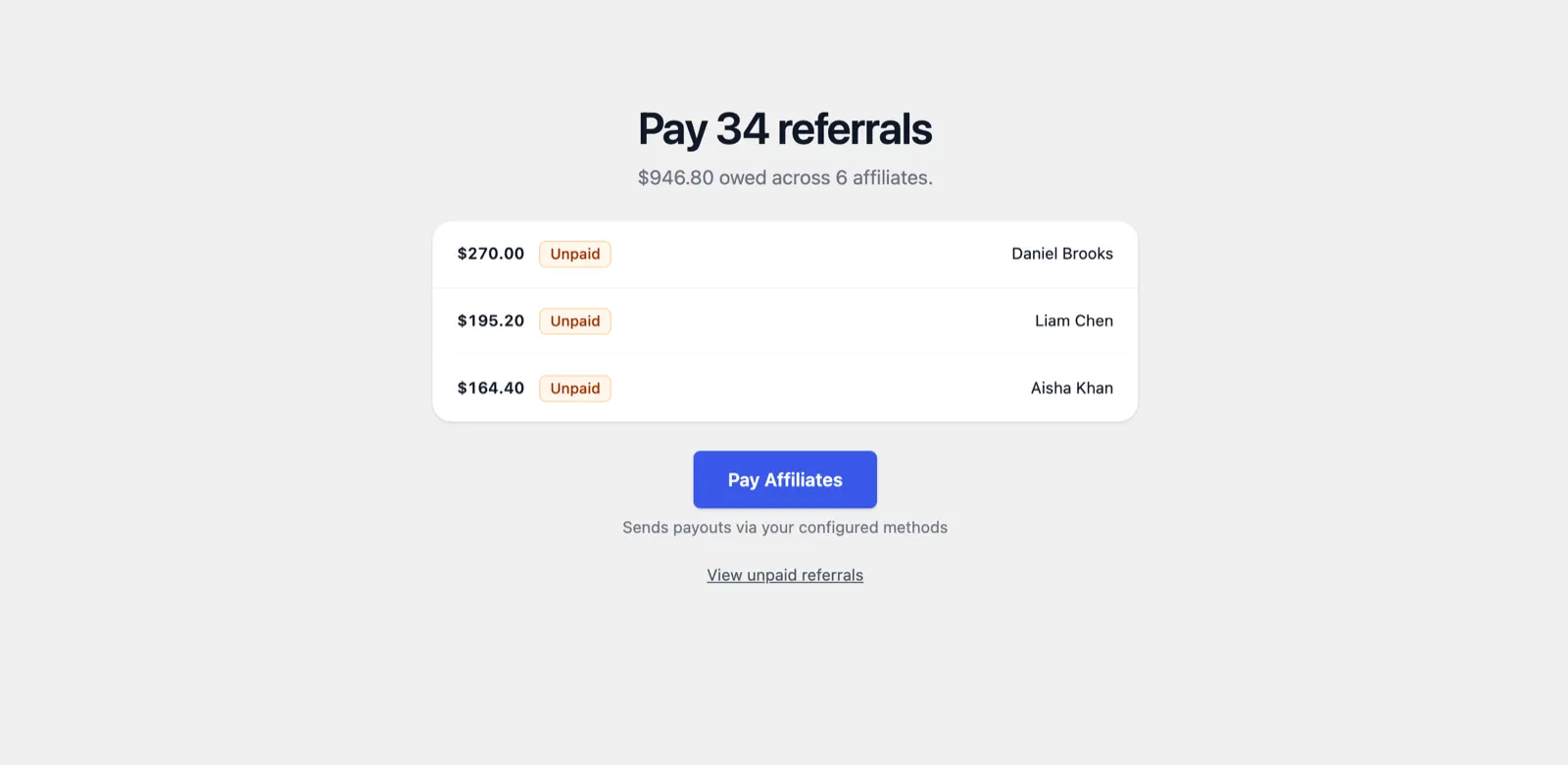
After our test orders the Payouts screen showed “Pay 34 referrals” and “$946.80 owed across 6 affiliates”, the largest balance first, behind one Pay Affiliates button.
One change to know about: AffiliateWP’s own code says its Payouts Service “was shut down on September 30, 2026” and asks sites still using it to switch to another payout method. Reviews that walk you through the Payouts Service describe something you can no longer use.
Fraud prevention and security
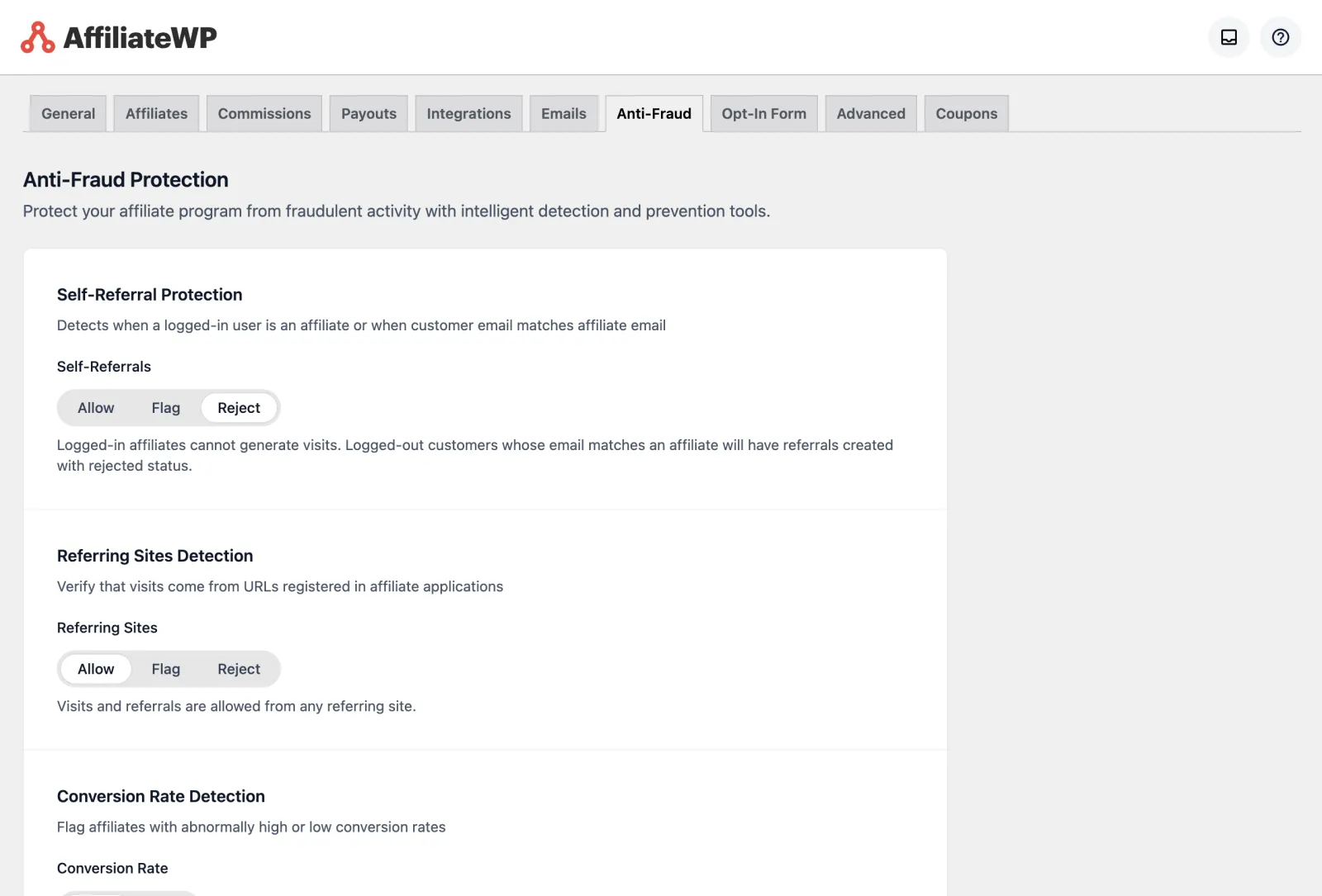
| Check | Options | Plan, according to its code |
|---|---|---|
| Self-referrals | Allow, flag or reject | Every plan |
| Blocked referring sites | A list of sites you block | Every plan |
| Referring sites not on the affiliate’s application | Allow, flag or reject | Pro |
| Unusual conversion rates | Allow or flag | Pro |
| Paid ad traffic (Google, Facebook and others) | Allow, flag or reject; Facebook traffic is only flagged | Pro |
| Many sign-ups from one IP address | Allow, flag or require approval | Pro |
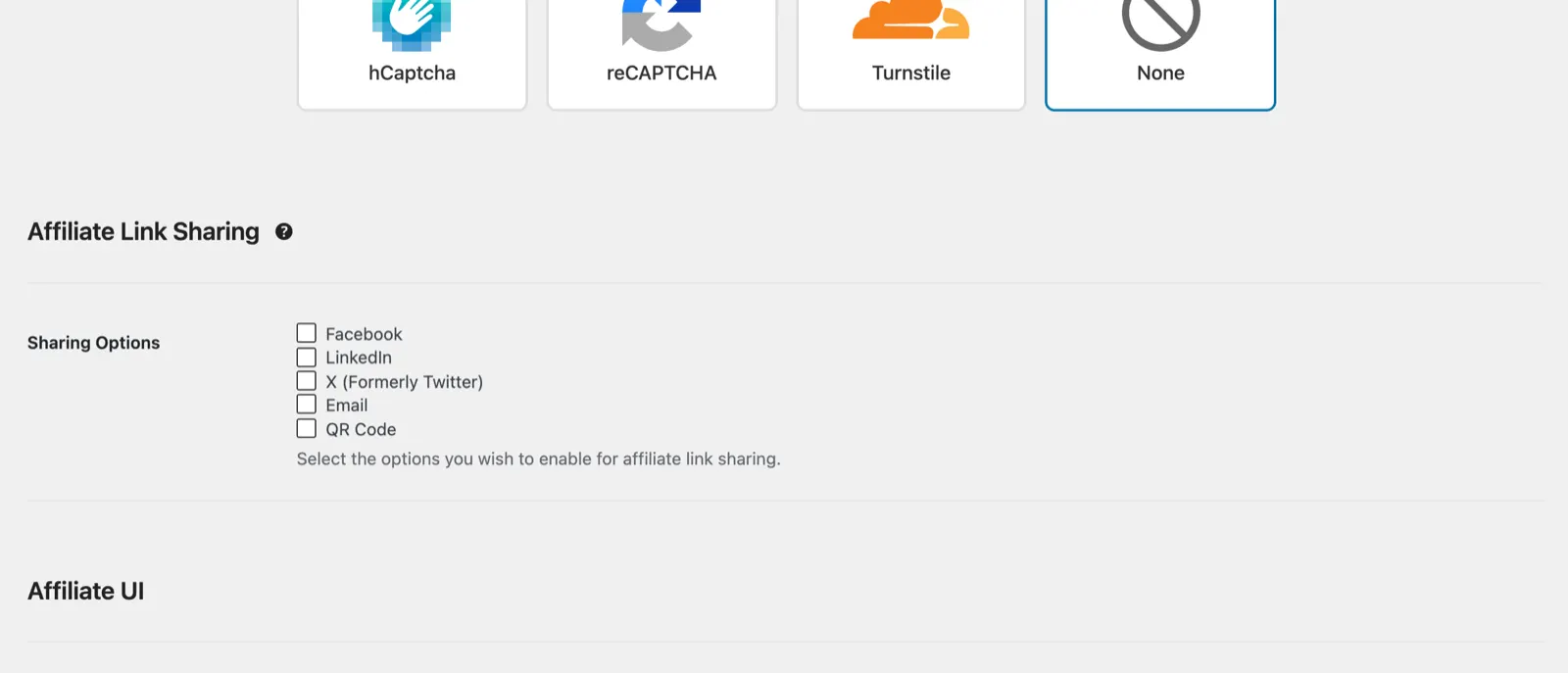
A flagged referral is marked for your review but stays eligible for payout; reject stops it. On the Affiliates tab you can add hCaptcha, reCAPTCHA or Cloudflare Turnstile to block bots “from creating or logging in to affiliate accounts”, and on the Advanced tab you can switch off IP address logging.
Reports and emails
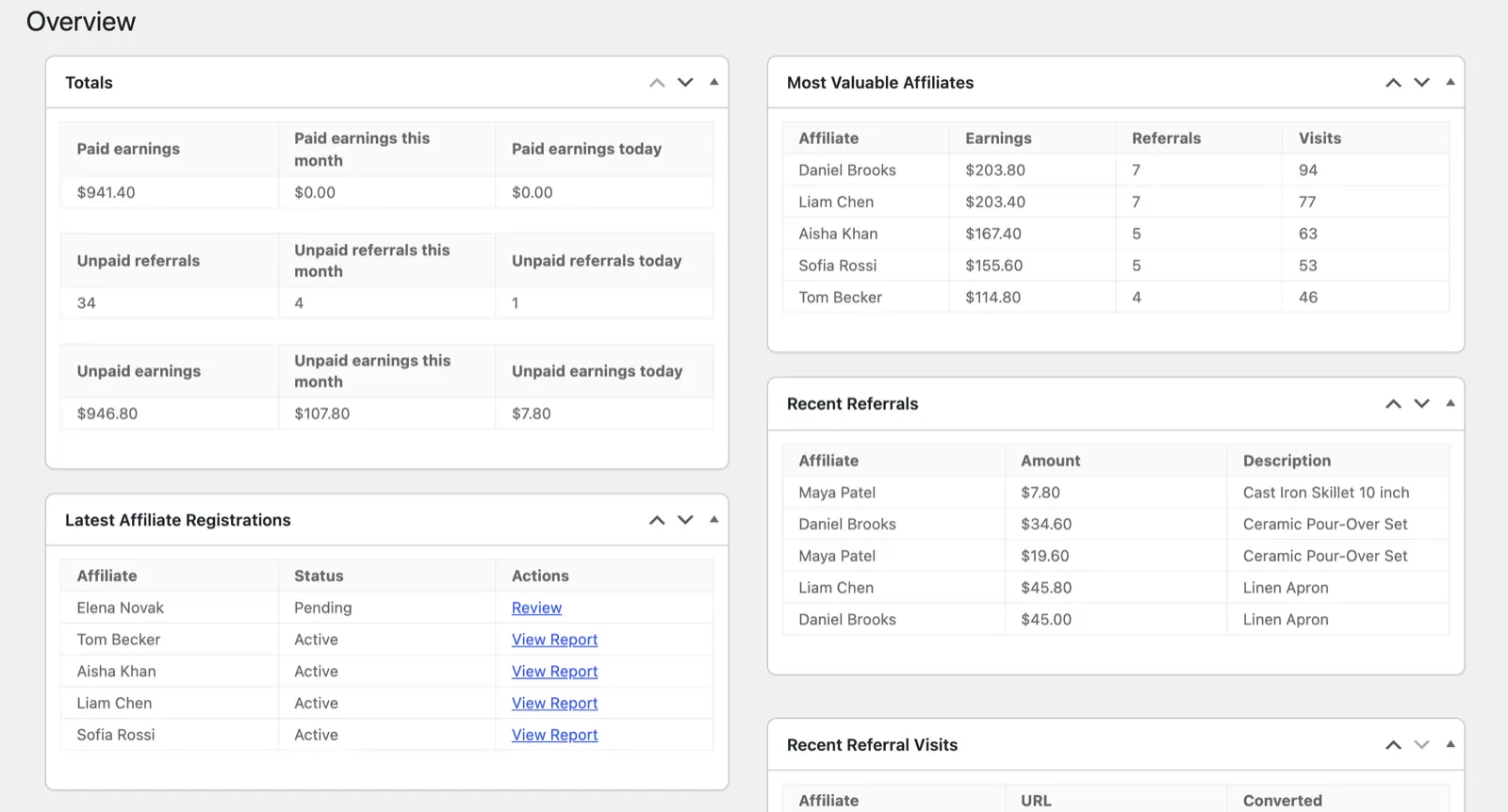
The Overview opens with paid and unpaid earnings and referral counts, then panels for the latest registrations, the highest-converting URLs, the most valuable affiliates, recent referrals and recent visits. The Reports screen has tabs for referrals, affiliates, sales, payouts, visits and campaigns; on our store it showed $941.40 in paid earnings. Exports to CSV are on the Tools screen.
AffiliateWP sends emails for new sign-ups, new referrals, application decisions and failed payouts, plus a set for Stripe payouts, each editable, and it can send each affiliate a monthly summary. You can set a logo, a template, the sender name and the sender address.
Managing affiliates and tools
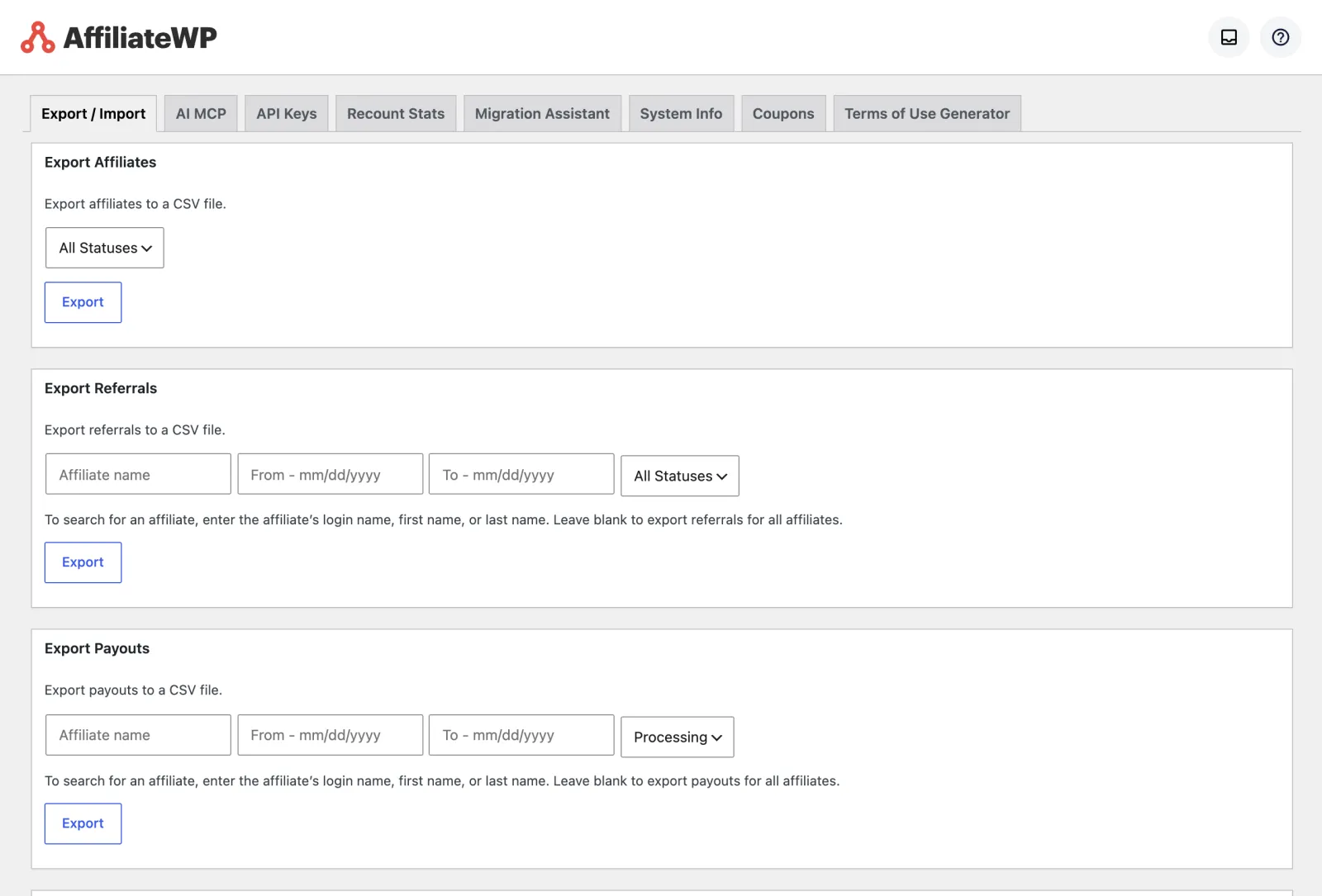
- Tools: exports of affiliates, referrals, payouts and visits to CSV; export and import of settings; imports of affiliates and referrals from CSV; a migration assistant for Affiliates Pro, WP Affiliate and existing WordPress users; API keys; coupons; a Terms of Use Generator; and recount and system information tools.
- Opt-in form: a sign-up form for Mailchimp, ActiveCampaign or ConvertKit that can pay the referring affiliate a set amount for each visitor who subscribes.
- REST API: included.
Performance
| On our test store, measured 6 October 2026 | AffiliateWP 2.37.0 |
|---|---|
| Size on disk | 37.2 MB (1,498 files) |
| Database tables created | 23 |
| Scripts added to the home and shop pages | 2 |
| Stylesheets added | 1 |
| Bytes added to the page head | 1,128 |
It adds little to the storefront: its tracking script, the jQuery cookie script it loads (served from WooCommerce’s folder), 1 stylesheet and 1,128 bytes in the page head. These figures are from its JavaScript tracking mode, which it switches to after a visitor’s browser runs its check; until then it uses a fallback with no scripts and 611 bytes. Add-ons are separate plugins and add their own files and tables; the Lifetime Commissions and Direct Link Tracking add-ons each added 1 table on our store.
Support and refunds
Personal and Plus include standard support and Pro includes priority support. Existing customers get help through a ticket system on AffiliateWP’s site. There is no trial and no demo; instead, AffiliateWP refunds the full price if you ask within 14 days of buying. A GPL copy, including ours, does not come with the developer’s support.
Pros and cons
Pros
- Link and coupon tracking both worked in our tests, and refunds rejected the commission automatically.
- Stripe, PayPal and store credit payouts on every plan, with bank payouts through Stripe.
- Rates per product, per category, per affiliate and per group.
- Self-referral checks on every plan and rule-based fraud checks on Pro.
- Useful tools: CSV exports, a migration assistant and a terms generator.
Cons
- Recurring, lifetime and multi-tier commissions need Pro.
- Renewals at double the first-year price.
- No free version, no trial and a 14-day refund window.
- The setup wizard ticks extra plugins for installation by default.
- The Affiliate Portal is a Pro add-on.
Who should use AffiliateWP
| Your situation | Our pick | Why |
|---|---|---|
| One WooCommerce store, one-off sales | AffiliateWP Personal | Links, coupons, store credit and Stripe or PayPal payouts are all on Personal |
| Subscriptions or memberships | AffiliateWP Pro, or compare SliceWP and YITH | Recurring referrals are Pro only on AffiliateWP |
| A shop that is not WooCommerce | AffiliateWP | Easy Digital Downloads, MemberPress, LearnDash and form plugins are on its integrations list |
| Agency with client sites | AffiliateWP Pro or the Growth Bundle | Client sites are allowed, and Pro covers 5 sites |
| Tight budget | SliceWP’s free version | AffiliateWP has no free version |
Alternatives
We have compared AffiliateWP with its main rivals, and tested all of them except Easy Affiliate on the same store:
- AffiliateWP vs SliceWP: SliceWP has a free version and puts every feature in both paid plans.
- AffiliateWP vs Solid Affiliate: a WooCommerce-only alternative.
- AffiliateWP vs YITH WooCommerce Affiliates: WooCommerce only, with permanent customer-to-affiliate links and commissions on renewal orders (with a subscriptions plugin) in its Premium version.
- AffiliateWP vs Ultimate Affiliate Pro: multi-level commissions and a 360-day default cookie on its cheapest plan.
- AffiliateWP vs Easy Affiliate: from the MemberPress team; its pages list PayPal and offline payouts.
What other reviews get wrong
- Prices and sites. Reviews on breakdance.com and oxygenbuilder.com give AffiliateWP’s plans as $149, $199 and $299, renewing at $374, $499 and $749, for 1, 3 and 10 sites. AffiliateWP’s pricing page shows $149.50, $199.50 and $299.50, renewing at $299, $399 and $599, for 1, 2 and 5 sites; 10 sites appear only on the Growth Bundle, which pairs Pro with a second plugin, and even there AffiliateWP itself covers 5.
- Normal prices. A review on conves.io gives Personal as “$149.60/year (Normally $374.00)”. AffiliateWP’s page shows $149.50, normally $299.
- A lifetime tier. A 2023 review on mhthemes.com describes “a fourth lifetime tier”. AffiliateWP’s support page says it does not offer a lifetime licence.
- First-year prices. A review on storeapps.org gives Plus as $179.55 and Pro as $209.65 for the first year. AffiliateWP’s page showed $199.50 and $299.50 when we checked, so check the price on the day you buy.
- The Payouts Service. Reviews on breakdance.com and isitwp.com still describe the Payouts Service, which AffiliateWP’s code says shut down on 30 September 2026. Breakdance’s says it pays affiliates “in over 50 countries”; the payout settings in 2.37.0 offer Stripe bank payouts in 30+ or 90+ countries instead.
On PureGPL
AffiliateWP is in our catalogue at $3.49; version 2.37.0 reached our catalogue on 2 October 2026. Many of its add-ons are there as separate downloads.
What a GPL copy does and does not include
AffiliateWP is licensed under the GPL, as its plugin header states, which is why it can be redistributed. A GPL copy comes without a licence from the developer, so it comes without the developer’s support, and anything that runs through the developer’s own account or service is not part of it. The copy we tested is not the developer’s unmodified release: it has added lines that write a fixed licence key into the site’s settings, report that licence as valid and fetch add-ons from a different server. Those lines replace any key you enter, so if you buy a licence from AffiliateWP for its support, install the developer’s own file. Updates come from us, with a year of our own support included.
Sources
Prices, plan contents and support terms were read from these pages on 6 October 2026. The screens, settings, test orders and measurements are from our own test store.
Frequently asked questions
Is AffiliateWP worth it?
If you need link and coupon tracking, Stripe, PayPal or store credit payouts and its integrations, yes, on the Personal plan. If you need recurring or lifetime commissions, budget for Pro, or compare SliceWP, YITH WooCommerce Affiliates and Ultimate Affiliate Pro, which include them for less.
Does AffiliateWP have a free version?
No. It is sold only as a yearly plan, with a 14-day refund and no trial.
How much does AffiliateWP cost?
$149.50 the first year for one site, then $299 a year. Pro, for 5 sites, is $299.50 then $599.
How do I set up a WooCommerce affiliate program with AffiliateWP?
Run the setup wizard, keep the WooCommerce integration it detects, choose a payout method and a default rate, untick any extra plugins you do not want, press Save once on the Commissions tab so the 30-day cookie is stored, then add the registration page to your menu and place a test order through a referral link before you invite affiliates.
Does AffiliateWP track coupons without a referral link?
Yes. In our test, a buyer who typed an affiliate’s coupon without visiting any link was credited to that affiliate.
What is the difference between the Affiliate Area and the Affiliate Portal?
The Affiliate Area is included on every plan and sits inside your theme. The Affiliate Portal is a Pro add-on that replaces it with a full-screen dashboard outside your theme.
Can AffiliateWP pay affiliates by bank transfer?
Yes, through Stripe: in 30+ countries through Stripe accounts it creates for affiliates, or in 90+ countries directly if your Stripe account is in the US or UK.
Does AffiliateWP support recurring commissions?
Yes, on the Pro plan, through its Recurring Referrals add-on.
Will AffiliateWP slow down my store?
On our store it added 2 scripts, 1 stylesheet and 1,128 bytes to the page head of the home and shop pages.
Does AffiliateWP work on WordPress.com?
Only on the Business or eCommerce plans, according to AffiliateWP. It does not work on sites that are not WordPress.
What happened to the AffiliateWP Payouts Service?
According to AffiliateWP’s code, it shut down on 30 September 2026. Use Stripe, PayPal, store credit or manual payouts instead.
See also: best WordPress affiliate plugins and our Solid Affiliate review.


