Avada Theme Free Download: What You Get, Tested (2026)

Avada has no free version. ThemeFusion sells it on ThemeForest, at $69 for one site with six months of support. What you can get free is Avada 7.16.1 from us, together with the two plugins it needs, Avada Builder 3.16.2 and Avada Core 5.16.2. We installed all three on our test store on 14 October 2026 to see what each one does, what still needs a ThemeForest purchase code, and where the other “free download” pages lead.
One thing to know first: Avada 7.16.2, released on 30 September 2026, fixed six security issues, and the free theme file is 7.16.1.
The short answer
| Route | Cost | What you get | The catch |
|---|---|---|---|
| A ThemeForest licence | $69 for one site | A purchase code: Avada installs its plugins for you, plus prebuilt websites, Avada Studio, premium plugins and updates | One live site and one staging site per code; support after six months costs extra |
| Our free download | Nothing | Avada 7.16.1, Avada Builder 3.16.2 and Avada Core 5.16.2 | Not a ThemeForest licence: no purchase code and no ThemeFusion support; 7.16.2 has security fixes that 7.16.1 lacks; later versions are paid |
| “Free download” pages on Google | Nothing, or a membership | The ones we checked: a theme-only download button, a membership, an old zip, or a templated page on an unrelated site | No purchase code, so no registered features; readers of one report missing plugins and failed demo imports and updates |
| Avada One, ThemeFusion’s new subscription | From $49 a year for one site | A yearly plan, announced after its beta ended | No release date yet |
How we tested
The store. WordPress 7.0.2 on PHP 8.3 and Apache 2.4, running in Docker on our own machine, with WooCommerce 11.1.2, its sample products and a review post built from WordPress blocks.
The copies. We tested our own copies: Avada 7.16.1, Avada Builder 3.16.2 and Avada Core 5.16.2, the same zips linked on this page (we checked they are byte for byte the same files). They did not come from ThemeForest, and we did not register them. What a purchase code unlocks is taken from Avada’s documentation and its code, not from our screens.
What we did. We uploaded the theme and both plugins, activated the theme from the Themes screen, then switched the plugins on. We switched each plugin on by itself to see what it adds, tried Avada Builder with two other themes, and measured four pages (homepage, review post, shop and a product page) with Avada and with WordPress’s default theme, Twenty Twenty-Five.
What we did not do. We did not import a prebuilt website, use Avada Studio or install the premium plugins, and we did not run Avada’s Performance Wizard. Our one speed test is Lighthouse on the review post, three runs per theme: it compares the two themes on the same store, and a real host will give different numbers.
Is there a free version of Avada?
No. Avada is sold on ThemeForest, and its own site sends buyers there: “Buy Avada for $69”. The price is per site. Avada’s licensing FAQ says “For each Avada license you purchase, you can use the individual purchase code to register a single website, as well as a staging site for that domain.”
What a licence costs
| What you buy | Price | What it covers |
|---|---|---|
| Regular licence | $69 | One site, with six months of support |
| Regular licence with 12 months of support | $90.38 | The same, with six more months of support bought at checkout ($21.38) |
| Six more months, bought before support runs out | $35.63 | Support only |
| Six more months, bought after support has lapsed | $49.88 | Support only |
| Extended licence | $2950 | One site or product that its end users pay for |
Prices from ThemeForest on 14 October 2026, in US dollars, before tax. The $90.38 total and the $35.63 extension appear only in the page’s code, not in its text.
There is no yearly renewal for the licence itself. When support ends, Avada’s documentation says you “continue to receive Avada updates”; only hands-on help stops. So the cost over three years depends on whether you want support:
| One site, three years | Total | Per year |
|---|---|---|
| Licence only (updates, no support after six months) | $69 | $23.00 |
| Licence with support for all three years (12 months at checkout, then four six-month extensions) | $232.90 | $77.63 |
| Five sites, licence only | $345 | $115.00 |
Avada One, ThemeFusion’s new subscription, is priced per year instead: $49 for one site on its Essential plan or $99 on Pro. Its pricing page says “We will share the official release date very soon”, and that existing Avada licences stay valid.
What the ThemeForest purchase code unlocks
Avada asks you to register the site with your purchase code. Avada’s documentation says “Registration is required to receive free updates for Avada”, and the code it ships checks whether the site is registered when it fetches plugins, prebuilt websites, Avada Studio content or a theme update. These are the parts that need the code:
| Feature | Needs a registered purchase code | What Avada says |
|---|---|---|
| Installing Avada Core and Avada Builder from the dashboard | Yes | “Before you can install any of the Premium plugins, including the two required plugins, you have to first register your Avada purchase.” |
| Bundled premium plugins | Yes | Six: Avada Custom Branding, Slider Revolution, LayerSlider, ACF Pro, Convert Plus and FileBird Pro |
| Prebuilt websites | Yes | “There are two ways to import any one of our prebuilt websites, and for both, you need to register Avada first.” |
| Avada Studio | Yes | The builder shows “Avada needs to be registered to access the Avada Studio” |
| Updates from the dashboard | Yes | “Registration is required to receive free updates for Avada” |
| Support | Yes | Six months with the licence, through a My Avada account |
In Avada’s code, the dashboard builds a download link for the two plugins only for a registered site (or one registered the older way, with an Envato token); otherwise it has no link to offer. For buyers whose registration keeps failing, Avada’s documentation points to My Avada, under Support and Downloads, where the plugin zips can be downloaded.
How to download and install the Avada theme
A ThemeForest purchase gives you two zips: “All files & documentation” and “Installable WordPress files only”. Avada’s documentation says “To install Avada, only the Installable WordPress package is required”; the larger zip adds the child theme and documentation.
- Upload the theme zip under Appearance, Themes, Add New, Upload Theme, then activate it.
- Install Avada Core, then Avada Builder. Avada’s documentation says “Install the Avada Core plugin before installing the Avada Builder plugin.” A registered site does this from Avada, Plugins; otherwise upload each zip under Plugins, Add New, Upload Plugin.
- Activate both plugins, then run the Setup Wizard, which asks for your purchase code first.
On our store, with both plugins uploaded but switched off, activating the theme opened Avada’s Setup Wizard, and the WordPress dashboard showed “The following required plugins are currently inactive: Avada Core and Avada Builder.” Our posts still displayed with the theme alone, under Avada’s default header and placeholder logo.
In Avada’s code, the Setup Wizard’s first step shows a welcome card and the purchase code form until the site is registered, and the next step, choosing a prebuilt website or a new site, appears only once the site is registered and both plugins are active.
Memory. Avada’s requirements page asks for a PHP memory_limit of 128M, and the theme’s own notice says “We recommend at least 128MB of memory.” Our pages loaded within 128 MB, but a WP-CLI command on the same store ran out of memory at 128 MB once both plugins were active. If you manage the site from the command line, give PHP more.
Avada Builder 3.16.2: free download and what it does
Download Avada Builder 3.16.2 (zip). This is the version Avada’s documentation lists as current: “Current version 3.16.2”.
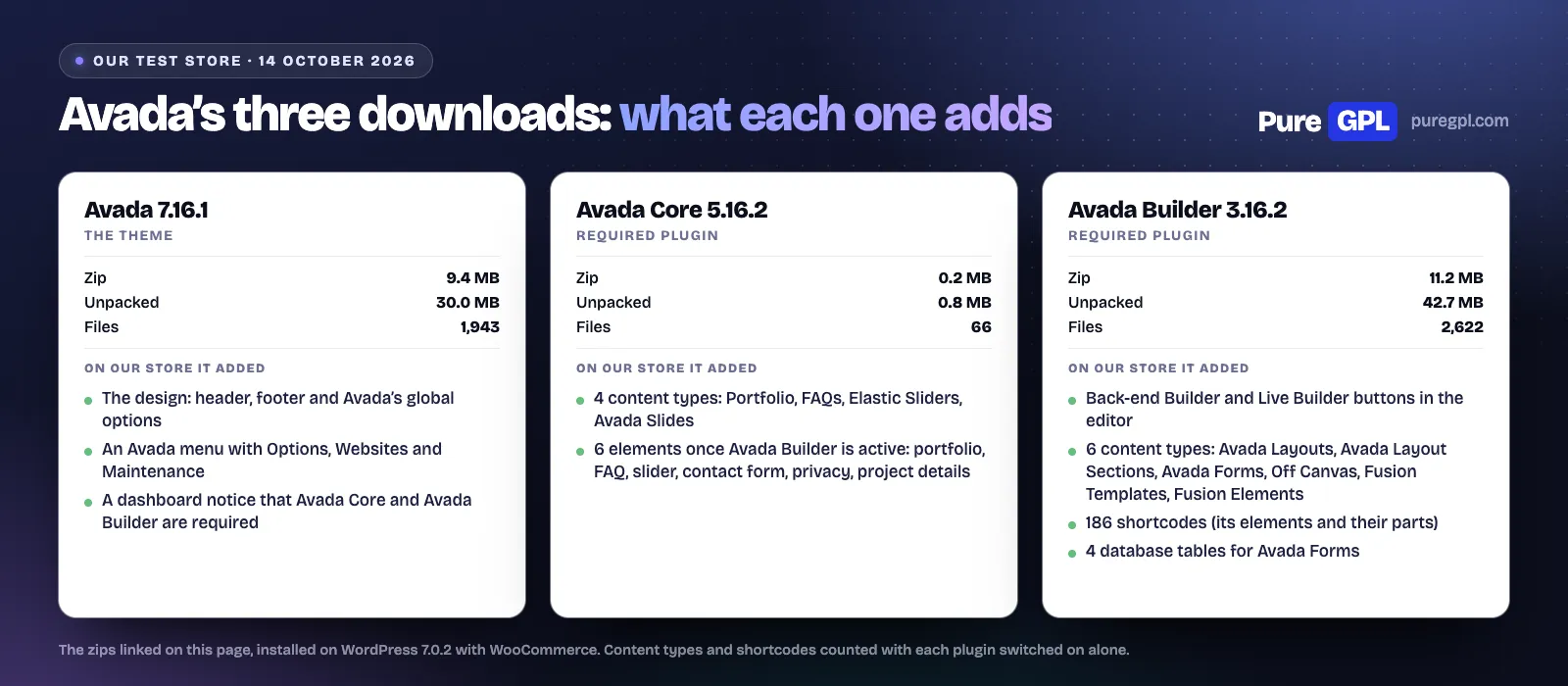
Avada Builder is the page builder. Avada’s documentation calls it “one of two required Avada plugins and is core to the Avada Live Visual Builder”. On our store it added:
- Two ways to edit: Back-end Builder and Live Builder buttons above the post editor, and an Edit Live link in the toolbar.
- Six content types: Avada Layouts, Avada Layout Sections, Avada Forms, Off Canvas, Fusion Templates and Fusion Elements.
- 186 shortcodes, the elements you place and the parts inside them. Avada’s own pages count elements differently: “150+ Design Elements” on its homepage and “There are 120 Elements to choose from” in its documentation.
- Four database tables for Avada Forms.
It is the bigger of the two plugins: an 11.2 MB zip that unpacks to 42.7 MB.
Can you use Avada Builder without the Avada theme?
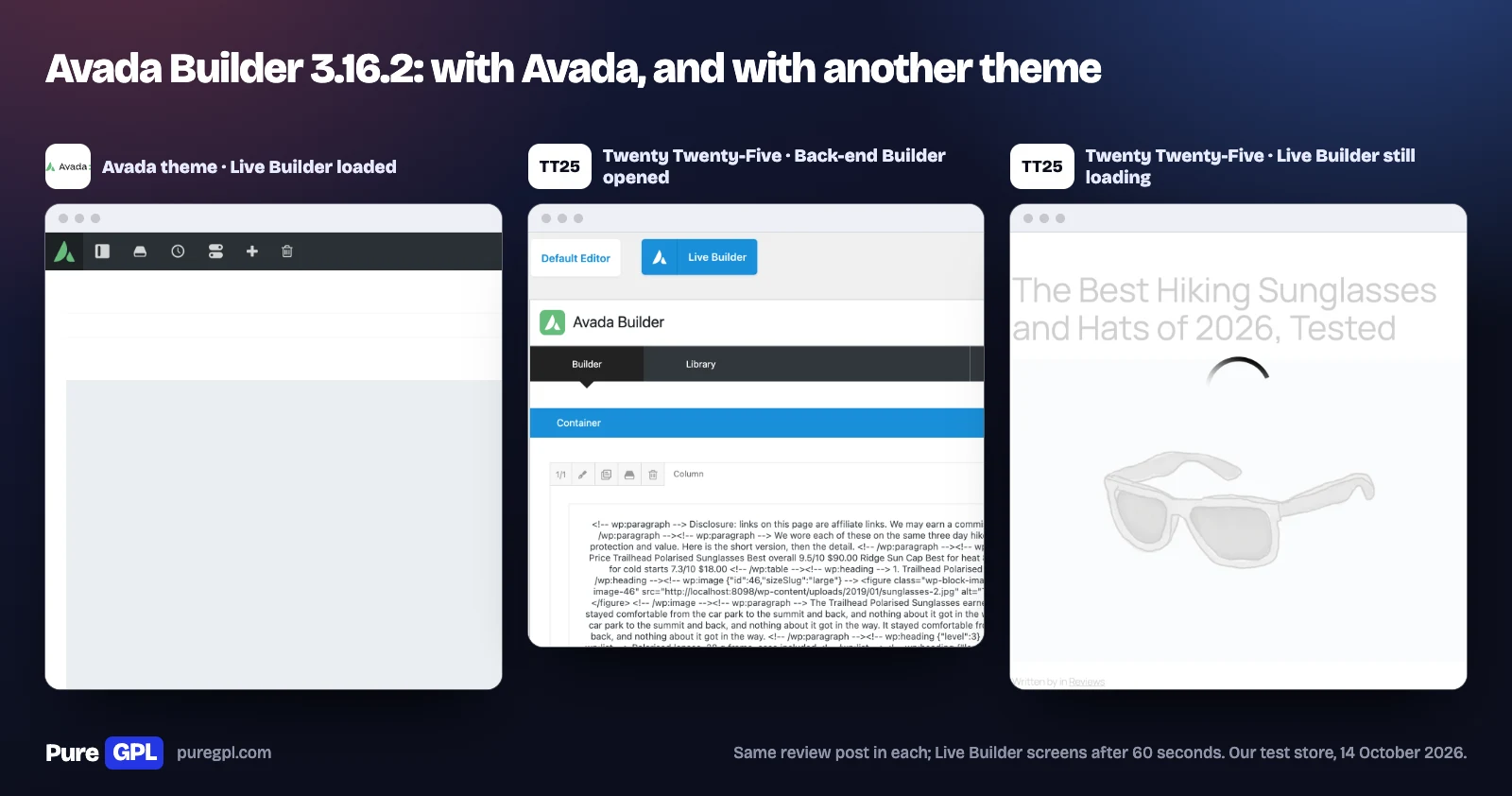
Only partly, in our test. With Avada Builder and Avada Core active and Twenty Twenty-Five as the theme, the Back-end Builder opened and put our post into a container and column, but the Live Builder never finished loading: after 60 seconds our post was still behind its loading spinner, and the same happened with Astra. The request behind it failed with a PHP fatal error (“Call to a member function get_available_languages() on null”), in code that also asks the Avada theme for its settings. With Avada as the theme, the same post opened in the Live Builder.
ThemeFusion does not sell Avada Builder on its own. A CodeCanyon search for it shows only items by other developers, most of them add-ons such as Elegant Elements for Fusion Builder.
Avada Core 5.16.2: free download and what it does
Download Avada Core 5.16.2 (zip). Avada’s documentation lists “Current version 5.16.2”.
Avada Core is the small one: a 0.2 MB zip of 66 files. Avada describes it as “Avada’s companion plugin and must be installed alongside the Avada Builder plugin for Avada to operate as intended.” On our store it added:
- Four content types: Portfolio, FAQs, Elastic Sliders and Avada Slides, with Portfolio, FAQs and Elastic Slider menus in the dashboard.
- Six elements, once Avada Builder is active: portfolio, FAQ, slider, contact form, privacy and project details. With Avada Core alone, it registered only the contact form.
Older guides call these plugins Fusion Core and Fusion Builder, which is still the name of their folders (fusion-core and fusion-builder). On our store Avada Builder ran without Avada Core, but Avada lists both as required, and without Avada Core you lose the portfolio and FAQ features.
Which version is current
| Download | Our free file | Current version (Avada, 14 October 2026) |
|---|---|---|
| Avada theme | 7.16.1 (25 August 2026) | 7.16.2 (30 September 2026) |
| Avada Builder | 3.16.2 | 3.16.2 |
| Avada Core | 5.16.2 | 5.16.2 |
Avada’s changelog lists security fixes in recent releases. Version 7.16.1 “Fixed a remote code execution vulnerability in the Fusion Patcher”, and ThemeFusion says 7.16.2 brought “fixes for six security issues”. Older copies carry the problems these releases fixed, which matters for older copies such as the “Avada 7.9.3” zip one of the pages below is titled with.
What the page adds: Avada against a default theme
We loaded the same four pages with Twenty Twenty-Five and with Avada and both plugins, as installed, in a fresh Chrome window with the cache off.
| Page | Twenty Twenty-Five | Avada with both plugins | PHP memory, Twenty Twenty-Five | PHP memory, Avada |
|---|---|---|---|---|
| Homepage | 229.4 KB, 29 requests | 905.2 KB, 24 requests | 12.3 MB | 59.4 MB |
| Review post | 270.3 KB, 32 requests | 870.9 KB, 28 requests | 12.2 MB | 59.6 MB |
| Shop | 456.8 KB, 47 requests | 902.7 KB, 31 requests | 13.3 MB | 59.9 MB |
| Product page | 312.6 KB, 51 requests | 727.6 KB, 28 requests | 12.6 MB | 59.6 MB |
The review post sent 870.9 KB with Avada against 270.3 KB with Twenty Twenty-Five, 3.2 times as much. More than half of it is one combined stylesheet of 225.6 KB, three Font Awesome icon fonts from the theme (165.1 KB) and two files of the Inter font from Google’s font servers (97.9 KB); a combined script adds 129.2 KB. Avada needed fewer requests, because it combines its files. In Lighthouse’s mobile test (median of three runs on the review post), Twenty Twenty-Five scored 80 and Avada 70: Avada showed its first content sooner, at 2.5 s against 3.2 s, but its largest element arrived later, at 6.4 s against 4.1 s. On the server, each page view peaked at about 60 MB of PHP memory with Avada, against about 12 MB with Twenty Twenty-Five.
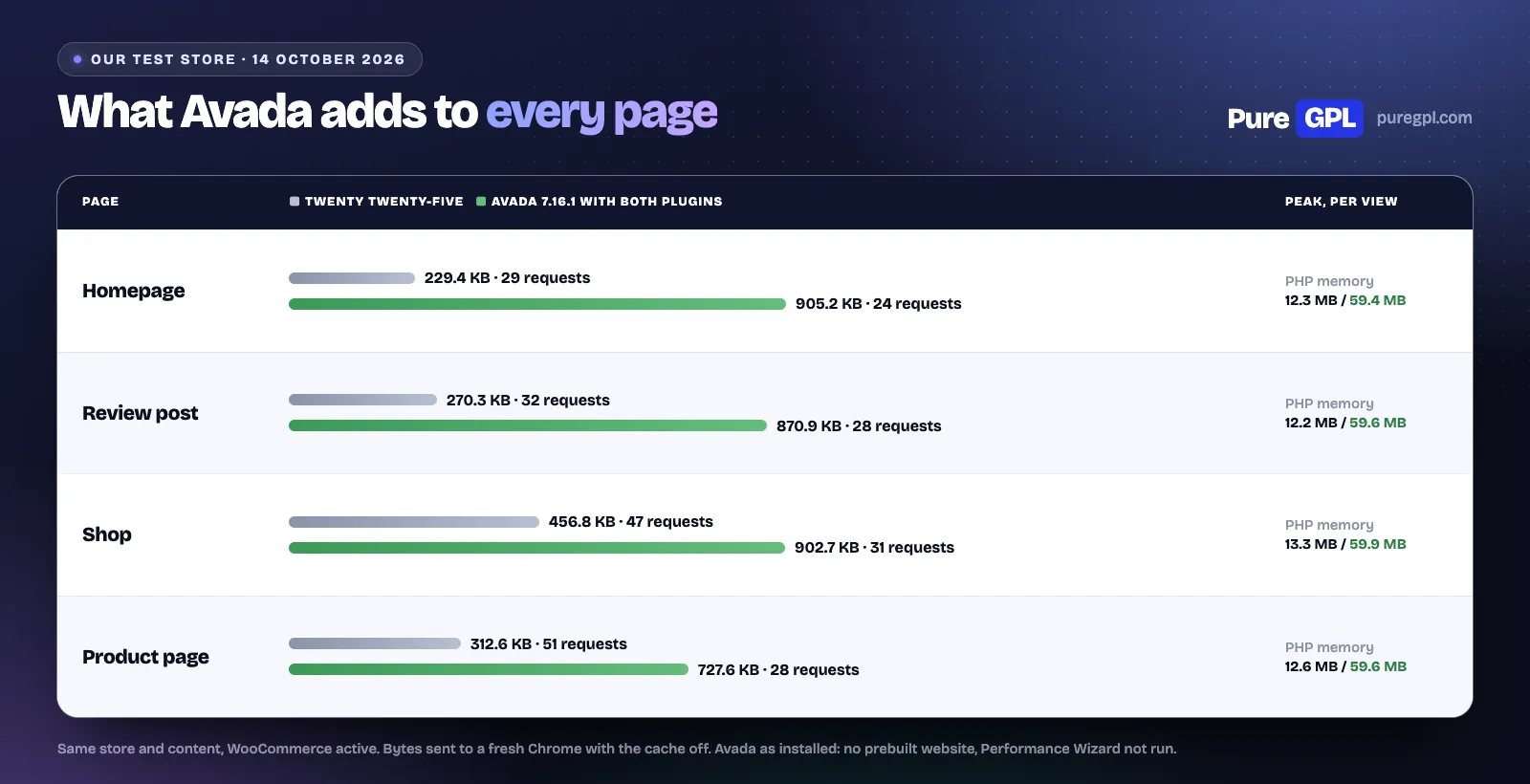
These figures are for Avada as it installs, without a prebuilt website and without running Avada’s Performance Wizard.
The “free download” pages on Google
We checked Google’s results in the United States (desktop, through the Mangools SERP checker) for “avada theme free download”, “avada builder plugin free download” and “avada core plugin free download” on 14 October 2026. Besides Avada’s own pages and some plugin resellers, these are the results worth knowing about:
- A theme-only download. The second result for “avada theme free download” is a download site offering “Avada 7.16.2” with one button, “Download Avada WP Theme”. Its readers’ comments say the plugins are missing: “Avada 7.16.2 – missed in package updated plugins: fusion-builder and fusion-core without them update dosent work, please fix.” The page promises an “Automatic Theme Updater directly through WP admin” and demos “imported with one click”; readers report “Import of demo content still fail” and “Envato API did not respond. Either the purchase code is incorrect”.
- A membership, not a free file. The fourth result, a GPL site, says “You can download this product for free by joining our membership”. Its page lists no separate download of Avada Builder or Avada Core, and it links its demo files from a file-sharing host, send.cm.
- A video from 2023. The third result is a YouTube tutorial uploaded on 2 July 2023, whose description links the download to the uploader’s own site and does not mention registration.
- An old zip. The fifth result is titled “Avada 7.9.3 theme for WordPress [zip]”, dated 18 March 2023, at an address that says “avada-8”. Avada’s latest version is 7.16.2, and its next product is Avada One. The page returned a server error when we tried to open it.
- Templated pages on unrelated sites. The first result for “avada core plugin free download” is a page titled “Download Avada Website Builder Elements Nulled WordPress Plugin Free” on a design studio’s site; the same template appears further down on a church’s site, claiming “26,490+ Downloads”. Each has a download button to a /download/ address on the same site, which we did not follow.
We did not download anything from any of these pages.
What other pages still say
Some pages that rank were right when they were written and have not kept up:
- Raidboxes, ninth for the main search, first published its guide in June 2019 and dates it July 2026. It still says “You can currently purchase the Avada theme from Themeforest for $60 and receive an unlimited licence to use the theme for one domain”; ThemeForest charges $69, for one site. It says “you must activate the theme using a token key”, while Avada’s licensing FAQ says “No, a token key will not work to register your Avada website. As of Avada 7.3 (March 2021), the process for registering your Avada website has changed.” It tells readers to activate ““Fusion Core” and “Fusion Builder””, now Avada Core and Avada Builder; it counts “Over 40 demos” and “over 610,000 licences sold”, against 113 prebuilt websites on Avada’s homepage and 1,073,186 sales on ThemeForest; and it says “No frontend editor (to be added in version 6)”, although Avada 6.0 shipped on 5 August 2019 with its live builder.
- A 2020 guide, second for the builder search, explains how to download the two plugins from ThemeFusion’s site by signing up “with your Envato Purchase Token”. The idea still works for buyers, but My Avada now asks for a purchase code: “you will need to register a valid Avada purchase code”.
- Counts on a GPL site. The fourth result for the main search says “45+ premade demo websites”. Avada’s own pages also disagree on Studio content: 642 items on its homepage, “650+” content blocks on ThemeForest.
- A price for Avada Builder. A reseller ranking for the builder search shows Avada Builder with “Original price was: $59.” ThemeFusion does not sell Avada Builder on its own, so there is no original price.
Which to choose
| Your situation | Choose | Why |
|---|---|---|
| A client site you will maintain | A ThemeForest licence | The purchase code brings prebuilt websites, premium plugins, dashboard updates and ThemeFusion’s support |
| You own a licence but registration keeps failing | My Avada, Support, Downloads | Avada’s own fallback: the plugin zips are there |
| Trying Avada on a test site | Our free download | The theme and both plugins at no cost; the theme file is 7.16.1 |
| Anyone | Not a templated “nulled” page on an unrelated site, or a theme-only download | The theme needs both plugins to get past its Setup Wizard, and we could not check what those pages’ download buttons lead to |
On PureGPL
You can download these three from us for free:
Later versions are not free. In our store, Avada costs $4.99 one-time and Avada Builder and Avada Core $3.49 each, or a membership from $14 a month includes the rest of our catalogue. On 14 October 2026 the store had the same versions as these free files. For an official licence, with a purchase code and ThemeFusion’s support, buy Avada on ThemeForest. For a hands-on look at the theme, see our Avada review.
What a GPL copy does and does not include
Avada’s files carry a split licence: the theme’s own header says “License: Themeforest Split Licence”, and Envato explains that such items “may be partially subject to the open source license”. A copy from us is not a ThemeForest licence:
- Purchase code: you do not get one, so you cannot register the site with ThemeFusion.
- Support: you do not get ThemeFusion’s support or a My Avada account.
- Updates: later versions come from our store, not from ThemeFusion.
If you need prebuilt websites, Avada Studio, the premium plugins or ThemeFusion’s support, buy Avada on ThemeForest.
Sources
Read on 14 October 2026. The downloads, measurements and screenshots are our own. The search results we describe are not linked.
- avada.com
- avada.com/?p=438940
- avada.com/blog/avada-one-beta
- avada.com/blog/avada-one-beta-wraps-up-pricing-and-what-comes-next
- avada.com/blog/version-7-16-2-security-update
- avada.com/documentation/avada-builder-plugin
- avada.com/documentation/avada-changelog
- avada.com/documentation/avada-theme-support
- avada.com/documentation/avadas-required-plugins
- avada.com/documentation/how-to-register-avada
- avada.com/documentation/how-to-use-the-avada-setup-wizard
- avada.com/documentation/plugin-installation-and-maintenance
- avada.com/documentation/requirements-for-avada
- avada.com/wp-content/themes/Avada/changelog.txt
- classic.avada.com/documentation/avada-registration-and-licensing-faq
- classic.avada.com/documentation/extending-and-renewing-avada-support
- classic.avada.com/documentation/how-to-import-a-prebuilt-avada-website
- classic.avada.com/documentation/how-to-install-avada-via-wordpress
- codecanyon.net/search/avada%20builder
- elegantthemes.com/join
- themeforest.net/item/avada-responsive-multipurpose-theme/2833226
- themeforest.net/licenses/terms/regular
Frequently asked questions
Is the Avada theme free?
No. It costs $69 for one site on ThemeForest, with six months of support. We offer Avada 7.16.1 as a free download; later versions are paid.
Where can I download Avada Builder and Avada Core?
Licence holders install both from Avada, Plugins once the site is registered, or, if registration keeps failing, download them from My Avada. We offer Avada Builder 3.16.2 and Avada Core 5.16.2 as free downloads.
Do I need Avada Builder and Avada Core?
Yes. Avada lists both as required, and in Avada’s code the Setup Wizard moves on to building the site only once both are active.
Does Avada Builder work with other themes?
Only partly. With Twenty Twenty-Five its Back-end Builder opened, but with Twenty Twenty-Five and with Astra its Live Builder never finished loading, while it loaded with Avada.
How do I install the Avada theme?
Upload the “Installable WordPress files only” zip under Appearance, Themes, Add New, then activate it. Install Avada Core and then Avada Builder, activate both, and run the Setup Wizard, which asks for your purchase code first. The full steps are in How to download and install the Avada theme.
What is the best free WordPress theme?
It depends on the site, but a free theme can be much lighter. On our store, WordPress’s default theme, Twenty Twenty-Five, sent 270.3 KB for our review post, against 870.9 KB with Avada and both plugins.
Which theme is better, Avada or Divi?
On price they are built differently. Avada is $69 per site, with updates for as long as you use it and six months of support. Elegant Themes sells Divi for any number of sites at $89 a year, with “24/7 Customer support” while you pay, or $249 once for “Divi Lifetime”. Before support costs, for one to three sites Avada costs less; from four sites, Divi Lifetime costs less than four Avada licences ($276). For the builders themselves, see our Avada review.
Which Avada zip do I upload?
The “Installable WordPress files only” zip. The “All files & documentation” zip also holds the child theme and documentation.
Can I use one Avada licence on several sites?
One live site and one staging site per purchase code. Avada says a code used on several live sites can be locked, and then “automatic updates will not work”.
Does Avada stop working when support expires?
No. Avada’s documentation says you “continue to receive Avada updates”; only hands-on support stops.
Are nulled Avada downloads safe?
We did not install any. Of the pages on Google we checked, one offered a theme-only download whose readers say the plugins are missing, one was titled with a 2023 version, and two were templated “nulled” pages on unrelated sites whose download buttons we did not follow. We would not install a file from a page like these.
More from our tests: Avada review, Enfold review, The7 review and Betheme review.