Content Egg Review 2026: Price Comparison for Affiliate Sites
Content Egg review: 30+ affiliate networks, price comparison, price history and alerts. Pricing, setup effort, and Content Egg vs AAWP.

Content Egg is a WordPress plugin for affiliate sites that pulls products, prices and offers from product feeds, affiliate networks and shop pages, keeps the prices updated and shows them in your posts as price comparisons, offer lists, price-history charts and price-drop alerts. Its developer, KeywordRush, sells a Pro version and gives away a free one on WordPress.org. We installed the free version on a test site and ran it end to end with example data: two product feeds, a price comparison across three shops and a price change it picked up when we ran its update.
How we tested. We installed Content Egg 11.9.0, the free version from WordPress.org, on a WordPress test store running WooCommerce and the Twenty Twenty-Five theme; it matched WordPress.org file for file. We wrote two small example product feeds as CSV files for two made-up shops (kitchen-depot.example and cookware-hub.example) and imported them with its feed wizard. We added a third offer for the same skillet through its Offer module, pointing at an example product page we put on our test server, then changed that page’s price and ran Content Egg’s price update by hand; we did not wait for a scheduled run. We showed all three on a test post with its price-comparison, offers-list, price-history and price-alert templates, signed up for a price alert from the front end, and measured what it adds to the page. We did not test Content Egg Pro: the networks it adds (Amazon, eBay, AWIN and others) need an account with each, which a test site does not have, so everything about Pro comes from the developer’s pages. We also did not test link cloaking or click counting, the price-alert email itself, or WooCommerce sync. Prices and plan details were read on 4 October 2026; the sources are linked at the end.
The short verdict
- Good for sites that send readers to several shops for the same product and want the prices kept current: feed import (up to 3 feeds), price comparison, price history and price-alert sign-up all worked in the free version.
- Pro is mostly about reach: it adds 29 network modules, including Amazon, eBay, AliExpress, Walmart and AWIN, and 50 feed modules instead of 3. Pro is $59 a year for one site, or $149 once.
- Watch the weight on posts with its price-history chart (about 479 KB of styles and scripts in our test, 223 KB with the price comparison alone, and nothing on the home and shop pages) and the refund terms: refunds within 14 days only if the plugin does not work, not for a change of mind.
At a glance
| Content Egg | Details |
|---|---|
| Developer | KeywordRush |
| Free version | WordPress.org, 10,000+ active installations, rated 3.9 from 56 reviews (38 five-star, 13 one-star) |
| Pro | $59 a year (1 site), $99 (5 sites), $179 (25 sites); or $149, $249 and $449 once |
| Networks | “30+ affiliate networks”, says its developer; 29 network modules are Pro, while the free version has GdeSlon, Sovrn, CJ Links and Skimlinks Coupons |
| Amazon | Pro only, through the Amazon API or a no-API module |
| Needs | WordPress 6.9 or later and PHP 8.0 or later |
| Refund | Within 14 days, only if the plugin does not work and support cannot fix it |
Pricing
Content Egg Pro comes as a yearly subscription or a one-time licence. The pricing page shows no introductory discount and no separate renewal price; the developer says existing customers “receive discounts on repeat purchases” without giving a figure, and the three-year figures below assume the yearly price repeats. Yearly plans include support while you subscribe; one-time licences include lifetime updates and one year of support. If a subscription lapses, the plugin keeps working, but updates and support stop.
| Plan | Per year | One-time | Sites |
|---|---|---|---|
| Content Egg Pro, 1 site | $59 | $149 | 1 |
| Content Egg Pro, 5 sites | $99 | $249 | 5 |
| Content Egg Pro, 25 sites | $179 | $449 | 25 |
| Over three years | 1 site | 25 sites |
|---|---|---|
| Yearly, three payments | $177 | $537 |
| One-time licence | $149 | $449 |
| Per site, one-time | $149 | $17.96 |
The one-time licence costs less than three years of the yearly plan at every size, though its support lasts one year. There is also a bundle of Content Egg with the developer’s Affiliate Egg and External Importer plugins, from $119 a year or $249 once.
Free or Pro?
The developer’s own line is “Every feature is in the free version”, and in our test that held for the features we used: feed import, the Offer module, price comparison, the price-history record and price-alert sign-up all worked without Pro. Pro widens where products can come from and adds AI features. The developer also lists Bridge Pages, landing pages on your own site before the shop, in the free version, and its settings include a Product/AggregateOffer schema markup option; we did not test either.
| Feature | Free | Pro |
|---|---|---|
| Feed import (CSV, XML, JSON) | Up to 3 feeds | Up to 50 feeds |
| Offer module (products you add by hand) | Yes | Yes |
| Network modules: Amazon, eBay, AliExpress, Walmart, AWIN and 24 more | Pro only; the free version has GdeSlon, Sovrn, CJ Links and Skimlinks Coupons, and keeps an old Amazon module, marked deprecated and hidden | Yes |
| Price comparison, price history, price alerts | Yes | Yes |
| Egg Blocks (editorial blocks) | Yes, 26 in our copy | Yes |
| AI agents | Read-only (17 abilities) | Can also build pages and edit products, modules and settings |
| Fully automatic AI prefill | Pro only | Yes |
The 29 Pro network modules, as the developer lists them: AliExpress, AllKeyShop, Amazon, Amazon NoAPI, Avantlink, AWIN, BestBuy, Billiger.de, Bol.com, CJ Products, CityAds.com, Coupang, Clickbank, Daisycon, eBay, Envato, Flipkart, Geizhals.de, Impact Radius, Kelkoo Group, Kieskeurig.nl, Linkwise, Lomadee.com, Paytm.com, Pepperjam, Rakuten (LinkShare), Shopee, Walmart and Webgains. Each needs your own account with that network or shop.
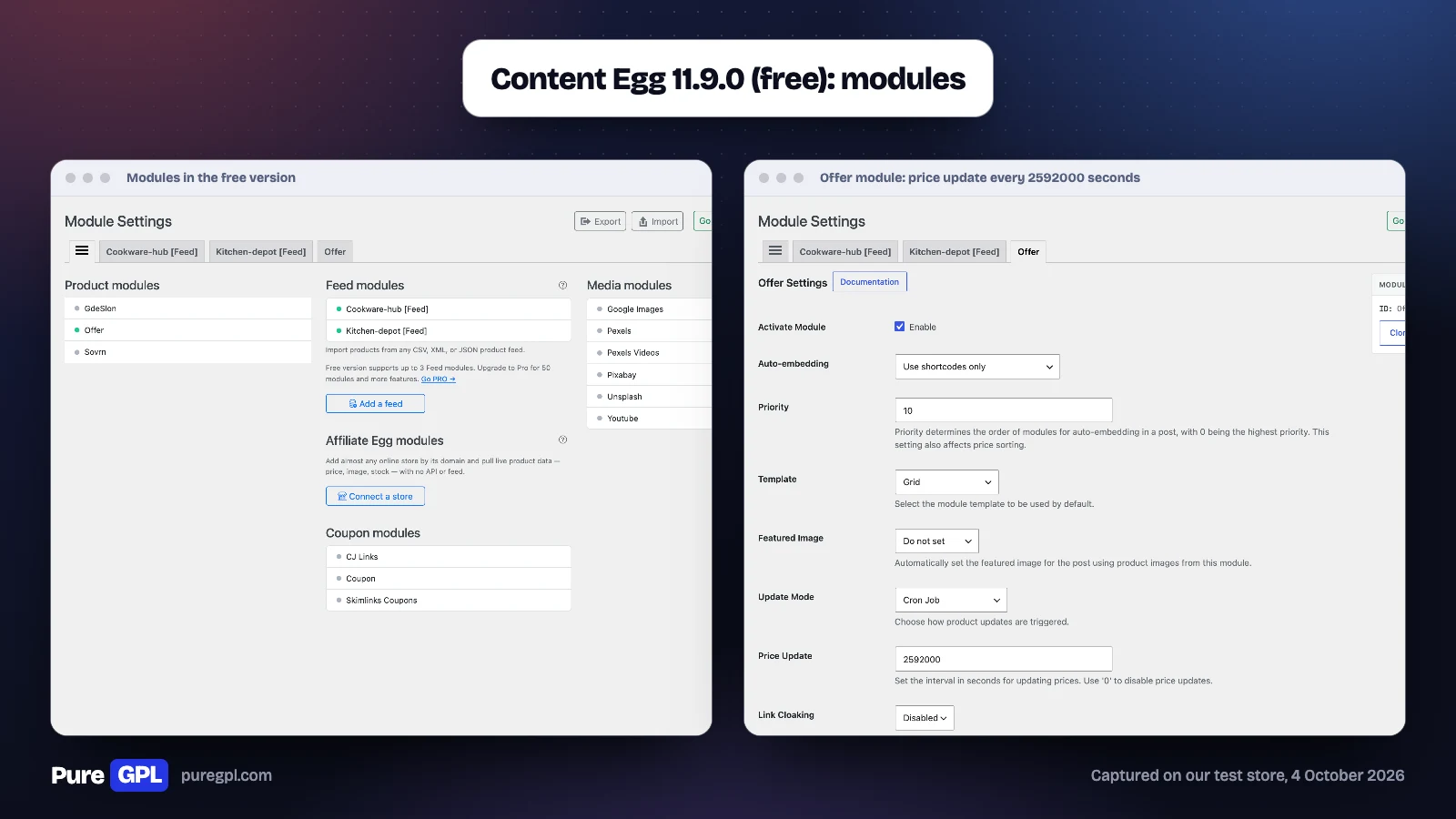
The free version’s own module screen listed three product modules (GdeSlon, Offer and Sovrn), three coupon modules, six media modules for images and videos, and the feed modules, with the note “Free version supports up to 3 Feed modules. Upgrade to Pro for 50 modules and more features.”
Setting it up
- Install the free version from WordPress.org. It needs WordPress 6.9 and PHP 8.0 or later.
- Open Content Egg, then Modules. Add a feed with the feed wizard, or switch on the Offer module for shops without a feed.
- Check each module’s update intervals: by default, feed files sync every 12 hours, feed products in posts refresh every 24 hours and offers every 30 days.
- In a post, add products from a module and place a block template (price comparison, offers list, price history, price alert) or an Egg Block.
- For click counts, switch on link cloaking, or “Track Clicks Without Redirect” for programs that prohibit cloaking, such as Amazon; both are off by default.
- For Amazon or a network, buy Pro and enter your account details in that module.
Getting products in
Feeds
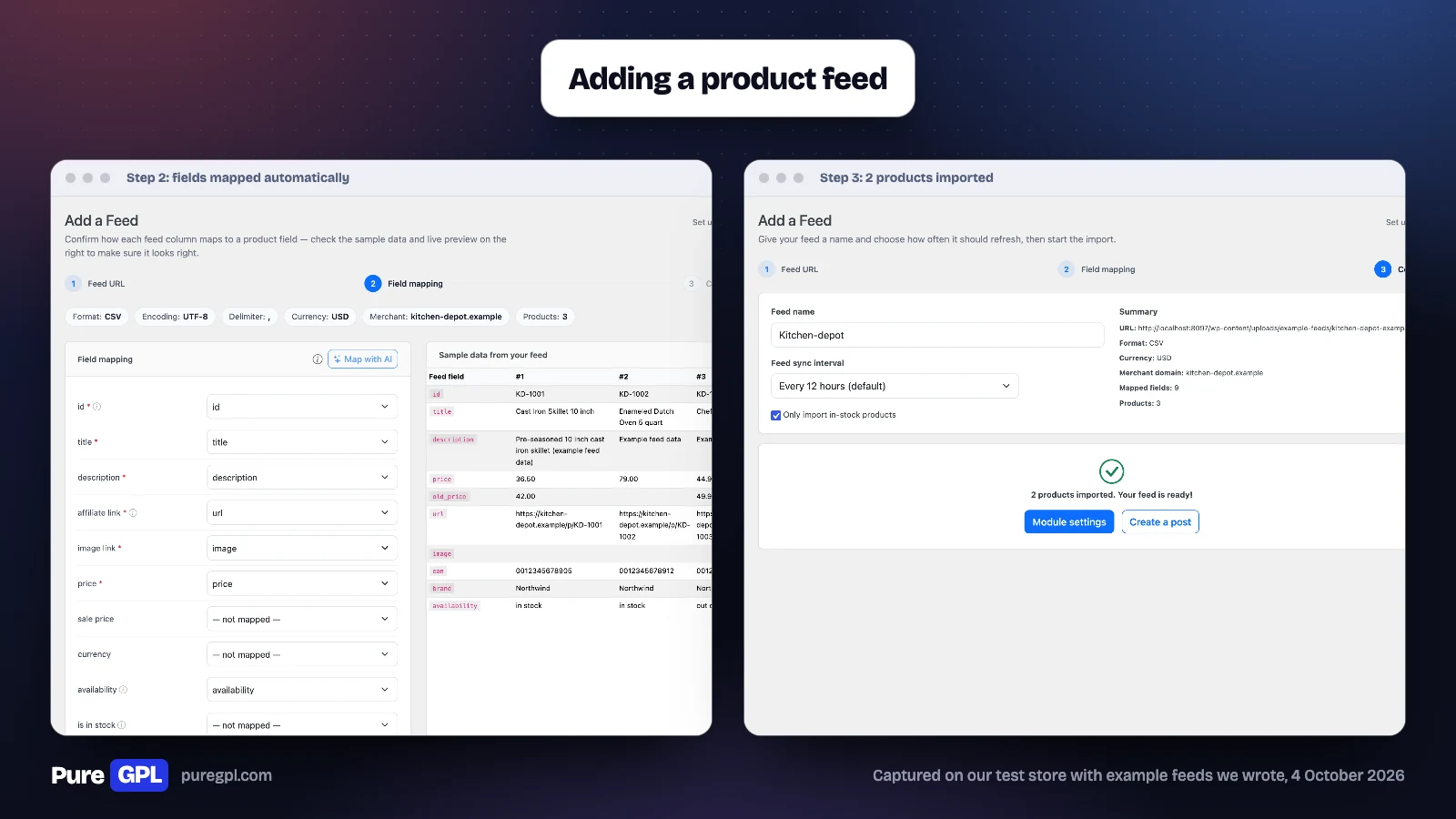
Most affiliate networks and many shops publish product feeds, and Content Egg’s feed wizard is the quickest way in. We pasted the URL of our first example feed; the wizard read it as CSV, UTF-8, comma-delimited, in US dollars, found 3 products and mapped 9 fields on its own, with sample data beside each field. Its confirm step offered a sync interval for the feed file (every 12 hours by default) and an “Only import in-stock products” box, ticked by default, so it imported 2 of our 3 products and skipped the one we had marked out of stock. Each feed belongs to one merchant domain, which it took from the product links.
Offers you add by hand
The Offer module is for a shop with no feed or network: you enter the product, price and link yourself, and give it a price selector so Content Egg can read the price from the shop’s page later. We pointed an offer at an example product page on our test server showing 39.00 dollars, changed the page to 34.00 dollars and ran Content Egg’s update: it read the new price, saved 34.00 dollars and kept 39.00 dollars in its price history. Its default is to check offer prices every 2,592,000 seconds, which is 30 days; network modules default to 3 days. Set it shorter if prices move often.
Affiliate networks and Amazon
Most network modules are Pro: the 29 listed above. The free version has two network product modules, GdeSlon and Sovrn, and two coupon modules, CJ Links and Skimlinks Coupons. Each network module connects to a network or shop with your account details and pulls products by keyword. Amazon comes as two Pro modules: one through Amazon’s API, and a no-API module the developer describes as “Designed for beginners”, for sites that do not have API access yet. We did not test any network module.
Showing products in posts
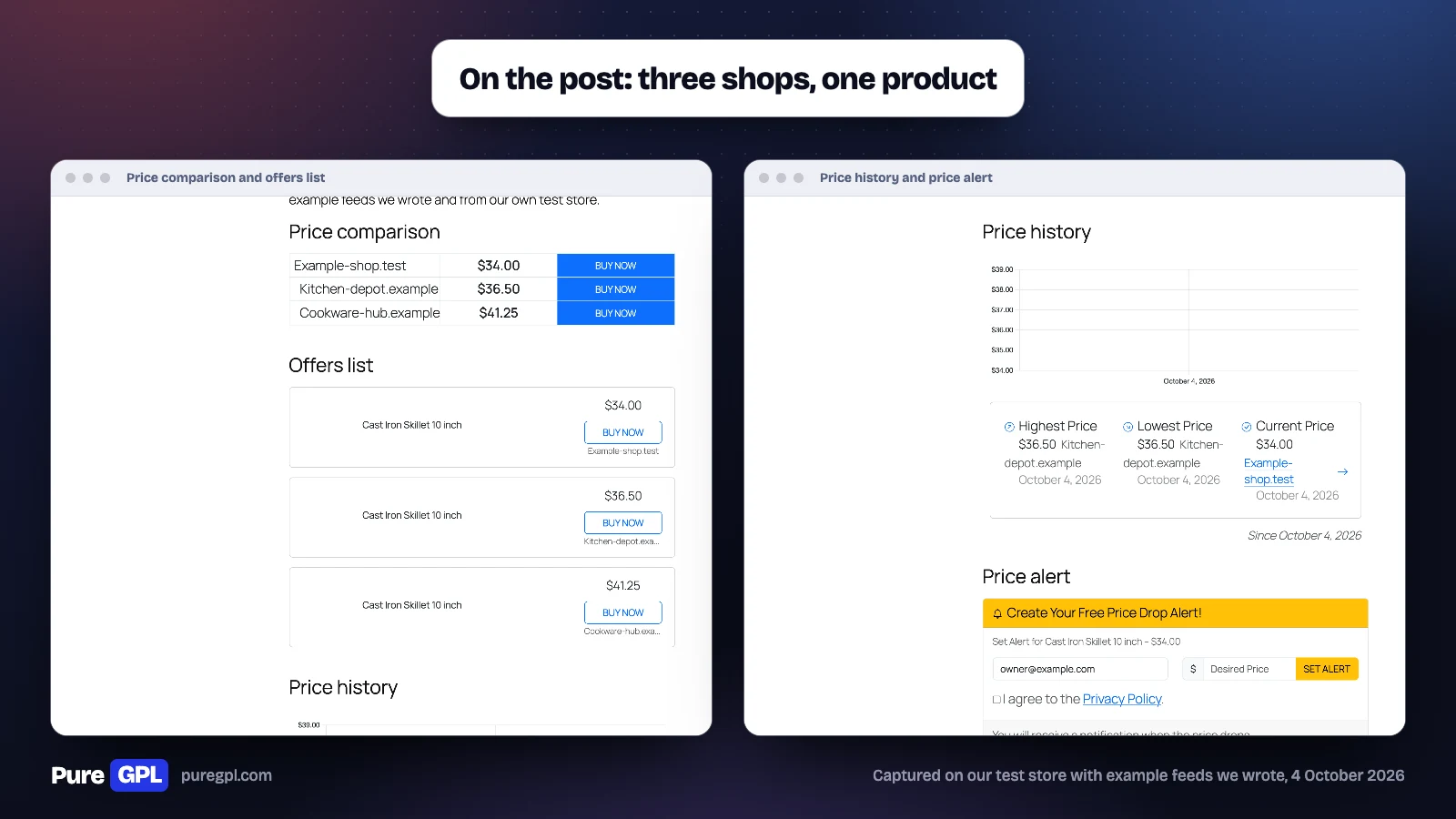
Content Egg gives you two ways to show products: its block templates, placed with a shortcode or block, and its Egg Blocks. The free version has 35 block templates, including a price comparison, offer lists and grids, a price-history chart, a price alert and coupons. On our test post, the price comparison listed the same skillet at three shops, cheapest first: 34.00, 36.50 and 41.25 dollars. It named each shop by its domain, not by the merchant name we gave the offer. Its Egg Blocks are 26 editorial blocks for review posts, plus a product manager block: Callout, Comparison Table, Conclusion, Contextual CTA, Criteria, Definitions, Editorial Product, FAQ, Intro, Key Takeaways, Methodology, Myth vs Fact, Pricing, Product Card, Pros & Cons, Quick Picks, Rating Breakdown, Related Posts, Section Header, Specifications, Step List, Testimonial, Table of Contents, Trust Signals, Verdict and Where to Buy. Blocks that show products stay empty until products are attached to the post.
What our test showed
| Step | What Content Egg did |
|---|---|
| Read our first feed | Detected CSV, UTF-8, a comma delimiter, US dollars and 3 products |
| Mapped the feed’s columns | 9 fields, on its own |
| Imported | 2 of 3 products: the out-of-stock one was skipped by default |
| Read a changed price from our example shop page, when we ran the update | Saved 34.00 dollars and kept 39.00 dollars in its history |
| Showed the same skillet from three shops | Sorted cheapest first: 34.00, 36.50 and 41.25 dollars |
| Took a price alert from a visitor | Recorded it and asked the visitor to verify their email first |
Keeping prices current
| Source | How prices update | Default interval |
|---|---|---|
| Feeds | The feed file is downloaded and re-imported; products in posts then refresh from it | Every 12 hours (file), every 24 hours (posts) |
| Offer module | The price is read from the shop’s page with your price selector | Every 30 days |
| Network modules (Pro) | The network’s API is asked again | Every 3 days |
Every price change is saved to a price history in the database: for our offer it held both 39.00 and 34.00 dollars. The price-history template charts the lowest price across shops, one point per day, so a change within the same day does not show on it: on our post it showed 36.50 dollars as both the highest and the lowest price, from one shop, and 34.00 dollars as the current price.
How the updates are triggered is a separate setting. Each module’s Update Mode offers Page View, Cron Job, or both; the Offer module was set to Cron Job on our store, and feed modules default to it in the code. Cron Job relies on WordPress’s scheduled tasks, so check they run on your site.
Products also appear only where you place them: each module’s Auto-embedding setting was on “Use shortcodes only” on our store, with options to embed products at the beginning or end of every post instead.
The templates we used
| Template | What it showed on our test post |
|---|---|
| Price comparison | One row per shop with its price and a Buy Now button, cheapest first |
| Offers list | Each offer with its title, price, button and shop |
| Price history | The highest, lowest and current price and the date tracking started, with a chart of the lowest price per day |
| Price alert | An email field, a desired price and a privacy checkbox |
Price alerts
The price-alert template lets a visitor leave an email and a target price. We signed up from the front end with a target of 30 dollars. Content Egg recorded the alert with the starting price of 34.00 dollars and showed “Please verify your email address to be notified of price drops”: alerts are double opt-in, so a visitor confirms by email before any alert is sent. Our test server does not send email, so we did not see the alert email itself.
Shops with no feed or API
For a shop with neither a feed nor a network, you have two routes. The free Offer module, which we tested, reads the price from the shop’s page with a selector you write. The other is the developer’s separate Affiliate Egg plugin, which Content Egg’s module screen says can “Add almost any online store by its domain and pull live product data”, meaning price, image and stock, “with no API or feed”. Affiliate Egg is sold separately, or in the bundle from $119 a year; we did not test it.
Price alerts and privacy
Price alerts collect visitors’ email addresses, so they fall under your privacy policy. The alert form we used asked visitors to tick “I agree to the Privacy Policy” before setting an alert, and Content Egg asked them to verify their address before sending anything. Mention price alerts in your privacy policy if you use them.
Settings, clicks and AI agents
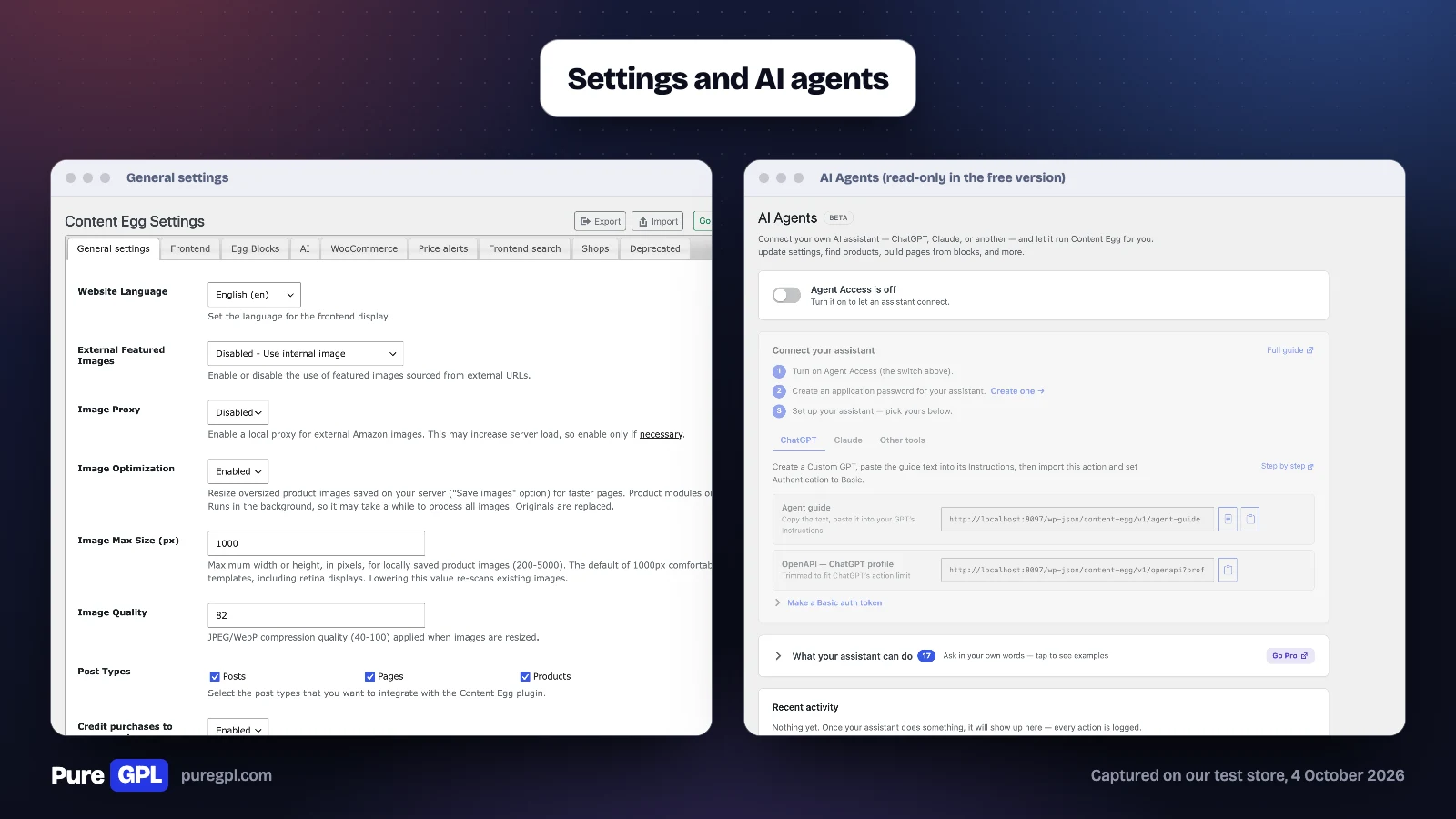
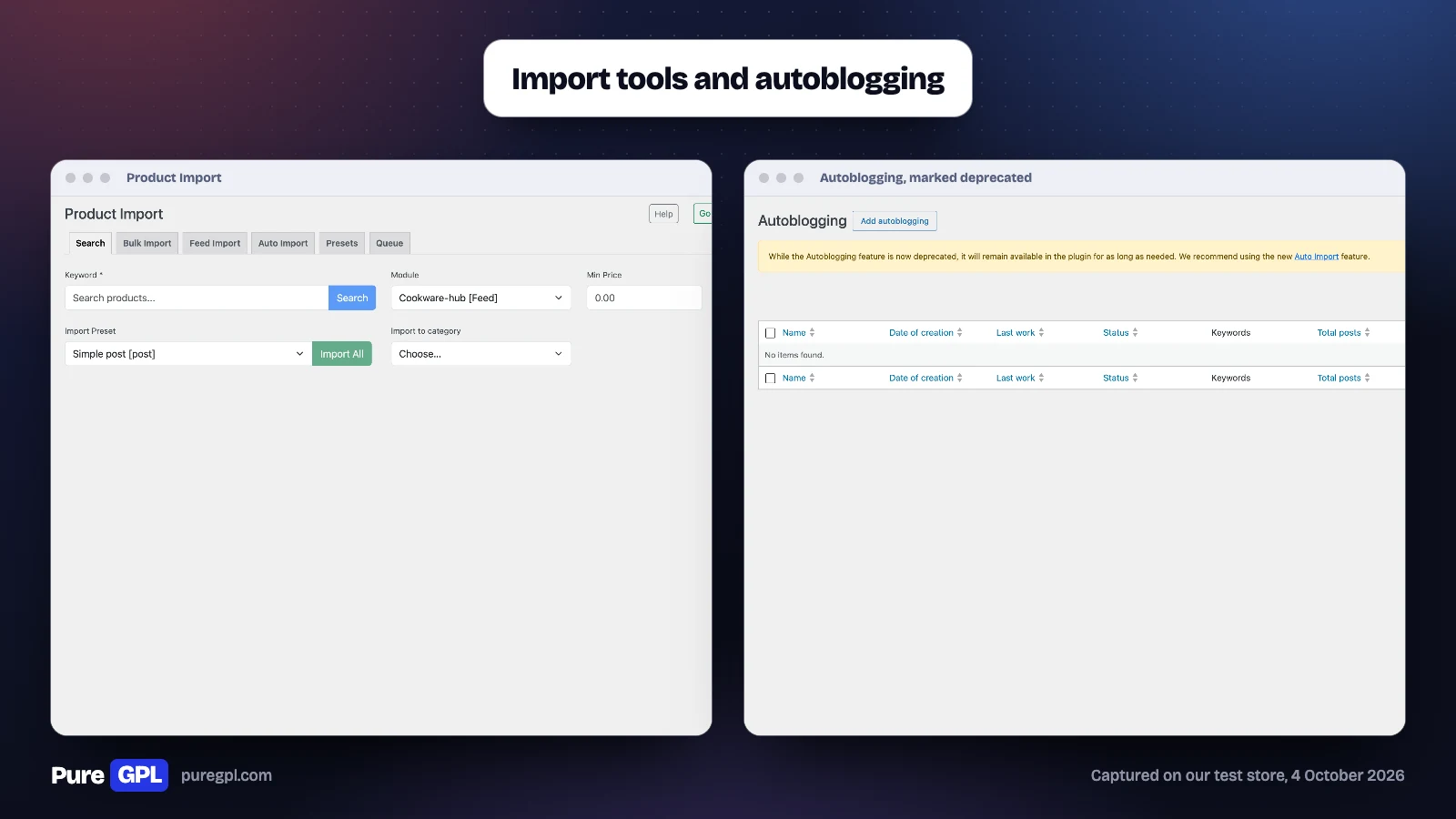
Link cloaking, which sends affiliate links through local redirect URLs so clicks can be counted, is off by default, and so is “Track Clicks Without Redirect”, which counts clicks on direct links and is the one to use for programs such as Amazon that prohibit cloaking. We did not test click counting. The AI Agents screen connects ChatGPT, Claude or another assistant to Content Egg; the free version includes 17 abilities, all read-only, while Pro “unlocks building pages and editing products, modules, and settings”. Autoblogging is still there, but its own screen says “the Autoblogging feature is now deprecated” and recommends the newer Auto Import.
Posts and WooCommerce products from your data
Content Egg can also turn imported products into posts or WooCommerce products: its developer lists “WooCommerce sync and autoblogging” in the free version, and its Product Import screen, which we opened, has search, bulk, feed and auto-import tabs. We did not create WooCommerce products with it, so we cannot say how well the sync works.
Updates and support
The free version was last updated on WordPress.org on 23 September 2026, and its support forum showed “Issues resolved in last two months: 1 out of 1”. Pro includes one year of support with the yearly and one-time licences alike, according to the pricing page.
Performance
| On our test store | Content Egg 11.9.0 (free) |
|---|---|
| Size on disk | 13.2 MB |
| Database tables created | 10 on activation, plus one per feed |
| Files added to the home and shop pages | 0 |
| Files added to a post with its templates | 2 scripts and 2 stylesheets |
| Size of those files | 479 KB, uncompressed |
On the home and shop pages, which showed none of its products, it added no files. On our test post it loaded its own Bootstrap stylesheet (217 KB) and product stylesheet with any of its templates, 223 KB in all, and Chart.js with a date adapter only when the price-history chart was on the page. If speed matters, leave the price-history chart off posts that do not need it.
Pros and cons
Pros
- Feed import, price comparison, price history and price-alert sign-up all worked in the free version.
- The feed wizard detected the format and mapped the fields on its own.
- The Offer module read a changed price from a shop page we made, with no network account.
- One-time licences, from $149 for one site.
- Nothing loaded on our home and shop pages.
Cons
- Amazon, eBay and the other 27 listed network modules need Pro, plus an account with each.
- About 479 KB of styles and scripts on posts that use its price-history chart.
- Offer prices are checked every 30 days by default.
- Refunds only if the plugin does not work, not for a change of mind or missing API access.
- Shops are named by their domain in the price comparison.
Who it is for
| Your site | Content Egg? | Why |
|---|---|---|
| Review blog linking to several shops | Yes | Price comparison, history and alerts on one post |
| Price comparison or deals site | Yes, probably Pro | Feeds plus network modules, with prices updated on a schedule |
| Amazon-only niche site | AAWP is more direct | Content Egg’s Amazon modules are Pro, and AAWP is built for Amazon alone |
| A few hand-picked links | A link manager instead | Pretty Links and ThirstyAffiliates counted every click in our roundup test, with no feeds to set up |
Content Egg or AAWP?
| Feature | Content Egg | AAWP |
|---|---|---|
| Where products come from | Feeds, shop pages and 30+ networks, says its developer | Amazon |
| Free version | Yes, on WordPress.org | None |
| Amazon without your own API keys | A no-API module, in Pro | AAWP’s own API, a paid service |
| One site, yearly | $59 | €79 before tax |
| One site, one-time | $149 | €299 before tax |
| Refund | 14 days, only if it does not work | 30-day money-back guarantee |
If every link on your site goes to Amazon, AAWP, built for Amazon alone, is the more direct tool; see our AAWP review. If you send readers to several shops and want one price comparison across them, with price history and alerts, Content Egg is built for that; AAWP covers Amazon alone.
What other reviews get wrong
- Amazon in the free version. An older review lists Amazon among the free modules. The developer’s page now lists Amazon only in Pro; the free plugin still carries its old Amazon module, but marks it deprecated and leaves it off the module screen.
- Licence terms. The same older review quotes a 5 dollar licence transfer and renewals at 15 dollars a year for all domains; the developer now sells Pro at $59 a year or $149 once.
On PureGPL
Content Egg Pro is in our catalogue at $3.49. The free version is on WordPress.org.
What a GPL copy does and does not include
Plugins licensed under the GPL can be redistributed, which is why we can sell copies; check the developer’s own licence for the terms. A GPL copy comes without a licence from the developer, so it comes without the developer’s support, and anything that runs through the developer’s own account or service is not part of it. Updates come from us. If you want the developer’s support, buy from the developer.
Sources
Prices, plans and the refund policy were read from these pages on 4 October 2026. The screens, tests and measurements are from our own test store.
- Content Egg Pro pricing
- Content Egg Pro
- KeywordRush refund policy
- Content Egg on WordPress.org
- AAWP pricing
Frequently asked questions
Is Content Egg free?
Yes. The free version on WordPress.org includes feed import, price comparison, price history and price alerts. Pro adds 29 network modules, including Amazon, and up to 50 feeds instead of 3.
Does Content Egg work with Amazon?
Yes, in Pro: through Amazon’s API, or through its no-API module before you have API access.
Do I need accounts with the affiliate networks?
For the network modules, yes, an account with each (Amazon also has a no-API module in Pro). The Offer and Feed modules need none.
How often does Content Egg update prices?
By default, feed files every 12 hours, feed products in posts every 24 hours, network modules every 3 days and hand-added offers every 30 days. Each interval can be changed.
Can I buy it once instead of yearly?
Yes. One-time licences are $149, $249 and $449 for 1, 5 and 25 sites.
Does Content Egg slow down a site?
On our home and shop pages it added no files. On a post with its price-history chart it added 2 scripts and 2 stylesheets, about 479 KB uncompressed, most of it its Bootstrap stylesheet and the Chart.js library; with the price comparison alone it was 223 KB. We measured file weight, not page load times.
Does it need WooCommerce?
Not for posts: our test post was an ordinary WordPress post, though our test store also ran WooCommerce. WooCommerce is needed if you want Content Egg to create WooCommerce products from your data.
Is Content Egg worth it?
If your posts send readers to several shops for the same products, yes: the free version covers up to 3 feeds, price comparison, price history and price-alert sign-up. If you only link to Amazon, AAWP is the simpler choice, and if you only need a few tracked links, a link manager is enough.
Can I get a refund?
Only within 14 days, and only if the plugin does not work and support cannot fix it. Try the free version first.
Related: best WordPress affiliate plugins, our AAWP review and Pretty Links Pro review.


