REHub Theme Review 2026: Is It Still the Best Affiliate Theme?
REHub theme review: what you can build, how long setup really takes, the downsides, and who should choose a lighter theme instead.


REHub is a WordPress theme for affiliate, price comparison, deal and marketplace sites, sold on ThemeForest. It comes with its own review boxes, offer boxes, comparison blocks and templates for the Content Egg plugin, and its ThemeForest page showed 38,721 sales. We installed REHub on a test store, built a review post with its shortcodes, tried a demo import, measured it against WordPress’s default theme, and checked what happens to your posts if you ever switch away. This review covers what it can do, what it costs, how heavy it is and what a GPL copy does and does not get you.
How we tested. We installed REHub 19.9.9.7 with its required REHub Framework plugin, version 19.9.9.7, on a WordPress test store running WooCommerce with one example product, and compared it with WordPress’s default Twenty Twenty-Five theme on the same store. We built one test post with REHub’s offer box, review box, pros and cons and versus shortcodes, plus REHub’s template for the Content Egg plugin showing three example offers we made for our Content Egg review. We opened its theme options, its plugin and demo screens, and tried to import its ReViewit demo. We measured page weight in Chrome with the cache off. Our REHub copy is from our own catalogue and is not the developer’s own release: it had lines added to functions.php that write a licence option with a purchase code, and its licence check had been replaced with a fixed reply that says the purchase is verified and lists the download addresses for the demos and bonus plugins. So on our store REHub reported itself as registered and listed its demos, and we could not test what the developer’s own licence check does. We blocked every request to the developer’s licence and download servers on our test store, so nothing was sent to them or downloaded from them; as a result the demo did not import. We used REHub’s shortcodes, not its Gutenberg blocks. We did not install Elementor or Greenshift, which many REHub demos use, so our page-weight figures are for REHub without a demo. Prices and version details were read on 4 October 2026; the sources are linked at the end.
The short verdict
- Good for affiliate sites that want review boxes, offer boxes, comparison blocks and deal layouts built into the theme, especially with Content Egg: REHub ships 13 templates of its own for it.
- Cheap to buy: $59 once on ThemeForest for one site, with updates included and 6 months of support.
- Watch the lock-in: the boxes we built are theme shortcodes. When we switched the store to the default theme with REHub Framework off, readers saw the raw shortcode text instead of the boxes.
At a glance
| REHub | Details |
|---|---|
| Sold on | ThemeForest, item 7646339 |
| Price | $59 Regular License, $3000 Extended License |
| Support | 6 months, can be extended to 12 |
| Sales and rating on ThemeForest | 38,721 sales, 4.89 stars from 1.7K ratings |
| Latest version | 19.9.9.8, 28 June 2026 |
| Required plugin | REHub Framework, bundled with the theme |
| Size on disk | 21.3 MB for the theme, 9.3 MB for REHub Framework |
| Demos | 19 in its demo importer |
Price and licence
| Licence | Price | What it covers |
|---|---|---|
| Regular License | $59 | One end product, not one that is sold; future updates; 6 months of support |
| Extended License | $3000 | Also covers use in an end product that is sold |
REHub is a one-time purchase, unlike most of the affiliate plugins we review: the $59 Regular License includes “Future updates” with no yearly renewal, and support can be extended to 12 months at checkout. ThemeForest’s licence FAQ defines a single application as “one unique end product”, so one Regular License covers one end product, such as one site. The ThemeForest page also lists 12 bonus plugins that come with a registered purchase: Revolution Slider, Import WP PRO, RH Frontend PRO, RH Link PRO, RH Woo Tools, RH Brand logo plugin, RH Gif plugin, RH Chart PRO, Greenshift Animation addon, Layered Popup plugin, WooCommerce Sale Notification plugin and Smart Code AI plugin. REHub’s own Plugins screen offered 8 bonus plugins on our store: Revolution Slider, RH Frontend Posting, RH Chart, RH Link Offer Cloaking, RH Woo Tools and Import WP with two add-ons. It takes their download links from the reply to its licence check, as it does for the demo files.
What a comparison site costs over three years
REHub has no renewal. Its price comparison across other shops uses Content Egg, and Content Egg Pro, which has the Amazon modules, renews yearly unless you buy its one-time licence. For one site, at the prices read on 4 October 2026:
| Setup | Year 1 | Over three years |
|---|---|---|
| REHub with free Content Egg | $59 | $59 |
| REHub with Content Egg Pro, one-time | $208 | $208 |
| REHub with Content Egg Pro, yearly | $118 | $236 |
| Content Egg Pro, one-time, on a theme you have | $149 | $149 |
ThemeForest offers to extend support from 6 to 12 months at checkout; we did not record that price. Theme updates need no renewal.
What you can build
REHub’s demo importer listed 19 demos: ReMart, ReCart, ReCompare, ReDeal, ReFashion, ReGame, ReLearn, ReDigit, ReTour, RePick, ReCash, ReDokanNew, ReWise, ReVendor, ReThing, ReDirect, ReMag, ReViewit and ReMarket, filed under the tabs Multi vendor, E-commerce, Comparison, Deal Site, Other and Reviews. They cover the four kinds of site REHub is built for: review sites, price comparison sites, deal and coupon sites, and stores or marketplaces on WooCommerce.
Which plugins each demo needs
Each demo has its own list of required plugins, written into REHub’s importer. Most need a page builder: Greenshift for 12 of the 19 demos and Elementor for 6. WooCommerce is required by 13, and Content Egg by the 3 comparison and deal demos built on it. RePick requires only Content Egg, though its notes ask you to switch on Content Egg’s Amazon modules, which are in Pro.
| Demo | Tab | Required plugins |
|---|---|---|
| ReMart | Multi vendor | Greenshift, WooCommerce |
| ReCart | E-commerce | Greenshift, Greenshift Animation Addon, WooCommerce |
| ReCompare | Comparison | Content Egg, Greenshift, Greenshift Animation Addon, WooCommerce |
| ReDeal | Deal Site | Greenshift, Greenshift Animation Addon |
| ReFashion | E-commerce | Elementor, WooCommerce |
| ReGame | E-commerce | Greenshift, WooCommerce |
| ReLearn | E-commerce | Greenshift, WooCommerce |
| ReDigit | E-commerce | Elementor, WooCommerce |
| ReTour | Multi vendor | Elementor, WooCommerce |
| RePick | Deal Site | Content Egg |
| ReCash | Deal Site | RH Frontend Publishing Pro, Greenshift |
| ReDokanNew | Multi vendor | Elementor, WooCommerce |
| ReWise | Comparison | Content Egg, Greenshift, WooCommerce |
| ReVendor | Multi vendor | Greenshift, WooCommerce |
| ReThing | Other | Elementor |
| ReDirect | Other | RH Frontend Publishing Pro, Elementor, WooCommerce |
| ReMag | Reviews | Greenshift |
| ReViewit | Reviews | Greenshift, Greenshift Animation Addon |
| ReMarket | Multi vendor | Greenshift, Greenshift Animation Addon, WooCommerce |
The importer also lists optional plugins per demo, such as BuddyPress, MyCred for cashback points, Contact Form 7 and Geo My WordPress. Each demo’s theme option file ships with the theme, but its content and widget files do not. In the developer’s code, REHub sends your purchase code to its licence server at lookmetrics.co, and the importer takes the content and widget file addresses from the reply, building the demo list only when the reply holds data.
Setting it up
REHub needs its REHub Framework plugin, which comes inside the theme package rather than from WordPress.org; its theme options, its Gutenberg blocks and the list of its shortcodes live there, while the code that draws the shortcodes is in the theme. After activation, a notice recommended Elementor, Envato Market, Greenshift and the Greenshift Animation addon. Demos install through the One Click Demo Import plugin, and each demo lists the plugins it needs first: ReViewit required Greenshift and the Greenshift Animation Addon, and suggested REHub’s own RH Frontend Publishing Pro.
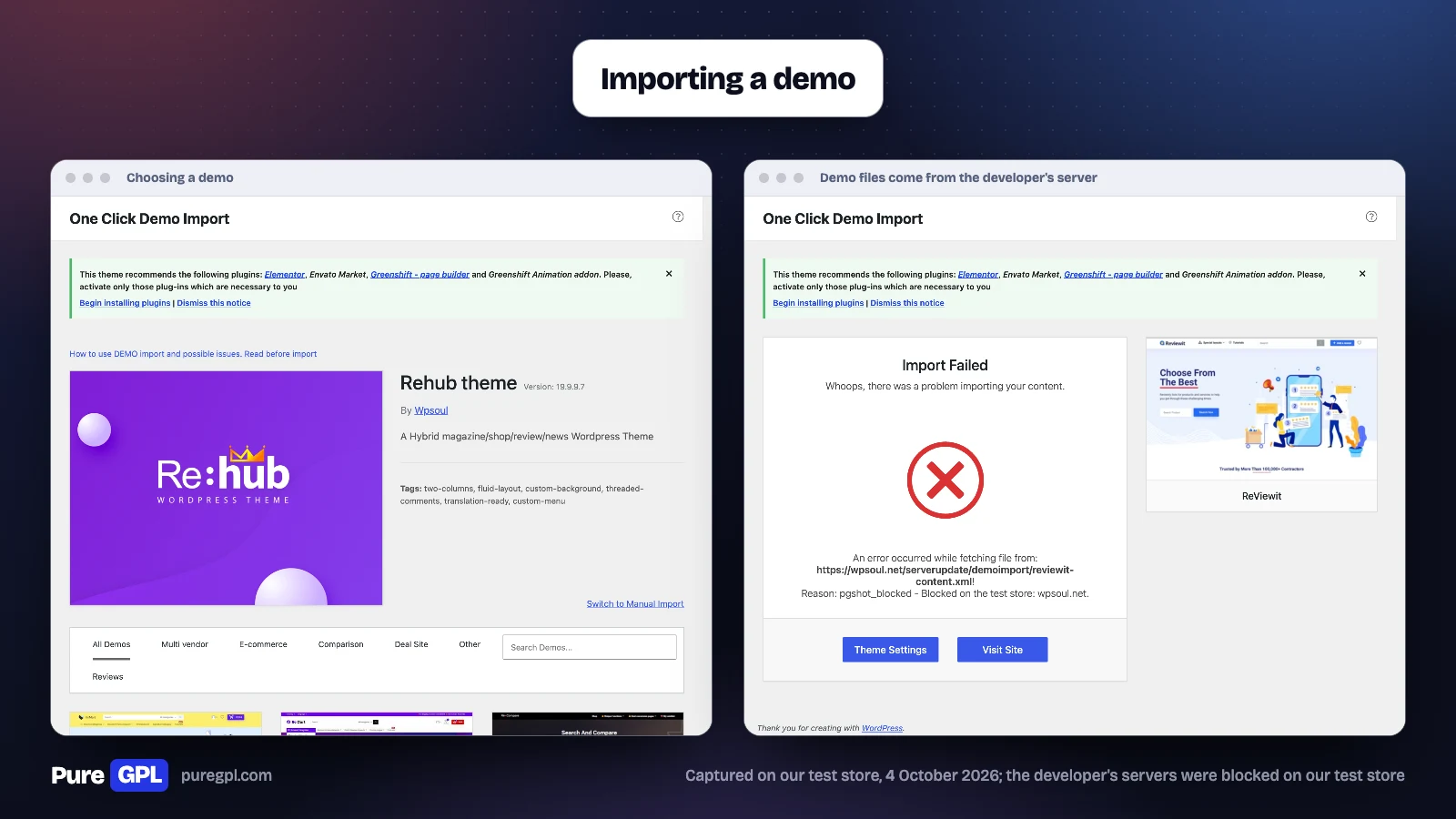
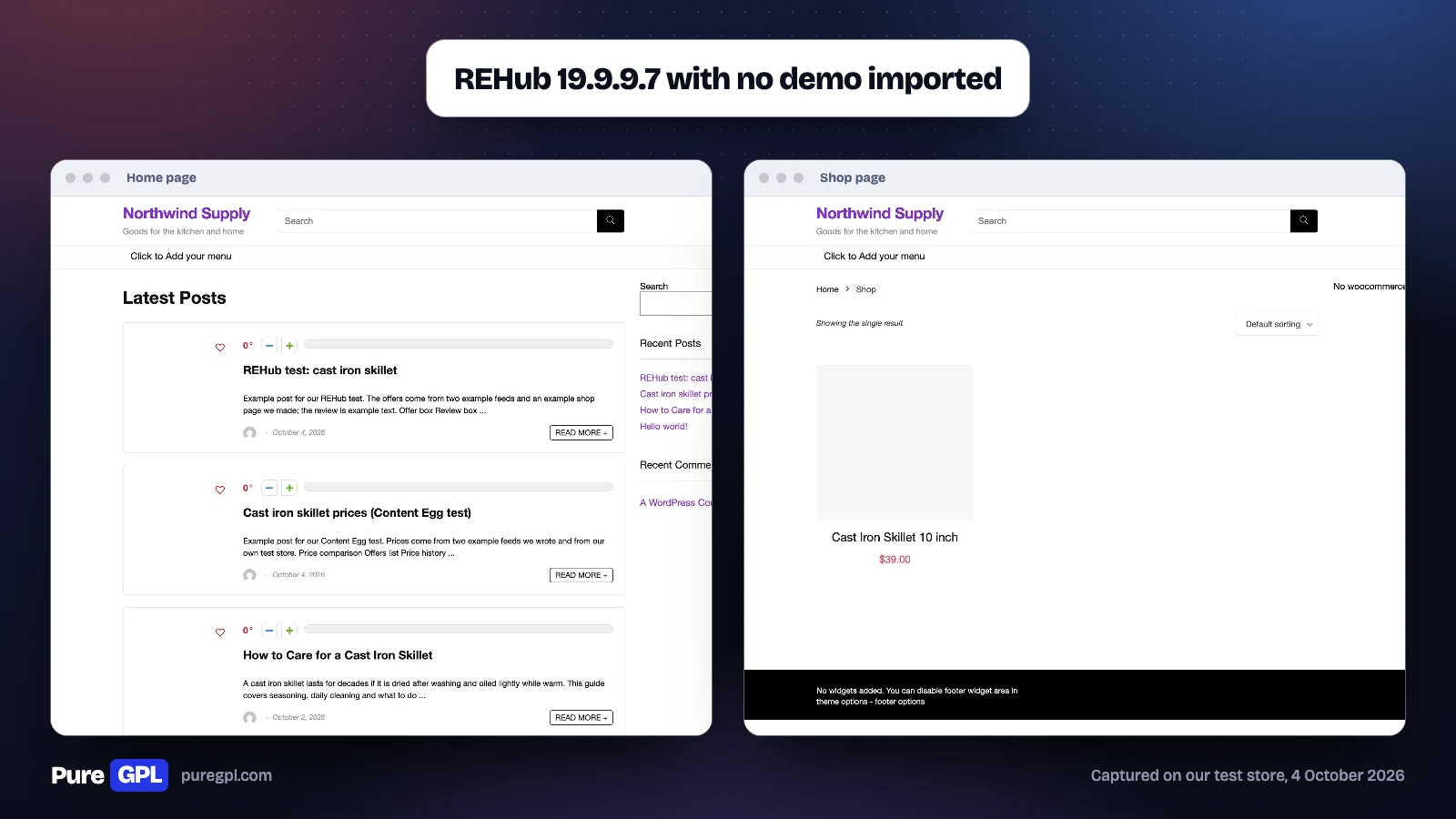
Demo import and the bonus plugins depend on the developer’s servers. In the developer’s code, REHub checks your purchase code with its licence server before giving access to demos and bonus plugins, and its code holds the messages “To get access to ALL demo stacks, you must register your purchase” and, for a copy it does not recognise, “You have no access to demo import, because you are using nulled or not official theme version”. In our copy that check had been replaced with a fixed reply, so the demo list appeared; the reply pointed the ReViewit demo at wpsoul.net, and with that server blocked the import stopped with “Import Failed” and named the address. Without a demo, REHub gave us a plain blog layout with a search bar and sidebar, and a basic shop grid.
How we built the test post
- Activated REHub Framework and switched the theme to REHub.
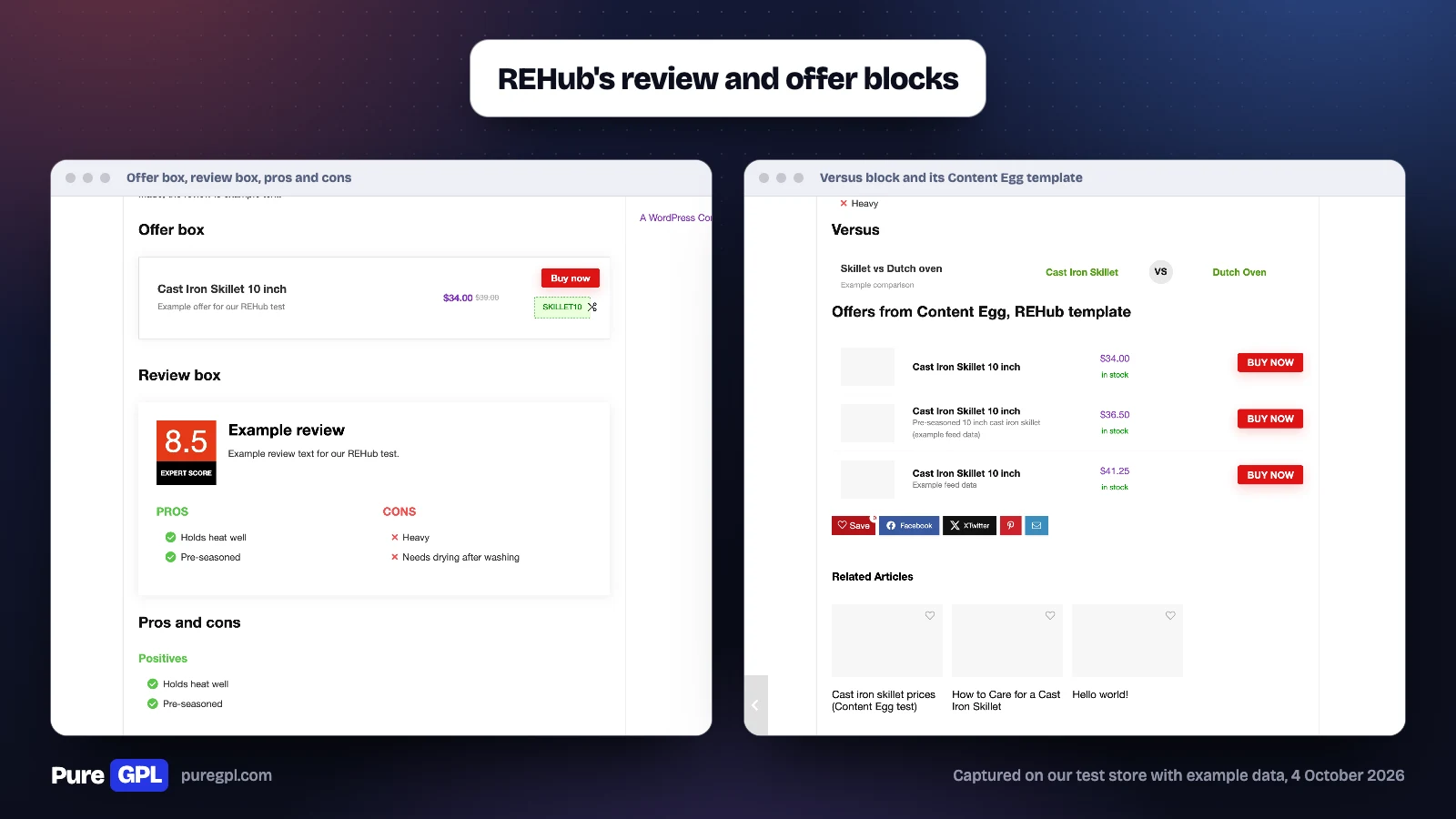
- Wrote a post with REHub’s shortcodes for an offer box (title, a 34.00 dollar price, the old price of 39.00 dollars, the coupon SKILLET10 and a Buy now link), a review box with a score of 8.5 and two pros and two cons, a pros and cons pair and a versus block.
- Copied the three skillet offers from our Content Egg test post and placed them with REHub’s offers-list template.
- Opened the post as a visitor, then measured it: 43 requests and 199 KB.
- Switched the store back to Twenty Twenty-Five with REHub Framework off and opened the same post again.
Reviews and offers
For review sites, REHub’s boxes are a main reason to choose it. On our test post, its offer box showed the product, a sale price with the old price crossed out, a Buy now button and a coupon code; its review box showed an expert score of 8.5 with pros and cons below it; and its versus block set two products side by side. REHub registers 130 shortcodes, and its framework 48 Gutenberg blocks, for this kind of content, including comparison tables, deal grids, offer listings, a score box and a table of contents.
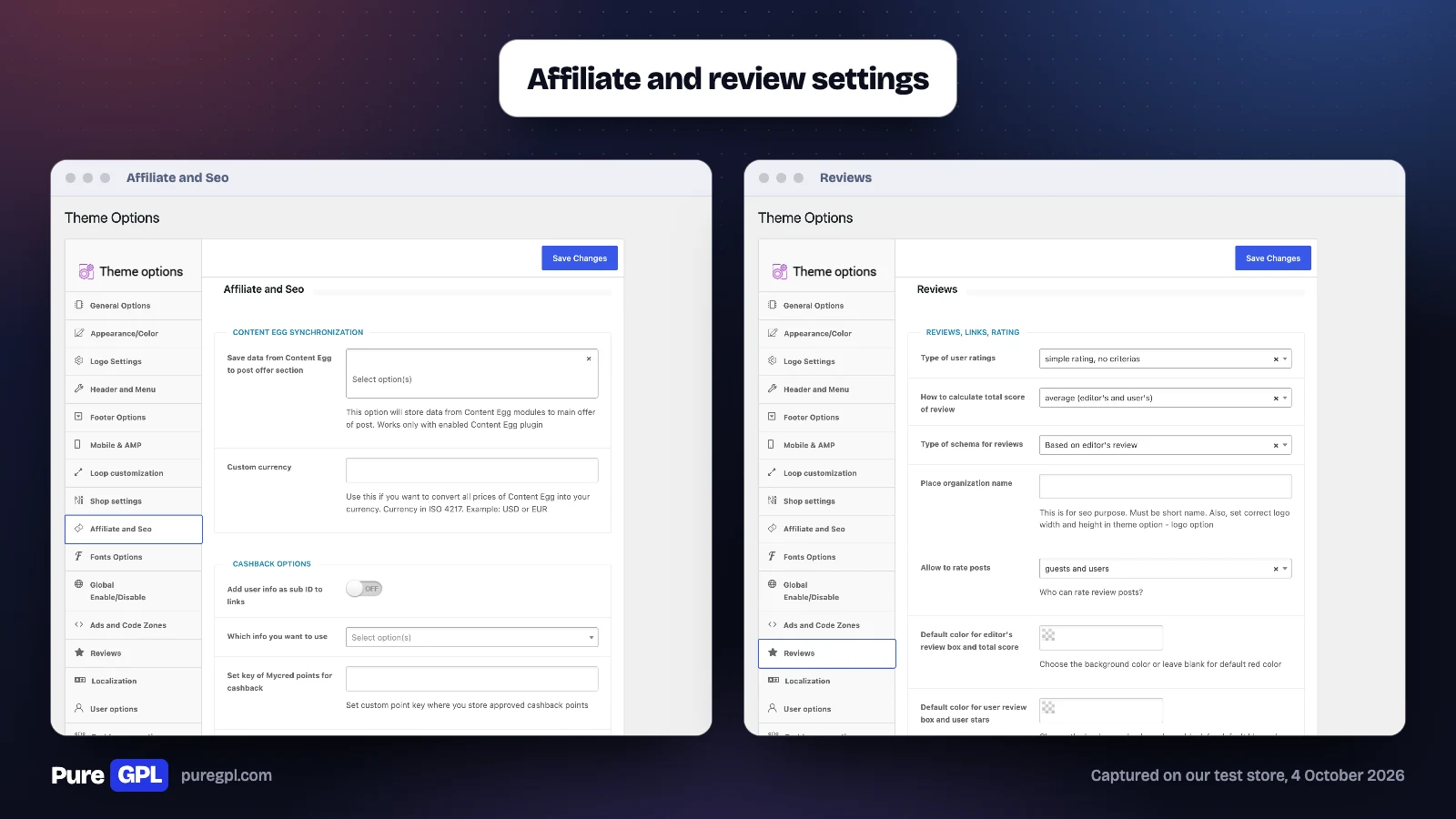
Its Reviews settings decide how scores work: user ratings can be a simple rating or a full review with criteria and pros and cons; the total score defaults to an “average (editor’s and user’s)”; and the review schema defaults to “Based on editor’s review”, with options to use user reviews or turn REHub’s schema off and use your own.
By default both guests and logged-in users can rate review posts. User reviews can have your own criteria, typed as a list such as “Design,Price,Battery life”. The editor’s review box is red by default and the user review box blue, and REHub asks for a short organization name for the review schema. With RH Frontend Publishing, one of the bonus plugins, visitors can send reviews through a form with your criteria fields.
| On our test post | What REHub showed |
|---|---|
| Offer box | Title, 34.00 dollars with 39.00 dollars crossed out, a Buy now button and the coupon SKILLET10 |
| Review box | An 8.5 “Expert Score”, our example text, and pros and cons in two columns |
| Pros and cons | Green ticks for positives, red crosses for negatives |
| Versus | Two products side by side with a VS badge |
| Content Egg offers (REHub template) | Three offers at 34.00, 36.50 and 41.25 dollars, each with a Buy now button and stock status |
Price comparison with Content Egg
REHub compares prices in two ways. For your own WooCommerce products, a product layout lists products that share a SKU, cheapest first; WooCommerce normally refuses a SKU that is already in use, and we did not test this layout. For offers from other shops and networks, it uses the Content Egg plugin (see our Content Egg review). REHub adds 13 templates of its own for Content Egg, among them offer lists, grids, logo lists, merchant widgets, and full price-history and price-alert blocks, plus its own versions of Content Egg’s module templates. On our test post, REHub’s offers-list template showed the same three skillet offers as Content Egg’s own template did on the default theme, in REHub’s style. Its Affiliate and Seo settings can copy Content Egg data into the post’s main offer, convert all Content Egg prices into one currency, and add a user’s ID or login to links as a sub ID, for cashback sites. The ThemeForest page says of Content Egg: “Free version is enough for your start. The difference with PRO is only in a number of affiliate modules.”
Affiliate settings worth knowing
- Sub IDs per network. REHub can add the user ID, the user’s login, or the post author’s login or ID to affiliate links as a sub ID, with a different parameter for each network on its own line, written as “amazon.com@subid=”. A domain written as “domain.com@exclude” gets no sub ID.
- Cashback points. It can store approved, pending and declined cashback as MyCred points, under keys you set.
- Expired offers. One switch hides all expired offers from archives.
- The year in titles. It can run shortcodes in titles, so a title can show the current month or year.
- An affiliate store archive. It can add an Affiliate Store taxonomy to posts, with its own link slug and six layouts: deal list, regular list, deal grid, a mobile-optimized deal grid, regular grid and compact grid.
REHub’s 13 Content Egg templates are: offers grid, offers list, offers logo and grouped logo list, logo list widget, merchant widget and grouped merchant widget, simple list and grouped simple list, full price alert, full price history, and two price-movers widgets (grid and top offers).
Stores, deals and marketplaces
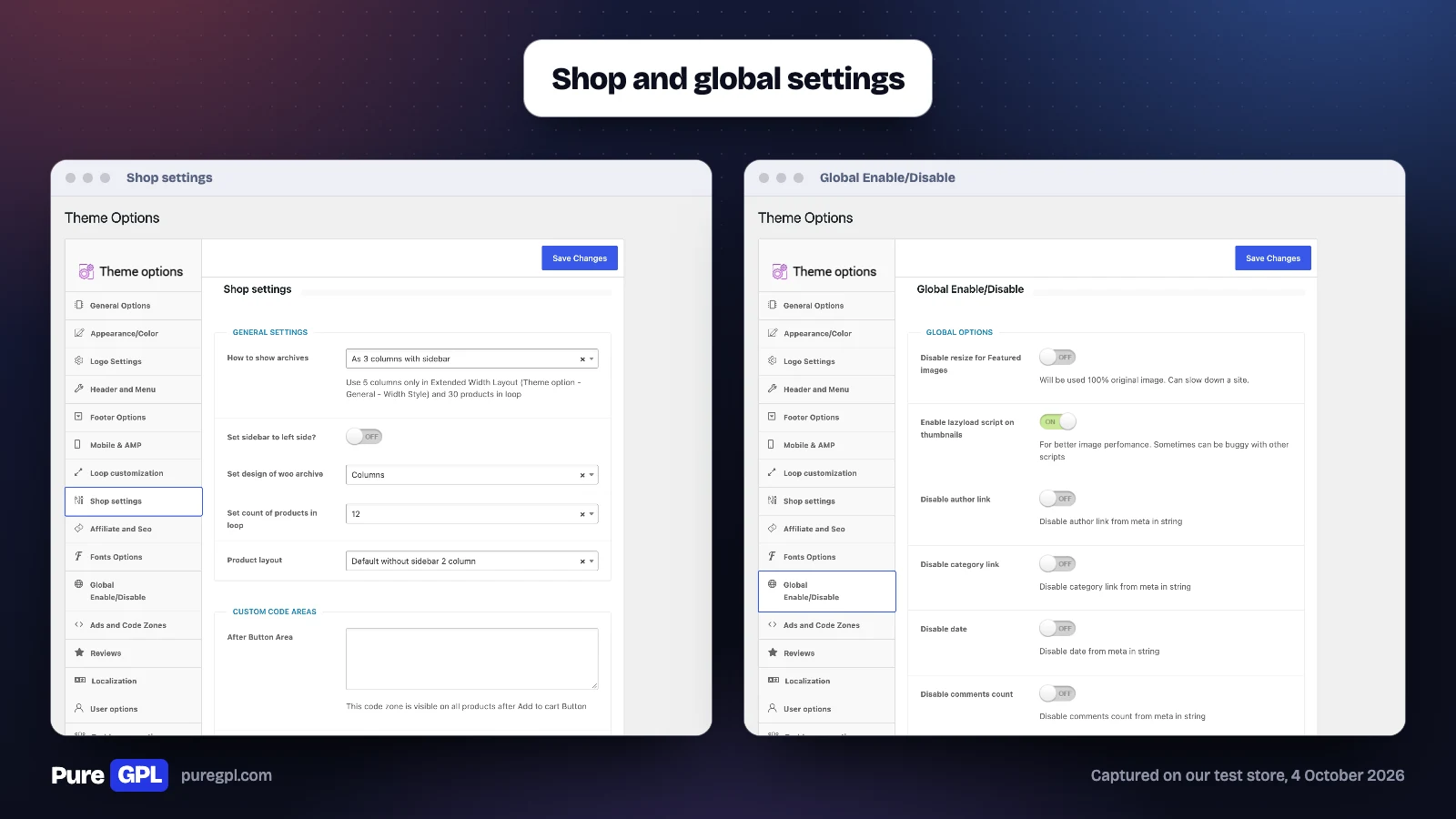
For WooCommerce, REHub’s Shop settings offer archive designs from plain columns to market, compact, directory, digital and deal grids and deal and wholesale lists, product layouts from a sidebar layout to marketplace, full-width and compare-prices-by-SKU designs, and 12 products per page by default. Its Global settings include a wishlist, a lazyload option for thumbnails and switches to drop the author and category links, the date and the comment count from post meta. ThemeForest lists it as compatible with WooCommerce, Elementor, BuddyPress and Easy Digital Downloads. We tested only a plain WooCommerce shop with one product; we did not set up a marketplace or BuddyPress.
Headers, widths and styles
REHub’s Header and Menu section has 8 header layouts: a shop and comparison header with logo, search, login and a cart or compare icon; a customizable header; logo and menu in one row; logo with a 468X60 code zone and search box; logo with slogan and search box; a centred logo with a code zone below; and two clean code-zone layouts. The site width can be Regular (1200px), Extended (1530px), Compact (1080px, which it calls “adsense banners optimized”) or Mini (1000px).
Its General Options also pick a theme subset, a base style named after a demo: Clean Rehub, Redigit for digital products, a white search in the ReGame style, Redeal with big buttons in the header, Redirect and Relearn with full-width headers, Rething with a big masonry grid, Repick with big grid items, Recash and ReMart. For deal sites, a category filter panel adds sort tabs to category pages; REHub’s example tabs sort by best price, hottest, most viewed, a price under 100 and deals that expire soon.
Setting up a price comparison site with REHub
- Install Content Egg and turn on the modules you need: the Offer module for shops you enter by hand, a feed for a shop’s product feed, or an affiliate network module.
- In Content Egg’s settings, choose “Shortcode only” for the Add Content option. REHub’s notes for its comparison and deal demos ask for this, so REHub’s templates place the offers rather than Content Egg adding them to every post.
- In REHub’s Affiliate and Seo section, turn on Content Egg synchronization, so Content Egg’s data fills the post’s main offer, and set a custom currency if your shops price in different currencies.
- Add products to a post with Content Egg, then place them with one of REHub’s 13 templates, such as the offers list we used.
- Turn on the Affiliate Store taxonomy if you want a page for each shop.
The blocks and shortcodes
REHub Framework adds 48 blocks to the WordPress editor. By name: accordion, advanced listing, box, coloured post grid, colour heading, colour title box, comparison item, comparison table, cons and pros, Content Egg, content toggler, countdown, deal grid, deal list, featured section, heading, how-to, itinerary, meta, news block, news directory list, offer box, offer listing, full offer listing, popup button, post element, post offer box, post offer listing, pretty list, promo box, review box, review heading, score box, search box, simple list, slider, taxonomy archive, title box, table of contents, versus table, video, and seven for WooCommerce products (box, deal, list, query, compare bars, deal of the day, featured section). Alongside them, REHub registers 130 shortcodes. Our test post used these shortcodes, not the blocks.
In the classic editor, REHub adds a shortcode generator that builds these shortcodes from a form. It groups them under Elements and typography, Boxes, Media, Interactive and Functions, from buttons, quotes and tooltips to offer boxes, review boxes, WooCommerce offer lists, sliders, tabs, countdowns, a price table, an RSS grabber, a Google map and “Content for members”.
Performance
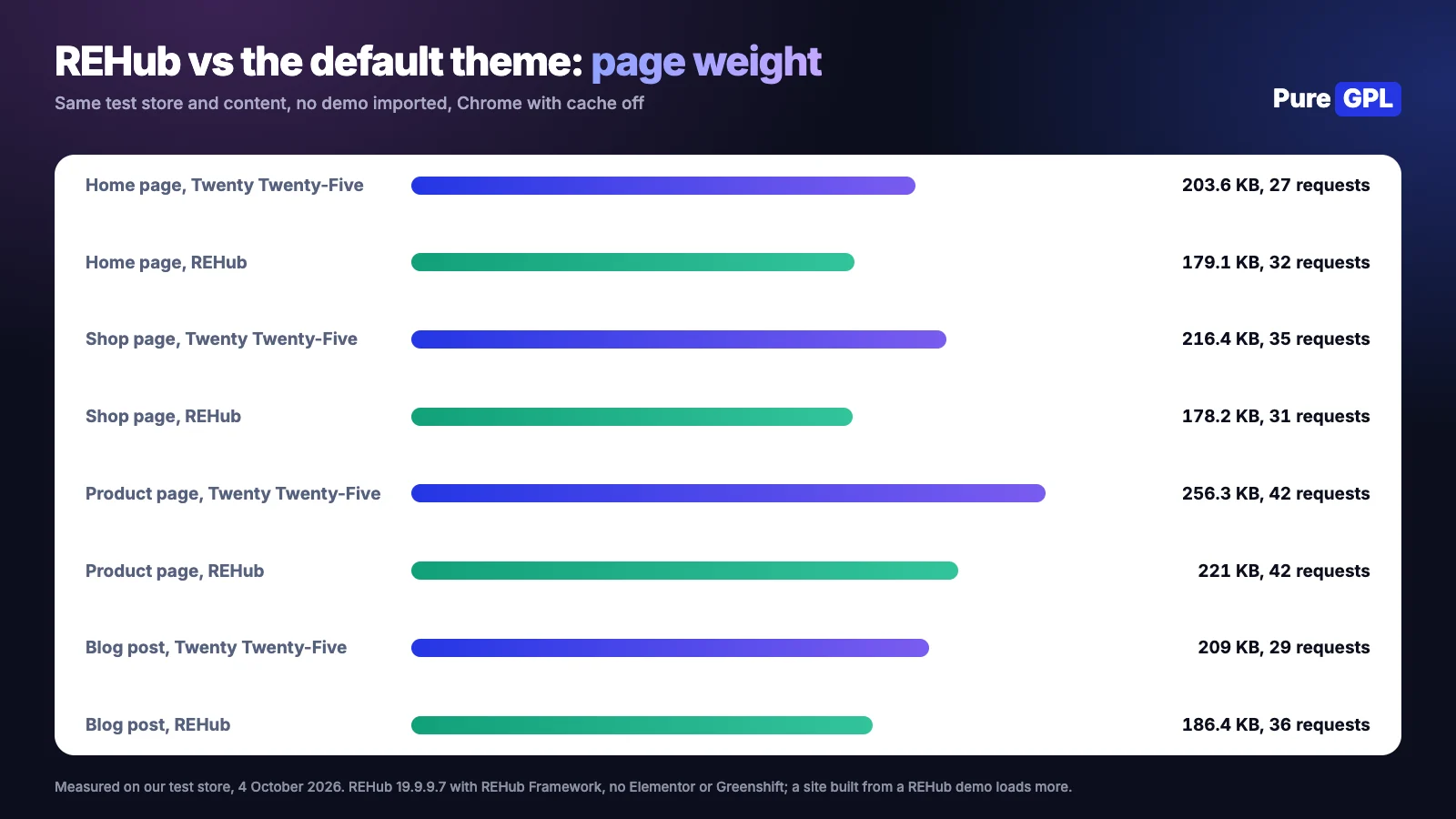
Bare REHub was lighter than WordPress’s default theme on every page we compared: fewer kilobytes on all five pages, though more requests on the home page and on both blog posts.
| Page | Twenty Twenty-Five | REHub |
|---|---|---|
| Home page | 203.6 KB, 27 requests | 179.1 KB, 32 requests |
| Shop page | 216.4 KB, 35 requests | 178.2 KB, 31 requests |
| Product page | 256.3 KB, 42 requests | 221 KB, 42 requests |
| Blog post | 209 KB, 29 requests | 186.4 KB, 36 requests |
| Our Content Egg test post | 326.9 KB, 36 requests | 307.9 KB, 44 requests |
| Our REHub test post | Not measured | 199 KB, 43 requests |
On our Content Egg test post, which shows a price comparison, a price history chart and a price alert form, REHub was 19 KB lighter but made 8 more requests than the default theme.
These are figures for REHub without a demo, Elementor or Greenshift, measured in Chrome with the cache off on a store with one product. A site built from a REHub demo adds its content and the plugins the demo needs, such as Greenshift, which we did not measure.
What REHub adds to every post
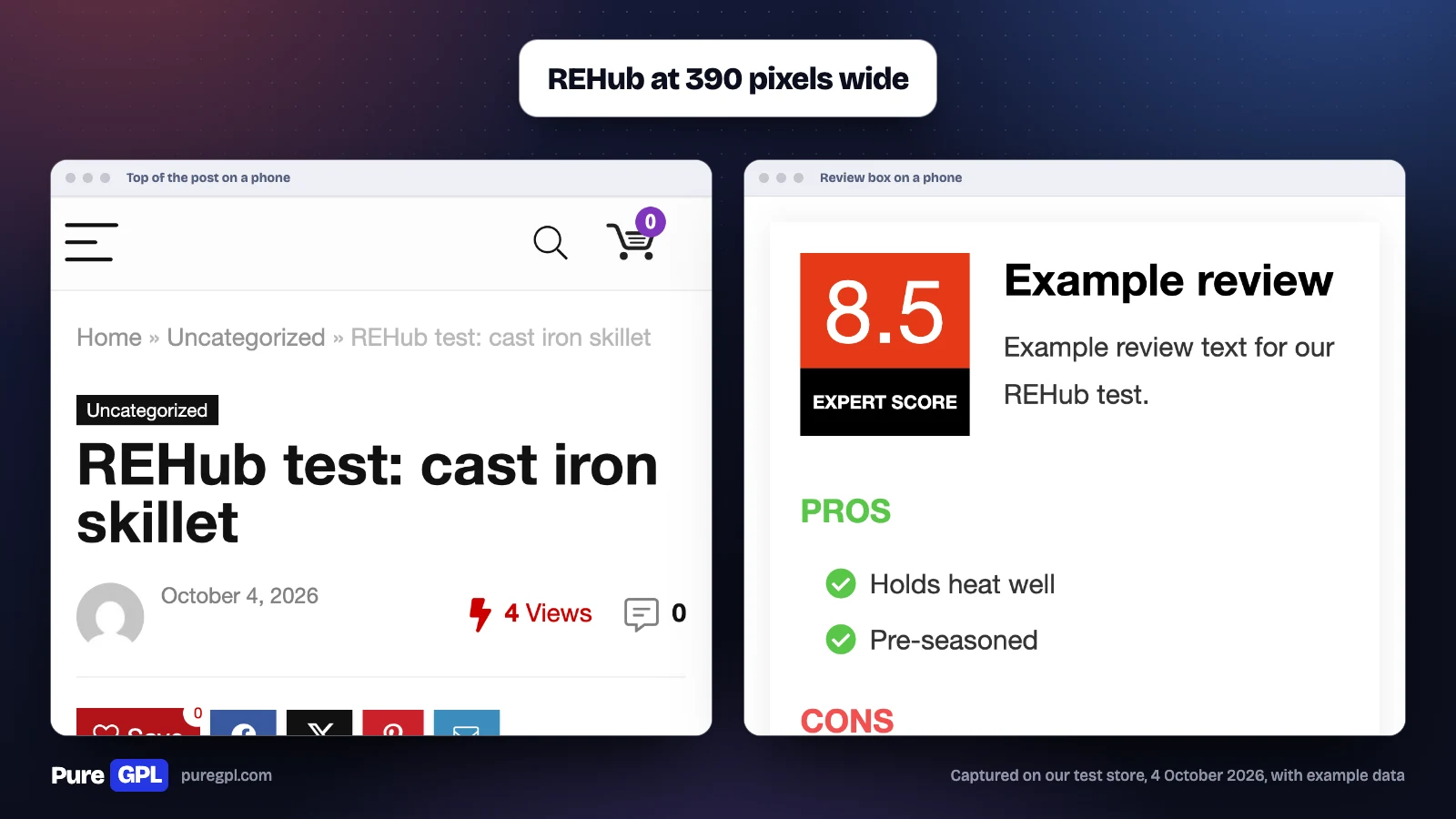
REHub puts its own furniture around each post, without any setting changed. Our test post opened with breadcrumbs (“Home » Uncategorized”), a category label, the date, a view count (“4 Views”), a comment count, a Save button for its wishlist and share buttons for Facebook, X, Pinterest and email. After the content came a Related Articles list and the comment form. The view count is a script on every post that reports each visit back to the server, and it keeps daily, monthly and yearly counts as well as the total. Its Global Enable/Disable section can turn each part off: the post view script, breadcrumbs, share buttons, previous and next links, tags, the author box, related posts, the sidebar on posts and the standard comments.
On a phone, 390 pixels wide, REHub replaced the menu with a menu button, search and cart icons, and set each box to the full width of the screen. The review box kept its score beside the title, with the pros and cons below.
Lock-in: what happens if you switch
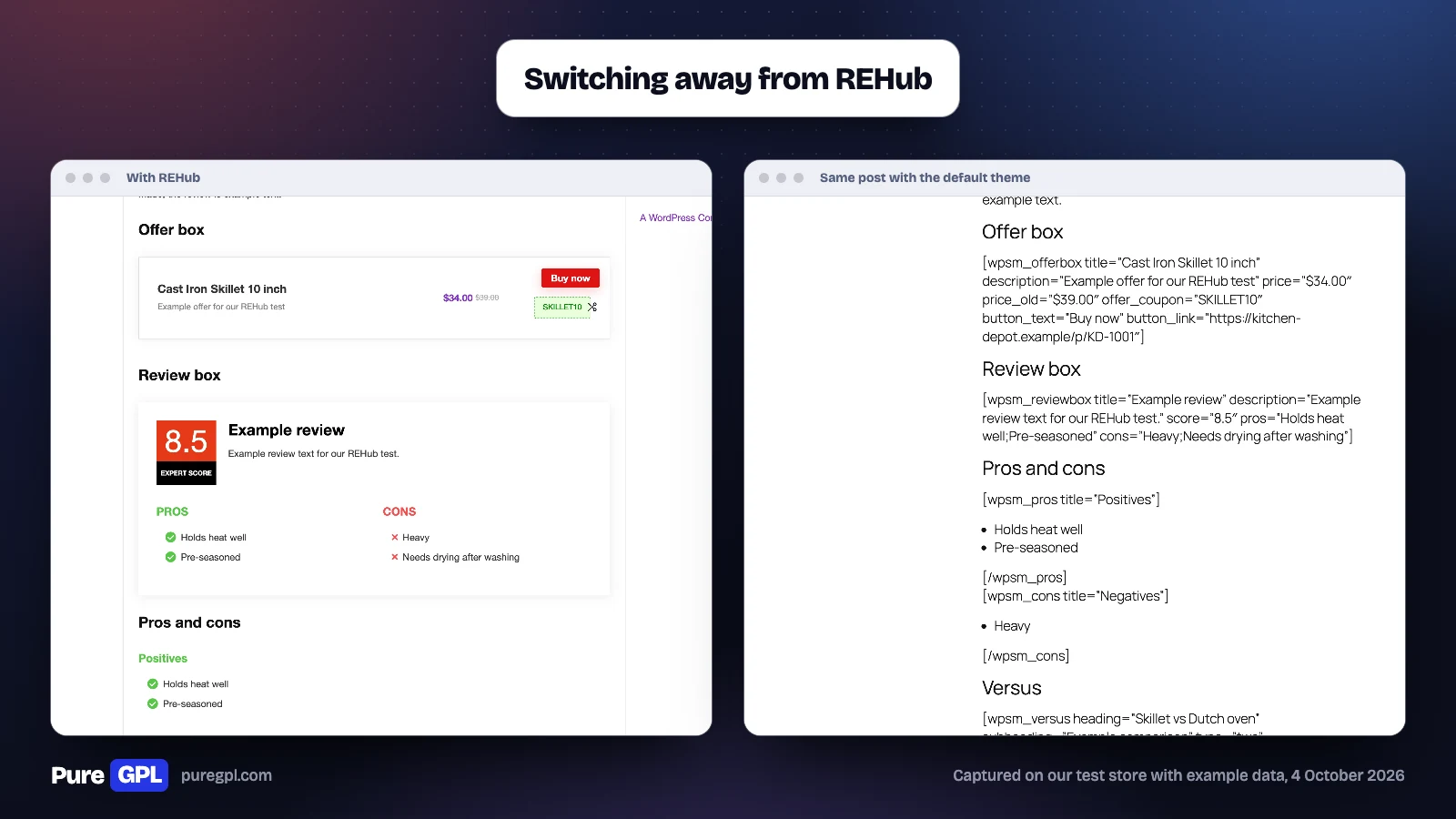
REHub’s boxes are shortcodes defined by the theme. We switched our test store back to the default theme with REHub Framework off and opened the same post: every box turned into raw text, such as “[wpsm_offerbox title=…” and “[wpsm_reviewbox title=…”, in the middle of the article, 5 shortcodes on one post. The Content Egg block we had placed with REHub’s template showed nothing at all, even with Content Egg active, because that template belongs to REHub; Content Egg’s own templates worked on the default theme in our Content Egg test. Most of REHub’s Gutenberg blocks are drawn by REHub Framework when the page loads, so they would not show as shortcode text, but we did not test what a post built with them shows after a theme change. If you might change theme later, keep your reviews and offers in plugins or plain blocks, or plan to rebuild each box.
REHub, or Content Egg on any theme?
For prices from other shops, REHub relies on Content Egg, so for a comparison site the real choice is between REHub with Content Egg and Content Egg on a theme you already have. We ran both on the same test store.
| On our test store | REHub with Content Egg | Content Egg on the default theme |
|---|---|---|
| Price | $59 once for REHub, plus Content Egg | Content Egg is free; Pro is $59 a year or $149 once |
| Templates for Content Egg offers | 13 from REHub, plus Content Egg’s own | 35 block templates in the free version |
| Review and offer boxes | REHub’s offer, review, pros and cons and versus shortcodes | 26 Egg Blocks, among them Pros & Cons, Rating Breakdown and Verdict |
| After a theme change | REHub’s boxes became raw shortcodes | Content Egg’s own templates worked on the default theme |
| Our Content Egg test post | 307.9 KB, 44 requests | 326.9 KB, 36 requests |
REHub earns its price when you want its deal and store layouts, cashback options and demos. For a review or comparison blog on a theme you like, Content Egg alone covers the offers, price history and price alerts, and keeps them working if you change theme.
The theme options, section by section
REHub’s Theme Options screen has 20 sections. This is what each held on our store, with REHub Framework 19.9.9.7 active.
| Section | What it holds |
|---|---|
| General Options | Layouts for archives and search results, from a plain blog list to deal lists, masonry and card grids |
| Appearance/Color | Main, secondary and highlight colours, offer button colours, rounded or square buttons, boxed layout |
| Logo Settings | Logo and retina logo, size, or a text logo with a slogan |
| Header and Menu | 8 header layouts, among them a shop and comparison header with search, login and cart, and a customizable header |
| Footer Options | Footer templates, footer widgets and their colours |
| Mobile & AMP | A mobile logo, mobile header colours, an icon toolbar and a sliding mobile panel |
| Loop customization | Buttons and prices in product and post loops, including showing a Content Egg offer, brand logo or discount in deal grids |
| Shop settings | WooCommerce archive designs, products per page and product page layouts |
| Affiliate and Seo | Content Egg synchronization, a custom currency for Content Egg prices and cashback sub IDs |
| Fonts Options | Google Fonts for navigation, headings and body text, with local storage of the fonts |
| Global Enable/Disable | Lazyload for thumbnails, a wishlist, and switches for the author and category links, the date and the comment count in post meta |
| Ads and Code Zones | Code areas in the header, before the header, before the footer, after the title and before the content |
| Reviews | User rating type, how the total score is calculated and which reviews feed the schema |
| Localization | Price format (USA, EU or India) and the text on its buttons, such as “Buy this item” and “Reveal coupon” |
| User options | A login popup, custom register and redirect links, and extra links in the user menu in the header |
| Buddypress options | Author links that go to BuddyPress profiles, a posts tab in profiles and BuddyPress sign-up in the login popup |
| Dynamic comparison | A comparison page for products, separate comparison pages for groups of categories, and a compare button |
| Custom badges | Four badges, Editor choice, Best seller, Best value and Best price, with your own labels and colours |
| Social Media Options | Links to social pages, from Facebook to Discord |
| Utility | Export, import and reset of the theme options |
Version history
| Version | Date | First change listed |
|---|---|---|
| 19.9.9.8 | 28 June 2026 | Better link handling for deal stores, latest updated items first, better schema for taxonomies |
| 19.9.9.2 | 10 May 2026 | Featured image hiding, directory product layout, removal of outdated social icons, security improvements for shortcodes |
| 19.9.4 | 15 January 2026 | A fix for the thumb counter in some cases and new experimental wireframes in the Greenshift library |
We tested 19.9.9.7, one release behind 19.9.9.8.
What we did not test
- A demo site: the import needs the developer’s servers, which we blocked.
- The developer’s own licence check: our copy had it replaced.
- REHub’s 48 Gutenberg blocks: our test post used its shortcodes.
- Deal grids and store layouts beyond a plain shop with one product.
- Elementor, Greenshift and the bonus plugins, which download only with a registered purchase.
- Multi-vendor stores with Dokan or WCFM, BuddyPress communities and MyCred cashback.
- Content Egg Pro and its Amazon modules: our offers came from example feeds and an example shop page.
- The developer’s support, which comes with a ThemeForest purchase.
Pros and cons
Pros
- Review, offer, versus and comparison boxes built in, with a choice of score and schema settings.
- 13 templates of its own for Content Egg.
- A one-time price of $59, with updates included.
- 19 demos for review, comparison, deal and store sites.
- Lighter than the default theme on our test store, before any demo or page builder.
Cons
- Content is locked to the theme: switching away leaves raw shortcodes in your posts.
- Demos and bonus plugins depend on the developer’s servers and a registered purchase.
- Many settings to learn: 20 sections of theme options, in a theme that takes 21.3 MB on disk, with a 9.3 MB framework plugin.
- Demos rely on extra plugins such as Greenshift.
Who it is for
| Your site | REHub? | Why |
|---|---|---|
| Review site with scores, pros and cons | Yes | Review and offer boxes are built in |
| Price comparison site | Yes, with Content Egg | 13 REHub templates for Content Egg’s offers |
| Deals or coupon site | Likely | Deal layouts and coupon offer boxes; we tested only the coupon box |
| Blog you may move to another theme | Think twice | Its boxes turn into raw shortcodes without it |
| Simple affiliate blog with a few links | Probably not | A link manager on your current theme does the job |
What other reviews get wrong
- Bonus plugins. One review lists WP Bakery Page Builder among REHub’s bonus plugins. The bonus list on ThemeForest now names RH Frontend PRO, RH Link PRO, RH Woo Tools, Revolution Slider and others, but not WP Bakery.
- “The clean, well-structured code ensures fast loading times”. The same review gives no measurement. Ours found bare REHub lighter than the default theme in page weight; a demo site with Elementor or Greenshift adds to that, and we did not measure one.
- Demo import. The same review says to find the Demo Import section in REHub’s Theme Options. On our store, Demo Import was its own item in the ReHub menu, not a section of Theme Options, and the review leaves out that the developer’s importer needs a registered purchase code and the developer’s servers.
On PureGPL
REHub is in our catalogue. A GPL copy comes without a ThemeForest purchase, and demo import and bonus plugin downloads are services the developer gives registered buyers, so they are not part of what we provide.
What a GPL copy does and does not include
ThemeForest says that when an author distributes an item as “100% GPL”, the GPL “applies to the whole item instead of the terms of the Regular or Extended License”. REHub’s own style.css leaves its licence line blank, so check the terms before relying on a GPL copy. A GPL copy comes without a licence from the developer, so it comes without the developer’s support, and anything that runs through the developer’s own account or service, such as REHub’s demo import and bonus plugins, is not part of it. Updates come from us.
Sources
Price, sales, rating, version and licence details were read on 4 October 2026. The screens, tests and measurements are from our own test store.
Frequently asked questions
Is REHub good for affiliate marketing?
For review, comparison and deal sites, yes: its review boxes, offer boxes, versus boxes and Content Egg templates are built for affiliate content. The trade-off is lock-in to the theme.
How much does REHub cost?
$59 for the Regular License on ThemeForest, once, with updates and 6 months of support. The Extended License is $3000.
Does REHub need WooCommerce?
Its shop and marketplace features use WooCommerce. We tested REHub with WooCommerce active, so we did not check it without.
Does REHub work with Amazon?
Through Content Egg. Content Egg’s Amazon modules are in Content Egg Pro, which REHub does not include.
Is REHub fast?
On page weight, the theme itself was lighter than WordPress’s default theme on our test store: 179.1 KB against 203.6 KB on the home page. We did not measure load times, or a site built from a REHub demo, which adds plugins such as Greenshift.
What happens to my content if I stop using REHub?
The boxes we built are shortcodes, so they showed as raw text on another theme. Plan to rebuild them, or keep key content in plugins.
Is there a free version of REHub?
Not that we found. REHub and REHub Framework are sold through ThemeForest; neither is listed on WordPress.org.
Does REHub work with Elementor?
Yes: ThemeForest lists Elementor among its compatible plugins, and REHub recommended Elementor, along with Greenshift, after activation. Its shortcode boxes worked on our test post without either.
Who makes REHub?
The theme’s own files name Wpsoul as the author, and ThemeForest says support comes from sizam.
Does REHub need Greenshift?
Not for the theme itself: our test post and its boxes worked without it. Greenshift is a required plugin for 12 of REHub’s 19 demos, and Elementor for 6 more.
Does REHub include Content Egg Pro?
The bonus plugins listed on ThemeForest do not include Content Egg Pro. REHub’s ThemeForest page says the free Content Egg “is enough for your start”.
Which REHub demo suits a review site?
ReMag and ReViewit are in its Reviews tab; both need Greenshift. RePick, a deal demo, needs only Content Egg, though its notes ask for Content Egg’s Amazon modules.
Can I import REHub demos with a GPL copy?
Not as REHub intends. In the developer’s code, the importer checks a registered purchase code with its licence server before giving access to demos, and each demo’s content and widget files come from the developer’s servers.
Related: our Content Egg review, best affiliate marketing WordPress themes and best WordPress affiliate plugins.


