Best Free SEO Plugins for WordPress in 2026: 6 Tested
Six free WordPress SEO plugins tested with default settings: what each gives you for nothing, and what the paid versions add.

You do not have to pay for an SEO plugin. The free versions of the main WordPress SEO plugins all write the title and Open Graph tags on a post, and all build an XML sitemap. They differ in what they give away: one free version has a full redirect manager and five focus keywords per post, another writes no meta description until you type one, and another adds no schema to a post.
We installed six free SEO plugins on the same test store on 5 October 2026, one at a time, and recorded what each printed, what it loaded and what it showed after activation. Then we went through every free feature against each developer’s own pages and code, so each table below says what the free version gives you and, where it does not, which paid plan does.
The short answer
- Most generous free version: Rank Math. It includes a redirect manager with a 404 log, five focus keywords per post, local business schema for one location, an llms.txt file, IndexNow and Search Console data inside WordPress. You have to connect a free account or press “Skip Step” before it does anything.
- Best if you want nothing to set up: Slim SEO. It is 1.7 MB with no database tables, it opened with its features already on, and it has free redirects. It has no focus keyword field or content analysis in the free version.
- Best free writing checks: Yoast SEO. Its SEO and readability analysis come free, but it wrote no meta description on our post, and it allows one focus keyword.
- Unlimited focus keywords for free: SEOPress. It checks any number of keywords per post, but printed no schema on our blog post.
- Lightest in the editor: The SEO Framework. It loaded 63 KB of JavaScript to edit a post, but has no redirect manager or llms.txt, and its last update was in December 2025.
All in One SEO’s free version (Lite) writes a description and schema and has llms.txt, but it was the heaviest here, and its redirects start on the Pro plan.
How we tested
The store. A WordPress 7.1.2 site with WooCommerce 11.1.2 and the Twenty Twenty-Five theme, running in Docker on our own machine. We measured one short blog post (“How to Care for a Cast Iron Skillet”: two paragraphs and one heading, no image) and one simple product.
The plugins. The free versions, as published on WordPress.org: Rank Math 1.0.279, Yoast SEO 28.6, All in One SEO 5.0.2.1, SEOPress 10.3, Slim SEO 4.11.0 and The SEO Framework 5.1.4. Each copy was byte-for-byte identical to the WordPress.org release.
The method. Before each test we deleted the plugin’s options, post data and tables, so each run started like a fresh install. We activated each plugin alone from the Plugins screen and left every setting at its default. For Rank Math we set the one option its “Skip Step” button sets, because it prints nothing before that.
What we did not do. We did not test the paid versions: what each paid plan adds comes from the developers’ own pricing and feature pages. This is a behaviour test, not a ranking test: no test like this can show that one plugin ranks a page higher than another.
All six free versions at a glance
| Free plugin | WordPress.org installs and rating | Size on disk | Database tables | Wrote a meta description | Free redirects |
|---|---|---|---|---|---|
| Rank Math | 4 million+, 4.8 from 7,508 ratings | 16.1 MB | 2 | Yes, 155 characters | Yes, with a 404 log |
| Yoast SEO | 10 million+, 4.8 from 27,819 ratings | 22.4 MB | 6 | Not printed | Premium only |
| All in One SEO | 2 million+, 4.7 from 5,217 ratings | 25.1 MB | 9 | Yes, 249 characters | From its Pro plan |
| SEOPress | 300,000+, 4.8 from 1,262 ratings | 13.2 MB | 1 | Yes, 249 characters | One post at a time |
| Slim SEO | 70,000+, 4.7 from 136 ratings | 1.7 MB | 0 | Yes, 160 characters | Yes, with a 404 log |
| The SEO Framework | 200,000+, 4.9 from 379 ratings | 3.2 MB | 0 | Yes, 156 characters | A 301 field on each post |
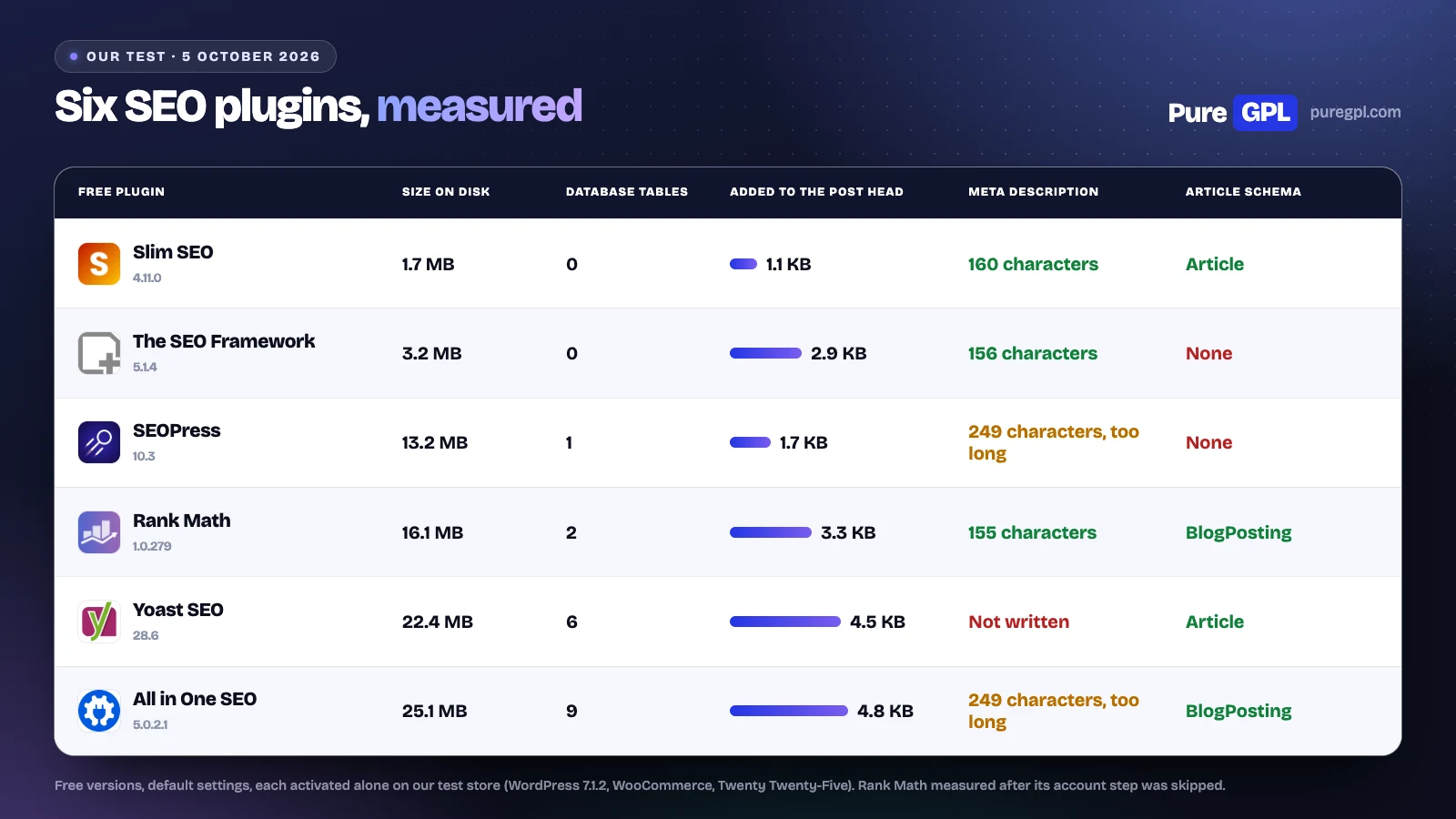
Installs and ratings are from WordPress.org on 5 October 2026. SEOPress and Slim SEO both recommend at most 160 characters in their own panels; the two at 249 characters used the whole of our short post.
What each free plugin printed on our post
With no SEO plugin, WordPress printed a title and a canonical tag on our post, and no meta description, social tags or schema. Here is what each free plugin added with its default settings.
| On our blog post | Rank Math | Yoast SEO | All in One SEO | SEOPress | Slim SEO | The SEO Framework |
|---|---|---|---|---|---|---|
| Meta description | 155 characters | Not printed | 249 characters | 249 characters | 160 characters | 156 characters |
| Open Graph tags | 6 | 6 | 6 | 6 | 7 | 6 |
| Twitter tags | 5 | 1 | 3 | 5 | 1 | 3 |
| Article schema | BlogPosting | Article | BlogPosting | Not printed | Article | Not printed (WebPage and breadcrumbs instead) |
| Added to the page head | 3.3 KB | 4.5 KB | 4.8 KB | 1.7 KB | 1.1 KB | 2.9 KB |
| Scripts or stylesheets added | 0 | 0 | 0 | 0 | 0 | 0 |
None of the six free versions added a script or stylesheet to the public page. Their cost on the front end is text in the page head, between 1.1 KB and 4.8 KB.
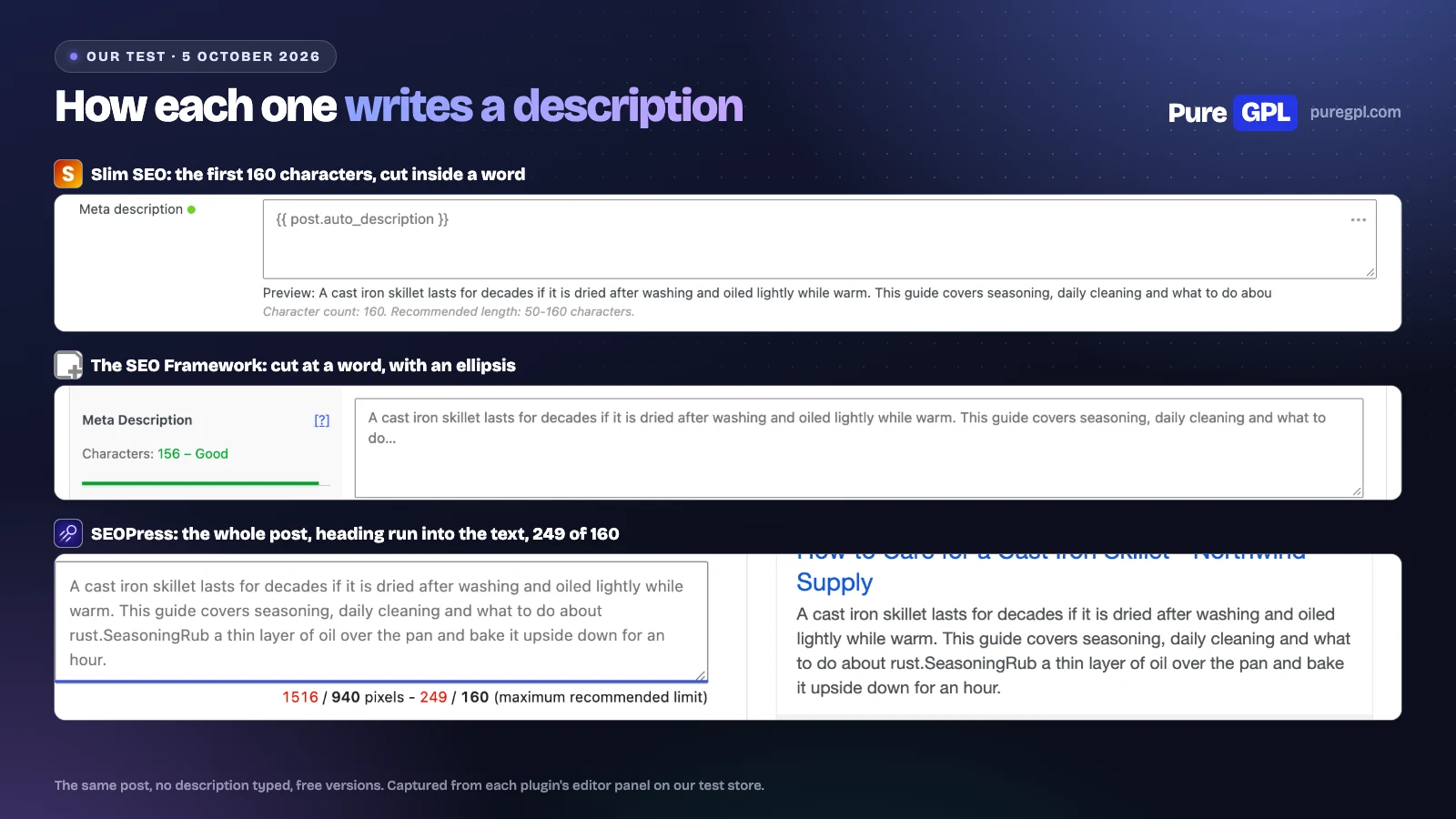
How they wrote the description matters if you leave the field empty on most posts:
- Rank Math and The SEO Framework cut at a whole word.
- Slim SEO stopped at exactly 160 characters, in the middle of a word (“abou”).
- All in One SEO and SEOPress used the whole post and ran the “Seasoning” heading into the next sentence (“rust.SeasoningRub”). SEOPress’s own panel then marked its description in red as 249 of 160 characters.
- Yoast printed no description until we typed one.
The first screen after activation
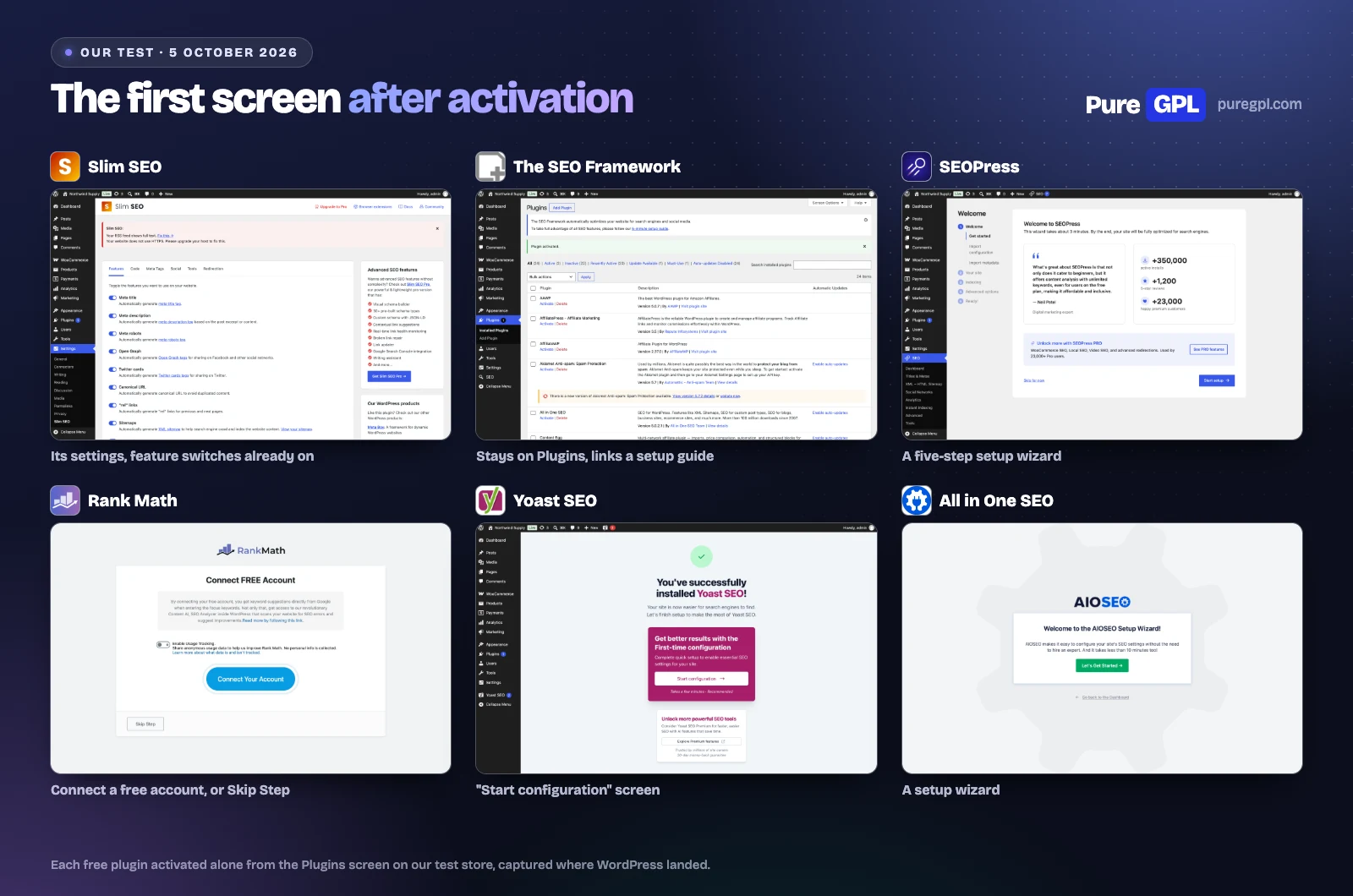
- Rank Math opened on “Connect FREE Account”. Until the account is connected or “Skip Step” is pressed, its code stops it printing anything on your site.
- Yoast showed “You’ve successfully installed Yoast SEO!” with a “First-time configuration”.
- All in One SEO opened its setup wizard, which says it “takes less than 10 minutes”.
- SEOPress opened a five-step wizard that says it “takes about 3 minutes”.
- Slim SEO opened on its own settings page, with its feature switches already on.
- The SEO Framework stayed on the Plugins screen and linked to a “5-minute setup guide”.
Writing and content analysis
How to read the tables that follow:
- “Yes”: in the free plugin.
- “Paid”: not free; the plan named is the lowest that has it, according to the developer.
- “Not in the free version”: missing from the free plugin’s code. “Not on any plan” means no plan has it either; “not listed for any plan” means the developer’s pages do not mention it.
| In the free version | Rank Math | Yoast SEO | All in One SEO | SEOPress | Slim SEO | The SEO Framework |
|---|---|---|---|---|---|---|
| Focus keywords per post | Yes (5 by default; a code filter lifts it) | 1 (5 on Premium) | 1 (up to 10 on paid plans) | Unlimited | No keyword field (several on Pro) | No keyword field (3 on Pro) |
| Readability analysis | Yes | Yes | Yes | Yes (one check: words per section) | Paid: Personal and up (English only) | Not in the free version (not listed for any plan) |
| SEO score or checklist in the editor | Yes | Yes | Yes | Yes (checklist) | Paid: Personal and up | Yes (SEO Bar) |
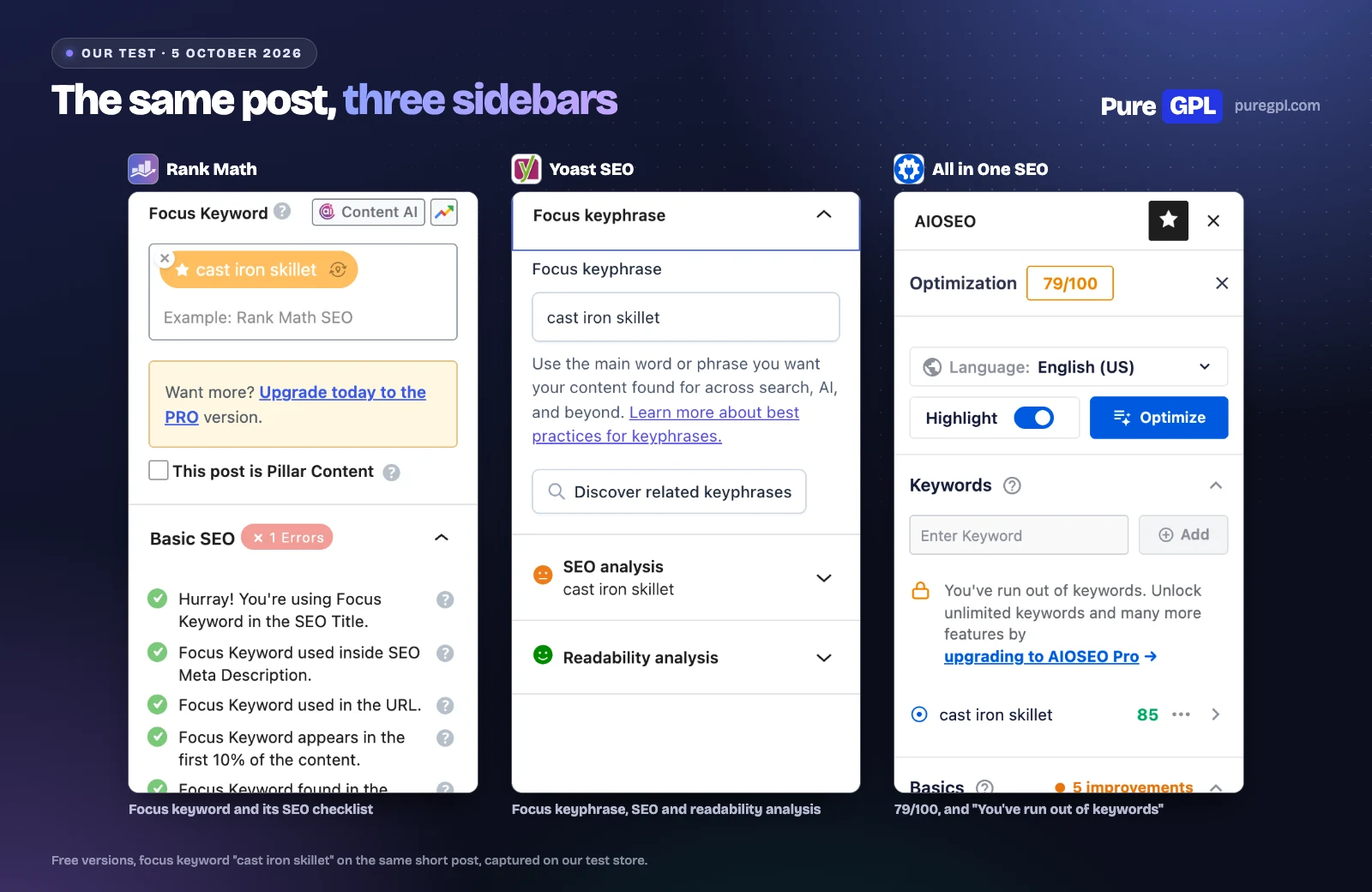
On the same post with the focus keyword “cast iron skillet”:
- Rank Math showed its checklist with errors flagged under all four headings: one in Basic SEO, six in Additional, one in Title Readability and two in Content Readability, above an “Upgrade today to the PRO version” notice.
- Yoast showed an SEO analysis and a readability analysis.
- All in One SEO scored the post 79/100 and the keyword 85. Above the one keyword it scored, its panel said “You’ve run out of keywords”.
Rank Math’s limit of five is a default that a code filter lifts. SEOPress checks any number of keywords, though its readability analysis is a single check, words per section.
Schema
| In the free version | Rank Math | Yoast SEO | All in One SEO | SEOPress | Slim SEO | The SEO Framework |
|---|---|---|---|---|---|---|
| Schema on by default | Yes (BlogPosting, Product, WebPage, WebSite, Organization) | Yes (Article, BreadcrumbList, WebPage, WebSite; Organization once you add a company name) | Yes (BlogPosting, BreadcrumbList, WebPage, WebSite, Organization) | Yes (WebSite, on the home page only) | Yes (Article, BreadcrumbList, WebPage, WebSite, Organization) | Yes (WebPage, BreadcrumbList, WebSite, Organization; no Article) |
| Choose schema type per post | Yes (18 types) | Yes (page and article type) | Paid: Basic and up | Paid: PRO | Paid: Personal and up | Paid: Pro and up (Articles extension) |
| Custom schema builder or templates | Paid: PRO and up | Not in the free version (page and article type picker only) | Paid: Basic and up | Paid: PRO | Paid: Personal and up (30+ types) | Not in the free version (not listed for any plan) |
| FAQ and How-to blocks | Yes | Yes | Yes: FAQ block (its schema Basic and up) | Yes: FAQ block; How-to in PRO | Paid: Personal and up (schema types, no blocks) | Not in the free version (not listed for any plan) |
Rank Math’s free version lets you pick from 18 schema types for each post; the others keep that choice for a paid plan, except Yoast, which lets you pick the page and article type. Yoast’s free version also has FAQ and How-to blocks that add their own schema, but no builder for other types.
Redirects and 404 errors
| In the free version | Rank Math | Yoast SEO | All in One SEO | SEOPress | Slim SEO | The SEO Framework |
|---|---|---|---|---|---|---|
| Redirect manager | Yes | Paid: Premium and up | Paid: Pro and up | Paid: PRO (free: one post at a time) | Yes | Per-post 301 field only |
| 404 monitor | Yes | Not in the free version (not on any plan) | Paid: Pro and up (the Basic card lists it too) | Paid: PRO | Yes (off by default) | Not in the free version (not on any plan) |
| Redirect when a slug changes | Yes | Paid: Premium and up | Paid: Pro and up (the Basic card lists it too) | Paid: PRO (one-click notice) | Yes (pages and other hierarchical types) | Not in the free version (not listed for any plan) |
| Regex redirects | Yes | Paid: Premium and up | Paid: Pro and up | Paid: PRO | Yes | Not in the free version (not listed for any plan) |
This is the biggest gap between free versions:
- Rank Math and Slim SEO include a full redirect manager, regex rules and a 404 log. In Rank Math the redirect manager and the 404 monitor are modules you switch on, and Slim SEO’s 404 log is off until you turn it on.
- Yoast keeps redirects for Premium and has no 404 monitor on any plan.
- All in One SEO keeps them for its Pro plan.
- SEOPress free redirects one post at a time.
If you change or delete pages often, that decides it.
Sitemaps
| In the free version | Rank Math | Yoast SEO | All in One SEO | SEOPress | Slim SEO | The SEO Framework |
|---|---|---|---|---|---|---|
| XML sitemap | Yes | Yes | Yes | Yes | Yes | Yes |
| Image sitemap | Yes | Yes | Yes | Yes | Yes | Not in the free version (the developer says its sitemap omits images) |
| News sitemap | Paid: PRO and up | Paid: Premium and up | Paid: Pro and up | Paid: PRO | Yes (posts only) | Paid: Pro and up |
| Video sitemap | Paid: PRO and up | Paid: Premium and up | Paid: Pro and up | Paid: PRO | Not in the free version (not listed for any plan) | Not in the free version (not listed for any plan) |
| HTML sitemap | Yes | Not in the free version (not on any plan) | Yes | Yes | Not in the free version (not listed for any plan) | Not in the free version (not listed for any plan) |
All six built an XML sitemap on our store with no setup. Rank Math’s is at /sitemap_index.xml, SEOPress’s at /sitemaps.xml, and Yoast, All in One SEO, Slim SEO and The SEO Framework answered at /sitemap.xml.
Local SEO and WooCommerce
| In the free version | Rank Math | Yoast SEO | All in One SEO | SEOPress | Slim SEO | The SEO Framework |
|---|---|---|---|---|---|---|
| Local business schema | Yes (one location) | Paid: Premium and up | Paid: Plus and up | Paid: PRO | Paid: Personal and up | Paid: Pro and up |
| Multiple locations | Paid: PRO and up | Paid: Premium and up | Paid: Plus and up | Paid: PRO (one schema per page) | Paid: Personal and up (one schema per location) | Paid: Pro and up |
| WooCommerce product schema enhancements | Yes (GTIN fields and more in PRO) | Paid: WooCommerce SEO ($178.80) | Paid: Basic and up | Paid: PRO | Paid: Personal and up | Not in the free version (not listed for any plan) |
| WooCommerce-specific settings | Yes (more in PRO) | Paid: WooCommerce SEO and up | Paid: Basic and up | Paid: PRO (a few options free) | Yes (product Open Graph, breadcrumbs) | Yes (noindex cart and checkout, primary category) |
Rank Math’s free version covers local business schema for one location and basic product schema. Slim SEO and The SEO Framework add WooCommerce settings for free (product Open Graph tags, breadcrumbs, noindex for cart and checkout). Yoast and All in One SEO keep their WooCommerce SEO for paid plans, and SEOPress has only a few WooCommerce options in its free version.
AI features and llms.txt
| In the free version | Rank Math | Yoast SEO | All in One SEO | SEOPress | Slim SEO | The SEO Framework |
|---|---|---|---|---|---|---|
| AI titles and meta descriptions | Up to 5 free uses, then a Rank Math AI plan | A small free trial; Premium and up | Trial: 100 AI credits on Lite, per the developer | Paid: PRO (own API key or credits) | Yes (your own API key) | Not in the free version (not listed for any plan) |
| AI content or writing assistant | A few free uses, then a Rank Math AI plan | Paid: Premium and up | Trial credits; more on paid plans | Paid: PRO (own API key or credits) | No AI writer | Not in the free version (not listed for any plan) |
| llms.txt file | Yes | Yes | Yes | Paid: PRO | Not in the free version (not listed for any plan) | Not in the free version (not listed for any plan) |
| MCP or AI agent connection | Yes | Yes (Abilities API) | Yes (13 abilities) | Yes (off by default) | Yes (via the MCP Adapter plugin) | Not in the free version (not listed for any plan) |
An llms.txt file lists your most important pages for AI tools. Rank Math, Yoast and All in One SEO all generate one in their free versions, and all three leave it off until you switch it on. We switched each on:
- Rank Math served the file live, with our posts, pages and product.
- Yoast wrote a 938-byte file and refreshes it weekly. It listed one of our four posts, because it builds the list from its own index of the site, which we had not filled with its “SEO data optimization”.
- All in One SEO wrote a 3,971-byte file. Its descriptions included raw shortcodes from plugins switched off on our store, and the glued “rust.SeasoningRub”.
Internal links, Search Console and rank tracking
| In the free version | Rank Math | Yoast SEO | All in One SEO | SEOPress | Slim SEO | The SEO Framework |
|---|---|---|---|---|---|---|
| Internal link suggestions | Yes | Paid: Premium and up | Paid: Pro and up | Paid: PRO | Paid: Personal and up | Not in the free version (not listed for any plan) |
| Google Search Console data in WordPress | Yes (90 days of data) | Yes, through Site Kit | Paid: Elite | Paid: PRO | Paid: Personal and up | Verification tag only |
| Keyword rank tracking | Paid: PRO and up (500 keywords on PRO) | Yes, through Wincher | Paid: Elite (100 keywords) | Paid add-on (Insights, $99 a year) | Paid: Personal and up (Search Console report only) | Not in the free version (not listed for any plan) |
| Broken link checking | Paid: PRO and up | Not in the free version (not on any plan) | Separate plugin | Paid: PRO | Paid: Personal and up | Not in the free version (not listed for any plan) |
Rank Math is the only one of the six whose free version shows Search Console data inside WordPress without a second plugin, keeping 90 days of it. Yoast shows it through Google’s free Site Kit plugin, and tracks rankings through Wincher, with your own Wincher account.
Technical SEO tools
| In the free version | Rank Math | Yoast SEO | All in One SEO | SEOPress | Slim SEO | The SEO Framework |
|---|---|---|---|---|---|---|
| robots.txt editor | Yes | Yes | Yes | Paid: PRO | Yes | Yes (generated rules, toggles only) |
| .htaccess editor | Yes | Yes | Yes | Paid: PRO | Not in the free version (not listed for any plan) | Not in the free version (not listed for any plan) |
| Breadcrumbs | Yes (off by default) | Yes | Yes | Paid: PRO | Yes | Yes |
| IndexNow or instant indexing | Yes (Bing and Yandex) | Paid: Premium and up | Paid: Basic and up (add-on) | Yes (also Google Indexing API) | Not in the free version (not listed for any plan) | Not in the free version (not listed for any plan) |
| Bulk edit titles and descriptions | Yes | Yes | Yes | Yes (Quick Edit); CSV import in PRO | Yes (Quick Edit, bulk AI) | Yes (Quick Edit) |
Switching from another SEO plugin
| In the free version | Rank Math | Yoast SEO | All in One SEO | SEOPress | Slim SEO | The SEO Framework |
|---|---|---|---|---|---|---|
| Import from other SEO plugins | Yes (Yoast, AIOSEO, SEOPress, Redirection and 2 schema plugins) | Yes (15 plugins incl. AIOSEO, Rank Math and TSF; not SEOPress) | Yes (Yoast SEO, Rank Math, SEOPress) | Yes (12 plugins incl. Yoast, AIOSEO, Rank Math, TSF and Slim SEO) | Yes (8 plugins incl. Yoast, AIOSEO, Rank Math, SEOPress and TSF) | Yes, Transport extension (Yoast, Rank Math, SEOPress) |
Run only one SEO plugin at a time. Each printed its own title, description and schema tags in our test, so two would give you duplicates. Yoast has no importer for SEOPress, although its free product page says it migrates SEOPress data, and Rank Math has no importer for The SEO Framework or Slim SEO.
Roles, multisite and support
| In the free version | Rank Math | Yoast SEO | All in One SEO | SEOPress | Slim SEO | The SEO Framework |
|---|---|---|---|---|---|---|
| SEO user roles or access control | Yes | Yes | Paid: Basic and up | Yes | Not in the free version (not listed for any plan) | Yes (capability constants only) |
| Multisite network support | Yes | Yes | Paid: Elite (network-wide settings) | Yes | Yes | Yes |
| Support | Forum; PRO: 24/7 tickets | Forum; Premium: 24/7 chat and email | Forum; paid: Standard to Premium by plan | Forum; PRO: email | Forum; paid plans: email | Forum; paid plans: private email |
Free versions come with the WordPress.org support forum. Ticket or email support comes with a paid plan.
Weight in your admin
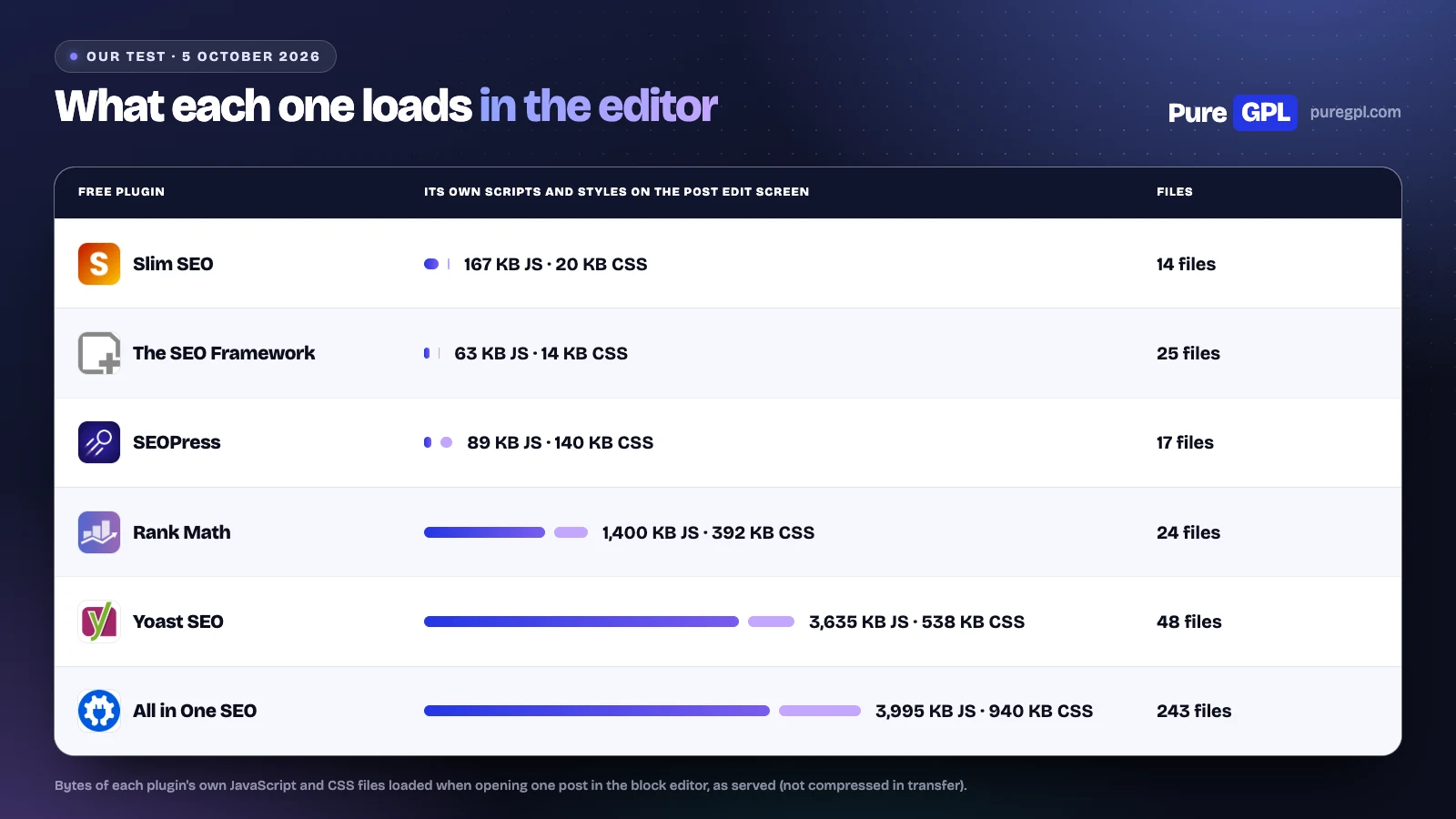
| Free plugin | Rank Math | Yoast SEO | All in One SEO | SEOPress | Slim SEO | The SEO Framework |
|---|---|---|---|---|---|---|
| JavaScript loaded in the post editor | 1,400 KB | 3,635 KB | 3,995 KB | 89 KB | 167 KB | 63 KB |
| CSS loaded in the post editor | 392 KB | 538 KB | 940 KB | 140 KB | 20 KB | 14 KB |
| Its files loaded in the post editor | 24 | 48 | 243 | 17 | 14 | 25 |
| Files on disk | 1,337 | 1,938 | 1,286 | 1,361 | 225 | 333 |
That is what your browser loads to open a post for editing. We did not time page loads.
The six free versions, one by one
1. Rank Math (free)
Gives you: the most of any free version: redirects and a 404 log, five focus keywords, 18 schema types per post, one-location local schema, llms.txt, IndexNow, an MCP connection for AI tools and Search Console data. On our post it wrote a 155-character description, six Open Graph and five Twitter tags, and BlogPosting schema.
The catch: nothing happens until you connect a free account or press “Skip Step”, and it loaded 1,400 KB of JavaScript in the editor. Paid starts with Rank Math PRO at $95.88 for the first year, then $107.88, for every site you own.
2. Yoast SEO (free)
Gives you: SEO and readability analysis, Article and breadcrumb schema, an llms.txt file, a robots.txt and .htaccess editor, and the most installs of the six (10 million+).
The catch: one focus keyword, no meta description until you write one, no redirects without Premium, and 3,635 KB of editor JavaScript. Premium is $118.80 a year per site.
3. All in One SEO (Lite)
Gives you: a description and BlogPosting, breadcrumb and organisation schema by default, breadcrumbs, an llms.txt file, an MCP connection and a trial of AI credits.
The catch: one focus keyword, redirects from the Pro plan, Search Console data only on Elite, and the heaviest footprint here: 25.1 MB, nine tables and 243 files in the editor. Basic is $49.50 in the first year, then $99.
4. SEOPress (free)
Gives you: unlimited focus keywords, a description and social tags, XML, image and HTML sitemaps, IndexNow and the Google Indexing API, an MCP connection, and a light load on the page and in the editor (1.7 KB in the head, 89 KB of editor JavaScript), though at 13.2 MB on disk it is not a small install.
The catch: no schema on posts, breadcrumbs or redirect manager without PRO, and since version 9.6 the free plugin shows “Get PRO” boxes loaded from seopress.org. PRO is $49 a year for one site.
5. Slim SEO (free)
Gives you: everything on at activation, Article, WebPage, WebSite, organisation and breadcrumb schema, redirects with regex rules and a 404 log, a news sitemap, and the smallest footprint (1.7 MB, no tables, 1.1 KB in the head).
The catch: no focus keyword field or content analysis, a description cut mid-word, and no llms.txt. Slim SEO Pro is $59 a year for one site.
6. The SEO Framework (free)
Gives you: clean descriptions cut at a word, breadcrumbs and WebPage schema, WooCommerce settings, the least editor JavaScript (63 KB), no database tables and the highest rating of the six (4.9).
The catch: no Article schema, no focus keyword field, no redirect manager and no llms.txt. WordPress.org showed its last update on 10 December 2025, and it is marked as tested up to WordPress 6.9.9, not the current 7.1.2. Its paid extensions start at $7 a month, paid yearly, for two sites.
Which free SEO plugin to choose
| Your situation | Free pick | Why |
|---|---|---|
| A blog or small business site | Rank Math | Redirects, a 404 log, five keywords and llms.txt for free |
| You never want to open the settings | Slim SEO | Its features were on at activation, with free redirects |
| Writers who want SEO and readability checks | Yoast SEO | Both analyses are free |
| Many keywords per post | SEOPress | Unlimited focus keywords for free |
| The smallest install | Slim SEO or The SEO Framework | The smallest on disk, no database tables and under 250 KB of editor JavaScript |
| A WooCommerce store, free only | Rank Math | Product schema, one-location local schema and redirects at no cost |
When the free version is not enough
Many sites can stay on a free version. You are likely to pay if you need one of these:
- Redirects in Yoast, All in One SEO or SEOPress. Yoast keeps them for Premium, All in One SEO for Pro, and SEOPress’s redirect manager for PRO.
- Several business locations, or local SEO in anything but Rank Math.
- A schema builder for FAQs, events or recipes. Rank Math, All in One SEO, SEOPress and Slim SEO keep their builders for paid plans. Yoast’s free FAQ and How-to blocks cover those two types only, and The SEO Framework lists no builder.
- Rank tracking or broken link checks. They come with paid plans, where a plugin offers them at all. Yoast connects to Wincher for rankings, and All in One SEO’s maker offers a separate Broken Link Checker plugin.
What the cheapest paid plan costs
| Paid plan | Sites | Year one | Then each year | Three years |
|---|---|---|---|---|
| SEOPress PRO | 1 | $49 | $49 | $147 |
| Slim SEO Pro Personal | 1 | $59 | $59 | $177 |
| All in One SEO Basic | 1 | $49.50 | $99 | $247.50 |
| The SEO Framework Pro | 2 | $84 | $84 | $252 |
| Rank Math PRO | Unlimited sites you own | $95.88 | $107.88 | $311.64 |
| Yoast SEO Premium | 1 | $118.80 | $118.80 | $356.40 |
Prices are from each developer’s page on 5 October 2026, before tax. All in One SEO is the second cheapest in year one, but over three years it falls behind SEOPress and Slim SEO, because Basic doubles to $99 at renewal: its page says “Special introductory pricing, all renewals are at full price.” Rank Math and The SEO Framework sell by the month but bill yearly ($7.99 and $7 a month in year one). SEOPress’s page says the price you pay is your renewal price “Forever”, except for special promotions and as long as automatic renewal stays on.
The top plan, three years, per site
| Top plan | Sites | Three years | Per site at full use |
|---|---|---|---|
| Rank Math Agency | 500 | $2,219.64 | $4.44 |
| The SEO Framework Agency | 200 | $972 | $4.86 |
| All in One SEO Elite | 100 | $1,497.50 | $14.98 |
| SEOPress PRO Unlimited | Unlimited | $447 | Falls with every site |
| Slim SEO Pro Agency | Unlimited | $537 | Falls with every site |
| Yoast SEO Premium (no multi-site plan) | Priced per site | $356.40 per site | $356.40, less a bulk discount |
Are free SEO plugins safe?
All six are in the official WordPress.org directory, and each copy we tested matched its WordPress.org release byte for byte. Five were updated between 28 September and 6 October 2026 and are marked as tested with WordPress 7.1.2. Rank Math released 1.0.280 on 6 October, after our tests; its changelog lists sitemaps pre-generated from WP-CLI, security hardening and bug fixes, none of which changes a table here. The SEO Framework is the exception: its last update was on 10 December 2025, and it is marked as tested up to 6.9.9.
What other lists get wrong
We checked the pages that rank for this search against the developers’ pages on 5 and 6 October 2026:
- “premium version starts at $9.99/month, billed annually” for Yoast (zapier.com). Yoast SEO Premium is $118.80 a year, which works out to $9.90 a month, not $9.99.
- “The free version offers a schema generator, rank tracking, internal linking automation, and SEO audits” for All in One SEO (zapier.com). The SEO audit is in the free version, but the schema generator is paid, rank tracking needs Elite and internal link suggestions start on Pro.
- “it uses AI to read your WordPress environment”, of The SEO Framework (zapier.com). Its code calls no AI service.
- “the $49/year premium add-ons” for Slim SEO (zapier.com). Their product pages now redirect to Slim SEO Pro, which starts at $59 a year.
- “WordPress has the basic tools to create and customize permalinks, meta descriptions” (zapier.com). On our test post WordPress alone printed no meta description.
- “AIOSEO packs the most into its free tier, including AI content generation” (theplusaddons.com). Rank Math’s free version gives away more: redirects with a 404 log, more than one focus keyword per post and local schema, all of which All in One SEO keeps for paid plans. The AI writing in Lite is a trial of 100 credits.
- “No Ads on free version” for SEOPress (codeless.co). SEOPress’s own site still says “No ads”, but the free plugin shows “Get PRO” and other upsell boxes on its settings pages, and since version 9.6 it loads some of them from seopress.org.
- “$59 per year” for Rank Math and “$49.60 per year” for All in One SEO (codeless.co). Rank Math PRO is $95.88 in year one, then $107.88; All in One SEO Basic is $49.50, then $99.
On PureGPL
We sell the Pro versions of five of these plugins:
- Rank Math SEO Pro, Yoast SEO Premium, All in One SEO Pack PRO and SEOPress Pro at $4.99 each;
- Slim SEO Pro at $3.49.
The free versions in this article come from WordPress.org.
What a GPL copy does and does not include
WordPress plugins are licensed under the GPL, which lets anyone share the code. A copy from PureGPL is not a licence with the developer:
- Support: you do not get the developer’s support.
- Hosted services: anything that runs on the developer’s servers (rank tracking, AI credits, Search Console reports through their account) is not part of it.
- On-site features: schema, redirects, sitemaps, WooCommerce and local settings run inside WordPress.
- Updates: they come from us.
If you need the hosted services or the developer’s support, buy from the developer.
Sources
Read on 5 October 2026, and the competitor pages on 5 and 6 October 2026. The measurements and screenshots are our own.
- WordPress.org plugin data: all-in-one-seo-pack
- WordPress.org plugin data: autodescription
- WordPress.org plugin data: seo-by-rank-math
- WordPress.org plugin data: slim-seo
- WordPress.org plugin data: wordpress-seo
- WordPress.org plugin data: wp-seopress
- aioseo.com/features/access-controls
- aioseo.com/features/ai-assistant
- aioseo.com/features/breadcrumbs
- aioseo.com/features/broken-link-checker
- aioseo.com/features/google-news-sitemaps
- aioseo.com/features/indexnow
- aioseo.com/features/internal-link-assistant
- aioseo.com/features/keyword-rank-tracker
- aioseo.com/features/llms-txt-generator
- aioseo.com/features/local-seo
- aioseo.com/features/redirection-manager
- aioseo.com/features/search-statistics
- aioseo.com/features/smart-xml-sitemaps
- aioseo.com/features/truseo-score-analysis
- aioseo.com/features/video-seo-sitemaps
- aioseo.com/introducing-aioseo-mcp
- aioseo.com/pricing
- aioseo.com/pricing-broken-link-checker
- aioseo.com/terms
- docs.wpslimseo.com/slim-seo-pro/link-manager/link-suggestions
- docs.wpslimseo.com/slim-seo-pro/link-manager/reports
- docs.wpslimseo.com/slim-seo-pro/markdown
- docs.wpslimseo.com/slim-seo-pro/schema/post-schemas
- docs.wpslimseo.com/slim-seo-pro/search-console/reports
- docs.wpslimseo.com/slim-seo-pro/writing-assistant
- docs.wpslimseo.com/slim-seo/abilities
- docs.wpslimseo.com/slim-seo/ai
- docs.wpslimseo.com/slim-seo/import-export
- docs.wpslimseo.com/slim-seo/integrations/woocommerce
- docs.wpslimseo.com/slim-seo/redirection
- docs.wpslimseo.com/slim-seo/schema
- docs.wpslimseo.com/slim-seo/xml-sitemap
- rankmath.com/ai/pricing
- rankmath.com/free-vs-pro
- rankmath.com/kb/content-ai-plans-and-credits
- rankmath.com/kb/llms-txt
- rankmath.com/kb/mcp-tools
- rankmath.com/pricing
- seopress.org/features
- seopress.org/features/google-search-console
- seopress.org/features/instant-indexing
- seopress.org/features/keyword-rank-tracker
- seopress.org/features/local-seo
- seopress.org/features/openai
- seopress.org/features/woocommerce-seo
- seopress.org/pricing
- seopress.org/seopress-free-vs-pro
- seopress.org/support/faq
- seopress.org/support/guides/edit-your-llms-txt-file
- seopress.org/wordpress-seo-plugins/insights
- seopress.org/wordpress-seo-plugins/seopress-ai-credits
- theseoframework.com
- theseoframework.com/extension-manager
- theseoframework.com/extensions
- theseoframework.com/extensions/articles
- theseoframework.com/extensions/focus
- theseoframework.com/extensions/local
- theseoframework.com/extensions/monitor
- theseoframework.com/extensions/transport
- theseoframework.com/pricing
- theseoframework.com/refund-policy
- theseoframework.com/support
- wordpress.org/plugins/all-in-one-seo-pack
- wordpress.org/plugins/autodescription
- wordpress.org/plugins/seo-by-rank-math
- wordpress.org/plugins/slim-seo
- wordpress.org/plugins/wordpress-seo
- wordpress.org/plugins/wp-seopress
- wpslimseo.com
- wpslimseo.com/products/slim-seo-pro
- wpslimseo.com/products/slim-seo-pro/changelog
- wpslimseo.com/terms
- yoast.com/discount
- yoast.com/features
- yoast.com/features/redirect-manager
- yoast.com/features/structured-data
- yoast.com/help/support
- yoast.com/product/yoast-seo-ai-plus
- yoast.com/product/yoast-seo-premium-wordpress
- yoast.com/product/yoast-seo-wordpress
- yoast.com/product/yoast-woocommerce-seo
- yoast.com/shop
- yoast.com/wordpress/plugins/local-seo
- yoast.com/wordpress/plugins/news-seo
- yoast.com/wordpress/plugins/video-seo
- yoast.com/yoast-partners/agency-program
- aioseo.com/best-seo-plugins-for-wordpress (competitor page we checked)
- keytomic.com/blog/best-seo-plugins-for-wordpress (competitor page we checked)
- nickschaeferhoff.com/best-wordpress-seo-plugins (competitor page we checked)
- onelittleweb.com/top-tools/best-wordpress-seo-plugins (competitor page we checked)
- wpcreative.com.au/most-effectual-wordpress-seo-plugins (competitor page we checked)
- zapier.com/blog/best-wordpress-seo-plugins (competitor page we checked)
Frequently asked questions
What is the best free SEO plugin for WordPress?
Rank Math’s free version does the most: redirects, a 404 log, five focus keywords and llms.txt. Slim SEO is the best free choice if you want nothing to configure.
Is Yoast SEO free?
Yes, the plugin is free, with SEO and readability analysis. Yoast SEO Premium, with redirects and five keyphrases, is $118.80 a year per site.
Is Rank Math free?
Yes. You connect a free account, or press “Skip Step”, before it starts. Rank Math PRO is $95.88 for the first year, then $107.88, for every site you own.
Which free SEO plugin has redirects?
Rank Math and Slim SEO, each with a 404 log you switch on first. SEOPress free redirects one post at a time, and The SEO Framework has a 301 field on each post.
Which free SEO plugin has llms.txt?
Rank Math, Yoast SEO and All in One SEO, each switched off until you turn it on.
Do free SEO plugins slow down a site?
None of the six added a script or stylesheet to the public page in our test, which is what usually slows a page down. They differ in your admin, from 63 KB of editor JavaScript (The SEO Framework) to 3,995 KB (All in One SEO).
Can I use two SEO plugins at once?
Not at once. Each one we tested printed its own title, description and schema tags. Import your settings into the new one, then deactivate the old one.
Do I need an SEO plugin at all?
On our test post WordPress alone printed a title and a canonical tag, and no meta description, social tags or schema. Those are what a free SEO plugin adds.
More from our tests: best SEO plugins for WordPress, Rank Math vs Yoast SEO, Rank Math vs All in One SEO vs SEOPress and Slim SEO Pro review.


