Best SEO Plugin for WooCommerce in 2026: 6 Tested on a Store
What WooCommerce does for SEO by itself, and what five SEO plugins add to a product page. Tested on a store, with real prices.


A WooCommerce store needs things a blog does not: product schema with a price and stock status, product pages that share as products, a sitemap with your products in it, and cart and checkout pages kept out of Google. On our test store, WooCommerce did a large part of it by itself, and two of the six free SEO plugins we tested undid part of what WooCommerce had done.
We built a small store on 6 October 2026, with a simple product carrying a brand, a GTIN and three reviews, a variable product and an out-of-stock product. Then we installed six SEO plugins one at a time, each from a fresh install with its default settings, and recorded what each changed on the product pages, the store pages and the sitemap. Every plan placement below comes from the developers’ own pages or code, and every price has a first-year and a renewal figure.
The short answer
- Best free plugin for a store as it comes: Slim SEO. It shared the product as a product with its price and stock, kept WooCommerce’s product schema with the brand, listed products, categories and product images in its sitemap, and has free redirects. It printed the product type and the breadcrumb list twice, and listed the cart pages in its sitemap.
- Most free features once set up: Rank Math. Price and stock tags for sharing, product title variables, a redirect manager and a 404 log. Its defaults need work on a store: choose your brand taxonomy (it dropped the brand WooCommerce had printed), and switch on its breadcrumbs, featured images and product categories in the sitemap, and its redirect and 404 modules.
- Fewest settings: The SEO Framework. It kept WooCommerce’s product schema and kept the cart, checkout and account pages out of the index and out of its sitemap, with nothing to change. Its developer says its sitemap leaves out categories and images, it has no redirect manager, and its last update was in December 2025.
- Cheapest paid plan for one store: SEOPress PRO at $49 a year, the same price at renewal. Its free version removed WooCommerce’s noindex from the cart, checkout and account pages: tick noindex on each of those pages by hand, or set it for all three in PRO.
- If you already run Yoast: Yoast WooCommerce SEO, $178.80 a year per store, for product schema and product fields. The free Yoast plugin shared our product as an article and wrote no meta description.
- Cheapest for ten stores you own: Rank Math PRO, $311.64 over three years for all of them.
All in One SEO’s free version shared the product as an article too. Its paid plans include WooCommerce SEO from the cheapest, Basic, at $49.50 for the first year and $99 after that.
How we tested
The store. WordPress 7.1.2 with WooCommerce 11.1.2 and the Twenty Twenty-Five theme, running in Docker on our own machine, with WooCommerce’s own brands, product categories and tags.
The example products. Three products, all made up for the test:
- a cast iron skillet: a simple product on sale, with a brand, a GTIN, an image and three reviews;
- a linen apron: a variable product in two sizes, each with its own price and GTIN;
- a carbon steel wok: marked out of stock.
The plugins. The free versions from WordPress.org: Rank Math 1.0.279, Yoast SEO 28.6, All in One SEO 5.0.2.1, SEOPress 10.3, Slim SEO 4.11.0 and The SEO Framework 5.1.4. Each copy matched its WordPress.org release byte for byte.
The method. Before each run we deleted the plugin’s options, data and tables, so it started like a fresh install. We activated it from the Plugins screen as the only SEO plugin, left every setting at its default, and read the three product pages, the shop, a category, a tag, a brand page, the cart, the checkout, the account page, a sorted and a filtered shop page, and every sitemap the plugin built. For Rank Math we set the one option its “Skip Step” button sets, because it prints nothing before that. We also recorded WooCommerce alone, with no SEO plugin.
What we did not do. We did not install the paid versions: what each paid plan adds comes from the developers’ own pages. This is a behaviour test on one store, not a ranking test: no test like this can show that one plugin ranks a product higher than another.
What WooCommerce does by itself
With no SEO plugin active, WooCommerce 11.1.2 printed product schema with almost everything Google’s product documentation asks for:
- the name, image, description and SKU;
- the brand and the GTIN;
- the average rating and each review;
- an offer with the sale price, currency and stock status, and a price range for the variable product;
- “OutOfStock” for the wok.
It also printed breadcrumb schema, added “noindex” to the cart, checkout and account pages, and listed the products, product categories, tags and brands in WordPress’s own sitemap.
What it did not print: a meta description, and any social sharing tags. Shared on Facebook or WhatsApp, the product had no chosen image, title or price. So on a WooCommerce store an SEO plugin’s work is mostly descriptions, social tags, sitemaps, redirects and control. It is not where your product schema comes from.
What each free plugin changed on a product page
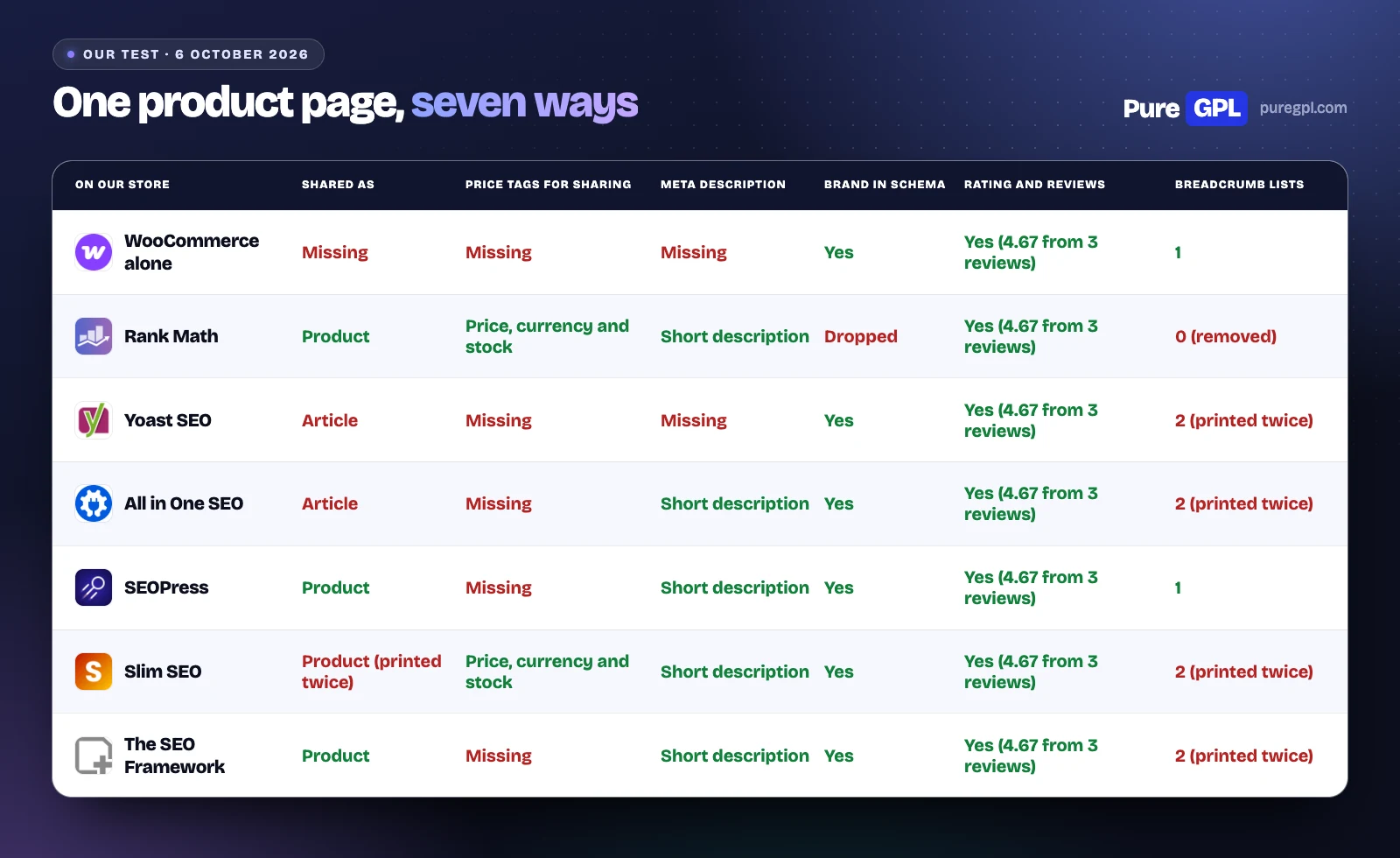
The skillet page, with WooCommerce alone and with each free plugin at its default settings:
| Product page | Shared as | Price tags for sharing | Meta description | Breadcrumb schema |
|---|---|---|---|---|
| WooCommerce alone | Missing | Missing | Missing | 1 |
| Rank Math | Product | Price, currency and stock | Short description | 0 (removed) |
| Yoast SEO | Article | Missing | Missing | 2 (printed twice) |
| All in One SEO | Article | Missing | Short description | 2 (printed twice) |
| SEOPress | Product | Missing | Short description | 1 |
| Slim SEO | Product (printed twice) | Price, currency and stock | Short description | 2 (printed twice) |
| The SEO Framework | Product | Missing | Short description | 2 (printed twice) |
“Shared as” is the Open Graph type each plugin printed. Yoast and All in One SEO shared the product as an article, and only Rank Math and Slim SEO added the price and stock tags that Facebook and Pinterest read. Slim SEO printed its product type twice.
Yoast wrote no meta description: it prints one only when you write it. The other five used the product’s short description.
Four of the plugins added a second breadcrumb list beside WooCommerce’s own, so the page carried two. Rank Math switches off WooCommerce’s structured data, breadcrumbs included, and its own breadcrumbs are off when you install it, so the page had none.
Product schema
| Product schema | Whose schema | Brand | GTIN | Rating and reviews |
|---|---|---|---|---|
| WooCommerce alone | WooCommerce's | Yes | Yes | Yes (4.67 from 3 reviews) |
| Rank Math | Its own (replaces WooCommerce's) | Dropped | Yes | Yes (4.67 from 3 reviews) |
| Yoast SEO | WooCommerce's | Yes | Yes | Yes (4.67 from 3 reviews) |
| All in One SEO | WooCommerce's | Yes | Yes | Yes (4.67 from 3 reviews) |
| SEOPress | WooCommerce's | Yes | Yes | Yes (4.67 from 3 reviews) |
| Slim SEO | WooCommerce's | Yes | Yes | Yes (4.67 from 3 reviews) |
| The SEO Framework | WooCommerce's | Yes | Yes | Yes (4.67 from 3 reviews) |
Five of the six left WooCommerce’s product schema in place. Rank Math replaced it with its own, which kept the GTIN, rating and reviews but dropped the brand: Rank Math reads the brand only from a taxonomy you choose in its WooCommerce settings, and none is chosen when you install it. On a fresh install, pick “Brands” there.
Variable and out-of-stock products
All six kept the variable apron’s price range (an “AggregateOffer” from the lower size price to the higher) and marked the wok “OutOfStock”, as WooCommerce does by itself. None of the outputs, WooCommerce’s included, listed each size as its own variant with its own GTIN. Variant data is what the paid product schema adds in Rank Math PRO, All in One SEO’s paid plans and Slim SEO Pro.
Shipping and returns
Shipping details and return policies, which Google can show with a product, were in no version’s output, WooCommerce’s included. All in One SEO’s WooCommerce page says its paid schema “automatically adds comprehensive details including shipping information, return policies, and product variations”. Google’s merchant listing documentation also offers a way round it for the whole store: “You can alternatively configure account-level shipping and return policies in Search Console”, or in Merchant Center.
Product titles and descriptions
A template fills in each product’s title or description from its own data, so every product gets one automatically. Four of the six have product variables for that:
- Rank Math, free: %wc_price%, %wc_sku%, %wc_shortdesc% and %wc_brand% (the brand stays empty until you choose a brand taxonomy).
- SEOPress, free: %%wc_single_price%%, %%wc_sku%%, %%wc_single_short_desc%% and %%wc_single_cat%%, among others.
- Slim SEO, free: WooCommerce variables for the price, the price including tax, sale dates, SKU, stock status, currency, rating and review count.
- All in One SEO, paid plans: smart tags that “include product details like price, brand, or availability”.
With any of them, write the description by hand for your best sellers: a template repeats the same sentence on every product.
Cart, checkout and account pages
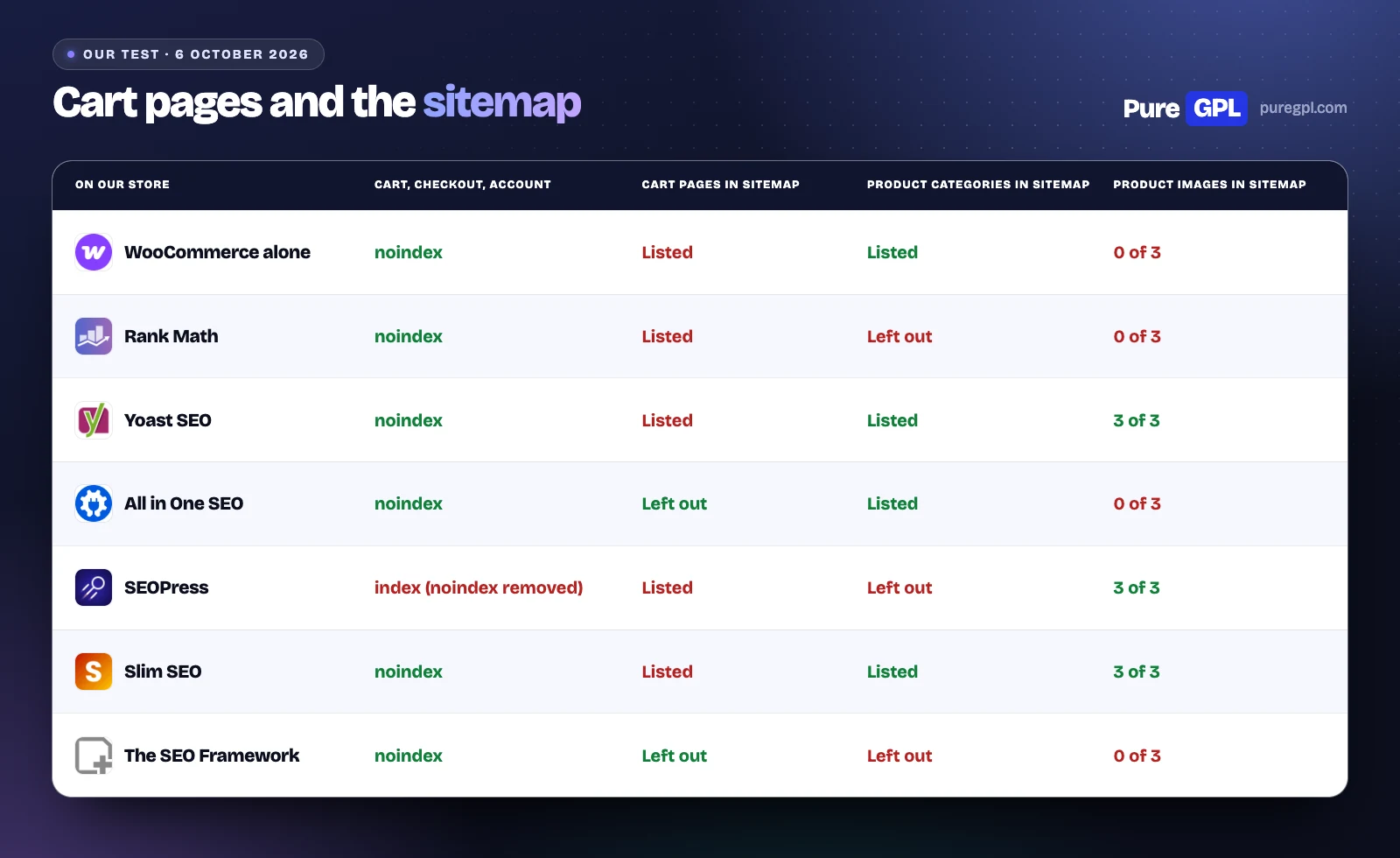
WooCommerce marks these pages “noindex” itself, so Google leaves them out. Five of the free plugins kept that. SEOPress removed it:
| Store pages | Cart, checkout and account | Cart pages in the sitemap | Product tag archives | Sorted or filtered shop page |
|---|---|---|---|---|
| WooCommerce alone | noindex | Listed | index | Missing |
| Rank Math | noindex | Listed | noindex | /shop/ |
| Yoast SEO | noindex | Listed | index | /shop/ |
| All in One SEO | noindex | Left out | index | /shop/ |
| SEOPress | index (noindex removed) | Listed | index | /shop/ |
| Slim SEO | noindex | Listed | index | /shop/ |
| The SEO Framework | noindex | Left out | index | /shop/ |
In SEOPress’s free code, a function commented “Remove WC default meta robots” takes WooCommerce’s noindex off the cart, checkout and account pages, and SEOPress then prints “index, follow” there. In the free version you can tick noindex on each of the three pages by hand; PRO has one setting for all of them. If you run SEOPress free on a store, check those three pages.
Rank Math also set product tag archives to noindex by default. All six pointed the canonical of a sorted or filtered shop page back to the shop, which WooCommerce alone does not do.
The sitemap
| Sitemap | Products | Product images | Product categories |
|---|---|---|---|
| WooCommerce alone | 3 of 3 | 0 of 3 | Listed |
| Rank Math | 3 of 3 | 0 of 3 | Left out |
| Yoast SEO | 3 of 3 | 3 of 3 | Listed |
| All in One SEO | 3 of 3 | 0 of 3 | Listed |
| SEOPress | 3 of 3 | 3 of 3 | Left out |
| Slim SEO | 3 of 3 | 3 of 3 | Listed |
| The SEO Framework | 3 of 3 | 0 of 3 | Left out |
All six listed every product. Rank Math, SEOPress and The SEO Framework left product categories out of the sitemap with their default settings, though WordPress’s own sitemap had them. Rank Math and SEOPress each have a setting to add them.
The cart, checkout and account pages were in the sitemaps of Rank Math, Yoast SEO, SEOPress and Slim SEO. Three of those four also marked the pages “noindex”, so their sitemaps listed pages they told search engines not to index; SEOPress made them indexable instead. All in One SEO and The SEO Framework left them out. Yoast’s own WooCommerce SEO plan lists a sitemap that skips cart and checkout pages as one of its features.
Yoast SEO, SEOPress and Slim SEO listed each product’s image in the product sitemap. Rank Math listed none: its setting that adds featured images to the sitemap is off when you install it, and our products had only a featured image. All in One SEO adds images with a background scan that its code schedules every minute, and had added none a few minutes after activation. The SEO Framework’s developer says its sitemap leaves images out.
Store features on each plan
Each cell says the plan the feature is on, from the developer’s pages and code on 5 and 6 October 2026. “Free” means the free WordPress.org plugin.
| Feature | Rank Math | Yoast SEO | All in One SEO | SEOPress | Slim SEO | The SEO Framework |
|---|---|---|---|---|---|---|
| Product schema extras (GTIN fields, variants) | Free (GTIN and more in PRO) | WooCommerce SEO and up ($178.80/year) | Basic and up | PRO | Personal and up (Product schema builder with variants) | Not listed |
| WooCommerce settings | Free (more in PRO) | WooCommerce SEO and up | Basic and up (Elite for WooCommerce 404 handling) | PRO (Free: /product-category/ removal, primary category and product variables) | Free (product Open Graph tags, WooCommerce variables, shop breadcrumbs) | Free (automatic: noindex cart/checkout/account, gallery Open Graph images, primary product category) |
| Breadcrumbs | Free (off by default) | Free | Free (custom templates Basic and up) | PRO | Free | Free (schema plus [tsf_breadcrumb] shortcode) |
| Local business schema | Free (one location) | Premium and up (Local SEO plugin) | Plus and up | PRO | Personal and up (LocalBusiness type in the builder) | Pro and up (Local extension) |
| Multiple locations | PRO and up | Premium and up (Local SEO plugin) | Plus and up | PRO (one manual Local Business schema per page) | Personal and up (several LocalBusiness schemas, no locations manager) | Pro and up (up to 4096 departments) |
The paid WooCommerce features are mostly about product schema you can edit: GTIN, MPN and brand fields on each product and variation, and a schema the plugin builds instead of WooCommerce’s. Our test shows WooCommerce already prints the GTIN and brand from its own fields, so those fields matter most if you sell variations with their own codes or need MPN or ISBN numbers.
Redirects for products you delete
A product you stop selling leaves a 404 unless you redirect it. Rank Math and Slim SEO have a free redirect manager and 404 log for this; in Rank Math both are modules you switch on first:
| Feature | Rank Math | Yoast SEO | All in One SEO | SEOPress | Slim SEO | The SEO Framework |
|---|---|---|---|---|---|---|
| Redirect manager | Free (module off at install) | Premium and up | Pro and up | PRO (Free: per-post 301/302/307 redirect only) | Free | Free (per-post 301 field only, no redirect manager) |
| 404 monitor | Free (module off at install) | No | Pro and up | PRO | Free (off by default) | No |
| Redirect when a slug changes | Free | Premium and up (automatic, with undo) | Pro and up (Basic card also lists it) | PRO (notice with one-click redirect, not automatic) | Free (hierarchical post types; Pro also rewrites links) | Not listed |
Sitemaps
| Feature | Rank Math | Yoast SEO | All in One SEO | SEOPress | Slim SEO | The SEO Framework |
|---|---|---|---|---|---|---|
| XML sitemap | Free | Free | Free | Free | Free | Free |
| Image sitemap | Free | Free (images inside the XML sitemaps) | Free | Free | Free | Not listed (vendor says the free sitemap omits images) |
Editing, switching and licences
| Feature | Rank Math | Yoast SEO | All in One SEO | SEOPress | Slim SEO | The SEO Framework |
|---|---|---|---|---|---|---|
| Bulk edit titles and descriptions | Free (advanced bulk options in PRO) | Free (AI bulk drafts in Premium) | Free | Free (Quick Edit in post lists); PRO (CSV import and AI bulk actions) | Free (Quick Edit per post, bulk AI generation; Bulk Edit sets noindex only) | Free (Quick Edit per post; Bulk Edit sets robots only) |
| Import from other SEO plugins | Free (Yoast SEO and Premium, AIOSEO and Pro, SEOPress, All In One Schema Rich Snippets, WP Schema Pro, Redirection) | Free (All in One SEO, Rank Math, The SEO Framework, SmartCrawl, Squirrly, WP Meta SEO, SEOpressor, Jetpack, Platinum SEO Pack, Premium SEO Pack, HeadSpace, Greg’s High Performance SEO, Ultimate SEO, WooThemes SEO, wpSEO.de; no SEOPress) | Free (Yoast SEO, Rank Math, SEOPress) | Free (12 plugins: Yoast, AIOSEO, Rank Math, The SEO Framework, Slim SEO, SmartCrawl, Squirrly, SEO Ultimate, WP Meta SEO, Premium SEO Pack, SiteSEO, SureRank) | Free (Yoast SEO, All in One SEO, The SEO Framework, Rank Math, SEOPress, Squirrly SEO, Redirection, 301 Redirects) | Free via the Transport extension (Yoast SEO, Rank Math, SEOPress) |
| Licence for client sites | Business and Agency (100 or 500 client sites) | Premium and up (one site per subscription; bulk discounts from 5) | Any plan within its site count (1, 3, 10 or 100 sites) | All PRO plans (1, 5 or unlimited sites) | All plans (Personal 1 site, Freelancer 10, Agency unlimited) | All paid plans (Pro 2 sites, Business 20, Agency 200); free plugin on any site |
| Refund window | 30 days (new purchases only) | 30 days (first purchase only; AI+ one week) | 14 days | 14 days (AI Credits non-refundable) | 14 days | 30 days (purchase or renewal) |
| Support | Free: WordPress.org forum; PRO: 24/7 tickets; Business and Agency: 24/7 priority | Free: wordpress.org forum; Premium and up: 24/7 live chat and email | Lite: WordPress.org forum; Basic and Plus: Standard; Pro: Priority; Elite: Premium | Free: wordpress.org forum and guides; PRO and Insights: email from the customer account | Free: WordPress.org forum; all paid plans: email tickets (one year) | Free: WordPress.org forum; Pro: + private email (billing and install); Business: + private developer support; Agency: priority private |
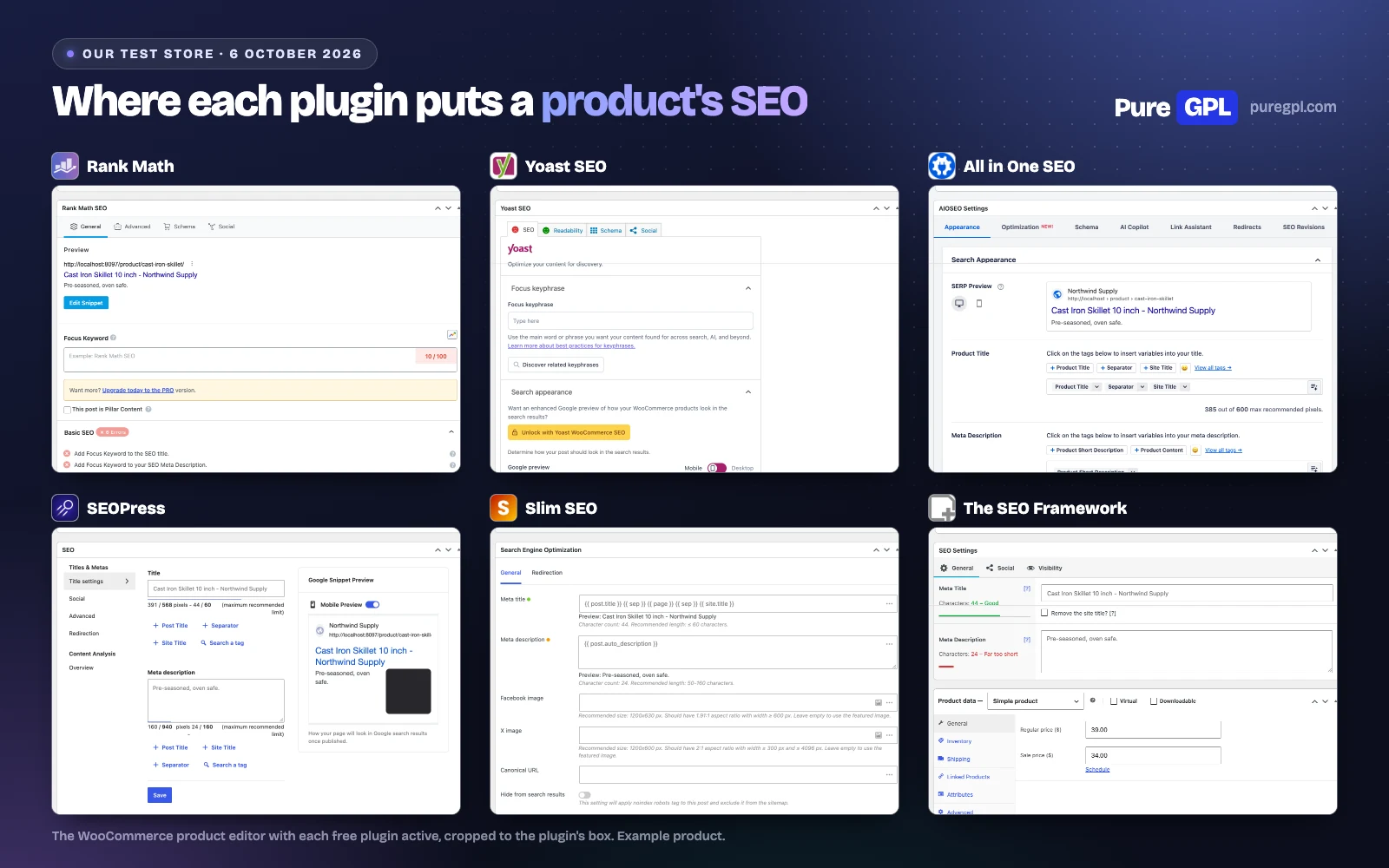
The six, one by one, for a store
1. Rank Math
For a store, the free version gives you: product Open Graph tags with price and stock, a redirect manager with a 404 log, product title and description variables, and settings to remove the /product/ and /product-category/ bases.
The catch: its store defaults. It replaces WooCommerce’s product schema and drops the brand until you choose a brand taxonomy; its breadcrumbs, the featured images in its sitemap, product categories in its sitemap, and its redirect and 404 modules are all off when you install it; and it lists the cart pages in its sitemap.
PRO adds: its own GTIN and MPN fields, also on variations (the free version already prints WooCommerce’s GTIN), for $95.88 in the first year and $107.88 after that, for every site you own.
2. Yoast SEO
For a store, the free version gives you: a sitemap with products, product categories, tags, brands and product images, and free breadcrumbs.
The catch: it shared our product as an article, wrote no description (it prints one only when you write it), and added a second breadcrumb list.
Yoast WooCommerce SEO adds: product schema with price, availability, ratings and identifiers, fields for brand, colour and material, a sitemap without cart, checkout and filter pages, and product checks in the editor. It includes Yoast SEO Premium, at $178.80 a year per store.
3. All in One SEO
For a store, the free version gives you: a description from the short description, WooCommerce’s product schema left in place, and a sitemap with products, categories, tags and brands that leaves the cart pages out.
The catch: it shared the product as an article and added a second breadcrumb list. Redirects start on Pro.
Paid adds: WooCommerce SEO on every plan from Basic: product schema that its WooCommerce page says adds shipping information, return policies and product variations, and smart tags for product details. Advanced 404 handling for WooCommerce products and categories is on Elite only.
4. SEOPress
For a store, the free version gives you: a product Open Graph type, a description, product variables for titles and descriptions, a per-page noindex box, and a setting to remove /product-category/ from category addresses.
The catch: it took WooCommerce’s noindex off the cart, checkout and account pages, and left product categories out of its sitemap.
PRO adds: one setting to noindex those pages, price and currency Open Graph tags, GTIN fields, its own product schema, a redirect manager and a 404 log, for $49 a year on one site, the same price at renewal.
5. Slim SEO
For a store, the free version gives you: product Open Graph, price and stock tags, a sitemap with products, categories, tags, brands and product images, product variables for titles and descriptions, and free redirects. It is 1.7 MB on disk and worked on our store with its default settings.
The catch: it printed the product Open Graph type twice and added a second breadcrumb list.
Slim SEO Pro adds: a schema builder with a product type and WooCommerce variant data, from $59 a year for one site.
6. The SEO Framework
For a store, the free version gives you: WooCommerce support with no settings at all: noindexed cart, checkout and account pages that it also leaves out of its sitemap, product gallery images in the social tags, and a primary product category.
The catch: no redirect manager, a sitemap without categories or images, a second breadcrumb list, and its last update was on 10 December 2025.
Its paid extensions add: local business data and other features, but nothing for products.
What it costs for one store, and for ten
Only the plans that add WooCommerce features. Prices are from each developer’s page on 5 October 2026, before tax.
One store
| Plan | Year one | Then each year | Three years |
|---|---|---|---|
| SEOPress PRO (1 site) | $49 | $49 | $147 |
| Slim SEO Pro Personal (1 site) | $59 | $59 | $177 |
| All in One SEO Basic (1 site) | $49.50 | $99 | $247.50 |
| Rank Math PRO (sites you own) | $95.88 | $107.88 | $311.64 |
| Yoast WooCommerce SEO (1 site) | $178.80 | Not stated | $536.40 at the same price |
All in One SEO’s page says “Special introductory pricing, all renewals are at full price”, so Basic doubles in year two. Rank Math sells by the month and bills yearly: $7.99 a month in year one, $8.99 after. Yoast’s pages give no renewal price, so its three-year figure assumes the price stays the same.
Ten stores
| Plan | Sites | Three years | Per store |
|---|---|---|---|
| Rank Math PRO (your own stores) | Unlimited | $311.64 | $31.16 |
| SEOPress PRO, two 5-site plans | 10 | $354 | $35.40 |
| Slim SEO Pro Freelancer | 10 | $357 | $35.70 |
| All in One SEO Pro | 10 | $997.50 | $99.75 |
| Yoast WooCommerce SEO, 15% off the first year | 10 | $5,095.80 | $509.58 |
Rank Math PRO covers sites you own; client stores need its Business plan. SEOPress PRO Unlimited is $447 over three years for any number of sites. Yoast sells per site and takes 15% off ten or more subscriptions bought in the same order; its terms say no one can count on a discount at renewal, so the figure assumes renewals at $178.80.
Which to choose
| Your store | Choose | Why |
|---|---|---|
| Small store, free only | Slim SEO | Product sharing tags with the price, WooCommerce’s schema kept, categories and product images in the sitemap, and free redirects |
| Free, and you will change settings | Rank Math | Product variables, local business schema, redirects and a 404 log, once its store defaults are changed |
| Free, and nothing to change | The SEO Framework | Kept the cart pages out of the index and out of its sitemap; its sitemap has no categories or images, and it has no redirects |
| One store, paying | SEOPress PRO | WooCommerce features and redirects on the cheapest plan, and $49 again at renewal |
| Already on Yoast | Yoast WooCommerce SEO | Product schema and product fields in the plugin you already know |
| Many stores of your own | Rank Math PRO | One price for every site you own |
What to set up, whichever you choose
- Fill in WooCommerce’s own GTIN and brand fields. WooCommerce prints them in its schema; most plugins pass them through.
- Check your cart, checkout and account pages for “noindex” in the page source, and remove them from your sitemap if your plugin lists them.
- Check your product categories are in the sitemap. Category pages often rank for broader searches than a single product.
- Write descriptions for your best sellers. Five of the six used the short description; Yoast left it empty.
- Redirect products you delete to the closest category instead of leaving a 404.
- Test one product, one variable product and one category in Google’s Rich Results Test after any change.
- Run one SEO plugin. Each one we tested printed its own title, description and social tags.
What other lists get wrong
We checked the pages that rank for this search against the developers’ pages and code on 5 and 6 October 2026:
- “you’ll need to pay $229/year (per site)” for Yoast’s WooCommerce features (webappick.com). Yoast WooCommerce SEO is $178.80 a year, and it includes Yoast SEO Premium.
- “Yoast SEO Premium runs $99/year with the WooCommerce add-on at $79/year for $178 total.” (redefineweb.com). Premium is $118.80, and there is no $79 add-on: Yoast WooCommerce SEO is one $178.80 plan.
- “locks Product schema, breadcrumbs, and internal linking behind the $178/year Premium plus Woo bundle” for Yoast (redefineweb.com). Breadcrumbs are in the free plugin.
- “AIOSEO Pro runs $99.50/year.” (redefineweb.com). Pro is $199.50 in year one and $399 after; $99.50 is the first year of Plus.
- “Configure the product title template as %title% for %product_price% at %sitename%” for Rank Math (redefineweb.com). Rank Math has no %product_price% variable; its WooCommerce variables are %wc_price%, %wc_sku%, %wc_shortdesc% and %wc_brand%, so the template prints the words as written.
- “a lightweight and AI-driven SEO plugin” for The SEO Framework (webappick.com). Its code calls no AI service; its own page says it “auto-configures its global settings”.
- “Rank Math $5.75 / month” (loginpress.pro), “Rank Math Pro runs $59/year.” (redefineweb.com), “The pro plan starts at $59 per year” (aioseo.com) and “Start from $59.00 / Year” (themesgrove.com). Rank Math PRO is $7.99 a month, billed yearly, in year one, then $8.99.
None of the five pages we checked (webappick.com, redefineweb.com, loginpress.pro, aioseo.com and themesgrove.com) gives a renewal price, and none says it tested anything on a store.
On PureGPL
We sell the paid versions of these plugins:
- Rank Math SEO Pro, Yoast WooCommerce SEO, All in One SEO Pack PRO and SEOPress Pro at $4.99 each;
- Slim SEO Pro at $3.49.
The free versions in this article come from WordPress.org. See also our Yoast WooCommerce SEO review.
What a GPL copy does and does not include
WordPress plugins are licensed under the GPL, which lets anyone share the code. A copy from PureGPL is not a licence with the developer:
- Support: you do not get the developer’s support.
- Hosted services: anything that runs on the developer’s servers (rank tracking, AI credits, Search Console reports through their account) is not part of it.
- On-site features: product schema, GTIN fields, redirects, sitemaps and WooCommerce settings run inside WordPress.
- Updates: they come from us.
If you need the hosted services or the developer’s support, buy from the developer.
Sources
Developer pages read on 5 October 2026, Google’s product documentation and the competitor pages on 6 October 2026. The measurements and screenshots are our own.
- WordPress.org plugin data: all-in-one-seo-pack
- WordPress.org plugin data: autodescription
- WordPress.org plugin data: seo-by-rank-math
- WordPress.org plugin data: slim-seo
- WordPress.org plugin data: wordpress-seo
- WordPress.org plugin data: wp-seopress
- aioseo.com/features/breadcrumbs
- aioseo.com/features/local-seo
- aioseo.com/features/smart-xml-sitemaps
- aioseo.com/features/woocommerce-seo
- aioseo.com/pricing
- aioseo.com/terms
- developers.google.com/search/docs/appearance/structured-data/merchant-listing
- docs.wpslimseo.com/slim-seo/ai
- docs.wpslimseo.com/slim-seo/import-export
- docs.wpslimseo.com/slim-seo/integrations/woocommerce
- docs.wpslimseo.com/slim-seo/redirection
- docs.wpslimseo.com/slim-seo/xml-sitemap
- rankmath.com/free-vs-pro
- rankmath.com/pricing
- seopress.org/features
- seopress.org/features/local-seo
- seopress.org/features/woocommerce-seo
- seopress.org/pricing
- seopress.org/seopress-free-vs-pro
- seopress.org/terms-conditions
- seopress.org/wordpress-seo-plugins/insights
- seopress.org/wordpress-seo-plugins/seopress-ai-credits
- theseoframework.com
- theseoframework.com/extensions
- theseoframework.com/extensions/local
- theseoframework.com/extensions/transport
- theseoframework.com/pricing
- theseoframework.com/refund-policy
- theseoframework.com/support
- theseoframework.com/terms
- wordpress.org/plugins/all-in-one-seo-pack
- wordpress.org/plugins/autodescription
- wordpress.org/plugins/seo-by-rank-math
- wordpress.org/plugins/slim-seo
- wordpress.org/plugins/wordpress-seo
- wordpress.org/plugins/wp-seopress
- wpslimseo.com
- wpslimseo.com/products/slim-seo-pro
- wpslimseo.com/products/slim-seo-pro/changelog
- wpslimseo.com/terms
- yoast.com/discount
- yoast.com/features
- yoast.com/features/redirect-manager
- yoast.com/features/structured-data
- yoast.com/help/support
- yoast.com/product/yoast-seo-ai-plus
- yoast.com/product/yoast-seo-premium-wordpress
- yoast.com/product/yoast-seo-wordpress
- yoast.com/product/yoast-woocommerce-seo
- yoast.com/shop
- yoast.com/terms-of-service
- yoast.com/wordpress/plugins/local-seo
- yoast.com/yoast-partners/agency-program
- aioseo.com/best-woocommerce-seo-plugins (competitor page we checked)
- loginpress.pro/woocommerce-seo-plugins (competitor page we checked)
- redefineweb.com/blog/best-seo-plugins-for-woocommerce (competitor page we checked)
- themesgrove.com/woocommerce/woocommerce-seo-plugins (competitor page we checked)
- webappick.com/best-seo-plugin-woocommerce (competitor page we checked)
Frequently asked questions
What is the best SEO plugin for WooCommerce?
Slim SEO for a free plugin that works as it comes, Rank Math if you will change its store defaults, SEOPress PRO if you are paying for one store, and Rank Math PRO for many stores of your own.
Does WooCommerce have built-in SEO?
Partly. On our test store it printed product schema with the brand, GTIN, rating, reviews, price and stock, added breadcrumb schema, and noindexed the cart, checkout and account pages. It printed no meta description and no social tags.
Is Yoast enough for WooCommerce?
The free version shared our product as an article and wrote no description. The store features are in Yoast WooCommerce SEO, $178.80 a year per store.
Do I need a separate schema plugin for products?
Usually not. WooCommerce prints product schema itself, and five of the six free SEO plugins left it in place. For an FAQ, Yoast’s free version has an FAQ block, and Rank Math’s free version lets you pick from 18 schema types.
Should cart and checkout pages be in the sitemap?
No. They have nothing to rank for, and WooCommerce marks them noindex. Four of the six free plugins listed them anyway; check yours.
Can I use two SEO plugins on one store?
Not at once. Each one we tested printed its own title, description and social tags. Import your settings into the new one, then deactivate the old one.
More from our tests: best SEO plugins for WordPress, best free SEO plugins, Rank Math vs Yoast SEO and Rank Math vs All in One SEO vs SEOPress.


