WooCommerce Coupon Box WordPress Plugin Review 2026: Features & Pricing

Building an email list from a WooCommerce store often means bolting on a generic pop-up plugin that has no real connection to your product catalog or checkout flow. This Coupon Box review looks at a narrower alternative: a plugin that trades a subscriber’s email for a discount coupon, built specifically for WooCommerce rather than adapted to it. The pitch is simple, but the setup terms and licensing model deserve scrutiny before you buy.
The real question is whether that WooCommerce-specific focus, plus a fast setup, outweighs a licensing structure that limits support and updates over time.
Quick Verdict
Coupon Box suits WooCommerce store owners who want a quick, purpose-built way to turn store visitors into email subscribers using a coupon incentive, without configuring a general-purpose pop-up tool. It’s a weaker fit for stores that need long-term hands-off updates or run on tight compliance requirements.
Pros
- Fast setup — first-hand testing showed installation and basic configuration took about 2 minutes
- Purpose-built for WooCommerce, pairing discount coupons directly with email capture rather than generic pop-up targeting
- Syncs collected subscriber emails with external email marketing platforms
- WPML compatibility supports multilingual WooCommerce stores
- Plugin ZIP installs directly through the WordPress dashboard without extraction
Cons
- Requires WooCommerce installed and active, adding a dependency on top of the plugin itself
- License-based support and update windows apply (see Pricing for details)
- Premium updates and support follow Envato’s CodeCanyon marketplace terms, separate from the free WordPress.org listing
Core Features
Coupon-Incentive Email Pop-Up
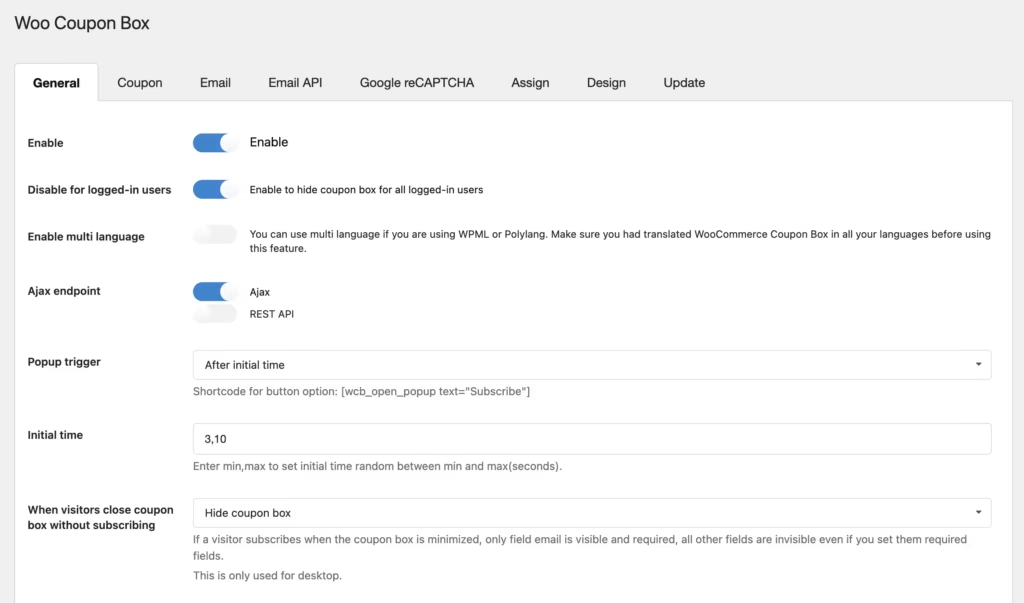
Coupon Box’s central mechanism is a pop-up that trades a discount code for an email address. Rather than asking visitors to subscribe for generic updates, the pop-up presents a concrete incentive: enter your email, receive a coupon usable in the store. The plugin’s built-in settings screen handles configuration of the pop-up display and the coupon offer itself.
For a WooCommerce store, this reframes list-building as a transaction rather than a request. A visitor browsing products has an immediate reason to hand over their email, since the reward applies directly to a purchase they may already be considering. That direct tie between signup and discount is the plugin’s main selling point over pop-up tools that aren’t built around WooCommerce coupons specifically.
In our testing on WordPress 6.5 with PHP 8.4, it took about 2 minutes to install and do the basic setup. We also noticed that the plugin’s ZIP file, codecanyon-22495702-woocommerce-coupon-box-wordpress-plugin.zip, can be installed directly via Plugins → Add New Plugin → Upload Plugin without extracting it, provided it is the actual installable plugin ZIP.
Subscriber Email Collection
The plugin captures and stores every email submitted through the pop-up in a dedicated subscriber collection interface, giving store owners a running list of visitors who opted in for a coupon, separate from WooCommerce’s own customer records.
That list carries real value: it represents visitors who have already shown buying intent, not just casual site traffic. Store owners can use it as a starting point for follow-up marketing — a welcome sequence, a re-engagement campaign, or seasonal offers built around the same coupon-for-email pattern.
Email Marketing Platform Sync
Collected addresses can optionally sync with external email marketing platforms, managed through the plugin’s sync settings panel. Instead of leaving subscriber data sitting inside WordPress, the plugin passes it along to whatever marketing tool the store already runs campaigns from.
For store owners who rely on a separate email platform for newsletters, promotions, or automated flows, this sync removes a manual export-and-import step. New subscribers picked up through the coupon pop-up become available for outreach in the same platform used for the rest of the store’s email marketing, without a second system to manage in parallel.
Installation and Setup
- Confirm your store meets the plugin’s dependencies before starting. Coupon Box requires WooCommerce to be installed and active on your WordPress site before it can function, since the pop-up and coupon logic are built to work inside a WooCommerce store.
- Download the plugin ZIP file after purchase (the file is named similarly to codecanyon-22495702-woocommerce-coupon-box-wordpress-plugin.zip).
- Log in to your WordPress dashboard and go to Plugins → Add New Plugin → Upload Plugin.
- Upload the ZIP file directly, without extracting it first. The upload works as long as the file you select is the actual installable plugin package rather than a folder containing documentation, license files, or other assets bundled with the CodeCanyon download.
- Click Install Now, then Activate Plugin once the upload finishes.
- Open the Coupon Box settings screen in the dashboard and configure the pop-up, coupon offer, and email collection settings for your store. On a straightforward setup, installation and basic configuration together take only a couple of minutes.
- If you plan to sync collected subscriber emails with an external email marketing platform, complete the sync settings from within the plugin’s configuration screen before publishing the pop-up on your live site.
Compatibility and Requirements
| Requirement | Details |
|---|---|
| WordPress | 6.0.x through 7.0.x (including 6.1.x, 6.2.x, 6.3.x, 6.4.x, 6.5.x, 6.6.x, 6.7.x, 6.8.x, 6.9.x, 7.0.x) |
| WooCommerce | 6.x.x through 10.x.x |
| WPML | Compatible |
| Browsers | Firefox, Safari, Opera, Chrome, Edge |
| Files included | JavaScript (JS), CSS, PHP |
Coupon Box’s listed requirements don’t state a minimum PHP version. As a general practice, running any WooCommerce plugin on a currently supported PHP version — rather than an outdated or end-of-life release — helps keep a live store secure and reduces the chance of compatibility issues with other plugins in your stack.
WooCommerce itself is the only plugin Coupon Box strictly depends on to run. WPML support means the plugin can work alongside a multilingual setup, but it is not a requirement for basic use.
Coupon Box Pricing
Coupon Box follows a freemium model split across two distribution channels. A free version is available through the official WordPress Plugin Directory, giving store owners a no-cost way to try the core pop-up and email-collection functionality before committing to a purchase. The premium version, sold on CodeCanyon, unlocks the full feature set and comes with direct developer support.
The premium plugin is offered under two license types:
| License | Price | Site usage | Included |
|---|---|---|---|
| Regular License | $49 | Single end product, not charged to end users | 6 months of support from VillaTheme |
| Extended License | $125 | Single end product that end users can be charged for | 6 months of support from VillaTheme |
The Regular License suits a standard WooCommerce store built for internal or client use. The Extended License is the correct choice if the end product itself will be resold or charged for, such as when the plugin is bundled into a theme or service sold to third parties.
Both licenses include six months of support from VillaTheme, covering bug fixes and assistance with setup issues. That support window can be extended to 12 months for an additional fee. Automatic in-dashboard updates only apply while support is active; once the support period lapses, updates have to be applied manually rather than through the WordPress dashboard.
As a CodeCanyon item, Coupon Box is covered by Envato’s standard refund policy. Refunds aren’t issued for a simple change of mind, but they are available if the plugin is broken, unsafe, or doesn’t function as described and the developer can’t resolve the issue within a reasonable time.
Pricing details and license terms are subject to change, so check the official CodeCanyon listing for the current rate before purchasing.
👉 Get Coupon Box at the best available price
Alternatives to Coupon Box
Coupon Box focuses narrowly on pairing WooCommerce discount coupons with email capture, but it isn’t the only option for growing a subscriber list. Store owners weighing broader popup functionality or platform flexibility may want to consider these alternatives.
| Product | Key Difference | Best For | Price Tier |
|---|---|---|---|
| Coupon Box | Purpose-built for WooCommerce, tying coupon incentives directly to email capture pop-ups | Store owners who want a quick, coupon-specific opt-in without configuring generic popup rules | Freemium |
| OptinMonster | SaaS-based lead generation tool with advanced targeting and A/B testing, usable across many platforms beyond WordPress | Marketers who need cross-platform popups with detailed testing and targeting controls | Freemium |
| Popup Maker | WordPress popup plugin with a free core version and paid extensions for advanced targeting and integrations | Users who want a free starting point and only pay for the features they add | Freemium |
| Icegram Engage | WordPress popup and lead generation plugin offering opt-in forms, popups, and email integrations, with a free version available | Site owners wanting varied opt-in formats beyond coupon pop-ups, without an upfront cost | Freemium |
Competitor data is sourced from publicly available information as of 2026 and may have changed.
The right pick depends on how much popup flexibility you need versus how tightly you want the tool bound to WooCommerce coupons specifically. Stores that just want a fast coupon-for-email exchange may prefer Coupon Box’s focused approach, while those needing broader targeting or multi-platform reach may lean toward OptinMonster, Popup Maker, or Icegram Engage.
Frequently Asked Questions
Does Coupon Box require WooCommerce to work?
Yes, Coupon Box needs WooCommerce installed and active on the site before it can function. It is built specifically to attach discount coupon offers to the email capture pop-up, so it relies on WooCommerce’s coupon system rather than working as a standalone opt-in tool.
How much does Coupon Box cost?
The Regular License costs $49 and covers a single end product that is not charged to end users. An Extended License costs $125 and covers a single end product that end users can be charged for. Both licenses include 6 months of support from VillaTheme.
Is there a free version of Coupon Box?
Yes. A free base version of Coupon Box exists separately from the paid CodeCanyon listing, hosted on the official WordPress Plugin Directory rather than CodeCanyon. The premium version, with its full feature set, is sold as a one-time purchase on CodeCanyon.
How do I install the Coupon Box plugin?
The plugin’s ZIP file can be uploaded directly through the WordPress dashboard, without needing to extract it first, provided it is the actual installable plugin ZIP rather than the full CodeCanyon download package. In practice, installation and basic configuration can be completed in about 2 minutes through Plugins, then Add New Plugin, then Upload Plugin.
What happens to updates and support after the included support period ends?
Automatic in-dashboard updates only apply while the support period is active. Once the initial 6 months lapse, any further updates must be applied manually, unless the support period is extended to 12 months for an additional fee.
Can I get a refund on Coupon Box if it doesn’t work?
Refunds are possible under Envato’s marketplace policy, but not simply for change of mind. A refund applies if the plugin is broken, unsafe, or does not work as described, and the author is unable to fix the issue within a reasonable time.
How does Coupon Box compare to OptinMonster for WooCommerce stores?
Coupon Box is built specifically around pairing a discount coupon with an email capture pop-up for WooCommerce stores, while OptinMonster is a broader lead-generation platform that supports pop-ups, targeting rules, and campaigns across many types of sites, not just WooCommerce. Store owners who only want a coupon-for-email exchange may find Coupon Box simpler to set up, while those wanting more general-purpose targeting and campaign features across multiple site types may lean toward OptinMonster.
Download & Pricing Options
🆓 Free Version
👉 Download the Free Version of Coupon Box
💎 Get Coupon Box (Best Available Price)
👉 Check Current Pricing for Coupon Box
Pricing and availability may change — use the link above for current rates.
A GPL membership covers WooCommerce Coupon Box WordPress Plugin along with thousands of other premium products. Our our GPL site comparison guide sets out what each vendor charges and what you give up in return.


