SUMO WooCommerce Dynamic Pricing Discounts Review (2026)

Running promotions on a WooCommerce store often means juggling several plugins just to cover quantity breaks, cart-total discounts, and category-specific offers. This SUMO Discounts review looks at a single plugin that bundles those discount types together, plus buy-X-get-Y offers and user role pricing, under one CodeCanyon license. The question is whether covering that much ground in one add-on, rather than several specialized ones, actually simplifies running discounts on a live store.
This review weighs the plugin’s rule variety and one-time pricing against its support terms and reliance on companion plugins for deeper tiered discounting.
Quick Verdict
SUMO WooCommerce Dynamic Pricing Discounts suits store owners who want quantity, cart, category, and role-based discount rules handled by one plugin instead of several, and who are comfortable with a one-time purchase model. It’s a weaker fit for stores that need membership-tier or reward-point discounts without buying additional SUMO plugins, or for anyone wanting to test a free version before committing.
Pros
- Covers quantity, cart total, category, product, and user role discounts in a single plugin
- Includes a built-in rule builder for special offers like buy 2 get 1 free
- One-time license fee instead of a recurring subscription
- Can extend into tiered membership or reward-point discounts when paired with SUMO Memberships or SUMO Reward Points
- Installs directly through the standard WordPress plugin uploader with minimal setup
Cons
- Membership and reward-point tier discounts require purchasing separate SUMO plugins
- The Regular License only covers one end product, so client work needs the pricier Extended License
👉 See SUMO WooCommerce Dynamic Pricing Discounts pricing
Core Features
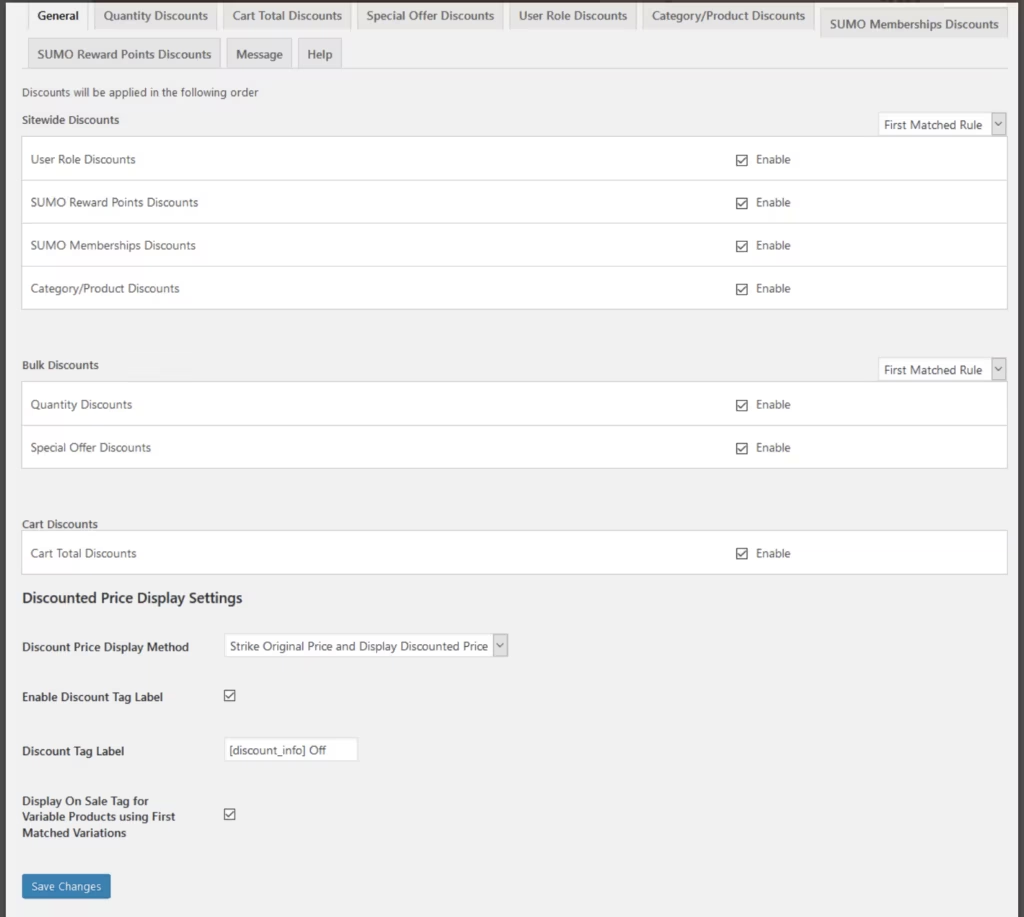
Quantity Discounts
SUMO Discounts lets store owners set price breaks tied to how many units a customer adds to their cart. A rule can apply to a single product or a group of products, cutting the price per unit once a threshold quantity is reached.
For stores that sell in bulk — wholesalers, B2B sellers, or anyone pushing multi-packs — this turns manual bulk-pricing spreadsheets into something the storefront handles automatically at checkout.
Cart Total Discounts
Rather than pricing individual items, this discount type triggers off the overall cart value. Once a customer’s subtotal crosses a set amount, the plugin applies the configured discount to the order.
It’s a straightforward way to encourage larger baskets: shoppers see the incentive to add one more item to clear the threshold, and the discount is calculated automatically rather than requiring a coupon code.
Category or Product Discounts
Discount rules can be scoped to specific product categories or to individual products, rather than applying store-wide. This gives merchants a way to run promotions on a subset of the catalog — clearing seasonal stock, for example — without touching pricing anywhere else.
Because the rule sits at the category or product level, it can run alongside other discount types in the same store without conflicting with quantity or cart-total rules aimed at different products.
Special Offer Discounts
The plugin includes a dedicated special offer rule builder for buy-X-get-Y style promotions, such as buy 2 get 1 free. It runs through its own rule set, rather than being bolted onto the quantity discount logic.
For merchants running short promotional campaigns, this means the “free item” mechanic doesn’t need a separate coupon plugin or manual cart manipulation — it’s built into the same dashboard as the rest of the pricing rules.
User Role Based Discounts
Discount rules can be tied to WordPress user roles, with dedicated user role based discount settings in the configuration dashboard. A wholesale role, for instance, can be given different pricing than a retail customer role, both shopping the same storefront.
It suits stores that serve more than one type of buyer — wholesale and retail, trade and public — since the discount is applied automatically based on who is logged in, rather than through separate price lists or duplicate products.
Membership Tier Discounts
When paired with SUMO Memberships, the plugin extends its discount rules to membership tiers, letting different membership levels receive different pricing. That’s a companion-plugin integration rather than a feature built into the base install.
Stores already running or planning a membership program can layer tiered pricing on top of that structure, giving higher membership tiers a pricing incentive rather than just added content or access.
Reward Points Earning Level Discounts
With SUMO Reward Points installed alongside it, discounts can also be tied to a customer’s reward points earning level. Customers who have accumulated more points, or reached a higher earning tier, can be given better pricing as a result.
For merchants running a loyalty program, this connects the loyalty mechanic directly to pricing, giving repeat customers a tangible reason to keep earning points rather than just redeeming them for one-off rewards.
Also included: a discount rule configuration dashboard that centralizes all the rule types above in one admin screen.
Installation and Setup
Setting up the plugin follows the standard workflow for a CodeCanyon-distributed WordPress add-on. In first-hand testing on WordPress 6.5 with PHP 8.4, the full process — from installation to a working discount rule — took about two minutes, with no unusual steps or errors encountered.
- Purchase a license and download the product zip file from the CodeCanyon listing.
- Extract the downloaded file (codecanyon-17116628-sumo-discounts-advanced-pricing-woocommerce-discount-system.zip). Inside, you will find a separate file named sumodiscounts.zip — this is the actual plugin package you upload to WordPress.
- In the WordPress admin, go to Plugins > Add New Plugin > Upload Plugin, then select sumodiscounts.zip and click Install Now.
- Activate the plugin once installation finishes. WooCommerce must already be installed and active on the site, since the plugin works as an add-on to it.
- Open the plugin’s discount rule configuration dashboard to start building pricing rules — quantity discounts, cart total discounts, category or product discounts, special offer rules, and user role based discounts are all managed from here.
- Optional: for tiered discounts tied to membership plans or reward point levels, install and activate the relevant companion plugin — SUMO Memberships for membership tier discounts, or SUMO Reward Points for reward points earning level discounts. Neither is required for the core discount features listed above; they only unlock the membership- and reward-point-specific discount types.
The two-step extraction is easy to miss the first time, since uploading the outer CodeCanyon zip directly to WordPress won’t work — it’s the inner sumodiscounts.zip file that needs uploading.
Compatibility and Requirements
| Requirement | Details |
|---|---|
| WordPress | 5.7.x through 6.9.x |
| WooCommerce | 5.x.x through 9.x.x |
| Browsers | IE9, IE10, IE11, Firefox, Safari, Opera, Chrome, Edge |
These ranges reflect the compatibility the vendor states on the product listing. WooCommerce is a hard dependency — the plugin has no function without it, since every discount type it offers is built on top of WooCommerce’s cart and pricing logic.
Two features extend beyond the core plugin’s requirements. Membership tier discounts need the SUMO Memberships plugin installed and active, and reward points earning level discounts need the SUMO Reward Points plugin installed and active. Store owners who only need quantity, cart total, category, product, or user role discounts can skip both and run the plugin standalone alongside WooCommerce.
SUMO Discounts Pricing
SUMO Discounts is sold as a one-time purchase through CodeCanyon, with no free version available. Buyers choose between two license types depending on how the plugin will be used.
Regular License — $39
Covers a single end product where end users are not charged for access. This is the license most store owners installing the plugin on their own WooCommerce site will need.
Extended License — $390
Also covers a single end product, but permits use in a product that end users are charged for. This tier suits developers or agencies building the discount functionality into a commercial offering.
Both licenses include six months of author support after purchase. Extending that support window to 12 months costs an additional fee; check the official listing for the current rate.
Since this is a premium-only plugin, there’s no trial or free tier to test the discount engine before buying.
👉 Get SUMO WooCommerce Dynamic Pricing Discounts at the best available price
Alternatives to SUMO Discounts
Store owners evaluating dynamic pricing tools for WooCommerce have several options in this category, though pricing and feature depth vary by product. The table below summarizes how SUMO Discounts positions itself before you compare it against other pricing-rule plugins on the market.
| Product | Key Difference | Best For | Price Tier |
|---|---|---|---|
| SUMO Discounts | Combines quantity, cart total, category, product, and user role discount rules with a built-in buy X get Y offer builder, sold as a one-time CodeCanyon license rather than a subscription | Store owners who want broad discount rule coverage without ongoing subscription fees | Paid (one-time license) |
Competitor data is sourced from publicly available information as of 2026 and may have changed.
Choosing between dynamic pricing plugins comes down to which discount conditions your store actually needs and whether a one-time license or a subscription model fits your budget better. Stores planning to layer in membership tiers or reward point discounts should also factor in the cost of the companion SUMO plugins required to unlock those specific rule types.
Frequently Asked Questions
What discount types does SUMO Discounts support?
SUMO Discounts supports quantity discounts, cart total discounts, category or product discounts, and user role based discounts. It also includes a special offer rule builder for buy X get Y style promotions, such as buy two get one free.
Does SUMO Discounts require other SUMO plugins to work?
The core discount rules work on their own, but two features need companion plugins. Membership tier discounts require SUMO Memberships, and reward point earning level discounts require SUMO Reward Points, both sold separately.
How much does SUMO Discounts cost?
The Regular License costs $39 and covers a single end product that end users are not charged for. An Extended License costs $390 and covers a single end product that end users can be charged for, which suits agencies building paid client sites.
How long is support included with SUMO Discounts?
Author support is included for 6 months from purchase. Store owners who need coverage beyond that window can pay an additional fee to extend support to 12 months.
Is there a free version of SUMO Discounts?
No, there is no free tier or trial version. It is sold exclusively as a premium plugin through its CodeCanyon listing.
How do you install SUMO Discounts?
After purchasing, you download and extract the main codecanyon zip file, which contains a smaller sumodiscounts.zip file. That file is uploaded directly through WordPress via Plugins, Add New Plugin, and Upload Plugin, and the process takes only a couple of minutes.
Which WooCommerce and WordPress versions does SUMO Discounts support?
It is listed as compatible with WordPress 5.7.x through 6.9.x and WooCommerce 5.x.x through 9.x.x. Supported browsers include Chrome, Firefox, Safari, Opera, Edge, and Internet Explorer 9 through 11.
Download & Pricing Options
🔍 Try Before You Buy
SUMO WooCommerce Dynamic Pricing Discounts does not have an official free tier. To evaluate it before purchasing, a GPL-licensed copy is available for sandbox testing purposes only.
👉 Download GPL Evaluation Copy
This is a GPL-licensed redistributed copy for testing only — not an official developer product.
💎 Get SUMO WooCommerce Dynamic Pricing Discounts (Best Available Price)
👉 Check Current Pricing for SUMO WooCommerce Dynamic Pricing Discounts
Pricing and availability may change — use the link above for current rates.
Wondering where to get SUMO WooCommerce Dynamic Pricing Discounts without the annual licence fee? We ranked the options in our GPL site comparison comparison, and we say plainly which ones we would avoid.


