Mailchimp for WooCommerce Memberships Review (2026)


Running a WooCommerce Memberships site means member statuses change constantly: people join, pause, cancel, and renew. Mailchimp has no way of knowing any of that unless someone updates it by hand. This Mailchimp for WooCommerce Memberships review looks at the plugin SkyVerge built specifically to close that gap. It pushes plan and status changes into Mailchimp automatically, so email segments stay accurate without manual list maintenance. For store owners already paying for both WooCommerce Memberships and a Mailchimp plan, the question is whether one more paid extension is worth adding to that stack.
The real decision isn’t whether the sync works – it’s whether the added cost and dependency on a second premium plugin pays for itself in better-targeted campaigns.
Quick Verdict
This plugin is right for WooCommerce store owners running an active membership program who already use Mailchimp for email marketing and want status-based segmentation without building it manually. It’s not a fit for stores without WooCommerce Memberships installed, or for anyone hoping for a free way to connect membership data to email lists.
Pros
- Automatically syncs WooCommerce Memberships plan and status data to Mailchimp subscriber profiles
- Enables targeted segmentation by membership plan and status, including active, paused, canceled, and expired members
- Built by SkyVerge, an official WooCommerce and Automattic partner
- Setup is fast, requiring only a Mailchimp API key to connect
- Covered by a 30-day money-back guarantee
Cons
- Renews on an ongoing annual or two-year subscription
- Requires PHP 7.4, which may need a hosting check before purchase
👉 See Mailchimp for WooCommerce Memberships pricing
Core Features
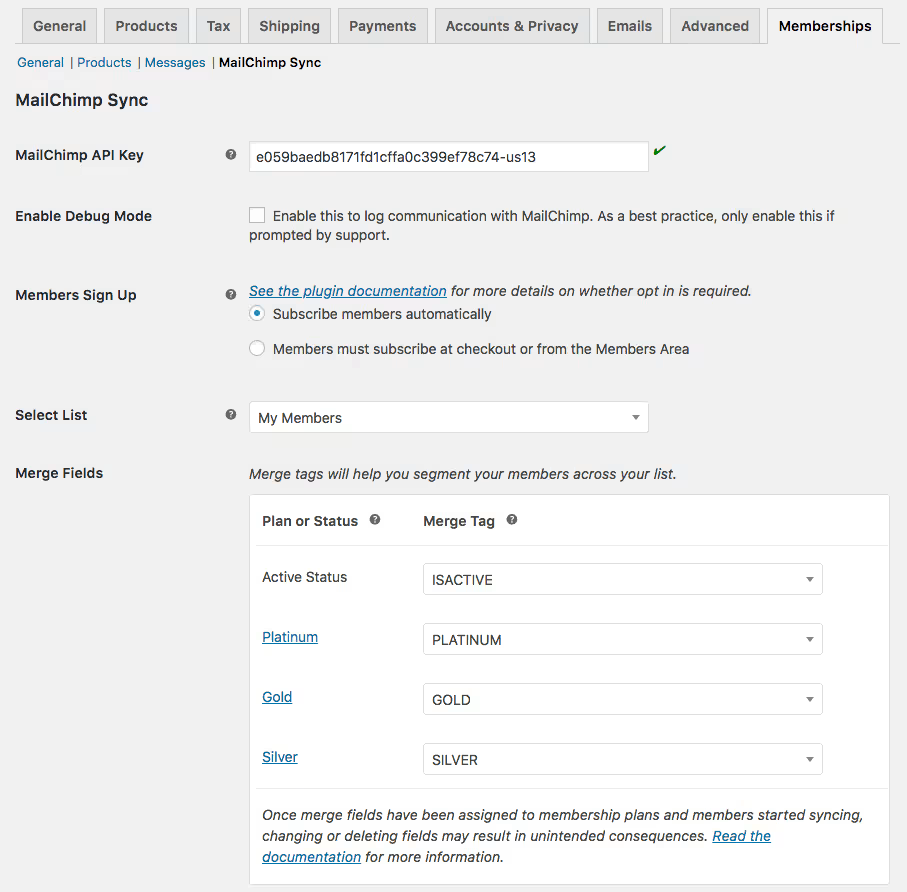
Automatic Sync of Membership Plan Data to Mailchimp
The plugin’s central function is pushing WooCommerce Memberships plan data into each subscriber’s Mailchimp profile. When a customer signs up for, upgrades, or switches membership plans, that plan information updates on the Mailchimp side without a manual export or CSV upload.
For a store running more than one membership tier, this removes the guesswork from list management. You don’t need a separate spreadsheet to track who belongs to which plan — Mailchimp holds that data directly against the contact record.
In our testing on WordPress 6.5 with PHP 8.4, installing and completing the basic setup took about 2 minutes. The plugin’s zip file, woocommerce-memberships-mailchimp.zip, installed directly through Plugins → Add New Plugin → Upload Plugin without needing to extract it first.
Membership Status Sync (Active, Paused, Canceled, Expired)
Beyond plan data, the extension tracks status changes and reflects them in Mailchimp: active, paused, canceled, and expired are the states it syncs. A member who cancels today shows that status in their Mailchimp profile shortly after, rather than staying tagged as active indefinitely.
That distinction matters most for lifecycle email — win-back sequences for cancellations, renewal nudges for expiring plans, or reactivation offers for paused accounts. Because the status lives on the subscriber profile, campaigns can be triggered or filtered off it directly rather than relying on a manual re-tagging process each time a membership changes.
Email List Segmentation by Plan and Status
Combining synced plan and status data lets store owners build Mailchimp segments around specific membership combinations — for example, everyone on a premium plan who has an active status, or everyone whose plan expired in the last billing cycle. Segmentation happens on the Mailchimp side using fields the plugin keeps current.
The practical benefit is targeting precision. Instead of emailing an entire list with a generic offer, a store can send a renewal reminder only to members whose plan is nearing expiration, or a plan-specific update only to the tier it actually affects. For membership businesses where different plans carry different content or pricing, that level of targeting is the main reason to add this extension on top of a standard Mailchimp connection.
Installation and Setup
- Confirm your store meets the plugin’s requirements before purchasing, since this plugin depends on paid add-ons rather than free plugins.
This product requires WooCommerce AND WooCommerce Memberships — both must be installed and activated, with WooCommerce Memberships at version 1.9.0 or newer.
- Purchase and download the plugin zip file from your WooCommerce.com account after buying a license.
- In your WordPress dashboard, go to Plugins → Add New Plugin → Upload Plugin, then select the downloaded zip file. It can be uploaded directly without extracting it first.
- Click Install Now, then Activate the plugin once installation finishes.
- Log into your Mailchimp account and generate an API key under Profile → Extras → API keys.
- Paste that API key into the plugin’s settings screen inside WordPress to establish the connection between your store and your Mailchimp audience.
- Save the settings, then create or update a membership on your site to confirm that plan and status data is reaching the corresponding subscriber profile in Mailchimp.
Compatibility and Requirements
| Requirement | Details |
|---|---|
| WordPress | Requires at least version 5.6; the vendor lists version 7.0 as tested |
| PHP | Version 7.4 or newer |
| WooCommerce | Requires at least version 3.9.4; the vendor lists version 10.8.1 as tested |
| WooCommerce Memberships | Version 1.9.0 or newer, purchased separately |
The plugin’s own PHP 7.4 requirement is worth flagging: that version reached end of life some time ago. Store owners setting up a new site should run a currently supported PHP version regardless of the stated minimum, both for security and for compatibility with other plugins in the stack.
Mailchimp for WooCommerce Memberships Pricing
It is sold as a paid extension with no free tier. SkyVerge offers two license terms:
| Plan | Price | Includes |
|---|---|---|
| 1-year plan | $49 | Annual license and updates |
| 2-year plan | $98 | Two-year license term, frequently discounted to $78.40 (Save 20%) |
Both plans grant access to the same feature set — automatic syncing of membership plan and status data to Mailchimp subscriber profiles for segmentation. There’s no functional difference between tiers beyond the length of the license term.
One cost that’s easy to overlook: this extension only works alongside WooCommerce Memberships, which is a separate paid product with its own license fee. Budgeting for this plugin means budgeting for both.
Purchases come with a 30-day money-back guarantee, along with access to documentation, feature requests, and support tickets.
Check the official developer website for current pricing before buying, since promotional discounts can change.
👉 Get Mailchimp for WooCommerce Memberships at the best available price
Alternatives to Mailchimp for WooCommerce Memberships
It fills a narrow gap: syncing membership status to Mailchimp. Store owners with wider automation or campaign needs may find a broader tool fits better.
| Product | Key Difference | Best For | Price Tier |
|---|---|---|---|
| Mailchimp for WooCommerce Memberships | Purpose-built sync of membership plan and status data to Mailchimp subscriber profiles | Stores that already use Mailchimp and just need membership-based segmentation | Paid |
| AutomateWoo | A broader WooCommerce marketing automation plugin covering email, SMS, and workflow triggers beyond just membership-to-Mailchimp sync | Store owners who want automation across the whole customer journey, not just membership emails | Paid |
| Klaviyo | An email and SMS marketing platform with native WooCommerce integration, positioned as an alternative to Mailchimp itself | Stores wanting to replace Mailchimp entirely with a platform built around ecommerce data | Freemium |
Competitor data is sourced from publicly available information as of 2026 and may have changed.
The right pick depends on scope. If Mailchimp segmentation by membership status is the only need, the dedicated extension is the simplest route; if broader automation or a different email platform is on the table, AutomateWoo or Klaviyo are worth evaluating instead.
Frequently Asked Questions
What does the plugin do?
It syncs WooCommerce Memberships plan and status data to subscriber profiles in Mailchimp. That covers changes like a membership becoming active, paused, canceled, or expired, letting store owners segment email campaigns based on a member’s current plan or status.
Do I need WooCommerce Memberships to use this plugin?
Yes, the plugin requires WooCommerce Memberships version 1.9.0 or newer, purchased separately. Without it installed and active, there is no membership data for the plugin to sync to Mailchimp.
How do I set up the plugin?
Setup involves logging into a Mailchimp account and generating an API key under Profile > Extras > API keys, then pasting that key into the plugin’s settings to connect the two platforms. The plugin file can be uploaded directly through Plugins > Add New Plugin > Upload Plugin without needing to extract the zip first, and installation and basic setup takes about 2 minutes.
Is there a free version of Mailchimp for WooCommerce Memberships?
No, there is no free tier. The plugin is premium-only and requires purchasing a license, separately from the WooCommerce Memberships extension it depends on.
How much does the plugin cost?
Pricing runs $49 for a 1-year plan or $98 for a 2-year plan, with the 2-year option frequently discounted to $78.40 (a 20% saving). That’s in addition to the cost of the WooCommerce Memberships extension, which must be purchased separately.
What is the difference between this plugin and the standard Mailchimp for WooCommerce plugin?
Mailchimp for WooCommerce Memberships is a standalone extension focused specifically on syncing membership plan and status changes to Mailchimp subscriber profiles for segmentation. The standard Mailchimp for WooCommerce core plugin handles broader e-commerce sync, such as orders and products, but does not address membership-specific data the way this extension does.
Download & Pricing Options
🔍 Try Before You Buy
Mailchimp for WooCommerce Memberships does not have an official free tier. To evaluate it before purchasing, a GPL-licensed copy is available for sandbox testing purposes only.
👉 Download GPL Evaluation Copy
This is a GPL-licensed redistributed copy for testing only — not an official developer product.
💎 Get Mailchimp for WooCommerce Memberships (Best Available Price)
👉 Check Current Pricing for Mailchimp for WooCommerce Memberships
Pricing and availability may change — use the link above for current rates.
Mailchimp for WooCommerce Memberships is available from most GPL vendors, but they are not equivalent. Our best GPL site review tested all ten on price, catalogue and whether updates reach wp-admin at all.


