MonsterInsights Review 2026: Is This Google Analytics Plugin Worth It?


Reading Google Analytics data usually means logging into a separate dashboard, hunting for the right report, and translating GA4’s interface into decisions about your WordPress site. This MonsterInsights review looks at whether paying for a plugin that pulls those reports into wp-admin actually saves the hassle, especially for store owners who need ecommerce numbers without writing tracking code by hand. For agencies juggling multiple client sites, the appeal is obvious, but the cost structure deserves scrutiny before you commit.
The real question is whether the convenience of in-dashboard GA4 reporting justifies an annual license, particularly once ecommerce tracking pushes you toward the pricier tiers.
Quick Verdict
MonsterInsights suits WordPress site owners and agencies who want GA4 data and WooCommerce ecommerce metrics inside the dashboard without touching tracking code. It’s a strong fit for store managers who need revenue and top-product reports without a developer. Bloggers or hobby sites with simple needs may find it harder to justify upgrading beyond the free Lite version.
Pros
- Connects WordPress to Google Analytics and GA4 without manual tracking code
- Displays analytics reports directly inside the WordPress dashboard
- Automatic, code-free enhanced ecommerce tracking for WooCommerce, including revenue and top-selling products
- Full GA4 support via Measurement ID connection with automated event tracking
- Built by Awesome Motive, the company behind an established ecosystem of WordPress plugins
- 1-click updates through a single license key
Cons
- No free tier beyond the entry-level Lite version, with meaningful features locked behind paid annual tiers
- Google Analytics 4 (GA4) standard ecommerce features are entirely free up to 10 million events per month. However, advanced analysis or enterprise limits require GA4 360 (starting around $50,000/year), meaning standard GA4 handles typical online store tracking without higher paid tiers
- Requires annual license renewal to keep receiving updates and support
- Admin area does not support IE10 and below, which can matter for agencies managing legacy client environments
Core Features
Google Analytics and GA4 Connection
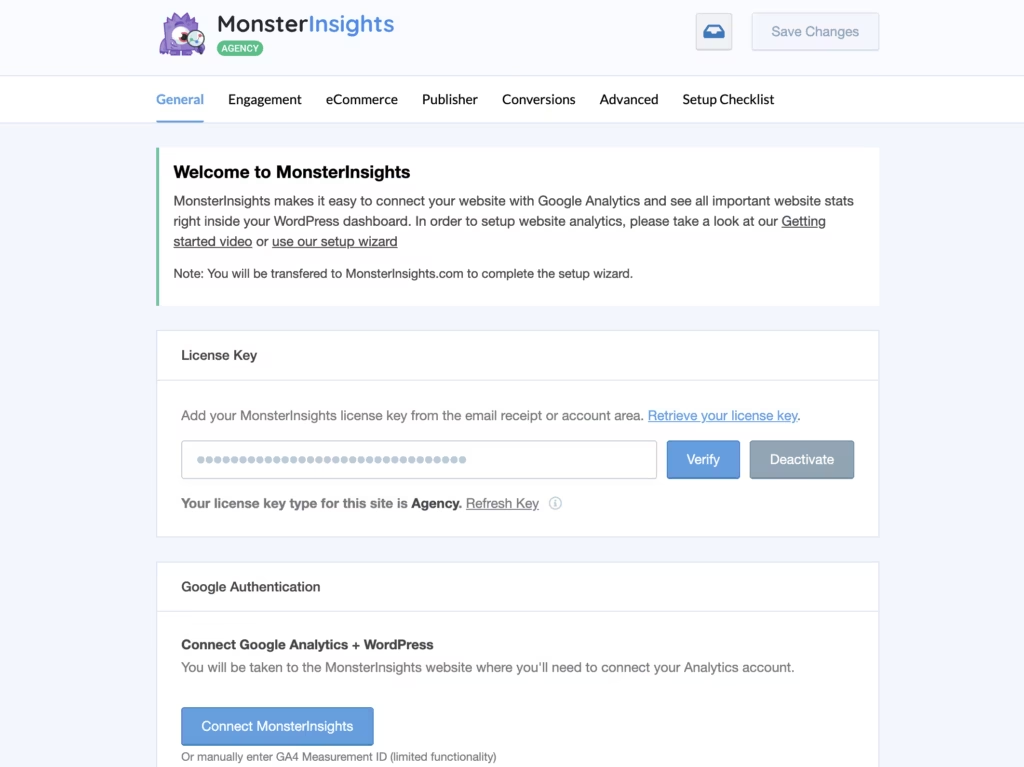
At its core, MonsterInsights links a WordPress site to Google Analytics by connecting to a GA4 Measurement ID, the code starting with “G-” that Google assigns to a property. Once that ID is entered, the plugin handles the tracking setup itself rather than asking the site owner to paste snippets into a theme’s header file.
The plugin also tracks automated events without requiring manual code, covering common GA4 event types that would otherwise need custom configuration in the Google Analytics interface. For a site owner who has never worked directly with GA4’s event-based model, this removes a real technical barrier to getting usable data flowing.
Installing on WordPress 6.5 with PHP 8.4 took about 2 minutes from upload to basic setup. The plugin file, google-analytics-premium.zip, can be installed directly in WordPress via Plugins → Add New Plugin → Upload Plugin without extracting it first, which simplifies the initial connection process.
In-Dashboard Analytics Reporting
Rather than sending users to the Google Analytics web interface to check numbers, MonsterInsights displays analytics reports inside the WordPress dashboard itself. This is the plugin’s second core function alongside the Analytics connection, and it’s what turns raw tracking data into something a site owner actually looks at day to day.
Because the reports live where content and orders are already managed, checking traffic or engagement becomes part of the normal WordPress workflow instead of a separate errand. Agencies overseeing several client sites benefit in particular, since analytics review happens in the same admin screens used for everything else.
WooCommerce Ecommerce Tracking
For online stores, MonsterInsights integrates with WooCommerce to provide enhanced ecommerce tracking without requiring any code. It syncs GA4 with the store and surfaces figures such as revenue, conversion rates, and top-selling products directly inside the dashboard reporting described above.
This matters for store owners who want to know which products are actually driving sales without cross-referencing WooCommerce order data against a separate Analytics account. Revenue and conversion figures sit alongside the site’s other traffic reports, so ecommerce performance and general site performance can be reviewed in one place.
License-Based Updates
MonsterInsights ships with 1-click updates tied to a single license key, letting a site owner or agency push new plugin versions without downloading and re-uploading files manually. This is a maintenance detail rather than a headline feature, but it affects how much ongoing work the plugin creates.
For anyone managing more than one WordPress installation, keeping an analytics plugin current through one license key rather than a manual process reduces the chance that a site is left running an outdated version.
Installation and Setup
Getting MonsterInsights running on a WordPress site is quick, taking only a couple of minutes from upload to a working connection with Google Analytics.
- Purchase a license and download the plugin file (typically named something like google-analytics-premium.zip) from your MonsterInsights account area.
- Log in to your WordPress dashboard and go to Plugins → Add New Plugin → Upload Plugin.
- Select the zip file and upload it directly — there’s no need to extract it first; WordPress handles the zip file as-is.
- Click Activate once the upload finishes.
- Enter your license key when prompted. This same key also enables 1-click updates for the plugin going forward.
- Follow the on-screen setup wizard to connect your Google Analytics account, selecting or creating a GA4 property with a Measurement ID (starting with G-).
- Once connected, open the MonsterInsights menu in your WordPress dashboard to confirm reports are populating with data from your site.
If you run a WooCommerce store, the connection wizard also offers to enable enhanced ecommerce tracking during setup, syncing GA4 with your store to surface revenue, conversion rate, and top-product data inside the dashboard without any manual code.
Compatibility and Requirements
MonsterInsights has modest platform requirements, though the admin interface does depend on a reasonably current browser.
| Requirement | Details |
|---|---|
| WordPress version | 4.9 or higher |
| Browser (admin area) | A modern web browser; IE10 and below are not supported |
The plugin’s reporting screens rely on modern browser rendering, so visitors accessing the WordPress admin area with outdated browsers like Internet Explorer 10 or earlier won’t be able to view the dashboard reports correctly. This only affects the admin-side interface, not the analytics tracking itself, which runs independently of what browser a site visitor uses.
MonsterInsights Pricing
MonsterInsights offers a free Lite version alongside three paid annual tiers. The features described in this review, particularly ecommerce tracking and advanced reporting, require an active annual license on one of the paid plans.
Three paid tiers are available:
| Tier | Price |
|---|---|
| Plus | $99.50/year |
| Pro | $199.50/year |
| Elite | $299.50/year |
These are annual subscription prices, and they may vary during promotional sales that MonsterInsights runs periodically. The Elite tier sits at the top of the lineup and is typically aimed at agencies and larger ecommerce operations that need the full range of tracking and reporting features. While MonsterInsights Plus suits smaller sites and single blogs that want core Google Analytics data inside the WordPress dashboard, higher tiers like Pro or alternative plugins are built for advanced tracking needs such as eCommerce or multi-site networks.
Yes, all three subscription tiers include full access to Google Analytics 4 (GA4) integration and the built-in plugin dashboard reporting features, ensuring you get core tracking and analytics visibility no matter which plan you select. Enhanced ecommerce tracking in WooCommerce connects your online store to tools like Google Analytics. It automatically records shopper actions—such as product views, cart additions, checkout steps, and completed purchases—and syncs metrics like revenue and conversion rates directly into your dashboard.
👉 Get MonsterInsights at the best available price
Alternatives to MonsterInsights
MonsterInsights is not the only way to get Google Analytics data into WordPress, and several plugins take a different approach to reporting, pricing, or privacy. Here is how it compares to some widely used alternatives.
| Product | Key Difference | Best For | Price Tier |
|---|---|---|---|
| MonsterInsights | Premium-only plugin with in-dashboard reporting and code-free GA4 and WooCommerce ecommerce tracking | Site owners and agencies who want deep analytics without touching code | Paid |
| Google Site Kit | Official Google plugin connecting Analytics, Search Console, AdSense, and PageSpeed Insights in one dashboard | Users who want a free, Google-maintained integration across multiple Google tools | Free |
| Analytify | GA integration plugin with dashboard reports and ecommerce add-ons available on paid tiers | Users who want a lighter-weight analytics plugin with optional upgrades | Freemium |
| WP Statistics | Self-hosted, privacy-focused visitor statistics that do not rely on Google Analytics data | Site owners who want analytics without sending data to Google | Free |
| Independent Analytics | Privacy-oriented, GDPR-friendly analytics built to run independently of Google Analytics | Users prioritizing data privacy and compliance over deep GA4 reporting | Freemium |
Competitor data is sourced from publicly available information as of 2026 and may have changed.
The right pick depends on what matters more. MonsterInsights suits stores and agencies that want GA4 and WooCommerce data inside WordPress without coding, while Site Kit, WP Statistics, or Independent Analytics fit those prioritizing cost, privacy, or a lighter footprint.
Frequently Asked Questions
Does MonsterInsights support Google Analytics 4 (GA4)?
Yes, MonsterInsights fully supports GA4. It connects your WordPress site to your GA4 Measurement ID (the one starting with G-) and tracks automated events without requiring manual code, with the resulting reports displayed inside the WordPress dashboard.
Is there a free version of MonsterInsights?
MonsterInsights offers a free Lite version alongside three paid annual tiers. However, meaningful features like ecommerce tracking and advanced reporting are locked behind the paid Plus, Pro, and Elite plans.
Does MonsterInsights work with WooCommerce for ecommerce tracking?
Yes, MonsterInsights integrates with WooCommerce to provide automatic, code-free enhanced ecommerce tracking. It syncs GA4 with your store to show revenue, conversion rates, and top-selling products directly inside the WordPress dashboard.
Who developed MonsterInsights?
Awesome Motive, a software and media company founded by Syed Balkhi, developed MonsterInsights. Awesome Motive manages a large portfolio of established WordPress plugins built to help small businesses build and optimize their online presence.
How much does MonsterInsights cost?
MonsterInsights is priced across three paid annual tiers: Plus at $99.50 per year, Pro at $199.50 per year, and Elite at $299.50 per year, alongside the free Lite version.
Download & Pricing Options
🔍 Try Before You Buy
MonsterInsights does not have an official free tier. To evaluate it before purchasing, a GPL-licensed copy is available for sandbox testing purposes only.
👉 Download GPL Evaluation Copy
This is a GPL-licensed redistributed copy for testing only — not an official developer product.
💎 Get MonsterInsights (Best Available Price)
👉 Check Current Pricing for MonsterInsights
Pricing and availability may change — use the link above for current rates.
Buying MonsterInsights outright is not the only route. See our best GPL sites comparison for how ten GPL vendors differ on file integrity, update speed and licence keys.


