Profile Builder Pro Review 2026: Features, Pricing, and Setup

Generic form plugins can handle a basic signup field, but membership sites, communities, and eCommerce stores usually need registration, login, and profile forms tied together with role management and a public directory. This Profile Builder Pro review looks at whether a dedicated toolkit from Cozmoslabs earns its yearly license over a general-purpose form builder patched together with add-ons. For site owners managing user accounts at any scale, that distinction matters more than it first appears.
The question is whether the convenience of an all-in-one member management system justifies paying annually versus assembling free plugins piece by piece.
Quick Verdict
Profile Builder suits WordPress developers and agencies building community, membership, or eCommerce sites that need custom registration flows, role-based access, and a member directory without stitching together multiple plugins. Site owners who only need a single contact or signup form, or who want to avoid recurring license fees entirely, should look at simpler free alternatives instead.
Pros
- Dedicated registration, login, and profile form builder with a member directory built in
- WooCommerce Sync add-on manages billing, shipping, and custom fields directly from user profiles
- Supports WordPress Multisite for network-wide registration and profile forms
- Mailchimp integration plus third-party bridge support (WP Fusion, FuseWP) for broader CRM connections
- A free core version exists on the WordPress plugin directory, letting users trial the basic form-building experience before upgrading
Cons
- The Pro add-on itself has no free tier and requires purchasing a yearly license
- Requires installing and maintaining a separate base plugin alongside Profile Builder Pro
- Multi-site coverage beyond a single install requires stepping up to the Pro or Agency tier
Core Features
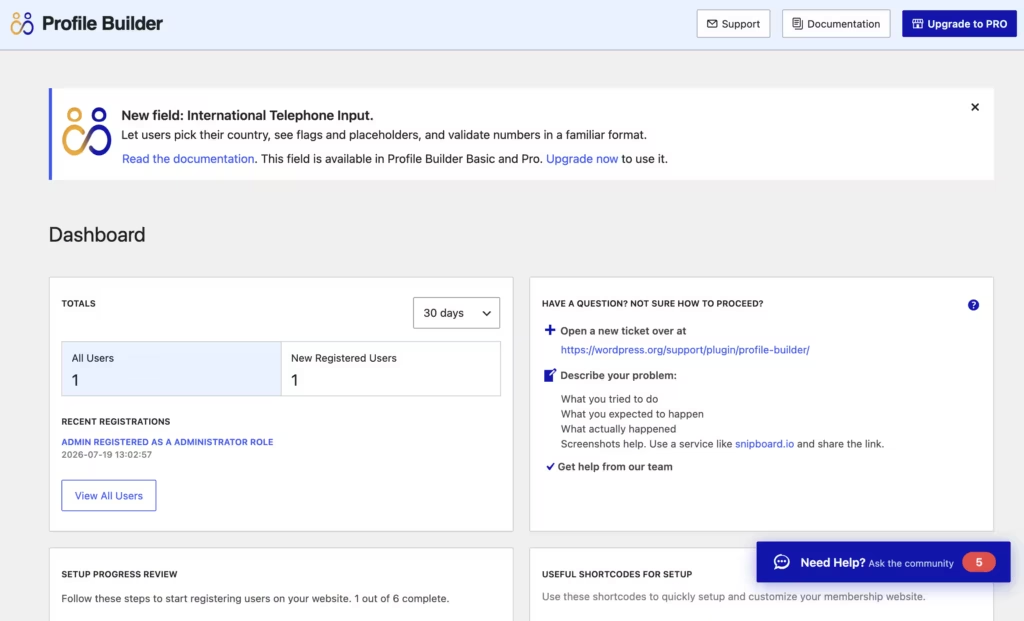
Custom User Registration Forms
Profile Builder lets you build registration forms with a front-end form builder rather than relying on the default WordPress registration screen. The plugin supports multiple registration forms on a single site, so you can run separate sign-up flows for different user roles or membership tiers without writing custom code.
For a membership or community site, this means new members see a form tailored to what they’re signing up for, whether that’s a paid subscription, a free account, or a vendor role. Admin approval can be layered onto registration, giving site owners a checkpoint before new accounts go live.
Profile Builder requires the base User Profile Builder – Beautiful User Registration Forms, User Profiles & User Role Editor plugin to be active before the Pro features become available.
Custom Login Forms
The login form builder replaces the standard WordPress login screen with a front-end form that matches the rest of the site. It’s built to work alongside the registration and profile forms as part of the same user-facing system, rather than as a standalone widget.
The practical benefit is a consistent login experience for members, which matters on community or eCommerce sites where sending users to /wp-login.php looks out of place and breaks the flow between browsing and account access.
Custom User Profile Forms
Profile forms let members edit their own account details from the front end, using fields the site owner defines rather than the default WordPress profile screen. This is where the WooCommerce Sync add-on becomes relevant: it connects these profile forms to WooCommerce billing and shipping fields, plus any extra custom fields, so account details entered through Profile Builder feed directly into store data.
For eCommerce site owners, that removes the need to keep a separate WooCommerce account page and a Profile Builder profile page in sync manually. Members update one form, and shipping, billing, and custom field data all update together.
User Management
Beyond forms, Profile Builder gives administrators a management layer for viewing and editing user accounts across the site. This sits underneath the form builders, handling the accounts those forms create rather than duplicating a separate user database.
On sites with growing membership lists, this centralizes the work of finding, editing, and maintaining accounts instead of relying solely on the default WordPress Users screen.
User Role Editing
The role editor lets site owners define and adjust WordPress user roles and their capabilities directly, rather than editing role definitions in code. Combined with the registration form builder, different roles can be tied to different sign-up forms.
This matters most on sites with tiered access: a community site might separate free members from paid contributors, or an eCommerce site might separate customers from vendors, each with different permissions set through the role editor.
Member Directory
The built-in member directory listing displays registered users on the front end, pulling from the same profile data collected through the custom profile forms. It functions as a searchable or browsable list rather than a static page.
For community sites, this turns individual member profiles into a connected directory members can browse, which is a use case general-purpose form plugins typically don’t cover without additional add-ons.
Also included: Mailchimp integration for subscribing users at registration, and support for WordPress Multisite installations so registration, login, and profile forms can run network-wide rather than per individual site.
Installation and Setup
- Purchase a license and download the Profile Builder zip file from your Cozmoslabs account dashboard.
- Install the free base plugin from the WordPress plugin directory. This product requires User Profile Builder – Beautiful User Registration Forms, User Profiles & User Role Editor AND Profile Builder — both must be installed and activated.
Search for “User Profile Builder” from Plugins → Add New Plugin inside your WordPress dashboard, install it, and activate it before moving on to the Pro plugin.
- Upload the Pro plugin. Go to Plugins → Add New Plugin → Upload Plugin, select the profile-builder-pro.zip file, and click Install Now. The zip can be uploaded directly without extracting it first.
- Activate Profile Builder once the upload finishes.
- Enter your license key under the plugin’s settings screen to enable updates and priority support.
- Configure your registration, login, and profile forms, then set up the member directory and any user role changes needed for your site.
Installation and activation on a test environment running WordPress 6.5 and PHP 8.4 took about two minutes from upload to a working configuration, with no additional setup steps required beyond entering the license key and building the forms.
Compatibility and Requirements
| Requirement | Details |
|---|---|
| WordPress | Tested on WordPress 6.5 |
| PHP | Tested on PHP 8.4 |
| Required companion plugin | User Profile Builder – Beautiful User Registration Forms, User Profiles & User Role Editor |
| Multisite | Supported for front-end registration, login, and edit-profile forms across a network |
Profile Builder works on top of the free User Profile Builder plugin rather than as a standalone install, so both need to stay active and updated together.
For eCommerce sites, a dedicated WooCommerce Sync add-on lets you manage default WooCommerce billing and shipping fields, add custom fields, and control account details during registration. Email marketing is covered through a Mailchimp integration add-on for subscribing users at sign-up, and broader CRM connections to tools like ActiveCampaign, Salesforce, or HubSpot are handled through third-party bridge plugins such as WP Fusion or FuseWP rather than a native integration.
If your server is running an older PHP version, upgrade to a currently supported release before installing any actively maintained plugin. Outdated PHP versions no longer receive security patches.
Profile Builder Pricing
Profile Builder is a paid product with no free tier. Cozmoslabs does offer a separate free plugin, User Profile Builder, in the WordPress plugin directory, which covers basic front-end login, registration, and edit-profile forms. Profile Builder Pro builds on that foundation with advanced features like multiple registration forms, front-end user listings, admin approval, and extra custom fields.
Three license tiers are available, each billed yearly on auto-renewal:
| Tier | Price | Sites | What’s included |
|---|---|---|---|
| Basic | €99/year | 1 site | 1 year of updates and support |
| Pro | €169/year | 3 sites | 1 year of updates and priority support |
| Agency | €299/year | Unlimited sites | 1 year of updates and priority support |
Cozmoslabs also sells an Ultimate Membership Bundle for €259, listed as 25% off the combined price of the included products.
All tiers renew annually, and every purchase is backed by a 15-day money-back guarantee with no questions asked. For the current rate and any active promotions, check the official Cozmoslabs pricing page.
👉 Get Profile Builder at the best available price
Alternatives to Profile Builder
Profile Builder is one of several WordPress plugins built for user registration, login, and profile management. The right pick depends on whether you need a dedicated member-management toolkit or a broader form solution that happens to cover profiles.
| Product | Key Difference | Best For | Price Tier |
|---|---|---|---|
| Profile Builder | Premium-only, dedicated registration, login, and profile builder with a member directory and WooCommerce Sync add-on | Site owners who want a specialist tool without piecing together separate plugins | Paid |
| Ultimate Member | A widely used free plugin for user profiles, registration, and membership functionality, with premium extensions sold separately | Users who want a free starting point and can add paid extensions as needed | Freemium |
| WP User Manager | Free core registration and profile management plugin with paid add-ons for extended functionality | Site owners who want to start free and scale up gradually | Freemium |
| Formidable Forms | A general-purpose form builder that can be configured for registration and profiles but is primarily built for broader form creation, including calculations and data views | Teams who need advanced form logic alongside occasional user-profile needs | Freemium |
Competitor data is sourced from publicly available information as of 2026 and may have changed.
None of these tools are strict substitutes for each other. Ultimate Member and WP User Manager suit those who want to test features before paying, while Formidable Forms fits sites that need form flexibility beyond user profiles. Profile Builder makes more sense when member management is the core requirement and the WooCommerce or multisite features justify a yearly license.
Frequently Asked Questions
Does Profile Builder have a free version?
Profile Builder itself has no free tier and is sold only as a paid license. Cozmoslabs does offer a free plugin called Profile Builder on the WordPress plugin directory, which covers front-end login, registration, and edit-profile forms. The Pro version builds on that base plugin by adding multiple registration forms, front-end user listings, admin approval, and extra custom fields.
Does Profile Builder work with WooCommerce?
Yes, Profile Builder integrates with WooCommerce through its dedicated WooCommerce Sync add-on. This lets you manage default WooCommerce billing and shipping fields directly from user profiles, add extra custom fields, and control user registration and account details in one place.
Is Profile Builder compatible with WordPress Multisite?
Yes, Profile Builder supports WordPress Multisite installations. It allows front-end registration, login, and edit-profile forms to be managed across an entire network rather than site by site.
Does Profile Builder integrate with Mailchimp or other CRMs?
Yes, a Mailchimp integration add-on lets users subscribe to a list during registration. For other CRM and email platforms like ActiveCampaign, Salesforce, or HubSpot, integration is handled through third-party bridge plugins such as WP Fusion or FuseWP rather than a native connection.
What is the difference between the free Profile Builder plugin and Profile Builder?
The free Profile Builder plugin covers the basics: front-end login, registration, and edit-profile forms. Profile Builder adds advanced capabilities on top of that foundation, including multiple registration forms, front-end user listings, admin approval workflows, and extra custom fields, plus add-ons like WooCommerce Sync and Mailchimp integration.
How much does Profile Builder cost?
Profile Builder starts at €99 per year for the Basic plan, which covers 1 site with a year of updates and support. The Pro plan is €169 per year for 3 sites with priority support, and the Agency plan is €299 per year for unlimited sites, also with priority support. All licenses renew automatically each year, and a 15-day money-back guarantee applies.
Download & Pricing Options
🔍 Try Before You Buy
Profile Builder does not have an official free tier. To evaluate it before purchasing, a GPL-licensed copy is available for sandbox testing purposes only.
👉 Download GPL Evaluation Copy
This is a GPL-licensed redistributed copy for testing only — not an official developer product.
💎 Get Profile Builder (Best Available Price)
👉 Check Current Pricing for Profile Builder
Pricing and availability may change — use the link above for current rates.
If you would rather not pay Profile Builder Pro’s renewal every year, a GPL membership is the usual alternative. We compared the options in our comparing GPL sites breakdown, including where each one falls short.


