MemberPress Pro Review 2026: Pricing, Features & Verdict


Most creators end up duct-taping a paywall plugin, a separate LMS, an email integration, and a payment processor together just to sell one course or run one paid community. This MemberPress review looks at whether a single plugin can actually replace that stack. MemberPress bundles content restriction, course delivery, coaching access, and subscription billing into one product, but its entry-level plan comes with a transaction fee that changes the math for anyone processing real revenue.
The question is whether consolidating your membership stack into MemberPress justifies its cost compared to piecing together cheaper standalone tools.
Quick Verdict
MemberPress suits course creators, coaches, and membership site owners who want paywalling, billing, and course delivery under one roof without managing several plugins. It’s a weaker fit for high-volume sellers who would rather avoid a per-transaction fee, or for anyone on budget hosting that can’t meet its database requirements.
Pros
- Combines paywalling, course sales, coaching delivery, and community features in a single plugin
- Includes MemberPress Courses, a built-in drag-and-drop LMS, on every plan
- Native integrations with Mailchimp, ActiveCampaign, and ConvertKit for email and CRM workflows
- Built-in payment gateway support for Stripe, PayPal, and other processors
Cons
Core Features
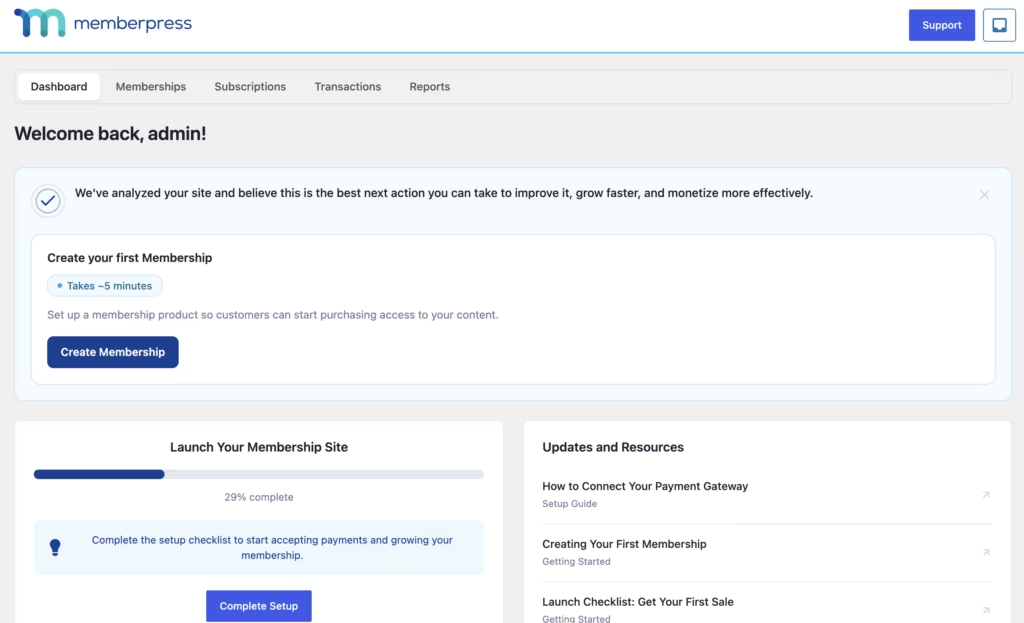
Content Restriction and Paywalling
MemberPress works by locking specific pages, posts, downloads, or entire sections of a WordPress site behind a membership gate. Access rules are tied to membership levels, so a visitor without an active subscription hits a paywall instead of the full page.
For site owners, this is the mechanism that turns a blog or resource library into a revenue source. You decide what free visitors see and what stays reserved for paying members, without needing a separate access-control plugin layered on top.
Online Course Sales
Course creation runs through MemberPress Courses, a drag-and-drop LMS built into the plugin and included on all plans rather than sold as a separate add-on. It handles building the course structure, protecting lesson content behind membership access, and selling enrollment, all inside the same dashboard used for other membership tasks.
That bundling matters for anyone comparing tools: instead of running a membership plugin and a standalone LMS side by side, course sales and content protection share one system. It suits creators who want to launch a paid course without stitching together multiple plugins first.
Coaching Program Delivery
Beyond one-off courses, MemberPress supports delivering ongoing coaching programs, using the same membership and access infrastructure that gates courses and content. Coaches can structure paid programs as recurring memberships rather than single purchases.
That structure suits service-based creators as well as course sellers. A coach can charge recurring fees for program access and manage that billing alongside any other membership tiers on the same site.
Community Building
MemberPress includes community features aimed at giving paying members a space to interact, rather than restricting the plugin to solely gating static content. That makes it a tool for building a paid community around a membership, not just selling access to files or lessons.
For site owners, that means membership can be sold as an ongoing relationship rather than a one-time content unlock, which supports higher retention on recurring plans.
Subscription Billing Management
Recurring billing sits at the center of MemberPress: the plugin manages subscription creation, renewals, and the ongoing relationship between a member and their payment method. That layer turns a one-time sale into repeat revenue without manual invoicing.
Site owners running any kind of recurring-revenue model, whether it is a monthly membership, a coaching retainer, or a course installment plan, get that billing logic handled natively instead of needing a third-party subscription manager.
Payment Processing Integration
MemberPress connects to payment gateways including Stripe and PayPal, so transactions initiated on the site flow through processors members already trust. That integration is built into the plugin rather than requiring a separate gateway connector plugin, so setting up checkout does not require sourcing and configuring an unrelated payment plugin.
Installation and Setup
Setting up MemberPress follows a familiar WordPress plugin workflow, with a couple of extra steps for licensing and payment configuration.
- Purchase a plan and download the plugin zip file (memberpress.zip) from your MemberPress account dashboard.
- Log in to your WordPress admin area and navigate to Plugins → Add New Plugin → Upload Plugin.
- Upload the memberpress.zip file directly through the uploader. There is no need to extract the archive first — the installer accepts the zip as downloaded.
- Click Install Now, then Activate Plugin once the upload finishes.
- Enter your license key when prompted, so the plugin can pull updates and connect to your account.
- Connect a payment gateway such as Stripe or PayPal under the MemberPress settings so the plugin can process subscription and one-time payments.
- Build out your membership levels, access rules, and any paywalled content, courses, or coaching materials you plan to sell.
On a test install running WordPress 6.5 with PHP 8.4, installation and basic setup took about two minutes from upload to an active, configured plugin. That included uploading the zip file directly through Plugins → Add New Plugin → Upload Plugin without extracting it beforehand, which is worth knowing if you are used to unzipping plugin files manually before upload — with MemberPress that step is unnecessary.
Compatibility and Requirements
| Requirement | Minimum |
|---|---|
| WordPress | 6.0+ |
| PHP | 7.4+ |
| MySQL | 8.0+ (strict mode enabled, zero dates disabled) |
These are baseline figures for the plugin to run correctly. Hosts running long-outdated, end-of-life PHP versions should plan an upgrade regardless of MemberPress, since unsupported PHP branches no longer receive security patches and can cause compatibility issues across a WordPress install generally.
The test environment referenced above used WordPress 6.5 with PHP 8.4, both comfortably above the stated minimums, and the plugin installed and activated without any compatibility warnings.
MemberPress Pricing
MemberPress is sold as a premium plugin, with no free version. Plans are named Launch, Growth, and Scale, and are billed annually at promotional first-year rates before renewing at standard baseline pricing.
| Plan | First-year price | Transaction fee | Best suited for |
|---|---|---|---|
| Launch | $199.50 | 4.9% per successful payment | New membership sites testing the waters |
| Growth | $349.50 | None | Growing sites that want fee-free payouts |
| Scale | $499.50 | None | Larger membership businesses and agencies |
The Launch plan is the most affordable entry point, but it carries a 4.9% transaction fee on every successful payment processed through the site. Upgrading to Growth or Scale removes that fee entirely on future payments and renewals. Standard processor fees from services like Stripe or PayPal still apply on top of any MemberPress fee, regardless of plan.
Every plan includes the core feature set: content restriction, MemberPress Courses for building and selling lessons, subscription billing, and community tools, so the price difference comes down to transaction fees and site limits rather than locked-away functionality.
Purchases are backed by a 14-day money-back guarantee. The refund window starts from the date and time the paid account is opened, and applies to new subscriptions rather than renewals.
For the current first-year and renewal rates, visit the official memberpress.com pricing page before purchasing, since promotional pricing can change.
👉 Get MemberPress at the best available price
Alternatives to MemberPress
MemberPress is not the only way to build a membership or course site on WordPress. The right alternative depends on whether you need an all-in-one platform or are happy to combine several plugins.
| Product | Key Difference | Best For | Price Tier |
|---|---|---|---|
| MemberPress | All-in-one plugin bundling paywalling, course sales, coaching delivery, and subscription billing without needing separate tools | Creators who want membership, courses, and billing handled by a single product | Paid |
| Restrict Content Pro | Focused on simpler paywalling and member management rather than course delivery | Site owners who mainly need content restriction without a built-in LMS | Paid |
| Paid Memberships Pro | Free core plugin on WordPress.org extended by paid add-ons | Budget-conscious site owners who want to start free and add features later | Freemium |
| LearnDash | LMS-first plugin known for advanced course structuring and learning features | Course creators who need deep learning-management functionality over general membership tools | Paid |
| WooCommerce Memberships | WooCommerce extension that adds membership and content restriction to an existing store | Store owners already running WooCommerce who want to layer memberships onto their ecommerce stack | Paid |
Competitor data is sourced from publicly available information as of 2026 and may have changed.
None of these plugins is a universal best pick. Choosing between them comes down to whether you already run WooCommerce, need advanced course structuring, or simply want the lowest possible entry cost.
Frequently Asked Questions
How much does MemberPress cost?
MemberPress is sold under three named plans: Launch, Growth, and Scale. These typically start at promotional first-year rates of $199.50, $349.50, and $499.50 respectively, before renewing at regular baseline prices. The Launch plan also carries a 4.9% transaction fee on successful payments, which is removed on higher-tier plans.
Does MemberPress have a free version?
No, MemberPress is a premium-only plugin with no free tier. There is no free version to test the plugin before purchasing a plan.
What is MemberPress's refund policy?
MemberPress offers a 14-day money-back guarantee on new subscriptions. The refund window begins immediately from the date and time the paid account is opened, and the policy is described as a no-risk guarantee for new purchases.
Can I sell online courses with MemberPress?
Yes, through MemberPress Courses, a built-in drag-and-drop LMS add-on included with all MemberPress plans. It lets site owners build, protect, and sell online courses directly on WordPress without additional coding.
Does MemberPress integrate with Mailchimp or ActiveCampaign?
Yes, MemberPress integrates natively with Mailchimp, ActiveCampaign, and ConvertKit. These connections work through built-in integrations and official add-ons for email marketing and CRM workflows.
What are the system requirements for MemberPress?
MemberPress requires at least WordPress 6.0 and PHP 7.4 to run properly. It also needs MySQL 8.0 or higher with strict mode enabled and zero dates disabled, which can require a hosting upgrade on older setups.
How many websites use MemberPress?
MemberPress is estimated to be active on roughly 17,000 to over 22,000 live websites globally. Technology profiler tools like BuiltWith Trends track upwards of 22,200 currently active domains, with more than 74,000 total historical and current implementations recorded.
Is MemberPress or LearnDash better for selling courses?
MemberPress bundles course sales into a broader membership toolkit that also covers paywalling, coaching delivery, community features, and subscription billing through its built-in MemberPress Courses add-on. LearnDash, by contrast, is built primarily as a dedicated learning management system with a deeper focus on course structure and delivery. Creators who need an all-in-one membership and course platform may lean toward MemberPress, while those wanting a course-first LMS with extensive learning-path features may prefer LearnDash.
Download & Pricing Options
🔍 Try Before You Buy
MemberPress does not have an official free tier. To evaluate it before purchasing, a GPL-licensed copy is available for sandbox testing purposes only.
👉 Download GPL Evaluation Copy
This is a GPL-licensed redistributed copy for testing only — not an official developer product.
💎 Get MemberPress (Best Available Price)
👉 Check Current Pricing for MemberPress
Pricing and availability may change — use the link above for current rates.
MemberPress Pro is one of thousands of premium plugins available through a GPL membership. Our which GPL site to use guide compares the ten main vendors on price, catalogue size and how fast updates actually arrive.


