The Aisle WordPress Theme Review 2026: Worth It?

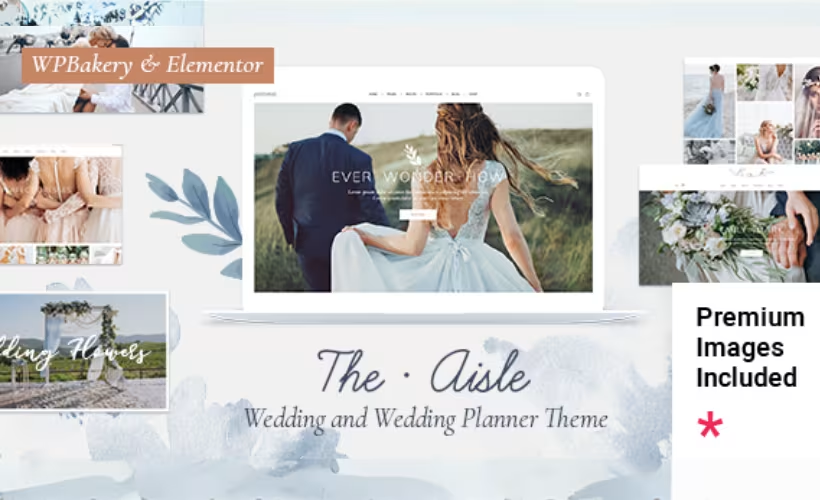
Building a wedding website usually means wrestling a generic theme into something that feels personal — bolting on RSVP forms, hunting for gallery layouts, and paying separately for a page builder. This review of The Aisle – Elegant Wedding WordPress Theme examines a purpose-built alternative: a premium WordPress theme from Elated-Themes that ships with dedicated wedding page templates, two bundled plugins, and WooCommerce support out of the box.
Whether the $69 price tag is justified depends on how much of that bundled value you’d actually use.
Quick Verdict
The Aisle suits couples, wedding photographers, and planners who want a polished, wedding-specific WordPress site without assembling it from scratch. Buyers who need a multi-site license or prefer to evaluate a theme before purchasing should look elsewhere.
Pros
- Wedding-specific templates — RSVP, venue map, and gift registry — are built into the theme
- Bundles WPBakery Page Builder and Slider Revolution, saving over $90 in plugin costs
- Compatible with Elementor, WooCommerce, WPML, and Contact Form 7
- Child theme included and demo content importable via XML for a fast start
- Supports WordPress 6.3 through 7.0.x with broad browser compatibility across modern and legacy browsers
Cons
- WPBakery Page Builder and Slider Revolution must be installed and activated separately before full theme functionality is accessible
Core Features
Wedding-Specific Page Templates
The Aisle ships with page templates built around the actual structure of a wedding website: RSVP pages, venue map pages, gift registry pages, and pricing plan pages are all included out of the box. These aren’t generic layouts repurposed for weddings — each template addresses a distinct guest or planning need that couples typically have to cobble together from separate plugins.
For a couple building their site, this means the core informational architecture of a wedding website is already mapped out before a single line of custom content is written. Guests can find directions, submit RSVPs, and browse the registry from purpose-built pages rather than adapted blog templates.
Photography Gallery Layouts
Gallery support is a first-class feature here, which makes sense given that wedding photographers are among the theme’s primary target users. Dedicated photography gallery layouts are built into the theme, designed to present images at the scale and visual weight that wedding photography demands.
A photographer or couple importing their own images gets a presentation layer already calibrated for that content — not a standard grid borrowed from a multipurpose theme.
WPBakery Page Builder Integration
WPBakery Page Builder is bundled with The Aisle at no additional cost, representing a $64 value included in the $69 purchase price. It’s the primary tool for building and customizing pages within the theme, and its inclusion means buyers don’t need a separate license to access full drag-and-drop editing.
Full theme functionality depends on WPBakery being installed and activated. The page builder and other required plugins need to be activated separately before all features become accessible.
Slider Revolution Integration
Slider Revolution, a premium responsive slider plugin with a standalone value of $29, is also included in the theme package. This covers animated hero sections and slideshow presentations — common elements on wedding announcement pages where couples typically want a visual-first introduction.
Bundled together, WPBakery and Slider Revolution account for $93 in plugin value within a $69 theme purchase, which meaningfully changes the cost calculation for buyers who would otherwise need to license those tools independently.
Elementor Compatibility
Beyond WPBakery, The Aisle is compatible with Elementor, giving buyers a choice of page builder rather than locking them into a single workflow. Elementor users who prefer its interface can work within The Aisle’s templates without switching tools.
This matters most for wedding planners or agencies who already have an established Elementor workflow and want to apply it to a wedding-specific theme rather than adapting a generic one.
WooCommerce Compatibility
The Aisle supports WooCommerce, which extends the theme beyond personal wedding sites into commercial territory. Wedding service businesses, photographers selling print packages, or planners offering bookable services can add a storefront without switching themes.
The pricing plan page templates built into the theme complement this — a venue or planner can present service tiers on a dedicated page and connect them to a WooCommerce checkout flow.
WPML and Contact Form 7 Compatibility
WPML compatibility means The Aisle can support multilingual wedding websites, useful for international couples or destination wedding venues serving guests across language groups. Contact Form 7 integration handles general contact and inquiry forms alongside the theme’s dedicated RSVP page template.
Neither requires configuration if the use case doesn’t call for it, but both are available when it does.
Demo Content and Child Theme
The theme package includes an XML export folder for importing demo content, giving buyers a populated starting point rather than a blank canvas. A child theme is also included, which allows customizations to survive future theme updates without being overwritten.
These two inclusions — demo content for a fast visual start, a child theme for safe long-term customization — reflect a setup approach aimed at users who want to move quickly without sacrificing flexibility later.
Installation and Setup
Getting The Aisle live on a WordPress site is straightforward. The theme package contains everything needed to begin: the main theme file, a child theme, documentation, licensing files, and an XML export folder for demo content.
- Log in to your WordPress dashboard and navigate to Appearance → Themes → Add New → Upload Theme.
- Upload
theaisle.zipfrom the downloaded package and click Activate.
- Install the bundled companion plugins. This theme requires WPBakery Page Builder for WordPress AND Slider Revolution Responsive WordPress Plugin — both must be installed and activated to access full theme functionality. Both are included in the purchase package at no additional cost.
- Install any additional compatible plugins your project needs:
- Contact Form 7 — for contact and RSVP form handling
- Elementor — if you prefer Elementor over WPBakery for page building
- WooCommerce — to sell wedding-related products or services
- WPML — for multilingual site support
- Import demo content by loading the XML file found in the export folder via Tools → Import → WordPress. This populates the site with sample pages and layouts to use as a starting point.
- If you plan to customize the theme without affecting core files, activate the included child theme (
theaisle-child.zip) instead of the parent theme, and apply your changes there.
Compatibility and Requirements
| Requirement | Details |
|---|---|
| WordPress | 6.3.x, 6.4.x, 6.5.x, 6.6.x, 6.7.x, 6.8.x, 6.9.x, 7.0.x |
| Compatible Browsers | IE11, Firefox, Safari, Opera, Chrome, Edge |
| Page Builder | WPBakery Page Builder, Elementor |
| Forms | Contact Form 7 |
| Multilingual | WPML |
The Aisle covers a wide range of WordPress versions, from 6.3 through 7.0.x. The browser support list includes both modern evergreen browsers and IE11, which suits wedding clients who may be accessing the site from a variety of devices.
WPML support means the site can be built in multiple languages without switching themes.
The Aisle Pricing
The Aisle is a premium theme with a single license tier sold through ThemeForest.
Regular License — $69
The Regular License covers one site and includes six months of priority support from Elated-Themes. At checkout, support can be extended to 12 months for an additional $21.38 — a discounted rate from the standard $49.88 extension price.
Bundled with the license are WPBakery Page Builder (a $64 standalone value) and Slider Revolution (a $29 standalone value), both included at no extra cost. The package also contains a child theme and an XML export file for importing demo content.
No free trial or evaluation version is available. For the current purchase price, visit the theme’s page on ThemeForest.
👉 Get The Aisle at the best available price
Alternatives to The Aisle
The wedding theme market offers several options worth considering before committing to a purchase. All four competitors listed below target the same audience — couples, photographers, and wedding professionals building sites on WordPress — but each takes a different approach to design and functionality.
Competitor details and pricing may have changed — verify directly with each vendor before purchasing.
Weddo, Amour, Wedding Lite, and Loveland are worth evaluating directly against your specific requirements. The Aisle stands out for its bundled plugin value and breadth of wedding-specific page templates; if those built-in tools align with what your site needs, it is a strong candidate at its price point.
Frequently Asked Questions
What does The Aisle WordPress theme cost?
The Aisle is priced at $69 for a Regular License, which covers a single site and includes six months of support. At checkout, you can extend support to 12 months for an additional $21.38, discounted from the standard rate of $49.88.
Does The Aisle theme include an RSVP page?
Yes, an RSVP page template is built into the theme alongside other wedding-specific layouts such as venue maps, gift registry pages, and pricing plan pages. These templates are part of the core theme package rather than add-ons requiring separate purchase.
Is The Aisle compatible with Elementor?
The Aisle lists Elementor compatibility as a supported feature. The theme also bundles WPBakery Page Builder, so you have the option to build pages with either editor.
Does The Aisle theme work with WooCommerce?
Yes, The Aisle is compatible with WooCommerce, making it possible to sell wedding-related products or services directly from the site. WooCommerce itself is a free plugin installed separately from the WordPress plugin directory.
How long does support last with The Aisle theme?
The Regular License includes six months of support from the date of purchase. An extension to 12 months is available at checkout for an additional $21.38.
Can I use The Aisle theme on multiple websites?
No. The Regular License covers a single site only. If you need to deploy the theme on more than one website, the theme’s licensing does not cover additional sites under a single purchase.
Download & Pricing Options
🔍 Try Before You Buy
The Aisle does not have an official free tier. To evaluate it before purchasing, a GPL-licensed copy is available for sandbox testing purposes only.
👉 Download GPL Evaluation Copy
This is a GPL-licensed redistributed copy for testing only — not an official developer product.
💎 Get The Aisle (Best Available Price)
👉 Check Current Pricing for The Aisle
Pricing and availability may change — use the link above for current rates.
The Aisle WordPress Theme is available from most GPL vendors, but they are not equivalent. Our best GPL site for WordPress review tested all ten on price, catalogue and whether updates reach wp-admin at all.


