Phlox Pro Review 2026: Elementor Multipurpose Theme Tested


Choosing a multipurpose theme often means gambling on whether its page builder integration and support terms hold up once a real client project is underway. This Phlox Pro review looks at whether an Elementor-based theme with a large pre-built demo library and a capped support window is worth its ThemeForest price tag. The theme promises fast setup and code-free design, but those benefits come tied to a single page builder and a support clock that starts ticking at purchase.
The question is whether Phlox Pro’s demo collection and design tools justify committing to Elementor and Envato’s licensing terms, or whether a competitor like Avada, Divi, OceanWP, or Astra fits better.
Quick Verdict
Phlox Pro suits freelancers and agencies who already build with Elementor and want a fast-launch multipurpose theme backed by a wide range of importable demos. It’s a weaker fit for anyone wanting page-builder flexibility, long-term support included by default, or a purchase path outside Envato’s marketplace.
Pros
- Large collection of pre-built demo sites, importable in one click
- Custom Elementor widgets plus visual, code-free design tools
- Broad plugin compatibility, including WooCommerce, Contact Form 7, Gravity Forms, Events Calendar, and WPML
- Free Phlox version available to test the core workflow before buying Pro
- Quick installation, taking roughly five minutes in practice
Cons
- Fully dependent on Elementor, locking the entire design workflow to that one page builder
- Included support runs just 6 months
- Sold exclusively through ThemeForest under Envato’s Regular License, rather than direct from the developer
- The downloaded package contains a nested theme file, which trips up first-time installers
Core Features
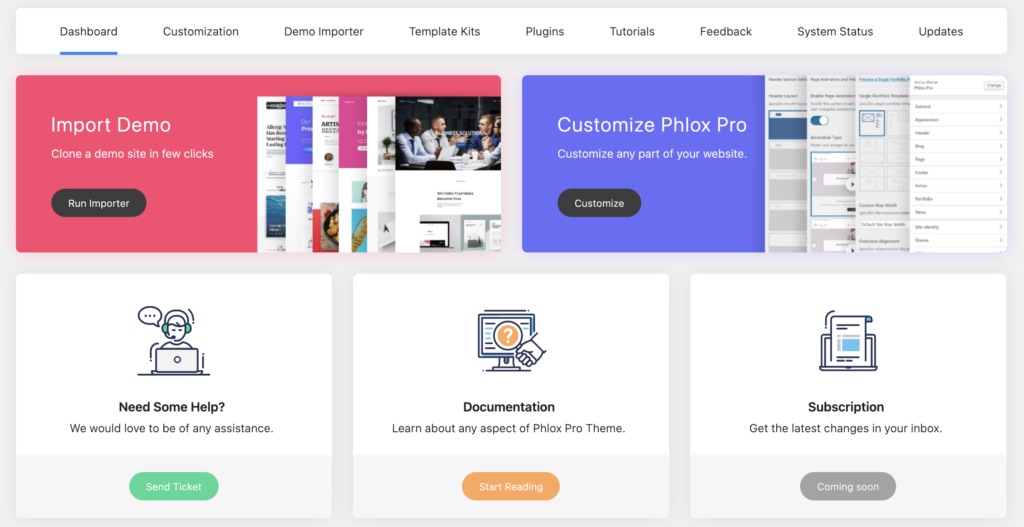
Pre-Built Page Templates
Phlox Pro ships with a library of pre-built page templates that form the backbone of its multipurpose positioning. Rather than starting from a blank canvas, you pick a layout suited to your project and adjust it inside Elementor. According to the developer, these templates cover a range of site types, which is what allows one theme to serve business sites, portfolios, and other project categories without separate purchases.
The included demo importer ties directly into this system. Instead of manually rebuilding a template’s structure, images, and content placeholders, you import a full demo in one action and edit from there. For freelancers and agencies working against a deadline, this cuts the gap between installation and a client-ready first draft considerably.
Custom Elementor Widgets
Because Phlox Pro is built entirely around Elementor, its custom widgets extend that page builder rather than replacing it or bolting on a separate design layer. These widgets sit inside the standard Elementor editing panel alongside Elementor’s own elements, so there’s no separate interface to learn.
For a site owner without development experience, this means added functionality beyond what stock Elementor offers, without touching a code editor or hiring a developer for layout tweaks. The tradeoff is that this convenience only exists within Elementor’s workflow; anyone not already committed to Elementor gains nothing from these widgets.
Visual, Code-Free Design Tools
Phlox Pro’s design tools are built for on-screen, drag-and-drop editing rather than settings panels buried in the backend. The theme customizer supports this: it lets you adjust site-wide styling and layout options from a live preview rather than editing template files.
The practical effect is that a small business owner can update colors, typography, and layout choices directly and see the result immediately, without needing a staging environment or developer review cycle. Combined with the custom widgets, this keeps the entire build process inside one visual environment.
Multipurpose Design Suited to Varied Site Types
Rather than being built for one niche, Phlox Pro is positioned as a multipurpose theme — a single license intended to support business sites, portfolios, and other formats depending on which template and demo you import. This is the throughline connecting the templates, widgets, and design tools into one product rather than three separate ones.
For agencies handling multiple client types, this reduces the need to license and learn a different theme for each project. A single Phlox Pro install, paired with the appropriate demo, can be repurposed across a business site one month and a portfolio the next.
Installation and Setup
- Purchase the Regular License for Phlox Pro through ThemeForest ($39), which includes a quality check by Envato, future updates, and initial support (see Pricing below for support terms).
- Download the theme package from your ThemeForest downloads area after purchase.
The downloaded ZIP is not the installable theme file itself — it contains an inner ZIP archive that must be extracted first. Uploading the outer package directly to WordPress will fail, so locate the inner theme ZIP before proceeding to the next step.
- Go to Appearance → Themes → Add New → Upload Theme in the WordPress dashboard and upload the inner theme ZIP file (not the original downloaded package). Activate the theme once the upload completes.
- Install and activate Elementor. This product requires Elementor — it must be installed and activated for the visual design workflow that Phlox Pro is built around.
Phlox Pro also bundles several plugins at no extra cost, which you can install and activate as needed for your build:
- Visual Composer
- Master Slider
- Go Pricing
- Ultimate Addon
- Run the built-in One-Click Demo Importer to bring in a pre-built demo site, including its pages, images, and widget configurations, as a starting point for your build.
- Open the WordPress Customizer (Appearance → Customize) to adjust global settings such as colors, typography, header, and footer layout using Phlox Pro’s built-in theme customizer.
Anyone wanting to try the design approach before buying can start with Phlox, the free version distributed as a separate download. It includes the demo importer, theme customizer, and core design features, and is supported through documentation, video tutorials, and a support forum rather than direct ticket support.
Compatibility and Requirements
| Requirement | Details |
|---|---|
| WordPress | 5.0.x through 6.9.x |
| PHP | 7.4 or higher; works best on PHP 8+ |
| WooCommerce | 5.x.x through 9.x.x |
| Browsers | IE9, IE10, IE11, Firefox, Safari, Opera, Chrome, Edge |
Beyond WordPress core and WooCommerce, Phlox Pro’s vendor-stated compatibility list also covers Elementor, Elementor Pro, Contact Form 7, Easy Digital Downloads, Events Calendar, Gravity Forms, WPML, and the Block Editor. Since the theme is built around Elementor, sites relying on a different page builder won’t get the intended design workflow.
IE9 through IE11 have been out of active Microsoft support for years. Although they appear on the vendor’s compatibility list, it’s a good idea to test checkout and contact forms in current browsers rather than relying on legacy IE behavior for a production site.
Phlox Pro Pricing
Phlox Pro is sold as a single Regular License priced at $39. That price covers a quality check performed by Envato before the theme is listed, access to future updates, and six months of support directly from averta.
Support beyond the initial six months isn’t included by default. The support extension to 12 months has been listed at both $23.63 and $10.13 — confirm the current price at checkout before purchasing.
Alongside the paid theme, averta also distributes Phlox, a separate free download. The free version includes a demo importer and the theme customizer, giving newcomers a way to test the design workflow before committing to a purchase. Support for the free tier comes through documentation, video tutorials, and a community support forum rather than direct one-on-one help from the developer.
For the latest figures on the Regular License and support extension pricing, check the official Phlox Pro listing before buying.
👉 Get Phlox Pro at the best available price
Alternatives to Phlox Pro
Phlox Pro isn’t the only multipurpose theme built around a visual page builder, and its Elementor dependency won’t suit everyone. Here’s how it stacks up against other established options.
| Product | Key Difference | Best For | Price Tier |
|---|---|---|---|
| Phlox Pro | Elementor-dependent multipurpose theme with pre-built demos, sold as a one-time ThemeForest license | Freelancers and agencies already committed to Elementor workflows | Paid |
| Avada | Uses its own Fusion Builder and is one of the longest-running multipurpose themes on ThemeForest | Users wanting an established, builder-included alternative to Elementor-based themes | Paid |
| Divi | Built around Elegant Themes’ own Divi Builder, sold via subscription or lifetime membership rather than a single license | Buyers who prefer ongoing access and updates over a one-time purchase | Paid |
| OceanWP | Lightweight and builder-agnostic, designed to work with multiple page builders instead of locking users into one | Users who want flexibility to switch page builders later | Freemium |
| Astra | Focuses on lightweight performance and starter templates, and works across multiple builders including Elementor | Performance-conscious users who still want Elementor compatibility without full lock-in | Freemium |
Competitor data is sourced from publicly available information as of 2026 and may have changed.
The right pick depends on how tied you want to be to a single builder and whether a one-time license or subscription model fits your budget better. Those already comfortable with Elementor may find Phlox Pro’s pre-built demos a faster path, while others may prefer the flexibility OceanWP or Astra offer across multiple builders.
Frequently Asked Questions
Is Phlox Pro free or does it require payment?
Phlox Pro is a paid theme, with the Regular License priced at $39 on ThemeForest. A separate free version called Phlox exists as a standalone download, offering the demo importer, theme customizer, and core design features without cost.
What is the difference between Phlox and Phlox Pro?
Phlox is the free version, supported through documentation, video tutorials, and a support forum, and it includes the demo importer and theme customizer. Phlox Pro is the premium version sold on ThemeForest, adding pre-built page templates, custom Elementor widgets, and direct support from averta for a set period.
Does Phlox Pro require Elementor to work?
Yes, Phlox Pro is built around Elementor and its design workflow depends on that page builder. The theme’s custom widgets and visual, code-free design tools are made to work within the Elementor editor, so the page builder is a required part of the setup rather than an optional add-on.
How long does Phlox Pro support last after purchase?
Support runs for 6 months from the date of purchase as part of the Regular License. Buyers who need coverage beyond that window can purchase a support extension that stretches it out to 12 months.
Is Phlox Pro compatible with WooCommerce?
Yes, Phlox Pro is compatible with WooCommerce versions 5.x.x through 9.x.x. It also works with other plugins commonly used on business sites, including Contact Form 7, Gravity Forms, Events Calendar, Easy Digital Downloads, and WPML.
Where can I buy Phlox Pro?
Phlox Pro is sold exclusively on ThemeForest, one of the digital marketplaces operated by Envato. Purchases go through Envato’s Regular License, which includes a quality check, future updates, and 6 months of support from averta.
What PHP version does Phlox Pro need?
Phlox Pro officially recommends PHP 7.4 or higher, with PHP 8 or above recommended for the best performance, security, and compatibility with modern page builders like Elementor. Running an older PHP version may limit the theme’s performance and its compatibility with Elementor.
How do I install the Phlox Pro theme file?
The file downloaded from ThemeForest is an outer package containing a second, inner zip file — that inner file is the actual installable theme. Extract the outer package first, then upload the inner zip through the WordPress dashboard’s theme upload screen rather than the original downloaded package. The whole process takes only a few minutes once you’ve located the correct file.
Download & Pricing Options
🆓 Free Version
👉 Download the Free Version of Phlox Pro
💎 Get Phlox Pro (Best Available Price)
👉 Check Current Pricing for Phlox Pro
Pricing and availability may change — use the link above for current rates.
Buying Phlox Pro outright is not the only route. See our best GPL site comparison for how ten GPL vendors differ on file integrity, update speed and licence keys.


