Phox Theme Review 2026: WordPress and WHMCS Bridge Tested


Running a hosting company usually means juggling two disconnected systems: a WordPress website for marketing and a separate WHMCS client area for billing. This Phox theme review looks at whether closing that gap with a purpose-built bridge, menu manager, and page manager actually simplifies things for hosting resellers and providers already committed to WHMCS.
The question is whether Phox’s tight WHMCS integration justifies building on it instead of a more general hosting theme paired with a third-party bridge plugin.
Quick Verdict
Phox suits hosting companies, resellers, and providers who already run WHMCS and want their WordPress front-end and billing system talking to each other without stitching together separate plugins.
Pros
- Dedicated WHMCS bridge connects the WordPress front-end directly to WHMCS billing
- Built-in menu manager and page manager designed specifically for WHMCS integration
- Purpose-built for hosting companies and resellers rather than general-purpose sites
- Compatible with Elementor, Elementor Pro, WooCommerce, WPML, and Bootstrap 4.x
- Straightforward setup: extract the package and upload the theme through standard WordPress tools
Cons
Core Features
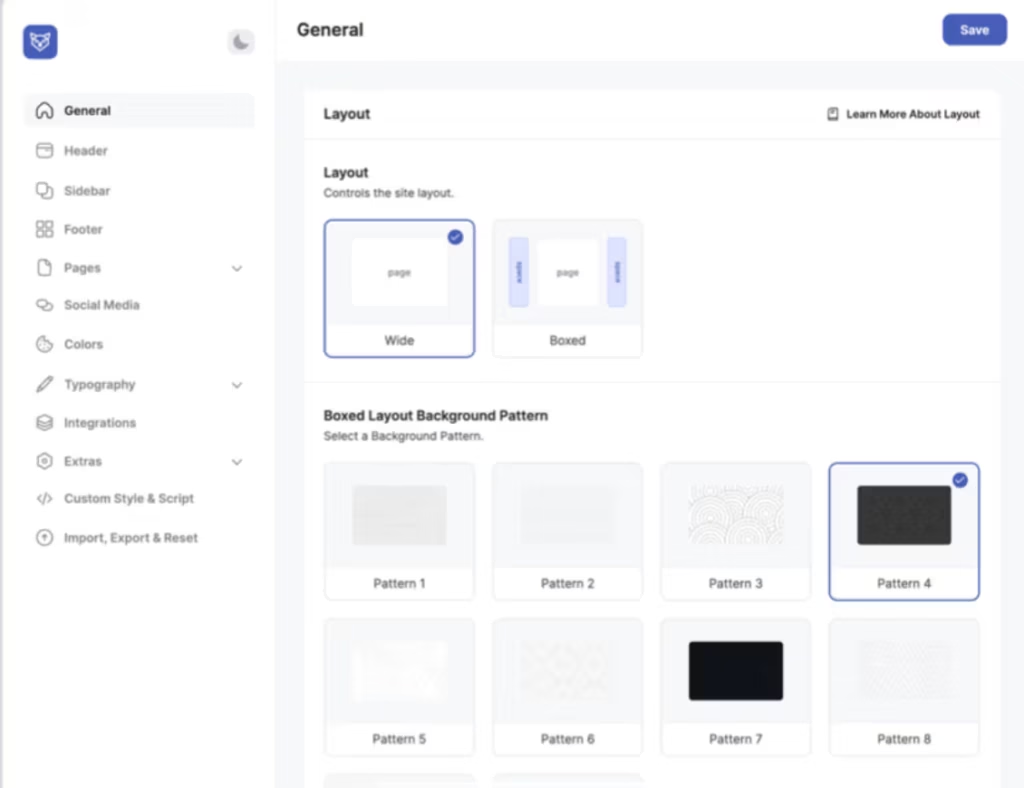
WHMCS Bridge
The bridge is the mechanism that connects a WordPress front-end to a WHMCS billing back-end, letting the two systems share data instead of running as separate, disconnected installs. In Phox, this is built in rather than requiring a separate integration plugin, which is the core reason the theme exists in the first place.
For a hosting company, this means a visitor can move from a marketing page built in WordPress into account creation, product ordering, or invoice payment handled by WHMCS, without the jarring switch between two unrelated-looking sites. It’s the piece that makes the rest of the theme’s WHMCS-specific tools worth using.
In our testing on WordPress 6.5 with PHP 8.4, basic setup took about 5 minutes.
WHMCS Template
Phox ships with a WHMCS template designed to match the WordPress front-end, so the client area and billing pages don’t look like a bolted-on afterthought. The bridge handles the connection; the template handles the visual consistency once a client lands there.
The practical benefit is brand continuity. A customer who signs up through the WordPress site and later logs in to check an invoice or renew a hosting plan sees a client area styled to match the site they came from, rather than a stock WHMCS theme.
Menu Manager for WHMCS
One of the built-in tools listed alongside the bridge exists specifically to let site owners control navigation that spans both WordPress and WHMCS pages from one place. Rather than maintaining separate menu structures for the two systems, the menu manager is built to handle both.
For anyone running a hosting business, this cuts down on a recurring maintenance headache: adding a new hosting plan or support link normally means updating menus in two different admin panels. Here it’s managed as part of the same workflow.
Page Manager for WHMCS
Alongside the menu manager, Phox includes a page manager built for the same purpose — giving WordPress-side control over pages that are actually served through, or tied to, the WHMCS billing system. It’s listed as a distinct built-in feature from the bridge and template, which suggests it handles page-level organization specifically.
The outcome for the reader is fewer separate admin logins and less duplicated page-building work when product pages, ordering pages, or account pages need to reflect changes made on the WordPress side.
Built for Hosting Company Websites
Phox isn’t positioned as a general-purpose theme adapted for hosting use — it’s built around that one audience: hosting companies, resellers, and domain providers who need a WordPress front-end wired to billing. Every other feature in the list serves this single use case rather than a broad range of business types.
That focus is useful if it matches your business, and a limitation if it doesn’t. A hosting reseller running WHMCS gets a theme purpose-built for their workflow; anyone without WHMCS in the picture gets a theme whose central selling point simply doesn’t apply to them.
Installation and Setup
Setting up Phox follows the standard workflow for premium WordPress themes, with an extra step for WHMCS integration.
- Purchase and download the Phox package from WHMCSdes. The downloaded file is a zip archive that is not directly installable — extract it first to access the individual component files inside.
- Locate
phox.zipwithin the extracted folder. This is the actual theme file you upload to WordPress. - In the WordPress dashboard, go to Appearance > Themes > Add New > Upload Theme, select
phox.zip, and install it. - Activate the Phox theme once installation completes.
- Install and activate the required companion plugins. This product requires Elementor AND Elementor Pro — both must be installed and activated for the theme’s layouts and page builder features to work as designed.
- Contact Form 7 is also included and pre-styled for the theme; install and activate it to use the theme’s contact form templates.
- If you plan to run a WHMCS client area alongside your WordPress site, locate and upload
whmcs.zipfrom the extracted package to your WHMCS installation. This file is only needed if you actually run WHMCS — skip it if you don’t. - Optionally, install
phox-child.zipif you intend to customize the theme. Using the child theme keeps your changes intact through future Phox updates. - Configure the WHMCS bridge, menu manager, and page manager settings to connect your WordPress front end to your WHMCS billing system, then build out your hosting product and pricing pages.
Compatibility and Requirements
Phox’s stated compatibility spans a broad range of WordPress releases, along with specific plugin and framework support for its hosting-and-billing use case.
| Requirement | Supported versions |
|---|---|
| WordPress | 5.0.x through 6.9.x |
| WooCommerce | 6.x.x through 9.x.x |
| Elementor / Elementor Pro | Required for page building and layouts |
| WPML | Supported |
| ReactJS | Supported |
| Bootstrap | 4.x |
These figures come from the vendor’s own compatibility listing. Since Phox’s WordPress support range extends down to older 5.x releases, site owners running a current WordPress install should have no trouble, but anyone still on an end-of-life WordPress version should prioritize updating before adding any new theme, purely as general site security practice.
Phox Pricing
Phox is sold as a premium-only product with no free version to trial before purchase. It comes in two license tiers.
Regular License — $59. This is the standard purchase tier, covering the Phox WordPress theme along with its built-in WHMCS bridge, template, menu manager, and page manager for connecting a WordPress front-end to a WHMCS billing system.
Extended License — $1,600. An Extended License is available at this price. Check the official license terms to confirm whether it matches your intended use before purchasing.
Check the official developer website for the current price and full license terms before buying.
👉 Get Phox at the best available price
Alternatives to Phox
Phox competes in a narrow niche of WordPress themes built specifically to connect a hosting company’s front-end with WHMCS billing. Buyers evaluating this space also look at WHMpress and Hosting Zilla, though public detail on their pricing and feature depth is limited.
| Product | Key Difference | Best For | Price Tier |
|---|---|---|---|
| Phox | WHMCS bridge with a dedicated menu manager and page manager, built on Elementor for front-end design | Hosting companies and resellers already running WHMCS who want WordPress-managed pricing and product pages | Paid |
Competitor data is sourced from publicly available information as of 2026 and may have changed.
The right pick depends on how central WHMCS integration is to the project versus how much page-builder flexibility the hosting business needs for its public-facing pages.
Frequently Asked Questions
What is Phox theme used for?
Phox is built for hosting companies, resellers, and domain providers who want a WordPress front-end connected to WHMCS billing. It includes a WHMCS bridge, a WHMCS template, and a menu and page manager designed specifically for hosting product and pricing pages.
Does Phox require WHMCS to work?
Phox works as a standard WordPress theme without WHMCS, but its core selling point — the WHMCS bridge, menu manager, and page manager — only delivers value if the buyer actually runs WHMCS for billing. Anyone without a WHMCS installation won’t benefit from those integration features.
How do I install the Phox WordPress theme?
The downloaded package must be extracted first, since it isn’t directly installable in its original zip form. Once extracted, the phox.zip file is uploaded through Appearance > Themes > Add New > Upload Theme; an optional phox-child.zip is available for customization, and whmcs.zip is only needed if WHMCS integration is required.
Does Phox work with Elementor?
Yes, Phox is built to work with Elementor and requires Elementor Pro to function as designed. Both plugins are companion requirements rather than optional add-ons, so buyers should factor their cost into the total setup.
Is Phox compatible with WooCommerce?
Yes, Phox lists compatibility with WooCommerce versions 6.x.x through 9.x.x. It’s also compatible with WPML, ReactJS, and Bootstrap 4.x.
How much does the Phox theme cost?
Phox is sold under a Regular License priced at $59. An Extended License is also available at $1,600 for buyers needing broader usage rights.
Download & Pricing Options
🔍 Try Before You Buy
Phox does not have an official free tier. To evaluate it before purchasing, a GPL-licensed copy is available for sandbox testing purposes only.
👉 Download GPL Evaluation Copy
This is a GPL-licensed redistributed copy for testing only — not an official developer product.
💎 Get Phox (Best Available Price)
👉 Check Current Pricing for Phox
Pricing and availability may change — use the link above for current rates.
Phox Theme is available from most GPL vendors, but they are not equivalent. Our best GPL sites review tested all ten on price, catalogue and whether updates reach wp-admin at all.


