Newsmag Theme Review 2026: Is tagDiv’s News Theme Worth It?

Launching a news or review site usually means bolting together a magazine layout, a separate review plugin, and a page builder that fights your theme at every turn. This Newsmag theme review looks at tagDiv’s long-running answer to that problem: a single package built specifically for publishers, with review scoring and layout tools included rather than added on. The question is whether that bundled approach still holds up against newer builder-based themes in 2026.
This review weighs Newsmag’s setup speed and built-in publishing tools against its plugin dependency and support terms, to help you decide if it fits your workflow.
Quick Verdict
Newsmag suits bloggers, publishers, and review site owners who want a dedicated news layout with rating and schema tools working out of the box, without hunting down separate review plugins. It’s less suited to buyers who want a lightweight, dependency-free theme or who need guaranteed one-on-one support rather than a community forum.
Pros
- Built-in review system with rating options, review boxes, and schema markup for rich snippets
- Includes the tagDiv Composer page builder and pre-built demo sites for fast setup
- Gutenberg optimized and purpose-built for news, magazine, blog, and review sites
- Long-established theme from tagDiv, a well-known name in the publishing theme space
- Straightforward installation and demo import, taking around 5 minutes based on first-hand testing
Cons
- Requires the separate tagDiv Composer plugin to function as intended, adding a dependency
- Support runs through a community forum rather than direct one-on-one channels, with limited standard coverage
Core Features
Built for News, Magazine, Blog, and Review Publishing
Newsmag isn’t a general-purpose theme with a news skin bolted on — it’s built specifically around four content types: news, magazine, blog, and review sites. That focus shapes the theme’s layout logic and content structures rather than leaving them as an afterthought.
For a publisher, this means the theme’s defaults line up with how editorial sites actually work, instead of requiring you to retrofit a shop or portfolio template into a magazine layout. Site owners running review-driven content or high-volume blogs get a theme designed around their content type from the ground up.
tagDiv Composer Frontend Page Builder
Newsmag is built around tagDiv Composer, the frontend page builder developed by tagDiv as the theme’s companion plugin. Rather than relying solely on native block editing, layout work in Newsmag happens through this dedicated builder, which installs alongside the theme.
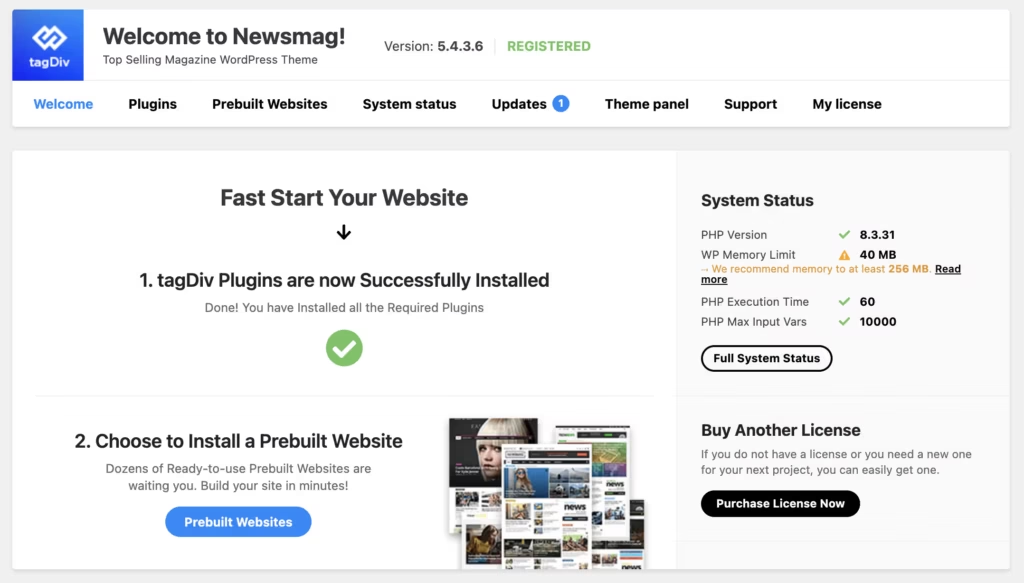
Demo import functionality is accessible right after theme activation, letting you pull in a pre-built starting layout instead of assembling pages from a blank canvas. For anyone setting up a magazine or news site for the first time, that combination of a purpose-built frontend editor and one-click demo content shortens the distance between installing the theme and having a working site.
Gutenberg Optimized
Newsmag is Gutenberg optimized, meaning it’s built to work with WordPress’s native block editor rather than against it. Themes tied heavily to a proprietary builder can sometimes clash with core editing tools; Newsmag is positioned to avoid that friction.
For editors who prefer writing and formatting posts in the standard block editor while still using tagDiv Composer for structural page layout, this gives some flexibility in how day-to-day content gets produced rather than locking every workflow into one tool.
Installation and Setup
- Purchase and download Newsmag from ThemeForest. The file you receive is a zip package containing the theme, documentation, and licensing files — it is not directly installable as-is.
- Extract the downloaded zip file on your computer first. Inside you’ll find a separate file named Newsmag.zip; this is the actual theme package you’ll upload to WordPress.
- In your WordPress dashboard, go to Appearance → Themes → Add New → Upload Theme, then select the extracted Newsmag.zip file and click Install.
- Activate the theme once installation finishes.
- When prompted, install and activate the required companion plugin. This product requires tagDiv Composer — it must be installed and activated for the theme’s page building and layout features to work as intended.
- Optionally, run the demo import to start with a pre-built site layout rather than building pages from scratch. Newsmag ships with pre-built demo designs you can browse before choosing one to import.
Based on first-hand testing on WordPress 6.5 with PHP 8.4, this entire process — from upload through activation and required plugin installation — took about five minutes, before any demo import or content customization.
Compatibility and Requirements
| Requirement | Details |
|---|---|
| WordPress version | 5.4 or higher |
| PHP version | 7.0 or higher required, 7.2 or higher recommended |
| Page builder | Gutenberg optimized; built around tagDiv Composer |
| Price | $49 (Regular License) |
| Support | Support forum |
Newsmag’s official PHP requirement sits well below current standards, so while the theme will technically run on PHP 7.0, running it on a currently supported PHP version is the safer choice for security and performance on a live site. Support is handled through a dedicated forum.
Newsmag Pricing
Newsmag is sold exclusively through ThemeForest as a premium theme, with no free tier available.
Regular License — $49
This one-time purchase includes the Newsmag theme files, access to the tagDiv Composer page builder, and the pre-built demo sites available for import after activation. Standard support is included for six months from the date of purchase, and this can be extended to twelve months for an additional fee at checkout.
Extended or multi-site licensing options are not part of the standard listing. For the current price and any active marketplace discounts, check the official ThemeForest listing before buying.
👉 Get Newsmag at the best available price
Alternatives to Newsmag
Newsmag operates within tagDiv’s own lineup of premium WordPress themes for publishers, and shoppers comparing options on ThemeForest often look at similarly positioned news and magazine templates before deciding. Below is a snapshot of where Newsmag itself sits on the key factors that matter for this category.
| Product | Key Difference | Best For | Price Tier |
|---|---|---|---|
| Newsmag | Built-in review system with schema markup, tagDiv Composer builder, and pre-built demo sites for news and magazine layouts | News publishers, bloggers, and review site operators | Paid |
Competitor data is sourced from publicly available information as of 2026 and may have changed.
The right pick ultimately comes down to the type of site you’re running and whether a built-in review system with schema markup, like the one Newsmag offers, matters more to you than other layout or builder options on the market.
Frequently Asked Questions
Does Newsmag have a review system with schema markup?
Yes. Newsmag includes a built-in review system with rating options, review description boxes, and schema markup that helps generate rich snippets in search results, which is useful for review-focused sites.
What PHP version does Newsmag require?
Newsmag officially requires PHP 7.0 or greater, with PHP 7.2 or higher recommended. Running a modern version such as PHP 8.0+ is safer from a security standpoint, and the theme has been tested on PHP 8.4 without issues.
How long does Newsmag support last?
Standard support for Newsmag runs for six months from the date of purchase. You can pay an additional fee to extend coverage to 12 months if you need longer-term assistance.
Do I need the tagDiv Composer plugin for Newsmag?
Yes, Newsmag is built around the tagDiv Composer frontend page builder and requires it to function as intended. It’s listed as a companion plugin and gets installed as part of the required plugins setup after theme activation.
How do I install Newsmag after downloading it from ThemeForest?
The package downloaded from ThemeForest isn’t directly installable, so it needs to be extracted first. Inside that extracted folder is the actual Newsmag.zip file, which you upload through Appearance, then Themes, then Add New, then Upload Theme. After activation, you install the required plugins when prompted and can optionally run the demo import to start with a pre-built site.
Does Newsmag come with pre-built demo sites?
Yes, Newsmag includes pre-built website demos along with the tagDiv Composer page builder and an intelligent ads system. The available layouts can be viewed on the Newsmag Demos page, and demo import functionality becomes accessible right after theme activation.
Download & Pricing Options
🔍 Try Before You Buy
Newsmag does not have an official free tier. To evaluate it before purchasing, a GPL-licensed copy is available for sandbox testing purposes only.
👉 Download GPL Evaluation Copy
This is a GPL-licensed redistributed copy for testing only — not an official developer product.
💎 Get Newsmag (Best Available Price)
👉 Check Current Pricing for Newsmag
Pricing and availability may change — use the link above for current rates.
If you would rather not pay Newsmag Theme’s renewal every year, a GPL membership is the usual alternative. We compared the options in our best GPL websites breakdown, including where each one falls short.


