JNews WordPress Theme Review 2026: Features, Pricing, Setup


Running a news or magazine site usually means bolting on separate paywall plugins, membership tools, and page builders just to get a working monetization setup. This JNews theme review looks at a WordPress theme built specifically for publishers, one that packages a paywall and pay-per-post system directly into the theme rather than leaving monetization to third-party add-ons. The question is whether that built-in approach actually saves publishers money and setup time compared to assembling those tools separately.
This review weighs JNews’s monetization features and page-building flexibility against its licensing structure to help you decide if it fits your publishing site.
Quick Verdict
JNews suits news publishers, magazine owners, and bloggers who want paywall and pay-per-post monetization working out of the box, without hunting down and licensing separate plugins. It’s a strong fit for single-site publishers comfortable with either a one-time ThemeForest purchase or an annual subscription. Agencies planning multi-client resale, or anyone wanting to trial the theme for free first, should look elsewhere.
Pros
- Built-in paywall and pay-per-post monetization tools without needing separate plugins
- Bundled WPBakery Page Builder and Slider Revolution at no extra licensing cost
- Compatible with Elementor, WPBakery, and Gutenberg, giving flexibility in page building
- Multilanguage support via Polylang and WPML plus RTL support for global publishers
- PHP 8 Ready architecture aimed at improved loading performance
Cons
- No free tier exists, so there is no way to trial the theme before purchase
- JNews Twenty on the official site is a recurring subscription rather than a one-time purchase
- Two separate purchasing paths (ThemeForest one-time vs. Jnews.io subscription) can confuse buyers comparing value
- A standard ThemeForest regular license only covers a single website, so multi-site or client resale use needs extended licensing
Core Features
Prebuilt Demo Sites
JNews ships with a library of prebuilt demos covering news, magazine, and blog layouts, giving publishers a starting point that matches their editorial format rather than a blank template. Each demo is built to reflect a specific content style, from breaking-news grids to long-form magazine spreads.
For a site owner, this cuts down the time spent designing a homepage from scratch. Instead of assembling a layout piece by piece, you import a demo that already resembles the finished publication and adjust branding and content from there.
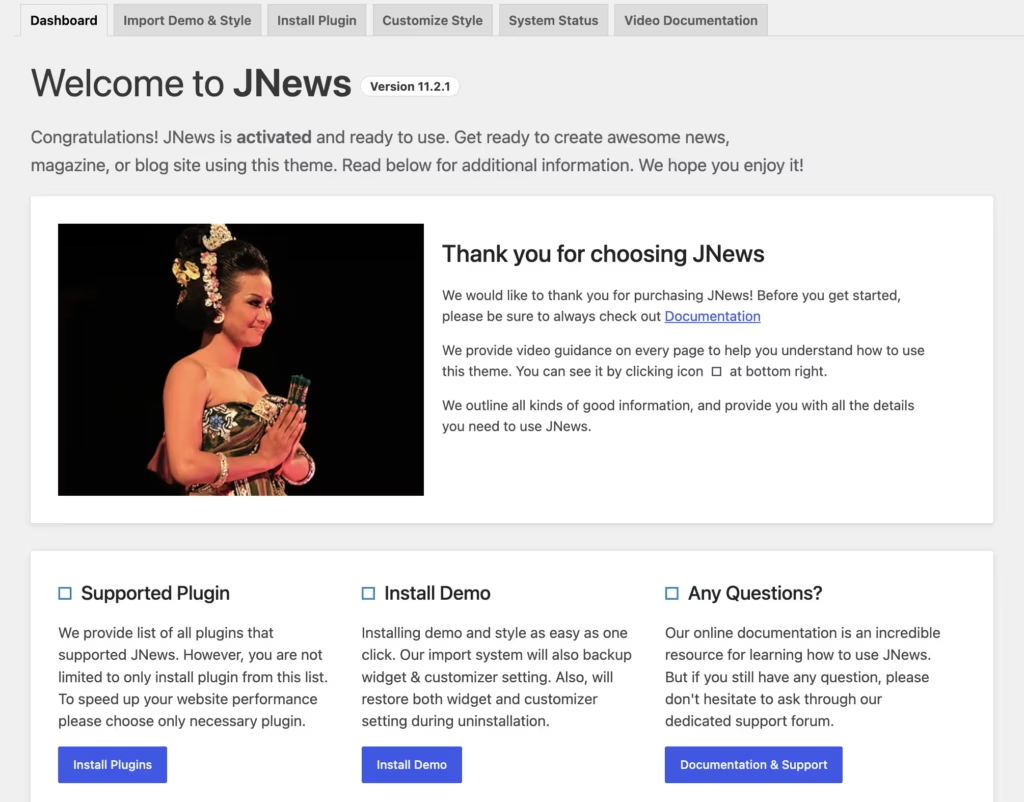
In our testing on WordPress 6.5 with PHP 8.4, the downloaded package was not directly installable. It had to be extracted first, then installed in two stages: uploading JNews Theme 1st Install.zip via Appearance → Themes → Add New → Upload Theme, importing the preferred demo, and then uploading JNews Theme 2nd Install.zip to complete the installation. A jnews-child.zip is also available for those planning to customize the theme. The full process, including basic setup, took about 5 minutes.
Visual Layout Builder
The theme includes its own visual layout builder as a core, built-in feature rather than a bolted-on add-on. It handles the placement of homepage modules, category pages, and post layouts directly inside the WordPress admin.
Editorial teams get control over how sections like trending posts, category blocks, and featured stories are arranged, without writing custom code for every layout change. Because it’s built in, layout adjustments don’t depend on a separate builder plugin staying compatible with theme updates.
Paywall Feature
Monetization is handled through a built-in paywall system, listed among JNews’s core and built-in features, which lets publishers restrict full access to premium articles. This is aimed squarely at news and magazine operations that want a subscription-style revenue model without sourcing a third-party paywall plugin.
For a publisher weighing a subscription strategy, having this shipped with the theme removes a layer of plugin vetting and licensing that would otherwise be needed to lock content behind a paywall.
Pay-Per-Post Feature
Alongside the subscription-style paywall, JNews includes a way to monetize individual articles rather than requiring a full subscription. This suits publishers who want to sell access to specific investigative pieces, reports, or premium content one article at a time.
Combined with the paywall system, it gives a site two distinct monetization paths — recurring and one-off — that can be run side by side depending on the type of content being published.
PHP 8 Ready Architecture
The theme’s architecture is built to be PHP 8 Ready, aimed at improving page loading time for content-heavy news and magazine sites. Publishing sites tend to carry large amounts of media, ad code, and dynamic modules, which makes backend performance more consequential than on a simple brochure site.
A theme built around a current PHP baseline gives site owners a technical foundation that aligns with modern hosting environments, rather than one carrying legacy code patterns that slow down high-traffic publishing sites.
Multilanguage Support
The theme supports multilanguage publishing through Polylang and WPML, two of the more established WordPress translation plugins. This is built specifically for outlets that publish in more than one language or serve regional editions of the same publication.
For a publisher targeting multiple language markets, this means the translation workflow can sit on top of established plugins rather than a proprietary in-house system, which keeps translator tooling familiar.
RTL Language Support
The theme also renders correctly for right-to-left scripts such as Arabic and Hebrew, extending its multilanguage capability beyond translation. This is a distinct feature from Polylang/WPML compatibility — it governs how the layout itself mirrors and displays for RTL languages.
Publishers running Arabic or Hebrew-language news sites get a layout that displays correctly without needing custom CSS overrides to flip menus, sidebars, and content flow.
Page Builder Compatibility
JNews is compatible with Elementor, WPBakery Page Builder, and Gutenberg, covering three of the most widely used WordPress page-building approaches. WPBakery Page Builder and Slider Revolution are bundled with the theme package at no extra licensing cost.
Editorial teams already trained on Elementor, or comfortable with the native Gutenberg block editor, aren’t forced to learn a proprietary builder just to use JNews, while WPBakery remains available as a bundled option for those who prefer it.
Installation and Setup
- Purchase and download the JNews package from either ThemeForest (JNews Classic) or the official Jnews.io site (JNews Twenty), then unzip the downloaded archive on your computer before uploading anything to WordPress.
- In your WordPress dashboard, go to Appearance → Themes → Add New → Upload Theme and upload the file named JNews Theme 1st Install.zip from the extracted folder.
- Activate the theme once the upload finishes.
- Run the built-in demo importer and select the prebuilt demo that matches your site type — news, magazine, or blog — to bring in the corresponding layouts, widgets, and sample content.
- Return to Appearance → Themes → Add New → Upload Theme and upload JNews Theme 2nd Install.zip to complete the installation.
- If you plan to customize template files directly, install the optional jnews-child.zip child theme so your changes survive future updates.
- Activate and configure the bundled plugins that ship with the theme package as needed for your site, including:
- WPBakery Page Builder for page-building
- Slider Revolution for slider modules
- YellowPencil for visual CSS editing
- Jeg Weather for weather widgets
- Jeg Paywall for content monetization
- Epic Split Post
- Epic Review
- Jeg Social Feed
- Epic Social Share
- Epic Gallery
- Open the visual layout builder to arrange homepage and category layouts, and set up the paywall or pay-per-post modules from the theme’s monetization settings if you intend to charge for content.
- Consult the backend documentation and video documentation included with the theme for guidance specific to the demo and features you’ve selected.
Setup following this sequence typically takes only a few minutes on a standard WordPress installation.
Compatibility and Requirements
| Requirement | Details |
|---|---|
| PHP | PHP 8 Ready architecture, described as improving loading time |
| Page builders | Elementor, WPBakery Page Builder, Gutenberg |
| Multilanguage | Polylang, WPML |
| Text direction | RTL language support included |
JNews bundles WPBakery Page Builder and Slider Revolution at no extra cost, though direct activation keys for those plugins aren’t provided separately from the theme package.
If you’re running an older PHP release on a live production site, it’s worth moving to a currently supported PHP version before installing any modern theme, since unsupported PHP branches no longer receive security patches.
JNews Pricing
JNews has no free version. It is sold as a premium theme through two separate channels, each with its own pricing structure.
JNews Classic (ThemeForest) is listed at $59 as a one-time purchase. This is a sale price on the ThemeForest marketplace and includes the theme package under Envato’s standard licensing terms.
JNews Twenty (Jnews.io) is sold directly from the official site as a subscription at $99/year, though it is frequently discounted to $49.5/year at 50% off. This is a recurring annual license rather than a one-time payment.
Both versions include the core feature set: the visual layout builder, paywall and pay-per-post monetization tools, prebuilt demos for news and magazine sites, and bundled access to companion plugins like WPBakery Page Builder and Slider Revolution.
Because JNews is distributed through two different platforms with different pricing models, buyers should check the checkout page on jnews.io or the ThemeForest listing directly to confirm current rates before purchase.
👉 Get JNews at the best available price
Alternatives to JNews
JNews competes in a crowded field of premium WordPress themes built for news, magazine, and blog publishing. Before committing to a purchase, it helps to see how its monetization tools and pricing model stack up against what else is available.
| Product | Key Difference | Best For | Price Tier |
|---|---|---|---|
| JNews | Built-in paywall and pay-per-post monetization plus compatibility with Elementor, WPBakery, and Gutenberg | Publishers wanting monetization tools without extra plugins | Paid |
Competitor data is sourced from publicly available information as of 2026 and may have changed.
Choosing between JNews and other WordPress news and magazine themes ultimately comes down to whether built-in monetization features, page builder flexibility, or licensing terms matter most for your specific publishing project.
Frequently Asked Questions
What is JNews used for?
JNews is a WordPress theme built for creating news websites, magazines, and blog publishing sites. It includes prebuilt demos tailored to these formats along with a visual layout builder, making it suited to publishers who need both design flexibility and content monetization tools in one package.
Does JNews have a paywall feature?
Yes, JNews includes a built-in paywall system as part of its core feature set. It also offers a pay-per-post option, giving publishers two distinct ways to monetize content directly through the theme without relying on third-party plugins.
How much does JNews cost?
JNews is sold through two separate channels at different prices. JNews Classic is available on ThemeForest for $59 as a one-time purchase, while JNews Twenty on the official Jnews.io site runs $99 per year, though it is frequently discounted to $49.5 per year at a stated 50% off.
Is JNews a one-time purchase or subscription?
It depends on which version you buy. JNews Classic through ThemeForest is a one-time purchase, whereas JNews Twenty sold directly on Jnews.io is a recurring annual subscription.
Does JNews work with Elementor and Gutenberg?
Yes, JNews is compatible with Elementor, WPBakery Page Builder, and Gutenberg. This gives site owners flexibility to build pages with whichever editor they prefer rather than being locked into a single builder.
Who develops JNews?
JNews is developed by Jegtheme, a premium WordPress theme developer. JNews is one of their more established products in the news, blog, and magazine theme category, sold through ThemeForest.
Can I use JNews on multiple websites with one license?
A standard ThemeForest regular license covers use on one unique website only. Using JNews across multiple sites, for software-as-a-service purposes, or for client resale typically requires separate or extended licensing, with domain activation details available through Jegtheme’s support and documentation.
How do I install and set up JNews?
Setup involves a two-part installation process. After uploading and extracting the JNews Theme 1st Install.zip file via Appearance, then Themes, then Add New, then Upload Theme, you import your preferred demo, then upload the JNews Theme 2nd Install.zip file to complete the installation, with an optional child theme file available for customization. The process takes about five minutes on a standard WordPress setup.
Download & Pricing Options
🔍 Try Before You Buy
JNews does not have an official free tier. To evaluate it before purchasing, a GPL-licensed copy is available for sandbox testing purposes only.
👉 Download GPL Evaluation Copy
This is a GPL-licensed redistributed copy for testing only — not an official developer product.
💎 Get JNews (Best Available Price)
👉 Check Current Pricing for JNews
Pricing and availability may change — use the link above for current rates.
JNews WordPress Theme is one of thousands of premium plugins available through a GPL membership. Our comparing GPL sites guide compares the ten main vendors on price, catalogue size and how fast updates actually arrive.


