Order Delivery Date Pro Review (2026)


Basic checkout date pickers work fine until a store needs different rules for different products, shipping methods, or pickup counters. This Order Delivery Date Pro review looks at what happens when a WooCommerce shop outgrows a simple calendar field and needs actual scheduling logic behind it. For businesses juggling multiple locations or delivery zones, that gap between “pick a date” and “pick a date that actually works for this order” is where most free plugins stop.
The question is whether Order Delivery Date Pro’s rule-based scheduling and multi-store licensing justify an annual subscription when free date-picker alternatives already cover the basics.
Quick Verdict
Order Delivery Date Pro suits WooCommerce store owners running local delivery or pickup across one or several locations who need scheduling rules tied to product category, shipping method, or store location rather than a flat date field. It’s a poor fit for single-location shops with simple needs, since a free plugin will likely cover a basic delivery date at checkout without any subscription cost.
Pros
- Delivery and pickup rules can be set by product category, shipping method, or pickup location
- Built-in Google Calendar sync keeps scheduled orders visible outside WooCommerce
- Order status automation can trigger changes based on the delivery date
- Multi-store licensing (1, 5, or 10 sites) fits businesses running several shops on one plan
Cons
- No free tier; every feature sits behind an annual subscription
- Store count is capped per tier, so a growing multi-location business may need to upgrade licenses
👉 See Order Delivery Date Pro pricing
Core Features
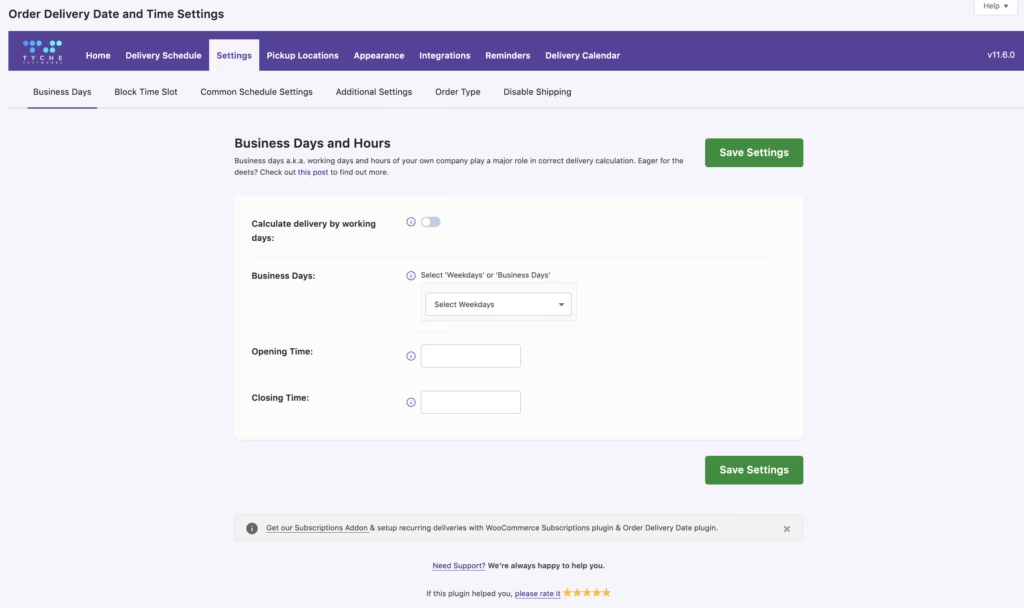
Delivery and Pickup Date Scheduling
Order Delivery Date Pro adds a scheduling layer to the WooCommerce checkout, letting customers pick a delivery or pickup date rather than defaulting to “as soon as possible” fulfillment. Every rule, time slot, and automation option in the plugin ties back to the date a shopper selects at this stage.
For a store owner, that turns an unpredictable order queue into something plannable. A florist or grocery business can see exactly which dates carry the heaviest load before they arrive, rather than finding out after orders start piling up.
In our testing with PHP 8.4, setup took about 2 minutes to install and complete the basic configuration. We uploaded the plugin zip (order-delivery-date.zip) directly via WordPress Admin → Plugins → Add New Plugin → Upload Plugin → Install Now → Activate, without needing to extract it manually.
Time Slot Management
Beyond the date itself, the plugin manages delivery and pickup time slots through a dedicated dashboard where slots are created and adjusted. Customers choose not just a day but a window within that day, which matters for any business promising a delivery appointment rather than a vague window.
That level of control is particularly useful for food and grocery sellers who need to match capacity to staffing. A shop can open more slots on a Saturday and fewer on a slow Tuesday, shaping demand around the resources actually available that day.
Delivery Rules by Category, Shipping Method, and Location
Store owners can configure rules three ways: by product category, by shipping method, or by pickup location, all managed from the same rule configuration screen. A bakery might restrict same-day slots to a “fresh baked” category, while a shipping-method rule keeps next-day delivery reserved for a premium courier option.
Multi-location retailers get the most direct benefit here, since each pickup location can carry its own rule set. A business running several storefronts under one license can give each location distinct hours and availability without needing separate plugin installs.
Google Calendar Sync
Settings built into the plugin sync scheduled orders to Google Calendar, so delivery and pickup dates appear alongside a business’s existing calendar events. That bridges checkout data with tools a store’s staff or drivers already check daily.
For a small delivery team, it means no separate spreadsheet or export step. An order confirmed on the storefront shows up on the calendar a driver or kitchen already relies on for the day’s schedule.
Order Status Automation
The plugin can change order status automatically based on the delivery date, using automation settings in the admin dashboard rather than requiring manual updates as each date approaches or passes. Order records stay aligned with what’s actually happening for each shipment or pickup as a result.
For stores handling volume, that removes a recurring manual task. Staff no longer need to comb through orders each morning updating statuses; the status shifts in step with the scheduled dates already set at checkout.
Installation and Setup
- Purchase a license for Order Delivery Date Pro through the Tychesoftwares product page and download the plugin zip file from your account dashboard.
- Confirm WooCommerce is installed and activated on your WordPress site. This product requires WooCommerce to function — the delivery and pickup scheduling tools attach directly to the WooCommerce checkout and order workflow.
- Log in to your WordPress admin dashboard and go to Plugins → Add New Plugin.
- Click Upload Plugin, then select the order-delivery-date.zip file you downloaded.
- Click Install Now. No manual extraction of the zip file is needed — WordPress handles this automatically once uploaded.
- Click Activate to enable the plugin on your site.
- Enter your license key when prompted so the plugin can receive updates and support for the duration of your subscription.
- Configure delivery and pickup date settings, time slots, and any category, shipping method, or pickup location rules from the plugin’s new settings dashboard.
- If you plan to use Google Calendar sync or order status automation, set those options up from the same dashboard before going live.
The upload-and-activate process is straightforward and typically takes only a few minutes from start to finish, since the plugin installs like any standard WordPress plugin package.
Compatibility and Requirements
| Requirement | Details |
|---|---|
| WordPress | 7.0.2 |
| WooCommerce | 10.9.4 |
| Required plugin | WooCommerce |
These are the version numbers the developer lists as requirements for Order Delivery Date Pro. Store owners should check their current WordPress and WooCommerce versions against these figures before purchasing, since running outdated core software alongside newer plugin releases is a common source of compatibility issues on WooCommerce stores.
Order Delivery Date Pro Pricing
Order Delivery Date Pro is a premium-only extension for WooCommerce. The plugin is sold in three tiers, scaled by how many stores a single license covers.
Starter — $119.00/year
Covers a single store. This tier suits a store owner running one WooCommerce site who needs delivery and pickup date scheduling, time slot management, and the core rule engine for categories, shipping methods, and locations. It’s frequently discounted to $95.20 for the first year, renewing at the standard $119.00/year rate afterward.
Business — $249.00/year
Covers five stores under one license, making it a fit for retailers running several WooCommerce shops from a single account. It includes the same feature set as Starter — delivery/pickup scheduling, time slots, rule configuration, and Google Calendar sync — spread across a multi-store license. This tier is frequently discounted to $199.20 for the first year, then renews at $249.00/year.
Enterprise — $349.00/year
Covers up to ten stores and adds Priority Support on top of the full feature set. It’s aimed at larger multi-location businesses or agencies managing multiple client stores. Enterprise is frequently discounted to $279.20 for the first year, renewing at $349.00/year thereafter.
All three tiers are annual subscriptions, and continued plugin updates, downloads, and support access depend on keeping that subscription active. Tychesoftwares backs every purchase with a 30-day money-back guarantee, giving buyers a window to test the plugin against their delivery and pickup workflows before committing to the renewal cycle.
For the current rates and any active promotions, check the official Order Delivery Date Pro pricing page.
👉 Get Order Delivery Date Pro at the best available price
Alternatives to Order Delivery Date Pro
Store owners evaluating delivery-scheduling tools for WooCommerce will find a small set of established options, each built around a different core need. The table below compares Order Delivery Date Pro against a well-known alternative in the booking space.
| Product | Key Difference | Best For | Price Tier |
|---|---|---|---|
| Order Delivery Date Pro | Rule-based delivery and pickup scheduling by product category, shipping method, or location, with multi-store licensing | Stores needing granular delivery rules across one or several locations | Subscription-based |
| YITH WooCommerce Booking | Focuses on appointment and rental-style booking management rather than delivery/pickup date scheduling | Businesses selling bookable services, rentals, or appointments rather than shipped or collected goods | Paid |
Competitor data is sourced from publicly available information as of 2026 and may have changed.
The right pick depends on what’s being scheduled. Stores managing delivery or pickup logistics with category- or location-specific rules fit Order Delivery Date Pro, while businesses selling appointments, rentals, or bookable time slots are better served by a dedicated booking plugin like YITH WooCommerce Booking.
Frequently Asked Questions
Is there a free version of Order Delivery Date Pro?
No, Order Delivery Date Pro is a premium-only plugin with no free tier. A separate free plugin, Order Delivery Date for WooCommerce (Lite), exists on WordPress.org and offers over 20 basic scheduling features, but it is a distinct product from the Pro version covered in this review.
What is the difference between Order Delivery Date Lite and Order Delivery Date Pro?
Lite is a free WordPress.org plugin with more than 20 basic delivery date features, while Pro is the paid version from Tychesoftwares with 50-plus advanced scheduling and workflow features. Pro adds capabilities like rule configuration by product category, shipping method, or pickup location, Google Calendar sync, and order status automation, none of which are part of the free Lite plugin.
How much does Order Delivery Date Pro cost?
Pricing runs on annual licenses across three tiers: Starter at $119.00/year for one store, Business at $249.00/year for five stores, and Enterprise at $349.00/year for ten stores with Priority Support included. All three tiers are frequently discounted for the first year, and every tier carries a 30-day money-back guarantee.
Does Order Delivery Date Pro support multiple pickup locations?
Yes, the plugin lets store owners set delivery and pickup rules by pickup location, alongside rules based on product category and shipping method. This makes it suited to multi-location retail businesses that need separate scheduling rules for each site.
Can Order Delivery Date Pro sync scheduled orders with Google Calendar?
Yes, Google Calendar sync for scheduled orders is a built-in feature of the plugin. Delivery and pickup dates set by customers can be reflected in a connected Google Calendar, making it easier to track upcoming orders.
How many stores can I use one Order Delivery Date Pro license on?
It depends on the tier: Starter covers a single store, Business covers five stores, and Enterprise covers ten stores. Store count is capped per license, so a growing multi-location business may need to upgrade to a higher tier as it adds sites.
Download & Pricing Options
🔍 Try Before You Buy
Order Delivery Date Pro does not have an official free tier. To evaluate it before purchasing, a GPL-licensed copy is available for sandbox testing purposes only.
👉 Download GPL Evaluation Copy
This is a GPL-licensed redistributed copy for testing only — not an official developer product.
💎 Get Order Delivery Date Pro (Best Available Price)
👉 Check Current Pricing for Order Delivery Date Pro
Pricing and availability may change — use the link above for current rates.
If you would rather not pay Order Delivery Date Pro’s renewal every year, a GPL membership is the usual alternative. We compared the options in our best GPL site for WordPress breakdown, including where each one falls short.


