JetFormBuilder Review 2026: Features, Pricing and Verdict

Most WordPress form plugins force a choice: keep things simple with a standard contact form builder, or bolt on extra plugins to connect forms to a database, a CRM, or a multi-step workflow. This JetFormBuilder review looks at Crocoblock’s approach, which builds forms natively inside the Gutenberg editor and leans on its own ecosystem for dynamic, database-connected functionality.
The question is whether that ecosystem approach — a premium plugin plus paid Pro add-ons and companion plugins — delivers more value than picking up an established standalone form plugin instead.
Quick Verdict
JetFormBuilder suits WordPress developers and agencies already invested in Crocoblock’s tools, or anyone who wants forms built visually inside Gutenberg without a separate page builder. Unlocking a Pro tier for a premium-only SaaS or e-commerce platform instantly activates critical backend capabilities like transaction calculations, secure payment gateways, and advanced marketing integrations.
Pros
- Includes over 24 basic field blocks for building forms directly inside the Gutenberg editor
- Forms are built natively inside the Gutenberg block editor, letting you mix layout blocks with form fields visually
- Integrates tightly with JetEngine and JetSmartFilters for dynamic, database-connected forms and custom post submissions
- Supports third-party marketing and automation tools like Mailchimp, ActiveCampaign, and Zapier through post-submit actions
Cons
- Calculations, payment gateways, and marketing integrations all require a paid Pro plan
- Full dynamic functionality depends on pairing with other Crocoblock products like JetEngine, adding to the total ecosystem cost
- Pricing scales by site count, so agencies running many sites need the higher-priced unlimited tier
Core Features
Custom Form Building
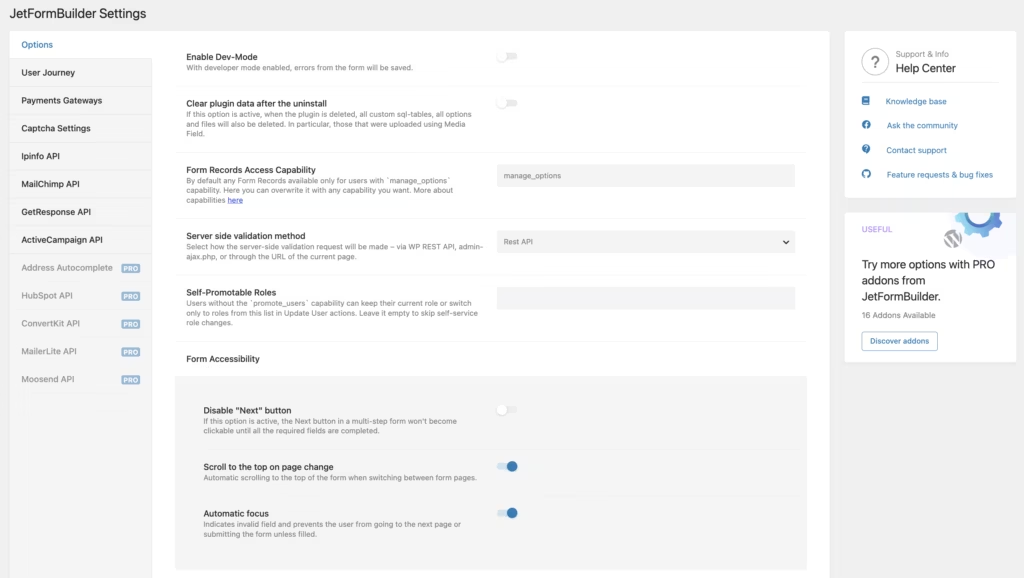
JetFormBuilder forms are assembled inside the native Gutenberg block editor, not a separate drag-and-drop canvas bolted onto WordPress. JetFormBuilder ships with more than 24 field blocks, letting you mix standard layout blocks (columns, headings, images) directly with form inputs on the same canvas.
Because the form lives inside Gutenberg, anyone already comfortable editing pages in WordPress can build a contact form or a full data-collection tool without learning a separate builder interface. Post-submission behavior is handled through actions attached to the form, which is also where third-party connections such as Mailchimp, ActiveCampaign, or Zapier get wired in.
The jetformbuilder.zip file installs directly via Plugins → Add New Plugin → Upload Plugin without needing to be extracted first, which keeps the initial setup simple.
Multi-Step Forms
Long forms can be split across multiple steps rather than presented as one overwhelming block of fields. This is built as a form structure option rather than a separate plugin, so a registration flow or an application process can be broken into logical stages without extra add-ons for the basic step mechanic.
For site owners collecting detailed information — job applications, event sign-ups, onboarding forms — breaking input into steps tends to reduce abandonment and makes long forms feel manageable to the person filling them out.
Calculators
JetFormBuilder can build calculators as a form type, tying field inputs to computed outputs. This sits alongside the plugin’s dynamic capabilities, where form fields can pull from or push to database values rather than only handling static submissions.
Quote generators, cost estimators, and pricing calculators are the practical use here — useful for service businesses, agencies, or any site where a visitor needs an instant number before contacting sales.
Order Forms
Order forms are one of the form types JetFormBuilder is built to handle, letting a site collect product selections and customer details in a single submission flow. Payment gateway connections and calculation logic for order totals are part of the paid Pro tier.
For stores or service providers that need a lightweight ordering mechanism without a full e-commerce cart, this offers a way to capture orders directly through a form rather than standing up a separate checkout system.
Registration Forms
User registration is handled as a native form type, and this is where JetFormBuilder’s integration with JetEngine becomes relevant — registration forms can be tied to custom user roles and database-connected fields rather than only the default WordPress user table. Crocoblock describes this integration as enabling advanced, database-connected front-end registration.
Sites that need visitors to create accounts with custom fields — membership sites, directories, community platforms — get a registration flow that goes beyond WordPress’s default signup screen.
Login Forms
Alongside registration, JetFormBuilder includes login forms as a distinct form type, so front-end authentication can be built with the same block-based editor used for every other form on the site. This keeps login, registration, and any custom post-submission forms consistent in look and behavior since they’re all built the same way.
For membership or community sites, having login handled in the same system as registration and custom submissions cuts down on juggling multiple plugins for what is really one connected user flow.
Quizzes
Quizzes are supported as a dedicated form type, using the same field-block foundation as the plugin’s other forms. This lets a quiz sit on the same page as other content blocks, built with the standard block interface rather than a quiz-specific plugin.
For sites using quizzes for lead generation or engagement — assessments, personality tests, product finders — this removes the need for a separate quiz plugin when the site is already running JetFormBuilder.
Application Forms
Application forms round out the form types JetFormBuilder ships with, suited to job applications, program submissions, or vendor onboarding. Combined with the multi-step option, a long application can be split into stages rather than presented as a single lengthy page.
For agencies, recruiters, or any organization processing structured submissions, this pairs the application form type with the plugin’s broader dynamic, database-connected capabilities through JetEngine and JetSmartFilters for custom post submissions.
Installation and Setup
- Purchase a JetFormBuilder license (Site PRO, Agency PRO, or one of the lifetime tiers) and download the plugin ZIP file from your Crocoblock account dashboard.
- Log in to your WordPress admin area and navigate to Plugins → Add New Plugin → Upload Plugin.
- Select the jetformbuilder.zip file and upload it directly — there is no need to extract the archive first, the WordPress uploader handles the compressed file as-is.
- Click Install Now, then Activate once the upload finishes.
- Enter your license key when prompted, which unlocks the 20 Pro Addons, updates, and support access tied to your plan.
- Open the new JetFormBuilder menu item in the WordPress dashboard to start building a form using the native Gutenberg block editor. Field blocks, layout blocks, and submission actions are all added and arranged visually within this interface.
- Configure post-submit actions such as email notifications, redirects, or third-party integrations, then publish the form and insert it into a page or post using the corresponding block or shortcode.
In first-hand testing on a WordPress 6.5 site running PHP 8.4, the entire process above — from upload to a working, activated form builder — took about two minutes.
Compatibility and Requirements
| Requirement | Details |
|---|---|
| WordPress version | 6.0 minimum, per the developer |
| Tested environment | WordPress 6.5 with PHP 8.4 (first-hand testing) |
| Editor | Native Gutenberg block editor |
JetFormBuilder builds forms entirely within the block editor rather than a separate drag-and-drop canvas, so anyone comfortable adding blocks to a page already knows most of the interface. The plugin supports third-party marketing and automation integrations, including Mailchimp, ActiveCampaign, and Zapier, through its post-submit actions, and it is built to work alongside other Crocoblock products such as JetEngine for database-driven, front-end form submissions.
JetFormBuilder Pricing
JetFormBuilder offers four paid Pro tiers designed for different site licenses and feature needs, ranging from a single site to unlimited use. All four tiers below carry a 30-day money-back guarantee and include the same package: 20 Pro Addons, Zoom and ticket support, and regular product updates.
| Tier | Price | Sites | Included |
|---|---|---|---|
| Site PRO | $49/year | 1 website | 20 Pro Addons, Zoom & ticket support, regular updates |
| Agency PRO | $129/year | Unlimited sites | 20 Pro Addons, Zoom & ticket support, regular updates |
| Lifetime Site PRO | $249 one-time | 1 website | 20 Pro Addons, Zoom & ticket support, regular updates |
| Lifetime Agency PRO | $499 one-time | Unlimited sites | 20 Pro Addons, Zoom & ticket support, regular updates |
Site PRO and Agency PRO renew annually, while the two Lifetime tiers are a single one-time payment covering the same feature set indefinitely. The choice between them mostly comes down to how many sites you manage and whether you’d rather pay once or budget a smaller annual fee.
👉 Get JetFormBuilder at the best available price
Alternatives to JetFormBuilder
JetFormBuilder isn’t the only option for building forms on WordPress, and site owners weighing dynamic, database-connected forms against simpler builders have several established plugins to consider. Here’s how the main alternatives compare.
| Product | Key Difference | Best For | Price Tier |
|---|---|---|---|
| JetFormBuilder | Gutenberg-native form builder tied to the Crocoblock ecosystem, with dynamic data handling via JetEngine | Developers wanting database-connected forms inside a broader Crocoblock setup | Paid, subscription or lifetime |
| WPForms | Drag-and-drop builder known for beginner-friendly templates | Beginners and small sites wanting a quick, guided setup | Freemium |
| Gravity Forms | Established premium plugin favored by developers for advanced logic and add-ons | Developers needing deep logic and third-party integrations | Paid |
| Ninja Forms | Free core plugin with paid add-ons for extended functionality | Users wanting a free starting point with optional upgrades | Freemium |
| Formidable Forms | Geared toward complex, data-driven applications and views from form entries | Building data-heavy applications and front-end views from entries | Freemium |
Competitor data is sourced from publicly available information as of 2026 and may have changed.
The right pick depends on what the form needs to do. Anyone building simple contact or lead forms may find WPForms or Ninja Forms faster to set up, while developers building dynamic, data-driven front-end applications may prefer JetFormBuilder or Formidable Forms.
Frequently Asked Questions
Does JetFormBuilder work with Gutenberg?
Yes, forms are built natively using the WordPress Gutenberg block editor. The plugin uses the standard block interface, letting users add field elements and mix regular layout blocks with form inputs while managing the form structure visually.
What does JetFormBuilder integrate with?
JetFormBuilder supports third-party marketing, automation, and webhook integrations, including Mailchimp, ActiveCampaign, and Zapier, through its post-submit actions. It also integrates tightly with other Crocoblock products, particularly JetEngine and JetSmartFilters, to create database-connected forms, user registration flows, and custom post submissions.
How much does JetFormBuilder cost?
Pricing starts at $49 per year for the Site PRO tier, which covers one website, and $129 per year for Agency PRO, which covers unlimited sites. One-time lifetime options are also available at $249 for a single site or $499 for unlimited sites, and every tier comes with a 30-day money-back guarantee.
What is the minimum WordPress version needed for JetFormBuilder?
JetFormBuilder requires a minimum WordPress version of 6.0 to install and activate properly.
Download & Pricing Options
🔍 Try Before You Buy
JetFormBuilder does not have an official free tier. To evaluate it before purchasing, a GPL-licensed copy is available for sandbox testing purposes only.
👉 Download GPL Evaluation Copy
This is a GPL-licensed redistributed copy for testing only — not an official developer product.
💎 Get JetFormBuilder (Best Available Price)
👉 Check Current Pricing for JetFormBuilder
Pricing and availability may change — use the link above for current rates.
JetFormBuilder is available from most GPL vendors, but they are not equivalent. Our best GPL site for WordPress review tested all ten on price, catalogue and whether updates reach wp-admin at all.


