Elementor Review 2026: Is the Free Page Builder Worth It?

Most WordPress site owners without coding skills face a familiar choice: pay a developer for every layout change or find a visual editor that actually holds up on a real site. This Elementor review looks at whether the free plugin’s drag-and-drop editor is enough on its own, or whether it’s really just a gateway to Editor Pro. With over 10 million active installations, it’s clearly popular — but popularity and capability aren’t the same thing.
The real question is whether the free Editor tier can carry a full site build, or whether Theme Builder, Popup Builder, custom code, and eCommerce features make Editor Pro a near-mandatory upgrade.
Quick Verdict
Elementor’s free plugin suits site owners who need a straightforward, no-code way to build and edit pages without touching a theme’s underlying code. It’s a poor fit for anyone planning a custom theme, popups, or an online store, since those all sit behind a paid tier. Freelancers and agencies serving varied client needs will likely end up comparing Editor Pro, Elementor One, and One Agency before settling on a plan.
Pros
- Free drag-and-drop, no-code editor works on any WordPress install without extra cost
- AI-assisted design and content tools are built directly into the editor
- Fully open-source under GPLv3, covering both the free core plugin and the Editor Pro code
- Backed by over 10 million active WordPress installations
Cons
- Free tier excludes Theme Builder, Popup Builder, custom code/CSS, and eCommerce tools
- A full custom theme, popup campaign, or store build requires upgrading to Editor Pro or a subscription
- Three separate paid tiers mean buyers must compare plans carefully to avoid overpaying
- Leaning on Elementor Pro as an add-on adds plugin dependency compared to a lighter, code-based build
Core Features
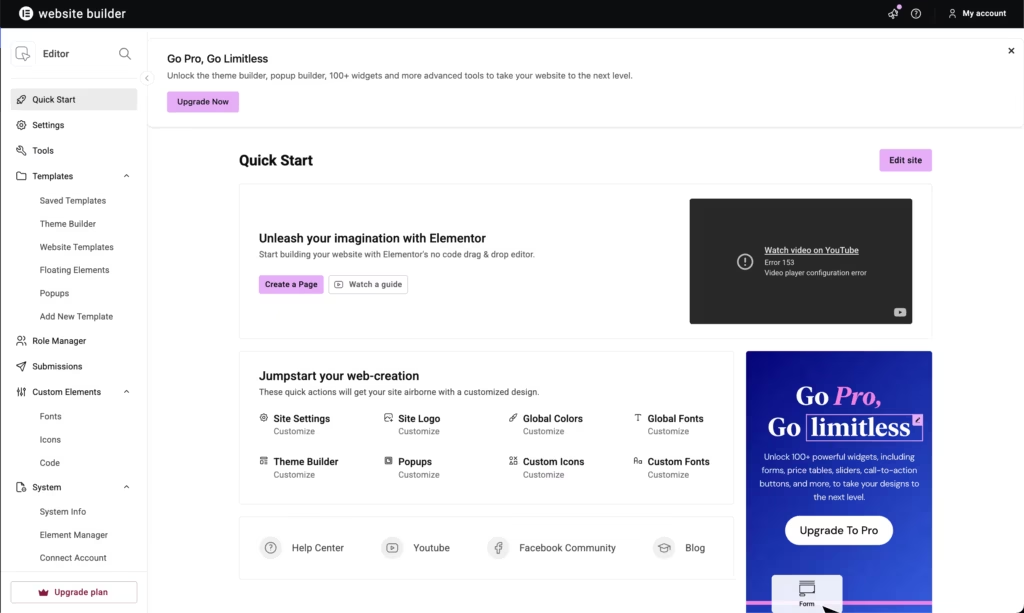
Drag-and-Drop Visual Editor
Elementor’s core editor lets you build pages by placing and arranging elements directly on the canvas, without touching a line of code. The free Editor tier offers exactly this: a no-code interface for assembling layouts, text, images, and widgets visually.
For a site owner without development experience, this removes the need to hire help for routine layout changes. Because the free tier includes only this editor, it suits straightforward page building rather than full theme or store construction — those tasks sit behind the Pro upgrade.
In our testing on WordPress 6.5 with PHP 8.4, installation and basic setup took about 2 minutes. The elementor.zip file can be uploaded directly through WordPress Dashboard → Plugins → Add New Plugin → Upload Plugin → Choose File → select the ZIP → Install Now → Activate, without needing to extract the archive first.
AI-Assisted Design and Content Tools
Elementor includes AI-assisted tools built into the editing workflow, aimed at speeding up design decisions and content writing as you build a page. These sit alongside the drag-and-drop canvas rather than as a separate application.
The practical benefit is fewer manual steps when drafting copy or testing layout variations, since the assistance is available in the same screen where you’re already editing. This matters most for solo site owners and freelancers who don’t have a copywriter or designer to lean on for every page.
Theme Builder (Pro)
Theme Builder is a Pro-only tool that extends Elementor beyond individual pages into full site templates — headers, footers, archive pages, and single post layouts. It isn’t available in the free Editor tier at all.
For anyone building a custom WordPress theme rather than just editing pages, this is the feature that makes Elementor function as a site-wide design system instead of a page-level editor. Freelancers and agencies building templated client sites will find this the more consequential of the Pro additions.
Popup Builder (Pro)
Popup Builder is another Pro-tier addition, giving users a dedicated interface for designing popups — for lead capture, announcements, or promotions — using the same visual editing approach as the main page builder.
Because it shares the drag-and-drop mechanics of the core editor, there’s no separate tool to learn. Businesses running email signup campaigns or on-site promotions get this without adding a third-party popup plugin, provided they’re on Editor Pro or a subscription plan.
Custom Code and CSS Support (Pro)
Editor Pro adds a custom code and CSS editor, letting developers and advanced users inject their own styling and scripts directly into Elementor-built pages rather than working only within the visual controls.
It closes the gap for anyone who hits the limits of drag-and-drop controls. Developers who want fine-grained control over spacing, typography, or interactive behavior get that access, but only after upgrading — the free Editor has no code injection option.
eCommerce Features (Pro)
Elementor’s eCommerce tools are bundled into the Pro tier and are aimed at businesses building online stores. The free plugin includes no store-building capability.
For anyone planning to sell products through their WordPress site, the free Editor alone won’t be sufficient — an upgrade to Editor Pro or one of the subscription plans is required before store pages, product layouts, or checkout-related design tools become available.
Collaborative Notes (Pro)
Collaborative notes let multiple people leave comments and feedback directly inside the page-building interface, which is useful when a site is being built by more than one person — a designer and a client, for example, or a team within an agency.
Feedback stays attached to the actual page element it refers to, rather than sitting in a separate email thread or spreadsheet. It’s a Pro-only addition, so solo users on the free tier won’t have access to it, but agencies managing client sign-off will likely find it saves back-and-forth.
Installation and Setup
- Download the Elementor plugin file (elementor.zip) from the official source.
- Log in to the WordPress Dashboard and navigate to Plugins → Add New Plugin → Upload Plugin.
- Upload the elementor.zip file directly — there is no need to extract it first.
- Click Install Now, then activate the plugin once installation finishes.
Installation and activation together take only a couple of minutes on a standard WordPress setup.
- Open any page or post and select Edit with Elementor to launch the drag-and-drop editor.
- Explore the free Editor tier’s widgets and templates to start building pages without writing code.
- If broader functionality is needed — Theme Builder, Popup Builder, custom code and CSS, or eCommerce tools — upgrade to Editor Pro, Elementor One, or the One Agency plan from within the plugin or through the official site.
Compatibility and Requirements
| Requirement | Details |
|---|---|
| WordPress version | 6.5 or greater |
| PHP version | 7.4 or higher |
| License | GNU General Public License v3 (GPLv3), applied to both the free core plugin and Editor Pro |
| Active installations | Over 10 million, per the WordPress.org Plugin Directory |
Elementor’s stated minimums are relatively low, but running the current stable WordPress release alongside a currently supported PHP version is advisable for security and performance. PHP 7.4 itself reached end of life some time ago and shouldn’t be relied on for a live production site.
Elementor Pricing
Elementor follows a freemium model: the core plugin is free to download and use, with optional paid upgrades for advanced functionality.
Editor (Free)
The free “Editor” tier costs nothing and provides a full drag-and-drop, no-code visual editor for building WordPress pages. It does not include the Theme Builder, Popup Builder, custom code and CSS support, or eCommerce tools — those are reserved for paid plans.
Editor Pro
Editor Pro adds the Theme Builder, Popup Builder, custom code and CSS editing, eCommerce features, and collaborative notes on top of everything in the free Editor. This is the plan most freelancers and designers who need full theme control will land on.
Elementor One
Elementor One is a subscription plan built for individual users managing a single site, bundling the Pro feature set into one license.
One Agency
One Agency is aimed at agencies and covers unlimited sites, making it the option for anyone managing multiple client builds under one subscription.
All paid plans come with a 30-day money-back guarantee, so upgrading carries little risk if Pro turns out not to fit a project. For current prices on Editor Pro, Elementor One, and One Agency, check the official pricing page before purchasing, since figures can change.
👉 Get Elementor at the best available price
Alternatives to Elementor
Elementor is not the only drag-and-drop option for WordPress. Depending on how much you value bundled themes, lightweight output, or a straightforward freemium model, one of these alternatives may suit a project better.
| Product | Key Difference | Best For | Price Tier |
|---|---|---|---|
| Elementor | Freemium page builder pairing a free no-code editor with paid Theme Builder, Popup Builder, custom code, and eCommerce tools | Users who want to start free and scale into advanced features later | Freemium |
| Divi | Drag-and-drop WordPress theme and builder from Elegant Themes, sold via subscription or lifetime membership rather than a per-plugin license | Buyers who prefer a theme-plus-builder bundle under one purchase | Paid |
| Beaver Builder | Front-end drag-and-drop builder plugin known for developer-friendly, lightweight output and a freemium licensing model | Developers and freelancers who prioritize clean code output | Freemium |
| WPBakery | Page builder plugin (formerly Visual Composer) widely bundled inside ThemeForest WordPress themes rather than sold standalone | Buyers whose chosen theme already includes it | Paid |
Competitor data is sourced from publicly available information as of 2026 and may have changed.
The right pick depends on how a project is structured. A site inheriting a ThemeForest theme may already have WPBakery included, while agencies wanting a lightweight, code-friendly output might lean toward Beaver Builder over Elementor or Divi.
Frequently Asked Questions
Is Elementor free to use?
Yes, Elementor offers a free “Editor” tier that provides a drag-and-drop, no-code website editor for any WordPress site. It does not include advanced tools like Theme Builder, Popup Builder, custom code and CSS support, or eCommerce features, which are reserved for paid plans.
What is the difference between Elementor free and Elementor Pro?
The free Editor covers basic drag-and-drop page building without coding. Editor Pro adds Theme Builder, Popup Builder, custom code and CSS support, eCommerce features, and collaborative notes, making it the option for anyone building a full custom theme, popups, or an online store.
What WordPress and PHP versions does Elementor require?
Elementor requires WordPress 6.5 or greater and PHP 7.4 or higher to function properly. It has also been tested on WordPress 6.5 with PHP 8.4.
Is Elementor open source?
Yes, Elementor is entirely open source and released under the GNU General Public License version 3 (GPLv3). That licensing covers both the free core plugin and the premium Editor Pro code, meeting the open-source requirements of the WordPress.org Plugin Directory.
How many websites use Elementor?
The WordPress.org Plugin Directory shows that Elementor has surpassed 10 million active installations. That reflects broad, long-term adoption across the WordPress ecosystem.
Does Elementor offer a money-back guarantee on paid plans?
Yes, Elementor states a 30-day money-back guarantee on its paid plans. That gives buyers a window to try Editor Pro or a subscription plan and request a refund if it doesn’t fit their needs.
Download & Pricing Options
🆓 Free Version
👉 Download the Free Version of Elementor
💎 Get Elementor (Best Available Price)
👉 Check Current Pricing for Elementor
Pricing and availability may change — use the link above for current rates.
A GPL membership covers Elementor along with thousands of other premium products. Our best GPL sites guide sets out what each vendor charges and what you give up in return.


