Social Snap Review 2026: Is This WordPress Social Plugin Worth It?


Most WordPress social plugins force a trade-off: free tools cover basic sharing buttons but skip growth features, while premium suites bundle everything and charge accordingly. This Social Snap review looks at whether paying for an all-in-one plugin that handles sharing, follower counts, and auto-posting makes sense when free and freemium alternatives already crowd the plugin directory. For bloggers and agencies trying to squeeze more reach out of existing content, the answer depends on how many of those extra features actually get used.
The real question is whether Social Snap’s premium-only pricing and addon structure deliver enough over free competitors to justify the annual cost.
Quick Verdict
Social Snap suits WordPress site owners and agencies who want sharing buttons, follower counts, and re-promotion tools consolidated into a single plugin rather than stitched together from several free ones. It’s a weaker fit for anyone on a tight budget or running a non-WordPress site.
Pros
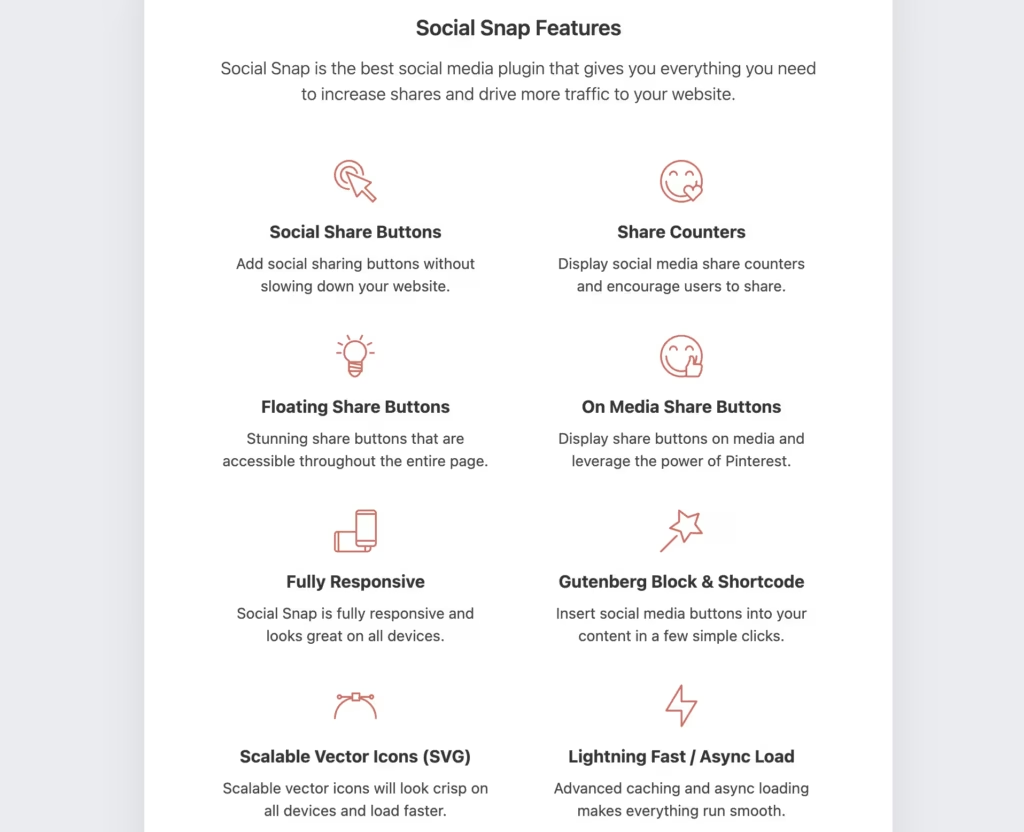
- All-in-one suite covering sharing buttons, follower counts, meta tags, click-to-tweet boxes, and statistics in one plugin
- Optional addons for auto-posting, boosting old posts, social login, and content locking extend functionality beyond basic sharing
- Flexible placement system lets site owners position share buttons wherever they drive the most engagement
- Pinterest-specific features, including image hover buttons, target a platform many lighter plugins treat as an afterthought
Cons
- Growth-oriented addons such as auto-posting and content locking are available as optional addons, with their specific plan availability not confirmed in the available information.
- Three-tier annual structure means cost scales with the number of sites and features needed
Core Features
Social Sharing Buttons
Social Snap’s sharing buttons come with a placement system that lets you decide exactly where they appear rather than locking you into a single fixed position. Social Snap includes a flexible placement system that lets site owners control where sharing buttons appear, giving you control over where they get the most clicks.
The plugin also includes Pinterest-specific tools, most notably image hover buttons that appear when a visitor hovers over an image, prompting a direct pin without the visitor leaving the page. It’s a feature many lighter sharing plugins skip entirely for sites that rely heavily on Pinterest traffic.
Because placement and platform selection are both configurable, you can tailor the sharing experience to match how your specific audience actually shares content, rather than accepting a one-size-fits-all button bar.
Social Follower Count Display
Social Snap can display live follower counts pulled from your connected social accounts directly on your site. That turns an existing audience number into visible social proof for new visitors deciding whether to follow you too.
For blogs and publishers trying to grow a following, showing real counts next to sharing buttons gives visitors a reason to hit follow rather than just scroll past.
Social Meta Tag Management
The plugin handles social meta tags, controlling how your pages display when shared on platforms like Facebook and Twitter. This covers the title, description, and image that appear in a shared link’s preview card.
Getting this right matters for click-through: a properly formatted preview card with the intended image and headline tends to draw more clicks than a link that renders with a blank thumbnail or the wrong text pulled from the page.
Click-to-Tweet Boxes
Social Snap lets you embed click-to-tweet boxes directly inside post content, turning a quotable line or statistic into a pre-formatted tweet a reader can share with one click. The text inside the box is what gets shared, so you control the exact wording that reaches Twitter.
It’s particularly useful for long-form articles or interviews where a few standout lines are worth extracting and pushing to social feeds separately from the general share buttons.
Advanced Statistics
Social Snap includes a statistics dashboard that tracks sharing activity across your site, showing which posts and which networks are driving the most shares. That gives you a data source for content decisions instead of guessing which topics resonate.
Reviewing which posts perform best on which network lets you adjust future content and promotion choices, and it pairs naturally with the boost old posts addon when you want to re-promote proven performers.
Social Auto-Posting (Addon)
This addon automates publishing new content to your connected social accounts as soon as it goes live, removing the manual step of copying a link into each network separately.
For sites publishing regularly, auto-posting keeps social feeds active without requiring someone to log into each platform every time a new post goes up.
Boost Old Posts (Addon)
The boost old posts addon re-promotes existing content on social media on a recurring basis, pulling older posts back into rotation instead of letting them disappear after their initial publish window.
It’s a direct way to keep evergreen content generating traffic long after it was first published, rather than relying solely on new posts to drive social visits.
Social Login (Addon)
The social login addon lets visitors log into your site using their existing social accounts instead of creating a new username and password. That lowers the friction for account creation, comment posting, or any other action on the site that normally requires a login form.
For site owners trying to reduce signup drop-off, cutting the registration process down to a single click on a familiar social button can make a meaningful difference in completed signups.
Also included: content locking, which restricts access to specific content until a visitor shares or follows, giving you a mechanism to trade content access for social engagement.
Installation and Setup
- Purchase a Social Snap license and download the plugin package from your account area on socialsnap.com.
- Locate the downloaded file. On the Agency plan, this arrives as a compressed package (for example, a file named similarly to socialsnap-agency-package.zip) that needs to be extracted first. Inside, you will find the actual plugin file — a zip such as socialsnap-agency.zip — which is what WordPress needs, not the outer package.
- Do not extract this inner zip file further. Upload it as-is.
- In your WordPress dashboard, go to Plugins, then Add New, then Upload Plugin.
- Select the inner plugin zip file (socialsnap-agency.zip or equivalent for your plan) and click Install Now.
- Activate the plugin once installation completes.
- Enter your license key when prompted, then follow the on-screen setup wizard to configure sharing buttons, follower counts, and any addons included with your plan.
Based on first-hand testing on a live WordPress installation, this process — from upload to a working configuration — took roughly two minutes, provided the correct inner zip file is used. Uploading the outer package zip by mistake will cause the installation to fail, so double-check which file you are selecting in step 4.
Compatibility and Requirements
| Requirement | Detail |
|---|---|
| Platform | Self-hosted WordPress (WordPress.org) only |
| Non-WordPress sites | Not supported |
Social Snap is built specifically for self-hosted WordPress installations and will not function on non-WordPress platforms or hosted site builders. The available information does not specify particular WordPress or PHP version requirements.
If you’re running an older, unsupported version of PHP on a production site, it’s worth updating before installing any actively maintained plugin. Outdated PHP versions carry known security and performance drawbacks regardless of the plugin in question.
Social Snap Pricing
Social Snap is a premium-only plugin — there is no free tier, so budgeting for a paid plan from the outset is part of choosing this tool. The plugin structures its offering into three annual tiers: Plus, Pro, and Agency, with site-count limits and feature access scaling as you move up the range.
Each tier unlocks the core sharing toolkit — social sharing buttons, follower counts, meta tag management, click-to-tweet boxes, and the statistics dashboard — while the higher tiers add scope for more sites and, depending on the plan, access to the auto-posting, boost old posts, social login, and content locking addons.
Current pricing details are not available in this review. Check the official developer website for up-to-date pricing information.
All plans come with a 30-day money-back guarantee, along with documentation and contact support, so there’s a window to test whether Social Snap fits your site before committing long term.
👉 Get Social Snap at the best available price
Alternatives to Social Snap
Social Snap’s all-in-one, premium-only approach won’t suit every site. Some readers may prefer a free share-button plugin or one bundled into a theme membership they already own.
| Product | Key Difference | Best For | Price Tier |
|---|---|---|---|
| Social Snap | All-in-one suite with sharing buttons, follower counts, statistics, and growth addons like auto-posting and content locking | Site owners wanting a full social growth toolkit in one plugin | Paid |
| Social Warfare | Lets you set custom images, titles, and descriptions per network when a post is shared | Publishers who want fine control over how shared posts appear | Freemium |
| Monarch | Social sharing plugin bundled with an Elegant Themes membership alongside Divi and other products | Existing Elegant Themes or Divi users who want sharing included | Paid |
| AddToAny | Lightweight, fully free universal share and follow button plugin supporting a wide range of networks | Sites wanting basic sharing without any cost | Free |
| Shared Counts | Free, minimal share button plugin focused on speed and accurate share counts without extra bloat | Performance-conscious sites that just need share counts | Free |
Competitor data is sourced from publicly available information as of 2026 and may have changed.
The right pick depends on whether you need Social Snap’s growth addons and Pinterest tools or just a fast, no-cost way to display share buttons.
Frequently Asked Questions
Is Social Snap free to use?
No, Social Snap is a premium-only plugin with no free tier. Every feature, including basic social sharing buttons, is locked behind one of its paid Plus, Pro, or Agency plans.
What features are included with Social Snap?
Social Snap covers social sharing buttons, follower count displays, social meta tag management, click-to-tweet boxes, and an advanced statistics dashboard. It also offers optional addons for social auto-posting, boosting old posts, social login, and content locking, which extend the plugin beyond basic sharing.
Does Social Snap have Pinterest-specific sharing features?
Yes, Social Snap includes Pinterest-specific tools designed to maximize shares on the platform. The most notable is its image hover buttons, which let visitors pin images directly from a post without hunting for a separate share icon.
Does Social Snap offer a refund or money-back guarantee?
Yes, Social Snap comes with a 30-day money-back guarantee. This gives buyers a window to test the plugin on a live site and request a refund if it doesn’t meet their needs.
How do you install and set up Social Snap?
Installation is straightforward: on a test with WordPress 6.5 and PHP 8.4, basic setup took about two minutes. The downloaded file arrives as a package that needs to be extracted first, revealing the actual plugin zip file inside, which is what gets uploaded directly into WordPress without further extraction.
Is Social Snap better than Monarch for social sharing?
It depends on what you need. Social Snap is sold as a standalone plugin with tiered annual pricing and a broader feature set aimed at social growth, including Pinterest image hover buttons and addons for auto-posting, boosting old posts, social login, and content locking. Monarch, developed by Elegant Themes, is typically bundled with a Divi membership rather than sold on its own, so site owners already inside that ecosystem may find it more convenient, while those wanting a dedicated, feature-rich social suite outside of Divi are likely better served by Social Snap.
Download & Pricing Options
🔍 Try Before You Buy
Social Snap does not have an official free tier. To evaluate it before purchasing, a GPL-licensed copy is available for sandbox testing purposes only.
👉 Download GPL Evaluation Copy
This is a GPL-licensed redistributed copy for testing only — not an official developer product.
💎 Get Social Snap (Best Available Price)
👉 Check Current Pricing for Social Snap
Pricing and availability may change — use the link above for current rates.
Wondering where to get Social Snap without the annual licence fee? We ranked the options in our best GPL site comparison, and we say plainly which ones we would avoid.


