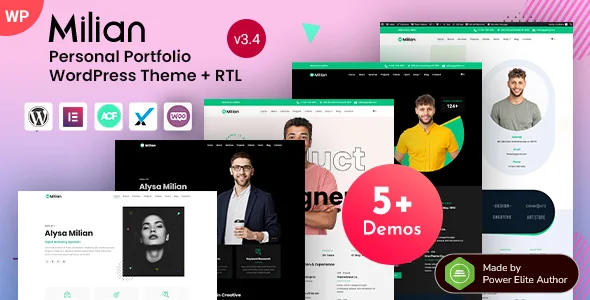
Milian – Personal Portfolio & Online Resume CV WordPress Theme
Milian is a beautifully crafted WordPress theme designed specifically for personal portfolios and online resumes. With…
- Instant download
- Unlimited domains
- Virus-scanned files
What you’re getting
Milian is a beautifully crafted WordPress theme designed specifically for personal portfolios and online resumes. With its modern layout and sleek design, it effortlessly showcases your skills, experiences, and achievements. Whether you’re a creative professional, freelancer, or job seeker, Milian provides the perfect platform to present your work in an engaging manner. Plus, its easy-to-use customization options allow you to tailor your site to reflect your unique style. Stand out in a competitive job market with a professional online presence that leaves a lasting impression.
Key Features
- Modern and responsive design for optimal viewing on any device
- User-friendly drag-and-drop page builder for effortless customization
- Multiple pre-built demo layouts to choose from
- Integrated contact forms for easy communication with potential employers
- SEO-friendly structure to enhance your visibility in search engines
- One-click demo import for quick setup and deployment
- Customizable color schemes to match your personal branding
- Social media integration to showcase your online presence
- Regular updates and dedicated support for a seamless experience
How to download Milian for free
Buy this theme on its own for $3.49, or take a membership from $14 and download it along with every other product on the site.
Either way you get the same file: the original .zip as the developer published it, with nothing removed and nothing added. Every upload is virus-scanned before it reaches your account, and earlier builds stay available if you ever need to match an existing site.
Updates come from us rather than from the developer — we publish each new release, usually within days. Our free Auto Updater plugin delivers them inside your WordPress dashboard, and the setup guide walks through connecting a site.
What works without a Milian licence key
Everything. The GPL licence is already active in the code you receive, so every feature is present and working the moment you activate the theme — nothing is stripped out, nothing is disabled, and your visitors see no difference from a site running the developer’s own copy.
The one thing a developer’s key normally carries is automatic updates from their servers. That is the gap we fill: our free Auto Updater plugin delivers each new release into your WordPress dashboard, so updates arrive the same way they would with the original licence. The setup guide takes about two minutes.
The one exception anywhere in the catalogue is a feature that runs on the developer’s own servers rather than on your site — a hosted template library, for instance. Those are theirs to serve, not ours to redistribute, and where one applies we say so on this page rather than letting you find out afterwards.
Is the Milian free download legal?
Yes. This theme is licensed under the GNU General Public Licence — the same licence WordPress itself uses. The GPL expressly permits redistribution of the code, including redistribution for a fee, and the Free Software Foundation states plainly that the licence sets no limit on what may be charged.
What we distribute is the original file, unmodified. The developer’s licence verification code is left exactly where they put it; we simply do not supply a key, because a key is not ours to give.
What is not legal, and what we do not do, is distributing nulled software — files with the licence check stripped out. That is modification of the code, and modified code is how WordPress sites get backdoored. We explain both at length: is GPL legal? and GPL versus nulled.
Up and running in minutes
Download the .zip, then in WordPress go to Appearance → Themes → Add New → Upload Theme, choose the file and click Install Now, then Activate. If the download contains extras such as documentation, unzip it first and install only the theme file.
Full guide: how to install a theme or plugin from a GPL site.
Questions, answered
Can I get Milian for free?
You can download it here for $3.49, or with a membership that includes every product on the site. It is not free of charge, but it is free of a recurring per-site licence — the GPL allows redistribution, so you pay once rather than every year for every domain.
Is the Milian free download legal?
Yes. It is licensed under the GNU General Public License, the same licence WordPress itself uses, and the GPL expressly permits redistribution including for a fee. You receive the original unmodified file. What is not legal, and what we do not do, is distributing nulled software with the licence check stripped out of the code.
Does Milian need a licence key?
No key is required to install and use the theme, and your visitors see no difference. What a developer licence adds is their own support channel, updates direct from their servers, and in some products a connection to their template or content library. Updates come from us instead.
Will I get Milian updates?
Yes. When the developer releases a new version we publish it here, usually within days. Install it over the previous one, or use our free Auto Updater plugin to receive updates inside your WordPress dashboard. Earlier builds stay available in your account if you ever need to roll back.
How many websites can I use Milian on?
Open a support ticket from your account and we’ll help you out. If you find a broken file, and we’ll fix it quickly.
Is this the original Milian file?
Yes. Downloaded from the developer and redistributed unmodified, with nothing added and nothing removed. Every file is virus-scanned before release. If you find a problem, use Report a problem on this page and we will fix it.
Or get all 16,000+ products
$14/month — every plugin, theme and template on the site, this one included. Cancel anytime.