Yoast SEO Premium Review 2026: Features, Pricing and Verdict


Free Yoast SEO gets a lot of WordPress sites onto page one, but it stalls once you need to optimize for more than one keyphrase, chase down broken links after a redesign, or write metadata at scale. This Yoast SEO Premium review looks at whether the paid upgrade actually closes those gaps or just adds another line item to your plugin budget. For bloggers and marketing teams already living inside the free version, that distinction matters more than any feature list.
The real question isn’t whether Premium adds tools — it clearly does — but whether those tools justify the annual cost against a rival like Rank Math, which bundles similar functionality differently.
Quick Verdict
Yoast SEO suits bloggers, in-house marketers, and agencies who already rely on the free plugin and are hitting its limits around redirects, multi-keyphrase content, and metadata production at volume. Site owners managing several domains, or anyone wanting deep native WooCommerce schema without buying a second extension, should weigh the alternatives before committing.
Pros
- Real-time content analysis with multi-keyphrase optimization in a single editor interface
- AI-assisted metadata and content drafting built directly into the WordPress editor
- Built-in redirect manager that prevents 404s when pages move or get deleted
- 24/7 expert support plus access to Yoast SEO Academy and the Help Center
Cons
- Advanced WooCommerce optimization needs a separate dedicated extension rather than coming built in
Core Features
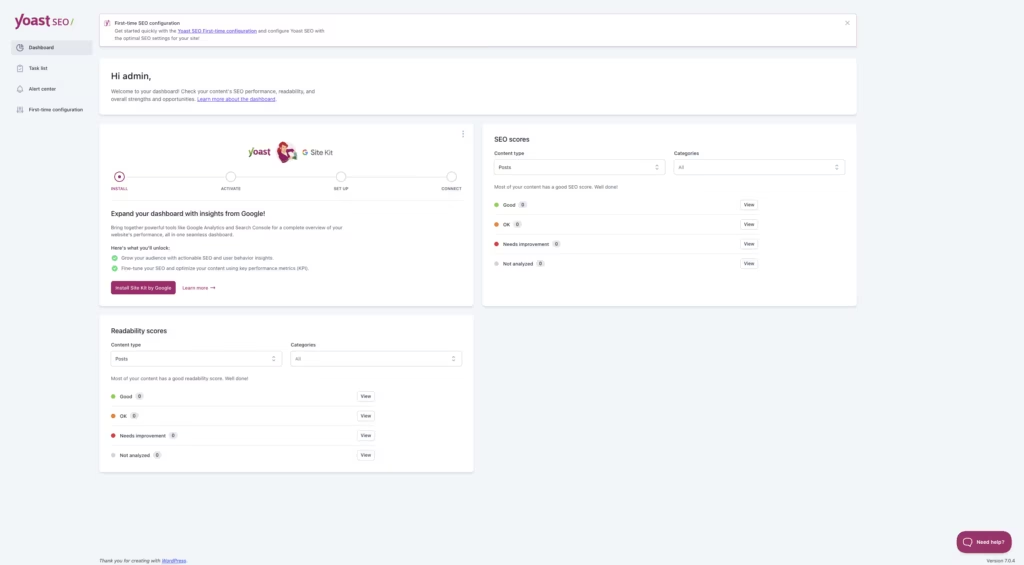
Real-Time Content Analysis
Yoast SEO builds its content guidance around a dedicated analysis interface that sits inside the WordPress editor. As you write, it checks structure, keyphrase placement, and readability against SEO best practices, flagging issues before the post ever goes live.
For a blogger or in-house marketer publishing regularly, this turns editing into a checklist rather than a guessing game. Instead of relying on separate SEO audits after publishing, the feedback loop happens while the draft is still open, which shortens the time between writing and ranking-ready.
Multi-Keyphrase Optimization
Where the free version limits analysis to a single keyphrase, Yoast SEO’s multi-keyphrase optimization tool lets you target several related phrases in the same piece of content. Each keyphrase gets its own set of checks, run through the same analysis interface used for the primary term.
Sites competing on topic clusters rather than single keywords benefit most — a product page or pillar post can satisfy several related search queries at once, instead of needing a separate page for each variation. Agencies managing content at scale get more coverage per page without diluting focus.
AI-Assisted Metadata Generation
Yoast SEO adds AI-assisted metadata tools directly into the publishing workflow, generating titles and meta descriptions based on the content already drafted. Rather than starting from a blank field, editors get a working draft they can accept or adjust.
For teams publishing at volume, this removes one of the more repetitive parts of on-page SEO. It’s a smaller time cost per post, which compounds across a content calendar that runs to dozens of articles a month.
AI-Assisted Content Drafting
Beyond metadata, the same AI tooling extends to drafting content itself, giving writers a starting structure or copy suggestions inside the editor. It sits alongside the real-time analysis, so AI-drafted sections are checked against the same guidance as manually written ones.
Entrepreneurs and solo bloggers without a dedicated writing team get the most direct benefit here, since the drafting assistance can fill the gap where a copywriter would otherwise be needed.
Redirect Manager
The built-in redirect manager lets site owners set up 301 redirects from within WordPress when a page or post is moved, renamed, or deleted, without editing server configuration files. It’s built as a standing feature of Yoast SEO rather than a bolt-on tool.
For any site with a content history, this is what prevents broken links from piling up after a redesign or a content pruning pass. Visitors and search engines following an old URL land on the right page instead of a 404, protecting the SEO value already built into that URL.
Automated Technical SEO
Yoast SEO automates a set of technical SEO tasks that would otherwise require manual configuration — the kind of behind-the-scenes work that affects how search engines crawl and index a site. It runs alongside the content-facing tools rather than replacing the free plugin’s technical foundation; Yoast SEO extends that foundation rather than replacing it.
The practical upside is fewer technical issues slipping through unnoticed, which matters most for agencies and larger content teams that don’t have a dedicated technical SEO specialist checking every page manually.
Installation and Setup
- Install and activate the free Yoast SEO plugin from the WordPress plugin directory first. Yoast SEO is built as an add-on to this free plugin rather than a standalone replacement, so both plugins need to remain active side by side for its features to work.
- Purchase a Yoast SEO subscription from the developer’s site and download the plugin zip file from your Yoast account.
- In the WordPress dashboard, go to Plugins → Add New Plugin → Upload Plugin and upload the downloaded zip file directly.
In testing, the file (packaged as wordpress-seo-premium-28.2.zip) uploaded and installed without needing to be extracted first — the whole process, from upload to an active plugin, took about two minutes.
- Click Activate Plugin once the upload finishes.
- Enter your license key when prompted, either during activation or from the Yoast SEO settings screen, to unlock the paid features and support access.
- Run through the Yoast configuration steps to set up your site basics — site type, organization or personal details, and social profiles — so the content analysis and metadata tools have the context they need.
Compatibility and Requirements
| Requirement | Detail |
|---|---|
| WooCommerce | Basic product page analysis included; full e-commerce schema and sitemaps need the separate Yoast WooCommerce SEO extension |
| Support | 24/7 expert support, plus Yoast SEO Academy and the Help Center |
Yoast doesn’t publish minimum WordPress or PHP version numbers alongside the Premium product page, so the safest approach is running the current stable WordPress release with a currently supported PHP version — sticking to an end-of-life PHP branch on a live site is worth avoiding regardless of which SEO plugin is installed.
If you plan to run multiple sites, remember licensing is per domain — a single Yoast SEO purchase won’t cover a second site.
Yoast SEO Pricing
Yoast SEO is sold as a single paid tier on top of the free plugin. The subscription costs $9.90/month, billed annually as one upfront payment of $118.80 (ex VAT).
A single subscription covers exactly one website or domain. Running Premium on additional sites requires additional subscriptions, though bulk discounts are available at checkout.
Purchases are backed by a 30-day money-back guarantee. If the plugin doesn’t work out, you can request a full refund within 30 days by contacting support or submitting the refund form with an explanation.
The free plugin, available through the “Download FREE” option on the developer site, provides the foundational SEO features that Yoast SEO builds on, adding real-time content guidance across multiple keyphrases, AI-assisted metadata and content drafting, redirect management, and automated technical SEO.
Teams collaborating in Google Docs can add that integration for $5 (excl. VAT) per month per seat, billed separately from the core subscription.
Companion products extend the same license further: Local SEO, Video SEO, and News SEO cover specific site types.
For the current rate and any active promotions, check the official pricing page before buying.
👉 Get Yoast SEO at the best available price
Alternatives to Yoast SEO
Yoast SEO is not the only option for WordPress on-page optimization, and both major rivals take a different approach to what belongs in a free tier. Here is how the leading alternatives compare.
| Product | Key Difference | Best For | Price Tier |
|---|---|---|---|
| Yoast SEO | Adds AI-assisted metadata, multi-keyphrase optimization, and a redirect manager on top of the established free plugin | Sites already using Yoast that want AI content tools and redirect handling in one place | Freemium |
| Rank Math | Bundles many advanced features, including schema and multiple keyword tracking, into its free tier | Budget-conscious site owners who want advanced features without paying upfront | Freemium |
| All in One SEO | Long-standing toolkit combining sitemaps, schema, and local SEO modules in one plugin | Users who want a broad, all-in-one SEO toolkit without stacking add-ons | Freemium |
Competitor data is sourced from publicly available information as of 2026 and may have changed.
The right pick depends on how much you value Yoast’s AI metadata tools and brand track record versus the feature depth Rank Math and All in One SEO offer at their free tier.
Frequently Asked Questions
Does Yoast SEO require the free Yoast SEO plugin to work?
Yes. Yoast SEO is an add-on that extends the free Yoast SEO plugin rather than replacing it, so both plugins need to stay installed and active on your site. If you deactivate the free plugin, Premium’s features stop functioning.
Does Yoast SEO offer a refund if I’m not satisfied?
Yes, Yoast SEO includes a 30-day money-back guarantee on initial purchases. You can request a full refund within that window by contacting support or submitting the refund form with an explanation.
How many websites can I use with one Yoast SEO license?
A single Yoast SEO subscription covers exactly one website or domain. Using it on additional sites requires separate subscriptions, though bulk discounts are available at checkout.
Does Yoast SEO work with WooCommerce product pages?
Yoast SEO provides basic product page analysis out of the box, but it doesn’t include specialized e-commerce optimization on its own. Deeper WooCommerce integration, such as automatic product schema and e-commerce-specific XML sitemaps, requires the dedicated Yoast WooCommerce SEO extension alongside Premium.
What does Yoast SEO add on top of the free version?
Premium adds real-time content guidance with multi-keyphrase optimization, AI-assisted metadata and content drafting tools, and a built-in redirect manager for handling moved or deleted content. It also includes 24/7 expert support along with access to Yoast SEO Academy and the Help Center.
Download & Pricing Options
🆓 Free Version
👉 Download the Free Version of Yoast SEO
💎 Get Yoast SEO (Best Available Price)
👉 Check Current Pricing for Yoast SEO
Pricing and availability may change — use the link above for current rates.
If you would rather not pay Yoast SEO Premium’s renewal every year, a GPL membership is the usual alternative. We compared the options in our best GPL sites breakdown, including where each one falls short.


