WPML Review 2026: Is This Multilingual CMS Plugin Worth It?

Turning a single-language WordPress site into one that serves visitors in multiple languages usually means choosing between a free plugin with limited support and a paid one that promises to handle translation at scale. This WPML review looks at whether that trade-off actually holds up, since WPML powers over 1.5 million multilingual WordPress sites and comes with an annual license rather than a one-time cost. For site owners and agencies comparing it against free tools, the pricing structure and translation workflow matter as much as the feature list.
The real question is whether WPML’s tiered licensing and built-in translation credits justify paying yearly when alternatives offer a free core plugin.
Quick Verdict
WPML suits WordPress site owners and agencies who need reliable multilingual support across WooCommerce, Elementor, or Divi sites and are willing to pay for structured translation tools and support. It’s a weaker fit for anyone running a single small site on a tight budget, since a free tier covers basic use but the fuller translation credits and support sit behind an annual fee.
Pros
- Backed by OnTheGoSystems and used on over 1.5 million multilingual WordPress sites
- Three clear annual tiers (Blog, CMS, Agency) scale from 1 site to unlimited sites
- CMS and Agency tiers include automatic translation credits through the Advanced Translation Editor
- Official integrations with WooCommerce, Elementor, and Divi for translating products, layouts, and widgets
- Installs quickly, with the plugin package uploadable directly through the WordPress admin with no extraction step
Cons
- Requires a paid annual tier for full translation credits and support, though a free tier is available to start with
- Site count is capped per tier, so scaling past 3 sites means upgrading to the Agency plan
- Automatic translation credits are limited per year and only included on paid tiers
👉 See Wp multi-lingual | Multilingual CMS pricing
Core Features
Creating Multilingual WordPress Websites
WPML’s site-creation feature lets you take an existing WordPress installation and add additional languages to posts, pages, custom post types, and taxonomies without rebuilding the site from scratch. Translation of individual pieces of content runs through the Advanced Translation Editor (ATE), which processes text while keeping HTML tags intact and building a translation memory as you work.
For a site owner starting a multilingual project, this means the existing WordPress install becomes the single source for every language version, rather than maintaining separate installs per language. Because ATE tracks translation memory, repeated phrases and previously translated strings don’t need re-translating from scratch on later pages.
WPML also integrates directly with WooCommerce, Elementor, and Divi, so translation extends to product listings, custom fields, page layouts, and page builder widgets rather than stopping at plain post content. That matters for anyone running a store or a design-heavy site, since product pages and Elementor-built layouts are where multilingual plugins most often fall short.
Managing Multilingual WordPress Websites
Once a site has multiple languages set up, WPML’s management side handles ongoing translation work through the same Advanced Translation Editor used during initial setup, plus automatic translation credits available on the Multilingual CMS and Multilingual Agency license tiers. New content added after launch, such as blog posts or updated product descriptions, runs through the same editor and credit system rather than a separate workflow.
Licensing is structured by account tier rather than per-site add-ons: the Multilingual CMS tier covers up to 3 production sites, while the Multilingual Agency tier covers an unlimited number, with development and staging sites bundled in at set amounts per tier. For an agency managing several client projects, this means one license can cover multiple live sites plus staging environments, rather than requiring a separate purchase for every domain.
Installation and Setup
- Download the plugin package file from your account after purchase or from the free-tier download.
- In your WordPress dashboard, go to Plugins → Add New Plugin → Upload Plugin.
- Select the downloaded .zip file and upload it directly — there is no need to extract the archive first; the installer accepts the packaged file as-is.
- Click Install Now, then click Activate once the upload finishes.
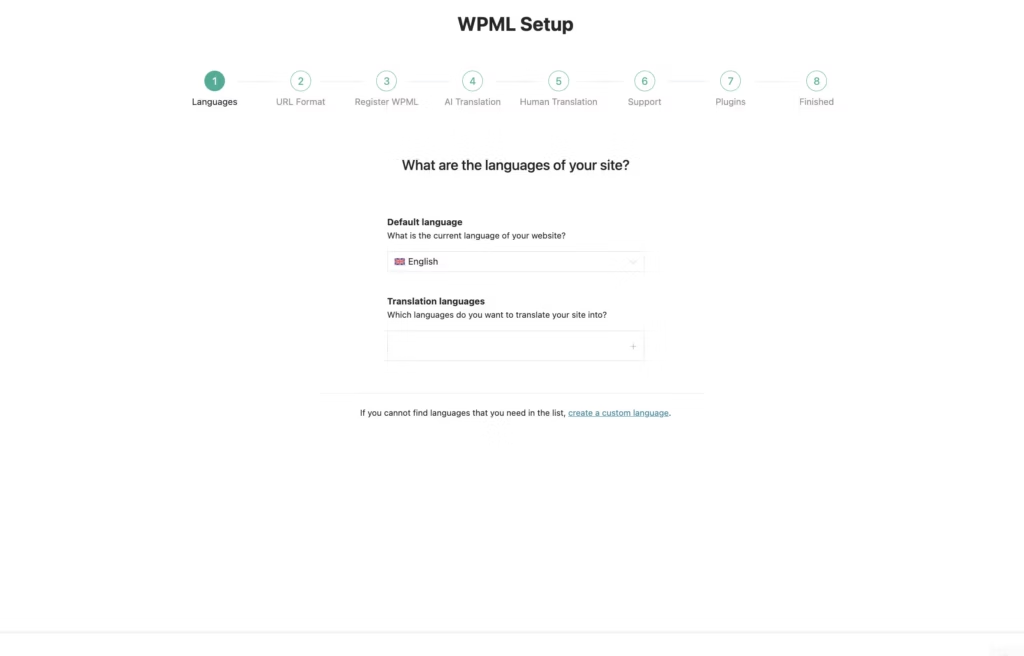
- Follow the on-screen configuration screens to set your site’s default language and the additional languages you want to support. For detailed guidance on advanced settings, translation workflows, and integration options, consult the official documentation.
Installing and activating the plugin this way is a fast process — first-hand testing found the entire upload-to-activation sequence took about two minutes, with no need to unzip the package manually before uploading it.
Compatibility and Requirements
If you’re running an older WordPress installation or an outdated PHP version, it’s worth updating both to a currently supported PHP version and the current stable WordPress release before installing any multilingual plugin, since translation tools tend to touch a large portion of a site’s database and templates.
The plugin’s Advanced Translation Editor integrates with WooCommerce, Elementor, and Divi, allowing translation of products, custom fields, page layouts, and page builder widgets within those tools.
WPML Pricing
WPML operates on a freemium model, with an official free tier available alongside three paid annual plans. Site owners planning multilingual content workflows should look at the paid tiers below, which cover the core translation tooling.
Multilingual Blog costs €39 per year and covers 1 production site, plus 3 development or staging sites.
Multilingual CMS is the most popular plan at €99 per year. It covers up to 3 production sites, includes 90,000 automatic translation credits, and extends to 9 development or staging sites.
Multilingual Agency runs €199 per year and covers an unlimited number of production sites, with 180,000 automatic translation credits and unlimited development or staging sites included.
All three tiers use the Advanced Translation Editor to process content, handle HTML tags safely, and maintain translation memory across a site. Every plan includes one year of automatic updates and technical support from the date of purchase, along with access to a dedicated support forum. Renewal after that first year restores updates and support for another year.
Check the official developer website for the current rate before purchasing.
👉 Get Wp multi-lingual | Multilingual CMS at the best available price
Alternatives to WPML
WPML is not the only way to run a multilingual WordPress site. Depending on budget and workflow preference, Polylang, TranslatePress, and Weglot each offer a different approach worth weighing.
| Product | Key Difference | Best For | Price Tier |
|---|---|---|---|
| WPML | Backend translation editor with automatic translation credits and tiered site licensing | CMS and agency projects needing structured, multi-site translation management | Paid |
| Polylang | Free core plugin with paid Pro and Business add-ons for e-commerce and automatic translation | Site owners wanting a free starting point before scaling into paid features | Freemium |
| TranslatePress | Lets users translate content visually from the live front-end preview rather than a backend editor | Users who prefer seeing translations applied directly on the page as they work | Freemium |
| Weglot | Cloud-based automatic translation service that works across many platforms, not just WordPress | Teams wanting fast, largely automated translation without managing content in WordPress itself | Freemium |
Competitor data is sourced from publicly available information as of 2026 and may have changed.
The right pick depends on how the site is built and who maintains it. A single-site blog with a tight budget may do fine with Polylang’s free core, while an agency managing several client sites with WooCommerce and Elementor may find WPML’s structured licensing and integrations a better fit.
Frequently Asked Questions
How much does WPML cost?
WPML is priced across three annual tiers: Multilingual Blog at €39 per year for 1 site, Multilingual CMS at €99 per year for up to 3 sites with 90,000 automatic translation credits, and Multilingual Agency at €199 per year for unlimited sites with 180,000 automatic translation credits. The CMS tier is the most popular of the three.
Is there a free version of WPML?
Yes, an official free tier exists, giving users a way to try WPML before committing to a paid annual plan.
How many websites can I use one WPML license on?
It depends on the tier you buy. The Multilingual Blog plan covers 1 production site, Multilingual CMS covers up to 3 production sites, and Multilingual Agency allows an unlimited number of production sites, with each tier also including a set number of development or staging sites (3, 9, and unlimited respectively).
Does WPML work with WooCommerce and Elementor?
Yes, WPML is fully compatible with WooCommerce, Elementor, and Divi through official integrations. It lets you translate products, custom fields, layouts, and page builder widgets using its Advanced Translation Editor.
What is the WPML Advanced Translation Editor?
The Advanced Translation Editor, or ATE, is the system WPML uses to process content for translation. It handles HTML tags safely during translation and tracks translation memory to keep terminology consistent across a site.
Who makes WPML?
WPML is developed, maintained, and supported by OnTheGoSystems. The plugin powers over 1.5 million multilingual websites globally.
How long does WPML support and updates last?
WPML support and updates run for one year from the date of purchase. This includes access to a dedicated support forum along with automatic updates and technical support during that period, after which renewal is needed to keep receiving them.
Download & Pricing Options
🆓 Free Version
👉 Download the Free Version of Wp multi-lingual | Multilingual CMS
💎 Get Wp multi-lingual | Multilingual CMS (Best Available Price)
👉 Check Current Pricing for Wp multi-lingual | Multilingual CMS
Pricing and availability may change — use the link above for current rates.
A GPL membership covers WPML along with thousands of other premium products. Our which GPL site to use guide sets out what each vendor charges and what you give up in return.


