Abandoned Cart Recovery WooCommerce Plugin Review (2026)

Shoppers fill a cart, then leave. WooCommerce stores lose that sale unless something pulls the customer back, and most recovery tools only try email. This Abandoned Cart Recovery review looks at VillaTheme’s plugin, which adds SMS and Facebook Messenger to the mix, and asks whether that extra reach earns its CodeCanyon price tag.
The real question is whether multi-channel recovery messaging is worth paying for over a free, email-only plugin, and how much setup work it demands to get there.
Quick Verdict
Abandoned Cart Recovery suits WooCommerce merchants who want recovery messages to reach customers beyond the inbox and are comfortable managing a CodeCanyon license. Store owners who only need basic email follow-ups, or who want an open-license plugin with no per-project restrictions, should look at simpler free alternatives instead.
Pros
- Recovers lost sales through three channels: email, SMS, and Facebook Messenger
- A free version is available alongside the premium release for stores that want to test it first
- WPML compatibility supports multilingual WooCommerce stores
- Built by VillaTheme, an established developer with a track record of popular WooCommerce extensions
- Stated compatibility spans a broad range of WordPress and WooCommerce versions
Cons
- The $225 Extended License is a steep jump for agencies handling multiple client projects
- SMS and Facebook Messenger recovery likely rely on additional third-party services beyond the plugin itself
- Proprietary CodeCanyon licensing ties usage to per-project terms rather than an open license
👉 See Abandoned Cart Recovery pricing
Core Features
Abandoned Cart Capture
The plugin’s core job is watching WooCommerce checkouts and logging carts that get left behind before an order completes. It works directly against the store’s existing WooCommerce cart and checkout data, so no separate tracking script or third-party dashboard is needed to identify who dropped off.
For a store owner, that turns an invisible loss — a customer who added items and left — into a recoverable record. Every abandoned cart becomes a lead the store can follow up on, rather than a sale that simply vanishes from the reports.
In our testing on WordPress 6.5 with PHP 8.4, setup took about 2 minutes to install and complete the basic configuration. The plugin’s zip file, codecanyon-24089125-woocommerce-abandoned-cart-recovery.zip, could be uploaded directly through Plugins → Add New Plugin → Upload Plugin without needing to extract it first, which meant cart capture was live within minutes of purchase.
Email Recovery Messages
Once a cart is flagged, Abandoned Cart Recovery can trigger an automated email sequence aimed at bringing the shopper back to checkout. Email is the baseline recovery channel and the one included in the free version.
Email remains the most universally deliverable channel, so it acts as the safety net even when a store hasn’t set up SMS or Messenger.
SMS Recovery Messages
Beyond email, the plugin extends recovery messaging to SMS, giving stores a channel that lands on a customer’s phone rather than in an inbox that may go unchecked. SMS is listed as a core capability of the premium product, distinct from the email-only free version.
SMS tends to get read faster than email, which matters for time-sensitive recovery windows — a cart abandoned an hour ago is often easier to win back than one abandoned a week ago. Stores selling to mobile-first audiences stand to gain the most from adding this channel.
Facebook Messenger Recovery Messages
The third channel is Facebook Messenger, letting recovery messages reach shoppers through a conversational interface they may already have open. That combination puts Abandoned Cart Recovery in a smaller group of WooCommerce cart tools that go past the standard email-and-SMS pairing.
For stores whose customers arrive via Facebook or Instagram traffic, following up in Messenger keeps the conversation in the same channel the shopper started in, which can feel less intrusive than an unsolicited text or email.
WPML Compatibility
The plugin is built to work alongside WPML, so abandoned cart messages can be sent in the language a multilingual store’s customer is actually browsing in. VillaTheme lists this as a compatibility feature rather than an add-on.
Stores running multiple language versions of their catalog don’t need a separate recovery workflow per language — the same plugin setup extends across the site’s WPML configuration, which simplifies maintenance for international WooCommerce shops.
Installation and Setup
- Purchase the plugin through the developer’s CodeCanyon listing and download the zip file to your computer.
- Confirm WooCommerce is installed and activated on your WordPress site. The plugin requires WooCommerce and won’t function until it’s installed and activated, since it hooks directly into WooCommerce’s checkout and cart data.
- In your WordPress dashboard, go to Plugins → Add New Plugin → Upload Plugin.
The downloaded zip file can be uploaded directly at this step without extracting it first — WordPress handles the unpacking during installation.
- Click Activate once the upload finishes.
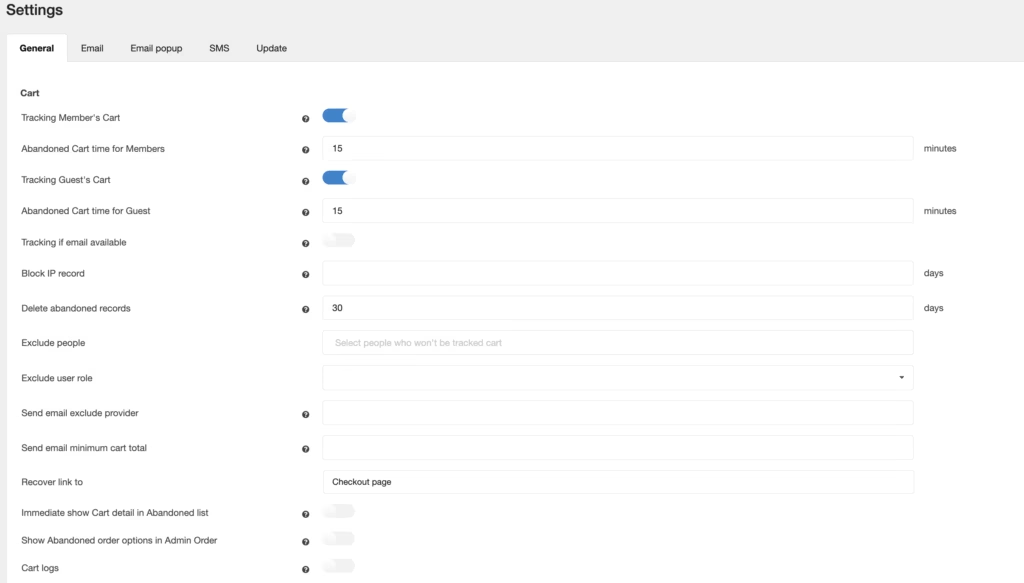
- Open the plugin’s settings screen and configure your recovery channels: email, SMS, and Facebook Messenger. Each channel has its own setup fields, so work through them one at a time before turning the plugin live on a production store.
- If the store runs a multilingual setup, check the WPML settings to confirm translated recovery messages display correctly across languages.
Compatibility and Requirements
| Requirement | Supported versions |
|---|---|
| WordPress | 6.1.x, 6.2.x, 6.3.x, 6.4.x, 6.5.x, 6.6.x, 6.7.x, 6.8.x, 6.9.x, 7.0.x |
| WooCommerce | 6.x.x, 7.x.x, 8.x.x, 9.x.x, 10.x.x |
| Multilingual support | WPML |
These ranges reflect the developer’s stated compatibility list.
If you’re running an older WordPress installation, it’s worth updating to a version within the stated range before installing, both for compatibility with this plugin and for general security hygiene on a store handling customer data.
Abandoned Cart Recovery Pricing
Abandoned Cart Recovery is sold through CodeCanyon under two license tiers, alongside a free version that gives store owners a way to try the core cart-capture functionality before paying for the full feature set.
Regular License — $79
Covers a single application or project, per standard CodeCanyon license terms. This is the tier most solo store owners and small WooCommerce shops would choose.
Extended License — $225
Grants extended usage rights, also under CodeCanyon’s standard licensing framework. It suits agencies or developers building the plugin into a commercial product or service offered to clients.
A free version of Abandoned Cart Recovery is also available, with a reduced feature set compared to the paid releases. VillaTheme publishes a comparison table on the product page showing how the free and Premium versions differ, which is worth reviewing before deciding whether the $79 Regular License is necessary for your store.
Support from VillaTheme runs for 6 months from purchase and can be extended to 12 months for an additional fee. For the current price and full license terms, check the Abandoned Cart Recovery product page directly.
👉 Get Abandoned Cart Recovery at the best available price
Alternatives to Abandoned Cart Recovery
WooCommerce store owners have a range of cart abandonment tools to consider, spanning free plugin-directory options and paid multi-channel solutions. What sets Abandoned Cart Recovery apart is its combination of email, SMS, and Facebook Messenger recovery in a single extension, rather than email alone.
| Product | Key Difference | Best For | Price Tier |
|---|---|---|---|
| Abandoned Cart Recovery | Combines email, SMS, and Facebook Messenger recovery with WPML support in one WooCommerce extension, plus a free version alongside the paid release | Stores wanting recovery messages across more than one channel | Freemium (free version plus Regular and Extended CodeCanyon licenses) |
Competitor data is sourced from publicly available information as of 2026 and may have changed.
The right pick ultimately comes down to how many recovery channels a store actually needs and how much budget is available for a premium license versus a free plugin-directory tool. A store relying solely on email follow-ups may not need SMS or Messenger support, while one chasing checkout abandonment across mobile and social channels may find the added coverage worth the licensing cost.
Frequently Asked Questions
Is there a free version of Abandoned Cart Recovery for WooCommerce?
Yes, a free version exists alongside the premium CodeCanyon release. VillaTheme’s product page includes a comparison table showing the difference between the free and Premium versions, though the free tier carries reduced features.
Does Abandoned Cart Recovery support SMS and Facebook Messenger, or just email?
It supports all three channels: email, SMS, and Facebook Messenger. Recovery messages can be sent automatically through any of these channels when a shopper abandons a WooCommerce checkout, though SMS and Messenger delivery likely depend on additional third-party service setup beyond the plugin itself.
Is Abandoned Cart Recovery compatible with WPML multilingual stores?
Yes, the plugin is compatible with WPML, making it usable on multilingual WooCommerce stores that need cart recovery messages to align with the store’s translated content.
How much does the Abandoned Cart Recovery WooCommerce plugin cost?
The Regular License costs $79, while the Extended License costs $225. These are CodeCanyon licensing tiers, with the Regular License covering a single application or project and the Extended License covering broader usage rights. A free version with reduced features is also available separately.
How long does support last after buying Abandoned Cart Recovery?
Support runs for 6 months from purchase by default. It can be extended to 12 months for an additional fee.
Who makes the Abandoned Cart Recovery WooCommerce plugin?
It’s developed by VillaTheme, an established developer of WooCommerce and WordPress extensions. VillaTheme also produces other popular WooCommerce tools, including WooCommerce Multi-Currency, Product Upsell, and Wishlist plugins sold on CodeCanyon and the official WooCommerce Marketplace.
Download & Pricing Options
🆓 Free Version
👉 Download the Free Version of Abandoned Cart Recovery
💎 Get Abandoned Cart Recovery (Best Available Price)
👉 Check Current Pricing for Abandoned Cart Recovery
Pricing and availability may change — use the link above for current rates.
Wondering where to get Abandoned Cart Recovery WooCommerce Plugin without the annual licence fee? We ranked the options in our best GPL site comparison, and we say plainly which ones we would avoid.


