WP Defender Pro Review 2026: Malware Scanning, Firewall & 2FA


Most WordPress security setups end up as a patchwork: one plugin for login protection, another for scanning, a third for activity logs. This WP Defender Pro review looks at the alternative WPMU DEV puts forward — malware and vulnerability scanning, a firewall with bot protection, two-factor authentication, hardening and audit logging inside a single plugin, with the free version already handling core protection on more than 60,000 sites.
The real question is whether the paid tier earns its subscription when the free build covers the basics, and whether a membership makes more sense than a per-site security tool.
Quick Verdict
WP Defender is a strong fit for freelancers and small agencies who maintain several sites and will actually use the wider WPMU DEV plugin bundle, plus Multisite network admins who want one place to apply hardening. Single-site owners who only need scanning and 2FA should test the free version first.
Pros
- Scanning, firewall, login security, hardening and audit logging handled by one plugin rather than a stack of separate tools
- Malware scanning checks WordPress core files against official WordPress.org checksums, alongside suspicious code and known plugin/theme vulnerability detection
- Two-factor authentication works with TOTP apps including Google Authenticator, Twilio Authy and Microsoft Authenticator, with an email verification fallback
- Full Multisite support with network-level settings, one-click hardening across subsites and centralized reporting
- Central monitoring of multiple sites through the WPMU DEV Hub dashboard
- Genuinely usable free tier on WordPress.org
- Pro build is bundled with every WPMU DEV membership alongside Smush Pro, Hummingbird Pro, Forminator Pro and SmartCrawl Pro
Cons
- Pro features require an active WPMU DEV subscription, and Pro updates arrive via the WPMU DEV Dashboard plugin instead of the standard WordPress update channel
- Annual Pro tiers cap at 10 sites
- Hands-on malware cleanup is a separate expert removal service, not an automated fix inside the plugin
- PHP 8.0 or higher is required, so older hosting needs upgrading first
Core Features
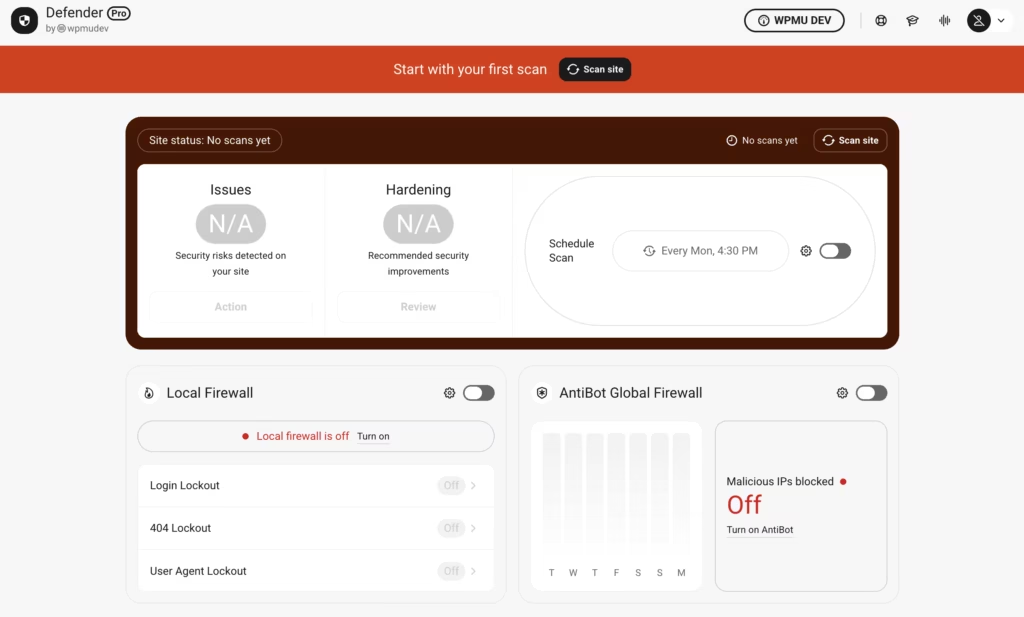
WP Defender bundles what would normally be four or five separate plugins — a malware scanner, a firewall, login protection, hardening tools, and an activity log — into a single security stack. Here’s what each layer actually does.
The Pro build ships as one archive. The wp-defender-pro-6.2.0.zip file installs directly in WordPress via Plugins → Add New Plugin → Upload Plugin without extracting it first, so everything below is available from the dashboard shortly after the download finishes.
Malware and Suspicious Code Scanning
The scanner works on two fronts. Core file integrity is checked by comparing your WordPress installation against the official WordPress.org checksums, so any core file that has been modified, added, or tampered with gets flagged rather than assumed clean. Alongside that, WP Defender runs a suspicious code scan across your site’s files, looking for the injected patterns that typically arrive through a compromised plugin or a stolen admin password.
For most site owners the practical value is knowing quickly whether an odd redirect or a sudden spam page is an actual infection or a plugin conflict. Pro adds scheduled malware scanning, so the check happens on a recurring basis instead of only when you remember to click the button.
Vulnerability Detection
Vulnerability detection covers known issues in WordPress core, plugins, and themes. It’s the layer that catches the far more common attack route: a perfectly clean site running an outdated plugin with a publicly disclosed exploit.
Because the check runs against the components already installed, it tells you which specific plugin needs updating or removing — useful if you maintain sites where every update has to be justified before it gets applied. Pro also monitors your Google Blocklist status, so if your domain gets flagged in Google’s safe browsing data, you find out from a report rather than from a customer.
Firewall with Bot Protection
WP Defender’s firewall is built around traffic behavior rather than a generic rule set. IP lockouts temporarily ban addresses that trigger too many failed login attempts or hit too many nonexistent 404 URLs — the two clearest signatures of brute-force tools and automated vulnerability scanners. Permanent allowlists and blocklists let you keep your own office IP permanently exempt and known bad actors permanently out.
The 404 detection piece matters more than it sounds. Bots probing for the file paths of known-vulnerable plugins generate a distinct pattern of missing-page requests, and locking those addresses out early cuts a lot of junk traffic before it reaches the rest of your stack.
Login Security and Two-Factor Authentication
Login protection is the layer most likely to earn its place on a site with multiple contributors. WP Defender supports TOTP authenticator apps via a standard QR code pairing, which covers Google Authenticator, Twilio Authy, and Microsoft Authenticator. Administrators can also enable an email verification fallback, sending a temporary code to users who don’t have an authenticator app set up.
That fallback is the difference between 2FA you can actually enforce and 2FA that generates support tickets. On a client site with editors of varying technical comfort, switching on email codes for the people who need them keeps the policy from collapsing at the first locked-out user.
Security Hardening Recommendations
Rather than applying changes silently, WP Defender presents a set of hardening recommendations you work through and toggle on. On Multisite, network administrators can apply these tweaks across every subsite at once instead of visiting each one individually.
The one-click network application is the real time-saver for anyone running a network of subsites. Hardening that would otherwise be a repetitive per-site chore becomes a single pass at the network level.
Audit Logging
The audit log records user and site activity: who logged in, what was edited, which settings changed. It was opened up to Free Hub and WordPress.org users in version 6.2.0, so it’s no longer a Pro-only feature.
For maintainers, it’s the tool you reach for after something breaks. Knowing which account changed a setting and when removes most of the guesswork from a post-incident review, and on Multisite, security alerts and scan results route to the main network administrator.
Scheduled and Automated Reports
Pro adds automated reporting on top of scheduled scans, so scan results and security alerts arrive by email instead of waiting in a dashboard nobody has opened. Google Blocklist status is part of what gets reported.
That makes WP Defender viable on sites you don’t log into weekly. A dormant client site with no reporting is effectively unmonitored; with scheduled reports, silence genuinely means nothing has changed.
Central Monitoring Through the WPMU DEV Hub
The Hub dashboard pulls security status for multiple sites into one view, and it’s also where Pro plugin management happens. For freelancers and small agencies, this is arguably the reason to pick WP Defender over a per-site security plugin — the value scales with the number of sites you look after.
Multisite fits into the same model. Global settings let network administrators enable firewall rules, malware scans, and audit logs across the whole network in one action while retaining per-subsite control where needed. Network-level settings and centralized reporting come as part of that support.
Installation and Setup
WP Defender installs like any other WordPress plugin, and the Pro build arrives as a single zip file that WordPress can handle directly.
- Download the plugin zip from your WPMU DEV account. The file (
wp-defender-pro-6.2.0.zipin the tested build) does not need to be extracted first. - In your WordPress admin, go to Plugins → Add New Plugin → Upload Plugin, select the zip, and click Install Now.
- Activate the plugin once the upload finishes. Installation and basic setup took about two minutes in testing on WordPress 6.5 with PHP 8.4.
- Connect the site to the WPMU DEV Hub. Pro updates are delivered through the WPMU DEV Dashboard plugin installed on your site, and the Hub is also where multiple sites are monitored from one screen.
- Run an initial malware scan to check core file integrity, suspicious code and known vulnerabilities.
- Work through the hardening recommendations, then enable the firewall and login security features you want — IP lockouts for failed logins and 404 hits, permanent allow and block lists, and two-factor authentication.
- Set up two-factor authentication for your user accounts by pairing each user’s TOTP app via QR code, with the email verification fallback enabled where needed.
- Schedule your malware scans and automated security reports so results arrive by email rather than requiring a manual check.
Moving up from the free version involves no reinstall. Upgrading from Free keeps your existing settings in place and unlocks the Pro features on top of them.
Compatibility and Requirements
| Requirement | Detail |
|---|---|
| PHP (minimum) | 8.0, as of version 5.7 |
| PHP (stated compatibility) | 8.4, per version 5.9 |
| WordPress (stated compatibility) | 7.1, per version 6.2.0; earlier entries note 6.8, 6.9 and 7.0 |
| Multisite | Supported, with network-level settings and centralized reporting |
| Tested environment | WordPress 6.5 with PHP 8.4 |
The PHP 8.0 floor is the figure that matters most in practice. Sites still running an end-of-life PHP branch will need a host-side upgrade before the plugin will run, and moving to a currently supported PHP version is worth doing on its own security merits regardless of which plugin you choose.
Beyond the server side, the developer lists compatibility with popular themes, builders and plugins including WooCommerce, Elementor, Astra, ACF and WPML — which covers most of what sits on a typical commercial WordPress build.
Free and Pro differ in delivery as well as features. The free version is distributed through the WordPress.org plugin directory, and it updates through the normal WordPress dashboard. Pro requires a paid WPMU DEV membership.
WP Defender Pricing
WP Defender follows a freemium model. The free plugin comes from the WordPress.org directory, and it covers core WordPress protection.
Paid access comes in three annual Pro tiers plus a monthly Premium membership.
Pro Basic — $50/year
Covers 1 site. Adds vulnerability detection, suspicious code scanning, scheduled malware scanning, automated reports, and Google Blocklist monitoring.
Pro Standard — $75/year
Covers 3 sites, with the same Pro feature set as Basic.
Pro Plus — $100/year
Covers 10 sites, again with the full Pro feature set. This is the practical tier for freelancers and small agencies with a maintenance roster.
Premium — $9.99/month
Covers unlimited sites and goes well beyond the plugin itself. Premium bundles every WPMU DEV Pro plugin — Smush Pro, Hummingbird Pro, Forminator Pro, SmartCrawl Pro, Branda Pro, Snapshot Pro and Hustle Pro alongside Defender Pro — plus 50% off Dedicated Hosting, access to Unlimited Hosting, unlimited backups and CDN, unlimited seats and CRM, and unlimited 24/7 expert support. The plan is frequently promoted at $4.99/month for the first three months, after which it reverts to the standard $9.99/month rate.
| Plan | Price | Sites |
|---|---|---|
| Free | $0 | Per install |
| Pro Basic | $50/year | 1 |
| Pro Standard | $75/year | 3 |
| Pro Plus | $100/year | 10 |
| Premium | $9.99/month | Unlimited |
Two details deserve attention before you choose. First, unlimited-site coverage sits only on the monthly Premium plan — the annual Pro tiers cap out at 10 sites, so anyone maintaining a larger portfolio is pushed toward Premium regardless of whether they want the rest of the bundle. Second, the annual Pro plans renew at the advertised rate rather than jumping after year one, which makes the $100/year Plus tier easier to budget than teaser-priced alternatives.
Every plan is backed by a 30-day money-back guarantee, and subscriptions can be canceled in one click. For the current rate on any tier, check the pricing page at wpmudev.com.
👉 Get WP Defender at the best available price
Alternatives to WP Defender
The WordPress security market is crowded, and most rivals sell protection per site rather than as part of a wider membership. The table below sets out how the main alternatives differ in approach.
| Product | Key Difference | Best For | Price Tier |
|---|---|---|---|
| WP Defender | Bundles malware and vulnerability scanning, firewall bot protection, 2FA login security, hardening and audit logs into one plugin, included with a broader WPMU DEV membership and managed centrally from the Hub | Owners and maintainers who want security alongside other site management tools, and agencies watching several sites from one dashboard | Freemium |
| Wordfence | The most widely deployed WordPress security plugin, built around an endpoint firewall and its own vulnerability database with a large free tier and a paid real-time threat feed | Single-site owners who want a well-known standalone firewall and scanner | Freemium |
| Sucuri | Cloud-based WAF and CDN that filters traffic before it reaches the server, paired with a hands-on malware cleanup service | Sites that need traffic filtered upstream and cleanup handled by a service | Freemium |
| iThemes Security | Hardening and login-security focused plugin from the Solid/iThemes stable, sold alongside a wider plugin and backup suite | Buyers who prioritize hardening and login controls within an existing plugin suite | Freemium |
| MalCare | Cloud-side malware scanning with one-click automatic cleanup, designed to remove the need for manual removal work | Anyone who wants infection cleanup automated rather than requested as a service | Freemium |
| Patchstack | Vulnerability-intelligence service that applies virtual patches for known plugin and theme flaws instead of acting as a general firewall | Maintainers whose main risk is unpatched plugin and theme vulnerabilities | Freemium |
| All In One WP Security & Firewall | Long-running free hardening and firewall plugin covering a broad checklist of WordPress security tweaks | Budget-conscious owners working through a hardening checklist | Freemium |
| Jetpack Protect | Automattic’s vulnerability scanning module, tied into the wider Jetpack service stack rather than sold as a standalone firewall | Sites already running Jetpack that want vulnerability alerts | Freemium |
Competitor data is sourced from publicly available information as of 2026 and may have changed.
Which of these fits depends less on feature counts than on how you buy and who cleans up after an incident. If automated malware removal is the deciding factor, a cloud cleanup tool answers that more directly. If you want scanning, firewall, 2FA and audit logs under one subscription that also covers performance, backups and forms, the WPMU DEV bundle is the stronger economic case.
Frequently Asked Questions
Is WP Defender free, and what do you get in the free version?
Yes, a free version of WP Defender is available from the WordPress.org plugin directory and is used on over 60,000 active sites. It covers core WordPress protection, and the Audit Log was opened up to Free Hub and WordPress.org users in version 6.2.0. Upgrading later keeps your existing settings intact while unlocking the Pro features.
How much does WP Defender Pro cost?
Pricing starts at $50/year for Pro Basic covering one site, with Pro Standard at $75/year for three sites and Pro Plus at $100/year for ten sites. All three annual tiers include vulnerability detection, suspicious code scanning, scheduled malware scanning, automated reports and Google Blocklist monitoring. A Premium plan at $9.99/month covers unlimited sites and adds the rest of the WPMU DEV suite.
What is the difference between WP Defender free and Pro?
The free version handles core protection, while Pro adds vulnerability detection, suspicious code scanning, scheduled malware scanning, automated reports and Google Blocklist monitoring. Pro features require an active WPMU DEV subscription.
Does WP Defender Pro work with WordPress Multisite?
Yes. Network administrators can manage security settings across every site from one dashboard, enabling firewall rules, malware scans and audit logs network-wide, and applying hardening tweaks to subsites without visiting each one. Security alerts and scan results go to the main network administrator.
What two-factor authentication methods does WP Defender support?
WP Defender supports TOTP authenticator apps linked via QR code, including Google Authenticator, Twilio Authy and Microsoft Authenticator. Administrators can also enable an email verification option as a fallback, which sends users a temporary verification code instead.
Does WP Defender remove malware automatically?
No. The plugin scans for malware, suspicious code and known vulnerabilities, but hands-on cleanup is handled by a separate WPMU DEV expert removal service rather than a one-click fix inside the plugin. That is a genuine gap against security tools that automate remediation.
How does WP Defender’s malware scan detect infected files?
The scan compares your WordPress core files against the official WordPress.org checksums to flag any files that have been modified. Alongside that core integrity check, Pro adds suspicious code scanning and detection of known plugin, theme and core vulnerabilities.
Is WP Defender Pro included with a WPMU DEV membership?
Yes. Defender Pro ships with every WPMU DEV membership plan, alongside the rest of the Pro plugin suite, including Smush Pro, Hummingbird Pro, Forminator Pro, SmartCrawl Pro, Branda Pro, Snapshot Pro and Hustle Pro. Membership also covers 24/7 expert support.
How do WP Defender Pro updates work?
The free plugin updates through the normal WordPress dashboard, but Pro updates are pushed through the WPMU DEV Dashboard plugin installed on your site. You can also manage updates centrally from the Hub.
Does WP Defender Pro come with a refund guarantee?
Yes, WPMU DEV offers a 30-day money-back guarantee, with one-click cancellation at any time. Annual Pro tiers renew at the same advertised rate, while the Premium plan’s promotional $4.99/month introductory rate reverts to $9.99/month once the introductory period ends.
Download & Pricing Options
🆓 Free Version
👉 Download the Free Version of WP Defender
💎 Get WP Defender (Best Available Price)
👉 Check Current Pricing for WP Defender
Pricing and availability may change — use the link above for current rates.
Buying WP Defender Pro outright is not the only route. See our best GPL site comparison for how ten GPL vendors differ on file integrity, update speed and licence keys.


