Crocoblock JetMenu Review 2026: Is This Mega Menu Plugin Worth It?

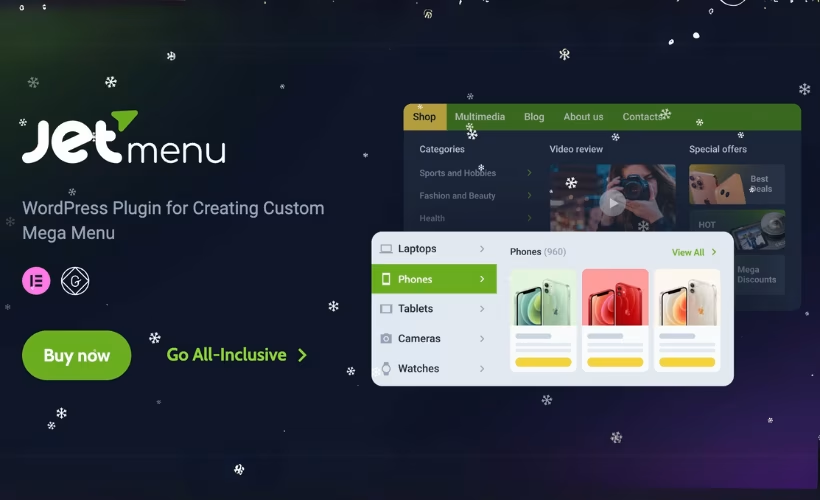
WordPress core navigation gives you a list of text links and a single-column dropdown — fine for a five-page site, useless for a store with forty categories or a service business that wants contact forms and product grids inside its menu panels. This JetMenu review looks at Crocoblock’s answer: a mega menu builder that turns dropdown content into full Elementor or Gutenberg templates, with a separate mobile layout built independently of the desktop version.
The question worth answering is whether a single navigation plugin justifies an annual subscription, or whether it only makes financial sense inside Crocoblock’s wider bundle.
Quick Verdict
JetMenu is a strong fit for Elementor and Gutenberg users who need media-rich, multi-column navigation and don’t want to hand-build responsive menu markup — especially anyone already subscribed to Crocoblock’s ecosystem. Site owners who use a different page builder, or who need nothing more than a tidy two-level dropdown, should look elsewhere; the editor dependency and the recurring cost make it poor value for simple navigation.
Pros
- Mega menu content is built visually in Elementor or Gutenberg, so dropdowns can hold images, forms, maps, and dynamic grids instead of plain links
- Dedicated Elementor widgets for desktop mega menus and mobile menus, with control over colors, typography, borders, and badges without code
- Covers multi-level dropdown, vertical, full-screen, hamburger, and pop-up formats, plus AJAX loading of menu content
- Mobile menu layouts are configured separately from desktop navigation
- Translation-ready with .pot files and RTL support, and compatible with WPML, Polylang, and TranslatePress
- One of the 22 JetPlugins bundled in All-Inclusive Plus, which changes the math for existing Crocoblock users
Cons
- Premium-only with no free or lite version — evaluation depends on the 30-day money-back guarantee
- Requires Elementor or Gutenberg as a base editor; it is an extension, not a standalone navigation solution
- Steep jump in price between the single-plugin subscription and the full bundle for anyone needing more than one Crocoblock tool
Core Features
Mega Menu Building Inside Elementor
JetMenu adds its own widgets to the Elementor editor, so a multi-column dropdown is designed the same way any other section of the site is designed — visually, with the standard Elementor interface. A Mega Menu widget drops the finished navigation into a header layout, and a separate Mobile Menu widget handles smaller screens.
Because the dropdown panel is built from Elementor content, it can hold maps, contact forms, dynamic post loops, or product grids rather than a stack of text links. Colors, typography, borders, and badges are all adjusted through widget controls, which keeps navigation styling out of the theme’s stylesheet and inside the builder where the rest of the design lives.
Gutenberg Block Editor Support
The plugin is not tied exclusively to Elementor. It also works with the Gutenberg block editor, which matters for anyone building on a block theme or simply preferring the native editor for content layout.
That dual support means the same dropdown-content approach applies either way: a template built in blocks can be assigned to a menu item and served as the dropdown panel. Site owners who have moved away from third-party builders are not locked out of the mega menu feature set.
Custom Templates as Menu Content
Menu items in JetMenu can be attached to saved templates rather than restricted to a link and label. The dashboard interface handles the assignment, replacing the standard text dropdown with whatever layout has been prepared.
For a store, that turns a “Shop” item into a browsable panel with category images and featured products. For a service business, a “Contact” item can carry a map and a form without the visitor ever leaving the page they are on.
Multi-Level Dropdown Navigation
Deep site structures are supported through multi-level dropdowns, so a category can branch into subcategories and then further again inside the same menu tree.
Larger catalogs and documentation-heavy sites benefit most here. Rather than pushing visitors through a series of intermediate landing pages, the full hierarchy is exposed in a single hover or tap path.
Vertical, Full-Screen, Hamburger, and Pop-Up Layouts
Beyond the standard horizontal bar, JetMenu covers vertical menus, full-screen overlays, hamburger triggers, and pop-up navigation. That range means the plugin fits sidebar-led layouts and minimal one-page designs as readily as conventional headers.
Choosing a format is a design decision rather than a plugin decision — a portfolio site can run a full-screen overlay while a shop on the same license uses a wide horizontal mega menu.
Separate Mobile Menu Layouts
Mobile navigation is configured independently of the desktop menu, using its own widget and its own layout rules. The mobile version can be off-canvas or a dropdown, and it does not need to inherit the structure of the desktop mega menu.
It is one of the more practical features in the set. A six-column desktop panel packed with images is unusable on a phone; building a trimmed, tap-friendly alternative separately avoids the usual compromise of designing one menu that serves neither screen well.
AJAX Menu Loading
Menu content can be loaded via AJAX, meaning template-heavy dropdown panels are fetched when needed rather than sitting in the initial page markup.
For a site running several image-rich mega menu panels, that keeps the navigation markup out of every page load — a relevant consideration when the dropdowns contain product grids or dynamic queries.
Media Content Inside Menu Items
Images, icons, and other media can be placed directly within menu items, which is what separates a mega menu from a styled dropdown in the first place. Combined with badge controls, individual items can carry visual weight — a “New” flag on a category, a thumbnail beside a product line.
Retail and catalog sites gain the most: visitors recognize a product image faster than they parse a text label, and the navigation starts doing some of the merchandising work.
Also Included
Subscriptions also bundle Crocoblock’s AI-native website builder, alongside translation-ready .pot files, RTL layout support, and compatibility with WPML, Polylang, and TranslatePress for multilingual sites.
Installation and Setup
JetMenu is an extension rather than a standalone navigation plugin, so the base editor has to be in place before anything else. It runs on top of either Elementor (free or Pro) or the Gutenberg block editor.
- Subscribe on crocoblock.com and open your account dashboard. Crocoblock’s site is the only source for the installer and license key.
- Confirm your base builder is active. Elementor (free or Pro) or the Gutenberg block editor must be running — JetMenu adds mega menu building on top of whichever of those you use.
- Download the plugin ZIP from your Crocoblock account. The
jet-menu-3.0.4.zipfile uploads directly through WordPress with no need to extract it first. - Go to Plugins → Add New Plugin → Upload Plugin, select the ZIP, install, and activate.
From download to activated plugin takes roughly two minutes.
- Connect your license key to the Crocoblock account that owns the subscription. Automatic updates and technical support both depend on an active key.
- Open the JetMenu settings screen in the WordPress dashboard and enable mega menu functionality for the menu locations you want to customize.
- Build the dropdown content as a template in Elementor or Gutenberg — this is where maps, contact forms, dynamic post lists, or product grids get placed inside a menu panel — then assign that template to the relevant menu item.
- Drop the Mega Menu widget into your header layout in Elementor to output the desktop navigation, and add the Mobile Menu widget for the responsive version.
- Configure the mobile layout separately. The mobile menu can use its own structure and styling rather than inheriting the desktop dropdowns.
Styling — colors, typography, borders, badges — is handled through the standard editor controls, so no CSS is required for the common cases.
Compatibility and Requirements
| Requirement | Details |
|---|---|
| Base editor | Elementor (free or Pro) or the Gutenberg block editor |
| PHP | 8.1 or higher |
| MySQL | 5.6 or 5.7 or higher |
| WordPress memory limit | 512 MB recommended, 768 MB or higher for optimal performance |
| SSL certificate | Required |
| Elementor compatibility (changelog history) | Changelog for version 2.4.7 (Dec 24, 24) states compatibility updated for Elementor 3.26 |
| Localization | Translation-ready, includes .pot files, RTL language support |
Crocoblock publishes those server figures as the baseline for its JetPlugins suite as a whole, not just this one plugin, so a host that already runs a full JetEngine or JetWooBuilder stack comfortably will have no trouble here. The memory recommendation is worth checking before you buy — plenty of entry-level shared hosting still ships with a lower default, and it is usually a one-line change in wp-config.php or a support ticket away.
On the translation side, the bundled .pot files work with the usual multilingual tooling — WPML, Polylang, and TranslatePress are all supported — and menu layouts flip orientation automatically when an RTL language is active.
The plugin runs on WordPress 6.5 with PHP 8.4 without issue. Whatever your stack, keep it on a currently supported PHP release; running a version that stopped receiving security patches years ago is a bad idea regardless of which plugins you install.
JetMenu Pricing
JetMenu is a commercial plugin. There is no free version, and the download comes only from Crocoblock with an active subscription tied to the license key.
Two routes lead to the plugin, and the right one depends on how many other Crocoblock tools you expect to use.
Custom Subscription — $55/year
The single-plugin route. A Custom Subscription at $55 per year covers JetMenu itself, the AI-native website builder, one year of product updates, and one year of Zoom and chat support. The subscription selector offers a 1 site option and an Unlimited sites option.
All-Inclusive Plus — $249/year
The bundle route. At $249 per year, All-Inclusive Plus includes 22 JetPlugins — among them JetEngine, JetElements, JetSmartFilters, JetWooBuilder, JetPopup, JetThemeCore, JetFormBuilder, JetBooking, JetAppointment, JetBlocks, JetTabs, JetTricks, JetReviews, JetBlog, JetSearch, JetProductGallery, JetCompareWishlist, JetGridBuilder, JetProductTables, JetMessenger, JetStyleManager, and JetMenu. It carries the same AI-native website builder, one year of updates, and one year of Zoom and chat support. The 1 site and Unlimited sites options apply here as well.
| Plan | Price | What you get |
|---|---|---|
| Custom Subscription | $55 / year | JetMenu, AI-native website builder, 1 year of updates, 1 year of Zoom & chat support |
| All-Inclusive Plus | $249 / year | 22 JetPlugins, AI-native website builder, 1 year of updates, 1 year of Zoom & chat support |
What to Know Before You Buy
Every plan is an annual subscription. Updates and support run for one year from purchase, and continued access to both requires renewal. Crocoblock states a 30-day money-back guarantee.
The math is straightforward: if JetMenu is the only Crocoblock tool you need, the Custom Subscription is the cheaper path by a wide margin. If you are already reaching for JetEngine for dynamic content or JetSmartFilters for product filtering, the bundle absorbs JetMenu at no meaningful extra cost — and agencies running multiple client builds tend to land there quickly.
Prices and promotional rates change, so check the official Crocoblock pricing page at crocoblock.com for the current figures before you commit.
👉 Get JetMenu at the best available price
Alternatives to JetMenu
Mega menu tools split fairly cleanly into two camps: plugins that extend the native WordPress menu system, and plugins that hand menu content over to a page builder. JetMenu sits firmly in the second camp, which makes the comparison as much about your editor as your navigation.
| Product | Key Difference | Best For | Price Tier |
|---|---|---|---|
| JetMenu | Builds dropdown content with Elementor or Gutenberg templates, so menus can hold media, forms, and dynamic grids, with separate mobile layouts | Elementor and Gutenberg users who want design-led, media-rich navigation | Annual subscription, no free tier |
| Crocoblock All-Inclusive Plus | Same plugin, bundled with JetEngine, JetSmartFilters, JetWooBuilder, JetPopup and the rest of the 22-plugin JetPlugins suite | Agencies and builders who need several Crocoblock tools on one license | Higher-tier annual subscription |
| Max Mega Menu | Extends the standard WordPress menu screen with widget-based mega menu panels rather than a builder canvas | Site owners who want mega menus without committing to a page builder | Freemium, with a paid pro add-on |
| UberMenu | Long-running standalone mega menu plugin with its own control panel, independent of any builder | Users on custom or non-Elementor themes wanting a one-off purchase | Paid, marketplace license |
| Elementor Pro Mega Menu widget | Native Elementor feature, so menus are built and styled inside the same subscription you already pay for | Existing Elementor Pro subscribers who want no extra plugin | Included with Elementor Pro subscription |
| QuadMenu | Theme-oriented mega menu builder with its own tab and column layouts configured from the menu editor | Users wanting a free starting point with optional upgrades | Freemium |
Competitor data is sourced from publicly available information as of 2026 and may have changed.
The right pick depends less on feature checklists than on what you already run. If your site is built in Elementor or Gutenberg and your navigation needs real layout work, JetMenu is a natural fit — and the bundle becomes the sensible route the moment you need a second or third Crocoblock plugin. If you want mega menus on a theme that avoids page builders altogether, a builder-independent option will serve you better.
Frequently Asked Questions
Is there a free version of JetMenu?
No. Crocoblock runs a premium-only model and does not publish free or lite versions of its JetPlugins on the WordPress.org repository, so the plugin is only available directly from crocoblock.com with an active subscription. The closest thing to a trial is the 30-day money-back guarantee attached to the subscriptions.
How much does JetMenu cost per year?
The single-plugin Custom Subscription is listed at $55 per year, which covers JetMenu, the AI-native website builder, one year of product updates, and one year of Zoom and chat support. The All-Inclusive Plus plan is $249 per year and bundles 22 JetPlugins instead of one. Both plans are annual subscriptions with a subscription selector offering 1 site or Unlimited sites options.
Does JetMenu work without Elementor?
Yes, provided you use the Gutenberg block editor instead. JetMenu is an extension rather than a standalone navigation plugin, so it needs either Elementor (free or Pro) or Gutenberg active to build the menu content. Without one of those two editors, there is no interface for designing dropdown layouts.
Can JetMenu create a separate mobile menu from the desktop menu?
Yes. Mobile layouts are configured independently of the desktop navigation, and a dedicated Mobile Menu widget adds a responsive, off-canvas, or dropdown menu built for smaller screens. The desktop mega menu and the mobile experience can use entirely different content and structure.
Is JetMenu included in the Crocoblock All-Inclusive Plus plan?
Yes. All-Inclusive Plus, priced at $249 per year, bundles JetMenu alongside JetEngine, JetElements, JetSmartFilters, JetPopup, JetWooBuilder, JetFormBuilder, JetThemeCore, JetBooking, and the rest of the 22-plugin JetPlugins suite. The plan also includes the AI-native website builder, one year of updates, and one year of Zoom and chat support.
What are the server requirements for running JetMenu?
Crocoblock’s stated requirements are PHP 8.1 or higher, MySQL 5.6 or 5.7 or higher, and an SSL certificate. A WordPress memory limit of 512 MB is recommended, with 768 MB or higher suggested for optimal performance across the JetPlugins range.
Is JetMenu translation ready and RTL compatible?
Yes on both counts. The plugin ships .pot files in its language folder for generating .po and .mo translations, and menu layouts flip orientation automatically when an RTL language such as Arabic or Hebrew is active. It also works with WPML, Polylang, and TranslatePress.
What happens to JetMenu when the subscription expires?
Product updates and Zoom and chat support are tied to the one-year subscription term, so both stop when the license lapses. Because Crocoblock distributes outside the WordPress.org directory, automatic updates require an active license key linked to your account, which means renewal is what keeps the plugin current with Elementor and WordPress releases.
Download & Pricing Options
🔍 Try Before You Buy
JetMenu does not have an official free tier. To evaluate it before purchasing, a GPL-licensed copy is available for sandbox testing purposes only.
👉 Download GPL Evaluation Copy
This is a GPL-licensed redistributed copy for testing only — not an official developer product.
💎 Get JetMenu (Best Available Price)
👉 Check Current Pricing for JetMenu
Pricing and availability may change — use the link above for current rates.
Wondering where to get Crocoblock JetMenu without the annual licence fee? We ranked the options in our best GPL site for WordPress comparison, and we say plainly which ones we would avoid.


