FlyingPress Review 2026: Is This WordPress Speed Plugin Worth It?

Slow page loads and weak Core Web Vitals scores cost WordPress sites traffic, rankings, and conversions, and most fixes involve stacking three or four separate plugins for caching, image compression, and CDN delivery. This FlyingPress review looks at a plugin that bundles those functions into one tool, aimed at freelancers and agencies who need results without a lengthy setup process. The question is whether consolidating those features into a single paid subscription actually saves time and money compared to running separate tools or a competitor like WP Rocket.
Quick Verdict
FlyingPress suits freelancers, agencies, and business owners who want caching, image optimization, and Core Web Vitals improvements handled by one plugin with minimal configuration. Solo site owners are covered too, via the single-site Starter plan, though every feature sits behind a paid license once the trial ends.
Pros
- Setup is fast and straightforward, often completed in a couple of minutes
- Caching and image optimization are built in, removing the need for separate plugins
- Works across all major hosting providers, themes, and plugins regardless of server stack
- CDN integration is flexible, supporting third-party CDNs or the optional FlyingCDN add-on
- A 14-day free trial is available before purchase
Cons
- Pricing scales with the number of sites, which can add up for agencies managing many client projects
Core Features
Caching for Faster Page Loads
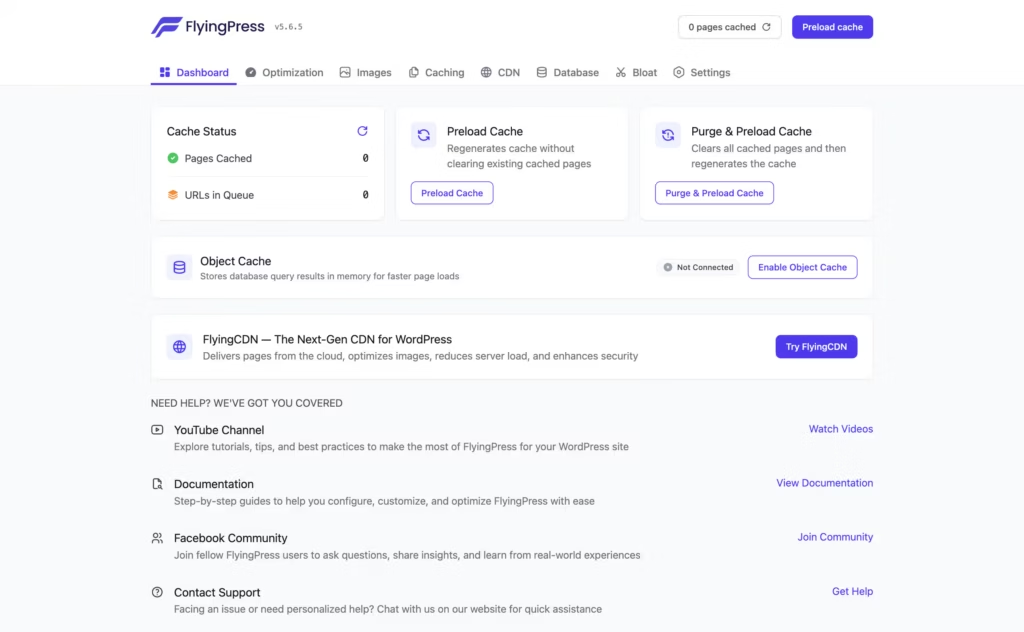
FlyingPress builds page caching directly into the plugin rather than requiring a separate caching layer or server-level configuration. The developer states it works across major hosting environments, so the caching engine doesn’t depend on a specific host’s setup to function.
For site owners and agencies, this removes a common point of friction: no need to verify whether a client’s host supports a particular caching method before installing. Caching is also where FlyingPress connects to content delivery. You can point it at a third-party CDN such as BunnyCDN, KeyCDN, or Cloudflare by entering the CDN URL in the plugin settings. Or use the optional FlyingCDN add-on if you’d rather not manage a separate CDN account.
In our testing on WordPress 6.5 with PHP 8.4, installation and basic setup took about 2 minutes. The plugin package (flying-press-5.6.5.zip) could be installed directly through Plugins → Add New Plugin → Upload Plugin without needing to extract the zip file first, which made getting the caching layer running a quick process.
Image Optimization
Image optimization ships as a built-in feature rather than a bolt-on extension, so compressing images doesn’t require installing and configuring a second plugin alongside FlyingPress. This keeps the toolset for a speed-focused setup contained within one dashboard.
For anyone managing image-heavy pages — product galleries, portfolios, blog posts with screenshots — this matters because image weight is often the single biggest contributor to slow load times. Handling it inside the same plugin that manages caching simplifies the stack for freelancers and agencies who don’t want to audit compatibility between multiple performance tools on every client site.
Core Web Vitals Improvements
FlyingPress includes features aimed specifically at improving Core Web Vitals scores, positioning it as a plugin built around Google’s page-experience metrics rather than generic speed tweaks alone. This is a distinct selling point for buyers who need to report on Largest Contentful Paint, Cumulative Layout Shift, or similar metrics to clients or stakeholders.
For agencies and companies where site performance is tied to SEO reporting, having caching, image optimization, and Core Web Vitals features under one plugin means fewer moving parts to troubleshoot when a score drops. It also suits novice users who want measurable performance gains without needing to understand the technical detail behind each metric.
Installation and Setup
- Sign up for a FlyingPress account and start the 14-day free trial.
- Download the plugin package from your FlyingPress account dashboard once your trial or subscription is active.
- In your WordPress admin area, go to Plugins → Add New Plugin → Upload Plugin and select the downloaded zip file. There is no need to extract the archive first — WordPress installs it directly from the compressed file.
- Click Activate once the upload finishes.
- Open the FlyingPress settings page and enter your license key to connect the plugin to your account. This step also links your site to the trial or paid plan you signed up for.
- Configure the core settings — caching, image optimization, and the other Core Web Vitals features — to match your site’s needs. Basic setup, from upload to a working configuration, typically takes only a few minutes.
- If you decide FlyingPress isn’t right for your site, cancel before the trial ends to avoid being charged, or reach out to the support team for help adjusting your plan.
Compatibility and Requirements
| Requirement area | Details |
|---|---|
| Hosting providers | Compatible with all major WordPress hosting providers |
| Web server / server stack | Works regardless of the underlying web server or server stack |
| Themes | Compatible with all major WordPress themes |
| Plugins | Compatible with all major WordPress plugins |
FlyingPress doesn’t publish a minimum WordPress or PHP version, positioning itself instead as broadly compatible across hosting environments. As a general practice, running the current stable WordPress release alongside a currently supported PHP version helps avoid unrelated security and performance issues, regardless of which optimization plugin is installed.
FlyingPress Pricing
FlyingPress is sold entirely on a paid subscription basis — there’s no permanent free version. Instead, the developer offers a 14-day free trial that unlocks every feature with no charge until the trial period ends, giving you time to test the plugin on a real site before committing.
Plans are billed annually and scale by the number of websites you manage:
| Plan | Price | Sites covered |
|---|---|---|
| Starter | $59/year | 1 website |
| Pro | $109/year | 3 websites |
| Business | $229/year | 25 websites |
The Starter plan suits personal blogs or solo projects, Pro fits freelancers running a small client portfolio, and Business is aimed at agencies handling larger site counts.
You can upgrade between tiers at any time, paying only the difference between your current plan and the new one. The license renews automatically each year, and you can cancel the subscription whenever you choose.
Refunds follow a tiered window. Cancellations within 24 hours of purchase get a full refund. Requests made between 24 hours and 7 days are refunded minus a 20% processing fee, and no refunds are issued after 7 days.
For the current prices and any promotional offers, check the official FlyingPress pricing page before buying.
👉 Get FlyingPress at the best available price
Alternatives to FlyingPress
FlyingPress isn’t the only premium option for speeding up a WordPress site. WP Rocket is the most commonly considered alternative for readers comparing caching and Core Web Vitals tools before committing to an annual license.
| Product | Key Difference | Best For | Price Tier |
|---|---|---|---|
| FlyingPress | Built-in caching and image optimization with flexible CDN integration, including an optional FlyingCDN add-on | Freelancers and agencies who want caching and image optimization bundled in one plugin | Paid |
| WP Rocket | Widely used premium caching plugin known for straightforward setup and broad compatibility with hosts and themes | Users who want an established plugin with wide hosting and theme compatibility | Paid |
Competitor data is sourced from publicly available information as of 2026 and may have changed.
The right pick depends on how you weigh setup speed, per-site pricing, and the specific caching or image optimization features your site needs.
Frequently Asked Questions
How much does FlyingPress cost?
FlyingPress pricing starts at $59 per year for the Starter plan, which covers a single website. The Pro plan runs $109 per year for 3 websites, with higher tiers available for those managing more sites. Costs scale by the number of websites covered rather than by feature access.
Does FlyingPress have a free version?
No, FlyingPress does not offer a permanent free tier. It provides a 14-day free trial with full access to all features, and no charge applies until the trial period ends.
Is FlyingPress better than WP Rocket?
FlyingPress and WP Rocket are direct competitors in the WordPress caching and speed optimization space, both offering caching and image optimization as core functions. Which one suits a given site depends on pricing needs and feature preferences, since FlyingPress’s per-site annual pricing structure and CDN flexibility differ from what competing plugins offer.
Does FlyingPress support CDN integration?
Yes, FlyingPress supports CDN integration in two ways. Users can connect any third-party CDN, such as BunnyCDN, KeyCDN, or Cloudflare, by entering the CDN URL in the plugin settings to rewrite static asset URLs, or they can use FlyingCDN, FlyingPress’s own optional add-on.
What is FlyingPress’s refund policy?
FlyingPress offers a tiered refund window. Cancellations within 24 hours of being charged qualify for a full refund, requests made between 24 hours and 7 days receive a refund minus a 20% processing fee, and no refunds are issued after 7 days have passed.
How long does it take to set up FlyingPress?
Setup takes about 2 minutes for installation and basic configuration. The plugin package can be installed directly through the WordPress Plugins Add New Upload Plugin screen without needing to extract the zip file first.
Is FlyingPress compatible with my WordPress host or theme?
FlyingPress is built to work with all major WordPress hosting providers, themes, and plugins, and is compatible with any hosting provider regardless of web server or server stack.
Download & Pricing Options
🔍 Try Before You Buy
FlyingPress does not have an official free tier. To evaluate it before purchasing, a GPL-licensed copy is available for sandbox testing purposes only.
👉 Download GPL Evaluation Copy
This is a GPL-licensed redistributed copy for testing only — not an official developer product.
💎 Get FlyingPress (Best Available Price)
👉 Check Current Pricing for FlyingPress
Pricing and availability may change — use the link above for current rates.
Wondering where to get FlyingPress without the annual licence fee? We ranked the options in our best GPL site comparison, and we say plainly which ones we would avoid.


