WP Schema Pro Review 2026: Is This Schema Plugin Worth It?


Structured data can lift how a page appears in search results, but writing JSON-LD by hand or trusting an SEO plugin’s generic schema module rarely gets every field right. This WP Schema Pro review looks at a dedicated plugin built specifically for that problem: adding schema markup through a click-and-select interface instead of touching code. The question is whether a single-purpose schema tool from Brainstorm Force justifies its price over free alternatives or the schema modules bundled into plugins you may already own.
Quick Verdict
WP Schema Pro suits WordPress site owners and bloggers who want Article, Product, Recipe, Event, FAQ, or Local Business schema implemented correctly without hiring a developer or learning JSON-LD syntax. It’s less compelling for anyone already satisfied with the basic schema output from their existing SEO plugin, or unwilling to pay for a feature they might use only occasionally.
Pros
- Click-and-select interface adds schema markup without writing any code
- Native support for Article, Product, Recipe, Event, FAQ, and Local Business schema types
- Built-in one-click Test Schema shortcut that links straight to Google’s Rich Results Test tool
- Unlimited website usage included on both the Annual and Lifetime plans
- Backed by Brainstorm Force, the team behind Astra, Spectra, SureCart, and other established WordPress products
Cons
- No free tier, so there’s no way to trial the plugin before purchasing
- The Lifetime plan demands a much larger upfront payment than paying annually
- Continued updates and support on the Annual plan depend on renewing each year
Core Features
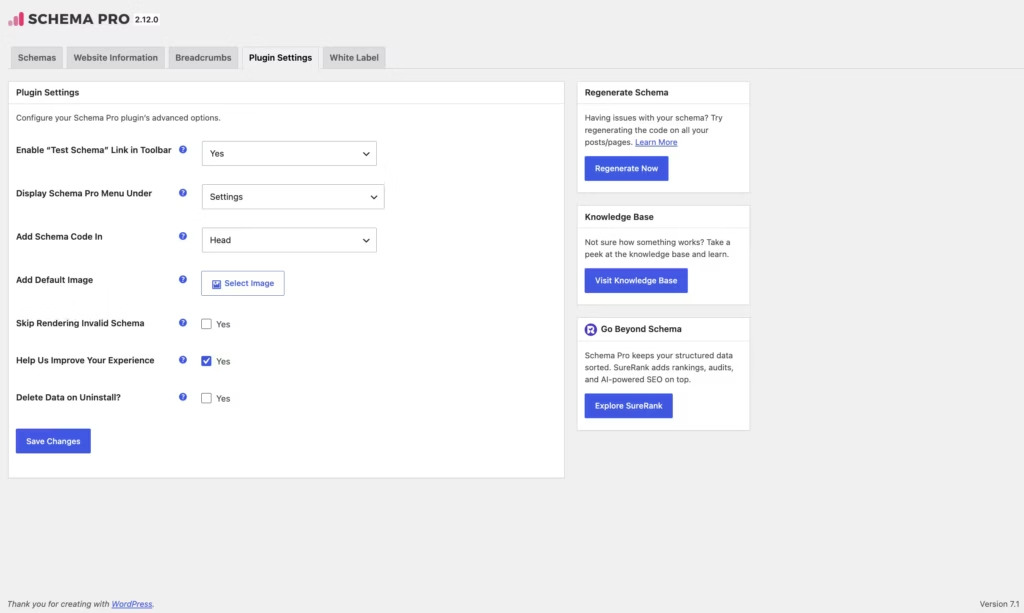
Click-and-Select Schema Interface
WP Schema Pro replaces manual JSON-LD editing with a point-and-click configuration screen. Instead of writing structured data by hand, you pick a schema type and map it to your existing content fields — post title, featured image, author, price, or custom fields — through a visual interface inside wp-admin.
For a site owner without development resources, this removes the single biggest barrier to using schema at all: syntax errors. A dropdown-driven setup means there’s no stray comma or missing bracket to break your markup, which matters because invalid structured data is often worse than none, since search engines simply ignore it.
Code-Free Structured Data Implementation
The plugin’s core proposition is that structured data implementation happens entirely without touching a template file or functions.php. WP Schema Pro generates and inserts the JSON-LD output on the front end automatically once a schema type is configured, so there’s no manual embedding step for each new post or page.
That’s especially useful for bloggers and small business owners running a site solo. Once a schema template is set up for a content type — recipes, products, events — every new piece of matching content inherits that markup automatically, rather than requiring a repeat setup for each new article.
In our testing on WordPress 6.5 with PHP 8.4, installation and basic setup took about 2 minutes. We also noticed that the plugin file, wp-schema-pro-2.12.0.zip, could be installed directly via Plugins → Add New Plugin → Upload Plugin without needing to extract it first — a small detail, but one that removes a step some WordPress plugins still require.
Native Support for Common Schema Types
WP Schema Pro ships with built-in support for Article, Product, Recipe, Event, FAQ, and Local Business schema, alongside a broader set of rich snippet types aimed at improving how pages appear in search results. Each type comes with its own field mapping, so a recipe post pulls in prep time and ingredients while a product page pulls in price and availability.
That range covers the schema types most commonly requested by publishers and small businesses without needing a separate add-on for each one. A food blogger and a local plumbing business can both use the same plugin, just pointed at different schema templates suited to their content.
Built-In Schema Testing Shortcut
A Test Schema shortcut sits in the WordPress admin bar and post editor, linking the current page directly to Google’s Rich Results Test tool. Rather than copying a URL or pasting raw JSON-LD into a separate validator, the shortcut carries the live page’s data straight into the test.
This closes the loop between configuring schema and confirming it actually validates. For anyone unfamiliar with reading raw structured data output, having the validation step built into the same workflow removes a manual, easy-to-skip task from the process.
Also included: a centralized schema markup configuration interface for managing templates across content types from a single settings screen.
Installation and Setup
- Log in to your WordPress dashboard and navigate to Plugins → Add New Plugin.
- Click Upload Plugin and select the WP Schema Pro zip file downloaded after purchase. The file does not need to be extracted first — it can be uploaded directly in its zipped form.
- Click Install Now, then Activate once the upload finishes.
- Enter your license key on the plugin’s settings screen to unlock updates and support.
- Open the Schema Pro configuration interface and use the click-and-select tool to choose which schema type — Article, Product, Recipe, Event, FAQ, Local Business, or another supported type — applies to a given template or content section.
- Map the relevant fields (post title, featured image, custom fields, and so on) to the schema properties using the plugin’s interface, with no manual code required.
- Use the built-in Test Schema shortcut, available in the admin bar or post editor, to send the live page directly to Google’s Rich Results Test tool and confirm the markup validates.
Compatibility and Requirements
| Requirement | Details |
|---|---|
| WordPress version | Latest version of WordPress |
| PHP version | 5.3 and above |
The PHP 5.3 floor is a technical minimum only — PHP 5.3 reached end of life years ago, and running a live WordPress site on it isn’t advisable regardless of what a plugin permits. Most current hosting environments run a much newer, actively supported PHP version by default.
WP Schema Pro Pricing
WP Schema Pro is sold directly through Brainstorm Force with two plans, both licensed for unlimited website usage rather than a fixed number of sites.
| Plan | Price | Sites | Includes |
|---|---|---|---|
| Annual | $69/year (regular $79/year) | Unlimited | One year of updates and technical support |
| Lifetime | $229 one-time (regular $249 one-time) | Unlimited | Lifetime updates and technical support |
The Annual plan is billed yearly and covers software updates plus access to dedicated support. The Lifetime plan is a single payment that carries the same update and support benefits without a recurring charge, making it the option to consider for anyone who wants to avoid future renewals.
Both plans are backed by a 14-day money-back guarantee, so buyers who find the plugin doesn’t fit their setup can request a full refund within two weeks of purchase.
For the current rates and any active promotions, check the official WP Schema Pro pricing page or use the discounted purchase link before checking out.
👉 Get WP Schema Pro at the best available price
Alternatives to WP Schema Pro
WP Schema Pro isn’t the only way to add structured data to a WordPress site, and several established SEO plugins bundle schema features alongside their broader toolsets. Here’s how it stacks up against some widely used alternatives.
| Product | Key Difference | Best For | Price Tier |
|---|---|---|---|
| WP Schema Pro | Dedicated, click-and-select schema plugin with native support for Article, Product, Recipe, Event, FAQ, and Local Business types | Users who want schema as a standalone, focused tool rather than part of a larger SEO suite | Paid |
| Yoast SEO | Full SEO plugin that includes basic schema markup as one feature within a much larger toolset | Sites that want general SEO, content analysis, and schema handled by a single plugin | Freemium |
| Rank Math | SEO plugin with a built-in schema generator covering multiple schema types alongside its broader SEO feature set | Users who want schema bundled with SEO tools without buying a separate plugin | Freemium |
| All In One Schema Rich Snippets | Lightweight plugin focused on adding basic rich snippet types to posts and pages | Budget-conscious users who need simple schema markup without extra SEO features | Free |
| Schema & Structured Data for WP & AMP | Plugin offering a range of schema types with more manual field configuration | Users who want granular control over schema output without a subscription cost | Freemium |
Competitor data is sourced from publicly available information as of 2026 and may have changed.
Which option makes sense depends on what the site already runs. Sites already using Yoast or Rank Math for SEO may find their built-in schema tools sufficient, while sites that want a dedicated, code-free schema solution with a wider native type library may lean toward WP Schema Pro instead.
Frequently Asked Questions
What schema types does WP Schema Pro support?
WP Schema Pro natively supports Article, Product, Recipe, Event, FAQ, and Local Business schema, along with a broad range of other rich snippet types. Structured data is deployed through global templates, mapped metadata, and custom field logic rather than manual code insertion.
How much does WP Schema Pro cost?
WP Schema Pro is available on two plans: an Annual Plan at $69 per year and a Lifetime Plan at $229 as a one-time payment. Both plans include unlimited website usage, so pricing is based on billing frequency rather than the number of sites, and both cover product updates and technical support.
Does WP Schema Pro require coding knowledge?
No, WP Schema Pro is built around a click-and-select interface that adds schema markup without writing code. Site owners configure structured data through the plugin’s setup screens rather than editing template files or JSON-LD manually.
Can I test my schema markup with WP Schema Pro?
Yes, the plugin includes a built-in Test Schema shortcut accessible from the WordPress admin bar or post editor. Clicking it sends the current page’s data directly to Google’s Rich Results Test tool, so there’s no need to copy URLs or paste raw JSON-LD to check validation.
Does WP Schema Pro offer a refund if I’m not satisfied?
Yes, WP Schema Pro comes with a 14-day money-back guarantee on all plans. Buyers who are not satisfied can request a full refund within 14 days of purchase.
Who develops WP Schema Pro?
WP Schema Pro is developed by Brainstorm Force, a WordPress product company also known for the Astra theme, Spectra, SureCart, Convert Pro, and SureMembers. The company focuses on building lightweight, performance-oriented plugins and themes designed to work together.
Download & Pricing Options
🔍 Try Before You Buy
WP Schema Pro does not have an official free tier. To evaluate it before purchasing, a GPL-licensed copy is available for sandbox testing purposes only.
👉 Download GPL Evaluation Copy
This is a GPL-licensed redistributed copy for testing only — not an official developer product.
💎 Get WP Schema Pro (Best Available Price)
👉 Check Current Pricing for WP Schema Pro
Pricing and availability may change — use the link above for current rates.
If you would rather not pay WP Schema Pro’s renewal every year, a GPL membership is the usual alternative. We compared the options in our GPL site comparison breakdown, including where each one falls short.


