Variation Swatches for WooCommerce Pro Review 2026

Plain text dropdowns force shoppers to guess which “Red” or “Large” they’re actually clicking, and that friction costs conversions on any WooCommerce store selling variable products. This Variation Swatches Pro review looks at whether upgrading from the free plugin actually fixes that problem across the pages where it matters most — shop archives, quick view popups, and page builder layouts. The question is whether those Pro-only additions justify paying for a plugin that has a capable free version already sitting in the WordPress repository.
Quick Verdict
Variation Swatches for WooCommerce Pro suits store owners and developers who already rely on variable products with color, size, or style attributes and want those choices visible before a shopper opens the product page. It’s less useful for stores built mostly on simple products, or for anyone happy with the swatch coverage the free version already provides on single product pages. Developers working with Elementor or WooCommerce Blocks get the clearest upgrade case, since that integration is Pro-only.
Pros
- Turns standard attribute dropdowns into color, image, button, and radio swatches
- Adds swatch display to archive/shop pages, quick view popups, and page builders like Elementor and WooCommerce Blocks
- Swatch shapes (round, rounded, square) and dimensions are customizable globally or per attribute and product
- A free version on the WordPress plugin repository lets buyers test core functionality before paying
Cons
- Pricing isn’t published on the marketing pages, so you need to reach checkout to see the actual cost
- Archive page swatches, quick view support, and page builder integration are locked behind the Pro tier
- Swatch functionality only applies to variable products, so simple product catalogs see no benefit
- Support runs through a forum and ticket system rather than live chat or phone
👉 See GetWooPlugins | Variation Swatches for WooCommerce Pro pricing
Core Features
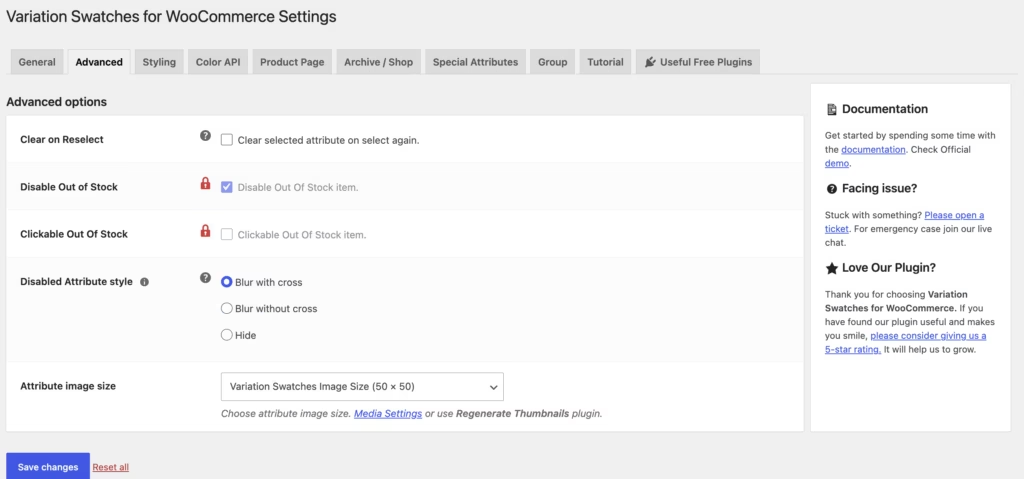
In our testing with PHP 8.4, setup took about 2 minutes to install and complete the basic configuration. The woo-variation-swatches-pro.zip file installed directly through Plugins → Add New Plugin → Upload Plugin, with no need to extract the archive first.
Color Swatches
Variation Swatches for WooCommerce Pro replaces the standard attribute dropdown with a row of color chips whenever a product attribute is set up as a color option. Each value in the attribute list maps to a swatch color, so a shopper picking between “Red,” “Navy,” or “Charcoal” sees the actual hue rather than reading it.
For stores selling apparel, accessories, or any product line where color drives the purchase decision, this removes a layer of guesswork. Shoppers scan visually instead of parsing text, which shortens the path from product page to add-to-cart.
Image Swatches
Attributes can also render as small product images instead of plain text or solid color blocks — useful for variations where a swatch alone doesn’t capture the difference, such as patterned fabric, wood grain, or packaging variants.
Because the image is tied to the specific attribute value, the swatch grid on the product page doubles as a visual index of every variant, cutting down on customer questions about what a variation actually looks like before it ships.
Button Swatches
Text-based options — sizes, materials, editions — display as clickable buttons rather than dropdown list items. Each button carries the attribute label directly, so options like “Small,” “Medium,” and “Large” are visible without opening a menu.
That format works well for stores where size or format selection is a routine part of checkout. Buyers see every available option at a glance, which reduces the extra click a dropdown requires and makes out-of-stock or unavailable combinations easier to spot.
Radio Swatches
The radio swatch style presents attribute choices as selectable radio buttons alongside the option label. It’s a plainer alternative to the button style, suited to stores that want a clear, form-like selection pattern rather than a styled button grid.
Combined with the other three formats, it gives store owners a way to match swatch style to the type of attribute being sold — visual formats for color and image, form-style selection for text options.
Customizable Swatch Shapes and Dimensions
Swatches aren’t fixed to one look. The plugin supports round, rounded, and square shapes, and dimensions can be set globally across the store or overridden for an individual attribute or a single product.
That flexibility matters for stores with a defined visual identity — a square swatch might suit a minimalist theme, while rounded shapes fit a softer design. Per-product overrides also mean a single unusual product line doesn’t force a store-wide styling change.
Archive and Shop Page Support
In the free version, swatches typically appear only on individual product pages. The developer states that Pro extends swatch rendering to archive and shop pages, so variation options show up directly in product listings and category grids.
Shoppers can then preview, and in some setups select, a variation before ever clicking into the product page — useful for stores where color or style drives the buying decision and browsing speed matters.
Quick View Popup Support
Pro adds swatch rendering inside quick view popups, so the same color, image, button, or radio options available on the full product page also appear in the lightweight overlay view.
For stores that rely on quick view to keep shoppers browsing without full page loads, this keeps the swatch experience consistent rather than falling back to a plain dropdown inside the popup.
Page Builder Compatibility
Swatches render correctly inside layouts built with Elementor and WooCommerce Blocks, according to the Pro feature set. That covers stores assembling product and shop pages with block-based or drag-and-drop builders rather than default theme templates.
Store owners running a custom Elementor-built shop page, or one composed with WooCommerce’s native blocks, can add swatch-based variation selection without extra workarounds to make the two systems display correctly together.
Installation and Setup
- Install and activate WooCommerce on the site first. This product requires WooCommerce as its base plugin, since the swatches replace the attribute dropdowns WooCommerce generates for variable products.
- Purchase the Pro plugin from GetWooPlugins and download the plugin ZIP file from the account area.
- In the WordPress dashboard, go to Plugins → Add New Plugin → Upload Plugin and upload the ZIP file directly — there is no need to extract it first.
- Activate the plugin once the upload finishes.
- Open the plugin’s settings screen to configure global swatch defaults, including swatch shape (round, rounded, or square) and attribute dimensions.
- Edit individual product attributes to assign swatch types (color, image, button, or radio), overriding the global defaults per attribute or per product where needed.
Compatibility and Requirements
| Requirement | Details |
|---|---|
| WordPress | 7.0+ |
| WooCommerce | 10.8+ |
| Plugin version referenced | 2.3.0 (released 08/06/2026) |
These figures are the version requirements stated by the developer for the current release. Store owners should confirm their WordPress and WooCommerce versions meet these figures before purchasing, since a version mismatch can prevent the plugin from activating correctly.
The Pro version reviewed here builds on the free plugin available through the WordPress plugin directory, so the underlying swatch engine shares the same base compatibility profile between both versions.
Variation Swatches for WooCommerce Pro Pricing
Current pricing details are not available in this review. Check the official developer website for up-to-date pricing information.
A free version of the plugin is available through the WordPress plugin directory, covering core swatch functionality — converting attribute dropdowns into color, image, button, and radio swatches for variable products. The Pro version builds on this with extras such as archive and shop page support, quick view popup compatibility, and integration with page builders like Elementor and WooCommerce Blocks.
GetWooPlugins offers a 30-day money-back guarantee on Pro purchases. If the plugin doesn’t work out, you can submit a refund claim within 30 days of buying it.
👉 Get GetWooPlugins | Variation Swatches for WooCommerce Pro at the best available price
Alternatives to Variation Swatches for WooCommerce Pro
Store owners comparing swatch plugins usually weigh depth of styling options against how well a plugin handles shop pages, quick view popups, and page builder layouts. The table below summarizes where Variation Swatches for WooCommerce Pro stands on those points.
| Product | Key Difference | Best For | Price Tier |
|---|---|---|---|
| Variation Swatches for WooCommerce Pro | Customizable swatch shapes with global or per-attribute and per-product overrides, plus Pro support for archive pages, quick view popups, and page builders like Elementor and WooCommerce Blocks | Store owners who want granular control over swatch appearance across shop and product pages | Freemium |
Competitor data is sourced from publicly available information as of 2026 and may have changed.
The right pick ultimately comes down to how a store displays variations. A shop that only needs swatches on single product pages may be fine with a lighter plugin, while stores that rely heavily on archive-page filtering, quick view popups, or a page builder workflow will get more value from a Pro-tier option built around those use cases.
Frequently Asked Questions
Is there a free version of Variation Swatches for WooCommerce Pro?
Yes, GetWooPlugins distributes a free version through the WordPress plugin directory that covers core swatch functionality, including converting attribute dropdowns into color, image, button, and radio swatches. The Pro version builds on this base with additional features such as archive page support, quick view popups, and page builder integration.
Does Variation Swatches for WooCommerce Pro work with Elementor?
Yes, the Pro version adds support for page builders including Elementor, alongside WooCommerce Blocks. That extends swatch functionality beyond the default WooCommerce product page templates.
Can I show swatches on the shop or archive page with this plugin?
Yes, Pro adds support for displaying swatches on archive and shop pages, not just single product pages. This is one of the features that separates the Pro version from the free plugin, which focuses on the core variation selection experience.
What swatch shapes does Variation Swatches for WooCommerce Pro support?
The plugin supports customizable swatch shapes including round, rounded, and square styles. Dimensions can be set globally or overridden on a per-attribute and per-product basis, giving store owners control over how swatches look across different product types.
Does GetWooPlugins offer refunds on Variation Swatches for WooCommerce Pro?
Yes, GetWooPlugins offers a 30-day money-back guarantee on Pro purchases. Buyers who are unsatisfied with the plugin can submit a refund claim within 30 days of their purchase date.
Does the plugin support quick view popups?
Yes, quick view popup support is included in the Pro version. That lets shoppers select variations using swatches directly within a quick view window rather than opening the full product page.
Download & Pricing Options
🆓 Free Version
👉 Download the Free Version of GetWooPlugins | Variation Swatches for WooCommerce Pro
💎 Get GetWooPlugins | Variation Swatches for WooCommerce Pro (Best Available Price)
👉 Check Current Pricing for GetWooPlugins | Variation Swatches for WooCommerce Pro
Pricing and availability may change — use the link above for current rates.
Variation Swatches for WooCommerce Pro is one of thousands of premium plugins available through a GPL membership. Our best GPL websites guide compares the ten main vendors on price, catalogue size and how fast updates actually arrive.


