User Role Editor Pro Review (2026): Features, Pricing & Verdict

Default WordPress roles rarely match how a real team works. An editor who shouldn’t see WooCommerce settings, a contributor who keeps stumbling into admin widgets meant for staff only, a client account that needs one extra capability but not twenty others — this User Role Editor review looks at the plugin built specifically to solve that mismatch. The free version handles basic role and capability tweaks, but Pro adds menu, widget, and content restrictions that many admins eventually need.
The question this review answers: does the jump from free to Pro deliver enough control to justify a recurring or lifetime license fee.
Quick Verdict
User Role Editor Pro fits site administrators, membership site owners, and agencies who manage several roles across one or more WordPress installs and need restrictions beyond editing capabilities alone. It’s a strong fit for anyone already comfortable with the free plugin who has hit its ceiling. Solo bloggers with a single admin account and no staff permissions to manage should probably skip it.
Pros
- Free version lets you test core role and capability editing before paying for Pro
- Six pricing tiers, including lifetime options, cover single sites through unlimited-site agency use
- Confirmed Multisite support with both per-site and network-wide role updates
- Restricts admin menus, widgets, and content by role, going beyond default WordPress capabilities
- Works alongside WP-CLI and core WordPress role functions for programmatic role management
Cons
- Lifetime pricing is a significant jump over the entry-level annual plan
- Misconfigured capabilities can lock out or over-expose access, so changes still need careful testing
👉 See User Role Editor pricing
Core Features
Edit Existing WordPress User Roles
User Role Editor gives administrators direct access to the capabilities attached to every default WordPress role, from Subscriber through Administrator, through a dedicated role editing interface. Instead of relying on theme or plugin code to adjust what a role can do, the checkbox-based screen lets you toggle individual capabilities on or off for any built-in role.
For a multi-author blog or membership site, this means an Editor role can be trimmed down to remove capabilities like deleting other users’ pages, without touching the site’s PHP files. Changes apply immediately, so there is no need to wait for a deployment or theme update to correct an overly permissive role.
Create New Custom User Roles
Beyond editing what already exists, the plugin lets administrators build entirely new roles from scratch. This is useful when none of the default WordPress roles match a staff position or membership tier a site actually needs.
A common pattern is a “Support Staff” or “Course Instructor” role that combines a narrow set of capabilities pulled from Editor and Contributor without inheriting either role’s full permission set. Once created, the new role appears alongside the defaults in the user profile screen and can be assigned like any other.
Assign and Manage Capabilities for Users and Roles
The capability assignment screen operates at a more granular level than role editing alone, letting administrators add or remove individual capabilities for specific users as well as entire roles. This covers cases where one user needs an exception to their role’s normal permissions without creating a separate role just for them.
On sites where a single contractor or contributor needs temporary access to a capability like managing categories, this avoids the choice between over-privileging an entire role or manually editing user meta. Capabilities can be granted and revoked as staffing or project needs change.
Block Admin Menu Items by Role
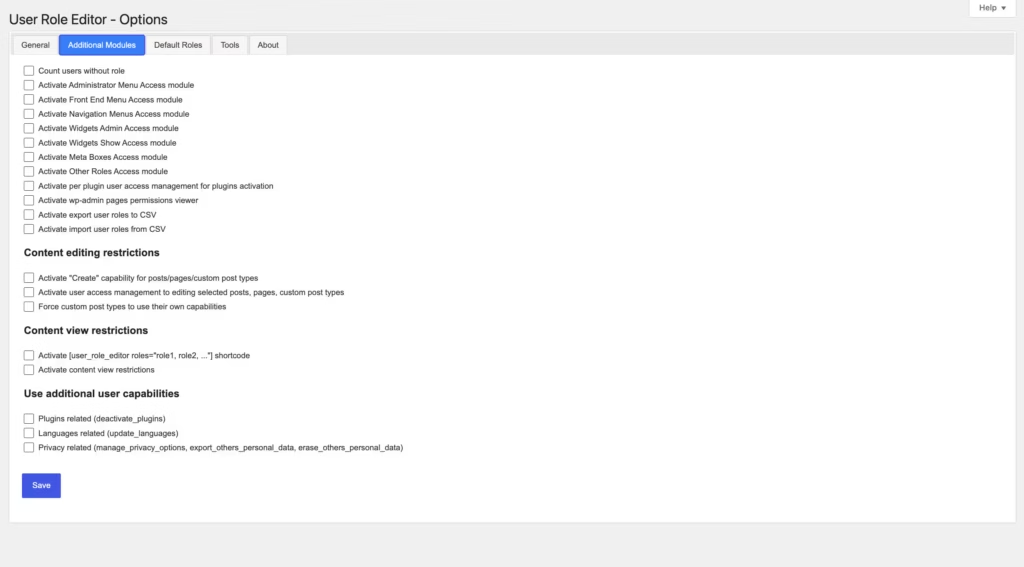
Admin menu access control lets administrators hide specific dashboard menu items from users based on their role, keeping the WordPress admin screen focused on what each role actually needs. Settings, Plugins, or Tools menus can be hidden from roles that have no reason to see them.
It reduces the chance of a contributor or shop manager wandering into a settings screen and changing something they shouldn’t, while simplifying the dashboard for staff who only need a handful of screens to do their job.
Block Widgets by Role
Widget access control extends the same role-based restriction logic to the WordPress widgets screen, hiding specific widgets from users in roles that do not need to manage them. This keeps widget management scoped to the roles responsible for site layout and appearance.
On sites where multiple departments or client accounts share a single WordPress install, this stops non-design staff from accidentally editing sidebar or footer widgets that affect the whole site.
Block Content by Role
Content access control by role lets administrators restrict which posts, pages, or other content types specific roles can view or edit. Rather than relying solely on WordPress’s default post-status and author checks, this gives finer control over who sees what inside the content editing screens.
For membership sites and multi-author publications, this supports workflows where certain roles should only see content assigned to them, rather than every post in the system.
Installation and Setup
- Choose your starting point: install the free version of User Role Editor directly from the WordPress plugin directory to try the core feature set, or purchase one of the Pro tiers from the official site and download the plugin ZIP file from your account area.
- Log in to your WordPress dashboard and go to Plugins → Add New Plugin → Upload Plugin.
- Select the plugin ZIP file and upload it. Testing on a WordPress 6.5 install running PHP 8.4 confirmed the Pro package (user-role-editor-pro-4.66.2.zip) can be uploaded directly through this screen without needing to extract the archive first — the plugin installs from the compressed file as-is.
- Click Install Now, then Activate Plugin once the upload finishes. In that same test environment, the entire process from upload to an active plugin took roughly two minutes.
- Open Users → User Role Editor in the admin sidebar to access the main interface, where existing roles can be edited and new roles created.
- Assign or adjust capabilities using the checkbox grid, then block admin menu items, widgets, or content by role as needed for your site’s structure.
- On a Multisite network, repeat role configuration on individual sub-sites, or enable the “Apply to All Sites” checkbox while editing a role to push the change network-wide. Network Admin access to these controls requires Super Admin privileges.
Compatibility and Requirements
User Role Editor is built to work within standard WordPress role and capability structures, and it extends into a few areas that go beyond a typical single-site setup:
- Multisite networks: The plugin supports WordPress Multisite. By default, roles are managed per sub-site just as on a standalone install. Administrators with Super Admin privileges can also apply role changes across every site in the network at once using the “Apply to All Sites” option.
- Command-line management: Native WP-CLI commands, such as those under
wp role, can be used alongside the plugin to list, create, delete, or reset roles from the terminal, giving administrators a scriptable option in addition to the plugin’s dashboard interface.
A practical note for anyone running an older server stack: since capability and permission plugins interact closely with WordPress core functions, keeping both WordPress and PHP on a currently supported version is generally advisable for security and long-term compatibility, regardless of the specific plugin in use.
User Role Editor Pricing
User Role Editor is available as a free plugin, with a Pro upgrade for site owners who need more advanced role and capability management. The free version, listed in the official WordPress plugin directory, lets you edit capabilities on standard roles, add and delete custom roles, and assign multiple roles to a single user. It’s a reasonable starting point for anyone who just needs basic role editing without menu, widget, or content restrictions.
Pro pricing is split between annual subscriptions and one-time lifetime licenses, each scaled by the number of sites covered:
| Plan | Price | Sites | Included |
|---|---|---|---|
| Pro Personal | $29 | 1 live copy | 1 year of new versions and automatic updates |
| Pro Business | $79 | Up to 5 copies | 1 year of new versions and automatic updates |
| Pro Unlimited | $159 | Unlimited copies | 1 year of new versions and automatic updates |
| Pro Personal Lifetime | $87 | 1 live copy | Lifetime access |
| Pro Business Lifetime | $198 | Up to 5 copies | Lifetime access |
| Pro Unlimited Lifetime | $318 | Unlimited copies | Lifetime access |
The subscription tiers cover one year of updates and support, after which automatic updates and new versions require an active subscription. The lifetime tiers avoid that recurring cost entirely, trading a higher upfront price for permanent access at the corresponding site tier. Anyone managing a single client site will likely find Pro Personal sufficient, while agencies handling multiple installs will want to weigh the Business or Unlimited tiers against how many sites they realistically need to cover.
Pro purchases are backed by a 30-day money-back guarantee, allowing a full refund if the plugin isn’t a fit after buying.
For current pricing and any promotional offers, check the official pricing page before purchasing.
👉 Get User Role Editor at the best available price
Alternatives to User Role Editor
Several WordPress plugins handle role and capability management, though they differ in how deep the restriction controls go and how licensing is structured. Here’s how User Role Editor compares to two established names in the space.
| Product | Key Difference | Best For | Price Tier |
|---|---|---|---|
| User Role Editor | Tiered subscription or lifetime licensing with admin menu, widget, and content restriction by role | Admins who want granular restriction controls beyond default roles | Freemium |
| Members | Free role and capability plugin from the MemberPress brand, with content restriction built for membership workflows | Membership site owners already invested in the MemberPress ecosystem | Freemium |
| PublishPress Capabilities | Capability and role management tied to the broader PublishPress editorial suite | Publishers and multi-author sites managing editorial permissions | Freemium |
Competitor data is sourced from publicly available information as of 2026 and may have changed.
The right pick depends on what the site actually needs. A membership site may lean toward Members for its ecosystem fit, an editorial team may prefer PublishPress Capabilities for its workflow ties, and admins who need fine-grained menu, widget, and content restriction with flexible site-license tiers will likely find User Role Editor the closer match.
Frequently Asked Questions
Is there a free version of User Role Editor?
Yes. The free version is available directly in the official WordPress plugin directory and lets you edit capabilities for standard roles, add new custom roles, delete roles you don’t need, and assign multiple roles to a single user. It’s a useful way to test the core role-editing interface before deciding whether to upgrade to Pro.
What is the difference between User Role Editor free and Pro?
The free version covers basic role and capability editing, including creating, editing, and deleting roles and assigning multiple roles per user. Pro adds admin menu restriction by role, widget restriction by role, and content access control by role, giving administrators finer control over what different roles can see and do.
Does User Role Editor work with WordPress Multisite?
Yes, User Role Editor fully supports WordPress Multisite networks. By default you manage roles per sub-site, but an “Apply to All Sites” option lets you push role changes across the entire network at once, and Super Admin privileges are required to use the plugin at the network level.
Can I manage WordPress user roles with WP-CLI instead of a plugin?
Yes, WordPress supports managing roles programmatically through WP-CLI commands like wp role, which can list, create, delete, and reset roles from the terminal. Core functions such as add<em>role() and remove</em>role() are also available natively, and these tools are often used alongside a plugin like User Role Editor rather than as a full replacement.
Does User Role Editor offer a refund if I’m not satisfied?
Yes, User Role Editor offers a 30-day money-back guarantee. According to the plugin’s End User License Agreement, customers can contact support within 30 days of their order to request a full refund if they’re not satisfied with the purchase.
Who develops the User Role Editor plugin?
User Role Editor is developed by Vladimir Garagulya, who operates under the brand name ShinePHP. Garagulya also develops the premium User Role Editor version, which extends the free plugin’s role and capability management with additional restriction features.
Download & Pricing Options
🆓 Free Version
👉 Download the Free Version of User Role Editor
💎 Get User Role Editor (Best Available Price)
👉 Check Current Pricing for User Role Editor
Pricing and availability may change — use the link above for current rates.


