UpdraftPlus Premium Review 2026: Is the Upgrade Worth It?

The free UpdraftPlus plugin handles scheduled backups to cloud storage well enough that millions of site owners never look further — until a botched plugin update, a client migration, or a Multisite install exposes what the free tier won’t do. This UpdraftPlus Premium review looks at exactly where that line sits: pre-update backups, incremental backups, direct site-to-site migration and encryption all live behind the paywall, along with most of the remote storage destinations. The question is whether those additions justify an annual subscription, and if so, which of the five tiers actually fits your site count.
Quick Verdict
Premium earns its cost for freelancers and agencies who migrate sites, run Multisite, or need a safety net before every update — the migration and granular restore tools alone save hours of manual work. Site owners with a single WordPress install already backing up nightly to Dropbox or Google Drive should stay on the free version; the upgrade solves problems they don’t have. Anyone drawn to the 50GB storage allowance needs to know it exists only on the top Gold plan.
Pros
- Automatic backups before WordPress updates, plus incremental backups, reduce both risk and server load
- Direct site-to-site migration and selective migration make client moves and staging refreshes straightforward
- Broad remote storage coverage — Dropbox, Google Drive, Amazon S3, OneDrive, Azure, Google Cloud, MEGA, WebDAV, FTP/SFTP — with simultaneous backups to multiple destinations
- Granular restores down to individual site parts and individual database tables, including archives from other backup plugins
- UpdraftClone staging runs on TeamUpdraft servers via a token system, and Gold bundles UpdraftCentral for multi-site management
- Database encryption, data anonymization, password-protected access and advanced retention rules support compliance work
- WP-CLI and WordPress Multisite support for developer workflows
Cons
- Included storage is only 1GB on every plan below Gold
- Site limits apply to all tiers except Enterprise and Gold, so growing portfolios can outgrow a plan mid-term
Core Features
The distributed archive, updraftplus-2.26.7.26.zip, installs directly in WordPress via Plugins → Add New Plugin → Upload Plugin without being extracted first — a small detail, but one that removes the most common stumbling block for anyone installing a paid plugin ZIP for the first time.
Automatic Backups Before WordPress Updates
The pre-update backup is the feature that most often justifies the Premium license on its own. Rather than relying on you to remember a manual run before pushing a plugin or core update, the plugin takes the snapshot itself as part of the update flow.
For anyone who has broken a live site with a routine plugin update, the practical value is obvious: the rollback point always exists, even on the updates you did not think twice about. It sits in the Premium tier only, so free-version users still have to run that backup by hand.
Incremental Backups
Instead of writing a full archive every time the schedule fires, incremental backups capture only what has changed since the last run. That too is a Premium-only capability.
On a site with a large uploads folder — a photography portfolio, a catalog with thousands of product images — the difference shows up in how much storage each cycle consumes and how much work the server does per backup. Frequent schedules become far more practical when each pass is not re-uploading the same media library.
Broad Remote Storage Coverage
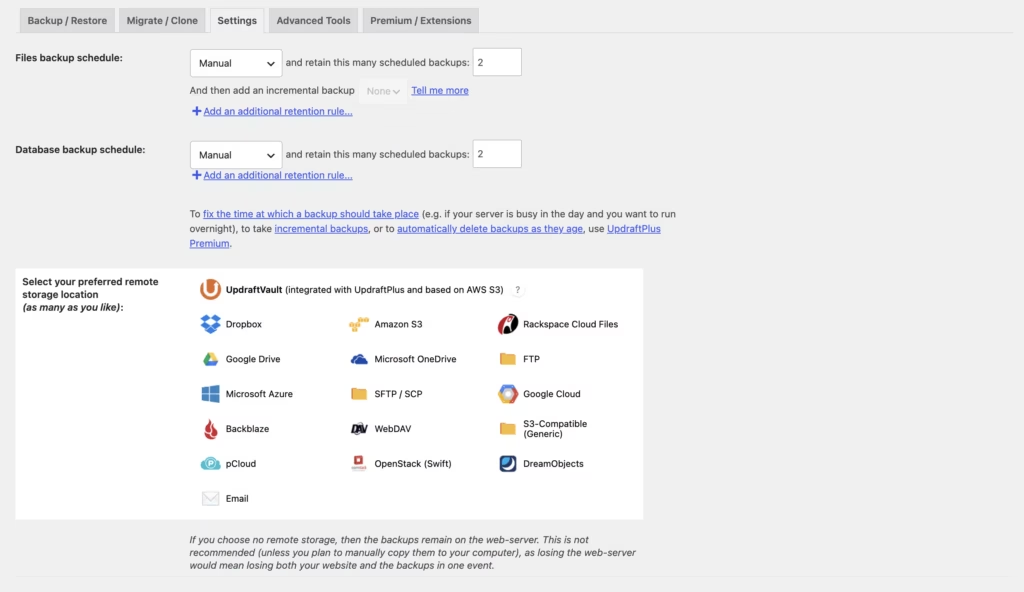
Backups can be sent to Dropbox, Google Drive, Amazon S3, Rackspace, OneDrive, FTP/SFTP, Microsoft Azure, Google Cloud, MEGA, OpenStack Swift, and WebDAV/SCP. UpdraftVault is the vendor’s own storage option, with the 50GB allowance included on the Gold plan. Backups can also be written to multiple locations at the same time.
That last detail matters more than the length of the list. Sending the same archive to both an S3 bucket and Google Drive means a locked account or a deleted folder does not cost you the only copy you have. The wider set of destinations beyond the free version’s options is part of what Premium adds.
Granular Restores
Restores are not all-or-nothing. You can bring back individual parts of a site — the database only, the plugins only, the uploads folder — and the plugin can restore individual database tables and handle sites running multiple databases.
The result is far less collateral damage during recovery. A corrupted options table or a single broken plugin directory can be repaired without rolling the entire site back to yesterday and losing every order, comment, or draft written since. There is also support for restoring archives created by other backup plugins, which makes switching from an incumbent tool considerably less risky.
Direct Site-to-Site Migration
Migration runs directly between two installs rather than through a manual download-and-upload cycle, and selective migration lets you move only the components you actually want at the destination.
For a freelancer moving a build from a development environment to a client’s production host, that removes the usual dance of exporting archives, transferring them by FTP, and hoping the search-replace lands cleanly. Like incremental backups, site-to-site migration sits behind the Premium license.
UpdraftClone Staging
UpdraftClone creates a staging copy of your site on TeamUpdraft’s own servers, using a token-based system rather than consuming space on your host. Every Premium tier includes staging, with plans labeled basic, standard, advanced, and ultimate.
Because the clone lives off your infrastructure, you can test a theme change, a plugin upgrade, or a PHP-version behavior without touching production or asking your host to provision a staging environment. The Gold plan additionally includes UpdraftCentral, a remote management tool for controlling multiple WordPress sites from one interface.
Encryption, Anonymization, and Access Control
Premium adds database encryption and data anonymization, along with password-protected access to the plugin’s controls. Both privacy features are Premium-only.
If your database holds customer records, membership details, or anything else that would be awkward sitting unencrypted in a cloud storage account, these are the features that make backups defensible under a privacy policy. Anonymization is particularly useful when you need a working copy of real data for testing without exposing the real people behind it.
Retention Rules and Reporting
Advanced retention rules govern how many backup sets are kept and for how long, which keeps a 1GB storage allowance from filling up after a handful of cycles. Detailed reports and email reporting cover what ran, what succeeded, and what did not.
For anyone maintaining sites they do not log into daily, the email report is the difference between knowing your backups work and assuming they do. Silent failures are the standard way backup strategies fail, and a report in the inbox surfaces them early.
Also Included
The plugin also handles manual and scheduled backups, backup of files outside wp-content, WordPress Multisite support, and WP-CLI support for developers who prefer to script their backup and restore operations from the command line.
Installation and Setup
UpdraftPlus installs like any other WordPress plugin, and the whole process is short. In a first-hand install on WordPress 6.5 running PHP 8.4, getting from upload to a working configuration took roughly two minutes.
- Decide which version you need — the free plugin covers manual and scheduled backups, remote storage and easy restores, while Premium adds the features listed in the pricing section below.
- If you are moving to Premium, remove the free version first. Deactivate and uninstall the free plugin before uploading the separate Premium ZIP file — the two are distributed as different packages and should not run side by side.
- Upload the plugin archive. In the WordPress dashboard, go to Plugins → Add New Plugin → Upload Plugin and select the ZIP. The distributed archive installs directly without needing to be extracted first.
- Activate the plugin. Once active, UpdraftPlus adds its own settings screen to the WordPress admin.
- Connect a remote storage destination. Options include Dropbox, Google Drive, Amazon S3, Rackspace, OneDrive, FTP/SFTP, Microsoft Azure, Google Cloud, MEGA, OpenStack Swift and WebDAV / SCP, alongside UpdraftVault. Most cloud services require you to authorize the connection once through your provider account.
Backups can be sent to multiple locations simultaneously, which is worth configuring early if off-site redundancy matters to you.
- Set your backup schedule and retention rules. Choose separate intervals for files and the database, then apply retention rules so old archives are pruned automatically rather than filling your storage allowance.
- Enable email reporting. Detailed reports tell you whether a scheduled run completed and where the archive landed.
- Run one manual backup before you rely on the schedule. That confirms the remote connection works and gives you a baseline archive.
- Test a restore. Restoring individual site parts — database only, plugins only, uploads only — is supported, so you can verify the process without rebuilding the whole site.
- Optional: spin up a staging copy with UpdraftClone. Clone sites are hosted on TeamUpdraft servers and run on a token-based system, so no separate hosting setup is required.
- Optional: connect UpdraftCentral. Included with the Gold plan, it manages multiple WordPress sites from a single interface — useful once you are past a handful of installs.
Full setup guides are published on the TeamUpdraft Documentation Hub.
Compatibility and Requirements
UpdraftPlus is a standard WordPress plugin with no companion plugin dependencies — it works on its own once activated.
| Item | Detail |
|---|---|
| Product type | WordPress plugin |
| Developer | TeamUpdraft |
| WordPress Multisite | Supported (Premium) |
| WP-CLI | Supported |
| Remote storage | Dropbox, Google Drive, Amazon S3, Rackspace, OneDrive, FTP/SFTP, Microsoft Azure, Google Cloud, MEGA, OpenStack Swift, WebDAV / SCP, UpdraftVault |
| Companion plugins required | None |
| Tested environment | WordPress 6.5, PHP 8.4 |
The environment above reflects a single first-hand install. In practice, running the current stable WordPress release on a currently supported PHP version is the sensible baseline — end-of-life PHP branches stop receiving security fixes, and a backup plugin is the last thing you want failing quietly on an unpatched stack.
WP-CLI support is useful if you script backups as part of a deployment routine or manage sites without loading the admin interface.
Premium licenses are tied to site counts rather than locked to a single domain, so license slots can be released from your account and reassigned to a different website — relevant for anyone who rebuilds or retires client sites regularly.
UpdraftPlus Pricing
UpdraftPlus follows a freemium model. The free version, distributed through WordPress.org, covers manual and scheduled backups, remote storage options and straightforward restores, with support handled by the community forums. For many single-site owners, that is enough to get off-site copies running on a schedule.
Premium adds the features that most professional workflows depend on: automatic backups before updates, incremental backups, direct site-to-site migration, the wider set of cloud storage destinations, Multisite support, database encryption and data anonymization. Support also shifts from community forums to a dedicated team that includes developers.
Five Premium plans are available, separated mainly by site count and staging capability.
| Plan | Price | Sites | Included |
|---|---|---|---|
| Personal | $70.00 / year | Up to 2 sites | Basic staging, 1GB storage, premium support, 12 months of updates and releases |
| Business | $95.00 / year | Up to 10 sites | Standard staging, 1GB storage, premium support, 12 months of updates and releases |
| Agency | $145.00 / year | Up to 35 sites | Advanced staging, 1GB storage, premium support, 12 months of updates and releases |
| Enterprise | $195.00 / year | Unlimited sites | Ultimate staging, 1GB storage, premium support, 12 months of updates and releases |
| Gold | $399.00 / year | Unlimited sites | Ultimate staging, 50GB storage, UpdraftCentral management, premium support, 12 months of updates and releases |
Which plan fits which user
Personal suits a freelancer or owner running one or two sites who wants pre-update backups and a proper migration tool. Business at 10 sites is the natural fit for a small client roster, while Agency covers up to 35 sites.
Enterprise removes the site cap entirely, which matters if you manage a large or growing portfolio. Gold is the only plan that bundles UpdraftCentral — the remote management dashboard for controlling multiple installs from one interface — along with a substantially larger 50GB storage allowance instead of the 1GB included on the other tiers.
Billing terms
Prices can be displayed in EUR, GBP or USD, with country selection applied for VAT. Every Premium purchase includes 12 months of updates and releases. Subscriptions renew automatically and can be canceled at any time, and a 10-day money-back guarantee applies.
For current rates in your own currency, check the official pricing page at teamupdraft.com.
👉 Get UpdraftPlus at the best available price
Alternatives to UpdraftPlus
Backup, migration and staging tools overlap heavily in WordPress, and the practical differences usually come down to where backups live and whether the vendor hosts the infrastructure. The options below sit closest to what UpdraftPlus does.
| Product | Key Difference | Best For | Price Tier |
|---|---|---|---|
| UpdraftPlus | Free tier handles scheduled backups and remote storage, while Premium adds pre-update and incremental backups, site-to-site migration, extra cloud destinations, Multisite support, database encryption and UpdraftClone staging | Site owners and small agencies who want to choose their own cloud storage destination and pay only for the tier that matches their site count | Freemium, with Premium tiers from Personal to Gold |
| Duplicator | Built around packaged site archives for cloning and manual migration rather than continuous scheduled off-site backups | Developers who move sites between environments and want a portable archive plus installer | Freemium |
| BlogVault | Backups are stored and processed on the vendor’s own infrastructure instead of a storage account you connect yourself | Owners who prefer a managed off-site service with no cloud account to configure | Subscription-based |
| Jetpack VaultPress Backup | Automattic-run backup service with its own hosted storage, sold as part of the Jetpack product family | WooCommerce and content sites already invested in the Jetpack ecosystem | Subscription-based |
| WP Migrate | Focused specifically on database and file migration between environments rather than scheduled backup retention | Developers running repeated local-to-staging-to-production syncs | Freemium |
Competitor data is sourced from publicly available information as of 2026 and may have changed.
The right pick depends on how you work. If you already have Dropbox, Google Drive or Amazon S3 and want control over retention and destinations, UpdraftPlus fits well. If you would rather hand storage and scheduling to a hosted service, or you only ever need one-off migrations, one of the alternatives above will be the cheaper path.
Frequently Asked Questions
What is the difference between UpdraftPlus free and Premium?
The free version handles manual and scheduled backups, remote storage and straightforward restores, while Premium adds the features many site owners assume are standard. Those include automatic backups before WordPress updates, incremental backups, direct site-to-site migration, additional cloud storage destinations, Multisite support, database encryption and data anonymization. Premium also replaces community forum support with direct help from the vendor’s support team.
How much does UpdraftPlus Premium cost per year?
Premium starts at $70.00 per year for the Personal plan and runs to $399.00 per year for Gold. In between sit Business at $95.00, Agency at $145.00 and Enterprise at $195.00 per year. Prices can be shown in EUR, GBP or USD, with country selection applied for VAT.
How many sites can I use one UpdraftPlus Premium license on?
It depends on the tier: Personal covers up to 2 sites, Business up to 10, and Agency up to 35. Enterprise and Gold both cover unlimited sites, so portfolios that keep growing avoid hitting a ceiling mid-term.
Do I need to uninstall the free UpdraftPlus before installing Premium?
Yes. The free version must be removed before you upload and activate the separate Premium ZIP file — upgrading is not a matter of entering a license key into the existing plugin.
Can UpdraftPlus migrate a WordPress site to a new host?
Yes. Premium includes direct site-to-site migration, along with selective migration if you only want to move specific parts of a site. It can also restore archives created by other backup plugins, which helps when you are switching tools and hosts at the same time.
Where does UpdraftPlus store backups?
Backups can go to Dropbox, Google Drive, Amazon S3, Rackspace, OneDrive, FTP/SFTP, Microsoft Azure, Google Cloud, MEGA, OpenStack Swift and WebDAV/SCP, as well as UpdraftVault. The plugin can also send backups to multiple locations simultaneously, and advanced retention rules control how long copies are kept.
What is UpdraftClone and where are staging sites hosted?
UpdraftClone is the built-in staging feature, and clone sites are hosted directly on TeamUpdraft servers rather than your own hosting account. It runs on a token-based system. Each Premium tier lists a staging level — basic on Personal, standard on Business, advanced on Agency, and ultimate on Enterprise and Gold.
Does UpdraftPlus work with WordPress Multisite?
Yes, but Multisite support is a Premium feature rather than part of the free plugin. Network administrators will therefore need a paid license to back up and restore a Multisite installation.
Can I transfer an UpdraftPlus Premium license to another website?
Yes. Licenses can be moved between sites by releasing a license slot from your account, which frees that slot for a different installation. That matters most on the tiers with fixed site counts, such as Personal, Business and Agency.
Does UpdraftPlus offer a refund or money-back guarantee?
Yes — a 10-day money-back guarantee applies to Premium purchases. Subscriptions renew automatically and can be canceled at any time, and each purchase includes 12 months of updates and releases.
What is UpdraftCentral and which plan includes it?
UpdraftCentral is a remote management tool for controlling multiple WordPress sites from a single interface, and it is included with the Gold plan at $399.00 per year. Gold also raises the included storage allowance to 50GB, compared with 1GB on the Personal, Business, Agency and Enterprise tiers.
Can UpdraftPlus restore backups made by another backup plugin?
Yes. UpdraftPlus can restore archives created by other backup plugins, which makes it practical to migrate away from a competing tool without losing your existing backup history. You can also restore individual site parts, such as only the database or only the plugins folder, rather than the whole site.
Download & Pricing Options
🆓 Free Version
👉 Download the Free Version of UpdraftPlus
💎 Get UpdraftPlus (Best Available Price)
👉 Check Current Pricing for UpdraftPlus
Pricing and availability may change — use the link above for current rates.
UpdraftPlus Premium is available from most GPL vendors, but they are not equivalent. Our best GPL websites review tested all ten on price, catalogue and whether updates reach wp-admin at all.


