Swift Performance Review 2026: WordPress Caching Plugin Tested

Core Web Vitals scores can make or break a site’s search rankings, yet most caching plugins only handle half the problem, leaving critical CSS, image compression, and preloading to separate tools. This Swift Performance review looks at a plugin built to close that gap with AI-driven critical CSS generation and intelligent preloading baked into a single package.
The real question is whether that all-in-one, premium-only approach delivers enough of an LCP and TTFB improvement to justify skipping established names like WP Rocket or LiteSpeed Cache.
Quick Verdict
Swift Performance suits agencies and site owners who want caching, image optimization, and Core Web Vitals tuning handled by one plugin instead of a stack of separate tools. It’s a weaker fit for anyone wanting to test drive a caching solution before committing. Budget-conscious single-site owners may also find the annual per-site pricing less flexible than a flat-rate competitor.
Pros
- AI-driven critical CSS generation paired with intelligent preloading targets LCP, FID, CLS, FCP, INP, and TTFB directly
- Built-in image optimization and caching eliminate the need for extra optimization plugins
- Server-side caching bypasses PHP execution entirely on high-traffic sites
- Native CDN integration with Cloudflare and Bunny.net through dedicated settings panels
- Installation via the standard WordPress plugin upload screen takes about two minutes
Cons
- Single-site pricing runs on an annual per-site basis, adding cost for anyone evaluating the plugin across more than one site
- Single and Multi plans are billed annually per site count, which can raise costs for agencies versus a flat-rate unlimited-site plan
👉 See Swift Performance pricing
Core Features
AI-Driven Critical CSS Generation
Swift Performance uses an AI-driven process to generate critical CSS for each page rather than relying on a single static ruleset applied site-wide. The critical CSS generator, one of the plugin’s built-in components, identifies the styles needed to render above-the-fold content and inlines them automatically.
For site owners, this removes a step that normally requires manual auditing or a separate tool: pages load their visible content without waiting on the full stylesheet, which directly targets render-blocking CSS as a cause of slow paint times.
Intelligent Preloading
The preloading engine works alongside the critical CSS generator to request pages and assets ahead of when a visitor’s browser would normally fetch them. Rather than leaving cache warm-up to chance, Swift Performance builds this into the plugin’s core behavior.
The practical effect is fewer cold-cache page loads for real visitors, since pages are more likely to already be cached by the time someone lands on them. This matters most on sites with frequently changing content, where cache entries expire and need to be rebuilt often.
Image Optimization
Swift Performance includes its own image optimizer as a built-in feature, handling compression without requiring a separate plugin or an external service subscription. It sits inside the same dashboard as the caching and CSS tools rather than operating as a bolt-on add-on.
For anyone managing image-heavy pages, this consolidates a task that often adds another plugin and another point of failure to a WordPress stack. One tool handles the caching, the critical CSS, and the image compression together.
Core Web Vitals Optimization
Swift Performance frames its feature set explicitly around Core Web Vitals: LCP, FID, CLS, FCP, INP, and TTFB. Rather than treating speed as a single generic metric, the plugin’s critical CSS, preloading, and image optimization tools are each positioned as levers against specific parts of that scorecard.
This is useful for site owners under pressure to improve Core Web Vitals for SEO reasons rather than speed for its own sake, since the reporting language matches what shows up in tools like Google Search Console. The underlying caching system that ties these features together is also part of the plugin’s built-in toolset, rather than a separately licensed add-on.
Installation and Setup
- Purchase a Swift Performance license — Single, Multi, or Must-Have Pack — from the official site and download the plugin zip file from your account area.
- Log into your WordPress dashboard and go to Plugins > Add New Plugin > Upload Plugin.
- Upload the swift-performance.zip file directly. There is no need to extract the archive first; the WordPress uploader accepts the zip as downloaded.
- Click Activate once the upload finishes.
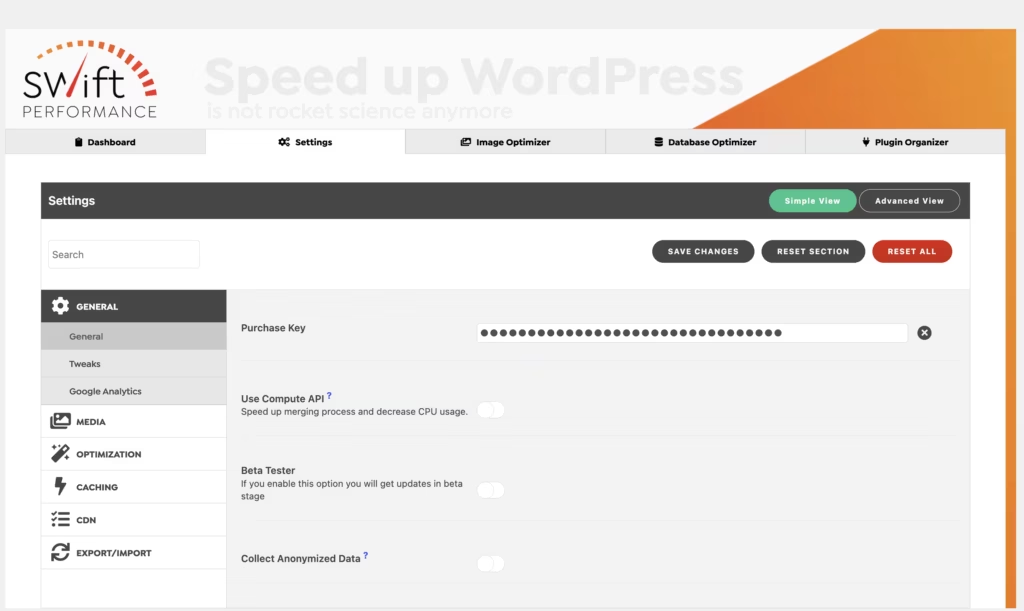
- Enter your license key in the plugin’s settings screen to unlock updates and Support Center access.
- Configure the core modules — critical CSS generation, the preloading engine, image optimization, and caching — under their respective settings tabs.
Enable Cloudflare or Bunny.net integration here if you use either CDN, since both have dedicated settings panels within the plugin.
- Run a test page load and check your Core Web Vitals scores (LCP, FID, CLS, FCP, INP, TTFB) to confirm the optimizations are active.
Basic installation and initial setup is quick. On a test install running WordPress 6.5 with PHP 8.4, the full process from upload to activation took about two minutes.
Compatibility and Requirements
| Requirement | Details |
|---|---|
| Minimum PHP version | PHP 7.4 |
| Recommended PHP version | PHP 8.0 or higher |
| CDN integrations | Cloudflare, Bunny.net |
| License type | Proprietary, tied to purchased plan |
PHP 7.4 is the floor Swift Performance needs to run correctly, but sites still on that version should plan an upgrade — PHP 7.4 reached end of life years ago, and running a live site on it carries security risk regardless of which plugins are installed. PHP 8.0 or newer gives better execution speed, lower server load, and active security support.
Beyond standard plugin-level caching, Swift Performance also applies server-side caching techniques designed to bypass PHP entirely for high-traffic pages. It remains a standard WordPress plugin rather than separate server software, but this hybrid approach means hosting environments with more configurable caching layers (such as those supporting Cloudflare or Bunny.net at the DNS level) can take fuller advantage of its performance features.
Swift Performance Pricing
Swift Performance is a premium-only plugin with no free tier. Three purchase options are available, covering different site counts and use cases.
| Plan | Price | Sites | Includes |
|---|---|---|---|
| Single | $49.99/year | 1 website | Support Center access |
| Multi | $99.99/year | 5 websites | Support Center access |
| Must-Have Pack | $59.99/month | Unlimited websites | Full Must-Have Plugins bundle |
The Single and Multi plans are billed annually, while the Must-Have Pack runs on a monthly billing cycle and bundles Swift Performance together with a wider set of Must-Have plugins rather than selling the caching tool on its own.
Support Center access is confirmed for the Single and Multi tiers. It isn’t clear whether the Must-Have Pack carries the same support inclusion, so agencies relying on direct support should confirm this before committing to that plan.
Swift Performance also offers a 14-day money-back guarantee from the date of initial purchase, with no reason required to request a refund within that window. Configuration services and custom jobs are excluded from this guarantee.
For current rates and any active promotions, check the official pricing page before purchasing.
👉 Get Swift Performance at the best available price
Alternatives to Swift Performance
Swift Performance isn’t the only plugin chasing better Core Web Vitals scores. Here’s how it stacks up against four established caching tools.
| Product | Key Difference | Best For | Price Tier |
|---|---|---|---|
| Swift Performance | AI-driven critical CSS and preloading with built-in image optimization | Site owners focused on Core Web Vitals without stacking extra plugins | Paid |
| WP Rocket | Straightforward setup and broad compatibility without manual configuration | Users who want minimal tinkering after activation | Paid |
| LiteSpeed Cache | Free plugin that unlocks server-level caching when paired with LiteSpeed or QUIC.cloud | Sites already running on LiteSpeed infrastructure | Freemium |
| NitroPack | All-in-one caching, image optimization, and CDN delivery via an external cloud platform | Users who prefer offloading optimization processing outside their server | Freemium |
| WP Fastest Cache | Free core caching with a paid upgrade for minification and image optimization | Budget-conscious users who want to start free and upgrade later | Freemium |
Competitor data is sourced from publicly available information as of 2026 and may have changed.
The right pick depends on how you weigh setup effort, hosting environment, and budget. Agencies managing many sites may value Swift Performance’s bundled feature set, while those on LiteSpeed servers or with tighter budgets may find a freemium option a better starting point.
Frequently Asked Questions
Does Swift Performance have a free version?
No, Swift Performance is premium only and does not offer a free tier. Every plan requires payment upfront, though a 14-day money-back guarantee from the date of initial purchase reduces the risk of trying it.
What is Swift Performance’s refund policy?
Swift Performance offers a 14-day money-back guarantee starting from the date of your first purchase, and no specific reason is required to request it. The guarantee excludes configuration services and custom jobs.
What PHP version does Swift Performance require?
Swift Performance requires PHP 7.4 or newer to run safely and correctly on a WordPress site. PHP 8.0 or higher is recommended for better execution speed, lower server load, and active security support.
Does Swift Performance work with Cloudflare?
Yes, Swift Performance includes a dedicated API integration for Cloudflare. It also offers built-in integration with Bunny.net, with each CDN handled through its own settings layout inside the plugin.
How much does Swift Performance cost?
Swift Performance offers three pricing options: the Single plan at $49.99 per year for one website, the Multi plan at $99.99 per year for five websites, and the Must-Have Pack at $59.99 per month for unlimited websites. The Single and Multi plans are billed annually and include Support Center access, while the Must-Have Pack is billed monthly and bundles additional plugins.
How long does it take to install Swift Performance?
Installation takes about two minutes when tested on WordPress 6.5 with PHP 8.4. The plugin zip file can be uploaded directly through the Plugins > Add New Plugin > Upload Plugin screen in WordPress without needing to extract it first.
Is Swift Performance good for agencies managing multiple sites?
Swift Performance can suit agencies through its Must-Have Pack, which covers unlimited websites for $59.99 per month and bundles additional plugins. Agencies handling a smaller number of sites may instead consider the Multi plan, which covers five websites for $99.99 per year and includes Support Center access.
Download & Pricing Options
🔍 Try Before You Buy
Swift Performance does not have an official free tier. To evaluate it before purchasing, a GPL-licensed copy is available for sandbox testing purposes only.
👉 Download GPL Evaluation Copy
This is a GPL-licensed redistributed copy for testing only — not an official developer product.
💎 Get Swift Performance (Best Available Price)
👉 Check Current Pricing for Swift Performance
Pricing and availability may change — use the link above for current rates.
Swift Performance is available from most GPL vendors, but they are not equivalent. Our best GPL websites review tested all ten on price, catalogue and whether updates reach wp-admin at all.


