Smush Pro Review 2026: Is It the Best WordPress Image Optimizer?


Unoptimized images are one of the most common reasons WordPress sites fail Core Web Vitals — and most site owners discover this only after their traffic has already suffered. This review examines whether WPMU DEV’s paid tier delivers enough over the free version to justify the upgrade: CDN delivery, next-gen format conversion, and multi-site licensing bundled into a single plugin.
The real question is whether those Pro features justify the cost when capable free and low-cost alternatives exist.
Quick Verdict
Smush Pro is a strong fit for developers and agencies managing multiple WordPress sites who want compression, CDN delivery, and WebP/AVIF conversion without stitching together separate tools. Single-site owners on a tight budget who only need basic compression may find the free tier — or a competing plugin — sufficient.
Pros
- CDN delivery spans 119 global locations across all Pro plans
- Supports both WebP and AVIF next-gen format conversion
- Lossy compression is free for all users, with no batch limit
- Multi-site licensing scales from 3 sites up to unlimited
- Setup is fast — a tested environment was ready in roughly 4 minutes
Cons
- Free tier blocks files larger than 5MB, which can be a hard stop for raw photography or high-res product images
- CDN traffic is capped per plan, with the entry-level tier limited to 50GB per month
- Premium tier pricing is not listed on the product page
- Only the top-tier plan includes VIP support
Core Features
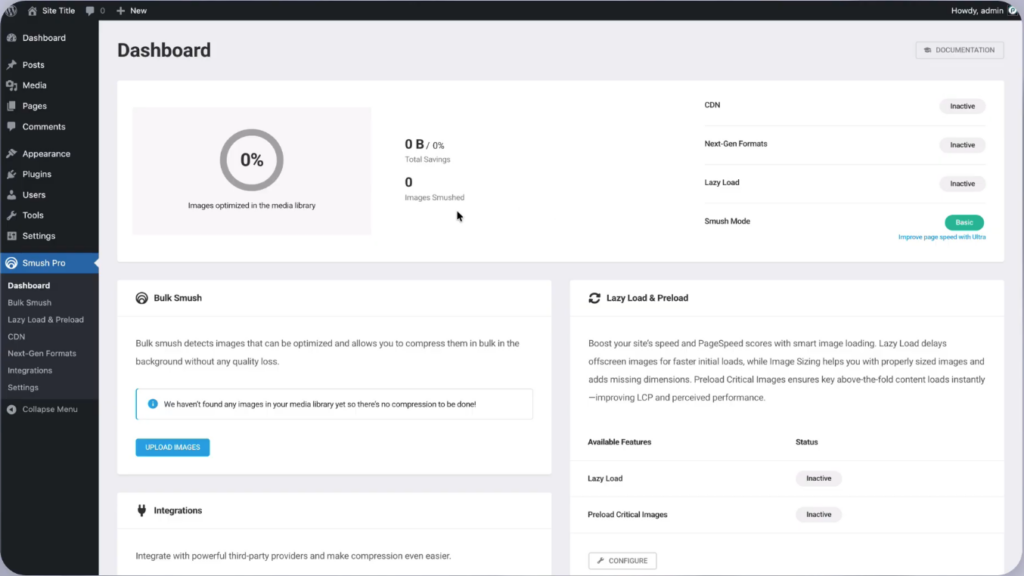
Image Compression: Lossy and Lossless Modes
Smush Pro supports both lossy and lossless compression, giving you direct control over the trade-off between file size reduction and image fidelity. Lossy compression strips more data for smaller files; lossless preserves every pixel while still trimming unnecessary metadata and overhead. Lossy compression has been available to free users since version 3.10 — it is no longer a Pro-only feature.
Version 3.12 removed the previous 50-image batch limit. Free users can now run bulk optimization across an entire media library without hitting an artificial ceiling. The 5MB per-file cap still applies on the free tier, which matters for photographers or WooCommerce stores uploading large raw images.
CDN Delivery Across 119 Global Locations
Every paid plan includes CDN delivery for images, distributed across 119 points of presence worldwide. Rather than serving images from your origin server, Smush Pro routes requests to the nearest CDN node — reducing latency for visitors regardless of where they are located. The traffic allowance scales with the plan: 50GB on Pro Basic, 100GB on Pro Standard, 250GB on Pro Plus, and 500GB on Premium.
For sites with international audiences or high image volume, this built-in CDN removes the need to configure a separate service. The traffic cap is worth monitoring on the entry-level plan — a media-heavy site with global traffic could approach 50GB quickly.
Next-Gen Format Conversion: WebP and AVIF
Smush Pro converts images to both WebP and AVIF, the two primary next-generation formats supported by modern browsers. AVIF offers compression efficiency beyond WebP, making it useful for sites where image quality and file size are both priorities. Supporting both formats means the plugin can serve the most efficient option available to each visitor’s browser.
Format conversion works alongside the compression pipeline rather than as a separate step. Sites carrying large catalogs of legacy JPEG or PNG images — WooCommerce stores being the obvious example — can convert existing assets in bulk without re-uploading or manually processing files.
Lazy Loading
Lazy loading defers the loading of off-screen images until a visitor scrolls toward them, reducing the volume of data transferred on initial page load. Smush Pro includes this as a built-in feature, so no separate plugin or custom code is required.
The practical effect is a faster perceived load time, particularly on long-form content pages or product listing pages where dozens of images sit below the fold. Combined with CDN delivery and format conversion, lazy loading addresses a different layer of the image performance problem — not how large the files are, but when they are fetched.
Automatic Optimization on Upload
When a new image is uploaded to the WordPress media library, Smush Pro processes it automatically. Compression, and any configured format conversion, applies at the point of upload rather than requiring a manual trigger afterward.
This matters most for teams or clients who upload images regularly without thinking about optimization. The workflow stays consistent without depending on anyone remembering to run a separate step.
Bulk Image Optimization
For sites with existing media libraries, Smush Pro includes a bulk optimization tool that processes previously uploaded images in batches. This is the mechanism for bringing legacy content up to the same optimization standard as newly uploaded files.
With the batch limit removed in version 3.12, free users can run bulk optimization without restriction on image count — though the 5MB per-file limit still applies.
Installation and Setup
- Log in to your WordPress admin dashboard and navigate to Plugins > Add New.
- Search for “Smush” in the plugin search field. Locate the free version in the results, then click Install Now followed by Activate. To install Smush Pro directly, download the plugin file from your WPMU DEV account and upload it via Plugins > Add New > Upload Plugin.
- Once activated, the Smush setup wizard launches automatically. Follow the on-screen prompts to configure your initial compression preferences — lossy or lossless — and enable automatic optimization on upload.
- To activate Pro features, connect the plugin to your WPMU DEV account. Navigate to the Smush dashboard within WordPress and enter your WPMU DEV credentials or API key when prompted.
- Enable CDN delivery from the CDN tab inside the Smush dashboard. The plugin will begin routing images through the global CDN network once the feature is toggled on and settings are saved.
- Run a bulk optimization pass on your existing media library by navigating to Smush > Bulk Smush and clicking Bulk Smush Now. This processes previously uploaded images that were not automatically optimized at upload time.
Setup completed in approximately 4 minutes in testing on WordPress 6.8 and PHP 8.2.
Compatibility and Requirements
| Requirement | Detail |
|---|---|
| Tested on WordPress | 6.8 |
| Tested on PHP | 8.2 |
Smush Pro has been tested on WordPress 6.8 and PHP 8.2.
Smush Pro Pricing
Smush is a freemium plugin. The free version handles the core compression workflow — lossy and lossless compression are both included, and the previous batch limit was removed in version 3.12. The one meaningful restriction on the free tier is a 5MB per-file size limit.
Upgrading to a paid plan adds CDN delivery across 119 global locations and next-gen format conversion (WebP and AVIF). Three publicly priced Pro tiers are available, each offered on annual or month-to-month billing.
Pro Basic — $36/year (or $5/month)
Covers one site. Annual billing works out to $3/month. Includes 50GB of CDN traffic.
Pro Standard — $60/year (or $10/month)
Covers three sites. Annual billing works out to $5/month. Includes 100GB of CDN traffic.
Pro Plus — $120/year (or $20/month)
Covers ten sites. Annual billing works out to $10/month. Includes 250GB of CDN traffic.
Premium — unlimited sites
Designed for agencies and resellers. This tier includes 500GB of CDN traffic, white label reseller functionality, a CRM with 0% billing, $700 in services credit, a dedicated account manager, and VIP support. Pricing is not listed on the product page.
Annual billing cuts the effective monthly rate in half across all three publicly priced tiers, making it the better value for anyone committing to the plugin long-term. CDN traffic is capped per plan, so high-volume sites should factor their monthly image delivery needs into the tier decision before purchasing.
For the current rate on any plan, check the official pricing page at wpmudev.com.
👉 Get Smush Pro at the best available price
Alternatives to Smush Pro
Several capable image optimization plugins compete in this space, each with a different approach to compression, delivery, and pricing.
| Product | Key Difference | Best For | Price Tier |
|---|---|---|---|
| Smush Pro | CDN delivery across 119 global locations, WebP and AVIF conversion, and multi-site licensing bundled under one subscription | WordPress site owners and agencies needing compression, CDN, and format conversion in a single plugin | Freemium |
| ShortPixel | Credit-based pricing charges per image rather than per site, giving flexibility to users with variable optimization needs | Sites with irregular or seasonal image upload volumes | Freemium |
| Imagify | Built by the WP Rocket team with tight integration into WP Rocket’s caching ecosystem | Sites already running WP Rocket that want a unified performance stack | Freemium |
| EWWW Image Optimizer | Compresses images locally on the server without sending files to a third-party cloud | Privacy-conscious site owners who want to keep image data in-house | Freemium |
| Optimole | Dynamically serves images at the correct size for each visitor’s device and viewport via a cloud CDN | Sites with diverse audiences across device types where adaptive delivery matters | Freemium |
Competitor data is sourced from publicly available information as of 2026 and may have changed.
The right choice depends on your priorities. Smush Pro suits teams that want compression, CDN delivery, and next-gen format conversion managed from a single dashboard — especially across multiple sites. ShortPixel may appeal to single-site owners watching costs closely, while EWWW Image Optimizer is worth considering if keeping image data off third-party servers is a requirement.
Frequently Asked Questions
What is the difference between Smush free and Smush Pro?
The free version includes lossy compression (available to all users since version 3.10) and bulk optimization without a batch limit (since version 3.12), but enforces a 5MB per-file size limit. Pro plans add CDN delivery across 119 global locations, next-gen format conversion, and multi-site licensing — features not available on the free tier.
How much does Smush Pro cost?
Pro Basic starts at $36/year (billed annually) or $5/month for a single site. Pro Standard covers three sites at $60/year or $10/month, and Pro Plus covers ten sites at $120/year or $20/month. A Premium tier for unlimited sites is also available, though its price is not listed publicly.
Does Smush Pro support WebP and AVIF conversion?
Yes — Smush Pro supports conversion to both WebP and AVIF, covering the two primary next-gen image formats used for modern browser performance.
How many sites can I use Smush Pro on?
Site coverage depends on the plan: Pro Basic covers one site, Pro Standard covers three, and Pro Plus covers ten. The Premium tier supports unlimited sites and also includes white label reseller capabilities.
Does Smush Pro include a CDN?
Yes, all Pro plans include CDN delivery across 119 global locations. The traffic allowance varies by plan — 50GB on Pro Basic, 100GB on Pro Standard, 250GB on Pro Plus, and 500GB on Premium.
Smush Pro vs ShortPixel: which is better for WordPress?
Smush Pro bundles CDN delivery and multi-site licensing directly into its plans, whereas ShortPixel operates on a credit-based compression model without a built-in CDN. The better choice depends on whether you need image delivery infrastructure alongside compression, or prefer a pay-per-image approach for a single site. Pricing structures differ significantly, so the value comparison shifts depending on your image volume and site count.
Is Smush Pro good for WooCommerce stores with large image libraries?
Smush Pro’s bulk optimization feature can process an existing media library in one pass, which suits stores with large numbers of product images. Automatic optimization on upload keeps new product images compressed without manual intervention, and CDN delivery reduces server load when serving those images to shoppers.
Download & Pricing Options
🆓 Free Version
👉 Download the Free Version of Smush Pro
💎 Get Smush Pro (Best Available Price)
👉 Check Current Pricing for Smush Pro
Pricing and availability may change — use the link above for current rates.
Wondering where to get Smush Pro without the annual licence fee? We ranked the options in our our GPL site comparison comparison, and we say plainly which ones we would avoid.


