Divi Builder Review 2026: Features, Pricing, and Verdict

Freelancers and agencies building client sites often end up juggling a theme, a page builder, and three or four add-ons just to get header customization, layout flexibility, and design consistency in one place. This Divi Builder review looks at Elegant Themes’ alternative: a single system that bundles a visual drag-and-drop editor with a full Theme Builder, so headers, footers, and templates get designed without extra plugins. The pitch is simplicity through consolidation, but that only matters if the pricing and workflow actually hold up for real project work.
The question worth answering is whether paying for Divi’s bundled subscription or lifetime license beats piecing together a standalone builder with separate theme and add-on purchases.
Quick Verdict
Divi suits freelancers and agencies who want one license to cover unlimited client sites and don’t mind a subscription model in exchange for an integrated theme, builder, and template system. It’s a weaker fit for someone who just wants a lightweight, single-purpose page builder without extra bundled plugins to learn or ignore.
Pros
- One license covers unlimited personal and client websites
- Theme Builder handles headers, footers, and site-wide templates without extra plugins
- Over 370 free pre-made layout packs with royalty-free images and icons built into the editor
- Works with any WordPress theme, or functions as its own complete theme system
- 24/7 chat and email support included with every license
Cons
- The Yearly and Pro plans require an ongoing subscription for updates and support, though a one-time Lifetime option is also available
- Overlapping pricing tiers (Yearly, Pro, Lifetime) make it easy to overpay or underbuy for a given project
- The Theme Builder’s depth, plus bundled companion plugins like Extra, Bloom, and Monarch, adds a learning curve for newcomers
- Companion plugins bundled into paid tiers add extra weight if a project only needs the core builder
Core Features
Drag-and-Drop Visual Page Builder
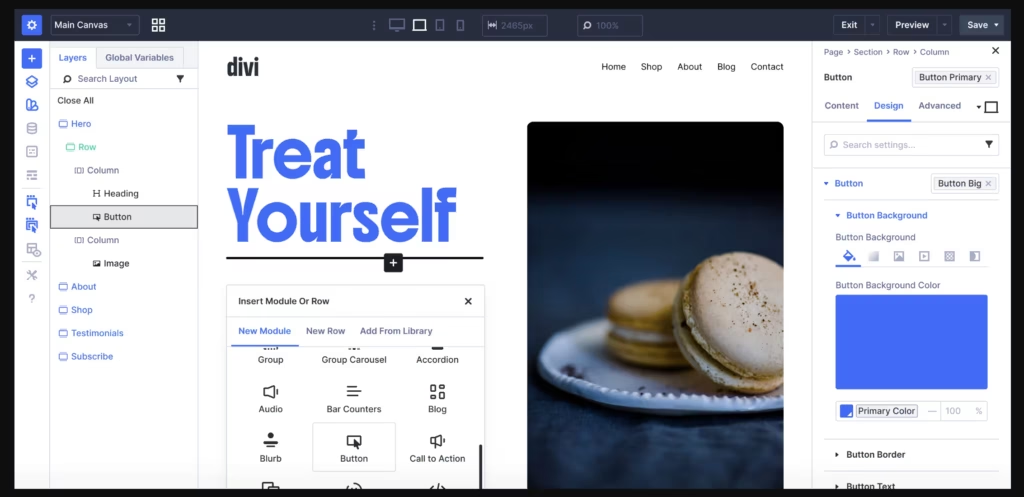
Divi’s builder lets you construct pages by dragging modules — text, images, buttons, forms, and layout sections — directly onto the canvas rather than working through a block editor or shortcode panel. The interface is built around rows, columns, and modules that can be nested and rearranged freely, giving you control over layout structure without touching code.
For a freelancer or agency building client sites, this removes the back-and-forth of coding custom layouts for every project. A page that would take hours to hand-code can be assembled visually, then reused as a starting point for the next client site.
On-Canvas (Front-End) Editing
Rather than editing content in a separate backend screen and previewing changes afterward, Divi lets you edit directly on the live front end of the page. The on-canvas editor is one of Divi’s built-in features, so changes to text, spacing, or module settings appear in place as you make them.
That matters most during client review calls or design iteration, where seeing the real page — not a stripped-down preview — cuts down on guesswork. What you edit is what visitors will see, without a separate publish-and-check step for every small adjustment.
Theme Builder for Site-Wide Templates
The Theme Builder extends Divi beyond individual pages, letting you design headers, footers, and other site-wide templates that apply across the whole site rather than one page at a time. It’s listed among Divi’s built-in features, so it comes packaged with the core plugin rather than requiring a separate add-on.
This is particularly useful for agencies maintaining consistent branding across many client pages: a header or footer built once in the Theme Builder can be applied sitewide, then adjusted centrally when a design update is needed, instead of editing each page individually.
Works With Any WordPress Theme
Divi functions as a plugin that can be layered onto any WordPress theme, not just the Divi theme itself. This separates the builder’s drag-and-drop functionality from the question of which theme is powering the site’s underlying structure.
For site owners who already have a theme they’re committed to — for branding, compatibility, or client preference reasons — this means adopting Divi’s editing tools doesn’t require a full theme migration. The builder can be added to extend design capability without disrupting an existing setup.
Full Website Building, Page by Page
Beyond single landing pages, Divi is built to construct complete websites — combining the visual builder, on-canvas editing, and Theme Builder templates to cover everything from the homepage to individual interior pages. Each page is built using the same module-and-row system, so the learning curve doesn’t reset from one page type to the next.
For no-code users taking on an entire site build, that consistency means skills learned on one page — how modules nest, how columns resize, how styling options work — carry over directly to every other page, including landing pages built for specific campaigns.
Installation and Setup
Getting Divi running is a straightforward plugin install, and it can be done without ever leaving the WordPress dashboard.
- Purchase a Divi plan (or download the free version) through Elegant Themes and save the plugin ZIP file, typically named divi-builder.zip, to your computer.
- Log in to your WordPress dashboard and navigate to Plugins → Add New Plugin → Upload Plugin.
- Select the divi-builder.zip file and upload it directly — there is no need to extract or unzip the file first before uploading.
- Click Install Now, then Activate Plugin once the upload finishes.
- Enter your Elegant Themes account credentials or API token when prompted, to connect the plugin to your license and unlock updates and support.
- Open any page or post and click Enable Divi to launch the drag-and-drop, on-canvas editor.
- If your plan includes the Divi Yearly bundle, install and activate the companion plugins separately as needed: Extra, Bloom, and Monarch.
These are independent products (a theme and two standalone plugins) rather than dependencies of Divi Builder itself, so none of them are required for the core page builder or Theme Builder to work.
On a test install running WordPress 6.5 with PHP 8.4, the entire process — upload, activation, and license connection — took about two minutes from start to finish.
Compatibility and Requirements
| Requirement | Details |
|---|---|
| WordPress version | 5.3 or higher |
| PHP version | 7.4 or higher |
| Theme compatibility | Works with any WordPress theme |
| Sites per license | Unlimited personal and client websites under a single membership |
Elegant Themes recommends running PHP 8.0 or higher rather than the 7.4 minimum, for better speed and security. This is a reasonable practice for any modern WordPress plugin, since older PHP branches lose active security support over time and tend to run page builders more slowly.
Because Divi installs as a plugin (or theme, depending on the plan) rather than hooking into a specific page builder framework, it doesn’t impose additional server-side dependencies beyond standard WordPress hosting.
Divi Pricing
Divi is available on a freemium basis: a free version of the builder exists alongside the paid Elegant Themes plans. The core drag-and-drop and on-canvas editing tools are the main draw of the free tier, giving you a way to try the interface before committing to a subscription.
Paid access comes through three main plans:
Divi Theme & Builder — $7.42/mo, billed yearly at $89. This plan bundles the Divi theme and builder together with three companion tools: Extra, Bloom, and Monarch.
Divi Pro — listed at $74.00/mo value, frequently discounted to $23.08/mo when billed yearly at $277 (a 69% saving off the standard rate). Divi Pro adds Pro Services on top of the standard Divi toolset, along with Divi VIP priority support offering a 30-minute or faster response time.
Divi Lifetime — a one-time payment covering unlimited website use for as long as you own the license. Elegant Themes does not publish an exact figure for this tier.
A single Elegant Themes license, regardless of plan, covers use of the Divi theme and builder across an unlimited number of personal and client websites. Every purchase is also backed by a 30-day money-back guarantee, so a refund can be requested within that window if the product doesn’t work out.
For the current rate on any plan, check the official Elegant Themes pricing page before purchasing.
👉 Get Divi at the best available price
Alternatives to Divi
Divi is one of several established WordPress page builders, and the right pick depends on whether a project needs a full theme system or just a lightweight editing layer. Here’s how the main alternatives compare.
| Product | Key Difference | Best For | Price Tier |
|---|---|---|---|
| Divi | Bundles a full theme system, Theme Builder, and companion plugins with subscription or lifetime licensing | Freelancers and agencies wanting an all-in-one theme-and-builder package | Freemium |
| Elementor | The most widely adopted WordPress page builder, with a large ecosystem of free and paid add-ons | Users who want broad community support and add-on flexibility | Freemium |
| Beaver Builder | Known for lightweight, stable output and developer-friendly workflows | Developers who prioritize clean code and site performance | Freemium |
| WPBakery Page Builder | Backend/frontend builder historically bundled with many ThemeForest themes | Buyers working within existing ThemeForest theme licenses | Paid |
| Oxygen Builder | Developer-oriented, code-centric builder offering deeper design control | Developers who want granular control over markup and styling | Paid |
Competitor data is sourced from publicly available information as of 2026 and may have changed.
None of these tools is a universal best choice. Agencies wanting an integrated theme and builder under one license may lean toward Divi, while developers prioritizing lightweight output or code-level control may find Beaver Builder or Oxygen a better match.
Frequently Asked Questions
What is Divi used for?
Divi is used to build full WordPress websites without writing code, using a drag-and-drop, on-canvas editor. It also includes a Theme Builder for designing headers, footers, and site-wide templates, and works for individual pages as well as complete site layouts.
Does Divi work with any WordPress theme?
Yes, Divi Builder works with any WordPress theme, in addition to functioning as its own standalone theme and builder system. This gives users the option to either build a site entirely within Divi’s theme system or use the builder alongside an existing theme.
How many websites can I use one Divi license on?
A single Elegant Themes membership and license covers use of the Divi Theme and Divi on an unlimited number of personal and client websites. This makes it suited to freelancers and agencies managing multiple client projects under one license.
Does Divi have a free version?
Yes, an official free tier of Divi Builder exists. The paid plans add the full Theme Builder, companion plugins, and priority support on top of it.
What is the difference between Divi and Divi Pro?
The standard Divi Theme & Builder plan is billed yearly at $89 ($7.42/mo) and bundles access to Divi, Extra, Bloom, and Monarch. Divi Pro adds Pro Services and Divi VIP priority support with a 30-minute or faster response time, typically billed yearly at $277.
Does Divi offer a money-back guarantee?
Yes, Elegant Themes backs all purchases of Divi Builder and its membership plans with a 30-day money-back guarantee. If a buyer is not satisfied with the purchase, they can request a full refund within 30 days.
What are the WordPress and PHP requirements for Divi?
Divi runs on WordPress 5.3 or higher and PHP 7.4 or higher. Newer PHP versions such as 8.0 or higher are strongly recommended for better speed and security.
How does Divi compare to Elementor?
Divi and Elementor are both visual, drag-and-drop WordPress page builders with on-canvas editing, but Divi bundles a full theme system and Theme Builder along with companion plugins like Extra, Bloom, and Monarch into its pricing plans. Elementor is a separate, widely used builder with its own pricing structure and plugin ecosystem, making the choice largely dependent on whether a bundled theme-and-builder package or a standalone builder better fits a given workflow.
Download & Pricing Options
🆓 Free Version
👉 Download the Free Version of Divi
💎 Get Divi (Best Available Price)
👉 Check Current Pricing for Divi
Pricing and availability may change — use the link above for current rates.
Buying Divi Builder outright is not the only route. See our which GPL site to use comparison for how ten GPL vendors differ on file integrity, update speed and licence keys.


