WP Rocket Free Download: What Is Safe, What Is Not (Tested 2026)

WP Rocket itself has no free version. What you can get for free is a 14-day trial from WP Rocket, the plugin’s source code on GitHub, a “free download” from a nulled-plugin site, a free caching plugin that does much of the same job, or WP Rocket 3.23.5.1 from us under the GPL. We looked at the first four on 13 and 14 October 2026, and they end very differently: the “free download” we opened carried a backdoor.
We compared every file of that download with WP Rocket’s official source, tried the GitHub source on our test store, switched on six free caching plugins one at a time, and read WP Rocket’s pricing, licence and documentation pages the same days. This page is what we found.
The short answer
| Route | Cost | What you get | The catch |
|---|---|---|---|
| WP Rocket’s free trial | Nothing for 14 days | The full plugin with a real licence | Needs a payment method; it bills automatically unless you cancel |
| WP Rocket’s source on GitHub | Nothing (GPL) | The official code | Failed to activate on our store as it comes; without a licence key it does not optimise your pages |
| A “free download” site | Nothing | An old version with the licence check switched off | The copy we opened installs a backdoor and a file manager and spreads to other sites on the server |
| A free caching plugin | Nothing | Page caching and many of the same file optimisations | You switch caching on yourself; some extras are paid |
| PureGPL’s free download | Nothing | WP Rocket 3.23.5.1 under the GPL | Not a WP Rocket licence: no WP Rocket support or cloud features; later versions are paid |
| A WP Rocket licence | $59.95 a year for one site | Updates, support and the cloud features | Renews automatically every year |
How we tested
The store. WordPress 7.1.3 on PHP 8.3 and Apache 2.4, running in Docker on our own machine, with WooCommerce, AffiliateWP and example posts. We tested on one post and the homepage.
WP Rocket. We downloaded release 3.23.5.1 of WP Rocket’s public source from GitHub (wp-media/wp-rocket) and activated it unmodified from the Plugins screen. We did not build it with Composer, did not use a licence key and did not test a licensed copy, so what WP Rocket does with a licence comes from its own pages and its source code.
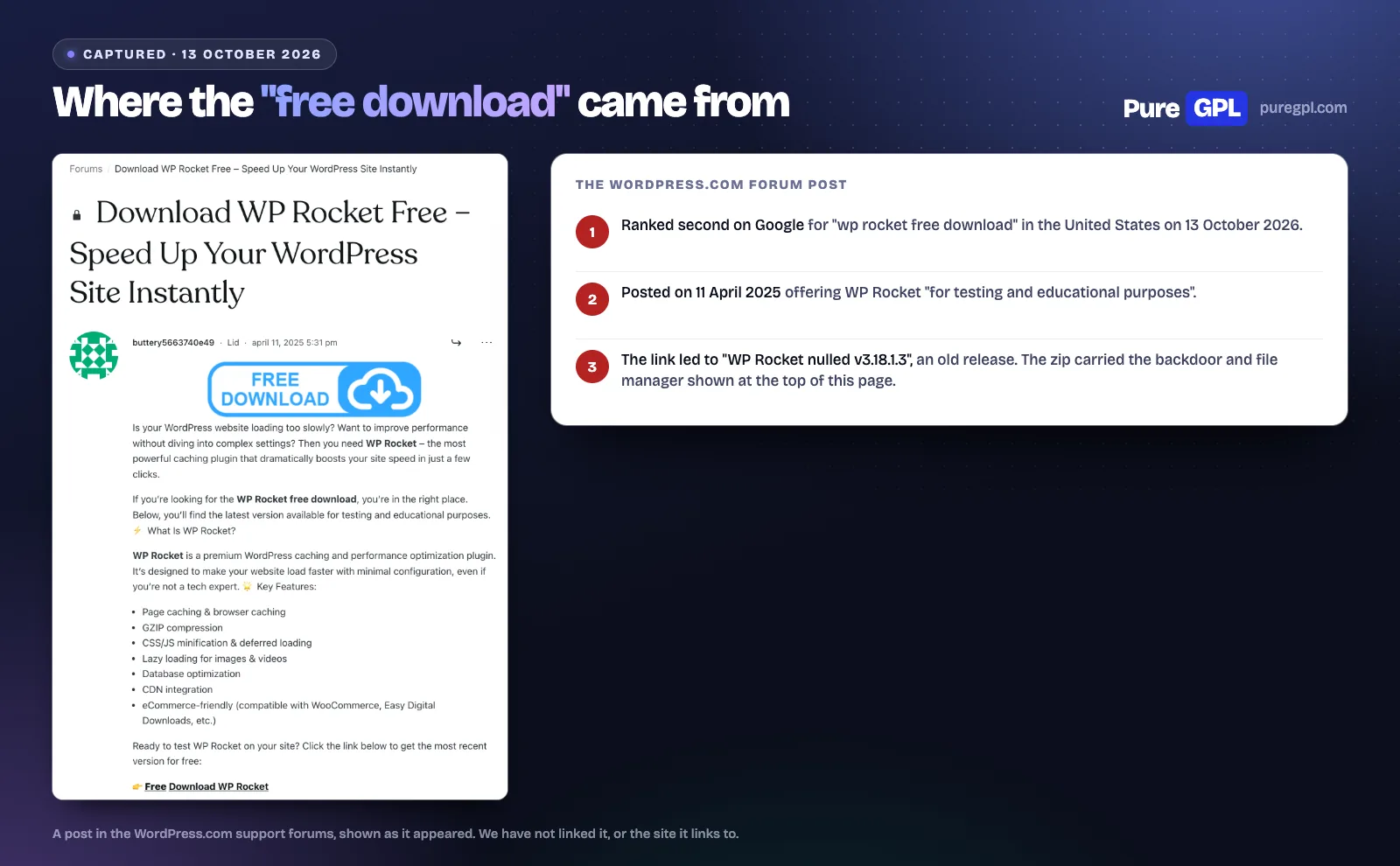
The “free download”. On 13 October 2026, the second Google result for “wp rocket free download” in the United States was a post in the WordPress.com forum with a download link. We saved the zip it led to and compared every file with WP Rocket 3.18.1.3 from GitHub, the version it claimed to be. We read the code. We did not install or run it.
The free plugins. LiteSpeed Cache 7.9.1, WP Fastest Cache 1.5.3, W3 Total Cache 2.10.7, WP Super Cache 3.1.4, WP-Optimize 4.7.0 and Autoptimize 3.1.16, each checked file by file against its WordPress.org release. We activated each one as the only caching plugin, starting each time from a clean store. To see whether a plugin served our post from its cache, we loaded the post twice, changed its text directly in the database (so no plugin was told the post had changed) and loaded it again: if the old text came back, the page came from the cache. Then, for the four that cache on any server, we switched page caching on in its settings and ran the same test again.
What we did not do. We did not time page loads. On a test store in Docker the differences were smaller than the noise, so we report what each plugin does, not how many milliseconds it saves.
Is there a free version of WP Rocket?
No. WP Rocket is sold only as a yearly licence. What is new is the trial. WP Rocket’s FAQ says “Yes, we now offer a free trial” and “You can try WP Rocket for free for 14 days”.
- How the trial works: you give a payment method when you start. WP Rocket says it will email a reminder before the trial ends, and “If you cancel before your trial ends, you won’t be charged. If you don’t, we’ll charge your payment method automatically”.
- If you buy straight away: the FAQ says it “can issue a full refund within 14 days of your purchase date”.
- RocketCDN and Rocket Insights: the trial page says both are “included from day one, same as a paid license”.
What a licence costs
| Licence | Sites | Year one | Per site | Three years at the year-one price |
|---|---|---|---|---|
| Single | 1 | $59.95 | $59.95 | $179.85 |
| Plus | 3 | $119.95 | $39.98 | $359.85 |
| Multi | 50 | $299.95 | $6.00 | $899.85 |
Prices from WP Rocket’s pricing page on 13 October 2026, before tax. Multi also comes in 100 and 500 site sizes, and WP Rocket asks anyone with more than 500 sites to contact it.
WP Rocket does not publish a renewal price, so the three-year column assumes you pay the year-one price each year. Licences renew automatically: its documentation says “If you don’t opt out you will be automatically billed every 12 months”, and that an email 15 days before tells you “when and how much we will charge”.
What stops when a licence ends
This matters for every way of getting WP Rocket without paying. WP Rocket’s documentation says the plugin “will continue to operate normally” after the licence expires, but you lose:
- support and plugin updates;
- updates to its lists of scripts and files that its optimisations leave out or include (it calls them dynamic exclusions and inclusions);
- the free plan of RocketCDN;
- the cloud features, which “stop working 15 days after license expiration”: Remove Unused CSS, Load CSS Asynchronously and Rocket Insights, plus the pre-warmup for its Priority Elements feature.
On RocketCDN, WP Rocket’s own pages say different things. The pricing page says “Speed up 3 key pages with RocketCDN for free”, while the FAQ says “WP Rocket Licenses do not include our CDN” and sells it at $7.99 a month per site.
WP Rocket on GitHub: free and official, but not a working download
WP Rocket’s developer publishes the plugin’s full source at github.com/wp-media/wp-rocket under the GPL 2.0 licence. It is legal to download, use and change. It is still not a free WP Rocket, for two reasons.
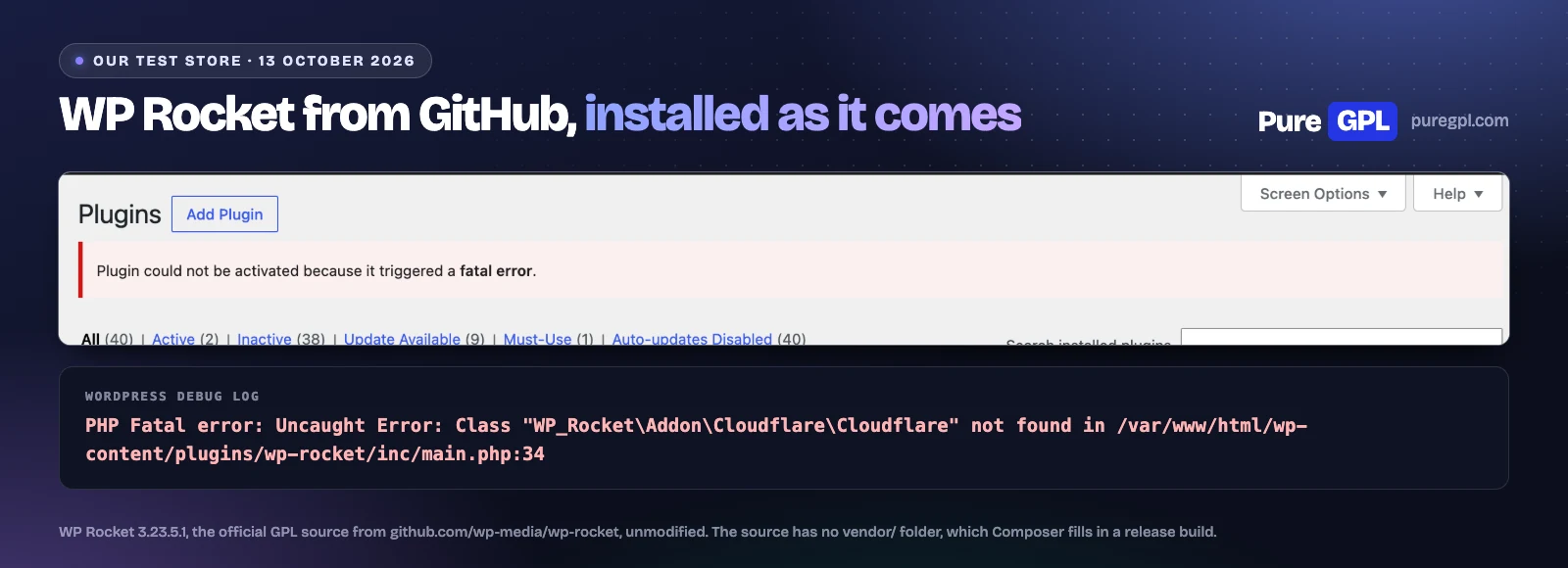
- It does not install as it comes. WordPress refused to activate it on our store: “Plugin could not be activated because it triggered a fatal error”. The source has no vendor folder, where a release build puts Composer’s autoloader, so PHP cannot find the classes the plugin loads first.
- Without a licence key, it does not optimise your pages. We did not build it, but the source is clear: minification, deferred and delayed JavaScript and lazy loading are switched on only when a valid licence is saved, and the code that switches the page cache on stops at the same check.
The GitHub source is still useful: it is the reference to compare any other WP Rocket zip against, which is what we did next.
What a “free download” site gave us
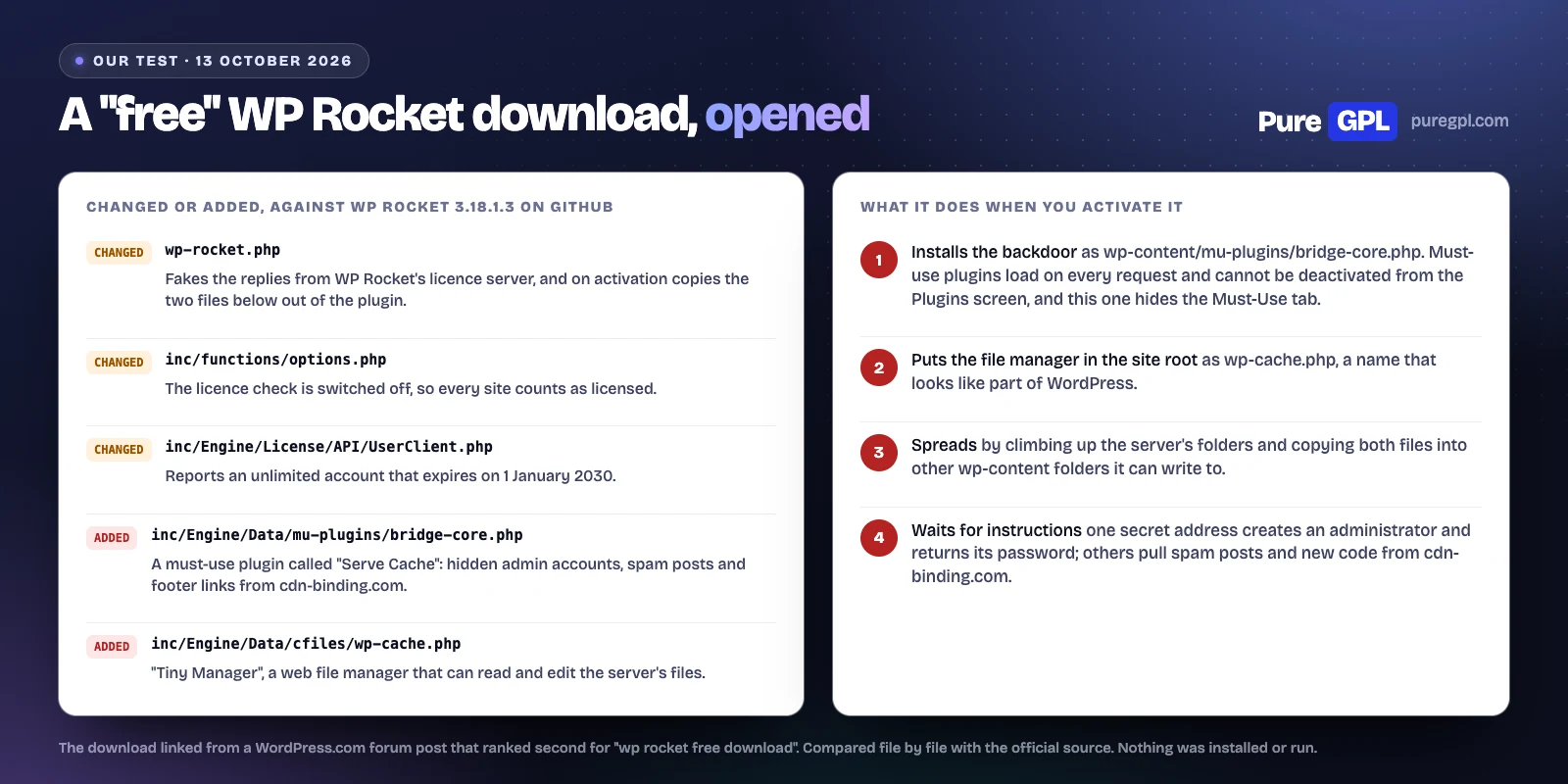
The WordPress.com forum post that ranked second was posted on 11 April 2025 and includes a “Free Download WP Rocket” link, offered “for testing and educational purposes”. The link leads to a site offering “WP Rocket nulled v3.18.1.3”, an old release: WP Rocket’s current version is 3.23.5.1. Apart from the vendor folder that a release build adds, the zip it served had three changed files and two PHP files that are not in WP Rocket at all.
- The licence is faked. The licence check is switched off, the replies from WP Rocket’s licence server are replaced, and the account is reported as unlimited until 1 January 2030.
- A backdoor goes in on activation. It copies a file to wp-content/mu-plugins/bridge-core.php, a must-use plugin named “Serve Cache”. Must-use plugins load on every request and cannot be switched off from the Plugins screen, and this one also hides the Must-Use tab there.
- It publishes spam by itself. When someone opens your homepage, at most once an hour, it fetches posts and footer links from cdn-binding.com, publishes the posts and prints the links on your homepage. The latest post it writes is hidden from logged-in users and from your blog’s lists, so you may not see it in your own admin.
- The backdoor takes orders. One secret address creates an administrator account named “adm_” plus random characters and sends back its password, and the account is then hidden from the Users screen. Other addresses delete posts and replace the backdoor with new code from cdn-binding.com.
- A file manager goes in the site root. A copy of Tiny File Manager, which can browse and edit every file it can reach, is saved as wp-cache.php next to wp-config.php, a name that looks like part of WordPress.
- It spreads. It climbs up the server’s folders, searches down from there for other wp-content folders it can write to, and copies the backdoor and the file manager into them, so other sites on the same hosting account can be infected too.
If you have installed a WP Rocket zip from a site like this, look at your homepage while logged out for links you did not add, and look for: a file at wp-content/mu-plugins/bridge-core.php, a wp-cache.php file next to wp-config.php, users whose names start with “adm_”, options named sca_hidden_admin_login or sm_excluded_slug, and requests to cdn-binding.com. The zip we checked had the SHA-256 hash 0d2609acb835c6959d33d4fc7ea5d8617512da626e4b65b4fcb46d7308e8ea81. Restore a clean backup, change every password, and check every site on the same hosting account, not only the one where you installed it.
The free alternatives, tested
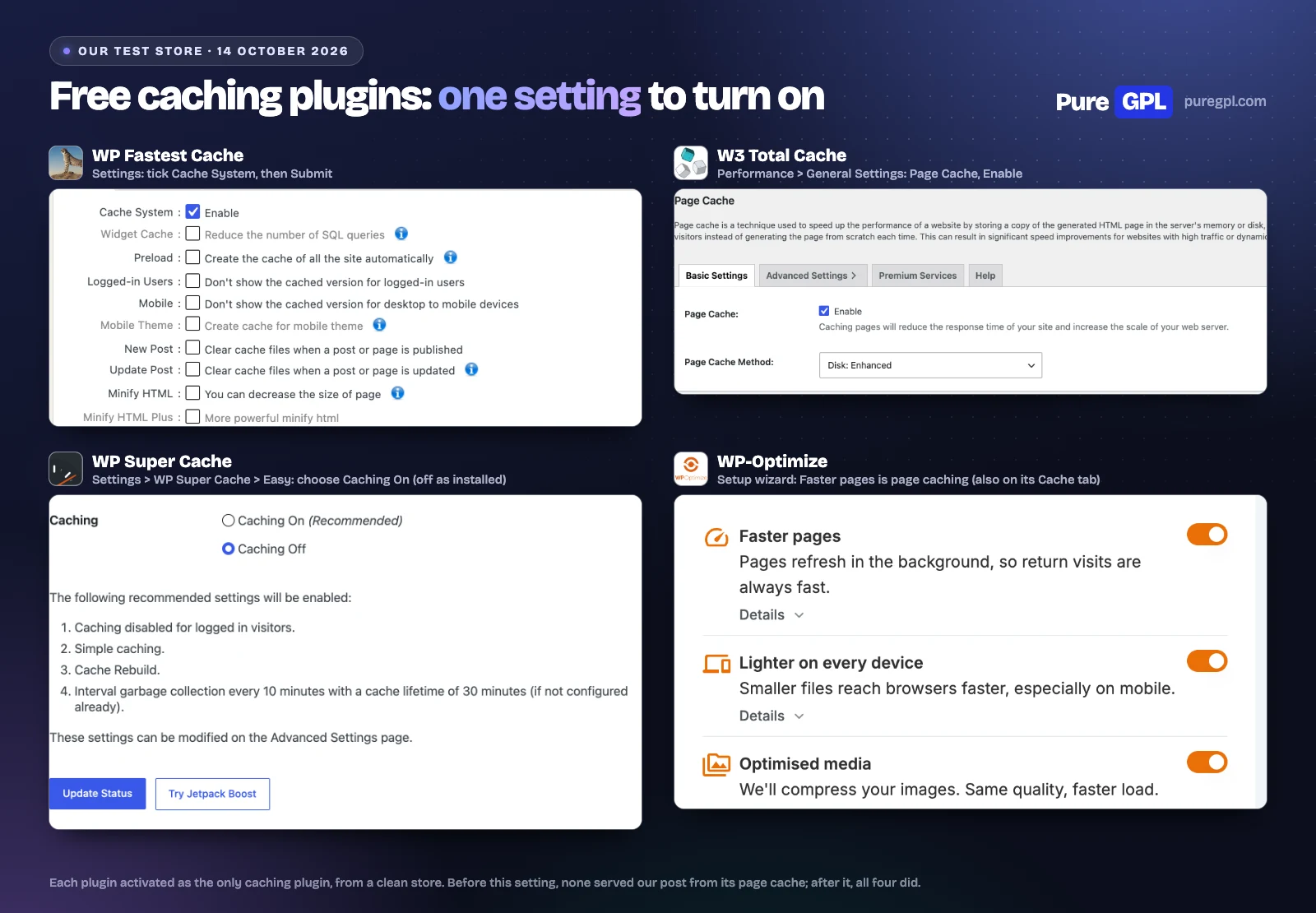
WP Rocket’s features page says that activating it applies “80% of web performance best practices right away”, and that it caches your site with “no settings to tweak”. None of the six free plugins cached our post as installed. Four of them did once we switched on one setting.
| Plugin | Version | Our post, as installed | After one setting | Files changed on activation | Size on disk | Database tables added |
|---|---|---|---|---|---|---|
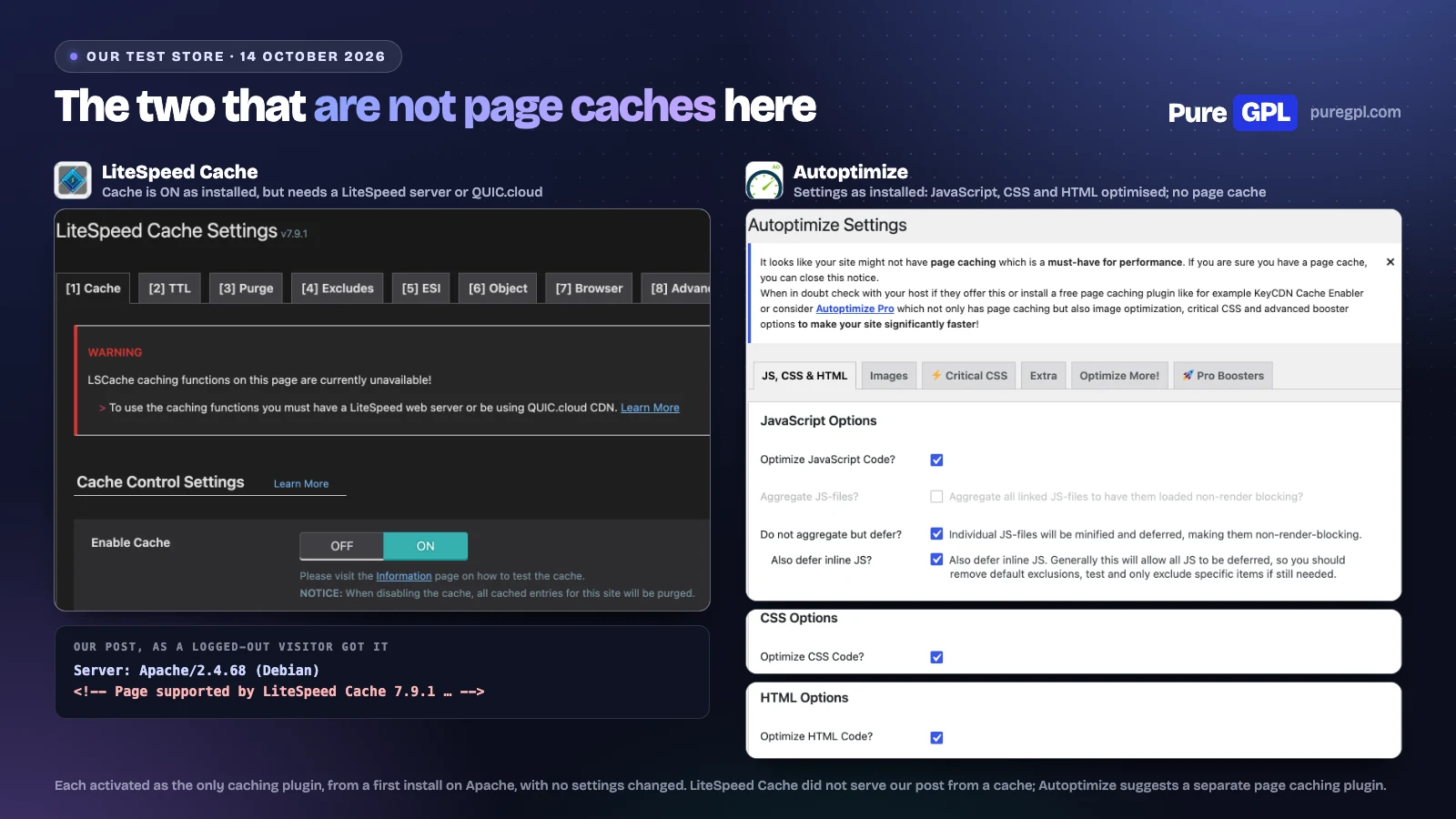
| LiteSpeed Cache | 7.9.1 | Fresh (not cached) | Not tested: needs a LiteSpeed server | wp-config.php, .htaccess | 4.4 MB | 2 |
| WP Fastest Cache | 1.5.3 | Fresh (not cached) | Cached | Nothing | 3.2 MB | 0 |
| W3 Total Cache | 2.10.7 | Fresh (not cached) | Cached | wp-config.php, .htaccess, advanced-cache.php | 67.8 MB | 0 |
| WP Super Cache | 3.1.4 | Fresh (not cached) | Cached | wp-config.php, advanced-cache.php | 3.6 MB | 0 |
| WP-Optimize | 4.7.0 | Fresh (not cached) | Cached | Nothing | 13.3 MB | 3 |
| Autoptimize | 3.1.16 | Fresh (not cached) | Not a page cache | Nothing | 1.1 MB | 0 |
The other two are not page caches you can use on any host. LiteSpeed Cache’s page cache needs a LiteSpeed web server or the QUIC.cloud CDN; on our Apache store it printed its comment in the page but served nothing from a cache. Autoptimize’s readme pairs it with a separate page caching plugin, and page caching is in its paid Pro version. It is the one plugin of the six that optimises pages as installed: it minifies HTML, CSS and JavaScript and defers scripts by default.
WP Rocket’s features in the free plugins
The cells say whether each free plugin has the feature, whether it is on as installed, and which paid plan has it when the free version does not. “No” means neither the free plugin nor any paid plan has it. The WP Rocket column is from its own pages and source code.
Caching
| Feature | WP Rocket | LiteSpeed Cache | WP Fastest Cache | W3 Total Cache | WP Super Cache | WP-Optimize | Autoptimize |
|---|---|---|---|---|---|---|---|
| Page caching | Yes (on by default) | Free, LiteSpeed server or QUIC.cloud only | Free (off by default) | Free (off by default) | Free (off by default) | Free (off by default) | Pro only |
| Cache preloading | Yes (on by default) | Free, LiteSpeed server only (off by default) | Free (off by default) | Free (off by default) | Free (off by default) | Free (off by default) | Own asset cache only |
| Browser caching | Yes (on by default) | Free (off by default) | Free (off by default) | Free (on by default) | Free (HTML only, 3 seconds) | Free (writes .htaccess rules) | Free (its own files only) |
| GZIP compression | Yes (on by default) | No (left to the web server) | Free (off by default) | Free (on by default) | Free (off by default) | Free (writes .htaccess rules) | Free (its own files only) |
| CDN integration | Yes (any CDN; RocketCDN free for 3 pages, more is paid) | Free (off by default) | Free | Free (off by default) | Free (basic URL rewriting) | Free (CDN URL for minified files) | Free (CDN URL box); Pro adds a CDN |
| Works on any web server | Yes | Optimisation yes; page cache needs LiteSpeed or QUIC.cloud | Yes (NGINX: GZIP/browser cache by hand) | Yes (Apache, NGINX, LiteSpeed rules) | Yes in simple mode (PHP) | Cache yes; gzip, browser cache manual | Yes (PHP; Nginx snippet in FAQ) |
CSS and JavaScript
| Feature | WP Rocket | LiteSpeed Cache | WP Fastest Cache | W3 Total Cache | WP Super Cache | WP-Optimize | Autoptimize |
|---|---|---|---|---|---|---|---|
| Minify CSS | Yes (on at install) | Free (off by default) | Free (off by default) | Free (off by default) | No | Free (off by default) | Free (on by default) |
| Minify JavaScript | Yes (on at install) | Free (off by default) | Premium only | Free (off by default) | No | Free (off by default) | Free (on by default) |
| Combine CSS or JS files | JS only (off by default) | Free (off by default) | Free (off by default) | Free (off by default) | No | Free (off by default) | Free (off by default) |
| Defer JavaScript | Yes (off by default) | Free (off by default) | Premium only | Free (off by default) | No | Free (inside Minify, off by default) | Free (on by default) |
| Delay JavaScript until user interaction | Yes (off by default) | Free (off by default) | Premium only | Pro only | No | Free (off by default) | Pro only |
| Remove unused CSS | Yes, on WP Rocket’s servers | Free, runs on QUIC.cloud (monthly allowance) | No | Pro only (removes whole files per page) | No | Premium only | Not listed (links to RapidLoad) |
| Critical CSS / async CSS | Yes, on WP Rocket’s servers | Free, runs on QUIC.cloud (monthly allowance) | No | Pro only (moves CSS into the page body; no critical CSS) | No | Free (async CSS and fallback CSS box) | Free (manual, or automatic with a paid criticalcss.com key); Pro automates it |
Images, fonts and the rest
| Feature | WP Rocket | LiteSpeed Cache | WP Fastest Cache | W3 Total Cache | WP Super Cache | WP-Optimize | Autoptimize |
|---|---|---|---|---|---|---|---|
| Lazy load images | Yes (off by default) | Free (off by default) | Premium only | Free (off by default) | No | Premium only | Free (off by default) |
| Lazy load iframes and videos | Yes (off by default) | Free (off by default) | Premium only | No | No | Premium only | Pro only (delays iframes) |
| Preload or self-host fonts | Yes (Google Fonts optimised at install; preload and self-hosting off) | Async Google Fonts only (free, off) | Premium: async Google Fonts only | Pro only (preload font URLs) | No | Free: async Google Fonts (off by default); self-hosting is Premium | Free (combine and defer; preload box) |
| Image optimisation or WebP | Separate plugin (Imagify) | Free, runs on QUIC.cloud | Premium only (10,000 image credits) | Free: 100 WebP conversions a month on BoldGrid’s servers | No | Free | Free (off by default, ShortPixel quota) |
| Database cleanup | Yes (manual or scheduled) | Free | Premium only | No | No | Free | Not listed |
| Heartbeat control | Yes (on at install, reduces activity) | Free (off by default) | No | No | No | Not listed | Not listed |
Like WP Rocket’s cloud features, some free features run on outside servers. LiteSpeed Cache’s unused CSS and critical CSS run on QUIC.cloud with a monthly allowance, and its image optimisation runs there too. W3 Total Cache’s WebP converter runs on BoldGrid’s servers, with 100 free conversions a month. Autoptimize’s image optimisation runs through ShortPixel, with a quota.
Which to choose
| Your situation | Choose | Why |
|---|---|---|
| You want WP Rocket itself | The 14-day trial, then a licence | The only way to get WP Rocket’s own updates, support and cloud features |
| Your host runs LiteSpeed | LiteSpeed Cache | A server-level page cache and most of WP Rocket’s file options, free |
| Any other host, simplest setup | WP Super Cache or WP Fastest Cache | One setting turns page caching on |
| More options for free | W3 Total Cache, or WP-Optimize | Minify and defer options alongside the page cache, with more settings to learn |
| Anyone | Not a “free download” site | The copy we opened was malware |
What other pages get wrong
We checked the pages that rank for this search against WP Rocket’s own pages on 13 and 14 October 2026:
- PagePipe (first result) gives WP Rocket’s price as “$49 personal annual license fee. ($99 for business)”. WP Rocket’s pricing page says $59.95 a year for one site and $119.95 for three.
- The WordPress.com forum post (second result) links to the download described above.
- The trial: none of the four ranking pages we could read mentions WP Rocket’s 14-day free trial.
On PureGPL
You can download WP Rocket 3.23.5.1 from us for free: download WP Rocket 3.23.5.1 (zip).
Later versions are not free. To get them, buy WP Rocket from our store for $4.99 one-time, or take a membership from $14 a month that includes the rest of our catalogue. For an official licence from WP Rocket, with its support and cloud features, buy from WP Rocket. For a hands-on look at the plugin, see our WP Rocket review.
What a GPL copy does and does not include
WordPress plugins are licensed under the GPL, which lets anyone share the code. A GPL copy is not a licence with WP Rocket:
- Support: you do not get WP Rocket’s support.
- Cloud features: Remove Unused CSS, Load CSS Asynchronously and Rocket Insights run on WP Rocket’s servers and need a WP Rocket licence. RocketCDN is a separate WP Rocket service.
- Updates: later versions come from our store, not from WP Rocket.
If you need the cloud features or WP Rocket’s support, buy from WP Rocket.
Sources
Read on 13 and 14 October 2026. The downloads, measurements and screenshots are our own.
- autoptimize.com/pro
- boldgrid.com/w3-total-cache
- docs.litespeedtech.com/lscache/lscwp/imageopt
- docs.litespeedtech.com/lscache/lscwp/pageopt
- docs.quic.cloud/billing/services
- docs.wp-rocket.me/article/1284-automatic-renewal
- docs.wp-rocket.me/article/1307-rocketcdn
- docs.wp-rocket.me/article/1312-optimize-google-fonts
- docs.wp-rocket.me/article/1529-remove-unused-css
- docs.wp-rocket.me/article/1711-what-happens-if-my-license-expires
- github.com/wp-media/wp-rocket
- quic.cloud/online-services-costs
- teamupdraft.com/wp-optimize/features
- teamupdraft.com/wp-optimize/free-vs-premium
- teamupdraft.com/wp-optimize/pricing
- wordpress.org/plugins/autoptimize
- wordpress.org/plugins/litespeed-cache
- wordpress.org/plugins/w3-total-cache
- wordpress.org/plugins/wp-fastest-cache
- wordpress.org/plugins/wp-optimize
- wordpress.org/plugins/wp-super-cache
- wp-rocket.me/faq
- wp-rocket.me/features
- wp-rocket.me/pricing
- wp-rocket.me/wp-rocket-trial
- wpfastestcache.com
- wpfastestcache.com/premium
- wpfastestcache.com/premium/lazy-load-reduce-http-requests-and-page-load-time
- wpfastestcache.com/premium/optimize-css-delivery
- pagepipe.com/get-wp-rocket-plugin-best-paid-features-for-free (ranking page we checked)
Frequently asked questions
Is WP Rocket free?
No. It costs $59.95 a year for one site. You can try it free for 14 days with a payment method on file.
Can I download WP Rocket for free legally?
Yes. Its source code is on GitHub under the GPL, but as it comes it failed to activate on our store, and without a licence key it does not optimise your pages. We also offer WP Rocket 3.23.5.1 as a free download under the GPL; later versions are paid.
Are nulled WP Rocket downloads safe?
The one we opened was not. It installs a backdoor that can create hidden administrator accounts and publish spam posts, adds a file manager, and copies the backdoor and the file manager to other sites on the server.
What is the best free alternative to WP Rocket?
LiteSpeed Cache if your host runs LiteSpeed. Otherwise WP Super Cache or WP Fastest Cache for the simplest setup. Each needs page caching switched on after you install it.
Does WP Rocket keep working if my licence expires?
Yes, but updates and support stop, and the cloud features stop 15 days after the licence expires.
More from our tests: WP Rocket review, W3 Total Cache review, WP Fastest Cache Premium review and WP-Optimize Premium review.