

Wpforms | Airtable
Updated on: December 17, 2025
Version 1.0.0

Single Purchase
Buy this product once and own it forever.
Membership
Unlock everything on the site for one low price.
Product Overview
Transform your data management with the WPForms to Airtable integration. This powerful add-on allows you to seamlessly connect your forms to Airtable, making it easier than ever to organize and analyze your submissions. With just a few clicks, you can automate data transfer, ensuring that your information is always up-to-date and accessible. Plus, you can customize the fields to match your needs, providing a tailored experience for your users. What makes it stand out is its user-friendly interface, which requires no coding knowledge, allowing anyone to harness the power of Airtable effortlessly.
Key Features
- Effortless integration between WPForms and Airtable for smooth data management.
- Real-time data syncing to keep your information current and accurate.
- Customizable field mapping to tailor submissions to your specific needs.
- User-friendly setup process that requires no technical skills.
- Automatic updates in Airtable as soon as a form is submitted.
- Supports multiple forms, making it ideal for diverse projects.
- Enhanced organization with Airtable's powerful database features.
- Streamlined workflow to save you time and reduce manual data entry.
Installation & Usage Guide
What You'll Need
- After downloading from our website, first unzip the file. Inside, you may find extra items like templates or documentation. Make sure to use the correct plugin/theme file when installing.
Unzip the Plugin File
Find the plugin's .zip file on your computer. Right-click and extract its contents to a new folder.

Upload the Plugin Folder
Navigate to the wp-content/plugins folder on your website's side. Then, drag and drop the unzipped plugin folder from your computer into this directory.
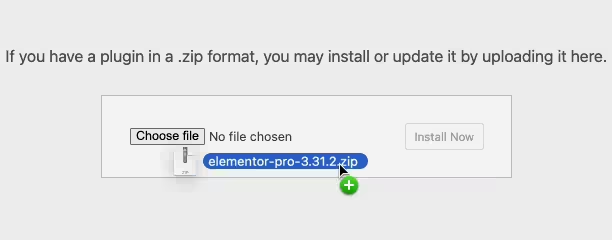
Activate the Plugin
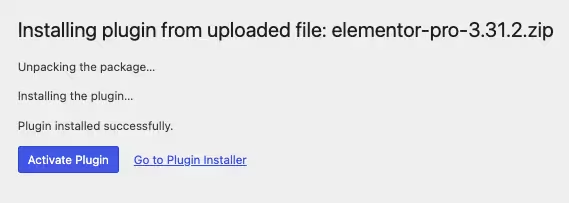
Finally, log in to your WordPress dashboard. Go to the Plugins menu. You should see your new plugin listed. Click Activate to finish the installation.
PureGPL ensures you have all the tools and support you need for seamless installations and updates!
For any installation or technical-related queries, Please contact via Live Chat or Support Ticket.