AdSanity Plugin Review 2026: Self-Hosted Ad Management for WordPress


Managing ads on a WordPress site usually means choosing between expensive managed networks that take a cut of revenue or piecing together disconnected tools across your dashboard. AdSanity addresses a specific gap: WordPress publishers who want direct control over ad placement, performance tracking, and revenue without surrendering data to third-party platforms.
The question is whether AdSanity’s lightweight, affordable approach justifies its premium-only model for publishers ready to take ownership of their ad strategy.
Quick Verdict
AdSanity is built for WordPress site owners and content publishers who value simplicity and transparency over feature complexity. It works best for publishers managing self-hosted ads, ad network placements, or a mix of both who need a single dashboard to track performance. Publishers requiring extensive ad network integrations, multisite management, or those wanting to trial the plugin before purchase should evaluate alternatives.
Pros
- Lightweight WordPress-specific design with no external dependencies or bloated code overhead
- Unified dashboard for self-hosted ads and ad network placements in one interface
- Built-in performance tracking and reporting for direct revenue visibility
- Low entry price—Blogger tier starts at $9/month (billed annually) with lifetime license option at $899
Cons
- Premium-only pricing with no free tier or trial to test functionality before committing
- Ad network compatibility details are unavailable, leaving integration scope unclear
Core Features
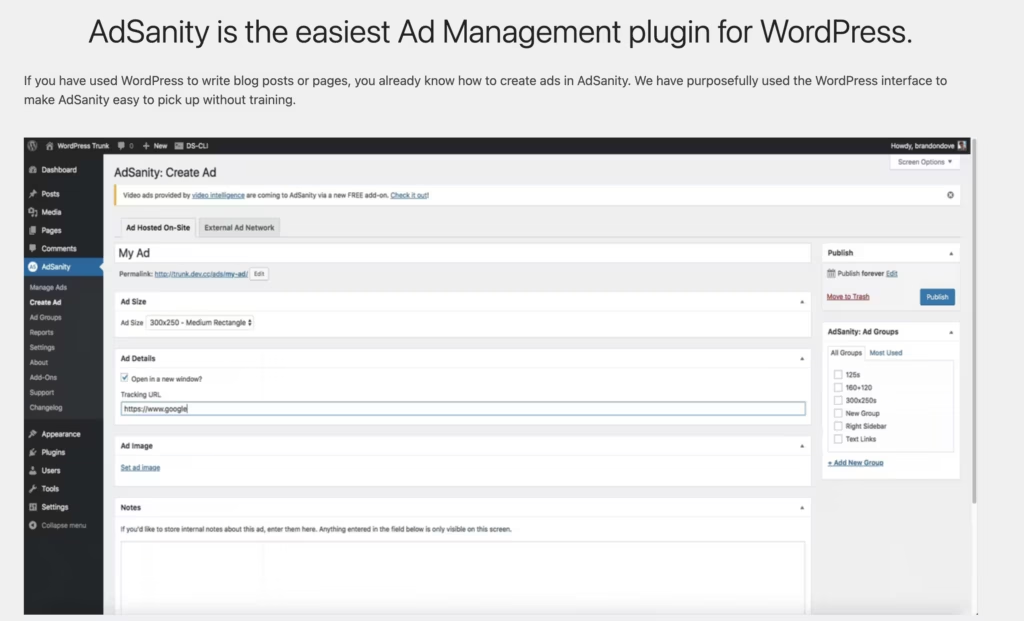
Ad Creation Interface
AdSanity provides a dedicated interface for creating ads directly within your WordPress dashboard. Rather than managing ad code in external platforms or scattered across your site’s configuration, you build and configure ads in one place alongside your other publishing tools.
This approach eliminates the friction of switching between systems. Publishers working with multiple ad sources can structure their inventory in a single, familiar WordPress environment.
Ad Management Dashboard
The plugin includes a centralized dashboard where all your advertisements—whether self-hosted or from external ad networks—appear in one view. You see active campaigns, paused ads, and performance data without logging into separate accounts or platforms.
Managing ad rotation, placement rules, and scheduling happens from this single interface. For publishers running ads across different sections of their site, this consolidation reduces time spent bouncing between tools.
Ad Tracking and Reporting
Built-in tracking and reporting let you monitor how your ads perform across impressions, clicks, and revenue. The data lives within your own WordPress installation rather than requiring you to pull reports from external platforms or piece together metrics from multiple sources.
Publishers gain direct visibility into which ads drive engagement and which placements underperform. This transparency supports faster optimization decisions.
Support for Self-Hosted Ads
The plugin handles ads you host yourself—banners, images, and ad code running from your own server or a CDN you control. You maintain full ownership of the creative assets and avoid dependency on external ad network infrastructure for your primary revenue.
Content publishers who want to sell direct sponsorships or manage house ads alongside network inventory find this built-in capacity essential for a mixed-ad strategy.
Support for Ad Network Ads
AdSanity also integrates ads from external ad networks into the same management dashboard. You place network-served ads alongside your self-hosted inventory and track their performance using the same reporting tools.
This unified approach lets you test and compare revenue from different sources—direct sponsors, ad networks, or both—without maintaining separate dashboards or manually logging performance data from each platform.
Installation and Setup
- Download AdSanity from the official website or your account dashboard.
- Log in to your WordPress admin panel and navigate to Plugins → Add New Plugin.
- Click Upload Plugin and select the AdSanity plugin file (adsanity-1.9.5.zip).
- Click Install Now and wait for the installation to complete.
- Click Activate Plugin to enable AdSanity on your site.
- Navigate to the AdSanity dashboard in your WordPress admin menu to begin creating and managing ads.
The plugin installs directly through the WordPress dashboard without requiring manual file extraction. Basic setup is straightforward and takes approximately two minutes.
Compatibility and Requirements
AdSanity requires the following minimum specifications:
| Requirement | Version |
|---|---|
| WordPress | 5.6 |
| PHP | 7.4 |
| MySQL | 5.7 |
Ensure your hosting environment meets these specifications before installation. If your site runs an older WordPress or PHP version, contact your hosting provider about upgrading to a currently supported release.
AdSanity Pricing
AdSanity is a premium-only plugin with no free tier. Three subscription options are available, billed annually for the monthly plans or as a one-time purchase for the lifetime license.
The Blogger plan costs $9 USD per month when billed annually, making it the entry-level option for individual publishers. The Professional plan is $19 USD per month, also billed annually, for users who need expanded capabilities. For those seeking perpetual access, the Lifetime license is a one-time payment of $899 USD.
For current feature comparisons and site limits per tier, consult adsanityplugin.com.
👉 Get AdSanity at the best available price
Alternatives to AdSanity
AdSanity is built for WordPress publishers who want lightweight, self-hosted ad management with transparent performance tracking. If you’re evaluating other solutions, here’s how the main alternatives compare.
| Product | Key Difference | Best For | Price Tier |
|---|---|---|---|
| AdSanity | Lightweight self-hosted plugin; direct control over ad placement and tracking without external dependencies | WordPress sites prioritizing control and transparency over advertiser curation | Paid |
| AdThrive | Full-service ad management platform with managed advertiser relationships and revenue optimization | Publishers seeking hands-off ad management with dedicated account support and yield optimization | Paid |
| Mediavine | Premium ad network with curated advertiser access and automated yield optimization | Content sites meeting traffic thresholds who want premium advertiser access and automated revenue growth | Paid |
| Google Ad Manager | Enterprise-grade ad management and trafficking platform with real-time bidding and header bidding support | Large publishers and ad networks needing sophisticated trafficking, reporting, and programmatic capabilities | Freemium |
The choice between these solutions depends on your priorities. AdSanity suits publishers who want WordPress-native control and transparency. Managed networks like AdThrive and Mediavine optimize for revenue but require application approval and delegate ad sourcing. Google Ad Manager works best for publishers with complex trafficking needs or those already using Google’s advertising ecosystem at scale.
Frequently Asked Questions
What is AdSanity and how does it work on WordPress?
AdSanity is a lightweight ad management plugin that runs directly on your WordPress site, letting you create, manage, and track both self-hosted ads and ads from ad networks through a single dashboard. The plugin installs like any other WordPress plugin and provides built-in tools for ad placement, performance tracking, and reporting without requiring external services or middlemen.
Can AdSanity manage ads from multiple ad networks?
Yes, AdSanity supports both self-hosted ads and ad network ads within the same interface. You can centralize management of direct-sold inventory and third-party ad network placements in one plugin rather than juggling separate systems.
How much does AdSanity cost per month?
AdSanity offers three pricing tiers: Blogger at $9 USD per month (billed annually), Professional at $19 USD per month (billed annually), and a Lifetime license at $899 USD as a one-time payment. All annual plans are paid upfront once per year.
Does AdSanity work with self-hosted ads only?
No, AdSanity supports both self-hosted ads you manage directly and ads from external ad networks through the same plugin. This dual capability lets you mix revenue sources without installing multiple ad management tools.
How do I install and set up AdSanity?
AdSanity installs directly through the WordPress dashboard: go to Plugins → Add New → Upload Plugin, select the plugin file, and activate it. Basic setup takes just a few minutes from initial installation to managing your first ads.
Download & Pricing Options
🔍 Try Before You Buy
AdSanity does not have an official free tier. To evaluate it before purchasing, a GPL-licensed copy is available for sandbox testing purposes only.
👉 Download GPL Evaluation Copy
This is a GPL-licensed redistributed copy for testing only — not an official developer product.
💎 Get AdSanity (Best Available Price)
👉 Check Current Pricing for AdSanity
Pricing and availability may change — use the link above for current rates.
A GPL membership covers AdSanity Plugin along with thousands of other premium products. Our best GPL site guide sets out what each vendor charges and what you give up in return.


