

Codecanyon | Bookly Google Maps Address
Updated on: May 3, 2024
Version 2.0

Single Purchase
Buy this product once and own it forever.
Membership
Unlock everything on the site for one low price.
Product Overview
Enhance your Bookly experience with the Google Maps Address integration. This powerful add-on allows you to streamline your appointment booking process by automatically fetching addresses through Google Maps. No more manual entries or errors; your clients can easily select their location, making the booking experience seamless and efficient. Plus, the integration is straightforward, ensuring that you can focus on providing excellent service without worrying about technical hiccups. What makes it stand out is its user-friendly interface and reliable performance, perfect for businesses of all sizes.
Key Features
- Automatic address fetching from Google Maps for accurate location entries.
- User-friendly interface that simplifies the booking process for clients.
- Seamless integration with Bookly, enhancing your existing setup.
- Reduces manual errors, ensuring a smooth experience for both you and your clients.
- Compatible with various devices, providing flexibility for users on the go.
- Regular updates to ensure compatibility with the latest Google Maps features.
- Easy installation process, so you can get started quickly.
Installation & Usage Guide
What You'll Need
- After downloading from our website, first unzip the file. Inside, you may find extra items like templates or documentation. Make sure to use the correct plugin/theme file when installing.
Unzip the Plugin File
Find the plugin's .zip file on your computer. Right-click and extract its contents to a new folder.

Upload the Plugin Folder
Navigate to the wp-content/plugins folder on your website's side. Then, drag and drop the unzipped plugin folder from your computer into this directory.
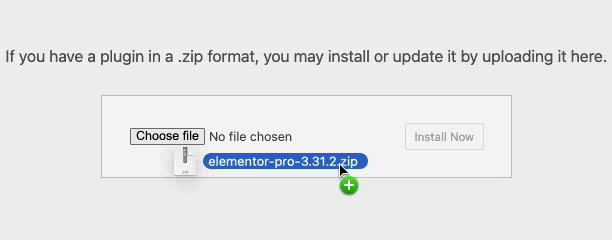
Activate the Plugin
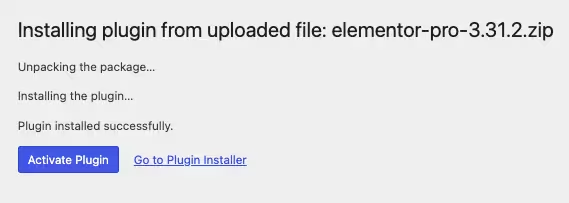
Finally, log in to your WordPress dashboard. Go to the Plugins menu. You should see your new plugin listed. Click Activate to finish the installation.
PureGPL ensures you have all the tools and support you need for seamless installations and updates!
For any installation or technical-related queries, Please contact via Live Chat or Support Ticket.